Week 7 — Midterm Project Demonstrations
| Date | 30.10.2026 |
| Learning outcomes | LO.1, 2, 3, 5, 7 |
| Duration | 3 hours |
Lecture notes (PDF) Lecture notes (DOCX) Slides (PDF) Slides (PPTX) Slides (HTML, offline) Download all (ZIP) Open slides full screen
Click inside the slides and use the arrow keys; use the button at the bottom right of the slides or the link above for full screen.
What happens this week?
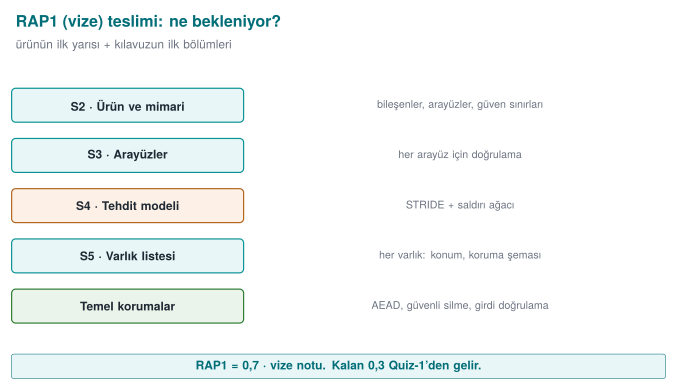
There is no lecture this week. The first checkpoint of the term project (RAP1) takes place: each team submits its midterm report (the midterm sections of the security guide) and demonstrates its working application. RAP1 is 60% of the midterm grade; the remaining 40% is next week's Quiz-1 (Grade_Midterm = 0.6·RAP1 + 0.4·QUIZ1). The detailed rubric (criteria, points, achievement levels) is in the course's project guide; this page is a checklist to help you prepare for the demonstration.
Submission and timing rules
Late submissions are not accepted (syllabus, section G). The demonstration order, time per team and submission time are announced in class. If something unexpected happens, notify the instructor before the demonstration.
1. What does the midterm checkpoint measure?
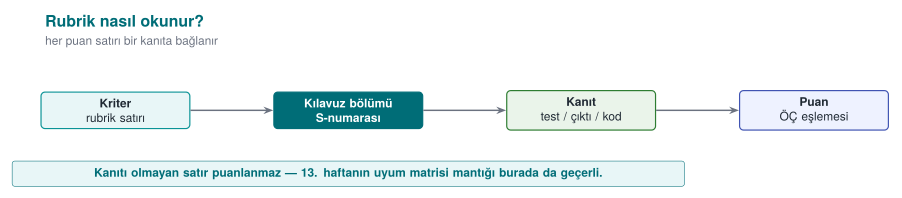
The five criteria of the midterm checkpoint rubric in the syllabus, and the corresponding sections in your security guide:
| Criterion | Learning outcome | Where in the guide | Which weeks? |
|---|---|---|---|
| Security analysis | LO.1 | S2 product overview · S3 architecture and interface table · S4 threat and attacker model | 1, 2 |
| Data security | LO.2 | S5 asset list (draft) · S7 data security and security shell matrix | 1, 3 |
| C/C++ code hardening and RASP | LO.3 | S9 code hardening (basic) · S10 RASP and response policy | 4, 6 |
| Project management | LO.5 | S13 development environment and process, SBOM, change management · GitHub repository and plan | 1, 5 |
| Interim report | LO.7 | All sections in the midterm column; document structure, references | All |
Sections that must be present in the interim report
The section structure of your security guide stays the same throughout the term; at the midterm checkpoint some sections are expected complete and others as drafts:
| No | Section | At the midterm checkpoint |
|---|---|---|
| S0 | Cover, document control, version history | Complete |
| S1 | Scope, target audience, abbreviations, references | Draft |
| S2 | Product overview | Complete |
| S3 | Architecture and interface table, trust boundaries | Complete |
| S4 | Threat model and attacker model (STRIDE, attack table, CWE) | Complete |
| S5 | Asset list and asset protection scheme (C/I/I+) | Draft |
| S7 | Data security (at rest/in use/in transit) + security shell matrix | Complete |
| S9 | Code hardening (compiler hardening, obfuscation) | Basic |
| S10 | RASP + response policy | Complete |
| S12 | Reporting and logging policy | Brief |
| S13 | Development environment and process, SBOM, change management | Complete |
| S16 | Security testing and verification | Plan |
| S17 | Requirement compliance matrix | Draft |
S6, S8, S11, S14 and S15 are left for the final checkpoint.
2. Week-by-week preparation checklist
The list below collects, in one place, the tasks from the "Term project: this week" sections of the first six weeks. You should be able to show every item in your guide and your repository.
Week 1 — Project plan and first sections
Source: Week 1 · Term project
- GitHub repository, README, project plan (work packages, schedule, task assignment) approved.
- S0 cover and version history.
- S2 product overview: what does the application do, who uses it?
- S3 architecture diagram and interface table (for each interface: endpoints, authentication, confidentiality/integrity).
- S4 attacker model, STRIDE table, at least one attack tree.
- S5 asset list draft: location, creation → deletion, C/I/I+.
Week 2 — Threat table and classification
Source: Week 2 · Term project
- In the S4 threat table, every threat is matched to a CWE and has a CVSS v3.1 vector.
- The attack tree is attached in a tool's input format or as a drawing.
- Threats are derived from the rows of the interface table; every asset appears in at least one threat.
Week 3 — Data security
Source: Week 3 · Term project
- S7: for data in transit, at rest and in use — which algorithm, which key, which binding?
- A security shell matrix (stage × shell) for the most sensitive asset.
- Random values come from a CSPRNG; the AEAD tag is verified before the plaintext is used.
- If TLS is used, chain validation + hostname verification (+ pinning if applicable) can be demonstrated.
Week 4 — C/C++ hardening
Source: Week 4 · Term project
- S9: compiler protection table (
checksec/dumpbin); justification for any protection left off. - Scan against CERT rules; at least five findings fixed and documented with the rule id.
- Tests run with ASan + UBSan; at least one fuzz target and its result.
- No logging in the release build; no sensitive string appears in
stringsoutput.
Week 5 — Dependencies and input validation
Source: Week 5 · Term project
- S13: SBOM in CycloneDX format and vulnerability scan result.
- Input validation table: for each entry point, format, length limit, validating function.
Week 6 — RASP
Source: Week 6 · Term project
- S10: for each critical operation, which RASP checks run, when, and where?
- Response policy: which secret is wiped, is it fail-closed, is it a decoy, where is the event reported?
- A bypass attempt on at least one check and its result (also written into the S16 plan).
3. Demonstration: suggested flow
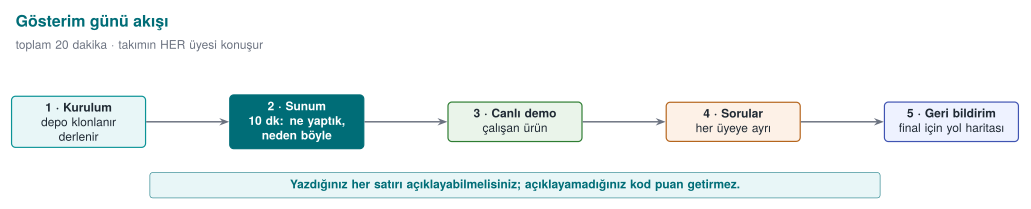
Think of the demonstration as a meeting where an assessor is examining your product for the first time. Time is limited; rehearse beforehand. Suggested order:
- Product and architecture (S2–S3): What does the application do? Show the interface table and trust boundaries in a single diagram.
- Threats and assets (S4–S5): The three most critical threats and the assets they target.
- Live demonstration: Run the application; show at least one security control working live (e.g., a tampered file being rejected, a RASP check being triggered).
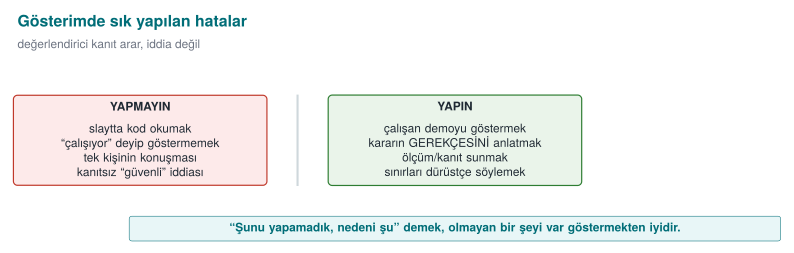
- Evidence: The protection table, sanitizer/fuzzing results, SBOM itself — not "we did it" but "we ran this command and got this output."
- Remaining risk and plan: What have you not done yet, what will you do before the final?
Think like an assessor
Prepare an answer to three questions for every control: What does it protect? (which asset, which threat) · How was it built? (file, function, flag) · How was it proven? (test, command, output). A control whose answer is "we didn't test it" does not exist yet, in the assessor's eyes.
Demo checklist (local)
A private repository has no GitHub Pages site, so you show the project locally (details: Project Guide). What you open and show, in this order:
- The home page of the local site (
9-open-site-..., onhttp://localhost). - Each report page: tests, code coverage, documentation coverage (Windows and Linux).
- The API docs.
- The
release/folder listing. - Run the app from the release archive.
- The GitHub Release page of your private repository (the instructor is a collaborator).
Sample questions you may be asked during the demonstration
- In your interface table, which flow crossing a trust boundary is the riskiest? Why?
- How long does this asset stay unencrypted in memory? Where is it wiped? How did you confirm the compiler did not remove the wipe?
- Where does your encryption key come from, where does it live? Can the nonce repeat?
- Which compiler protection is turned off? Why?
- What happens when your RASP check fails? Is the response right next to the trigger?
- Does your SBOM contain a component with a known vulnerability? Are you affected?
- Which section describes the control for T3 in your threat table, and how was it tested?
Common mistakes
| Mistake | Why is it a problem? |
|---|---|
| The control described in the guide is not in the code (or vice versa) | Document and product are inconsistent: one of the most serious findings in an assessor's eyes |
| Saying "it's secure" without showing evidence | A claim without evidence is not scored |
| Keys, logs and the code itself are missing from the asset list | An asset that is not in the list is treated as unprotected |
| The threat table was written from general knowledge, not from the interfaces | Project-specific threats get missed |
| The live demonstration was not rehearsed | Time is wasted; a demonstration that does not work lowers the score |
| Secret information (password, key, personal data) in the repository | A serious security mistake; all values must be synthetic |
4. Academic integrity
The "Academic Integrity" section of the syllabus applies to the project as well: using someone else's code or text without attribution, taking work from outside the team, and fabricating results are not acceptable. You must be able to explain every line you submit. Any member of the team may be asked a question during the demonstration.
5. After the demonstration
- Write the feedback you received as a finding list (finding, severity, correction plan, target date). This list is a small model of the assessment process you will see in Week 12.
- The sections expected at the final checkpoint (S6 identity and binding, S8 cryptography and key lifecycle, S11 secure communication, S14 assumptions and deferred requirements, S15 build and deployment pipeline, S16 test results, S17 compliance matrix) will be filled in with the topics of weeks 9–14.