Week 6 — Runtime Application Self-Protection¶
| Date | 23.10.2026 |
| Learning outcomes | LO.3 |
| Duration | 3 hours |
| Prerequisites | Pointers, arrays and files in C; memory layout and secure erasure from Week 1; AES-GCM/HMAC/HKDF and the security shell from Week 3; patching and reverse engineering concepts from Week 4 |
| Labs | code/week-06 — 8 demos; on Windows .\demo.ps1, on WSL/Linux sh demo.sh |
Lecture notes (PDF) Lecture notes (DOCX) Slides (PDF) Slides (PPTX) Slides (HTML, offline) Download all (ZIP) Open slides full screen
Click inside the slides and use the arrow keys; use the button at the bottom right of the slides or the link above for full screen.
By the end of this week you will be able to
- Define the concept of RASP (Runtime Application Self-Protection); explain the detect → defend → deter triad and how RASP differs from classic external defences (WAF, network firewall).
- Adopt the untrusted device (MATE) attacker model: the device's owner is the attacker; we expect root/debugger/hooking.
- Set up an application's own runtime integrity verification (self-hashing, HMAC) and detect patching; discuss the limit that "the checker itself can be patched too."
- Demonstrate debugger (ptrace/TracerPid, IsDebuggerPresent, PEB), environment/emulator (CPUID, timing), and hook/instrumentation (LD_PRELOAD, dlsym/dladdr, Frida) detection in a running example.
- Read root/privileged environment indicators (root,
su, elevated privilege) and discuss that these are a signal, not proof; discuss false positives. - Set up component/package signature and digest verification — the general form of APK signature verification on Android — and catch repackaging.
- Build a control-flow counter so that a single
ifcheck cannot be skipped (resilience against skip attacks). - Design a response policy (fail-closed, secure erasure, decoy output, device/version binding) and combine all the pieces into a single RASP engine.
Class schedule (timing plan for the instructor)
| Time | Section | What happens |
|---|---|---|
| 0:00–0:10 | 1 | What RASP is, detect/defend/deter, the MATE model, lab check |
| 0:10–0:25 | 2 | RASP architecture: when, where, and how the checks decide |
| 0:25–0:50 | 3 | Integrity checking (self-hashing); Demo 1 (HMAC patch detection) |
| 0:50–1:00 | Break | |
| 1:00–1:20 | 4 | Debugger detection; Demo 2 (ptrace/PEB) |
| 1:20–1:35 | 5 | Environment/emulator detection; Demo 3 (CPUID + timing) |
| 1:35–1:50 | 6 | Hook/instrumentation; Demo 4 (LD_PRELOAD, dladdr) — class activity |
| 1:50–2:00 | Break | |
| 2:00–2:15 | 7 | Dynamic memory protection and memory-monitoring detection |
| 2:15–2:30 | 8 | Root/environment indicator (Demo 7); component signature (Demo 6) |
| 2:30–2:45 | 9 | Control-flow counter; Demo 5 (skip attack) |
| 2:45–2:57 | 10 | Response policy + device binding; Demo 8 (RASP engine) |
| 2:57–3:00 | 11+ | Limits, project step (S10), wrap-up |
Prepare the lab in advance
The demos build from the same source on both Windows (Visual Studio 2022 compiler, no extra install) and WSL/Linux (GCC). The integrity and signature demos use the shared cen429_crypto.h header for crypto (OpenSSL on Linux, BCrypt/CNG on Windows); no extra install is needed. Demo 4 only runs on Linux/WSL (LD_PRELOAD).
Choose File > Open > Folder > code/; pick "Windows (MSVC)" or "WSL (GCC)" from the configuration dropdown at the top; Build > Build All. If you run the anti-debug demo with F5 (under the debugger), you will see the detection trigger.
Setup details and safety rules: code/README.en.md.
Ethics rule — applies every week in this course
This week we look at techniques an application uses to protect itself, and how those techniques are bypassed. All demos only produce files in their own folders, never ask for administrator rights, and never touch a system setting. The "patch" step is applied to a copy of the binary itself; the debugger only attaches to the demo's own process; LD_PRELOAD only affects a single demo command. Try the techniques you learn only on your own computer and on the demos provided. Reverse-engineering or breaking the protection of someone else's application without permission can be illegal.
0. Before we start¶
This section prepares you for the week. It first briefly recalls the earlier topics this week builds on; it then defines each of this week's concepts in one sentence and links it to the section where it is explained in full.
What we bring from earlier weeks¶
- The white-box attacker model — the user who owns the device is also a potential attacker; they can read memory, attach a debugger, and modify code (Week 1, §3; see also the "white-box attacker's six paths" table: Week 1, §5). This week we turn this model into RASP's single attacker model under the name MATE (§1.1).
- Digest, MAC, and HMAC — a digest is a fixed-size, one-way fingerprint computed from data; a MAC/HMAC proves a message hasn't changed using a shared secret key (Week 3, §2.4). This week we use HMAC-SHA-256 to verify the application's own code (§3) and to build a control-flow chain (§9).
- Deriving keys from a master secret (HKDF) — RFC 5869 HKDF is a function that derives new keys from a master secret through Extract and Expand steps (Week 3, §7). This week we trace the same two steps by hand, deriving a key from a device fingerprint instead of a master secret (§10.1).
- Device binding — a secret being meaningful only on a specific device is the innermost layer of the security shell (Week 3, §13.1). This week we make that layer part of a RASP response policy (§10).
This week's concept map¶
| Concept | In one sentence | Detail |
|---|---|---|
| RASP (detect/defend/deter) | RASP is a set of protections embedded inside an application that watch themselves at runtime and respond to an attack through detection, defence, and deterrence. | §1 |
| MATE attacker model | MATE ("Man-At-The-End") is an attacker model where the attacker owns the device/endpoint the application runs on, can read memory, modify code, and attach a debugger. | §1.1 |
| RASP architecture | RASP checks run at load time, right before a sensitive operation, and in the background at irregular intervals, at many points in the code, and tie the result to a data dependency rather than an if. | §2 |
| Integrity / self-hashing | Self-hashing is the application computing an HMAC digest of its own code/file at runtime and comparing it against a known golden value to catch a patch/tamper. | §3 |
| Debugger detection | Anti-debug is reading information the kernel/OS already keeps (TracerPid on Linux, PEB on Windows) to work out whether a debugger is attached to the process. | §4 |
| Emulator/VM detection | Environment detection is trying to sense, from clues like the CPUID hypervisor bit, the vendor signature, and timing measurements, whether the application is running on a virtual machine/emulator or on real hardware. | §5 |
| Hook / LD_PRELOAD detection | Hook detection is checking which shared object (.so) a critical function actually resolves from, using dlsym+dladdr, to find out whether it's been replaced by a tool like LD_PRELOAD/Frida. | §6 |
| Dynamic memory protection | Dynamic memory protection is the whole set of measures that make it harder to read (disabling dumps, locking) and to silently modify (shadow copy + digest) sensitive data in a running program's memory. | §7 |
| Root indicator | A root indicator is a signal — never treated as proof on its own — that points to a device's/process's security restrictions having been removed (root/jailbreak) or to it running with elevated privilege. | §8.1 |
| Component signature verification | Component signature verification is checking whether a dynamically loaded module/package carries the expected signature/digest before it's loaded, to catch repackaging. | §8.2 |
| Control-flow counter | A control-flow counter is a technique that ties security checkpoints to a key chain (acc = HMAC(acc, stage)) so that being passed in the correct order matters, making patching a single check useless. | §9 |
| Response policy and device binding | A response policy is choosing, once a threat is detected, among options like erasing the secret, returning a decoy, binding to the device/version, and notifying the server, the response that gives the attacker the least information. | §10 |
How do the concepts connect to each other?¶
The concepts above are not a random list; each one builds on the previous one. If you forget a concept further along, go back to the "prerequisite" column of the table below and refresh it first.
| Term | Prerequisite | Which section goes deeper? |
|---|---|---|
| RASP (detect/defend/deter) | runtime, the MATE model | Section 1 |
| RASP architecture (when/where/how) | RASP's three functions | Section 2 |
| Integrity / self-hashing | digest (hash), Week 3 HMAC | Section 3 |
| Debugger detection | runtime | Section 4 |
| Emulator/VM detection | debugger detection's "signal, not proof" lesson | Section 5 |
| Hook / LD_PRELOAD detection | how bypassable debugger and emulator detection are | Section 6 |
| Dynamic memory protection | Week 1 memory layout, debugger/hook detection | Section 7 |
| Root indicator | the concept of privilege | Section 8.1 |
| Component/package signature verification | Week 3 HMAC/digital signature | Section 8.2 |
| Control-flow counter | the "single point" weakness of integrity checking | Section 9 |
| Response policy | all the detection signals | Section 10 |
| Device binding | Week 3 HKDF, response policy | Section 10 |
How should you read this week?
The sections build on each other in sequence: 3 → 4 → 5 → 6 (four independent detection families: integrity, debugger, environment, hook), 7 (their counterpart on memory), 8 (root and component signature — two separate but similar checks), 9 (making the individual checks unskippable), 10 (combining all of it into a response policy). If you skip a section, phrases in a later one such as "like in Demo 2" or "the same idea as in Section 3" will be floating without an anchor; if a section is hard, read it a second time and move on.
1. What is RASP? Detect → defend → deter¶
Over the first five weeks we hardened the application statically: we validated input (Weeks 1, 4), encrypted data (Week 3), obscured the code (Weeks 4, 5). But all of that rested on one assumption: the program will run as written. This week we drop that assumption and look at runtime — not the moment the program is compiled and sitting on disk, but the moment it is actually executing. While it runs, the application may be in a hostile environment: the user owns the device, may have rooted it, may have attached a debugger, may have patched pieces of code, may have hooked functions.
A short history: an application protecting itself
- 1980s — the crack/anti-crack culture: anti-debug and self-checking code trace back to here.
- 2000s — DRM, mobile banking, and payment apps are forced to move protection inside the application (the device is no longer trusted).
- 2012 — Gartner coins the term RASP (Runtime Application Self-Protection): the protection runs inside the application.
- 2010s–today — OWASP MASVS-RESILIENCE turns these expectations into auditable requirements (Week 13).
In short, RASP isn't a new idea; it's the name of the corporate answer to the MATE attacker.
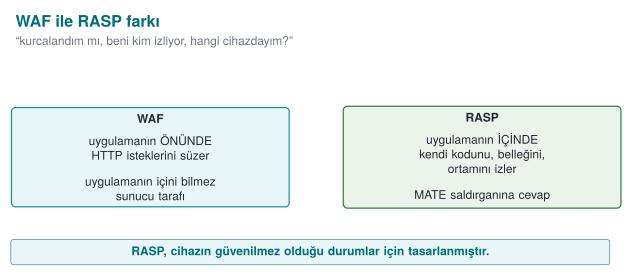
RASP (Runtime Application Self-Protection) is a set of protections embedded inside the application that watch themselves at runtime and respond to attacks. The application is its own guard.
How is RASP different from external defences?
| Defence | Where it sits | What it sees |
|---|---|---|
| Network firewall | At the network edge | Packets |
| WAF (Web App Firewall) | In front of the application | HTTP requests |
| RASP | Inside the application | Its own code, memory, and the environment it runs in |
| A WAF asks "is the request coming from outside malicious?" RASP asks "have I been tampered with, who is | ||
| watching me, which device am I on?" In this course we treat RASP in the mobile/embedded and desktop | ||
| C/C++ context, as an application protecting itself. |
RASP does three jobs; this triad is the backbone of the week:
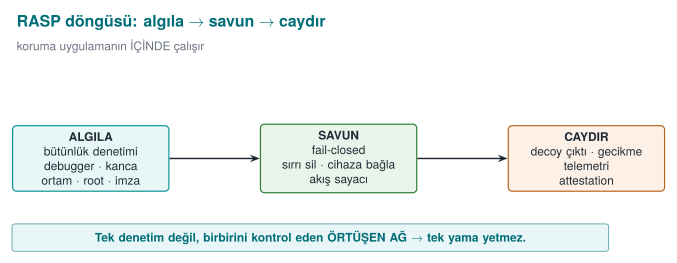
- Detection: understanding that something is wrong — the binary has been patched, a debugger is attached, the environment is an emulator, the app is on a rooted device, a component has been repackaged.
- Defence: giving a meaningful response to detection — erase the secret, reject the operation (fail-closed), bind the key to the device, tie a critical operation to the control flow.
- Deterrence: making the attacker's job expensive — return a fake (decoy) result instead of crashing, delay the response, report the event to the server. The goal is not unbreakability; it is slowing the attack down enough (the RASP-flavoured version of Week 4's "obscurity delays, it does not block" principle).
This triad can also be seen as a single pipeline: detect → decide → respond. The animation below shows how a set of independent checks (up to 12 of them) collapses into one "failure count", how that count (and a device mismatch) turns into a state (NORMAL/WARN/DEGRADE/LOCK), and what concrete response each state triggers, end to end (see Section 10, Demo 8's real engine):
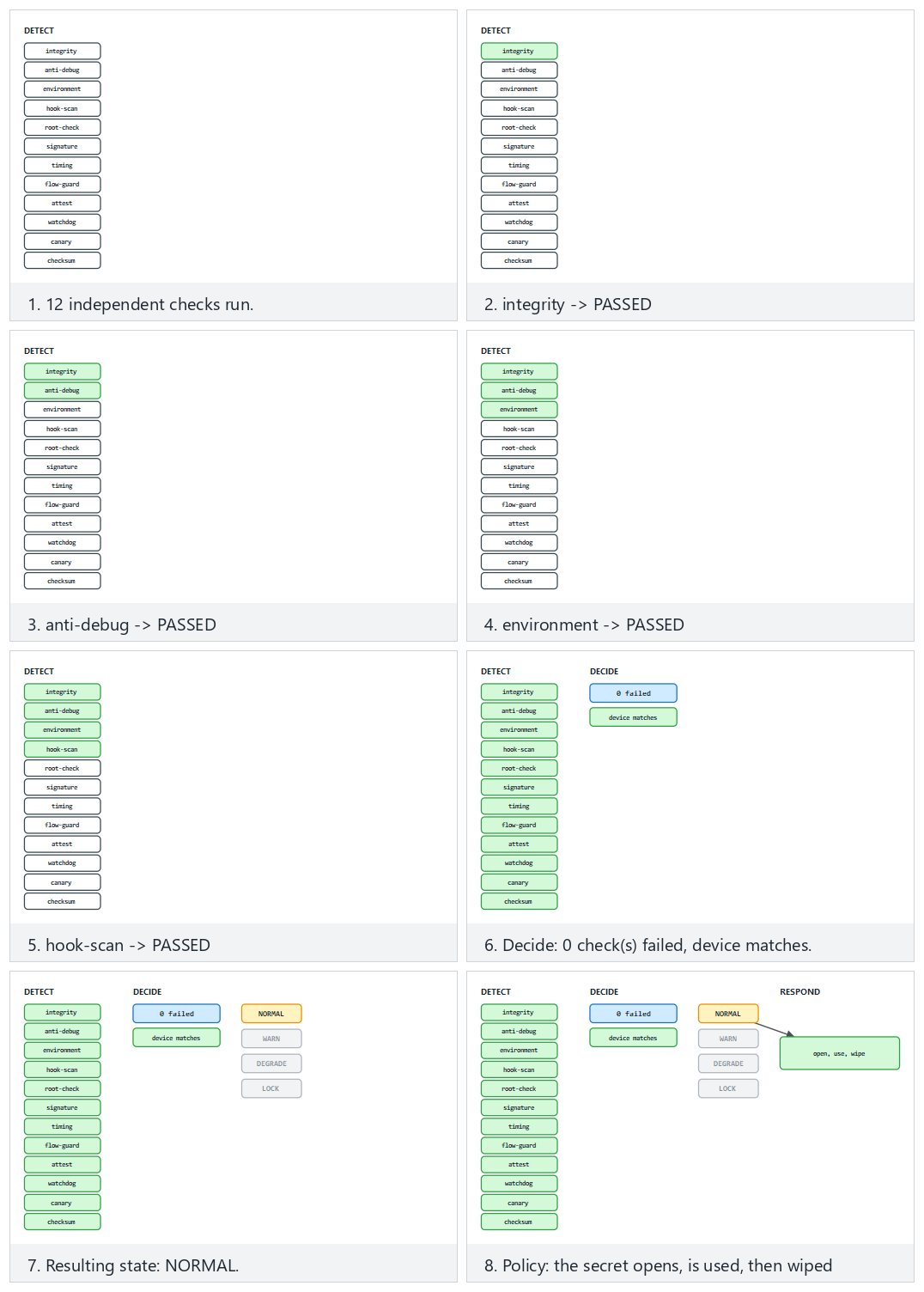
Try the normal/two-failed/edge presets; changing how many checks fail and whether the device matches lets you reach every one of the four states.
1.1 The attacker model: MATE ("Man-At-The-End")¶
In Week 1 we saw three attacker types. RASP's world is entirely MATE: the attacker owns the endpoint where the application runs. Against a server, the attacker is outside (and TLS, authentication protect it); but inside the client application, the attacker sees everything: they can read memory, modify code, step through it with a debugger. This is the same assumption as the white-box model in Week 11.
What sets the MATE attacker apart from the other attacker types we saw in Week 1 is position, not capability:
| Attacker type | Where it sits | What it can see | Classic defence |
|---|---|---|---|
| Network attacker | Between the client and the server | Only encrypted traffic (if TLS is used) | TLS, authentication |
| Server attacker | Outside the server | Only the requests it sends and the responses it gets | Input validation, authorization, rate limiting |
| MATE (the attacker at the end) | Inside the device running the app, owns it | Memory, the binary, every step at runtime | RASP: integrity, anti-debug, hook detection, device binding |
Why does this table matter? Because against a MATE attacker, network-attacker defences (TLS, server-side input validation) do nothing at all — TLS protects the connection's content, but the attacker is the application that opens the connection; the moment it decrypts, it sees the data in the clear in its own memory. That is why RASP is added on top of, not instead of, the earlier weeks' defences.
RASP's painful truth
If the device's owner is the attacker, no client-side protection is ever ultimately unbreakable. Given enough time and skill, every check can be bypassed. So why does RASP exist? Because the goal isn't unbreakability, it's making the attack unscalable and expensive: if breaking one device takes days, and it has to be redone on every broken device, and server-side anomalies get caught, the attack can collapse economically. RASP is the runtime layer of defence in depth; it makes sense not alone, but together with crypto (Weeks 3, 10), obfuscation (Weeks 4, 9), whitebox (Week 11), and server-side checks.
1.2 This week's example architecture and its central idea¶
Recall the example architecture we've used all term: a mobile payment app and a security library (native C/C++) that does its critical work. The phone is an untrusted environment. This week we add a RASP layer to that library that protects itself while it runs. All example values are synthetic (made up); no real key, card number, device id, or product name is used.
The central idea in one sentence: don't trust a single control. Every detection signal can be bypassed on its own; the strength comes from multiple independent signals, a response policy, and device binding working together. This is the runtime counterpart of Week 3's security shell.
1.3 Worked example: handling the same event three different ways¶
Let's make concrete why detection, defence, and deterrence are separate concepts. Scenario: right before unwrapping the payment key, the crypto library notices a debugger is attached (the Section 4 TracerPid signal is
0). Three developers handle this in three different ways:
- Detection only, no response: the code increments the
suspiciousvariable but never checks it; the function continues its normal flow. Result: an attacker with a debugger attached reads the key directly. The detection was wasted — because it was never wired to a defence. - Detection + a crude defence: the code writes
if (suspicious) exit(1);. Result: the attacker can't read the key, but they see exactly which line the program stopped on; within a few tries they patch thatif(the same weakness as the "the checker itself gets patched too" lesson in Section 3). - Detection + defence + deterrence: the code mixes the signal, not into
exit()directly, but as data into the key-derivation operation (a small-scale version of the control-flow counter from Section 9), and if triggered, produces a decoy result (Section 10). Result: the attacker sees no error message; they get a result that looks "successful" but is useless, and they can't tell which check fired.
All three options share the same detection code; they differ only in the defence and deterrence layers. As this week's demos progress we'll keep moving toward the third approach (see the full comparison in Section 10.2).
2. RASP architecture: when, where, and how do checks work?¶
In the sections ahead we'll see the individual checks (integrity, debugger, environment, hook, root) one by one. But in the field, a RASP solution's strength comes less from how clever each individual check is, and more from how these checks are combined. A check that runs in one place, once, and whose result is evaluated with a single if, no matter how well it's written, is the easiest check to find and bypass. This section covers the design principles for placing checks.
When does it run? Three trigger moments¶
| Moment | Example | Why? |
|---|---|---|
| At load time | When the library is loaded into memory (on Android, the native library's load function) | If the environment is untrusted from the start, no secret should ever be unwrapped |
| Right before a sensitive operation | Right before decrypting a key, computing a payment, authenticating to the server | An attacker can attach a debugger after the app opens |
| In the background, at irregular intervals | On a separate thread, at random times | A fixed-time check is easily predicted and "stepped around" |
A single trigger moment isn't enough: a debugger check done only at startup will never see a debugger that attaches after the app has started.
Where does it run? Distributed checking¶
- Multiplicity: the same check isn't done in one function; it's done, each time slightly differently, in many places in the code. When the attacker patches one point, the others still run.
- Mutual checking: the managed layer (Java) and the native layer check each other's integrity; if one is modified, the other notices ("mutual integrity checking" in the split fingerprint of Week 5 and the interface table of Week 1).
- Inside the protected function itself: a valuable function (e.g., string decryption or key derivation) does several checks itself, at its own entry point. In the field, a single such function is often protected with close to fifteen checks of its own (code integrity, debugger, environment, root, control-flow counter), in addition to the checks already done at load time. For performance reasons, only the internal-use builds push some of these checks down to the entry point.
- Decoy parameters: at the entry points of sensitive functions there can be extra parameters, hidden behind a macro for the programmer's readability, that trigger an integrity check ("decoy parameters" in Week 4).
How does it decide? Not centralized, data-dependent¶
The weakest design is this:
if (hata_ayiklayici_var() || root_var() || butunluk_bozuk())
    return HATA;                     /* changing this single line bypasses everything */
anahtari_coz();
An attacker who flips a single comparison (or makes the hata_ayiklayici_var function always return "no") gets past the whole protection. In a strong design, the checks' results don't feed an if; they feed the data of the next computation:
- Check results participate in key derivation: if the environment is clean, the correct key comes out; if not, a different but plausible-looking key comes out (the control-flow counter and the decoy output in the response policy are two applications of this idea).
- Check results are carried as opaque values (Week 4): they can't be flipped to "passed" by changing a single byte.
- The response is given far away in time and code from the trigger (the response-policy section).
What does "data dependency" mean, concretely? In a weak design you write if (kontrol_gecti) anahtari_kullan(); — the anahtar (key) is already sitting ready in memory, the if only decides whether to use it; if the attacker patches that if, the key is already there and gets used. In a strong design, the key itself doesn't exist yet; it is computed from the check result: anahtar = HMAC(kontrol_sonucu, sabit_tuz). If the check fails, kontrol_sonucu is a different value, and anahtar comes out different (and useless) — there is no if for the attacker to skip, because there's no decision to skip, only a value to compute. The acc chain in Section 9.1 and the device key in Section 10.1 are two concrete applications of this idea.
Layers protect each other¶
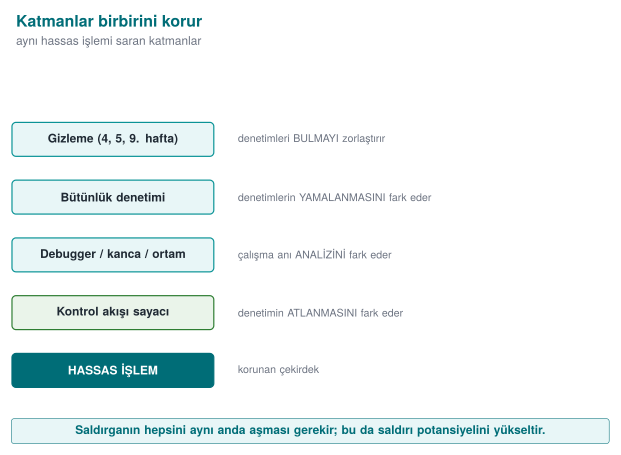
Each layer covers the previous one's weakness: obfuscation hides the checks, integrity checking notices the hidden checks being changed, the control-flow counter notices the integrity check being skipped, device binding stops the data being used somewhere else even if all of that is bypassed; server-side validation has the final word even if the client is completely compromised (the telemetry and server-side risk engine in the response policy).
2.1 Worked example: protecting one function at three points¶
Let's not leave "multiplicity" abstract. Take the anahtar_coz() function (the native function that unwraps the payment key) in the example architecture and apply the three trigger moments in order:
- At load time: when the library is loaded into memory (in the native library's init function), an integrity check (Section 3) runs once. If the environment is already broken from the start,
anahtar_cozis made uncallable (a global flag is cleared). - Right before the sensitive operation: at
anahtar_coz()'s own entry, an anti-debug check (Section 4) and a hook check (Section 6) also run — because the attacker may have attached the debugger after load time. - In the background, at irregular intervals: a separate thread reruns the environment check (Section 5) at random intervals (e.g., 2–7 seconds); the next
anahtar_coz()call reads that thread's latest result.
Result: an attacker who wants to bypass anahtar_coz() has to defeat three separate checks at three separate points in time at once. Patching only point 2 (the function's own entry) doesn't affect the checks at points 1 and 3 — the attacker thinks they've finished the job, but the background thread catches the inconsistency within a few seconds and the response policy kicks in (Section 10).
How it's done in the field
Card scheme application-protection requirements list exactly these layers: protection against unauthorized modification, self-integrity checking at runtime, refusing to run on unsupported devices, blocking version rollback, defence against static and dynamic reverse engineering and hooking techniques, detecting debugging and test environments, notifying the back end and the user in case of compromise and erasing the data, and checking that OS protections are turned on. A certified library's manual maps fourteen separate RASP measures on the native side and fourteen on the Java side to these requirements, one by one.
3. Integrity checking: the application verifies itself (self-hashing)¶
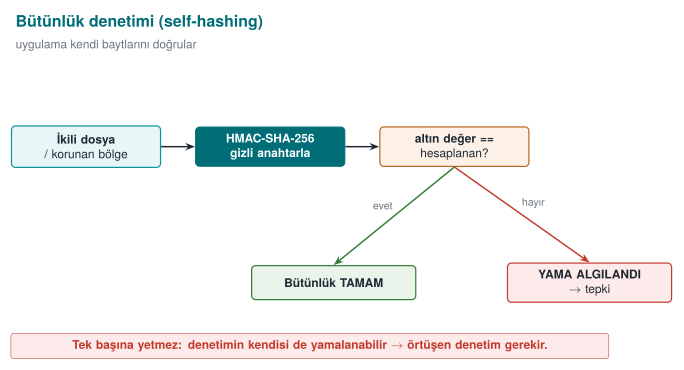
RASP's first and most basic step: "Have I been modified?" An attacker tries to bypass a license check, an if (odendi) (if paid) branch, or a crypto call by patching it (the je → jmp patch we saw in Week 4). The defence: the application computes a digest of its own binary (or of a protected code/data region) at runtime and compares it against a known-in-advance golden value. If even a single byte has changed, the patch is caught.
The book's recipe and an update
The textbook (Viega & Messier) does this in Recipe 12.2 (Detecting Modification) with CRC32. CRC32 is not cryptographic: an attacker can patch the code and easily arrange for the same CRC to come out. We update this to HMAC-SHA-256 (see Week 3, §2.4): producing the correct HMAC requires the secret key. There's a reason the author chose CRC: the real attack is already patching the checker code itself — that's the main discussion of this section.
Demo 1 — Runtime integrity checking and patch detection¶
Demo 1 · code/week-06/01-integrity-hmac · self-hashing, HMAC-SHA-256 (an update to Recipe 12.2)
The program computes the HMAC-SHA-256 digest of its own binary (self) and stores it as the "golden" value, then verifies it. Then a copy of the binary is made and one byte in it is changed (a patch simulation, in the demo's own output/ folder), and the patched copy's digest is compared against the golden value.
The animation at the bottom of this section (normal/patched-mid/edge, 🎲 random bytes) shows exactly this mechanism, step by step, over 12-16 bytes.
The core of the code (reads the file and computes the HMAC; crypto_hmac_sha256 from cen429_crypto.h):
/* Find your own path: Linux /proc/self/exe, Windows GetModuleFileNameA */
self_path(path, sizeof(path));
read_file(path, &data, &size);
crypto_hmac_sha256(RASP_KEY, 32, data, size, digest);   /* HMAC over the file */

/* verify: constant-time comparison (prevents a timing leak) */
unsigned char diff = 0;
for (int i = 0; i < 32; i++) diff |= expected[i] ^ digest[i];
if (diff == 0) { /* INTEGRITY OK */ } else { /* PATCH DETECTED */ }
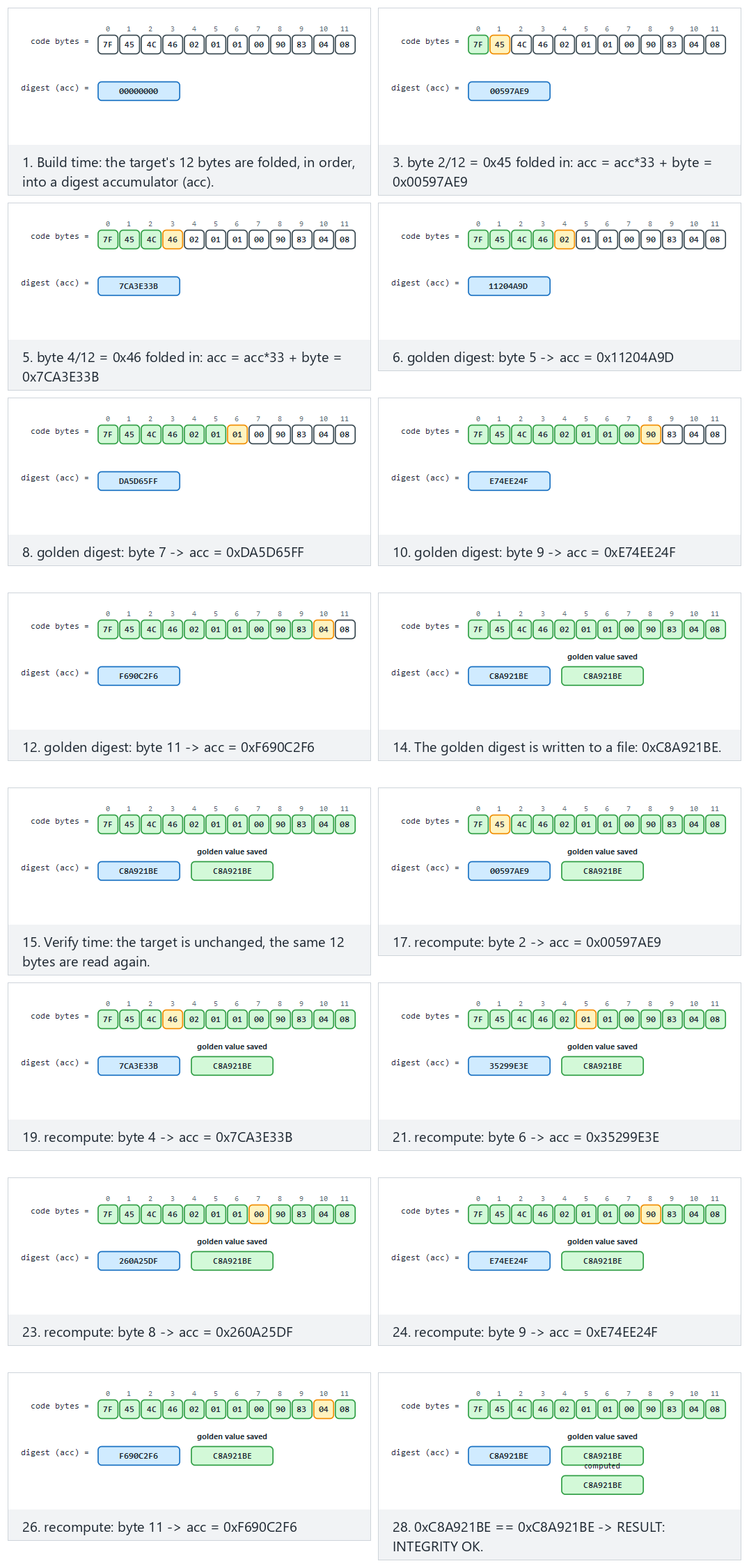
Try the normal, patched-mid and edge-first-byte presets; generate random bytes with 🎲, or type your own.
Actual output captured on Windows (shortened):
STEP 2 - Normal run: integrity verifies OK (no patch)
Expected   : 5aeaf45226dbb29af724cb7101a621419aa58e0630f1fee3d647f76b55115de4
Computed   : 5aeaf45226dbb29af724cb7101a621419aa58e0630f1fee3d647f76b55115de4
RESULT: INTEGRITY OK - target unchanged.

STEP 3 - Attack: a COPY of the binary is made and 1 byte is changed
> flip byte at offset 22272 (0xCC -> 0x33)
STEP 4 - The patched copy's HMAC is compared with the golden value
Expected   : 5aeaf45226dbb29af724cb7101a621419aa58e0630f1fee3d647f76b55115de4
Computed   : c47c35687dc205b93a2eec33df49c97defecfcb868fb8a23e6c01c2aca0ec8ac
RESULT: PATCH DETECTED - target was modified! (tamper)   (exit code 3)
While unpatched, the digest was exactly the same as the golden value. Changing a single byte completely changed the digest (the avalanche effect), and the patch was caught. The comparison is done in constant time (not memcmp), because as we saw in Week 3, a plain memcmp stops at the first differing byte and leaks timing.
3.1 Worked example: which bytes does the HMAC digest, and how does a patch break it?¶
Which bytes are digested? Looking at the target_hmac() function, the answer is clear: read_file() reads the entire target (its own binary) into memory (with fread, from offset 0 to the end of the file), and crypto_hmac_sha256 digests this whole byte sequence in one pass — not a specific function or section, but every byte of the file. In demo.ps1's actual output, offset 22272 was changed; this lands roughly at the middle of the file (SIZE / 2) — meaning the binary's total size in that run was roughly 22272 × 2 ≈ 44544 bytes. No matter which byte of the file the attacker changes (beginning, middle, or end), that byte is included in the computation and the digest changes.
How the patch breaks it — step by step on a small example. Let's see the same avalanche effect, not on a huge binary, but in a single character of text; the logic is identical. Let's HMAC-SHA-256 the string "MERHABA" ("HELLO") with a fixed key, then flip the last character from A to B and hash again:
printf 'MERHABA' | openssl dgst -sha256 -hmac "ornek-anahtar"
printf 'MERHABB' | openssl dgst -sha256 -hmac "ornek-anahtar"
SHA2-256(stdin)= 4d45a6382deee7f75c75b3cf5a6a81a2776d317e1db9ec9b0125b69e09492615
SHA2-256(stdin)= 4fbdf8768822083c3fc3797c5f1d278dd1ea58ab0bfde31a8ebf85e260fbcbd7
Only 1 of the input's 7 bytes changed (the last character, A=0x41 → B=0x42; these two values differ in only two bits); but all 32 bytes of the output are different. This is the avalanche effect of cryptographic digest functions: if a single bit of the input changes, on average half of the output changes. The 5aeaf452...55115de4 → c47c3568...aca0ec8a transformation you saw in Demo 1's actual output is this same property on a huge binary: XOR 0xFF flips every bit of a single byte, and this spreads to all 256 bits of output through HMAC-SHA-256's internals (each round of SHA-256's compression function).
Why is this necessary for the check to work at all?
Without the avalanche effect (as in a weak digest function like CRC32), an attacker could restore the digest to its old value by adding a few compensating bytes next to the byte they patched (a "fix the checksum" attack). In a cryptographic digest like HMAC-SHA-256 this is practically impossible without knowing the key — which is why we saw at the start of Section 3, in the "The book's recipe and an update" note, why CRC32 is upgraded to HMAC.
Why isn't integrity checking enough on its own?
The HMAC key lives inside the binary. A determined enough attacker can: 1. Patch the checker function itself to "always return OK." 2. Patch the target and recompute the golden value (if they find the key).
That's why real RASP strengthens integrity checking with three things: (1) multiple/overlapping checkers (in a network, where one also checks another), (2) making the result a data dependency — using the digest directly as a key/jump-table index, so patching breaks behaviour (see Section 9, Demo 5), (3) server-side attestation — sending the client's integrity proof to the server with a nonce.
Rule
Verify the integrity of critical code/data regions at runtime with a cryptographic digest (HMAC/signature), not CRC. Don't check only at a single point and only at startup; make it periodic, multiple, and overlapping. Where possible, tie the result to a data dependency.
How it's done in the field / How does an evaluator test this?
In the example architecture, the native library verifies a combined digest of both its own .so/.dll and the upper layer (e.g., Java/DEX); it does mutual verification (Catalogue K6, Demo 6). An evaluator patches the binary and checks whether detection triggers, then tries patching the checker code itself to see whether the protection can be bypassed that way (a single checker or a network of them?).
Common mistakes and a checklist
- Is the integrity check cryptographic (not CRC)?
- Does it check periodically, not only at startup?
- Is there a single checker, or overlapping checkers?
- Is the result tied to a behaviour (data dependency), or just an
if? - Is there server-side attestation (not trusting the client alone)?
How often should "periodic" be? A cost-latency trade-off. Let's put a number to Section 2's "in the background, at irregular intervals" principle. The shorter the check interval, the faster a patch gets noticed, but CPU/battery cost also rises; the longer the interval, the more "unnoticed operation" window is left to the attacker:
| Check interval | Delay before a patch is noticed (upper bound) | Typical extra CPU load |
|---|---|---|
| Only at startup (once) | Unbounded (may never be noticed) | Lowest |
| Every 30 seconds | ~30 seconds | Low |
| Every 2–7 seconds (random) | ~7 seconds, at an unpredictable moment | Medium |
| Right before every critical operation (point 2 in Section 2) | Nearly instant | Only on critical operations |
In the field, the preferred approach is to use not just one of these four options alone, but all of them together: once at startup (cheap, broad coverage), every time right before a critical operation (cheap, narrow coverage but the most critical moment), and at random intervals in the background (not cheap, but it stops the attacker from predicting "when does the check run"). A fixed interval (e.g., exactly every 30 seconds) gives the attacker predictability; a random interval prevents that — which is why the third row of the table is marked "random."
4. Debugger detection¶
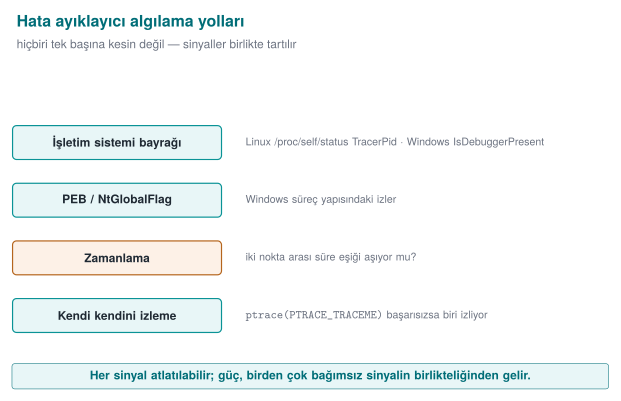
The attacker's most powerful tool is a debugger (gdb, lldb, x64dbg, WinDbg, Visual Studio): it stops the program, steps through it, reads memory and keys, and changes branches. RASP tries to figure out whether a debugger is attached.
| Environment | Indicator | Book |
|---|---|---|
| Linux / WSL | /proc/self/status → TracerPid (if >0, a process is watching us via ptrace); whether the parent process's name is gdb/strace/ltrace | Recipe 12.13 |
| Windows | IsDebuggerPresent (PEB BeingDebugged); CheckRemoteDebuggerPresent; PEB NtGlobalFlag (bits 0x70) | Recipe 12.14 |
From 2003 to today: what's outdated?
- SoftICE (Recipe 12.15) is completely dead. It has been replaced by modern hypervisor/ring-0 debuggers, x64dbg, WinDbg, gdb, lldb, and especially Frida/DBI (dynamic binary instrumentation) (see Section 6).
IsDebuggerPresent(12.14) still exists but is weak on its own; it's paired with PEBBeingDebugged/NtGlobalFlag,CheckRemoteDebuggerPresent, and timing-based detection.- The
ptracetechnique (12.13) is still valid; a modern addition: cross-checking/proc/self/statusTracerPid.
Demo 2 — Debugger detection (Linux ptrace/TracerPid, Windows PEB)¶
Demo 2 · code/week-06/02-debugger-detection · anti-debug, read-only
The program looks at several independent signals and changes nothing (it doesn't even watch itself with ptrace; it only reads /proc and PEB fields). demo.sh runs the program first normally, then under gdb.
/* Read TracerPid from /proc/self/status; if >0 we're being watched */
long tp = tracer_pid();
if (tp > 0) suspicious++;      /* a process is watching us via ptrace */
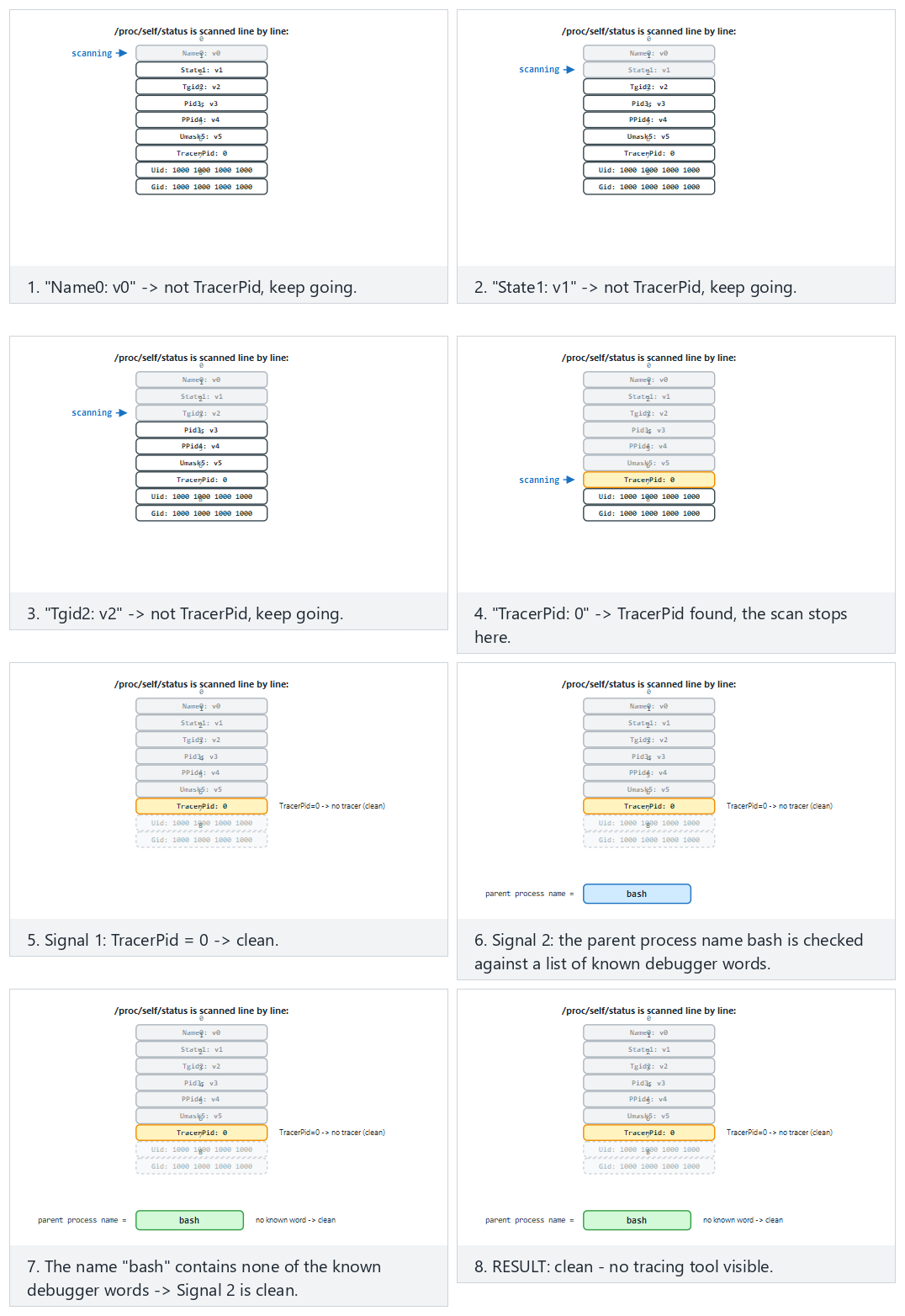
Watch the animation scan /proc/self/status line by line and weigh the two signals (TracerPid, parent process name); try the clean/gdb-attached/edge presets.
STEP 1 - Normal run (NO debugger): clean is expected
1) /proc/self/status TracerPid           : 0 (no tracer)
2) Parent process name                   : sh
RESULT: clean - no tracing tool visible.

STEP 2 - Run under gdb (TracerPid > 0 is expected)
1) /proc/self/status TracerPid           : 41885 (TRACED)
RESULT: a debugger/tracing TOOL was detected (2 signal(s)).
Without a debugger TracerPid was 0, under gdb it was >0; the program told the two situations apart. On Windows, if you run under Visual Studio with F5 (under the debugger), IsDebuggerPresent returns YES and the result is "detected."
4.1 Worked example: tracing TracerPid's move from 0 to non-zero step by step¶
Demo 2's output showed TracerPid moving from 0 to 41885; let's now unpack why step by step. /proc/self/status is a text file the kernel keeps for every process, readable by the process itself too (in Week 1 we described /proc as "a window the kernel opens onto the process"). The TracerPid: line inside it holds the PID (Process ID) of the process watching that process with the ptrace() system call; if nobody is watching, the value is 0.
Step 1 — without a debugger. The antidebug program is run directly from the shell and reads its own /proc/self/status file (representative, shortened content):
Name:      antidebug
Pid:       4821
PPid:      4820          <- the shell that launched it (sh)
TracerPid: 0             <- nobody is tracing with ptrace
The program reads this line, finds the numeric value 0; since tp > 0 is false, it doesn't increment the suspicious variable. The "RESULT: clean - no tracing tool visible." line in the demo output comes from here.
Step 2 — when run under gdb. On its second pass, demo.sh starts the program from inside gdb. When gdb starts or attaches to the target process, it tells the kernel "I'm watching this process"; this happens via a ptrace(PTRACE_TRACEME, ...) or ptrace(PTRACE_ATTACH, ...) call. The kernel records this and fills the watched process's /proc/self/status TracerPid field with the watching gdb process's own PID:
Name:      antidebug
Pid:       4821
PPid:      41885          <- the parent process is now gdb
TracerPid: 41885          <- gdb is tracing us with ptrace
This is exactly the 41885 value seen in the demo output. The program itself did nothing — it only read a field the kernel already keeps; that's why the technique is classified as "read-only" and has no side effects (exactly why the safety promise in the demo's README can be kept).
Step 3 — the decision. Since tp > 0, the suspicious counter goes up by 1; since the parent process's name is also gdb, a second independent signal (the parent_process_name (parent-process-name) check) gets added too; the "algilandi (2 sinyal)" (detected, 2 signals) phrase in the demo output is the sum of these two. Reading a single field on its own may not be enough, but this kernel-level information is a signal that is hard to fake: zeroing out TracerPid directly is impossible, because it's read from a kernel data structure, not from the process's own memory — the only way for an attacker to hide it is to hook the library function that reads /proc/self/status, which is exactly the topic of Section 6.
4.2 The Windows counterpart: reading the bits in NtGlobalFlag¶
Windows has no direct /proc file, but the same idea (reading a piece of information the kernel already keeps) has a counterpart: the PEB (Process Environment Block — a memory structure kept by the kernel for every process, which the process itself can also read). The PEB's NtGlobalFlag field carries three special flag bits if the process was started under a debugger (not only attached later):
| Bit (hex) | Meaning |
|---|---|
0x10 | FLG_HEAP_ENABLE_TAIL_CHECK — heap end check |
0x20 | FLG_HEAP_ENABLE_FREE_CHECK — freed-heap check |
0x40 | FLG_HEAP_VALIDATE_PARAMETERS — heap parameter validation |
These three bits together make up 0x70 (0x10 | 0x20 | 0x40 = 0x70); when the Windows loader starts a process under a debugger, it automatically switches the heap allocator into a stricter-checking mode and sets these three bits. The line (ntglobal & 0x70) != 0 in Demo 2's Windows code reads exactly this: whether the NtGlobalFlag value carries at least one of these three bits. Just like TracerPid, this too is a read-only operation; the program changes nothing, it reads a field the kernel/loader has already written.
The detection–counter-detection race
Anti-debug is a classic arms race. Every detection technique has a counter-technique: an attacker can turn ptrace into a no-op with LD_PRELOAD (Demo 4), patch IsDebuggerPresent's return value, or clear the PEB flag. That's why a single check is never trusted; signals are multiplied and tied to a response policy (Demo 8).
Rule
Don't write anti-debug as a single if (IsDebuggerPresent()) exit(); (the attacker patches that call). Collect several independent signals (ptrace + TracerPid + timing + parent), tie the result directly to a behaviour/key, and delay the response (don't exit immediately; make it hard for the attacker to work out which check triggered).
Common mistakes and a checklist
- Do you rely on a single anti-debug call, or on several signals?
- Is the detection result tied to a behaviour/key, or is it just
exit()? - Did you prefer a read-only technique (
TracerPid) over a technique with side effects likeptrace(PTRACE_TRACEME)? - Is the response immediate, or delayed/implicit?
5. Environment detection: virtual machine and emulator¶
An attacker most often runs the application in a controlled analysis environment — a virtual machine, an emulator, or a sandbox. An emulator is a software environment that imitates a device (an Android emulator, QEMU); a virtual machine (VM) abstracts real hardware to run another operating system on top of it. The attacker does their analysis here instead of on a real device, because it's easier. RASP tries to sense this from environmental clues.
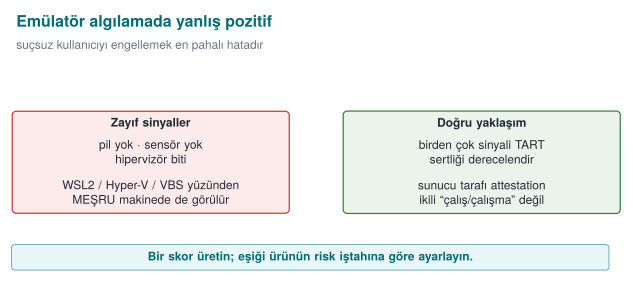
| Technique | How | Note |
|---|---|---|
| CPUID hypervisor bit | CPUID.1:ECX[31] — "hypervisor present" | 0 on bare metal |
| Hypervisor vendor signature | CPUID leaf 0x40000000 → 12 characters (KVMKVMKVM, VMwareVMware, Microsoft Hv...) | Some hypervisors hide it |
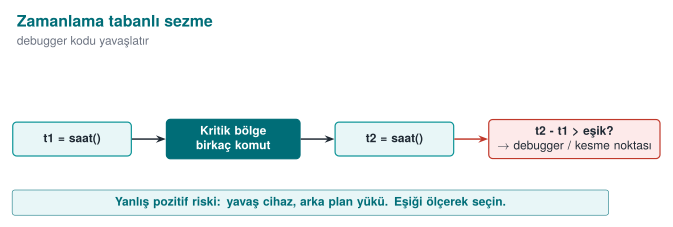
| Timing | Measure an operation; single-stepping debugging/heavy emulation slows it down a lot | The threshold varies by machine |
Demo 3 — VM/emulator and timing detection (CPUID)¶
Demo 3 · code/week-06/03-environment-timing · only reads a CPU instruction and the clock
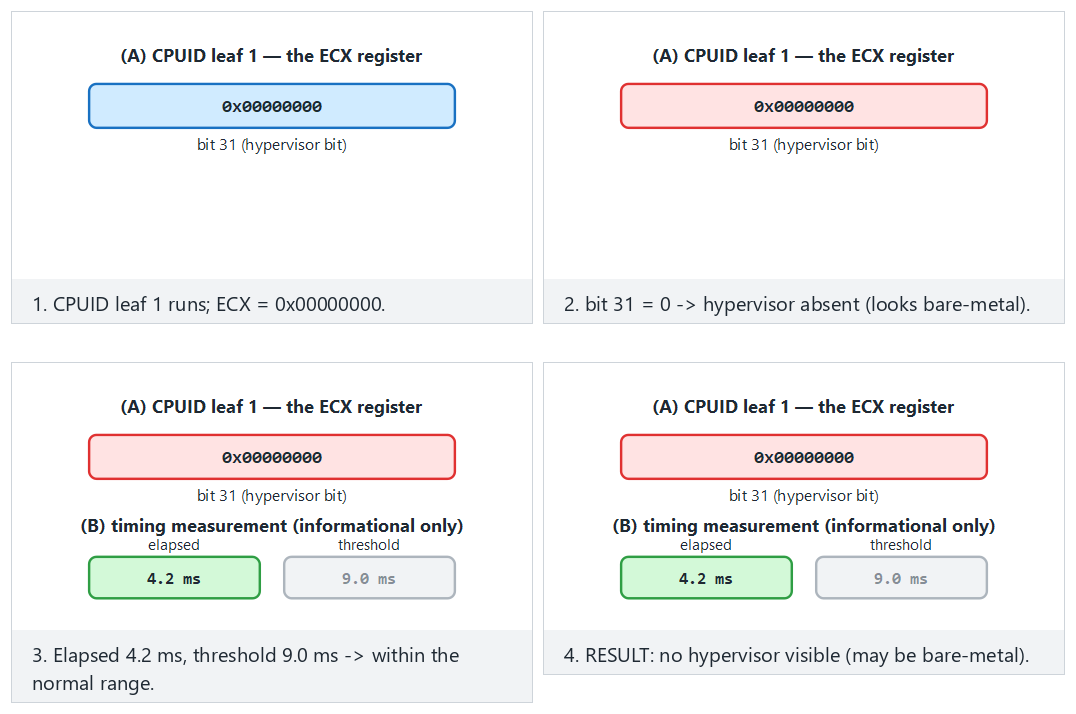
Try the bare-metal/kvm/edge-blank-vendor/edge-slow-timing presets; use 🎲 to generate random hypervisor/timing values.
(A) CPUID.1:ECX[31] hypervisor bit    : PRESENT
    Hypervisor vendor signature        : "Microsoft Hv"
(B) time for 2,000,000 iterations      : 0.662 ms  (checksum=4544)
RESULT: a hypervisor was SEEN. But WSL2/Hyper-V/VBS also look like this;
this ALONE does not mean 'analysis environment' - it is a weak signal.
The single most important lesson: false positives
The output above was captured on an ordinary Windows laptop with Hyper-V, and the hypervisor bit said "PRESENT." But this is not an analysis environment — it's an ordinary developer machine! On modern Windows, most machines report a hypervisor because of Hyper-V, WSL2, and virtualisation-based security (VBS). So this bit alone does not mean "an attacker is analysing this." If an application refused to run just because it saw a hypervisor, it would block millions of legitimate users. RASP always weighs multiple indicators and accepts that each one can be bypassed.
Rule
Use environment detection as a risk score, not a binary run/don't-run decision. Combine multiple indicators; account for false positives (real users on a legitimate VM/emulator); make the final call together with a server-side risk engine.
How it's done in the field
In the mobile world the counterpart is emulator detection (QEMU/Android emulator clues: ro.kernel.qemu, fake sensors, typical IMEI/serial values). Same principle: signal, not proof; combination plus server-side checking.
5.1 Worked example: how do you build a risk score and a threshold?¶
Let's put numbers to Section 1.2's "don't trust a single control" principle here. Every environment-detection signal is given a weight (a contribution score between 0 and 100); all the weights are summed and a risk score comes out. The decision is not a single if (hipervizor_var), but whether this score is above a threshold.
| Signal | Source | How reliable alone? | Example weight |
|---|---|---|---|
| Hypervisor bit (CPUID) | Demo 3 | Low — also set under WSL2/Hyper-V/VBS | 15 |
| Known hypervisor vendor signature | Demo 3 | Medium — more reliably shows a virtualised environment | 25 |
| Timing anomaly | Demo 3 | Medium — can also happen on a real machine under load | 20 |
| Known emulator file trace (on mobile) | e.g. ro.kernel.qemu | High — almost never happens on a real device | 40 |
| Debugger attached | Demo 2 (TracerPid) | High — rarely happens while a legitimate user is using the app | 35 |
Example 1 — a developer working on an ordinary Windows laptop with Hyper-V (a legitimate user). As in Section 3's real demo.ps1 output, the hypervisor bit is PRESENT AND the vendor signature is visible ("Microsoft Hv" — see Section 3), timing is normal, there's no emulator trace, no debugger attached. Total score: hypervisor bit (15) + visible vendor signature (25) = 40. Timing and emulator/debugger signals contribute nothing.
Example 2 — an attacker working in an analysis environment. Hypervisor bit PRESENT (15) + vendor signature visible (25) + timing anomaly (20) + debugger attached (35) = total 95. The score is high; the operation is rejected or a decoy is returned (Section 10).
Notice: Example 1 and Example 2's first two signals are identical (40 points) — a Hyper-V-equipped developer machine and an analysis VM can look the same to a system that only checks these two signals! The difference only shows up in the timing anomaly and debugger signal (this is what carries Example 2 from 40 to 95). If the threshold is set as low as 30 (the banking example below), even Example 1's legitimate developer gets rejected — this is exactly what the "the real cost of a false positive" warning right below is about.
The difference is not the presence of a single bit, but how many independent signals appear together. Where should the threshold be set? That's a risk appetite decision that varies from product to product — a trade-off of "how many legitimate users am I willing to block, in exchange for how many attacks I prevent":
| Product | Cost of a false positive | Cost of a false negative | Example threshold |
|---|---|---|---|
| Banking / payment app | User can't complete the transaction, call-centre load rises | Fraudulent transaction, direct money loss | Low (e.g. 30) — reject when in doubt |
| Loyalty points / coupon app | User is annoyed but the loss is small | An extra coupon gets used | High (e.g. 70) — rarely reject |
| DRM-protected content player | Legitimate user can't watch the content, store rating drops | Content gets copied | Medium (e.g. 50) |
The real cost of a false positive
Setting the threshold too low (e.g., making the banking threshold 10 instead of 70) blocks — while they are entirely legitimate — every developer using WSL2/Hyper-V, every IT department testing on a virtual machine, and ordinary users of some accessibility/security tools. The cost of this is not abstract: call-centre load, store rating/negative reviews, lost users. RASP design should measure "how many legitimate users did we block" as carefully as "how many attackers did we catch" — ideally with a staged rollout (log-only first, then reject).
Rule
Combine environment/root/debugger signals into a weighted risk score, not a single binary decision. Choose the threshold deliberately, based on the asset's value and the product's risk appetite; there is no fixed, one-size-fits-all "industry-standard threshold." Keep the score and the threshold tunable over time (based on server-side telemetry); don't hard-code them into the binary.
6. Hook and instrumentation detection (LD_PRELOAD, Frida)¶
A sneakier threat than a debugger: function hooking and dynamic instrumentation. A hook is intercepting and changing a function's call; instrumentation is injecting code into a running program to observe or change its behaviour (the most common tool for this is Frida). Without stopping the program, the attacker replaces the functions it calls — including our own anti-debug/anti-root checks — with their own version. This lets them make Demo 2's checks lie and always return "clean."
A short history: from static patching to dynamic instrumentation
- 1990s — hooking techniques were hand-written, target-specific tools operating on the IAT (Import Address Table) and the PLT/GOT; they had to be rewritten for every target.
- 2000s —
LD_PRELOAD(Linux) and DLL injection (Windows) became common as general-purpose but static (precompiled) hooking methods. - 2013–2014 — the Frida project emerged; the real difference was that hook code could be written and injected in JavaScript, at runtime — no compilation needed.
- 2010s–today — Frida became the standard tool for mobile security testing; this is the main reason RASP's "hook detection" section exists at all.
The lesson of this history: hooking techniques evolved from static to dynamic; that's why detection also needs to look, not at a specific tool's signature (like the dladdr technique in Section 6.1), but at the behaviour itself (where does the function actually run from?).
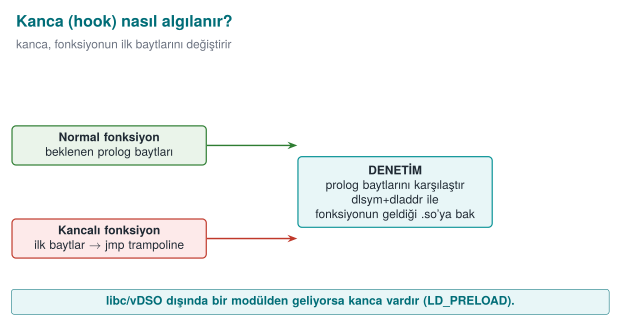
| Technique | How | Platform |
|---|---|---|
| LD_PRELOAD | Preloading a .so to replace standard functions (interposition) | Linux |
| PLT/GOT hooking | Redirecting call-table entries to your own function | Linux/ELF |
| Inline hooking | Overwriting a function's first bytes with a jmp | Everywhere |
| Frida / Xposed | Dynamic binary instrumentation frameworks | Mobile/desktop |
Detection ideas (Catalogue K7/K8/K18):
- Is the
LD_PRELOADenvironment variable empty? (getenv— weak, becausegetenvitself can also be hooked) - Which shared object does a function actually resolve from?
dlsym(RTLD_DEFAULT, ...)+dladdrare used to look up which.sofile a function actually comes from; if a foreign.soshows up instead of the expected libc, there's a hook. (This doesn't rely ongetenvfaking.) - Unexpected executable regions in
/proc/self/maps, known framework indicators.
Demo 4 — Hooking with LD_PRELOAD and detection with dladdr¶
Demo 4 · code/week-06/04-preload-hook · Linux/WSL only · CWE-like: dynamic instrumentation
The demo compiles a small fake hook library (libfake_hook.so) that takes over the time() function. With LD_PRELOAD, this library is loaded only for a single demo command. The main program catches the hook by looking at which .so the function comes from. On Windows, demo.ps1 explains how this is run under WSL (the Windows counterpart is IAT/inline-hook detection).
void *p = dlsym(RTLD_DEFAULT, "time");   /* returns a preloaded hook if one exists */
Dl_info info;
dladdr(p, &info);                        /* the .so that provides the function */
int hook = !is_legitimate(info.dli_fname);   /* anything other than libc/vdso/ld = HOOK */
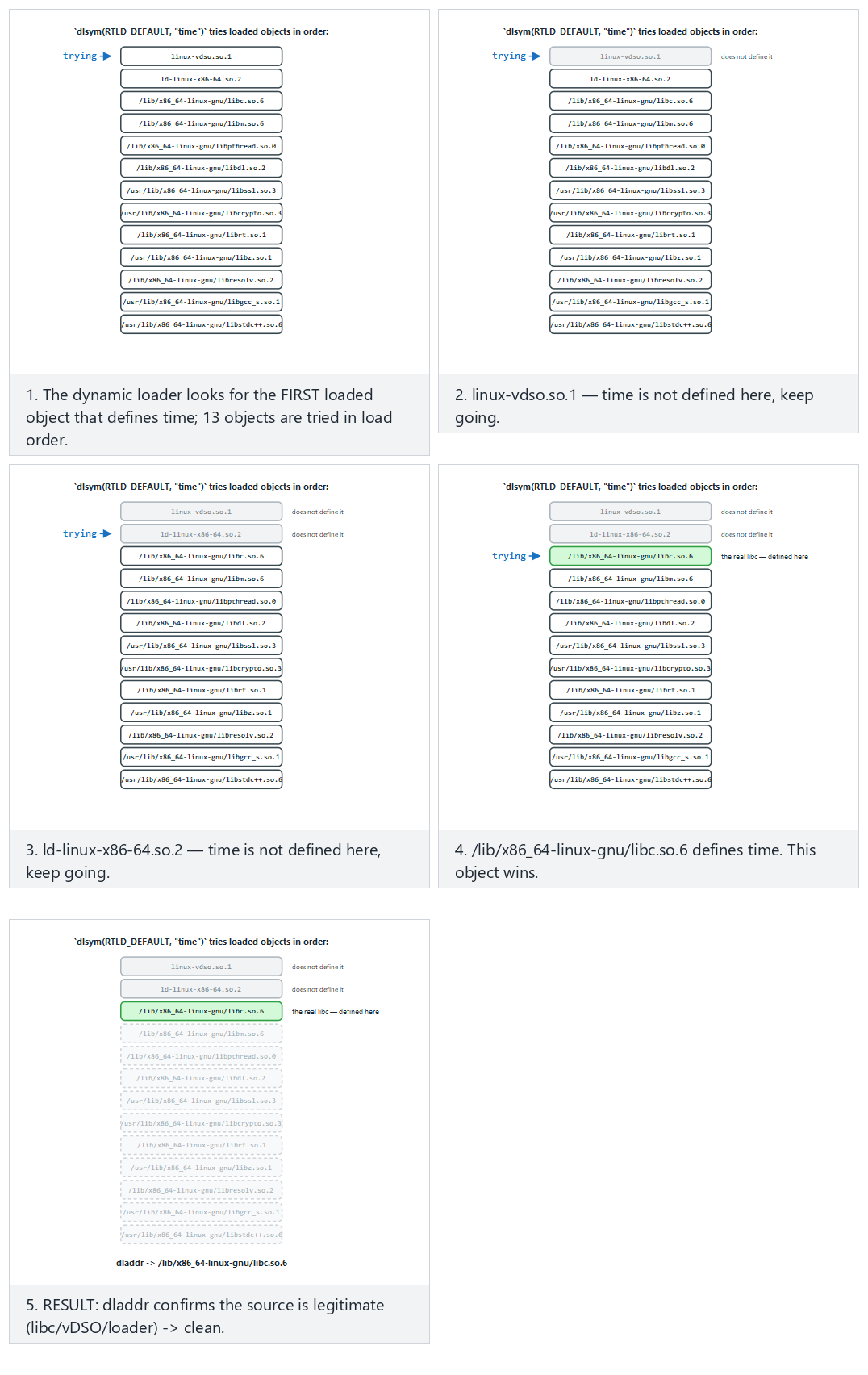
The animation shows the ORDER time is searched for among loaded objects, and why an LD_PRELOAD hook wins when one is present; try the clean/hooked-first/edge presets.
STEP 1 - Normal run (no LD_PRELOAD): clean is expected
   time     -> linux-vdso.so.1
   getenv   -> /lib/x86_64-linux-gnu/libc.so.6
   time(NULL) returned              : 1790690227
RESULT: clean - no preload/hook visible.

STEP 2 - Attack: the fake hook is preloaded ONLY into this process
   time     -> bin/linux/libfake_hook.so (HOOK!)
   getenv   -> /lib/x86_64-linux-gnu/libc.so.6
   time(NULL) returned              : 1234567890
RESULT: function hook / preload DETECTED (2 signal(s)).
In the clean run, time resolved from the kernel's vDSO (this is legitimate, not a hook). Once the hook was loaded, the same time resolved from libfake_hook.so and returned a fixed fake value (1234567890); dladdr caught the hook by pointing at the function's location. Note: to avoid counting linux-vdso as a false positive in the clean run, detection treats libc, vDSO, and the dynamic loader as legitimate sources — this is the lesson that "writing a detector is easier than writing a correct detector."
6.1 Worked example: finding a function's source step by step with dlsym + dladdr¶
The heart of Demo 4 is two function calls: dlsym and dladdr. Let's unpack what the two do together, step by step.
Step 1 — what does dlsym(RTLD_DEFAULT, "time") do? dlsym searches the running process's symbol table for a symbol with the given name ("time") and returns its memory address. RTLD_DEFAULT is a special handle meaning "use the program's normal symbol search order (its own binary, then loaded libraries, including LD_PRELOADed ones)." This step's output is just a number (a memory address); it carries no information about which file it came from.
Step 2 — who provided this address? This is dladdr's job: it takes a given address, looks it up in the running process's map of loaded shared objects (.so files), and finds which .so's memory range the address falls into. It writes the result into a Dl_info structure; the field we use, dli_fname, is that .so's file path.
Step 3 — in the clean run. With LD_PRELOAD empty, the time symbol resolves through the normal search order and comes from the kernel-provided vDSO (virtual Dynamic Shared Object — a special virtual .so the kernel automatically adds to a process's memory to provide fast reads without a system call). Demo output: time -> linux-vdso.so.1. The is_legitimate() (is-it-legitimate) function recognises this name (it looks for the linux-vdso substring) and says not a hook.
Step 4 — once the hook is loaded via LD_PRELOAD. demo.sh starts the program with the environment variable LD_PRELOAD=./libfake_hook.so. The dynamic linker (ld-linux.so) puts this library at the very front of the normal search order; since the library defines its own time() function, dlsym(RTLD_DEFAULT, "time") now finds not the real time in vDSO, but the fake time in libfake_hook.so. dladdr sees this address falls within libfake_hook.so's memory range; dli_fname returns "bin/linux/libfake_hook.so". Since is_legitimate() doesn't recognise this name (not libc/vDSO/ld), it says HOOK — exactly the time -> bin/linux/libfake_hook.so (HOOK!) line in the demo output.
Step 5 — why is this stronger than a getenv(LD_PRELOAD) check? The getenv check looks at the environment variable itself — but the environment variable is only used to load the library at the program's start-up moment; once it's loaded, the attacker can delete it (unsetenv) or hook getenv itself in their own fake library to return empty (exactly what Activity 1 tries). The dladdr check never looks at the environment variable at all; it directly asks "where is this function actually running from right now?" — since the hook is already loaded, the answer to that question comes, not from the environment variable, but from the running code itself, which is why it doesn't rely on getenv faking.
Rule
Don't rely on manipulable sources like getenv(LD_PRELOAD) for hook detection; verify critical functions' source (which module they come from). Check multiple functions; add extra signals like /proc/self/maps; tie the result to a response policy.
How does an evaluator test this?
An evaluator hooks critical functions with a known instrumentation tool (e.g., Frida) and checks whether the protection catches it; then they try hooking the detection function itself to see whether the protection can be blinded (a single point, or distributed?).
7. Dynamic memory protection and memory-monitoring detection¶
One of the items the syllabus puts in this week is dynamic memory protection: measures taken, while the program runs, against sensitive data in memory being read and modified. In Week 1 we saw erasing secrets from memory and preventing them from being swapped out; in Week 3, the "data in use" layers. This section asks the same question again, from the runtime attacker's angle: what can we do if the attacker is watching or modifying memory?
Brief history: why a secret in memory can't be treated like a secret on disk
- 2008 — J. Alex Halderman and co-authors, in "Lest We Remember: Cold Boot Attacks on Encryption Keys," showed that DRAM retains part of its contents for seconds to minutes after power is cut (remanence): they recovered full-disk-encryption keys from memory by cooling a laptop and rebooting it. This is one of the field's most-cited results proving that "the secret is only in RAM, not on disk" is not enough on its own — it is the direct motivation for this section's "short lifetime" and "never leave it in the clear" countermeasures.
- Linux kernel memory protections like
prctl(PR_SET_DUMPABLE, ...)andmlock/MADV_DONTDUMPbelong to the same general, OS-level defense family that predates RASP: protecting a process's own memory against another process or against disk.
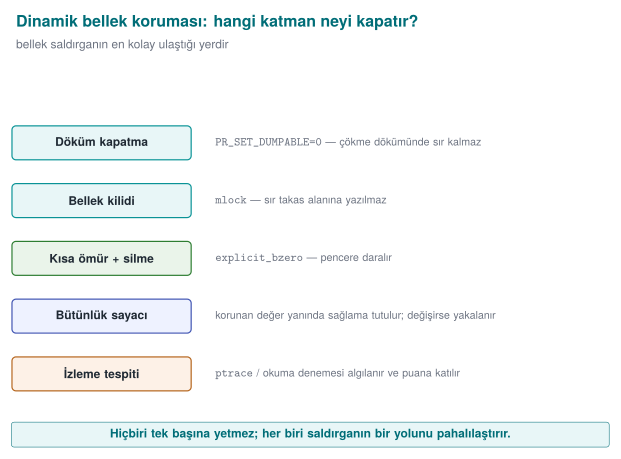
What does an attacker do with memory?¶
| Attack | Example | Target |
|---|---|---|
| Reading | Dumping process memory, searching memory for a known value | Key, PIN, decrypted data |
| Modifying | Changing a score in a game, a counter value, or a "license valid" flag in memory | Logic and checks |
| Watching | Finding which address holds what, using tools that report when a value changes | Discovering where variables live |
For all of these attacks the attacker needs to access process memory: through a debugger, through the OS's process-memory interfaces, or through a library loaded into the process. That's why memory protection is thought of together with the debugger and hook detection from earlier sections.
Countermeasure 1: keep little in memory, keep it short, keep it scattered¶
The most effective memory protection is leaving nothing to read in memory:
- Short lifetime: the secret is only ever in the clear inside the function that uses it, and is erased before the function returns (Week 3: the window of exposure).
- Masking and splitting: while unused, the secret sits XORed with a random mask or split into pieces; the secret itself never sits whole in one place in memory.
- Erase with a random value: once done, memory is filled, not with zeros, but with random values, so it doesn't even leave the trace "a secret was just here." In the field, on the native side, this is the one place a random generator is used.
- Never unwrap it at all: in whitebox cryptography, the key is never in the clear in memory at any point (Week 11). In the field's shell matrix, this is the only shell left on the native side during a payment.
Countermeasure 2: make memory harder for the OS to read¶
| Measure | Platform | Effect |
|---|---|---|
Disabling core dumps, PR_SET_DUMPABLE = 0 | Linux | Even another process owned by the same user can't attach as a debugger or read the process's memory file (Week 1) |
Memory locking (mlock / VirtualLock), MADV_DONTDUMP | Linux / Windows | The secret doesn't end up in swap or in a dump (Week 1) |
Page protections (mprotect / VirtualProtect) | Linux / Windows | Tables that shouldn't change after initialization are made read-only; an attempt to modify them causes a fault |
| Protected-process features | Windows, mobile platforms | The OS's "protected process" and app sandboxing limit other apps' access to memory |
These measures don't stop an attacker with administrator (root) privileges; but they force the attacker to move to a more powerful position, and that's where root detection comes in.
A concrete example: what does PR_SET_DUMPABLE change? On Linux, every process is "dumpable" by default — the kernel can produce a core dump on a crash and another process owned by the same user can attach to it with ptrace(PTRACE_ATTACH, pid, ...). The prctl(PR_SET_DUMPABLE, 0) call turns this flag off:
| State | Attaching from outside with ptrace | A memory dump on crash | Reading /proc/<pid>/mem |
|---|---|---|---|
PR_SET_DUMPABLE = 1 (default) | Another process of the same user can attach | Produced (stays on disk) | Readable |
PR_SET_DUMPABLE = 0 | Even the same user's process can't attach ("Operation not permitted") | Not produced | Refused |
This works complementary to the TracerPid check in Section 4: TracerPid detects "is someone watching right now?"; PR_SET_DUMPABLE = 0 prevents "an ordinary tool owned by the same user shouldn't be able to watch." An attacker with root privilege can still get past this flag (depending on the ptrace_scope setting and their privilege) — which is why it should be considered together with the root indicator in Section 8.
Countermeasure 3: notice when data has been changed¶
The way to notice a critical structure in memory (a counter, a permission flag, a configuration table) being silently modified is to never leave that data alone:
typedef struct {
    uint32_t value;         /* the actual value                       */
    uint32_t shadow;        /* value XOR the runtime mask              */
    uint32_t mac;           /* a short MAC over value and shadow       */
} ProtectedCounter;

/* On read, the consistency of all three is checked; if it doesn't hold, the value has been changed in memory. */
int counter_read(const ProtectedCounter *s, uint32_t *out)
{
    if ((s->shadow ^ runtime_mask) != s->value) return -1;
    if (short_mac(s->value, s->shadow) != s->mac) return -1;
    *out = s->value;
    return 0;
}
If the attacker changes only the value field in memory, the shadow copy and the digest no longer match. To change all three consistently, they'd also need to find the mask and the digest key; this raises the cost of the attack. The same idea appears in Week 5's device fingerprint being stored with two different digests in two different places, and in Week 2's tamper-resistant log.
7.1 Worked example: how does ProtectedCounter catch an attack?¶
Let's trace the structure above with numbers. Let runtime_mask be a fixed value randomly generated at startup: 0xA5A5A5A5. When a payment-attempt counter value = 3 (third attempt), the structure is filled like this:
| Field | Value | How it was computed |
|---|---|---|
value | 0x00000003 | the actual counter |
shadow | 0xA5A5A5A6 | value XOR runtime_mask = 0x00000003 XOR 0xA5A5A5A5 |
mac | (example) 0x7F2C1B90 | short_mac(value, shadow) |
counter_read() checks on every read whether shadow XOR runtime_mask equals value: 0xA5A5A5A6 XOR 0xA5A5A5A5 = 0x00000003 — equal to value, consistent; the function returns 0.
Now suppose the attacker uses a memory editor to change only the value field to 0x00000063 (99) (trying to reset/increase an attempt counter or a score). The shadow and mac fields are unchanged. The next counter_read() call: shadow XOR runtime_mask = 0xA5A5A5A6 XOR 0xA5A5A5A5 = 0x00000003 — but value is now 0x00000063. They don't match; the function returns -1, and the inconsistency is caught. For the attacker to get past this, they'd also have to recompute shadow with the correct mask and produce a consistent mac — which, as long as they don't know short_mac's key, is exactly as hard as recreating the HMAC golden value from Section 3.1.
A consistency check is a check too
A caller that ignores counter_read's -1 return "as if nothing happened" throws away the whole protection; and the check code itself can be patched too. That's why the inconsistency is tied to a response (the response policy), and the check code is also brought under the scope of the integrity check.
Countermeasure 4: notice when you're being watched¶
Most memory-watching tools work by attaching to the process as a debugger or by loading a library into the process. That's why the foundation of watch detection is the methods we saw in the debugger and hook detection sections. In addition, some indirect signals are used:
- Timing: code that is single-stepped or paused at breakpoints runs far slower than normal; an unexpectedly long time between two points is a signal (the same idea as the timing measurement in environment detection).
- Unexpected modules: libraries present in process memory that the application itself never loaded.
- Broken consistency: protected values like in Countermeasure 3 becoming inconsistent.
None of these signals is conclusive on its own; all of them are used as contributions to the risk score in the response policy.
How does an evaluator test this?
They dump process memory during and after a sensitive operation and search for known test secrets; they change a counter or a flag in memory with a memory editor and see whether the application notices; they attach memory-monitoring tools and observe the application's response. The report answers "how long was the secret exposed in memory" and "was the changed value noticed."
8. Root/privileged environment and component signature verification¶
Brief history: package signing and root indicators
- Android 1.0 (2008) — the original APK signing scheme (JAR signing, later called "v1") was the first defense against repackaging: a modified APK cannot carry a signature produced with the original developer's private key.
- Android 7.0 Nougat (2016) — Google introduced APK Signature Scheme v2: instead of signing files one by one, it signs the whole APK (including some areas JAR signing left out of scope); it verifies faster and closes some "add content without breaking the signature" holes v1 left open.
- Android 9 Pie (2018) — APK Signature Scheme v3 added key rotation support to the same principle.
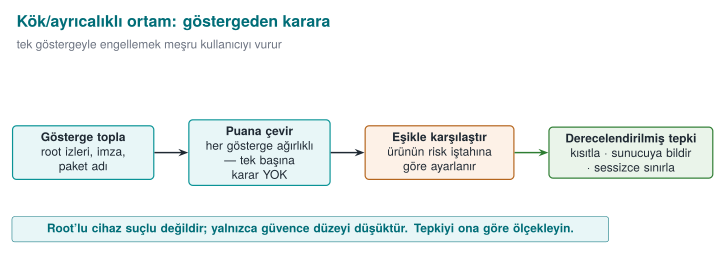
8.1 Root / privileged environment indicator¶
Root is full privilege on a device, normally restricted; jailbreak is the name for forcing that same privilege open on a closed system like iOS. On a rooted (or jailbroken) device, an application's security assumptions collapse: any process can read memory, file-system protections are bypassed. RASP looks at root indicators (Catalogue K4/K5): the presence of the su binary, dangerous packages, writable system paths, root-hiding frameworks. The desktop counterpart: is the application running with elevated privilege (Linux geteuid()==0, an elevated token on Windows)?
The difference between mobile "root" and desktop "elevated privilege" is just a name; the idea is the same. On Android, an application finding the su binary shows that root access is installed; on Linux/desktop, a process's geteuid() returning 0 shows the process is actually running as the root user. A small but important difference between the two: on mobile, root may be installed but not in use at that moment (the indicator is just an indicator); on desktop, geteuid()==0 reports the actual current state (the kernel itself keeps this information, just as hard to fake as TracerPid in Section 4.1 was). That's why the desktop/ server-side "privileged process" check is a slightly more reliable signal than the mobile "root indicator" scan — still, it should be added to the risk score in Section 8.1.1 rather than deciding on its own.
Demo 7 — Root/privileged environment indicator (read-only)¶
Demo 7 · code/week-06/07-environment-privilege · root/privilege indicator, read-only
The program checks (1) the privilege level (root/admin?) and (2) the presence of known "dangerous marker" paths purely by reading. To make the demo deterministic, a fake marker (output/fake_su) is passed on the command line.
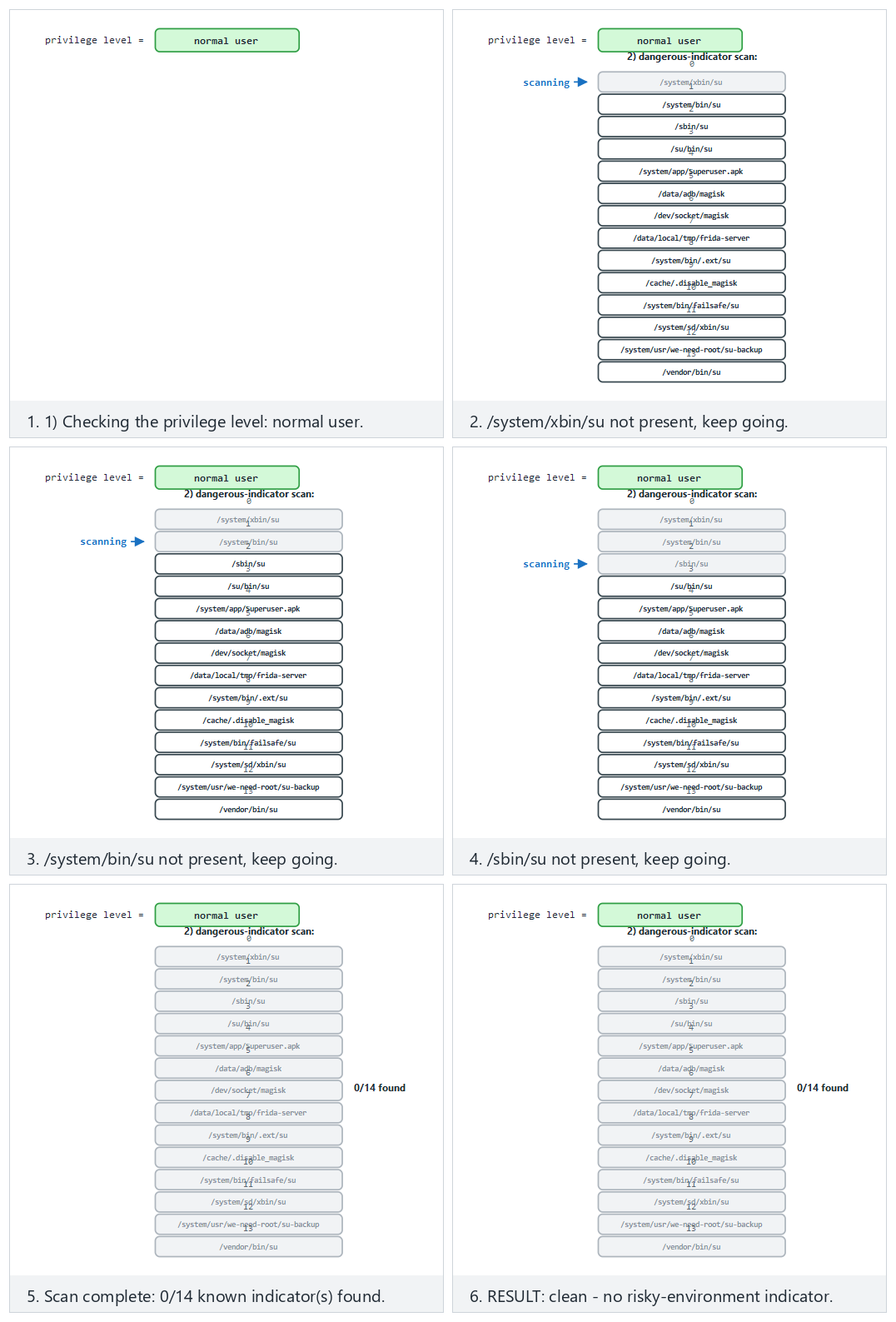
Try the clean/rooted-one-mark/edge presets; the animation shows how the 14 known indicators are scanned and how the privilege level adds to the signal count.
STEP 2 - Flagged case: a fake 'su' indicator file is created
1) Privilege level : normal user
2) Dangerous-indicator scan:
   [FOUND] output\fake_su (extra indicator)
RESULT: an elevated/risky environment INDICATOR is present (1 signal(s)).
Signal, not proof
Root indicators are easily faked (tools like Magisk Hide hide su and known paths). Also, if an application refuses to run just because it saw root, it also blocks users who have legitimately rooted their device (a false-positive / user-experience trade-off). The modern approach: measure the device's integrity with an OS/platform attestation service (nonced, verified server-side) — don't trust the client's own "I'm not rooted" claim.
8.1.1 Tying the root indicator to a risk score too¶
The risk-score idea from Section 5.1 applies to the root/privilege indicator as well; in fact, the field prefers a list rather than a single indicator, because every single indicator can be both missed (an attacker hides it) and produce a false positive (a legitimate user has genuinely rooted their device).
| Indicator | Meaning alone | Example weight |
|---|---|---|
su binary/marker found | Root access may be installed | 20 |
| Known root-management package installed | Root is actively being managed | 25 |
| System partition is writable | An area that should be read-only can be changed | 30 |
geteuid() == 0 (desktop/server counterpart) | The process is actually running with elevated privilege | 40 |
Demo 7's actual output — a single signal (output/fake_su found → 1 signal) — corresponds to a low score; on its own, it shouldn't be enough to stop a banking application. For the score to come out high, several indicators are expected to appear together — just as in the environment example in Section 5.1.
Common mistake: exit() instantly on seeing root
Shutting down the application the instant a single root indicator is seen neither catches the real attacker (who has already hidden the clues, so this check never sees them) nor is it fair to an ordinary user who has rooted their device for a legitimate reason (customization, development). Rule: add the indicator to the score, leave the decision to the threshold (Section 5.1); before fail-closed, consider reduced functionality first (e.g., reject high-value operations, accept low-value ones).
8.2 Component/package signature and digest verification (the general form of APK signature verification)¶
On Android, an application verifies the APK signature (APK Signature Scheme v1/v2/v3) against repackaging: even if an attacker opens the app, modifies it, and repackages it, they can't carry the signature produced by the original developer's private key. This is the general form of "is the component I loaded/called the expected, unmodified version?" (Catalogue K2/K3/K6).
Demo 6 — Component signature verification and repackaging detection¶
Demo 6 · code/week-06/06-component-signature · signature/digest verification
A "plugin module" file is verified with a detached signature (HMAC-SHA-256) before it's loaded. If the module changes by even a single byte, the signature won't match and loading is refused.
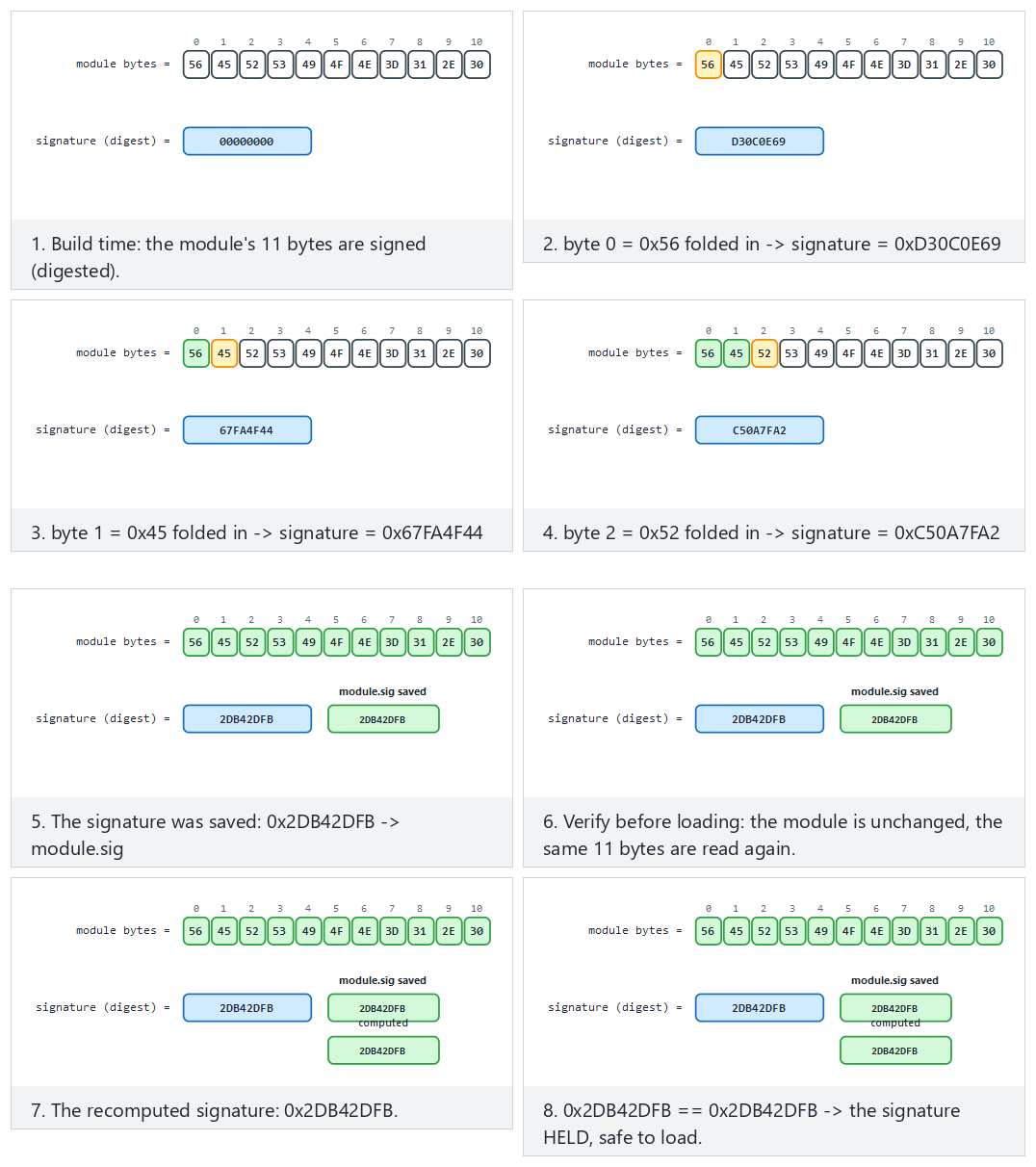
Try the holds/appended-byte/edge presets; the animation shows build-time signing and pre-load verification side by side.
STEP 3 - Verify before loading (module unchanged): HOLDS
Module signature HELD -> safe to load.
STEP 4 - Attack: the module is REPACKAGED (one character changes)
Module signature DID NOT HOLD -> REPACKAGED/modified.
Loading REJECTED.   (exit code 3)
An important difference: HMAC vs. asymmetric signature
APK v2/v3 uses an asymmetric (public-key) signature (see the digital signature in Week 3): the verifier needs only the public key, not the signing key. In this demo we use shared-key HMAC for teaching purposes (simple and ready-made in cen429_crypto.h); we'll cover asymmetric signatures (Ed25519 / RSA-PSS) and certificate chains in Week 10. The principle is the same: integrity + source verification before loading.
8.2.1 Worked example: how is repackaging caught by adding a single byte?¶
Let's combine Demo 6's actual "modül YENIDEN PAKETLENIR (tek bayt eklenir)" (module repackaged, one byte added) step with Section 3.1's logic. The module's verification is also an HMAC-SHA-256 computed over the whole file, just like Demo 1; the difference is that this time the target isn't the program itself but a separate file (the plugin module).
Step 1 — the original module. The module file is N bytes; the loader reads it, computes HMAC(anahtar, modul[0..N)), and compares it against the previously stored signature. It matches → "TUTAR" (holds) → loaded with confidence.
Step 2 — the attacker opens the module, adds a feature, repackages it. This operation appends one byte to the end of the file (it's now N+1 bytes) — even if it never touches the module's intended functionality. This time the loader computes HMAC(anahtar, modul[0..N+1)). Because the input's length itself has changed (a more fundamental difference than the single byte value change in Section 3.1), HMAC's internal block-processing sees different blocks from the very start, and the result comes out completely different — just as we saw in Demo 1.
Step 3 — the comparison fails. The new HMAC doesn't match the stored signature → "TUTMADI" (doesn't hold) → "YENIDEN PAKETLENMIS/degistirilmis" (repackaged/modified) → loading is refused (exit code 3). For the attacker to reproduce the signature even after adding a single byte, they'd need the signing key; in this teaching HMAC, that key lives inside the loader, but in a real APK signature (asymmetric), it is the private key held only by the original developer — which is exactly the crux of the distinction in Section 8.2's "An important difference" note: anyone who can verify an HMAC can also produce one; with an asymmetric signature, the verifier can only verify, never produce.
Rule
Cryptographically verify every dynamically loaded component (module, plugin, native library, update package) before loading it. Where possible, set up mutual verification (Catalogue K6): the native side verifies the upper layer's digest; the upper layer verifies the native side's digest — the attacker would have to patch both consistently. For the long run, prefer an asymmetric signature (easier distribution).
9. Control-flow integrity: why a single if isn't enough¶
Every check so far (integrity, anti-debug, environment, root) makes one decision at one point: if (tehlike) reddet; (if danger, reject). The attacker's job is simple: patch that one jump (je → jmp) and skip the check (the patch from Section 3). So what's the way to make checks unskippable?
Brief history: from software tamper-resistance to verifiable control flow
- 1996 — David Aucsmith works on the idea of distributed integrity checks that cross-check each other, so no single patch point can be trusted alone (one of the early contributions to the software tamper-resistance literature).
- 2001 — Christian Collberg and Clark Thomborson publish a taxonomy and terminology for obfuscation and tamper-resistance; around the same time, Hoi Chang and Mikhail Atallah work on "guards" — small pieces of code that check and repair each other's control flow — the root of the "multiple/overlapping checker" idea this week's checkpoint 3 uses against a skipped check.
- 2005 — Martín Abadi, Mihai Budiu, Úlfar Erlingsson, and Jay Ligatti formally define Control-Flow Integrity (CFI) in the academic literature: verifying that a program's runtime control flow conforms to a control-flow graph extracted at compile time. This week's flow counter applies CFI's core idea (catching a deviation from the expected path) in a simplified form — a data-dependent key chain instead of a full graph.
The answer: tie the security checks to a control-flow counter / key chain (Catalogue K17). A critical operation can only produce the correct result if all the checkpoints have been passed in order. We build this as a data dependency: each checkpoint advances a key chain (acc = HMAC(acc, "stage-i")); the critical operation unwraps a secret with the key derived from this chain.
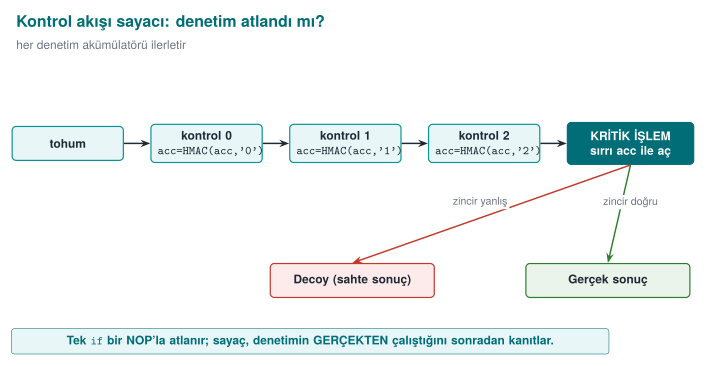
If a check is skipped, or its order is broken, acc comes out different, the key is wrong, and GCM decryption is rejected — the real result can't be produced. So a single jmp patch is useless.
Demo 5 — Control-flow counter and a skip attack¶
Demo 5 · code/week-06/05-flow-counter · control-flow integrity (Catalogue K17)
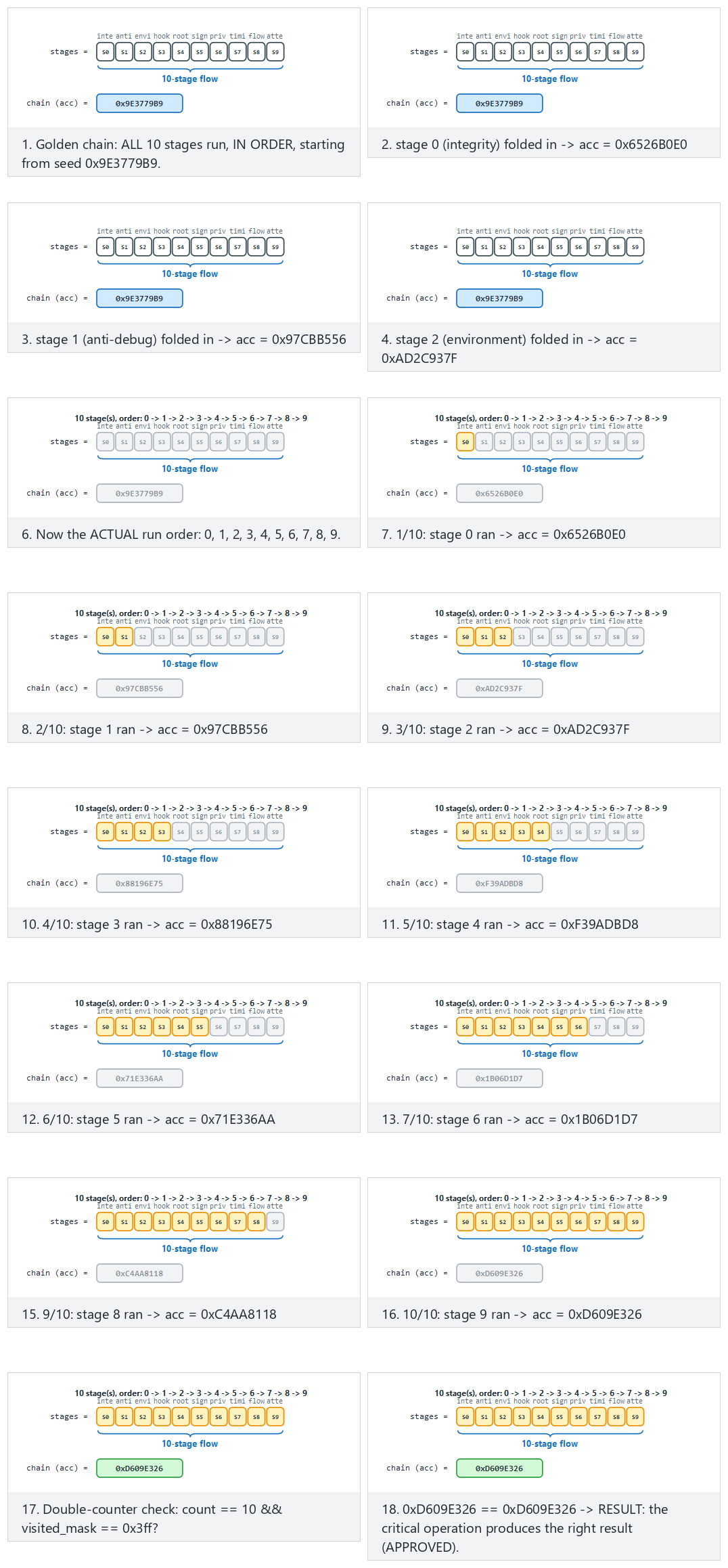
The animation compares a 10-14 stage flow against the golden chain; try the in-order/skip-half/edge presets — the chain breaks even if no stage runs at all, or if every stage runs in the WRONG order.
SCENARIO 1 - normal: every checkpoint runs in order
   [passed] checkpoint 0 (integrity (Demo 1))
   [passed] checkpoint 1 (anti-debug (Demo 2))
   [passed] checkpoint 2 (environment (Demo 3))
RESULT: PAYMENT APPROVED -> "PAYMENT-APPROVAL-TOKEN-4242"

SCENARIO 2 - skip: the checks are SKIPPED entirely (straight to the critical operation)
   [SKIPPED] no checkpoint ran
   (warning: count=0 visited_mask=0x0 expected=3/0x7)
RESULT: PAYMENT DENIED (wrong chain key).

SCENARIO 4 - reorder: the checks run in the WRONG ORDER
RESULT: PAYMENT DENIED (wrong chain key).
In the normal flow, all three checkpoints were passed in order, the chain came out correct, and the payment was approved. When the checks were skipped, only partly passed, or passed in the wrong order, the chain came out different; the critical operation couldn't produce the real result and returned a fake (decoy) one. The program also keeps a double counter (a count counter plus a visited_mask trace bit) (K17); together with the key chain, this gives a triple consistency check.
Why is the "double counter" needed — isn't the acc chain enough? The acc chain proves, indirectly, which stages ran in which order (wrong stage/order → wrong key), but as we see in the demo's warning line (warning: count=0 visited_mask=0x0 expected=3/0x7), the program also keeps two more simple counters: count (a plain integer counting how many checkpoints ran) and visited_mask (a bit set where each checkpoint sets its own bit position, e.g., if checkpoints 0, 1, and 2 passed, visited_mask = 0b111 = 0x7). Their purpose is different from acc's: acc is cryptographically strong but on its own gives no readable diagnostic information like "how many checks passed, which ones" (you cannot infer "all three checks passed" from an HMAC output). count and visited_mask give the developer and the log a readable summary, while the actual authorization decision still rests only on the key derived from acc — even if the count and visited_mask fields themselves are patched to 3 and 0x7, the key still comes out wrong because the acc chain is wrong. The three values (acc, count, visited_mask) thus cross-check each other: if one is inconsistent, it's noticed in the log, but none of them alone can change the authorization decision.
9.1 Worked example: computing the key chain by hand¶
Let's not leave acc = HMAC(acc, "stage-i") abstract; let's compute it by hand with real openssl commands. Let the starting value acc0 be produced by HMACing empty data with a fixed key of 32 zero bytes (in a real system this is randomly generated per session):
A0=$(printf '' | openssl dgst -sha256 -mac HMAC \
     -macopt hexkey:0000000000000000000000000000000000000000000000000000000000000000 \
     -binary | xxd -p -c 256)
echo "acc0 = $A0"
Correct order — checkpoint 0, then 1, then 2, in order. At each stage, the previous acc is used as the key, and the stage label is HMACed as the data; the result becomes the new acc:
A1=$(printf 'stage-0' | openssl dgst -sha256 -mac HMAC -macopt hexkey:$A0 -binary | xxd -p -c 256)
A2=$(printf 'stage-1' | openssl dgst -sha256 -mac HMAC -macopt hexkey:$A1 -binary | xxd -p -c 256)
A3=$(printf 'stage-2' | openssl dgst -sha256 -mac HMAC -macopt hexkey:$A2 -binary | xxd -p -c 256)
echo "acc3 (CORRECT chain) = $A3"
The critical operation (e.g., payment approval) only derives the correct key and produces the real result if acc3 is exactly equal to this value — Demo 5's normal scenario.
Attack — checkpoints are skipped, only the first stage runs. The attacker patches around the calls to checkpoint functions 0 and 2 (the same idea as the je → jmp patch in Section 3); only the stage-1 label is processed:
B1=$(printf 'stage-1' | openssl dgst -sha256 -mac HMAC -macopt hexkey:$A0 -binary | xxd -p -c 256)
echo "acc (SKIPPED chain) = $B1"
e2db3f2f... and 1af937ed... are completely different values. The critical operation can't open the real secret with the key derived from this wrong acc; this is exactly the "RESULT: PAYMENT DENIED ... a decoy is returned" result we saw in Demo 5's skip and reorder scenarios. The attacker's jmp patch doesn't even change which check gets skipped — every skipped combination produces a different but always wrong acc, because the HMAC chain spreads every change in its input through the avalanche effect (the same property from Section 3.1, here in its chained form).
Rule
Don't tie critical decisions to a single boolean (it gets patched). Tie security checks to a control-flow counter and, where possible, to a data dependency (the key of the result the critical operation produces). Use double/overlapping counters; randomise the failure exit points (K15/K16).
Common mistakes and a checklist
- Is the critical decision tied to a single
if, or to a counter/key? - Can a path that skips the checks produce the real result? (It shouldn't.)
- Does the order of the checks matter (is an attack that breaks the order caught)?
- On failure, does it return a decoy, or does it crash immediately and give the attacker a clue?
10. Response policy, device binding, and deterrence¶
Detection alone is useless; what really matters is the response. A bad response (e.g., exit(1) the instant detection fires) tells the attacker exactly which check fired and points them straight at that check's patch. A good response policy slows the attacker down and misleads them:
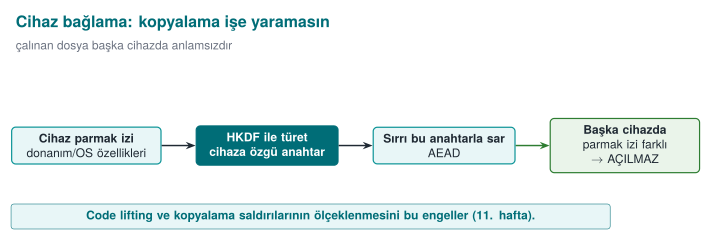
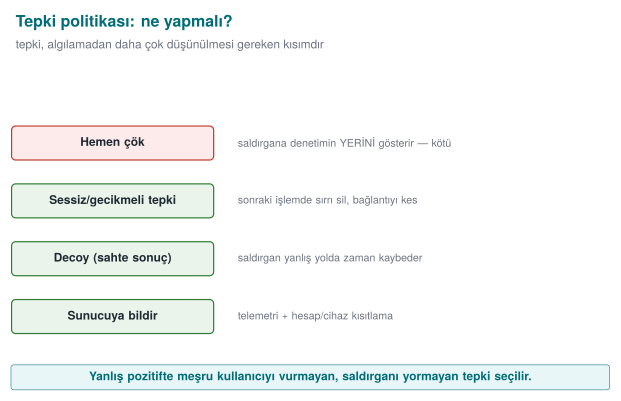
| Strategy | What it does | Catalogue |
|---|---|---|
| Fail-closed | Reject the operation when in doubt; don't fall into a trusted state | — |
| Erase the secret | Securely erase the valuable data the instant tampering is found (crypto_wipe) | K15 |
| Decoy (fake) output | Return a random/fake result instead of crashing; the attacker can't tell real from fake | K16 |
| Delayed/implicit response | Separate the response from the trigger, in time/code distance | K15 |
| Device/version binding | Bind the secret to the device/version; even if the keys are copied, they won't open on another device | L1/L2 |
| Telemetry/attestation | Report the event to the server; let a server-side risk engine decide | K5 |
Device binding (Week 3, §13.1, the innermost shell of Demo 9) becomes part of RASP here: the valuable secret is wrapped with a key derived, via HKDF, from the device fingerprint and the version string. Even if the phone is cloned and the files copied to another device, the key comes out different and the secret can't be opened.
10.1 Worked example: deriving a key from a device fingerprint (HKDF step by step)¶
Let's trace Demo 8's "device/version binding" step by hand with real values. crypto_hkdf_sha256 implements the two steps (Extract, Expand) of the RFC 5869 HKDF we saw in Week 3; here ikm (input key material) is the device fingerprint, tuz (salt) is the version string, and info is a fixed context label:
| Parameter | Value (Demo 8's normal scenario) |
|---|---|
ikm (device fingerprint) | device=SIM-MODEL-A;serial=SN-0001;maker=DEMO |
tuz (version) | version=1.0.0 |
info (context label) | rasp-data-key |
Step 1 — Extract. This step compresses ikm (a device fingerprint is plain text; it may not be cryptographically "well distributed"), whose length and randomness are uncertain, into a fixed-length, secure intermediate key; this intermediate key's standard name is PRK (Pseudo-Random Key): PRK = HMAC-SHA256(anahtar = tuz, veri = ikm). Let's do the same computation with openssl:
printf '%s' 'device=SIM-MODEL-A;serial=SN-0001;maker=DEMO' \
  | openssl dgst -sha256 -mac HMAC -macopt hexkey:$(printf '%s' 'version=1.0.0' | xxd -p -c 256) -binary \
  | xxd -p -c 256
Step 2 — Expand. Since we need 32 bytes (a single block), one HMAC is enough: T1 = HMAC-SHA256(key = PRK, data = info || 0x01) (0x01 is RFC 5869's block counter). This T1 directly becomes the 32-byte data key:
Step 3 — repeating the same computation with "another device's" fingerprint. Let's just change the serial number from SN-0001 to SN-9999 (exactly like an attacker copying the data file to another phone) and repeat the same two steps:
PRK (another device)   = ac53ee1fffc9fc61b5a2d3f874187855f40e6d3514d92a7df955d26e35638cdb
key (another device)   = b68e35acc1ce116e1879a5dd6243e5c4a194821dbd234d15c2f0a22f462073d6
Result. The two keys (3c8af67f... and b68e35ac...) differ so much they share no common bytes — a single-character serial-number difference produces a completely different key from start to finish, because of HKDF's HMAC core (the avalanche effect from Section 3.1). This is exactly the "device/version binding failed" result we saw in Demo 8's other-device scenario: because the key the packet was encrypted with (3c8af67f...) and the key being used to try to decrypt it (b68e35ac...) are not the same, AES-GCM's authentication tag doesn't hold and crypto_gcm_decrypt fails — the secret is never exposed, even if the files are copied to another device.
Demo 8 — The RASP engine: detection + response + device/version binding (capstone)¶
Demo 8 · code/week-06/08-tamper-response · this week's capstone (K15/K16, L1/L2)
Combines the earlier pieces into a single "self-protection engine": a series of checks run; the secret is wrapped with a device-bound key (HKDF + AES-GCM); the outcome is NOT a binary clean/tamper decision but a four-state graded response policy (decide_response()): NORMAL (0 failed checks) → WARN (1) → DEGRADE (2) → LOCK (3 or more, OR the device/version binding fails entirely — that always jumps straight to LOCK).
SCENARIO 1 - normal: 0 failed checks, device matches -> NORMAL
RESULT: NORMAL. The secret opened and is in use -> "PAYMENT-KEY-7C4A"
(the secret was safely wiped from memory after use)

SCENARIO 2 - warn: 1 failed check -> WARN (still opens, just logged)
RESULT: WARN. One weak signal is not worth degrading service over.
The secret still opened -> "PAYMENT-KEY-7C4A"
   Policy: event logged, monitoring tightened, no functionality lost.

SCENARIO 3 - degrade: 2 failed checks -> DEGRADE (wiped, redacted result)
RESULT: DEGRADE. Multiple signals -> full trust withdrawn.
   Policy: secret wiped; a REDACTED result is returned, the full
   operation is refused, but the application keeps running.
RESULT-VALUE: PAYM**** (redacted)

SCENARIO 4 - lock: 3 failed checks -> LOCK (wipe + decoy + flag)
RESULT: LOCK -> detection checks failed (tamper)
   A DECOY result was returned instead of crashing: 9be972a7...

SCENARIO 5 - other-device: checks pass, device key does not hold -> LOCK
RESULT: LOCK -> device/version binding failed (cloned?)
   A DECOY result was returned instead of crashing: 39f368f4...
In the normal flow, the checks passed, the device was correct, the secret was opened, used, and erased right away (NORMAL). When exactly one check failed, the engine still opened the secret — but logged the event (WARN); a single weak signal isn't worth degrading a legitimate user's experience over. When two checks failed, the secret was erased and only a redacted result came back (DEGRADE) — the application kept running, just without the full result. When three or more checks failed, OR the package was moved to another device (even though the checks passed), the engine locked completely (LOCK): the secret was erased, a decoy was returned, a flag was raised. This is the innermost layer of Week 3's security shell (device binding), merged with RASP's graded response policy.
Let's visualize the four states as a state machine: the animation below classifies every independent call on a monitoring timeline into NORMAL/WARN/DEGRADE/LOCK (using decide_response()'s real decision table) and summarizes how often each state fires:
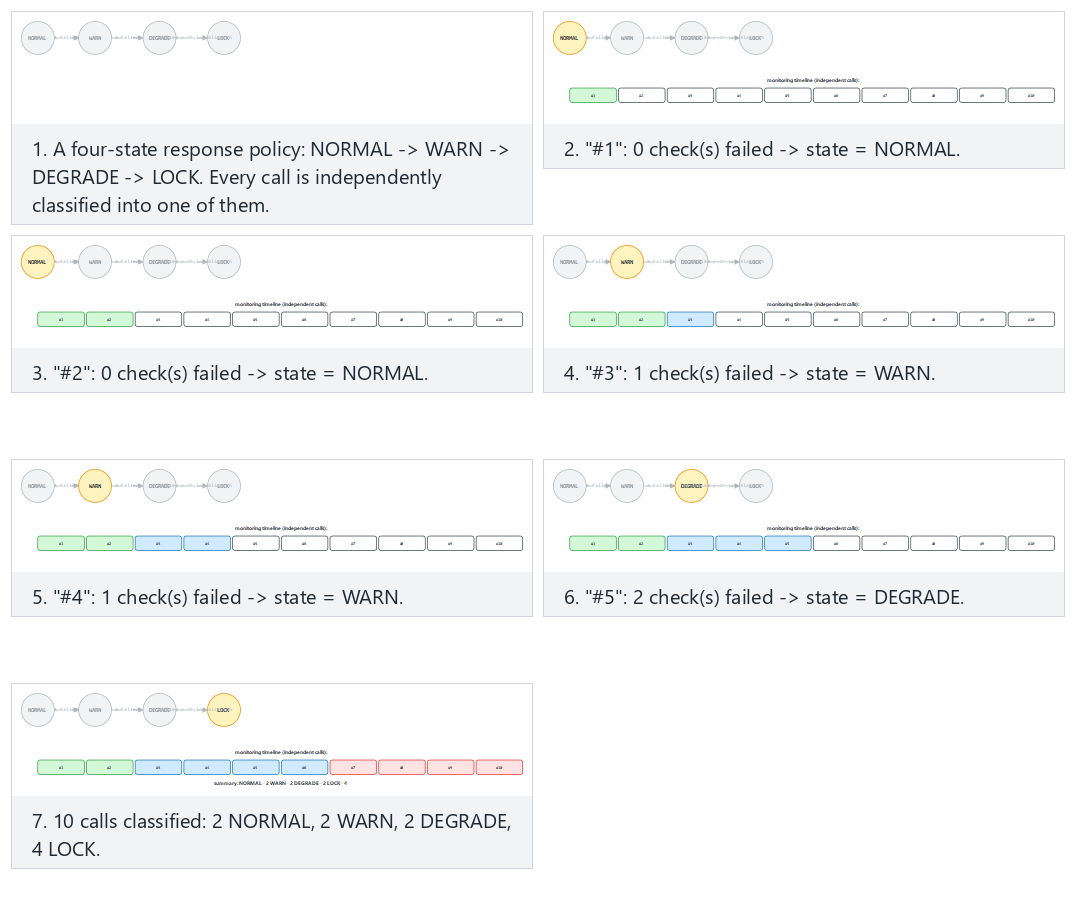
Try the escalating/noisy/edge presets; escalating shows a session gradually worsening from NORMAL to LOCK over time, while edge-all-device-mismatch shows that a device mismatch always jumps straight to LOCK, regardless of how many checks failed.
10.2 Worked example: three different responses to the same event, three different outcomes¶
In Section 1.3 we briefly compared three different responses to the same detection signal; now let's compare it outcome by outcome using Demo 8's LOCK scenario. Event: three checks failed (Demo 8 SCENARIO 4 — lock). (If only one check had failed, the engine would have moved to WARN and still opened the secret — see Section 10; a decoy only appears in the LOCK state.)
| Response | What the attacker sees | What happens to the secret | Effect on a legitimate user | Assessment |
|---|---|---|---|---|
(a) Crash immediately (exit(1) / segfault) | "The program crashed" — they find which check fired within a few rounds by disabling each check one by one and retrying | Readable if it's still in memory | Unnoticeable if rare; frequent triggers give an impression of an unreliable app | Gives the attacker the most information, the worst option |
| (b) Delayed and silent (end the session silently, a few seconds/operations later) | "Something went wrong but it's unclear when/where" — there's distance in time and code between the trigger and the outcome | Erased (fail-closed) | A rarely seen "session timed out" message | Slows the attacker down; a reasonable middle ground |
| © Decoy (fake result) — what Demo 8 does | "The operation looks successful" — but the produced decoy result has no relation at all to the real secret; the attacker may waste time thinking they succeeded | Erased, random data returned instead | No noticeable effect (the secret was already opening correctly for the legitimate user on the correct device) | Gives the attacker the least information, the most deterrent option |
All three rest on the same detection code (Section 1.3); they differ only in when and what they return. In Demo 8's actual output, option © is applied in the LOCK state: "A DECOY result was returned instead of crashing: 9be972a7...". This number is different every run (Exercise 7); if it were a fixed "ERROR-0x1234" value, the attacker would recognise this constant and could tell it apart from the real result — the decoy being random prevents that distinction too.
Common mistake: never changing the response in the test environment
During development, option (a) (crash immediately, print the error to the console) is generally used to get fast feedback — that's natural, it makes debugging easier. A common mistake is carrying this behaviour straight into production. Rule: tie the response policy to the build configuration (verbose error messages in a debug build, silent/decoy in a production build); no detection message should ever be written to stdout/stderr in the production binary — don't hand the attacker a free debug log.
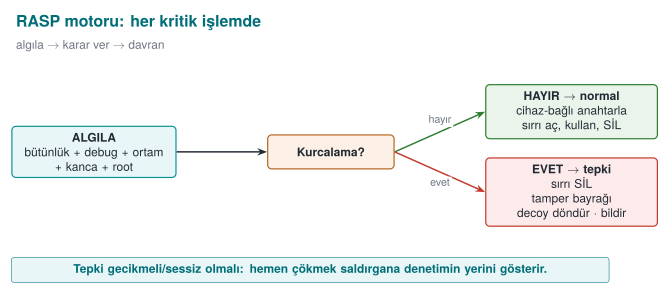
Rule
Separate the response from the trigger: exiting immediately points the way for the attacker. On tampering, erase the valuable data, return a decoy instead of crashing, report the event to the server, and bind the secret to the device/version. Set up detection + response + binding together.
How it's done in the field / an evaluator's test
In the example architecture, the payment key is only unwrapped at the moment of payment, from a device-bound key; when tampering is detected, the key is destroyed and the transaction is reported to the server as "suspicious." An evaluator tries to bypass a single check to reach the real result; they report that the protections must be broken in combination (not one by one, but as a chain) — that's the proof that defence in depth is working.
11. RASP's limits and ethics¶
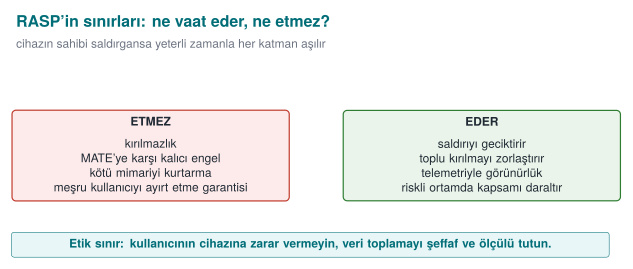
'I added RASP, my application is unbreakable.'
If the device's owner is the attacker (MATE), given enough time, every client-side protection can be bypassed. RASP doesn't provide unbreakability; it makes the attack expensive, unscalable, and noisy. The ultimate assurance is always server-side (risk engine, anomaly detection, key rotation, transaction limits).
'One strong control is enough.'
Every single control has a counter-technique (patching, hooking, faking). Strength comes from combination: many independent signals + a control-flow counter + device binding + server-side attestation.
'I should crash immediately on detection.'
Crashing immediately tells the attacker which check fired. Delay and obscure the response: return a decoy, report the event silently, erase the secret.
'If the environment is a VM, it's definitely an attack.'
Because of WSL2/Hyper-V/VBS, most legitimate machines report a hypervisor (Demo 3). Environmental signals are contributions to a risk score, not a binary decision; otherwise you block real users.
'RASP is worth any amount of slowdown.'
RASP has a cost (CPU, battery, complexity, false positives). Scale the protection to the value of the asset: put it on critical operations (payment, key use), not on every function. This is Week 1's "plan protection around the asset" principle.
'I'll tune the risk-score threshold once and forget about it.'
Devices, OS versions, and attack tools change over time; a score considered "certainly an attacker" today may, six months from now, mistakenly catch a legitimate configuration that has since become common (a new virtualisation feature, a developer tool that has become widespread). Review the threshold and the weights regularly, using telemetry (the server reporting in Section 10.2) (Section 5.1).
12. Term project: this week¶
This week you will write the RASP (self-protection) sections of your security guide and add your first RASP check to your project. This is the direct subject of the midterm project demo (Week 7) and Quiz-1 (Week 8, weeks 1–6); it is graded as A2.4 RASP Techniques (15p → LO.3) in the midterm rubric and F2.4 Binary Application Protections (15p → LO.3) in the final rubric.
- S10 — RASP detection inventory: for every critical operation in your project, list in a table which RASP checks you applied (integrity, anti-debug, environment, hook, root, signature), what each one detects, and how it could be bypassed.
- S10 — Response policy: write down what happens when tampering is detected: which secret is erased, whether it's fail-closed, whether it's a decoy, whether there is device/version binding, whether there is a server notification.
| Control            | What it detects      | How it's bypassed     | Hardening           |
| ------------------ | --------------------- | ---------------------- | -------------------- |
| Integrity (HMAC)   | Binary patch          | Checker gets patched  | Overlapping checker|
| Anti-debug         | Debugger               | ptrace no-op / patch  | Multiple signals+counter |
| Hook detection     | LD_PRELOAD/Frida       | Hiding from maps      | dladdr + maps      |
| Device binding     | Cloning                | (bound to the device) | HKDF + AES-GCM     |
| Trigger             | Response                         | Notification     |
| ------------------- | --------------------------------- | ----------------- |
| integrity failed    | erase secret + decoy + fail-close | event to server   |
| device mismatch     | don't open, decoy                 | event to server   |
Course requirement families
These sections satisfy the following requirement families: CEN429-RA (RASP detection), CEN429-RT (response policy), CEN429-BD (device/version binding), CEN429-CF (control-flow integrity). For every requirement, add a row to the S17 compliance matrix: requirement → state → document section → evidence (test/code/demo).
13. Class activities¶
Activity 1 — Build the hook with your own hands (15 min, pairs, WSL)
Run Demo 4 on WSL. Then add getenv to fake_hook.c too (have it return empty, to hide LD_PRELOAD). Rebuild and run it: does signal 1 (getenv) still catch it now? Does signal 2 (dladdr) still catch it? Why is this more robust?
Activity 2 — Patch the single if (10 min, discussion)
In Demo 5, the skip (skip) mode couldn't produce the real result. Now think: if the critical operation were just if (kontroller_gecti) onayla; (if checks passed, approve), what would the attacker do with a single jmp? Why does the key chain make this patch useless?
Activity 3 — Hunt for false positives (15 min, groups of 3–4)
Run Demo 3; it will most likely say "hypervisor PRESENT." If an application refused to run just because of this, which legitimate users would suffer? Discuss the same question for root detection (Demo 7). Why should RASP decisions be a risk score, not a binary run/don't-run?
Activity 4 — Design a response policy (10 min, individual)
A mobile banking application detected root. Design three different responses: (a) crash immediately, (b) reject the operation and inform the user, © keep running silently but report to the server and lower the transaction limit. Which gives the attacker the least information? Which does the least harm to a legitimate user?
14. Code-reading exercises¶
Reading 1 — Is this anti-debug safe?
Answer
No. (1) It relies on a single signal; (2) the result is a direct exit() — the attacker patches IsDebuggerPresent's return value or this if; (3) exiting immediately tells them which check fired. Fix: multiple signals + a control-flow counter + a delayed/implicit response (Demo 2, 5, 8).
Reading 2 — Why is this integrity check weak?
Answer
CRC32 is not cryptographic: an attacker can patch the code and easily tune it so the CRC still matches. There's also a single checker (which can itself be patched) and the result isn't tied to a behaviour. Fix: HMAC/signature + overlapping checkers + a data dependency (Demo 1).
Reading 3 — What does this hook detection fall for?
Answer
getenv itself can be hooked to return NULL; or the attacker can use a ptrace/PLT hook instead of LD_PRELOAD. Fix: verify the function's source (dlsym+dladdr), scan /proc/self/maps, use multiple signals (Demo 4).
Reading 4 — Why is this environment-detection decision risky?
unsigned int ecx;
__cpuid_ecx(1, &ecx);
if (ecx & (1u << 31)) {
    /* hypervisor bit set */
    exit(1);           /* "analysis environment, refuse to run" */
}
Answer
The hypervisor bit alone is not proof (Section 5, Demo 3): because of WSL2, Hyper-V, and virtualisation-based security (VBS), many legitimate Windows machines also set this bit. This code could block millions of real users just because it saw a hypervisor — a classic false positive. Fix: add this signal to a risk score as in Section 5.1 instead of deciding on it alone, and make the decision together with other signals (vendor signature, timing, debugger), against a threshold.
15. On your own¶
These exercises aren't graded; they're for reinforcement. All of them are done on your own computer, on the code/week-06 demos.
Exercise 1 — Easy: patch a different byte
In Demo 1, change a different offset byte in the copy. Does the HMAC still change? Why (the avalanche effect)?
Exercise 2 — Easy: tamper with the golden value
In Demo 1, edit the output/golden.hmac file like an attacker would. What can the check no longer catch? Why does this make the question "where should the golden value be stored?" important?
Exercise 3 — Medium: Demo 2 under gdb
Run Demo 2 with strace -f ./bin/linux/antidebug. What happens to TracerPid? What is the parent process's name? Which signals fire?
Exercise 4 — Medium: hook getenv too
Add getenv to Demo 4's fake_hook.c. Which signal goes blind, which one still catches it? (The code version of Activity 1.)
Exercise 5 — Medium: a fifth check in the chain
In Demo 5, make STAGE_COUNT (stage) 5 and add two more checkpoints. How does the chain change? Does the normal flow still get approved?
Exercise 6 — Medium: mutual verification
Extend Demo 6: have the module file also carry the native side's (your own binary's) HMAC; have the native side verify the module and the module verify the native side (K6). Why did this make the attacker's job harder?
Exercise 7 — Hard: measure the decoy
In Demo 8, run the tamper scenario twice and compare the returned decoy. Same or different? Why is it better for the decoy to be random (different every time) than a fixed "error value"?
Exercise 8 — Hard: test device binding
In Demo 8's other-device mode, is there any way to open the secret? Is it possible to derive the key without changing the device fingerprint? Why does this make a stolen data file useless on another phone?
Exercise 9 — Hard: the timing threshold
Run Demo 3's timing measurement under gdb (single-stepped), like in Demo 2. How does the duration change? Why is it hard to set a reliable threshold (dependence on the machine/load)?
Exercise 10 — Medium: scale RASP to the asset
In your project, which operations deserve RASP (payment, key use) and which don't need it (reading a locale setting)? Why is putting RASP on every function a bad idea?
Exercise 11 — Medium: build your own risk score (Section 5.1)
Combine the signals produced by Demo 3, Demo 2, and Demo 7 (hypervisor bit, TracerPid, root indicator) into a weighted sum like in Section 5.1. What score does your own (clean) computer produce? What does it come out to if you run it under gdb? What threshold would you recommend for a banking application, and why?
Exercise 12 — Hard: recompute HKDF by hand (Section 10.1)
Run Section 10.1's openssl commands on your own machine; do you get the same PRK and key values? Now change the VERSION_STRING (version) string (version=1.0.0 to version=1.0.1) and recompute the key. How does this explain why a version upgrade "locks" secrets in old data?
16. Self-check¶
1. What is RASP? How does it differ from a WAF?
A protection embedded inside the application that watches itself at runtime. A WAF filters requests coming in front of the application; RASP watches its own integrity, memory, and environment inside the application.
2. Explain the detect → defend → deter triad.
Detection: understanding that something is wrong (patch, debugger, hook, root). Defence: a meaningful response (fail-closed, erase, bind to the device). Deterrence: making the attack expensive (decoy, delay, telemetry).
3. What is the MATE attacker model?
"Man-At-The-End": the attacker owns the endpoint the application runs on; they can read memory, modify code, attach a debugger. The same assumption as white box (Week 11).
4. What is self-hashing? Why HMAC instead of CRC?
The application computing a digest of its own code/file at runtime and comparing it against a golden value. CRC isn't cryptographic (an attacker can match it); HMAC needs the secret key.
5. Why isn't integrity checking enough on its own?
The checker itself can also be patched. Solution: overlapping checkers, making the result a data dependency, server attestation.
6. How is a debugger detected on Linux and on Windows?
Linux: /proc/self/status TracerPid (>0). Windows: IsDebuggerPresent (PEB BeingDebugged), CheckRemoteDebuggerPresent, PEB NtGlobalFlag.
7. Why is the hypervisor bit a weak signal?
Because of WSL2/Hyper-V/VBS, most legitimate machines report a hypervisor; on its own it doesn't mean "analysis environment." The false-positive risk is high.
8. How is an LD_PRELOAD hook detected?
By verifying the critical function's source: use dlsym(RTLD_DEFAULT)+dladdr to see which .so provides the function; if it's a module other than libc/vDSO/ld, there's a hook. getenv(LD_PRELOAD) alone is weak.
9. Why are root/jailbreak indicators 'a signal, not proof'?
They're easily faked (Magisk Hide); they can also block legitimate rooted users. The modern way: platform attestation (server-side, nonced).
10. What does APK signature verification prevent? What's the C equivalent?
Repackaging: a modified app can't carry the original signature. The C equivalent: verifying a component with HMAC/signature before loading it (Demo 6).
11. What does the control-flow counter solve?
A single if check being patched and skipped. The critical operation only produces the correct result if all checks are passed in order (the correct key chain).
12. Why isn't a good tamper response an immediate exit()?
Crashing immediately tells the attacker which check fired. A good response: erase + decoy + delayed/implicit + server notification.
13. Why is a decoy (fake) output better than crashing?
The attacker can't easily tell real from fake; it hides which check fired; no data leaks.
14. What does device binding add to RASP?
Keys/files can't be opened on another device even if copied (against cloning). Built with HKDF(device fingerprint)+AES-GCM; the innermost layer of Week 3's security shell.
15. Is RASP unbreakable? Then why use it?
If the device's owner is the attacker, it can ultimately be broken. The goal isn't unbreakability; it's making the attack expensive, unscalable, and noisy, combined with server-side checks.
16. Why is putting RASP on every function a bad idea?
It costs (CPU, battery, false positives, complexity). Scale the protection to the asset's value: put it on critical operations (payment, key).
17. What is the risk-score approach in environment detection, and why is it better than a binary decision?
Every signal gets a weight, the weights are summed, and compared against a threshold (Section 5.1). A binary decision (run/don't-run on one signal) blocks legitimate users on a single weak signal (e.g., the hypervisor bit); a risk score requires several independent signals to appear together.
18. Where is the TracerPid field read from, and what does it represent?
It's a line in /proc/self/status on Linux; it holds the PID of the process watching this process via ptrace(). 0 means no watcher; >0 means that PID is watching the process (Section 4.1).
19. How are dlsym and dladdr used together in RASP?
dlsym(RTLD_DEFAULT, ad) finds a symbol's address in the running process; dladdr tells which .so file provided that address. If a foreign .so shows up instead of the expected library (libc/vDSO/ld), there's a hook (Section 6.1).
20. How are HKDF's Extract and Expand steps used in device binding?
Extract: PRK = HMAC(anahtar=sürüm/tuz, veri=cihaz parmak izi). Expand: anahtar = HMAC(PRK, info || sayaç). A different device fingerprint produces a completely different PRK and therefore a different key; the secret can't be opened on another device (Section 10.1).
21. What is the core difference between three responses (crash immediately, delayed silent, decoy) to the same tamper event?
The amount and timing of the information given to the attacker: crashing immediately gives the most information (it shows which check fired), a delayed silent response blurs this in time/distance, and a decoy gives the least information by returning a result that looks "successful" but is useless (Section 10.2).
22. Why are the shadow copy and digest fields in the ProtectedCounter structure kept separate?
If the attacker changes only the value field in memory, the shadow (masked copy) and mac (short MAC) stay inconsistent with the old values; the read function catches this inconsistency (Section 7.1).
23. What is the relationship between the control-flow counter's acc chain and the avalanche effect?
At each stage, acc is updated with an HMAC that uses the previous acc as the key. If a stage is skipped or its order changes, the avalanche effect of HMAC makes the result a completely different acc/key; no matter which combination a single jmp patch tries, it can't reach the real result (Section 9.1).
24. How does a product's risk appetite determine the response threshold?
If the cost of a false positive is high (banking — the transaction can't complete, risk of money loss), the threshold is kept low: reject when in doubt. If the cost of a false negative is low (a loyalty app), the threshold is kept high: rarely reject (Section 5.1).
25. What's the downside of turning a root indicator into a single if "reject"?
It doesn't catch the real attacker (who has already hidden the clues) but it does punish an ordinary user who has legitimately rooted their device. Rule: add the indicator to a risk score, leave the decision to the threshold (Section 8.1.1).
26. Why does it matter that detection messages are never written to stdout/stderr in the production binary?
If they are, the attacker gets a free debug log/clue — it directly shows which check fired and when. The response policy should be tied to the build configuration and stay silent in production (Section 10.2).
17. Quiz-1-style sample questions¶
Quiz-1 (Week 8) covers weeks 1–6; it includes short questions and code reading of this kind
- (Multiple choice) Which of the following detects a patch at runtime? a) ECB · b) Self-hashing with HMAC · c) PBKDF2 · d) TOFU
- (True/False) "If the hypervisor bit is set, the device is definitely an analysis environment." → False (WSL2/VBS set it on legitimate machines too).
- (Short answer) Why is
if (IsDebuggerPresent()) exit(1);weak? → A single signal + a directexit(); it gets patched and gives away the trigger. - (Code reading) If a critical operation is protected only by
if (checks_ok), how does the attacker bypass it, and why does a control-flow counter prevent this? → A singlejmppatch; the counter/key chain turns the result into a data dependency. - (Matching) TracerPid ↔ anti-debug · dladdr ↔ hook detection · HKDF(device) ↔ device binding · decoy ↔ tamper response · APK signature ↔ repackaging.
- (Short answer) If an environment check says "hypervisor PRESENT," should the application reject the operation directly or not? Why? → It shouldn't; this alone is a weak signal (WSL2/VBS), it should be used as a contribution to a risk score (Section 5.1).
- (True/False) "HMAC-based integrity checking alone protects against the checker itself being patched." → False; that's why overlapping checkers and making the result a data dependency are needed (Section 3).
- (Short answer) Why is the
VERSION_STRING(version) string given to HKDF as thetuz(salt) in device binding? → So that the derived key changes when the version changes; this automatically "locks" data produced under an old version's vulnerability once the new version ships (Section 10.1, Exercise 12).
18. Resources and further reading¶
Textbook — J. Viega, M. Messier, Secure Programming Cookbook for C and C++, O'Reilly, 2003:
- Recipe 12.2 (Detecting Modification — updated from CRC to HMAC/signature)
- Recipes 12.12–12.15 (Detecting Debuggers — Unix/Windows; SoftICE → modern tools)
- Chapter 12 (Anti-Tampering) overall is the core of this week and of Week 9.
Open standards and resources
- OWASP MASVS-RESILIENCE and MASTG (mobile resilience: anti-debug, anti-tamper, root/emulator detection, signature verification).
- Android APK Signature Scheme v2/v3 (signature against repackaging); Play Integrity / hardware-backed attestation.
- MITRE CWE: CWE-693 (Protection Mechanism Failure), CWE-919 (mobile weaknesses), CWE-925 (improper verification).
- SEI CERT C: ENV and FIO rules (safe use of the environment and files).
Glossary
| Term | Turkish | Short definition |
|---|---|---|
| RASP | Çalışma zamanı öz koruması | Mechanisms embedded inside an application that protect it while it runs |
| Detection / Defence / Deterrence | Algılama / Savunma / Caydırma | RASP's three functions |
| MATE | Uçtaki saldırgan | The attacker who owns the device (white box) |
| Self-hashing | Öz özetleme | The application digesting and verifying its own code/file at runtime |
| Tamper | Kurcalama | Unauthorized modification of a binary/data |
| Patch (yama) | Yama | Changing behaviour by modifying binary code |
| Anti-debug | Hata ayıklayıcı karşıtı | Detecting/blocking an attached debugger |
| TracerPid | İzleyen süreç kimliği | On Linux, the PID of the process watching a process via ptrace |
| Hooking (kanca) | Kancalama | Replacing a function with your own version (LD_PRELOAD, PLT/GOT, inline) |
| DBI / Frida | Dinamik ikili enstrümantasyon | Injecting code into a running program to change its behaviour |
| Emulator / VM detection | Emülatör/VM algılama | Sensing an analysis environment from clues (CPUID, timing) |
| Root / jailbreak | Kök erişimi | The device's security restrictions having been removed |
| Attestation | Doğrulama tanıklığı | Proof (often server-side) of a device's/application's integrity |
| Repackaging | Yeniden paketleme | Opening, modifying, and repackaging an application |
| Control-flow integrity | Kontrol akışı bütünlüğü | Ensuring a critical flow is unskippable/in order (a counter/key chain) |
| Tamper response | Kurcalama tepkisi | The policy at the moment of tampering (erase, fail-closed, decoy) |
| Decoy | Sahte çıktı | A genuinely indistinguishable fake result returned instead of crashing |
| Device / version binding | Cihaz / sürüm bağlama | Binding a key to a specific device/version so it can't be opened elsewhere |
| Fail-closed | Kapalı kalma | Rejecting an operation when in doubt (not falling into a trusted state) |
| Risk score / threshold | Risk puanı / sınır değer | A weighted sum of several weak signals; the decision looks at whether this sum crosses a threshold |
| Risk appetite | Risk toleransı | The balance a product accepts between false positives and false negatives |
dlsym / dladdr | Sembol çözme / adres bilgisi | Finding a function name's memory address / finding which .so an address comes from |
| vDSO | Sanal dinamik paylaşımlı nesne | The virtual .so the kernel automatically adds to process memory, providing fast reads without a system call |
| PRK | Sözde rastgele anahtar | The intermediate key that comes out of HKDF's Extract step and feeds into the Expand step |
| HKDF Extract / Expand | Sıkıştırma / genişletme | HKDF's two steps: compressing an irregular input into a PRK, deriving a key of the requested length from the PRK |
| Avalanche effect (çığ etkisi) | Çığ etkisi | A single bit change in the input changing, on average, half the output; a fundamental property of cryptographic digests/MACs |
PR_SET_DUMPABLE | Dökülebilirlik bayrağı | On Linux, the flag controlling whether a process can be watched by another process via ptrace and whether it produces a core dump |
Next week
Week 7 — Midterm project demos. You will present this week's RASP checks (integrity checking, debugger/environment/hook detection, the control-flow counter, the response policy) live in your project. Week 8 is Quiz-1, covering weeks 1–6. Then Week 9 — Advanced obfuscation and diversification continues by deepening this week's debugger/environment detection ideas and its "obscurity/deterrence is not unbreakability" theme on the code-obfuscation side.