Week 5 — Code Hardening: Java and Interpreted Languages¶
| Date | 16.10.2026 |
| Learning outcomes | LO.3 |
| Duration | 3 hours |
| Prerequisites | Basic programming in Java or Python; CWE/CVE and vulnerability classification from Week 2; input validation and secure coding rules from Week 4; simple SELECT in SQL |
| Labs | code/week-05 — 7 demos; requires Python 3 and JDK 17+; on Windows .\demo.ps1, on WSL/Linux sh demo.sh |
Lecture notes (PDF) Lecture notes (DOCX) Slides (PDF) Slides (PPTX) Slides (HTML, offline) Download all (ZIP) Open slides full screen
Click inside the slides and use the arrow keys; use the button at the bottom right of the slides or the link above for full screen.
By the end of this week you will be able to
- State which classes of bugs managed languages (Java, Kotlin, C#, Python) remove and which they do not.
- Read the SEI CERT Oracle Java rules and apply the input-validation (
IDS), deserialisation (SER) and sensitive-data (MSC,FIO,ERR) rules to your own code. - Demonstrate SQL injection, command injection and path traversal flaws, and fix them with a parameterised query, an argument list, and canonicalisation plus a root check.
- Explain why unsafe deserialisation is dangerous, and set up an allow list with
ObjectInputFilter. - Show with
javaphow readable Java bytecode is; shrink, optimise and obfuscate with ProGuard / R8, and write correct-keeprules. - Produce a project's software bill of materials (SBOM) in CycloneDX format and find components with known vulnerabilities.
Lecture flow (timing plan for the instructor)
| Time | Section | What happens |
|---|---|---|
| 0:00–0:15 | 1–2 | What do managed languages solve and not solve? SEI CERT Oracle Java |
| 0:15–0:50 | 3–4 | The common root of injection; SQL injection — Demo 1 |
| 0:50–1:00 | Break | |
| 1:00–1:20 | 5–6 | Command injection Demo 2; path traversal Demo 3 |
| 1:20–1:50 | 7–9 | Unsafe deserialisation Demo 7; XXE, XSS, template injection; Python and JavaScript, ReDoS |
| 1:50–2:00 | Break | |
| 2:00–2:15 | 10 | Bytecode and decompilation — Demo 4 |
| 2:15–2:40 | 11–13 | ProGuard / R8, advanced rules; string obfuscation, reflection Demo 5; Android R8, measurement, static analysis |
| 2:40–2:55 | 14 | Dependency security and SBOM — Demo 6 |
| 2:55–3:00 | 15+ | Project step, self-check |
Prepare the lab beforehand
This week's demos need Python 3 and JDK 17+. The main part of the SQL demo runs with Python's built-in sqlite3 module, with nothing to download; for the optional Java parts (the JDBC driver, ProGuard) every demo folder has a prepare script. The scripts only download into the demo folder; they install nothing on the system.
Ethics rule — applies every week in this course
The injection examples run only against a synthetic database and files created inside the demo folder; the injected command is only a harmless echo. The deserialisation demo contains no attack chain at all — it only shows the defence. Trying these techniques against a website, application or database that belongs to someone else is illegal; authorised penetration testing is carried out under a written contract and scope document (Week 12).
0. Before we start¶
This section prepares you for the week. It first briefly recalls the earlier topics this week builds on; it then defines each of this week's concepts in one sentence and links it to the section where it is explained in full. Background knowledge not covered in earlier weeks is explained from scratch under the "Background" headings.
What we bring from earlier weeks¶
- Memory bugs (overflow, use of freed memory, undefined behaviour) — across the first four weeks we saw how buffer overflow, use of freed memory, and undefined behaviour arise in C/C++ and how they are prevented (Week 4). This week Section 1 compares which of these bug classes disappear at the language level in managed languages, and which do not.
- The structure of the SEI CERT rule book — in Week 4 we saw the common structure of the SEI CERT C/C++ rules: identifier, title, non-compliant example, compliant solution, risk (Week 4, §2). This week Section 2 reuses the same structure for the Java standard, with the
IDS/SER/FIO/MSC/ERRcategories. - TOCTOU (time-of-check to time-of-use) — in Week 2 we saw that the gap between checking a file's permissions and actually using it is a race-condition flaw (Week 2, §12). This week Section 6 justifies, on the same principle, re-checking that a path is still inside the root after the file has been opened.
This week's concept map¶
| Concept | In one sentence | Detail |
|---|---|---|
| Injection | Data from the user being processed as a command, instead of data, by an interpreter (a SQL engine, a shell, a filesystem, an XML parser); this is the common root of every injection type. | §3 |
| JVM and bytecode | The JVM (Java Virtual Machine) is the virtual machine that runs Java; bytecode is the machine-independent intermediate form Java source is compiled into, and it reverses back to source much more easily than machine code. | §10 |
| Parameterised query | A SQL call that keeps the query text fixed and binds user data as a value through a separate channel (a prepared statement); the data can never change the structure of the query. | §4 |
| Deserialisation | Creating an object from a byte sequence; if the stream is untrusted, an attacker can choose which class gets created. | §7 |
| XXE (XML external entity) | Abuse of an XML parser reading a local file or a network address via the <!DOCTYPE>/entity definitions in a document. | §8 |
| Path traversal | Escaping outside an allowed folder with sequences such as ../, reaching files outside the root directory. | §6 |
| ProGuard / R8 | Tools that shrink and optimise Java bytecode, and obfuscate it by replacing class/method names with meaningless ones; R8 is ProGuard's successor on Android. | §11 |
The -keep rule | A configuration rule telling ProGuard/R8 not to change the name of a given class or method; code called by name through reflection cannot be found at run time without it. | §11 |
| SBOM | A machine-readable list of every component inside a piece of software (Software Bill of Materials); it quickly answers "are we affected?" when a vulnerability is disclosed in a dependency. | §14 |
Background: managed languages and garbage collection¶
A managed language (Java, C#, Python, JavaScript, and the like) is a language whose memory is managed automatically by the runtime instead of the programmer; the programmer never calls malloc/free, and instead a garbage collector (GC) automatically cleans up objects that are no longer used, in the background. This single difference is why most of the overflow and use-of-freed-memory bugs we saw in C/C++ over the first four weeks disappear at the language level; §1 shows this in detail.
Background: databases and SQL¶
SQL is the query language used to talk to a database (SELECT ... WHERE ... and the like); an application reads or writes data by putting a value it received from the user (a username, a search term) into such a query. If that value is spliced into the query text without escaping, the SQL injection we will meet in §3–4 results.
Background: reflection and dependencies¶
Reflection is the ability to find and call a class or method at run time, from a string (Class.forName("..."), getMethod("...")), instead of writing it by name directly in the source; §12 shows how this interacts with obfuscation. A dependency is an external library your project uses that your own team did not write; even if your own code is secure, a flaw in a dependency you use affects you too — §14 covers this with the SBOM.
How do the concepts connect to each other?¶
The terms above are not a random list; each one sits on top of the previous one. The table below shows the relation "to understand this I must first know that" — if you forget a term, come back to the "prerequisite" column of the table.
| Term | Prerequisite | Which section goes deeper? |
|---|---|---|
| Injection | Interpreter, data/command separation | Section 3 |
| SQL injection / parameterised query | Injection, SQL syntax | Section 4 |
| Command injection | Injection, the shell concept | Section 5 |
| Path traversal | Injection, filesystem path | Section 6 |
| Deserialisation | Object, class, byte sequence | Section 7 |
| XXE / XSS / template injection | Injection, XML/HTML | Section 8 |
| ReDoS | Regular expression, backtracking | Section 9 |
| Bytecode | JVM | Section 10 |
ProGuard/R8, -keep | Bytecode, reflection | Sections 11–13 |
| SBOM | Dependency | Section 14 |
The direction in which this table is read matters: to understand the term at the start of a row, you must first know the term in the "prerequisite" column. For example, before reading the "parameterised query" section, the concept of "injection" ("if data travels through the same channel as a command, it is taken for a command") has to already be settled; otherwise the question "why is the ? mark safe but string concatenation is not?" is left hanging in the air.
How should you read this week?
The sections build on each other in order: 3 (the common root of injection) → 4–8 (every injection type stems from the same root) → 9 (same root, different languages) → 10–13 (bytecode and obfuscation, a separate topic: secrets embedded in code) → 14 (dependency security, a third topic). If you skip Section 3 and jump to Section 4, the sentences about "a different face of the same bug" stay meaningless; re-read a section that feels hard and then move on.
1. What do managed languages solve, and what do they not solve?¶
The first four weeks were spent with C and C++: buffer overflow, freed memory, integer overflow, undefined behaviour. In managed languages such as Java, Kotlin, C#, Python and JavaScript, most of these bugs disappear at the language level:
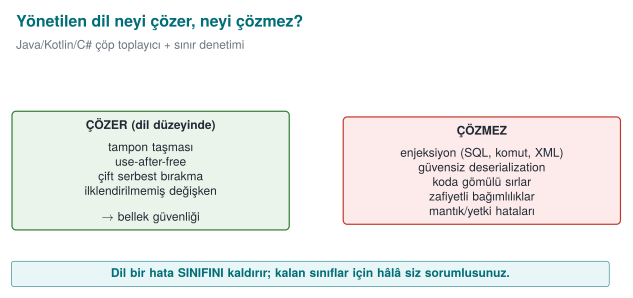
Brief history: managed languages and the gaps that remain
- 1995 — Java and the JVM: the garbage collector and bounds checking remove most memory bugs at the language level.
- 1998 — SQL injection is documented in detail for the first time: rain.forest.puppy's article "NT Web Technology Vulnerabilities" in Phrack issue 54; 2003 the first OWASP Top 10 is published — logic/injection bugs, not memory bugs, come to the fore.
- 2002 — ProGuard (Java shrinking/obfuscation) is released; 2019 its Android successor R8 (built by Google) becomes the default in the Android Gradle Plugin.
- 2014 — Shellshock (CVE-2014-6271): a single bug in how Bash parses environment variables leaves millions of already-deployed systems open to command injection — a reminder of how old and deep shell parsing bugs can run.
- 2015 — Chris Frohoff and Gabriel Lawrence's "Marshalling Pickles" talk shows remote code execution through Java
readObject()by chaining classes (a gadget chain) inside the Apache Commons Collections library; 2017 the same class of attack, through an unpatched Apache Struts library (CVE-2017-5638), leads to the Equifax breach — one of the largest examples of why dependency tracking matters. - 2020–21 SolarWinds and Log4Shell (CVE-2021-44228) open the age of supply-chain/SBOM concerns.
Main idea: the language solves memory bugs, it does not solve injection or dependency risk.
| Bug class | C/C++ | Java / managed languages |
|---|---|---|
| Buffer overflow | The programmer's responsibility | Every array access is checked → ArrayIndexOutOfBoundsException |
| Freed memory, double free | The programmer's responsibility | Garbage collector: memory is freed once nothing points to it |
| Uninitialised variable | Undefined behaviour | The compiler errors out, or the field starts with a default value |
| Signed integer overflow | Undefined behaviour | Defined: it wraps (but the logic bug remains) |
Format string (%n) | Writes to memory | String.format does not write to memory (but log injection remains) |
This is a large win; but it is not enough to say "we use Java, so we are safe." The classes below are language-independent, and they are the most commonly found vulnerabilities from web applications all the way to mobile applications:
| Bug class | Why doesn't the language solve it? | This week |
|---|---|---|
| Injection (SQL, command, path, XML, template) | Mixing data and command is a design error | Demos 1–3 |
| Unsafe deserialisation | The language's own feature is abused | Demo 7 |
| Secrets embedded in code | Bytecode is easy to read | Demo 4 |
| Reverse engineering | Bytecode is high-level; names and strings are preserved | Demos 4–5 |
| Vulnerable dependencies | Most of the application is someone else's code | Demo 6 |
| Logic and authorisation errors | Business rules the language cannot know | Week 2 |
Worked example: why an array overflow crashes in Java but not in C¶
In Week 4 we saw that for a 10-element array such as buf[10], writing to index 10 (the 11th element) is undefined behaviour in C, and most of the time silently corrupts adjacent memory with no error at all. Let's trace the same bug in Java, step by step.
public class ArrayOverflow {
    public static void main(String[] args) {
        int[] array = new int[10];      // a 10-element array: indices 0..9 are valid
        array[9] = 42;                   // valid: the last element
        System.out.println("array[9] = " + array[9]);
        array[10] = 99;                  // INVALID: there is no 11th element
    }
}
array[9] = 42
Exception in thread "main" java.lang.ArrayIndexOutOfBoundsException:
    Index 10 out of bounds for length 10
        at ArrayOverflow.main(ArrayOverflow.java:6)
Step by step, what happened:
- On every array access (
array[10]) the JVM first checks whether the index is within the bound0 ≤ i < length; this check is a part of the bytecode the compiler generates that runs before everyaload/iastore. - Because
10is equal to or greater than the array's length,10, the check fails. - The JVM does not write to adjacent memory; instead it throws an
ArrayIndexOutOfBoundsExceptionand stops the program (or, if atry/catchexists, only that block) in a controlled way. - Which line, with which index, shows up in the error message — whereas in the C example from Week 4 this would have been a silent memory corruption or a random crash, and finding the source of the bug could take hours.
Rule
In Java, an array overflow is always caught as an exception; the program is expected to stop in a controlled way, not to crash or misbehave. This is the concrete meaning behind the sentence "a managed language guarantees memory safety" — but remember that this guarantee does not hold for injection, deserialisation or logic bugs; those are the topic of the rest of this week.
Native code inside a managed language
A Java application gains memory safety only for as long as it stays entirely in Java. C/C++ code invoked through JNI for performance or security reasons (such as the native layer in the mobile payment architecture from Week 1) carries all of the first four weeks' risk right back in. In the field, the two sides are therefore hardened separately: the native side with Week 4's methods, the Java side with this week's methods; each side checks the other's integrity.
2. SEI CERT Oracle Java: the managed language's rule book¶
The SEI CERT Java standard, which we met in Week 4, has the same structure: identifier, title, non-compliant example, compliant solution, risk. Identifiers end with the -J suffix.
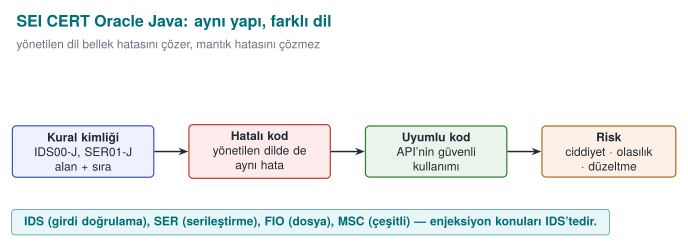
| Abbreviation | Category | The rule that touches this week |
|---|---|---|
IDS | Input validation and data sanitisation | IDS00-J: prevent SQL injection from untrusted data · IDS07-J: do not pass untrusted data to Runtime.exec() · IDS16-J: prevent XML injection · IDS17-J: prevent XML external entity attacks |
FIO | Input/output | FIO16-J: canonicalise path names before validating them |
SER | Serialisation | SER12-J: prevent deserialisation of untrusted data |
MSC | Miscellaneous | MSC03-J: never hard-code sensitive information |
ERR | Error handling | ERR01-J: do not leak sensitive information in exceptions |
FIO | Logging | FIO13-J: do not log sensitive information outside a trust boundary |
OBJ | Object orientation | OBJ01-J: limit the accessibility of fields |
SEC | Platform security | SEC00-J: do not let privileged blocks leak sensitive information |
Why are CERT rules still needed if Java has solved memory bugs?¶
The SEI CERT C rules we saw in Week 4 (ARR, STR, MEM, …) targeted memory-management bugs for the most part; because the JVM closes off this class automatically, the MEM category in the Java standard is almost empty. But the IDS, SER, FIO, MSC and ERR categories in the table are bugs the language does not solve: topics such as input validation, deserialisation and leaking sensitive information are about design decisions, not memory. This is why CERT works from language to language on the principle "which category grows, which shrinks": in the C standard MEM and ARR are printed bold; in the Java standard IDS and SER are.
Reading it alongside OWASP
For web applications, the OWASP Top 10 (Week 2) and ASVS, and for mobile applications OWASP MASVS (especially MASVS-CODE and MASVS-RESILIENCE) rank the same topics by application type. The CERT rules answer "how do I write the code?"; the OWASP documents answer "what do I test?"
3. The common root of injection: data and command mixing together (Recipe 3.11)¶
SQL injection, command injection, path traversal, XML injection, template injection, the log injection from Week 2, and the format-string flaw from Week 4 are different faces of the same bug: inside the text handed to an interpreter (a SQL engine, a shell, a filesystem, an XML parser, printf), the command and the data travel through the same channel. If the user data contains the interpreter's special characters (', ;, ../, <, %), the data becomes part of the command.
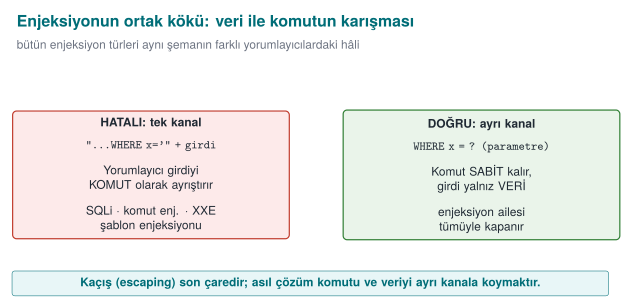
This is why the real fix for every kind of injection is the same: give the command and the data through separate channels. Sanitising with an escape character (' → '') is the second line of defence; every interpreter's escaping rules are different, and forgetting just one is enough.
| Interpreter | Single channel (wrong) | Two channels (correct) |
|---|---|---|
| SQL engine | "SELECT … WHERE name='" + name + "'" | PreparedStatement + ? parameters |
| Shell | Runtime.exec("sh -c 'ping " + host + "'") | ProcessBuilder("ping", host) — no shell |
| Filesystem | new File(root, request) | Canonicalise + check it is inside the root |
| XML | Building XML by string concatenation | Building elements and attributes with the DOM / StAX API |
| HTML | "<p>" + comment + "</p>" | The template engine's automatic escaping, context-aware encoding |
printf | printf(input) | printf("%s", input) |
Why does the interpreter mistake input for "code"? Step by step¶
This is the link students miss the most: the interpreter does not know which characters of the string it receives are "fixed code the programmer wrote" and which are "data the user entered." All it has is a sequence of characters, one after another. Let's make this concrete; let's follow, character by character, how a SQL engine reads the string that "SELECT ... WHERE name = '" + name + "'" builds at run time (assume the name variable holds the input x' OR '1'='1):
- Java first performs the string concatenation; the result is a single piece of plain text:
SELECT ... WHERE name = 'x' OR '1'='1'. From this point on, the information "this part was written by the developer," "this part was entered by the user" has already been lost — all that remains is characters. - This plain text is sent to the SQL engine as a single command. The engine's parser (lexer/parser) scans the string left to right, character by character, and enters a state based on each character.
- After reading
WHERE name =, it meets a space and then a'character → the parser moves into the "string literal started" state. From then on it treats every following character (letter, space,O,R, …) as the content of that string literal, up to the next'character. - The first
'in the input (the one the user wrote) satisfies exactly this expectation: the parser says "the string literal has ended" and returns to ordinary SQL syntax. - At the point it returns to, the text
OR '1'='1'now stands in front of the parser; this text is read as SQL keywords and operators (OR,=), because the parser has left the "string literal" state. - Result: the engine has parsed a single query, but this query's logical structure (
... OR always_trueinstead of... AND ...) has been determined by the characters the user typed in.
The critical point is this: the parser is not making a mistake; it is behaving exactly according to SQL syntax rules. The bug is that there is no separate channel carrying the information "are you part of the code, or are you data?" to the interpreter. The same sequence of steps (an interpreter → character-by-character scanning → a state change on a special character) repeats identically for the shell with ;, for the filesystem with ../, and for XML with </&; only the "special character" and the "state machine" change. Sections 4–8 will show the concrete counterpart of these steps in each interpreter.
The counterpart in the textbook
Viega and Messier cover SQL injection in Recipe 3.11, cross-site scripting (XSS) in 3.10, filename and path validation in 3.7, and safely running external programs in 1.7. The book explains through C, but the principles are language-independent: use a parameterised interface, skip the shell, canonicalise, apply a white list.
4. SQL injection¶
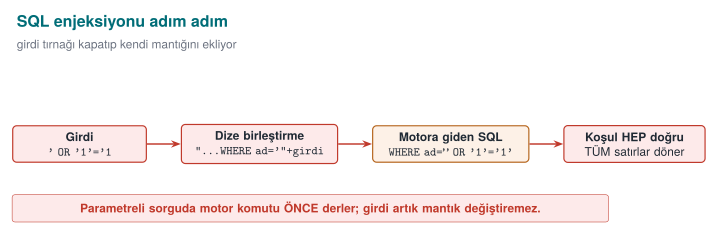
Imagine that behind a login form there is code like this:
String sql = "SELECT id, role FROM users WHERE name = '" + name +
             "' AND password_hash = '" + hash + "'";
ResultSet rs = connection.createStatement().executeQuery(sql);
When the username field has alice typed into it, the query behaves as expected. But if the user types alice' --, the query turns into this:
-- means "comment to the end of the line" in SQL: the password check has been erased from the query. A single quote character in the input changed the query's structure. With the same technique an attacker can read other tables (UNION SELECT), modify or delete records, and, depending on the database configuration, even run operating-system commands. SQL injection has sat near the top of the OWASP Top 10 lists for more than twenty years (CWE-89).
The fix: a parameterised query¶
String sql = "SELECT id, role FROM users WHERE name = ? AND password_hash = ?";
try (PreparedStatement ps = connection.prepareStatement(sql)) {
    ps.setString(1, name);
    ps.setString(2, hash);
    try (ResultSet rs = ps.executeQuery()) {
        /* ... */
    }
}
The query's text is fixed, and it is sent to and compiled by the database first; the values arrive through a separate channel. Whatever the value contains (', --, ;), it is compared only as a value; it cannot touch the query's structure. This is the exact counterpart of the "two channels" principle from the previous section (IDS00-J).
The animation below shows a password value being appended into the query text character by character — and how a single quote turns a "data" character into a "code" character — as well as why this can never happen with a parameterised query.
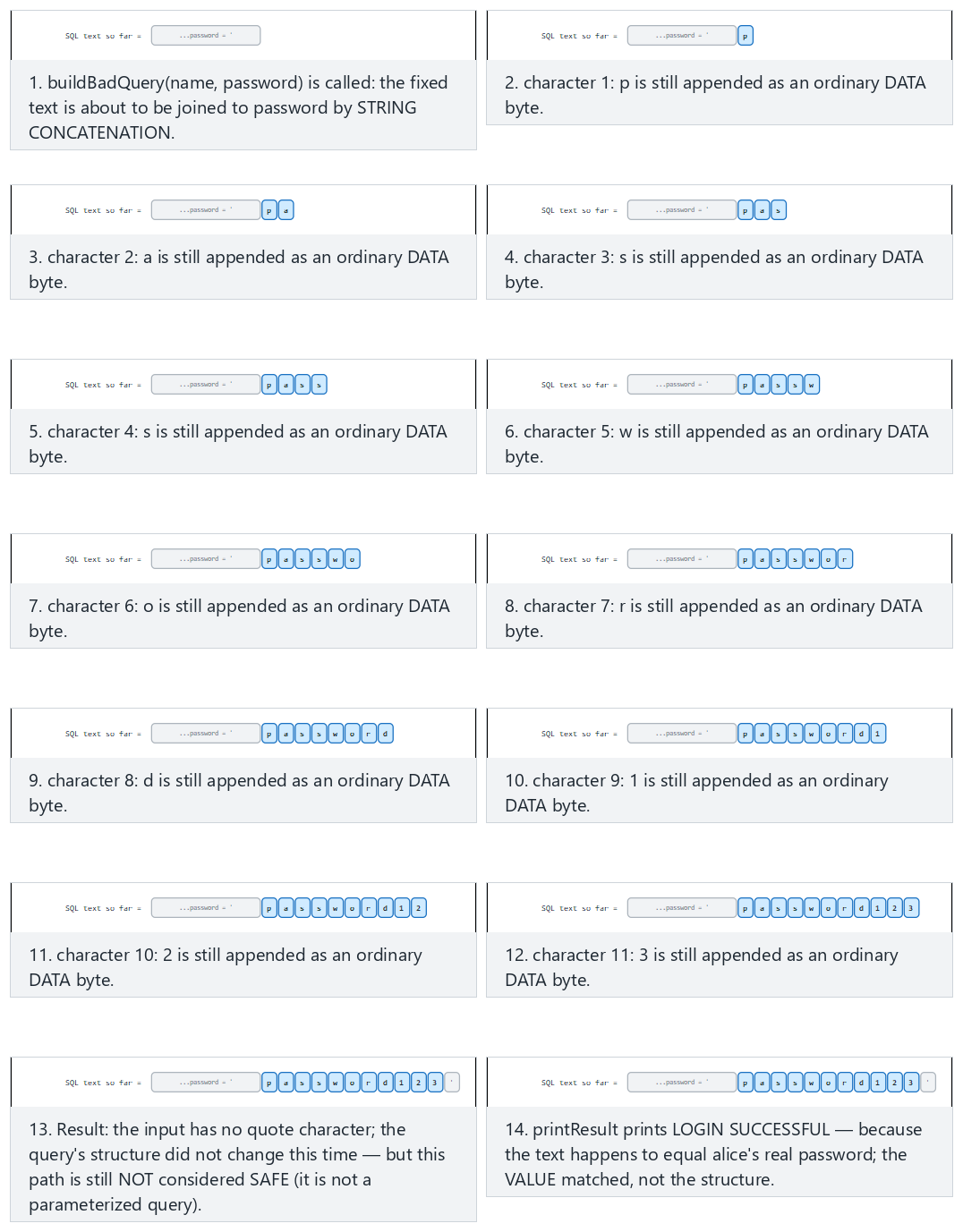
Try the Normal, Hard (' OR '1'='1) and Edge case examples; use 🎲 to generate a random password, or type your own value.
Why does a parameterised query work, mechanically?¶
In Section 3 we saw that the parser works character by character. PreparedStatement splits this mechanism into two stages; that is where the magic hides:
- Prepare stage: when
connection.prepareStatement(sql)is called, only the textSELECT id, role FROM users WHERE name = ? AND password_hash = ?is sent to the database server — the user's input does not exist yet. The server parses this text (with the state machine from Section 3), produces a query plan and keeps this plan in memory. The?marks are placeholders inside the plan, marked "a value will go here." - Bind stage: when
ps.setString(1, name)is called, the content of thenamevariable is never concatenated with the SQL text. The driver sends the value through a separate binary protocol message (the wire protocol between JDBC and the database), saying "the value of placeholder 1 is this byte sequence." - When
ps.executeQuery()runs, the database places the incoming values directly into the plan that has already been parsed. Even if the value contains'or--, these characters never pass through the parser — parsing is already finished. The characters are only copied over as "the byte sequence to compare against this column."
It is instructive to compare this with the printf("%s", input) example from Section 3: the string put in place of %s is not reinterpreted, the way a %n inside a format string would be; it is printed as-is. In a parameterised query too, the value put in place of ? is not re-parsed, the way the query text is; it is compared as-is. Both mechanisms rest on the same principle: the parsing that determines structure happens once; binding the data is separate, and happens afterwards.
A common mistake: escaping only the single quote
Some developers write a line like name.replace("'", "''") and believe they have "solved SQL injection." The result: in a numeric field (WHERE age = " + age) there is no single quote at all, so escaping does nothing; % is a different special character inside a LIKE pattern; MySQL, PostgreSQL and Oracle each have different escaping rules; some drivers accept sequences in Unicode or multi-byte encodings that bypass the escaping. Forgetting a single character class invalidates the entire defence.
Rule
Escaping is not the primary defence against SQL injection; at best it is an extra layer of security. The primary defence must always be a parameterised query (or the ORM's parameter-binding interface) — because escaping relies on "recognising and cleaning special characters," while a parameterised query ensures that the special characters never reach the parser at all.
Where a parameterised query is not enough¶
| Case | Why? | Fix |
|---|---|---|
Table or column name (an ORDER BY column) | ? can only stand in for a value, not a name | White list: Map<String,String> allowed = {"name"→"name", "date"→"created_at"} |
LIKE patterns | % and _ are wildcard characters | Make the value a parameter; escape the wildcards separately |
| A hand-written query inside an ORM | JPQL / HQL is also a query language; concatenation makes the same mistake | The ORM's parameter-binding interface (setParameter) |
| Dynamic SQL inside a stored procedure | If concatenation happens inside the procedure, the problem has just moved | Use parameters inside the procedure too |
Defence in depth¶
- Least privilege: the application's database user should reach only the tables it needs, and only with the operations it needs. The user behind the login screen should not have
DROP TABLErights. - Error message: showing the database error to the user as-is leaks the query's structure and table names (ERR01-J). Give the user a generic message; put the detail in a secure log.
- Input validation: for fields with a known expected shape (an ID number, a date, an e-mail address), white-list validation narrows the attack surface; but it does not replace a parameterised query.
Worked example: reading Demo 1's output line by line¶
The Python part of Demo 1 (sql_injection.py) sets up an SQLite database with three synthetic users (alice, bob, and an admin, admin), and runs the same login query in two ways. Let's follow, step by step, the output you will see when you read and run the code; at every step we tie why that result came out back to the mechanism from Sections 3–4.
[BAD WAY]
   Generated SQL:
   SELECT id, name, role FROM user WHERE name = 'alice' AND password = 'password123'
   -> 1 row(s) returned. LOGIN SUCCESSFUL:
      id=1 name=alice role=user
[GOOD WAY]
   Generated SQL (template):
   SELECT id, name, role FROM user WHERE name = ? AND password = ?   [values sent separately]
   -> 1 row(s) returned. LOGIN SUCCESSFUL:
      id=1 name=alice role=user
As expected: when the input is harmless, both the wrong code and the correct code produce the same result. This is exactly why the wrong code goes unnoticed during development — testing is done with honest input.
[BAD WAY]
   Generated SQL:
   SELECT id, name, role FROM user WHERE name = 'alice' AND password = '' OR '1'='1'
   -> 3 row(s) returned. LOGIN SUCCESSFUL:
      id=1 name=alice role=user
      id=2 name=bob role=user
      id=3 name=admin role=admin
   ^ Logged in without knowing the password: query structure changed.
[GOOD WAY]
   -> No rows. LOGIN REJECTED.
   ^ Input was searched for as a VALUE; no such password exists: rejected.
Follow the steps from Section 3 here: after password = ' is written, the attacker's first ' character closes the string literal; the text OR '1'='1' that follows is then read as a SQL operator. Because '1'='1' is always true, the right-hand side of the AND is true for every row; the query effectively becomes WHERE name='alice' OR true, and the entire table is returned. In the correct path, the whole string the attacker typed (quote, OR, equalities and all) goes to the database as a single text value; since no one has such a password, the result is empty.
[BAD WAY]
   Generated SQL:
   SELECT id, name, role FROM user WHERE name = '' OR role='admin' --' AND password = 'doesn't matter'
   -> 1 row(s) returned. LOGIN SUCCESSFUL:
      id=3 name=admin role=admin
   ^ Another user's (admin's) row was leaked.
[GOOD WAY]
   -> No rows. LOGIN REJECTED.
   ^ No such name exists: no leak.
Here the attacker both changed the query structure with OR and used -- to turn the rest of the query (the password check) into a SQL comment, disabling it; it now no longer matters at all what is written in the password field. In the parameterised query this string (quote, OR, -- and all) is compared against the name column as a single text value; since no such username exists, the result is empty.
Demo 1 — SQL injection: string concatenation and parameterised query¶
Demo 1 · code/week-05/01-sql-injection · CWE-89 · IDS00-J · Recipe 3.11
The demo builds a small SQLite database with synthetic users inside the demo folder, and sets up the same login/search query in two ways: by string concatenation and by parameterised query. The main part runs with Python's built-in sqlite3 module and downloads nothing; the optional Java part shows the same idea with a real JDBC PreparedStatement (the driver is downloaded into the demo folder by the prepare script).
| Step | What happens? | Lesson |
|---|---|---|
| 1 | Honest login: both paths work | The wrong code looks correct under normal conditions |
| 2 | ' OR '1'='1 in the password field | With string concatenation, login succeeds without knowing the password |
| 3 | Input in the search field that changes the query's structure | Another user's (the admin's) row leaks |
| 4 | The same inputs with a parameterised query | The input is only a value; the attack is rejected |
How does an assessor test this?
In the source code, they search for every place that concatenates a variable into query text ("SELECT + +, SQL built with String.format, createStatement). In dynamic testing, they put a single quote, a comment marker and logical expressions into every input field, and look for changes in error messages, response times and the number of records returned. Automated tools (e.g. sqlmap) are used only in authorised test environments.
5. Command injection¶
Applications sometimes hand a task off to an external program: converting an image, opening an archive, testing a network address. If the command is given to a shell as a single string, the shell characters inside the string (;, &&, |, `, $( )) start new commands:
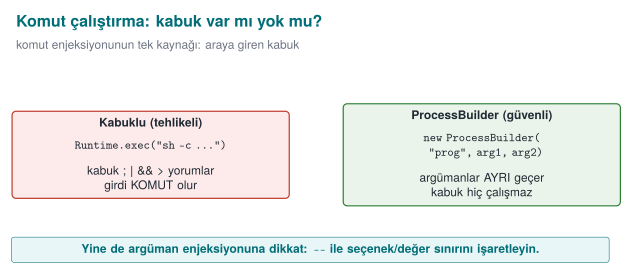
String user = request.getParameter("name");
Runtime.getRuntime().exec(new String[]{"sh", "-c", "echo Hello " + user});
/* name = "alice; <another command>"  →  the shell runs two commands */
The same situation arises on Windows with cmd /c and the & character. Java's Runtime.exec(String) form, which takes a single string, also splits the string on whitespace by its own rules; it is possible to shift arguments around by playing with quotes (IDS07-J).
How does the shell parse input, step by step?¶
Let's apply the general principle from Section 3 to the shell (sh, bash, cmd). Suppose the user variable holds "alice; echo LEAKED"; Java concatenates this string and hands the shell the following single piece of text: echo Hello alice; echo LEAKED. The shell processes it like this:
- The shell first splits the text it receives into commands, based on command separator characters (
;,&&,||, end of line). This is the shell's own syntax rule, exactly like the SQL parser changing state on a'character. - The part up to the
;character (echo Hello alice) is separated out as the first command. - The part after the
;(echo LEAKED) is separated out as a second, independent command. - The shell runs both commands in sequence — as if the user had typed two separate lines at the terminal.
- The application itself believes it made a single
execcall; but from the shell's point of view there are two commands, because the shell re-parsed the text by its own rules.
The critical point is, again, the same: the shell is not making a mistake, it is reading the ; character exactly according to its syntax rule. Java's information "this was a username" was already lost the moment the string reached the shell.
The fix: no shell, with an argument list¶
private static final Pattern NAME = Pattern.compile("^[A-Za-z0-9_]{1,32}$");

if (!NAME.matcher(user).matches()) {
    throw new IllegalArgumentException("invalid name");       // default: reject
}
Process p = new ProcessBuilder("/usr/bin/printf", "Hello %s\n", user)
        .redirectErrorStream(true)
        .start();
- No shell:
ProcessBuilderlaunches the program directly;;or&are just characters inside an argument. - Full path: the program's full path is given, against the PATH attack from Week 1.
- Allow list: the argument is validated against the expected shape before it is run.
- Best of all: removing the need for an external program entirely. Using a library to convert an image, or
InetAddress.isReachableto test an address, eliminates the whole problem.
An argument list doesn't solve everything
Even without a shell, the program being called interprets its own arguments. User input starting with - can be passed to the program as an option (argument injection): for example, --output=/baska/yer instead of a file name. Most programs support -- to say "everything after this is not an option"; the allow list should also reject input that starts with -.
A common mistake: filtering out only the characters that look dangerous
Some developers remove only ; and & from the input and believe they have "cleaned it." The shell's command separators are not limited to these two: |, `, $( ), the newline character (\n), and even > and < (redirection to a file) are also special to the shell. A blacklist approach (forbidding specific characters) is always open to the next forgotten character.
Rule
The primary defence against command injection is never calling the shell at all (ProcessBuilder, a subprocess argument list). An allow list (matching against the expected character set), not a blacklist, is the secondary layer.
The animation below shows how the shell tokenizes a single command string, and why a bare ;/& token means "end this command and start a new one" instead of "just another argument."
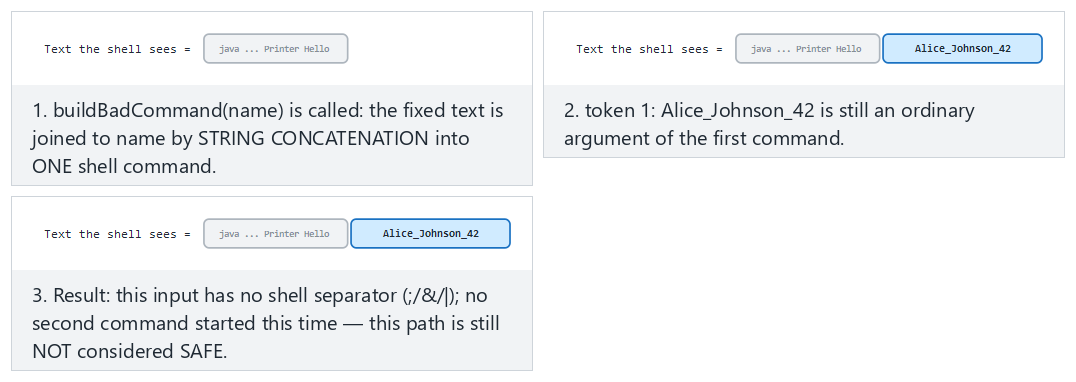
Try the Normal, Hard (Linux-style ;) and Edge case (Windows-style &) examples.
Worked example: reading Demo 2's output line by line¶
The Python part of Demo 2 (command_injection.py) runs a "greeting tool" first through the shell (shell=True), then with an argument list (shell=False). On WSL/Linux, the actual output is as follows:
[BAD WAY]
   Command sent to the shell:
   echo "TOOL OUTPUT: Hello" Alice
   | TOOL OUTPUT: Hello Alice
[GOOD WAY]
   Argument list:
   [python, -c, ...] ... 'Alice'
   | TOOL OUTPUT: Hello Alice
[BAD WAY]
   Command sent to the shell:
   echo "TOOL OUTPUT: Hello" Alice ; echo LEAKED-COMMAND-INJECTION
   | TOOL OUTPUT: Hello Alice
   | LEAKED-COMMAND-INJECTION
   ^ The 'LEAKED...' line = the injected command ran.
[GOOD WAY]
   Allow-list REJECTED it (^[A-Za-z0-9_]+$):
   input = Alice ; echo LEAKED-COMMAND-INJECTION
   -> The program was never run.
   ^ The allow-list saw a space/;/& and rejected it.
In the wrong path, the shell followed the five steps above, split the string in two at the ;, and ran two separate commands; the second line (LEAKED-...) is proof that the injected command actually ran (the demo uses a harmless echo). In the correct path, ProcessBuilder/subprocess never calls any shell; the input is a single argument, and the allow list (^[A-Za-z0-9_]+$) rejects this input, which contains a space and a ;, before it is ever run.
Demo 2 — Command injection¶
Demo 2 · code/week-05/02-command-injection · CWE-78 · IDS07-J · Recipe 1.7–1.8
A "greeting tool" passes the username to an external program. The wrong version gives the command to the shell as a single string (sh -c, cmd /c, Runtime.exec(String) in Java); a ; or & in the input starts a second command. The injected command is only a harmless echo. The correct version uses ProcessBuilder (Java) and a subprocess argument list (Python), and validates the input with an allow list. The same lesson is shown in two languages.
6. Path traversal (Recipe 3.7)¶
A file server should only serve files under a specific folder. If the requested file name is appended directly to this folder's path, sequences of ../ escape outside the root:
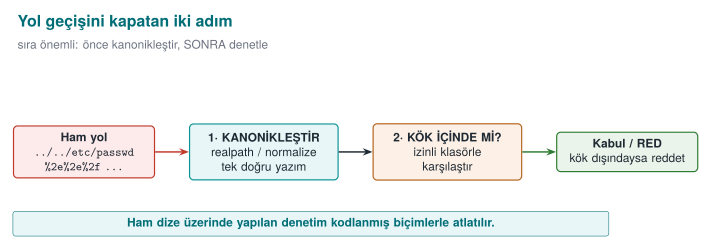
Path root = Paths.get("/srv/data");
Path file = root.resolve(request);                  // request = "../../etc/passwd"
return Files.readAllBytes(file);                 // a file outside the root is read
Path normalisation step by step: why does ../ walk back up to the root?¶
resolve()/normalize() process a path with a single stack algorithm. Let root = "/srv/data" and request = "../../etc/passwd". The filesystem processes this request segment by segment, like this:
| Step | Segment read | Stack state | Explanation |
|---|---|---|---|
| 0 | (start) | [srv, data] | Starts from the root path |
| 1 | .. | [srv] | One segment up (data) is popped from the stack |
| 2 | .. | [] | One more segment up (srv) is popped |
| 3 | etc | [etc] | A normal segment is pushed onto the stack |
| 4 | passwd | [etc, passwd] | A normal segment is pushed |
Result: /etc/passwd — a path completely outside the root (/srv/data). The .. characters are, for the parser, the command "go up one folder"; just as ' in SQL is the command "close the string literal," .. plays the same role in the filesystem. This is why a check that only searches the raw string for ".." (request.contains("..")) is not enough: forms such as ..%2f (URL-encoded) or ....// (nested spelling) bypass this search, while still ending up outside the root when processed with the same stack algorithm. The correct order is therefore to normalise first (run the stack algorithm to completion), then check the result — we check the final stack content, not the intermediate steps.
The fix: canonicalise first, then check whether it is inside the root¶
Path root = Paths.get("/srv/data").toRealPath();
Path candidate = root.resolve(request).normalize();      // if request is an absolute path, resolve returns it unchanged
if (!candidate.startsWith(root)) throw new SecurityException("outside root");
Path real = candidate.toRealPath();                  // also resolves symbolic links
if (!real.startsWith(root)) throw new SecurityException("outside root");
return Files.readAllBytes(real);
Order matters: first the canonical (single, definitive) path is obtained, and only then is it checked. Checking the raw string (request.contains("..")) is not enough; ..%2f, ....//, ..\ on Windows and absolute paths with a drive letter, Unicode forms, and symbolic links can all bypass the check. toRealPath() also resolves symbolic links to their real targets; because the TOCTOU problem from Week 2 (the time between check and use) still applies, it is most robust to verify again that the file is inside the root after it has been opened.
Path traversal inside archives: Zip Slip
When extracting a ZIP or TAR archive, the file names inside the archive are also untrusted input. An entry named ../../x can be written outside the extracting program's destination folder. Any code that extracts archives must canonicalise each entry's destination path the same way as above and verify it is inside the root.
A common mistake: searching only for the .. string
The line if (request.contains("..")) is the "fix" students write most often. But ..%2f (a URL-encoded dot and slash, which becomes ../ if decoded before reaching the server), ..\ on Windows, absolute paths with a drive letter (C:\...), and a symbolic link inside the root folder that points outside the root — none of these are caught by this one-line check. contains("..") can also produce a false positive on a legitimate file name (report..v2.txt).
Rule
The only valid pattern against path traversal: normalise (canonicalise) first, then check that the result stays inside the root, and if needed check again after the file is opened. Searching the raw string for a pattern is never enough.
The animation below walks a request path one segment at a time, and shows why, once you are already at the root, a .. counts as an attempt to leave the root.
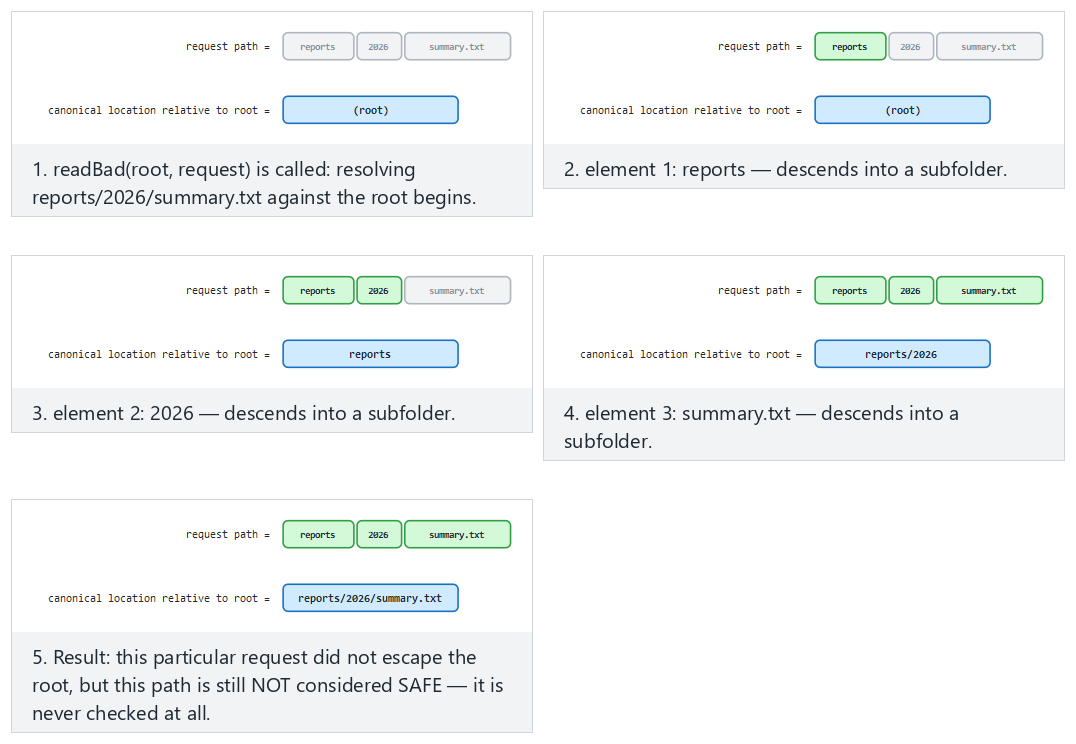
Try the Normal, Hard (../secret.txt) and Edge case examples.
Worked example: reading Demo 3's output line by line¶
The Python part of Demo 3 (path_traversal.py) treats the output/data/ folder as the root; outside the root (output/secret.txt) there is a synthetic "admin note." The actual output:
[BAD WAY]
   Resolved path: .../output/data/report.txt
   READ -> Public report (synthetic).
[GOOD WAY]
   Resolved path: .../output/data/report.txt
   READ -> Public report (synthetic).
[BAD WAY]
   Resolved path: .../output/secret.txt
   READ -> SECRET: synthetic admin note (outside the root).
   ^ The secret file outside the root was leaked.
[GOOD WAY]
   REJECTED: escapes outside the root -> .../output/secret.txt
   ^ Canonicalization + root check blocked it.
In the wrong path, the expression ROOT / "../secret.txt" pops the data segment with the stack algorithm above and lands directly on output/secret.txt — it has climbed to one folder above the root. In the correct path, the same normalisation happens, but because the result does not start with the root (output/data), the request is rejected before it is ever executed.
Demo 3 — Path traversal¶
Demo 3 · code/week-05/03-path-traversal · CWE-22 · FIO16-J · Recipe 3.7
A "file server" should serve only the files under output/data/. The wrong version appends the request directly to the root, and a ../secret.txt request leaks the synthetic secret file outside the root. The correct version canonicalises the path (normalize() + toRealPath(), resolve() in Python) and verifies the result stays inside the root; an absolute path and a drive letter are also rejected. On Windows both the ..\ and ../ separators are handled.
7. Unsafe deserialisation¶
Serialisation is converting an object into a byte sequence to store it or send it over the network; deserialisation is the reverse. Java's built-in ObjectInputStream mechanism creates an object of any serialisable class whose name is written in the byte stream, and while doing so runs some of that class's methods (such as readObject, readResolve).
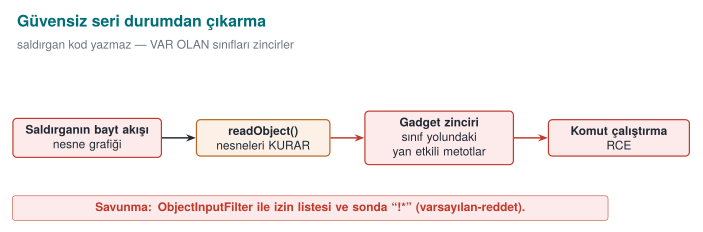
The problem is this: if the byte stream comes from an untrusted source, the attacker chooses which classes get created. Innocent-looking classes found in libraries on the application's class path can be chained together so that, as they are created, they trigger one another. In real incidents these chains have gone all the way to remote code execution; in 2015 this is exactly how a series of vulnerabilities, working through classes in a widely used common library, affected many enterprise server products. This is why CWE-502 ("deserialisation of untrusted data") is part of the "software and data integrity failures" category in the OWASP Top 10.
We are not writing a chain in this course
How attack chains are built is not the subject of this course. The only thing we need to know is: deserialising an untrusted byte stream without a filter hands the attacker the authority to choose the class. The defence rests entirely on this one sentence.
How does a byte stream carry a class name? The mechanism, step by step¶
We are not writing the attack chain itself, but understanding where the authority in the attacker's hands comes from also makes the defence meaningful. The beginning of the byte stream ObjectOutputStream produces has a fixed format:
- The first two bytes are always
AC ED— the "stream magic," a signature stating that this stream is a Java object stream. - The next two bytes are
00 05— the version of the stream format. - After that comes an object block; this block begins with a class descriptor: the class's fully qualified name (something like
com.example.Setting) sits in the stream as plain text, with a length prefix. - When
ObjectInputStream.readObject()runs, it first reads this name, then looks up and loads the class on the class path with a call resemblingClass.forName(name)— no type check has happened yet, because the stream itself is stating what the expected type is. - Once the class is loaded, the JVM allocates an object of this class (without an ordinary constructor call, through a mechanism specific to deserialisation) and writes the field values from the stream into this object; if the class defines special methods such as
readObject/readResolve, these are also run at this point.
The result of steps 3–4 is: the party that sends the stream decides which class gets loaded, not the application. If the stream comes from an untrusted source, any class name on the class path can be written; then whatever that class's readObject/readResolve methods do while they run (opening a file, creating another object, calling a method) is under the attacker's control. A series of such classes triggering one another in a chain (the "gadget chain" of real incidents) can end up at arbitrary code execution — we are not writing how the chain is built, but steps 3–4 fully explain "why it is possible."
A common mistake: thinking 'my own classes are the ones being deserialised, so I'm safe'
Without a filter, ObjectInputStream accepts every Serializable class whose name is written in the stream — not only the classes you wrote, but the classes of all your dependencies on the class path (and their dependencies, too). Even if your application never writes a dangerous readObject, if a library you use has such a class, it is enough to write its full name into the stream.
Rule
Before opening an untrusted byte stream with ObjectInputStream.readObject(), always attach an ObjectInputFilter, and always end the pattern with !*. If possible, do not use Java serialisation at all; formats such as JSON/Protobuf never write a class name into the stream, they only carry data fields.
Layers of defence¶
| Order | Measure | Explanation |
|---|---|---|
| 1 | Never use it | For untrusted data, use data formats (JSON, Protobuf) instead of Java serialisation; these only carry data, they never let the sender choose a class |
| 2 | Allow-list filter | Since Java 9, ObjectInputFilter (JEP 290); since Java 17, a context-specific filter factory (JEP 415): only the expected classes |
| 3 | Limits | The stream's depth, array size, total byte count and object count are bounded (against denial of service) |
| 4 | Integrity | If serialised data is stored or transported, it is signed with an HMAC; it is not deserialised until the signature is verified |
| 5 | Dependency hygiene | Do not leave unused libraries on the class path (Section 14) |
ObjectInputFilter filter = ObjectInputFilter.Config.createFilter(
        "com.example.Setting;java.base/*;maxdepth=5;maxarray=1000;maxbytes=65536;!*");
try (ObjectInputStream in = new ObjectInputStream(stream)) {
    in.setObjectInputFilter(filter);
    Setting s = (Setting) in.readObject();          // unexpected class → InvalidClassException
}
The pattern is read left to right: allow classes in com.example.Setting and the java.base module, apply the limits, reject everything else (!*). The last item is the deny-by-default principle; if it is left out, the filter turns into a blacklist.
The animation below shows that an unfiltered stream always builds whatever class it names, while a filtered stream first checks that name against an allow-list pattern.
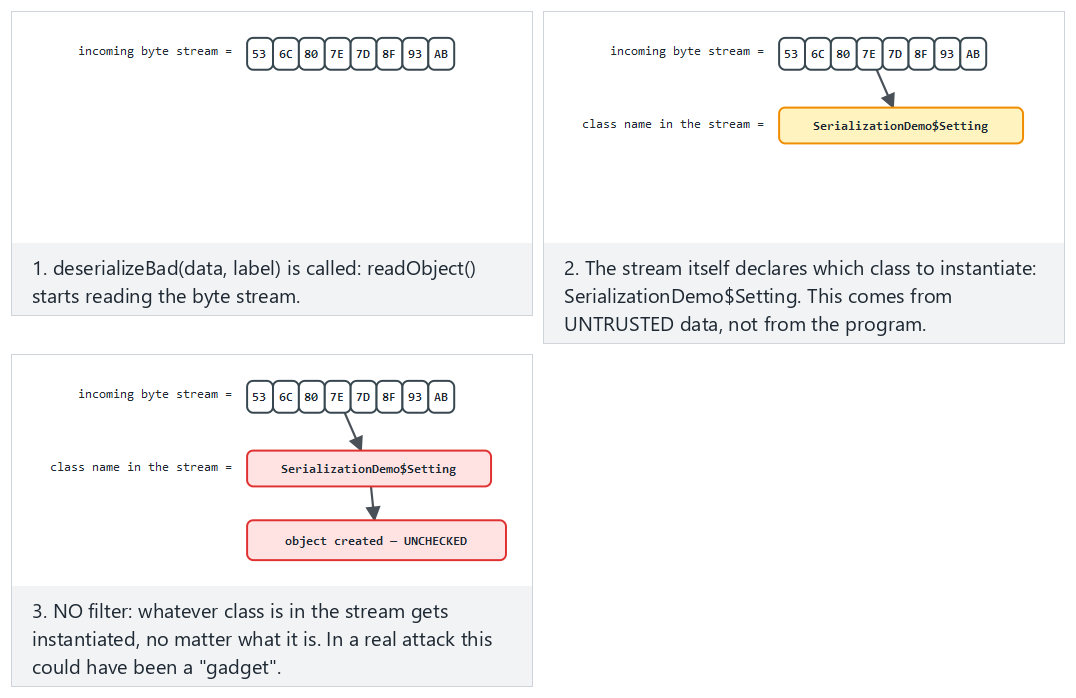
Try the Normal, Hard (a suspicious class name) and Edge case examples.
Worked example: reading Demo 7's output line by line¶
Demo 7's Java code (SerializationDemo.java) defines two harmless classes: the expected Setting (carries a name + value), and the unexpected OtherClass (in a real attack this would be a "gadget"; here it only carries a string). Both are serialised and then deserialised, first without a filter, then with one. The actual output:
   [expected Setting] ACCEPTED -> Setting(name=timeout, value=30)  (Setting)
   [unexpected OtherClass] ACCEPTED -> OtherClass(payload=unexpected-class)  (OtherClass)
   ^ Without a filter, EVERY class in the stream is built;
     in a real attack this could have been a gadget chain.
   [expected Setting] ACCEPTED -> Setting(name=timeout, value=30)
   [unexpected OtherClass] REJECTED (filter): unexpected class blocked.
The filter "SerializationDemo$Setting;java.base/*;!*" allows only the Setting class and Java's own core classes. Recall the mechanism from Step 1: the filter checks the name read from the stream before the class is loaded; because OtherClass is not on the list, the readObject call stops with an InvalidClassException — the class is never instantiated, none of its methods run.
Demo 7 — Safe deserialisation¶
Demo 7 · code/week-05/07-deserialization · CWE-502 · SER12-J
The demo contains no attack chain at all. The unfiltered version creates every class in the stream: both the expected Setting and the unexpected OtherClass are accepted. The filtered version uses ObjectInputFilter to allow only the expected classes; the unexpected class is rejected with InvalidClassException.
How does an assessor test this?
They search the source code for ObjectInputStream, readObject, XML-based object decoders, and JSON libraries with "polymorphic type" support turned on; for every use they ask where the data comes from. If a filter exists, they check that its pattern ends in !*. They look for Java serialisation's magic bytes (AC ED 00 05) in network traffic or in files.
8. XML, template and other kinds of injection¶
The same "mixing of data and command" bug shows up in every interpreter. The four most common ones:
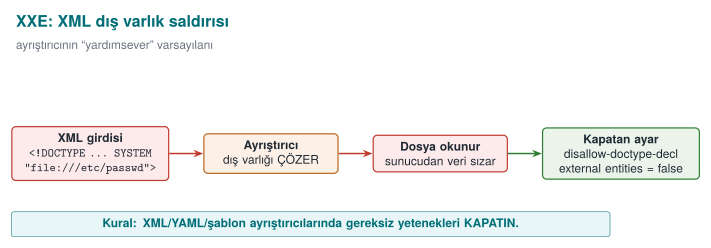
| Type | How does it arise? | Defence | CWE |
|---|---|---|---|
| XML external entity (XXE) | The XML parser reads local files or network addresses through <!DOCTYPE> definitions in the document | Disable DTDs and external entities in the parser | 611 |
| Cross-site scripting (XSS) | User data is written into an HTML page without escaping; a script runs in another user's browser | The template engine's context-aware automatic escaping, a Content Security Policy (CSP) | 79 |
| Template injection | User data is processed as the template itself | Give user data only as a template variable | 1336 |
| LDAP / XPath injection | The directory or XML query is built by string concatenation | Parameterised interfaces, escaping special characters | 90, 643 |
The XXE mechanism, step by step (without writing a payload)¶
We are not writing a working XXE payload in this course
As in the deserialisation section, we are not giving a real attack document here either. What we need to know is which step the XML parser makes exploitable; the defence (the code below) consists entirely of closing off that step.
The XML standard allows a document to declare a DTD (Document Type Definition) at its start, and to define special abbreviations (entities) inside that DTD — much like a "find-and-replace" shortcut in a text editor: wherever &abbreviation; is written in the document, the real content defined in the DTD is substituted in. The problem is that this "real content" can come from an external source (a file path or network address marked with the SYSTEM keyword):
- While reading the document, the parser first processes the DTD block; it records every
<!ENTITY ad SYSTEM "kaynak">definition inside the DTD into an abbreviation table (ad→kaynak). - While processing the body of the document, if the parser meets a reference of the form
&ad;, it opens thekaynakfrom the abbreviation table (reads the file or makes a network request) and substitutes its content in place of&ad;. - This substitution happens during parsing, without the application's own logic ever getting involved; by the time the application "finishes reading" the XML, the entity has already been expanded, and the file's content has been mixed into the document text.
- If the application shows this expanded text back to the user in any form (in an error message, in a response field), the file's content has been leaked; if the source is a network address, this also means the server has sent a request into the internal network (SSRF, Week 3).
The critical point is, again, the same: the parser is not making a mistake, it is implementing the DTD standard exactly. The hardening below closes off the first step of these four (processing the DTD at all) and the second step (opening externally sourced entities) from the start; that way steps 3–4 never get a turn.
A common mistake: validating only the user input and leaving the XML parser as-is
Input validation (a white list, a length limit) looks at XML's content; but XXE abuses a structural property of the document (the DTD/entity declaration). Saying "the content looked safe" is not enough — entity expansion happens at the parser level, without ever passing through any of the application's input checks.
Rule
If your application does not use DTDs or external entities (most web services do not), always disable them in the parser (disallow-doctype-decl, rejecting external entities). This is the most direct application of the "disable what you don't need" principle (the rule at the start of Section 8).
DocumentBuilderFactory f = DocumentBuilderFactory.newInstance();
f.setFeature("http://apache.org/xml/features/disallow-doctype-decl", true);   // no DTD
f.setFeature("http://xml.org/sax/features/external-general-entities", false);
f.setFeature("http://xml.org/sax/features/external-parameter-entities", false);
f.setXIncludeAware(false);
f.setExpandEntityReferences(false);
The rule is the same every time: know which of the interpreter's features are turned on, disable what you do not need, do not pass data through the command channel. The book's XSS recommendations in Recipe 3.10 (encoding output based on context, validating input with a white list) have become the default behaviour of today's web frameworks; but turning on a "raw HTML" option in a template, or building a page by string concatenation, brings the same bug right back.
The same mechanism in XSS: how does the browser parse HTML?¶
The exact counterpart of the "the parser expands externally sourced content" idea from XXE, in XSS, is the browser's HTML parser. In a string concatenation like "<p>" + yorum + "</p>", if the yorum variable contains an HTML tag-opening character (<), the browser moves from the "text state" into the "tag state" the moment it sees this character — exactly the same mechanism as the SQL parser changing state on a ' character. Result: part of the text the user wrote becomes part of the page's structure (a new tag, and therefore potentially an executable script tag), and it runs in the browser of every user who views this HTML — the difference from SQL injection is that the victim is not a database, but another user who opens the page. Template engines' "automatic escaping" does exactly the same job as the parameterised query from Section 4: it encodes user data as plain text content, not as HTML syntax (writing < instead of <), so that the parser never enters the "tag state" at all.
9. Interpreted languages: the same bugs in Python and JavaScript¶
The syllabus names this week "Java and interpreted languages." In languages such as Python, JavaScript (Node.js), Ruby and PHP, memory safety is also free; but these languages make generating and running code at run time much easier than Java does. The same bug classes appear here under different names:
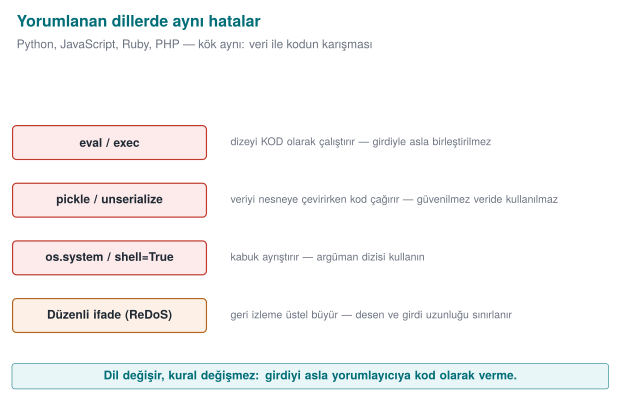
| Bug | Java | Python | JavaScript / Node.js |
|---|---|---|---|
| SQL injection | Statement + concatenation | cursor.execute(f"... {name}") | Query built with a template string |
| The fix | PreparedStatement | cursor.execute("... ?", (name,)) | The driver's parameter-binding interface |
| Command injection | Runtime.exec(String) | os.system, subprocess.run(..., shell=True) | child_process.exec |
| The fix | ProcessBuilder | subprocess.run([...]) (a list, shell=False) | child_process.execFile / spawn (an array) |
| Running code | Reflection, script engines | eval, exec | eval, new Function, vm |
| Unsafe deserialisation | ObjectInputStream | pickle.loads, yaml.load (the unsafe loader) | Object-decoding libraries; prototype pollution |
| The fix | Filter / JSON | json.loads, yaml.safe_load | JSON.parse + schema validation |
eval and friends: running data as code¶
The most dangerous feature of interpreted languages is being able to run a string as code. A string coming from the user reaching eval is the most direct form of injection: the interpreter itself is the command channel.
value = eval(input_text)                 # WRONG: input_text could be any Python expression

import ast
value = ast.literal_eval(input_text)     # Better: accepts only LITERALS such as numbers, strings, lists
value = int(input_text)                  # Best: parse the expected type directly, catch the error
The rule is simple: user data must never reach eval, exec, new Function, or a script engine. If a calculator or a rule engine is genuinely needed, a small parser that recognises only the allowed operations is written instead.
A common mistake: saying 'I filtered the input, then eval'd it'
Searching for dangerous words (import, os, __) and calling eval when none are found is a common but fragile defence: in Python there are ways to call the same functionality under other names (through indirect access), and this list is never complete. eval itself is the code channel; putting a filter in front of the channel is weaker than closing the channel.
Rule
Never give user input to a language's full interpreter. Use a parser that accepts only literals (ast.literal_eval), or a function that directly parses the expected type (int, float); neither of these executes code, they only read data.
Deserialisation: pickle and YAML¶
Python's pickle module carries the same problem as Java serialisation: the data being decoded determines which objects get created and how; its own documentation explicitly says "never unpickle untrusted data." YAML libraries' full loaders can create objects in a similar way.
import json, yaml

data = json.loads(text)             # data only: dict, list, number, string
config = yaml.safe_load(text)       # only basic YAML types
# pickle.loads(text)                # ONLY on data you produced yourself and verified with an HMAC
Denial of service through regular expressions (ReDoS)¶
The most common tool for input validation is regular expressions; but a badly written regular expression can itself become an attack surface. In engines that use backtracking (the built-in engines of Java, Python and JavaScript), a pattern containing nested repetition runs in exponential time on a specially crafted input:
Pattern: ^(a+)+$
Input:   "aaaaaaaaaaaaaaaaaaaaaaaaaaaaa!"   → the engine tries millions of paths to prove there's no match
A single request can keep a server's processor busy for seconds or minutes (CWE-1333). Defence:
- Avoid nested repetition (
(a+)+,(a|a)*,(\w+\s?)*); write the pattern as precisely as possible. - Bound the input's length before the regular expression runs (the "length first" principle from Week 4).
- Use a linear-time engine where possible (RE2 and its derivatives).
- Turn on static analysis tools' ReDoS rules.
Worked example: why does backtracking grow exponentially? Let's count by hand¶
Let's not leave the "tries millions of paths" sentence from above abstract; let's count, on a small input, exactly how many paths really get tried. The pattern ^(a+)+$ consists of two nested repetitions: the inner (a+) means "one or more a," and the outer (...)"+" repeats this group "one or more times." The engine tries every possibility for how many pieces to split the inner group's a sequence into — this is called the compositions of a number.
Let's take just 4 a characters as input ("aaaa"), and work out by hand how many different ways the engine's inner group can split these 4 a's (each part must contain at least 1 a, because a+ cannot be empty):
| # | Split (how many times the outer group runs) | Parts |
|---|---|---|
| 1 | 1 time | aaaa |
| 2 | 2 times | aaa + a |
| 3 | 2 times | aa + aa |
| 4 | 2 times | a + aaa |
| 5 | 3 times | aa + a + a |
| 6 | 3 times | a + aa + a |
| 7 | 3 times | a + a + aa |
| 8 | 4 times | a + a + a + a |
There are exactly 8 different splits. The general rule: the number of compositions of n a's is 2^(n-1) (for n=4, 2³=8, which the table confirms). The input "aaaa" matches on its own (the pattern ends with $, and the full match succeeds), so the engine can stop on the first attempt. But if we add a single character to the end of the input that breaks the match ("aaaa!"), the $ can never be satisfied; the engine tries all 8 splits, all of them fail, and it finally says "no match" — but before reaching this conclusion it has exhausted every path.
As n grows, the number of attempts grows exponentially with 2^(n-1):
n (how many a's) | Number of attempts 2^(n-1) | Comment |
|---|---|---|
| 4 | 8 | Can be counted by hand |
| 10 | 512 | In the blink of an eye |
| 20 | 524,288 | Still fast |
| 30 | ≈ 536 million | Noticeable delay |
| 40 | ≈ 549 billion | Seconds–minutes |
| 50 | ≈ 562 trillion | Practically "never finishes" |
All the attacker has to do is make n large enough (say, 40–50 characters, not long at all) and add one character at the end that breaks the match; the input is not even kilobyte-sized, but it can lock up a single processing core on the server for minutes. This is the regular-expression counterpart of the "small input, disproportionate effect" idea from Week 4.
A common mistake: the assumption that 'a regular expression is fast anyway'
Simple patterns (such as ^[0-9]+$) really do run in linear time; the problem only shows up in nested repetitions (a repetition inside another repetition, or two alternatives that are subsets of each other). Testing a pattern only with "valid" inputs hides this bug; unless ReDoS is tested for, it is first encountered in production, with an actual attacker.
Rule
Before accepting a regular expression, ask two questions: (1) can the same character be matched by two different groups at the same time (ambiguity = backtracking risk)? (2) is the input's length bounded before the regular expression runs? If the answer to both is "no," the pattern is open to ReDoS.
Prototype pollution (JavaScript)¶
In JavaScript, objects inherit properties from a prototype chain. If a function that deep-merges a JSON object coming from the user allows writing to a special key such as __proto__, a new property gets added to the shared prototype of all objects; a check elsewhere in the application such as if (user.admin) can then come out unexpectedly true. Defence: reject the keys __proto__, constructor and prototype, use prototype-less objects (Object.create(null)) or a Map, and validate incoming JSON against a schema.
A language-independent rule
Whichever language you use, four questions are the same: Is the data going to an interpreter (SQL, a shell, eval, a template)? Is it going to a decoder that creates objects (pickle, Java serialisation)? Is its length and shape bounded? Is the dependency itself trustworthy (Section 14)?
10. Bytecode and decompilation¶
The C/C++ compiler translates source code directly into machine code; in the process, variable names, types and most of the structure are lost. The Java compiler, on the other hand, translates source code into the bytecode understood by the JVM (Java Virtual Machine), the virtual machine that runs Java, as .class files; on Android this bytecode is further converted into the DEX format. Bytecode is much more high-level than machine code:
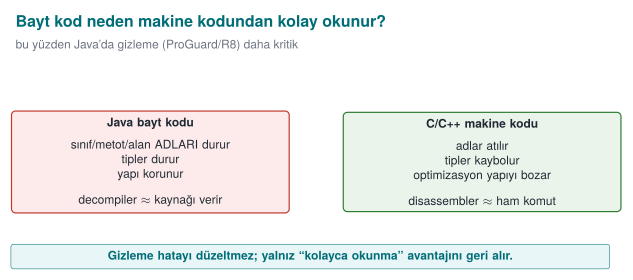
| Information | Machine code (C/C++, after strip) | Java bytecode / DEX |
|---|---|---|
| Class, method and field names | Lost | Preserved (needed for reflection and linking) |
| Types | Lost | Preserved (needed by the verifier) |
| String constants | Sit in the binary | Sit as plain text in the constant pool |
| Control flow | Machine instructions, indirect jumps | Structured; converts back very close to the source code |
| Result of reversing | Pseudo-C that takes effort to read | Often compilable Java code |
This is why reversing a Java or Android application does not require expertise. The JDK's own tool, javap, shows bytecode as text; decompilers such as jadx, CFR and Fernflower produce readable Java source. In Week 9 we will cover, in depth on the C/C++ side, the very tools used against obfuscation (symbolic execution, pattern recognition) and the principle of resilience against them (Week 9, §10).
private static final java.lang.String VALID_PIN;
static boolean pinCorrect(java.lang.String);
  Code:
     0: ldc           #9                  // String 4729
     2: aload_0
     3: invokevirtual #11                 // Method java/lang/String.equals:(Ljava/lang/Object;)Z
     6: ireturn
Bytecode line by line: the JVM is a stack machine¶
Let's make the four lines above readable even for someone who has never seen bytecode before. The JVM is a stack machine: every instruction pushes a value onto a small stack, or pops a value off it:
| Line | Instruction | What does it do? | Stack state (after the operation) |
|---|---|---|---|
0 | ldc #9 | Push entry 9 from the constant pool (the string "4729", i.e. VALID_PIN) onto the stack | [VALID_PIN] |
2 | aload_0 | Push local variable 0 (the method's only parameter, entered) onto the stack | [VALID_PIN, entered] |
3 | invokevirtual #11 | Pop two values off the stack, call the String.equals(...) method, push the result (true/false) onto the stack | [result] |
6 | ireturn | Return the integer/boolean value on the stack as the method's return value | [] |
These four lines are the exact counterpart of the source expression return VALID_PIN.equals(entered); — no information has been lost. The // String 4729 comment is javap reading and showing entry 9 from the constant pool; decompilers (jadx, CFR) see these four lines and produce the source code return VALID_PIN.equals(entered); directly. In C, in the equivalent machine code after strip, neither the constant's value nor which type the equals call operates on would remain this obvious (compare with the machine code examples from Week 4).
Even without the source code, three things are plainly visible: the constant (4729), meaningful names (VALID_PIN, pinCorrect), and the logic ("compare the input to this constant"). A password, API key or server address embedded in the code has effectively been handed to everyone who downloads the application (MSC03-J, CWE-798).
The animation below shows exactly these four bytecode instructions mapping, one at a time, onto reconstructed source fragments — until the whole method has been rebuilt.
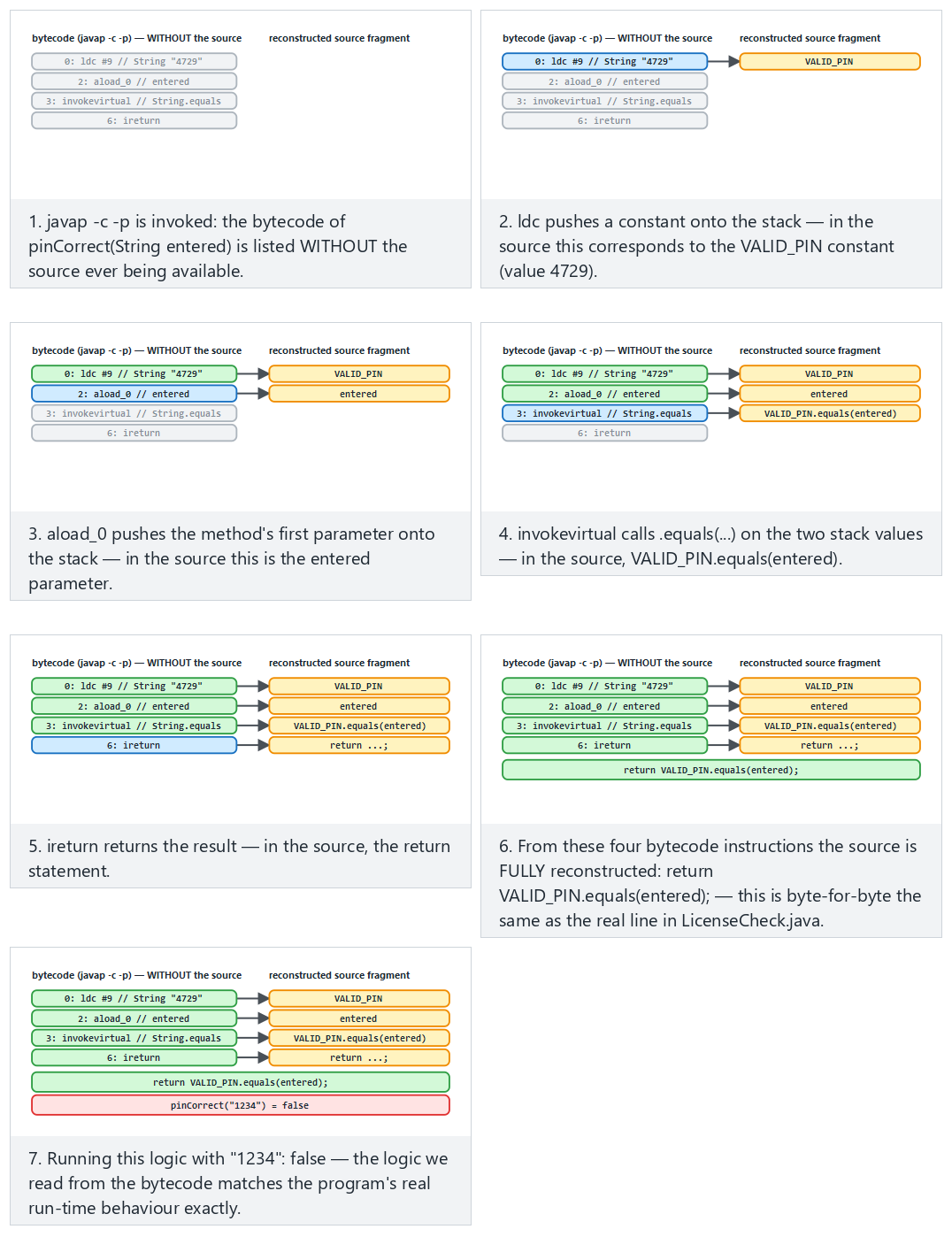
Try the Normal (PIN check, a wrong guess), Hard (the correct PIN) and Edge case (the license check) examples.
A common mistake: thinking 'I'm not giving out the source code, so I'm safe'
Distributing a .jar or .apk file does not mean not giving out the source code: according to the table above, bytecode is almost the source code itself. "Closed source" and "cannot be reverse engineered" are two different things.
Rule
Write every constant that goes into a client-side Java/Kotlin application (a key, a PIN, a server address, a business rule) on the assumption that "whoever sees this is effectively reading the source code." Sections 11–12 will show tools that make this visibility harder (not that remove it).
There are no secrets on the client
Obfuscation makes what is described in this section harder, but it is not a way of genuinely hiding a secret in a client application. An API key or password should not stay on the client unless it absolutely has to: it should be kept server-side, and the client should authenticate with a short-lived token. For keys that genuinely have to stay on the client, the secure enclaves from Week 3 and the whitebox cryptography from Week 11 are needed.
Demo 4 — What shows up in the bytecode?¶
Demo 4 · code/week-05/04-bytecode-decompile · CWE-798 · MSC03-J
A small "licence/PIN check" class is compiled and examined with javap -c -p. Without the source code, the constant strings (a synthetic PIN and licence key), the private field and method names, and the comparison logic are all visible. This demo is the motivation for needing obfuscation; Demo 5 reduces the same leak.
11. ProGuard and R8: shrinking, optimisation, obfuscation¶
ProGuard is an open-source tool that processes Java bytecode; R8 is its successor, developed by Google for Android, compatible with ProGuard rules, and shipped as the default in the Android build system. Both do four jobs:
| Stage | What does it do? | Security contribution |
|---|---|---|
| Shrinking | Removes classes, methods and fields that are never used (including those in libraries) | The attack surface and the code to review shrink |
| Optimisation | Inlining, dead-code elimination, constant folding | The code's structure drifts away from the source |
| Obfuscation | Replaces class, method and field names with short, meaningless names like a, b, c, … | Meaningful names disappear |
| Preverification | Adds verification information for Java ME / old JVMs | — |
Obfuscation's output is a mapping file (mapping.txt) that matches old names to new ones:
com.example.payment.CardManager -> com.example.a:
    android.content.Context context -> a
    boolean setDefaultCard(java.lang.String) -> b
The mapping file is a secret
mapping.txt completely reverses the obfuscation. It needs to be kept so crash reports can be read, but it must not be shipped together with the application, must not be put in a public repository, and must be kept somewhere access-restricted, separately for each release.
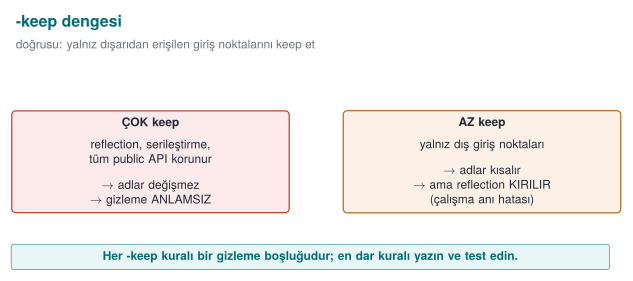
-keep rules: whose name has to be kept?¶
The obfuscator cannot know whether a class or method is called by name from the outside. In the following cases the name has to be kept; otherwise the application throws a ClassNotFoundException or a NoSuchMethodException at run time:
- The application's entry points (in Android, the activities and services named in the manifest;
mainon the desktop). - Classes and methods called by name through reflection.
- Methods called by name from native code via JNI, and
nativemethods. - Fields of serialised classes (JSON libraries use field names).
- A library's public-facing API.
| Rule | What does it do? |
|---|---|
-keep class X { <methods>; } | Both keeps the class and its members and keeps their name |
-keepclassmembers class X { ... } | The class can be shrunk, but the specified members are kept (e.g. serialisation fields) |
-keepnames / -keepclassmembernames | Unused ones can be removed; the name of what remains is kept |
-keepclasseswithmembers | Keeps classes that have the specified members (e.g. those with a native method) |
-dontobfuscate / -dontshrink / -dontoptimize | Turns off the corresponding stage |
The golden principle of writing rules is to write the narrowest rule. A broad rule like -keep class com.example.** { *; } effectively turns obfuscation off; this is the most common "obfuscation exists but doesn't do anything" situation seen in the field.
Worked example: why a missing -keep crashes the application¶
If a class's name is called through reflection (Class.forName("com.example.Payment")) but there is no -keep for this class in proguard-rules.pro, here is what happens, step by step:
- During compilation, ProGuard/R8 sees no static call to the
com.example.Paymentclass — because the call is written as a string insideClass.forName; the obfuscator does not count strings as part of the class graph. - The obfuscator assumes this class is "unused" and either removes it during the shrinking stage or renames it to
a.b.c. - When the application runs,
Class.forName("com.example.Payment")is called; but the class's name in this release is now different (or the class does not exist at all). - At run time a
ClassNotFoundExceptionis thrown (if the class was removed) or aNoSuchMethodException(if the method's name changed) — this is seen only in the release build, because obfuscation is turned off in the debug build (Section 13); the developer usually only notices the problem during store testing.
java.lang.ClassNotFoundException: com.example.Payment
    at java.lang.Class.forName(Class.java:...)
    at com.example.a.b.start(Unknown Source:1)
A common mistake: forgetting a class called through reflection
Static calls are seen by the compiler and are protected automatically; reflection, JNI, and serialisation fields are not seen, because they live in strings resolved at run time, not in the class graph. Turning on obfuscation without knowing which classes a newly added library (e.g. a JSON decoder, dependency injection) calls by name leads to random crashes in production.
Rule
When you add a new library, first add its official ProGuard/R8 rules (most libraries carry their own consumer-rules.pro file); then actually run and test the release build. "It compiled" and "it works" are not the same thing while ProGuard/R8 is turned on.
The animation below shows ProGuard/R8 walking a class's members one at a time, either keeping a name because it matches a -keep rule, or renaming it to a short, meaningless one.
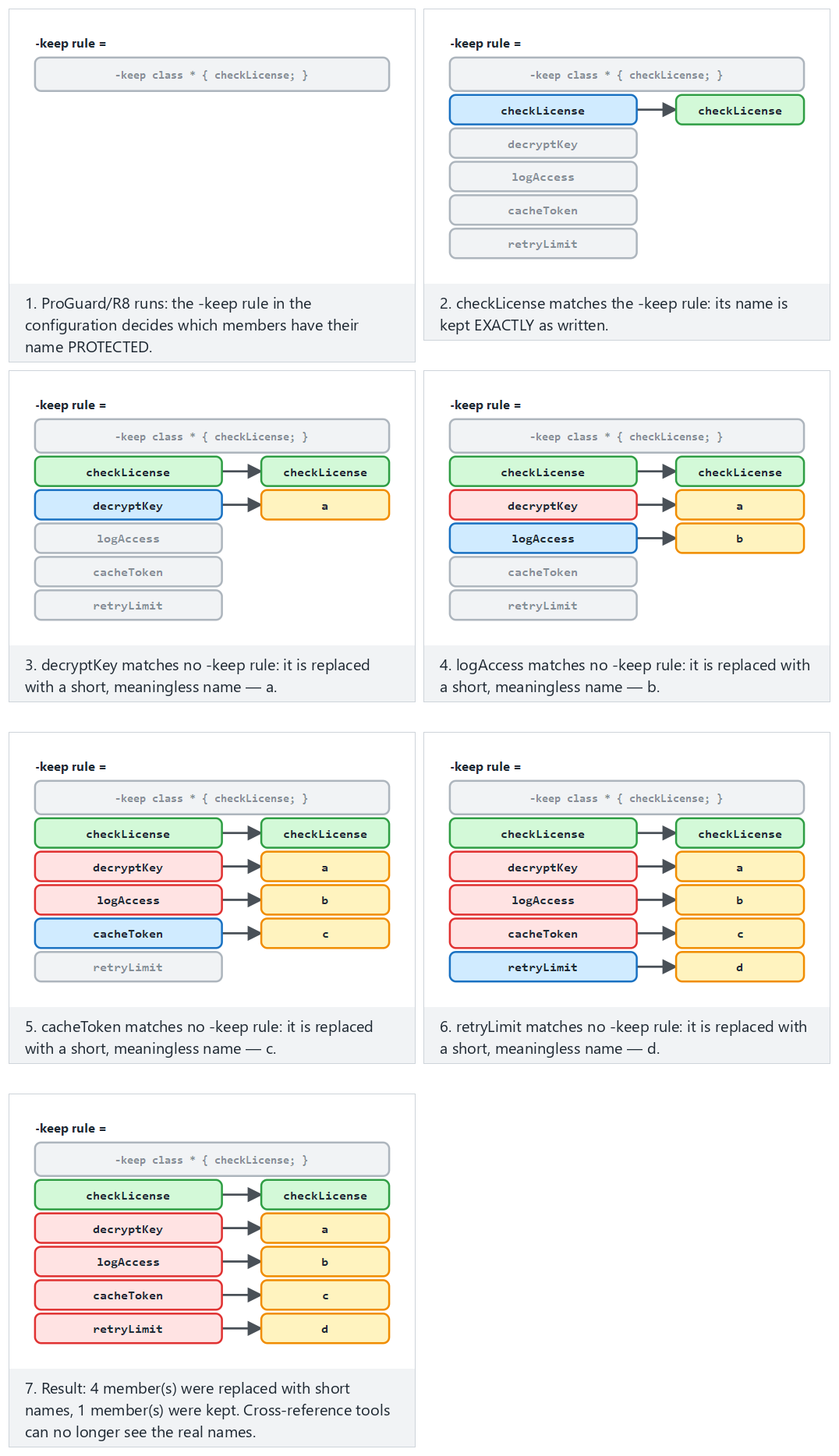
Try the Normal, Hard (nothing kept) and Edge case (-keep too broad — obfuscation wasted) examples.
Advanced rules: a configuration from the field¶
The obfuscation configuration of a certified mobile payment library includes the following rules and their rationale (a generalised version of the library's own rules):
| Rule | Meaning | Why? |
|---|---|---|
-optimizations !code/simplification/arithmetic,!code/simplification/cast,!field/*,!class/merging/* | Every optimisation except arithmetic and type-cast simplification, field optimisations and class merging | Some optimisations cause bugs on older runtimes; the safe ones are left on |
-optimizationpasses 5 | Optimisation is repeated for five passes | Each pass uses the new opportunities opened up by the previous one; the structure drifts further from the source |
-allowaccessmodification | Access modifiers can be widened | More inlining and repackaging becomes possible |
-repackageclasses | All renamed classes are moved into a single package | The package structure (which class is in which module) is lost |
-keeppackagenames not specified, -useuniqueclassmembernames | Package names are also obfuscated; members with the same name get consistent renaming | No structural hint remains; but crash debugging stays consistent |
-keepattributes Exceptions | Only exception declarations are kept | The source file name and line number (SourceFile, LineNumberTable) do not go into the release |
-assumenosideeffects class android.util.Log { *; } | Logging calls are treated as "side-effect free" and removed | No logging strings or calls remain in the release (the Java counterpart of the log removal from Week 4) |
How is this applied in the field?
The same guide also spells out an important separation of responsibility: the library obfuscates and shrinks its own code, but has no authority over the code of the application that uses it; this is why the guide delegates, as a requirement, that the host application must also take its own measures against obfuscation and reverse engineering. The guide's "security expected from third-party components" section lists exactly these hand-offs.
What ProGuard does not do¶
ProGuard and R8 obfuscate names, they do not obfuscate strings. The // String 4729 line in javap's output stays exactly the same after obfuscation. They only change control flow as much as a side effect of optimisation. String encryption, control-flow obfuscation and tamper checks require commercial tools (such as DexGuard, iXGuard) or the application's own methods (the next section).
12. String obfuscation and dynamic method invocation¶
The leak in Demo 4 had two sources: plain-text constants and direct calls. Two simple methods reduce them.
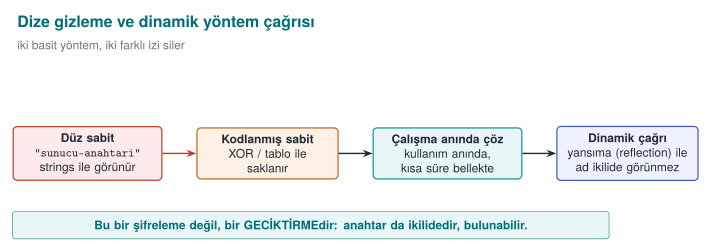
Static string obfuscation¶
In Week 4 we saw symbol and string hiding on the C side; here we apply the same idea to Java bytecode. The sensitive string sits in the source not as plain text but as an encrypted or scrambled byte sequence, and is decoded at the moment it is used. Meaningless bytes appear in the constant pool instead of the string itself.
- A simple XOR scramble stops
javapandstringsscans; but the decoding function and the key are also inside the application. This is an obstacle, not a lock. - In the field, strings are AES-encrypted by a tool before the build and embedded into the build configuration as encrypted constants; the decoding work is left to a single function on the native side, protected by additional checks, and the decoded string is wiped from memory once the job is done. This way, neither the string itself nor the decoding key is found on the Java side.
- The decoded string sits in memory in the clear at the moment it is used; this is why string obfuscation gains its real meaning together with run-time protection (RASP, Week 6).
Worked example: decoding XOR obfuscation by hand¶
Demo 5's HiddenConstant.java file scrambles the synthetic string "server-key-9F3A" with the XOR key 0x5A (decimal 90) and stores it as a byte array. Let's decode the first three bytes of the source array (41, 63, 40) by hand; by the definition of XOR, XOR-ing with the same key twice returns the original value (x ⊕ k ⊕ k = x) — this is why encryption and decoding are the same operation:
  41 = 0010 1001
  90 = 0101 1010
  ----------------  (bit by bit XOR: 0 if the same, 1 if different)
 115 = 0111 0011  =  0x73  =  's'
  63 = 0011 1111
  90 = 0101 1010
  ----------------
 101 = 0110 0101  =  0x65  =  'e'
  40 = 0010 1000
  90 = 0101 1010
  ----------------
 114 = 0111 0010  =  0x72  =  'r'
The remaining 12 bytes decode with the same operation and give, in order, the characters v, e, r, -, k, e, y, -, 9, F, 3, A; joined together, they produce exactly the source string "server-key-9F3A". javap -c -p shows not this string, but only 15 meaningless byte values and the KEY constant; a strings scan does not find the plain text either. But the key (0x5A) and the decoding loop are inside the same class — which is why the warning below applies.
A common mistake: thinking XOR obfuscation is 'encryption'
A single-byte XOR key is only one of 256 possibilities; because the key and the decoding code sit in the same .class file, a decompiler can see both and automatically redo the same computation. This is not cryptographic encryption, it is an obstacle that only slows down tools such as javap/strings that scan for plain text.
Rule
String obfuscation does not mean "the secret is hidden"; it means "no plain text is left in the constant pool." A genuinely sensitive value (a production server's address, a real API key) should never be embedded in client code at all; it should be fetched from the server at run time, or protected with dedicated methods such as the whitebox cryptography from Week 11.
The animation below plays out this exact XOR loop byte by byte: starting from the encrypted byte array, it builds the decrypted string live.
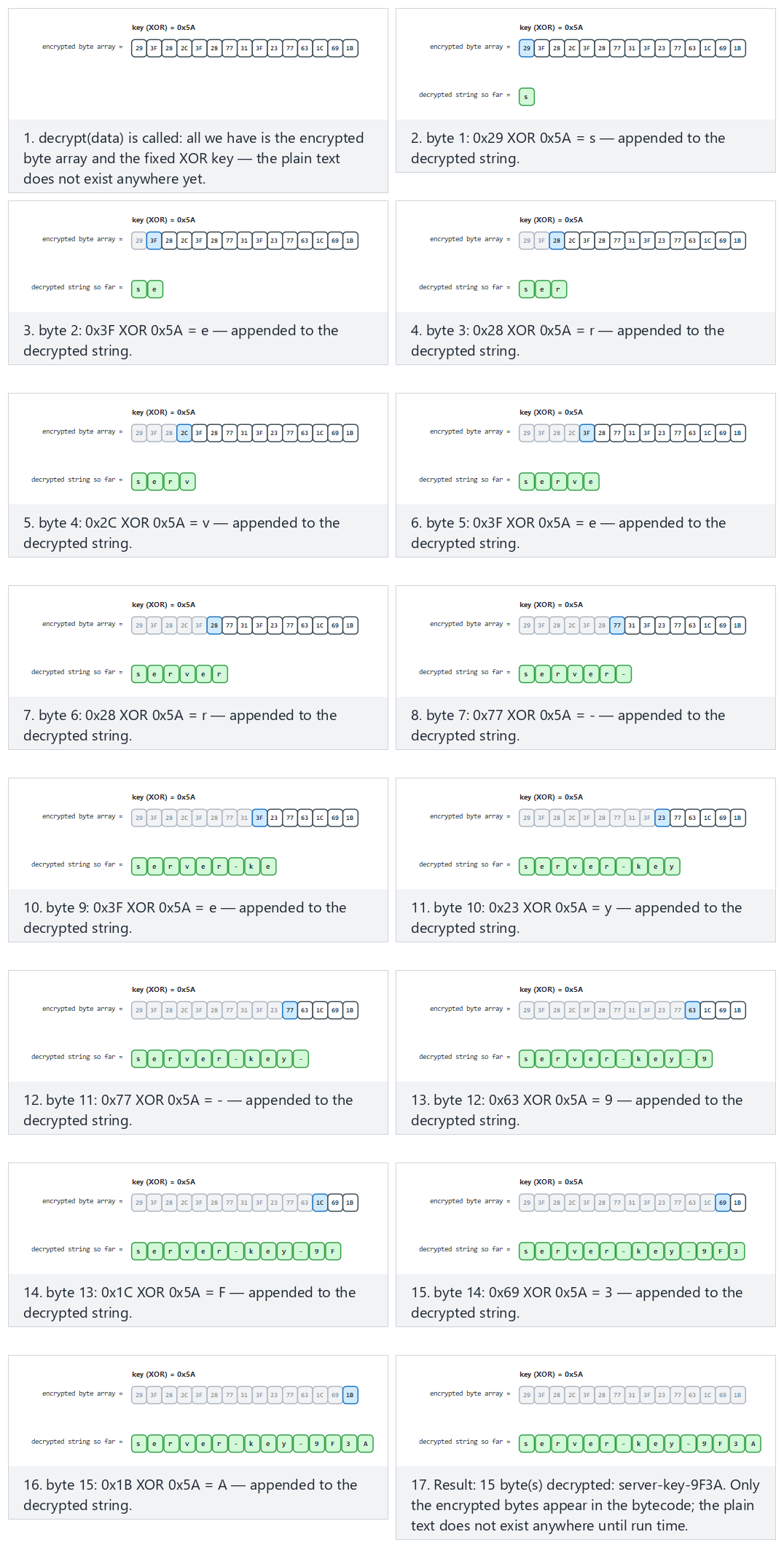
Try the Normal (the real Demo 5 constant), Hard and Edge case (a 0x00 key — nothing is hidden at all!) examples.
Dynamic method invocation (reflection)¶
Calling a method directly (object.hiddenOperation()) leaves an explicit link (invokevirtual) to that method in the bytecode; the decompiler easily reconstructs the graph of "this function is called from here." With reflection, the method name in the call is generated at run time (and this name can also be obfuscated):
result = Account.hiddenOperation(input);                                   // an explicit link in the bytecode

Method m = Account.class.getDeclaredMethod(resolveName(NAME_BYTES), String.class);
m.setAccessible(true);
result = (String) m.invoke(null, input);                            // the static call graph is broken
Let's be honest about the limits: the method is still defined in the class, and javap -p lists it; reflection only hides the call link. Its real power appears when combined with ProGuard renaming the method (in that case, a -keep rule is needed for the reflectively called method; the rule is written so that it matches the new name generated at run time). Reflection is also slow and loses compile-time type checking; it is used only for a handful of genuinely sensitive calls.
How is this applied in the field?
In the JNI interface between Java and a native library, method names are made meaningless: two- or three-letter names such as native byte[] ced(...) hide what each method does (because JNI names also appear as symbols on the native side, this protects both sides at once). Binding values such as a device fingerprint are then stored on the Java side with two different hashes in two different places (one in a local database, one in an application preferences file), and a background thread regularly compares the two; inconsistency or root detection triggers deletion of the cards. This is why changing the value in just one place is not enough.
Demo 5 — String obfuscation, reflection and ProGuard¶
Demo 5 · code/week-05/05-obfuscation · Recipe 12.11 (concept), 12.9 (indirect call, concept)
Three defences are shown in sequence: (A) the same secret string sits as a byte array scrambled with XOR instead of plain text, and does not appear in javap's output; (B) the method name is generated at run time and called through reflection, so no direct call remains in the bytecode; (C) optionally, the same jar is shrunk and obfuscated with ProGuard: the entry point kept with -keep remains, unused private members are removed, and the rest are renamed with short names. ProGuard is downloaded into the demo folder by the prepare script.
How does an assessor test this?
They open the application package (JAR/APK) with a decompiler and ask four questions: do meaningful class and method names remain, do sensitive strings (a server address, a key, a file name) appear as plain text, do logging calls remain in the release, and is the mapping file inside the package or somewhere public? They then measure how long it takes to locate the security checks (root detection, pinning) in the decompiled code.
13. R8 on Android, measuring the effect of obfuscation, and static analysis for Java¶
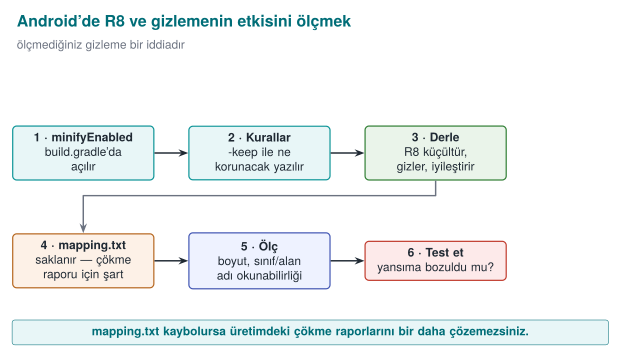
R8 in the Android build pipeline¶
In Android applications, R8 is turned on with a few lines in the Gradle configuration. Having it on in the release build is a baseline expectation of mobile security standards (OWASP MASVS-RESILIENCE):
android {
    buildTypes {
        release {
            minifyEnabled true          // R8: shrinking + optimisation + obfuscation
            shrinkResources true        // also remove unused resources (images, layouts)
            proguardFiles getDefaultProguardFile('proguard-android-optimize.txt'),
                          'proguard-rules.pro'
        }
    }
}
proguard-android-optimize.txt contains reasonable defaults for Android; application-specific -keep rules are written into the proguard-rules.pro file. A typical rule for methods called from native code via JNI, and for native methods:
There is no obfuscation in the debug build
The debug build run inside Android Studio is not obfuscated by default, and is also marked "debuggable." Confirming that the distributed package is the release build and that the debuggable flag is off is one of the assessor's first checks (debugger detection is covered in Week 6).
Reading crash reports: retrace¶
An obfuscated application's crash report contains lines such as a.b.c(Unknown Source). The mapping file is used to reverse this report (the retrace tool, or uploading the mapping file to a crash-reporting service securely). This is why the mapping file is not deleted; but as we said above, it is also not shipped together with the application. Adding -keepattributes SourceFile,LineNumberTable makes reports readable but puts source file names and line numbers into the package; this is a trade-off, and it is recorded.
Measuring the effect of obfuscation¶
Saying "obfuscation is on" is not enough; you need to show what actually changed. Simple, repeatable metrics:
| Metric | How is it measured? | Expected change |
|---|---|---|
| Number of classes and methods | javap / decompiler output | Decreases with shrinking |
| Ratio of meaningful names | Ratio of class/method names longer than 3 characters | Drops sharply with obfuscation (except for the kept entry points) |
| Number of plain-text sensitive strings | strings / constant-pool scan, against a list of known sensitive strings | Drops to zero with string obfuscation |
| Package size | File size | Decreases with shrinking (obfuscation alone barely changes it) |
| Number of logging calls | Searching for Log. in the decompiled code | Zero in the release |
| Time to find a security check | Human trial | Increases; measurement methods in Week 9 |
Filling in this table for before and after obfuscation and putting it into the security guide turns the claim "obfuscation was done" into evidence.
Worked example: doing the measurement step by step on Demo 5¶
Let's actually run the first two rows of this table on the jar files Demo 5 produces (if you downloaded ProGuard with the demo's prepare script):
cd code/week-05/05-obfuscation/output
javap -p -classpath sample.jar DirectCall | grep -c "hiddenOperation"
# Output: 1 (the source method name appears verbatim)
mkdir -p extracted && (cd extracted && jar -xf ../sample-obfuscated.jar)
javap -p -classpath extracted DirectCall | grep -c "hiddenOperation"
# Expected: 0 (the unused private member was removed by shrinking)
ls -la sample.jar sample-obfuscated.jar
# Shrinking reduces the size depending on the class count; obfuscation alone barely changes the size
These three commands turn the claim "obfuscation worked" into a measurable number: if the first command's output is greater than zero (a meaningful name is still found), then either the -keep rule was written too broadly, or the obfuscation stage never ran at all — both show the same symptom as the "most common mistake seen in the field" from Section 11.
Static analysis for Java¶
The Java counterparts of the static-analysis layers we saw for C/C++ in Week 4:
| Tool | What does it find? |
|---|---|
Compiler warnings (javac -Xlint:all) | Unsafe casts, deprecated APIs |
| SpotBugs + the Find Security Bugs plugin | SQL/command/path injection patterns, weak crypto, unsafe deserialisation, hard-coded passwords |
| Semgrep, CodeQL | Source-to-sink data flow (user input → executeQuery) |
| Android Lint | Android-specific security warnings (exported components, insecure network configuration) |
| OWASP Dependency-Check (Maven/Gradle plugin) | Vulnerable dependencies (Section 14) |
mvn com.github.spotbugs:spotbugs-maven-plugin:check
# the findsecbugs-plugin is added to the plugin configuration in pom.xml
These tools are added to the secure build pipeline (CI) from Week 4 in exactly the same way: a new high-severity finding blocks the merge.
14. Dependency security and the software bill of materials (SBOM)¶
Most of a modern application's code does not belong to the team that wrote it. In a typical Java or JavaScript application, a few dozen directly added libraries reach hundreds of components once their own dependencies are counted in. A vulnerability in one of these components is a vulnerability in the application.
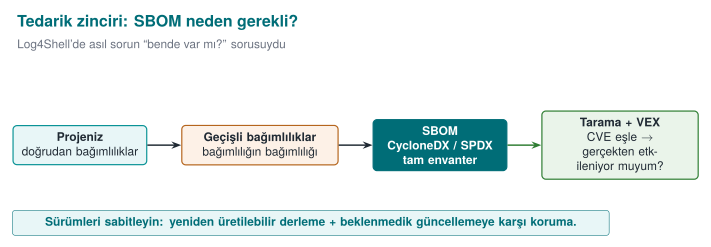
Log4Shell (December 2021)
In Log4j 2, one of the Java world's most widely used logging libraries, a special expression inside a string written to the log could cause the library to load and run a class from a remote address (CVE-2021-44228, CVSS 10.0). Every application that logged user data was affected. The real crisis was not applying the patch, it was knowing which system had which version: most organisations spent days searching for which of their applications had Log4j embedded inside another library. The incident ties together the log injection from Week 2 and the dependency security topics of this section.
What is an SBOM?¶
A software bill of materials (SBOM) is a machine-readable list of every component inside a piece of software: like the ingredients list on a food package. At least the following is recorded for every component:
| Field | Example | Why? |
|---|---|---|
| Name and version | log4j-core 2.14.1 | To match against vulnerability databases |
| purl (package URL) | pkg:maven/org.apache.logging.log4j/log4j-core@2.14.1 | An ecosystem-independent, uniform identifier |
| Hash value | SHA-256 | To verify the file really is that component |
| Licence | Apache-2.0 | Licence compliance |
| Supplier, dependency relations | who depends on what | To trace transitive dependencies |
There are two common standards: the Linux Foundation's SPDX (Software Package Data Exchange, published in 2011, originally for licence compliance; later became the ISO/IEC 5962 standard) and OWASP's CycloneDX (published in 2017, designed from the start around the security/SBOM use case). US Executive Order EO 14028 ("Improving the Nation's Cybersecurity", May 2021) is one of the first major regulations to require an SBOM from federal software suppliers; the European Union's Cyber Resilience Act brings a similar requirement to the EU.
{
  "bomFormat": "CycloneDX",
  "specVersion": "1.5",
  "components": [{
    "type": "library",
    "name": "example-json",
    "version": "1.2.0",
    "purl": "pkg:maven/com.example/example-json@1.2.0",
    "hashes": [{ "alg": "SHA-256", "content": "9f86d081884c7d65..." }]
  }]
}
From SBOM to a vulnerability list¶
An SBOM is just an inventory on its own; it gains its value once combined with software composition analysis (SCA) tools. These tools match every component in the SBOM against vulnerability databases (NVD, GitHub Advisory Database, OSV):
| Tool | Type |
|---|---|
| OWASP Dependency-Check | Project-level scanning, open source |
| OWASP Dependency-Track | An open-source platform that collects SBOMs and monitors them continuously |
GitHub Dependabot, npm audit, pip-audit, OSV-Scanner | Repository- and ecosystem-level alerts |
| CycloneDX plugins (Maven, Gradle, npm, pip) | SBOM generation |
A match does not always mean "we are affected": the vulnerable function might never be called at all. VEX (Vulnerability Exploitability eXchange) documents are used to publish this information in a machine-readable form: "this component has CVE-X, but our product is not affected, because …"
Dependency hygiene: a checklist¶
- Pin the versions: keep a lock file (
package-lock.json,gradle.lockfile,poetry.lock) in the repository; do not use floating versions such as "latest." - Verify hashes: Maven/Gradle dependency verification,
pip --require-hashes; is the downloaded file the expected file? - Remove what's unused: every library on the class path is an attack surface (deserialisation chains can also be built from unused libraries).
- Monitor continuously: generate the SBOM on every release, send it to a monitoring platform; know within minutes which products are affected when a new CVE is published.
- Vet the source: pin the package source against name-squatting (typosquatting: e.g.
reqeusts) and dependency confusion (an internal package name being hijacked by a fake package in a public registry) attacks. - Build integrity: the supply-chain incidents and the SLSA framework from Week 2: the build itself must also be provable.
A common mistake: generating an SBOM once and forgetting about it
An SBOM is the dependency list at the moment it was generated. If a new library is added, or a version is upgraded, one release later, the old SBOM now gives wrong information — and nowhere does it say it is wrong, it is simply out of date. In Log4Shell, the real time lost came from the situation "we had an SBOM, but it belonged to a release from three months earlier."
Rule
An SBOM must be generated automatically on every run of the build pipeline (CI) and sent to an SCA tool; an SBOM prepared by hand once and attached to a document is correct on the day it was produced, not on the day of the next dependency update.
The animation below shows every component in a dependency tree being checked, one at a time, by name and exact version against a known-vulnerable list — the same synthetic list Demo 6 itself uses.
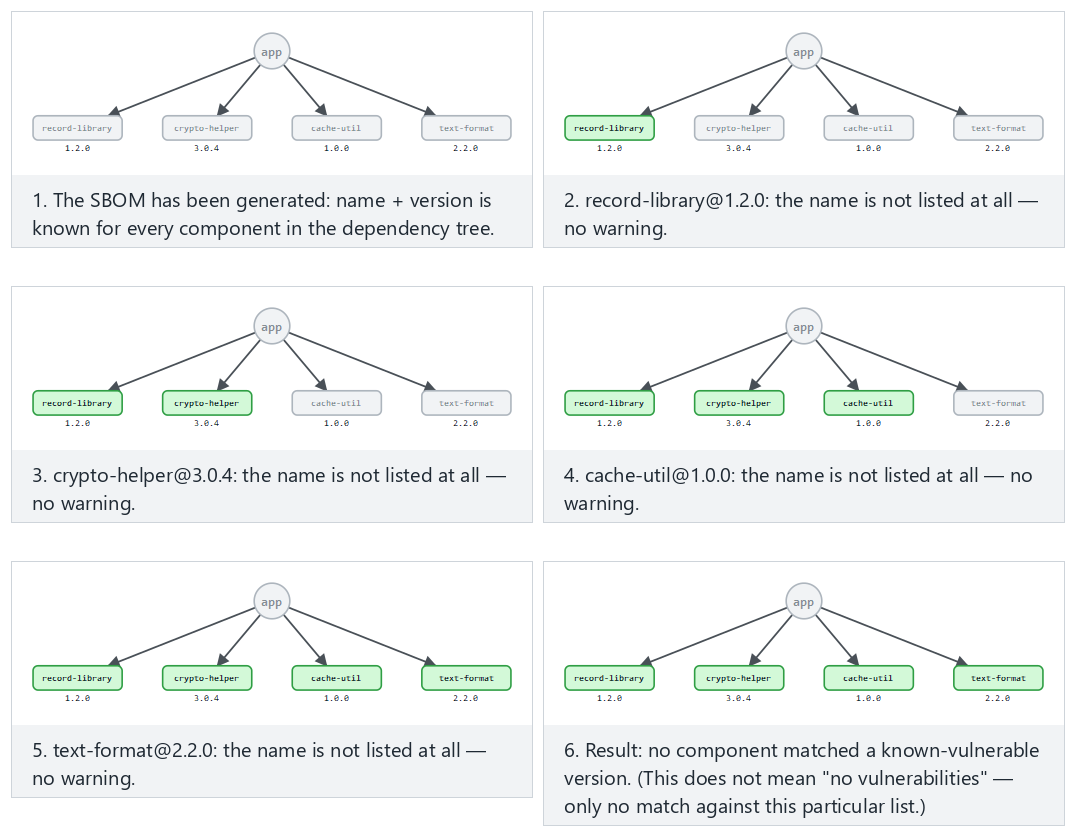
Try the Normal (all four safe), Hard (Demo 6's real SBOM, two matches) and Edge case (a fixed version is no longer flagged) examples.
Worked example: reading Demo 6's output line by line¶
Demo 6 (sbom.py) produces small jar files from four synthetic libraries, writes a CycloneDX component for each one, and matches them against a small dictionary of "known vulnerable versions." The actual output (the component names and versions come from a fixed list in the source code):
name                   version  SHA-256 (first 16)
crypto-helper          3.0.4    <computed from the jar bytes>...
json-tool              2.5.1    <computed from the jar bytes>...
log-core               2.14.0   <computed from the jar bytes>...
record-library         1.2.0    <computed from the jar bytes>...
pkg:maven/example.group/crypto-helper@3.0.4
pkg:maven/example.group/json-tool@2.5.1
pkg:maven/example.group/log-core@2.14.0
pkg:maven/example.group/record-library@1.2.0
[WARNING] json-tool 2.5.1  (CEN429-2026-0002)
          Unsafe deserialization (synthetic example).
          Fix: upgrade to >= 2.6.0.
[WARNING] log-core 2.14.0  (CEN429-2026-0001)
          Remote code execution via a formatted message (synthetic example).
          Fix: upgrade to >= 2.17.1.
The SHA-256 values come out different on every run (the generated jar's ZIP metadata contains a timestamp); this is deliberate, and it is a good supply-chain lesson — the hash verifies exactly which byte sequence the file is; "the name and version match" alone is not enough. record-library and crypto-helper are not on the synthetic vulnerability list, so they get no warning — the part of an SBOM that stays empty is also information: it means "these components are not on the known list," not "they are safe."
Demo 6 — Generating an SBOM and matching it against vulnerabilities¶
Demo 6 · code/week-05/06-sbom · CWE-1104
The demo produces a CycloneDX 1.5 JSON SBOM from its own synthetic jar files (output/lib/): a name, version, purl and SHA-256 for every component. It then matches these against a small, synthetic "known vulnerable versions" list and warns for the two affected components. It does not connect to the internet.
How is this applied in the field?
In certification documents, third-party components are listed in a separate table, together with their versions and why they are used: payment scheme SDKs, the platform's integrity-verification API, a notification service, a whitebox library, a number-theory library. An assessor reads this list the way they read an SBOM: does every component have a known vulnerability, is it up to date, is it genuinely necessary? A component being present in the package without being on the list is itself a finding.
15. Term project: this week¶
Even if your project is C/C++, two of this week's topics apply directly to your project:
- SBOM: List all of your project's dependencies (libraries, build tools, components downloaded through CMake) in CycloneDX format. If you use vcpkg or Conan, try their SBOM-generation support; if not, write it by hand. Look up every component in the OSV database and add the result to the guide.
- Input-validation table: List every point where your project takes in outside data (a file, the command line, the network, configuration); for each one write the expected format, the length limit, and the function where validation happens.
- If your project contains a file path, a SQL query, or a call to an external program, review it again with this week's patterns (canonicalisation + root, parameterised query, argument list).
- If your project has a scripted or Java component, add the obfuscation requirement and the
-keeprules to section S9.
16. Work on your own¶
Exercise 1 — Easy: Convert it to a parameterised query
Turn Demo 1's wrong query into a parameterised one yourself. Then add a sorting feature that takes an ORDER BY column from the user, and make it safe with a white list. Explain why this cannot be done with ?.
Exercise 2 — Easy: What the error message leaks
Give Demo 1's wrong query an input with broken syntax, and examine the database's error message. Can table and column names be extracted from the message? Fix it so a generic message goes to the user and the detail goes to the log.
Exercise 3 — Medium: Argument injection
Give Demo 2's safe version an input starting with -. Does the allow list reject it? If it does not, observe whether the called program interprets this input as an option, and add the -- separator.
Exercise 4 — Medium: Path traversal variants
Send Demo 3's safe version the following requests: ..%2fsecret.txt, ....//secret.txt, an absolute path, ..\secret.txt and a drive-lettered path on Windows, and a file inside the root that points outside the root with a symbolic link. Which one is rejected by which check?
Exercise 5 — Medium: Deserialisation without and with a filter
Write Demo 7's filter pattern without !*, and show that the unexpected class is now accepted. Then pull the maxbytes and maxdepth limits down to very small values, and find the point where a legitimate object gets rejected.
Exercise 6 — Medium: Look with a decompiler
Open Demo 4's and Demo 5's jar files with a decompiler other than javap -c -p (e.g. CFR or jadx). Compare readability before and after obfuscation: which information is still visible?
Exercise 7 — Hard: Narrow the -keep rule
Write the -keep rule in Demo 5's proguard.pro file both broader (com.**) and narrower, and compare the results. What is the narrowest rule under which the application still works?
Exercise 8 — Hard: A real SBOM
For any open-source Java project that uses Maven or Gradle, generate an SBOM with the CycloneDX plugin and scan it with OWASP Dependency-Check or OSV-Scanner. How many components came out, how many were transitive, how many vulnerability matches were there? Investigate whether one of the matches genuinely affects the project.
17. Self-check¶
1. Which classes of bugs does Java remove at the language level, and which does it not?
It removes memory bugs such as buffer overflow, freed memory, and uninitialised variables. It does not remove injection, unsafe deserialisation, secrets embedded in code, reverse engineering, vulnerable dependencies, or logic bugs.
2. What is the common root of every kind of injection, and the common fix?
Data and command being given to an interpreter through the same channel. The fix: keep the command fixed and give the data through a separate channel (a parameter, an argument).
3. Why can an ORDER BY column not be given with a ? parameter? What is done instead?
? can only stand in for a value, not for an identifier (a column or table name). Mapping is done with a white list.
4. Why does using ProcessBuilder prevent command injection? Does it solve everything on its own?
The shell never runs; the input is passed as a single argument. It does not solve everything: the called program can interpret the argument as an option (argument injection); an allow list and -- are still needed.
5. In path traversal, why is canonicalisation done first, and only then the check?
The same path has many spellings (../, encoded forms, symbolic links); a raw-string check can be bypassed. The canonical path is single and definitive.
6. In unsafe deserialisation, what authority is in the attacker's hands?
The authority to choose which classes get created. Classes on the class path can be chained together, all the way up to code execution.
7. What does the !* at the end of an ObjectInputFilter pattern do?
It rejects everything not on the list; the deny-by-default principle. Without it, the filter turns into a blacklist.
8. Why is Java bytecode easier to reverse than machine code?
It preserves class, method and field names, types, and strings; control flow is structured.
9. What are ProGuard's four stages? Which one obfuscates strings?
Shrinking, optimisation, obfuscation (renaming), preverification. None of them obfuscate strings.
10. Why is mapping.txt a secret?
It completely reverses the obfuscation; it maps old names to new ones. It must not be shipped, and must be kept access-restricted.
11. What does -assumenosideeffects class android.util.Log { *; } do?
It treats logging calls as side-effect free and removes them from the release build; no logging strings or calls remain in the binary.
12. Why do purl and a hash value appear in an SBOM? What is VEX for?
purl identifies the component uniformly, independent of the ecosystem; the hash verifies the file really is that component. VEX states whether a vulnerability in a component genuinely affects the product.
13. When the SQL parser meets a ' character in the input, which state does it move into? Why does this state change the query's structure?
It moves into the "string literal started/ended" state. The ' in the input closes an open string literal early; the text after it is then read not as string content but as ordinary SQL syntax (keywords, operators).
14. Why are the prepare and bind stages separate in a parameterised query? How does this separation prevent injection?
In the prepare stage only the fixed query text is parsed and turned into a plan; the user's data does not exist yet. In the bind stage the values are placed into the already-parsed plan through a separate channel, and never pass through the parser again; this is why, whatever their content, they cannot change the query's structure.
15. How many commands does the shell run the string echo Hello alice; echo LEAKED as? Why?
Two commands. The shell first splits the text it receives into separate commands based on command separators such as ;; this is the shell's own syntax rule, and it has nothing to do with Java's information "this was a single username."
16. Resolve ROOT.resolve(\"../../etc/passwd\") step by step with the stack algorithm: what is the result?
Every .. segment pops the previous segment off the stack; every normal segment is pushed onto the stack. The two ..'s remove the root's last two segments (srv, data); the remaining etc and passwd are pushed. Result: /etc/passwd — completely outside the root.
17. Which information in the stream does ObjectInputStream read to decide which class to create? Who determines this information?
It reads the fully qualified class name written as plain text in the stream's class-descriptor block, and loads it with a call resembling Class.forName. This name is determined by whoever sends the stream; if the stream is untrusted, the attacker determines it.
18. In XXE, when is the content of a SYSTEM entity \"expanded\"? Why can't the application's input validation catch this?
During parsing, while the document body is being processed; before the application's own logic ever gets involved. Input validation looks at content, but entity expansion is a structural property of the document; it happens at the parser level, without passing through any of the application's checks.
19. If the input to the pattern ^(a+)+$ contains 4 a's, how many ways can the engine's inner group split it? What is the general formula?
8 (2^(4-1) = 2^3 = 8). General formula: for n a's there are 2^(n-1) different splits (compositions).
20. Why does adding a single character that breaks the match (like \"aaaa!\") to the end of the input for ^(a+)+$ trigger ReDoS?
Even though the input is still short (n is small), because the $ can never be satisfied, the engine tries all possible 2^(n-1) splits, and only after every one fails does it reach the result "no match"; as n grows, this number grows exponentially.
21. What do the ldc and invokevirtual instructions do to the JVM stack in Java bytecode?
ldc pushes a value from the constant pool (a number, a string) onto the stack. invokevirtual pops the required operands (the object and its arguments) off the stack, calls the corresponding method, and, if there is one, pushes the return value back onto the stack.
22. If a class is called only through reflection (Class.forName) and there is no -keep rule, why might ProGuard/R8 think this class is \"unused\"?
The reflective call is written as a string (text evaluated at run time); the obfuscator only tracks the static call graph, and does not count a string's content as class usage. This is why the class can be removed during shrinking, or renamed, causing a ClassNotFoundException/NoSuchMethodException at run time.
23. What does an attacker need to decode a string obfuscated with XOR? Why does this make XOR obfuscation a weak defence?
The key and the decoding loop are inside the same class as the obfuscated string; a decompiler can see both and automatically repeat the same XOR operation. This is why XOR obfuscation is not a cryptographic lock, only an obstacle that slows down tools that scan for plain text (strings, javap).
24. Why doesn't a match between an SBOM component and a known CVE automatically mean \"we're affected\"? Which document type declares this difference?
Even if the vulnerable code matches, that function might never be called by the application at all. VEX (Vulnerability Exploitability eXchange) documents state, in machine-readable form, whether a known vulnerability in a component genuinely affects the product.
25. In Demo 1's wrong path, with the input name = ' OR role='admin' --, why does the login succeed no matter what is written in the password field?
-- starts a comment to the end of the line in SQL; the parser never reads the AND password_hash = '...' part that follows this character as part of the query at all. The password check has effectively been erased from the query.
26. Why is an SBOM only correct at the moment it is generated? Why must it be added to the CI pipeline automatically?
Dependencies can change with every release (additions, removals, version upgrades); a hand-generated SBOM goes out of date with the very next change, but says so nowhere. If it is generated automatically on every build in CI and sent to an SCA/monitoring tool, the inventory always reflects the actual, current state.
18. Resources and further reading¶
Course textbook — J. Viega, M. Messier, Secure Programming Cookbook for C and C++, O'Reilly, 2003:
- Recipe 3.1 (basic input validation), 3.7 (validating file names and paths), 3.10 (preventing cross-site scripting), 3.11 (preventing SQL injection)
- Recipe 1.7–1.8 (safely running external programs)
- Recipe 12.9 (function pointers and indirect calls — concept), 12.11 (obfuscating strings)
Open standards and resources
- SEI CERT Oracle Coding Standard for Java (the IDS, FIO, SER, MSC, ERR rules).
- OWASP: Top 10, SQL Injection Prevention Cheat Sheet, OS Command Injection Defence Cheat Sheet, XML External Entity Prevention Cheat Sheet, Deserialisation Cheat Sheet; MASVS-CODE and MASVS-RESILIENCE.
- Oracle: JEP 290 (deserialisation filters), JEP 415 (context-specific filters); Java Secure Coding Guidelines.
- The ProGuard manual (Guardsquare) and the Android developer documentation: "Shrink, obfuscate, and optimise your app" (R8).
- The CycloneDX 1.5 and SPDX 2.3 (ISO/IEC 5962) specifications; the package-url (purl) specification; the CISA SBOM and VEX documents; the SLSA framework.
- MITRE CWE: CWE-89, CWE-78, CWE-88 (argument injection), CWE-22, CWE-502, CWE-611, CWE-79, CWE-798, CWE-1104 (use of unmaintained third-party components).
Glossary
| Term | English | Short definition |
|---|---|---|
| Managed language | Managed language | A language whose memory is managed by the runtime (Java, C#, Python) |
| Injection | Injection | Data being processed as a command by an interpreter |
| Prepared statement | Prepared statement | A SQL call in which the query text and the values are sent separately |
| Path traversal | Path traversal | Escaping the allowed folder using sequences such as ../ |
| Canonicalization | Canonicalisation | Reducing a value to its single, definitive form |
| Deserialisation | Deserialisation | Creating an object from a byte sequence |
| Bytecode | Bytecode | The intermediate code the virtual machine executes |
| Decompiler | Decompiler | A tool that produces source code from bytecode |
| Shrinking | Shrinking | Removing unused code |
| Mapping file | Mapping file | A file that maps obfuscated names to their real names |
| Reflection | Reflection | Accessing classes and methods by name at run time |
| SBOM | SBOM | A machine-readable list of a software's components |
| purl | purl | An identifier that identifies a package independent of its ecosystem |
| SCA | SCA | Matching dependencies against vulnerability databases |
| VEX | VEX | A declaration of whether a vulnerability affects the product |
Next week
Week 6 — RASP. This week we used obfuscation and shrinking to make bytecode harder to read statically; but an attacker can also examine an application while it runs (attaching a debugger, dumping memory, installing a hook). In Week 6 we will see how an application verifies itself at run time with RASP (Runtime Application Self-Protection), and how it detects debuggers and hooks — the next layer built on top of this week's static defences.