Week 4 — Code Hardening: C/C++¶
| Date | 09.10.2026 |
| Learning outcomes | LO.3 |
| Duration | 3 hours |
| Prerequisites | Pointers, arrays and dynamic memory (malloc/free) in C; memory layout, stack and heap from Week 1; building and basic gdb steps in a Linux/WSL terminal |
| Labs | code/week-04 — 7 demos; on Windows .\demo.ps1, on WSL/Linux sh demo.sh |
Lecture notes (PDF) Lecture notes (DOCX) Slides (PDF) Slides (PPTX) Slides (HTML, offline) Download all (ZIP) Open slides full screen
Click inside the slides and use the arrow keys; use the button at the bottom right of the slides or the link above for full screen.
By the end of this week you will be able to
- Tell apart the three layers of code hardening (secure coding, compiler/OS protections, code obfuscation) and state what each one stops and what it does not.
- Read SEI CERT C/C++ rules, interpret their priority levels, and find the most frequently violated rules in your own code.
- Demonstrate and fix format string, use-after-free, integer overflow, and undefined behaviour bugs in working examples.
- Find bugs automatically with AddressSanitizer, UndefinedBehaviorSanitizer, and fuzzing; write a fuzz target (harness).
- Turn the stack canary,
_FORTIFY_SOURCE, PIE/ASLR, DEP/NX, RELRO, and CFI/CFG protections on and off, and audit which ones are enabled in a given binary. - Explain the purpose, cost, and basic techniques of code obfuscation (symbol and string hiding, removing logging from the release build, constant transformations, control-flow flattening, opaque values).
Class schedule (timing plan for the instructor)
| Time | Section | What happens |
|---|---|---|
| 0:00–0:10 | 1 | Layers of code hardening; bridge from Week 1 |
| 0:10–0:30 | 2–4 | SEI CERT C/C++; input validation principles; noncompliant/compliant code pairs |
| 0:30–0:50 | 5 | Format string vulnerability — Demo 1 |
| 0:50–1:00 | Break | |
| 1:00–1:25 | 6–8 | Use-after-free Demo 2; integers and UB Demo 3; error handling and signals |
| 1:25–1:50 | 9–11 | Static analysis; sanitizers; fuzzing — Demo 4 |
| 1:50–2:00 | Break | |
| 2:00–2:25 | 12–13 | Compiler and OS protections Demo 5; secure build pipeline (CI) |
| 2:25–2:50 | 14–16 | Introduction to code obfuscation; symbol, string, log Demo 6; control-flow flattening Demo 7 |
| 2:50–3:00 | 17+ | Project step, self-check |
Prepare the lab in advance
The demos are in the code/week-04 folder; they run on Windows (Visual Studio 2022 Community), on WSL, and on Linux. The fuzzing demo requires clang on Linux/WSL (sudo apt install -y clang); if clang is missing, the demo says so and shows the same bug with the sanitizer instead. On Windows, fuzzing needs Visual Studio's "C++ AddressSanitizer" component.
Ethics rule — applies every week in this course
This week's demos show memory bugs and protections only on our own small programs. None of them touches another program or system; steps that could crash something are kept contained. The code obfuscation techniques are taught here to protect your own software against reverse engineering. Analysing or modifying someone else's software without permission can violate license agreements and laws.
0. Before we start¶
This section prepares you for the week. It first briefly recalls the earlier topics this week builds on; it then defines each of this week's concepts in one sentence and links it to the section where it is explained in full. Background knowledge not covered in earlier weeks is explained from scratch under the "Background" headings.
What we bring from earlier weeks¶
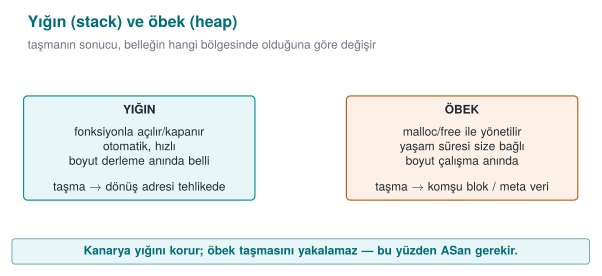
- Process memory: stack and heap — the memory a running program uses; the stack automatically manages the local variables of function calls, and the heap is allocated manually with
malloc/newand released withfree/delete(Week 1, §13). This week we build on this in §6 (reallocating a freed heap block) and §12 (protecting the stack frame with a canary). - Buffer overflow — a program writing more data to an array than the size allocated for it; the overflowing bytes land in the memory right next to the buffer, overwriting other variables or the return address (Week 1, §14). This week we extend this bug with the format string vulnerability (§5) and integer-driven overflows (§7).
- Stack frame and return address — the portion of the stack allocated for a function when it is called, holding its local variables and the return address that says where to go back to when it ends (Week 1, §14). This week we trace, step by step, how the format string vulnerability reads from the stack (§5) and how the stack canary protects this frame (§12); we will also use the term offset often (a distance from a starting point, in bytes).
- The white-box attacker model — the model in which the user who owns the device is also a potential attacker, able to read memory and attach a debugger (Week 1, §3; see also the "the white-box attacker's six paths" table in Week 1 §5). This week we build the motivation for code obfuscation (§14) on this model.
- CWE — the numbered catalogue of software weaknesses maintained by MITRE (Week 2, §13). This week we name findings by their CWE number in almost every section.
This week's concept map¶
| Concept | In one sentence | Detail |
|---|---|---|
| CERT | SEI CERT C/C++ is a catalogue of secure-coding rules drawn from real vulnerabilities, each giving a noncompliant example, a compliant fix, a risk assessment, and a CWE link. | §2 |
| Undefined behaviour (UB) | An operation the C/C++ standard does not define the result of (e.g., signed integer overflow); the compiler may assume it never happens and delete a check that relies on it. | §7 |
| Static and dynamic analysis | Static analysis looks for bugs without running the code (compiler warnings, clang-tidy); dynamic analysis observes it while it runs (sanitizers); the two complement each other. | §9 |
| Sanitizer | A compiler-added runtime check that inspects every memory access or undefined-behaviour-prone operation and gives a detailed report at the first failure (e.g., AddressSanitizer). | §10 |
| Fuzzing | The technique of running a program with large numbers of automatically generated, mostly malformed inputs to find ones that crash it or trigger a sanitizer report. | §11 |
| ASLR / NX / canary | Compiler and OS protections that make a bug harder to exploit once it slips through: ASLR randomises addresses, NX/DEP blocks executing code on data pages, and the stack canary catches an overflow that reaches the return address. | §12 |
| CI | A continuous-integration system that runs an automatic build, static analysis, sanitizer-instrumented tests, and fuzzing on every code change. | §13 |
Background: pointers and compiler options¶
These two were not taught in earlier weeks but are used in almost every example this week; let's define them briefly.
Pointer. A pointer is a variable that holds a memory address. p holds an address; *p reads or writes the value at that address (dereferencing). If a pointer points at an invalid or wrong address, the program crashes or reads/writes the wrong data — most of this week's bugs ultimately come down to a pointer pointing at the wrong place.
Compiler flag, warning, and error. A flag is an option passed to the compiler on the command line; e.g., -O2 tells it to optimise the code, -Wall turns on all warnings, and -fsanitize=address adds instrumentation. When the compiler sees a suspicious construct in the code, it reports one of two kinds of message: an error stops compilation; a warning does not stop compilation, it only reports a problem. This distinction matters for this week's rule: with the right flags (-Werror), warnings must be turned into errors, because an ignored warning is tomorrow's vulnerability.
1. What is code hardening?¶
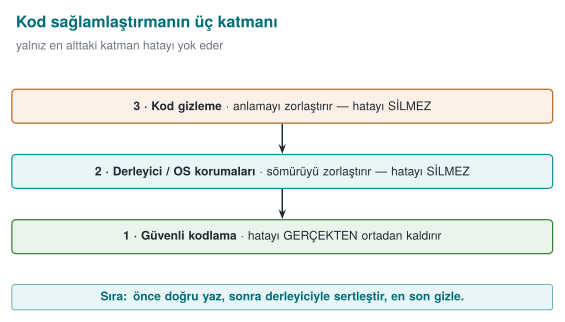
In Week 1 we saw the seven layers of application protection. This week we open up three of them, specifically for C and C++ code:
A brief history: the race between memory bugs and defences
- 1988 — The Morris Worm announces the buffer overflow to the world; the attack class stops being "academic."
- 1996 — Aleph One's article "Smashing the Stack for Fun and Profit" teaches exploitation to everyone.
- 1998 → 2004 — defences arrive in sequence: StackGuard/canary (1998), PaX/ASLR (2001), DEP/NX (2004), FORTIFY.
- 2012 → 2013 — AddressSanitizer and fuzzing (AFL) start catching bugs automatically.
The course follows this race in order: first write the bug, then watch the tool catch it, then add the compiler/OS protection.
| Layer | Question | This week's tools |
|---|---|---|
| 2 · Secure coding | Is there a bug in my code? | SEI CERT rules, bounds and return-value checks, sanitizers, fuzzing |
| 3 · Compiler and operating system protections | If a bug slips through, is it hard to exploit? | Stack canary, _FORTIFY_SOURCE, PIE/ASLR, DEP/NX, RELRO, CFI |
| 4 · Code obfuscation | Can someone examining the code understand its logic and secrets? | Symbol and string hiding, removing logging, constant transformations, control-flow flattening |
Code hardening is applying these three layers together. The order matters: first bug-free code, then protections that limit the damage if a bug still slips through, and finally obfuscation that makes the code harder to read. Let's repeat the warning from Week 1: obfuscation does not fix the bug. An obfuscated overflow is still an overflow.
How it's done in the field
Card scheme mobile payment requirements explicitly ask for these layers: "common programming vulnerabilities (management of sensitive data in memory, injection, buffer overflow, and language-specific weaknesses) must be addressed," "defensive programming techniques must be applied consistently across the entire codebase," and the application "must be protected against static and dynamic reverse engineering." A certified library's guide lists eighteen separate hardening measures for the native (C/C++) side alone. By the end of this week you will recognise most of these measures.
Why this order? What happens if we reverse the stack?¶
To see that the order (first 2, then 3, finally 4) is not arbitrary, let's try reversing it:
- Obfuscation first, without fixing the bug: if a program with flattened control flow and encrypted strings still has a buffer overflow, the overflow still works. The attacker doesn't even need to reverse-engineer it to find the overflow; fuzzing from the outside is enough (this week's Section 11). Obfuscation does not make the bug invisible, it only makes reading the code harder — but a working exploit can be found without reading the code.
- Protections first, without fixing the code: with the stack protector on, a program with an overflow still has the overflow; the program now crashes instead of silently corrupting memory (
*** stack smashing detected ***). This is a gain (control flow cannot be hijacked), but it is still a denial of service — an attacker can crash the program repeatedly and make the service unavailable. The canary does not fix the bug, it only changes its outcome. - Secure coding first: if the bug is never there to begin with, neither obfuscation nor a protection needs to step in. This is why layer 2 always comes first; layer 3 is a safety net in case a bug slips through; layer 4 is a final addition that makes the attacker's job more expensive.
These three do not replace each other. This is Week 1's defence-in-depth principle applied to C/C++ code: each layer exists to catch what the previous one missed.
2. SEI CERT C/C++: the rulebook for secure coding¶
Saying "this line looks dangerous to me" in a code review is not enough — you need to give the evaluator a concrete rule ID and a rationale. So where do these rules come from, who writes them, and why do they all look the same? That is this section's topic.
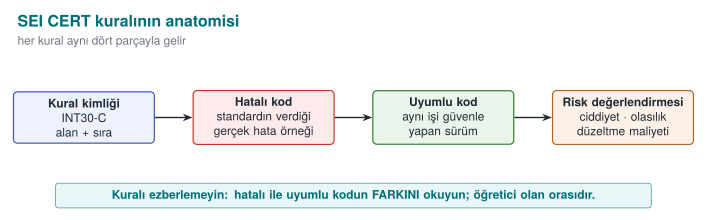
The CERT division of Carnegie Mellon University's Software Engineering Institute (SEI) publishes secure coding standards for C, C++, and Java. These standards collect hundreds of rules — distilled from real vulnerabilities — into a single format, and are one of the core documents certification labs consult during source code review. Think of it less like reading a guidebook and more like a dictionary: every rule, just like a dictionary entry, is written in the exact same fixed shape (ID, statement, example, fix) — so an evaluator browsing thousands of rules finds the same structure every time.
Anatomy of a rule¶
Every rule is written in the same structure:
| Section | Content |
|---|---|
| Identifier | Category abbreviation + number + language: STR31-C, MEM50-CPP |
| Title | A one-sentence summary of the rule |
| Noncompliant example | Realistic code that violates the rule |
| Compliant solution | Code that does the same job correctly |
| Risk assessment | Severity × likelihood × cost to fix → priority (L1, L2, L3) |
| Related rules | Mapping to CWE and other standards |
A rule is distinct from a recommendation: violating a rule can directly lead to a vulnerability and can be checked by automated tools, whereas recommendations describe good practice. Rules with priority L1 are the ones that are serious, common, and cheap to fix all at once; a code review starts here.
Categories¶
| Abbreviation | Category | Example rule |
|---|---|---|
PRE | Preprocessor | PRE31-C: avoid side effects in macro arguments |
DCL | Declarations | DCL30-C: declare objects with appropriate storage durations |
EXP | Expressions | EXP33-C: do not read uninitialized memory |
INT | Integers | INT30-C: ensure unsigned integer operations do not wrap; INT32-C: do not allow signed integer overflow |
ARR | Arrays | ARR30-C: do not form or use out-of-bounds pointers |
STR | Strings | STR31-C: guarantee sufficient space for the string and its terminator |
MEM | Memory management | MEM30-C: do not access freed memory |
FIO | File I/O | FIO30-C: exclude user input from format strings |
ENV | Environment | ENV33-C: do not call system() |
SIG | Signals | SIG30-C: call only asynchronous-safe functions within signal handlers |
ERR | Error handling | ERR33-C: detect and handle standard library errors |
CON | Concurrency | CON43-C: do not allow data races in multithreaded code |
MSC | Miscellaneous | MSC32-C: seed pseudorandom number generators correctly |
POS / WIN | POSIX / Windows | POS36-C: correct order for dropping privileges |
The C++ standard (with the -CPP suffix) inherits most of the C rules and adds language-specific ones: MEM50-CPP (do not access freed memory), CTR50-CPP (container indices and iterators must stay within the valid range), STR50-CPP (sufficient space for a string), EXP53-CPP (do not read uninitialized memory), ERR50-CPP (do not abruptly terminate the program).
Ten rules linking Week 1 to this week¶
| Rule | Summary | Where did we see it? |
|---|---|---|
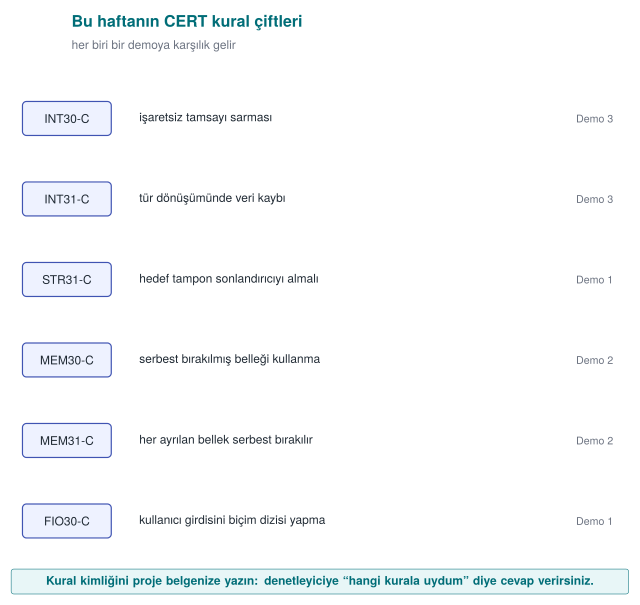
| STR31-C | Sufficient space for a string | Week 1 Demo 3 |
| INT31-C | Integer conversions must not lose data | Week 1 Demo 4 |
| MSC06-C | Beware of compiler optimisation deleting security code | Week 1 Demo 2 |
| ENV33-C | Do not call system() | Week 1 Demo 1 |
| FIO30-C | Exclude user input from format strings | This week Demo 1 |
| MEM30-C | Do not access freed memory | This week Demo 2 |
| MEM31-C | Free dynamic memory once you are done with it | This week Demo 2 |
| INT32-C | Do not allow signed integer overflow | This week Demo 3 |
| ERR33-C | Detect library errors | This week Section 8 |
| SIG30-C | Only safe functions within a signal handler | This week Section 8 |
Worked example: quantifying a finding with a rule id¶
Let's learn to read a rule not as "good advice" but as a measurable risk. Take the following loop, which violates MEM31-C ("free dynamic memory once you are done with it"):
void handle_request(const char *data)
{
    char *buffer = malloc(64);          /* a NEW block on every call */
    if (!buffer) return;
    snprintf(buffer, 64, "%s", data);
    process(buffer);
    /* free(buffer) MISSING: the pointer is lost when the function returns, the block is never freed */
}
Let's not leave this abstract — let's count:
Memory leaked per call        : 64 bytes
Server requests per second    : 200 req/s   (example load)
Leak rate                     : 200 * 64 bytes = 12,800 bytes/s ≈ 12.5 KB/s
Accumulation in 1 hour        : 12,800 * 3600 ≈ 46,080,000 bytes ≈ 43.9 MB/hour
Accumulation in 24 hours      : 43.9 MB * 24 ≈ 1,053.6 MB ≈ 1.03 GB/day
64 bytes alone looks harmless; but it accumulates on a long-running server and, over days, exhausts memory and crashes the program (CWE-401, resource leak). This calculation turns into a concrete, prioritizable sentence in a code review report — "MEM31-C violation, handle_request(), ~44 MB/hour leak, fix: add free(buffer) at the end of the function" — which is far more powerful than saying "I think memory management is missing here."
Common mistake: dismissing a small leak as unimportant
Thinking "64 bytes, no big deal" and deferring the leak turns into a cumulative denial of service in long-running services (servers, background processes, embedded devices). The same leak might be harmless in a short-lived command-line tool (the operating system reclaims the memory once the process ends); lifetime is the factor that actually determines how serious a leak is.
Rule
For every malloc/new there must be exactly one matching free/delete in the code, and every path between the two (an early return, a goto, a thrown exception) must not break this pairing (MEM31-C, MEM12-CPP). If in doubt, run the function under ASan — LeakSanitizer counts leaks directly for you (Section 10).
Auditing rules automatically
Some CERT rules can be checked automatically with compiler warnings and static analysis tools: GCC/Clang -Wall -Wextra -Wformat=2 -Wconversion, clang-tidy's cert-* checks, cppcheck --addon=cert, MSVC /analyze, and commercial tools. Automated auditing is a starting point; only human review finds logic errors and design flaws.
How does an evaluator test this?
In a source code review, the evaluator first runs a static analysis tool with the CERT rule set and sorts the findings by priority. They then read every function that takes external data (network, file, IPC, JNI interface) by hand: are length fields validated, are return values checked, is memory managed by a single owner? Findings are written into the report with their rule id: "FIO30-C violation: gunluk.c:42."
3. Input validation principles (Recipe 3.1)¶
Almost all of this week's bugs come from the same root: trusting a value that enters the program from the outside. Chapter 3 of the textbook treats input validation as the foundation for every other measure. The principles in Recipe 3.1 still hold today; let's turn them into a daily checklist for a C/C++ programmer.
Where does input come from?¶
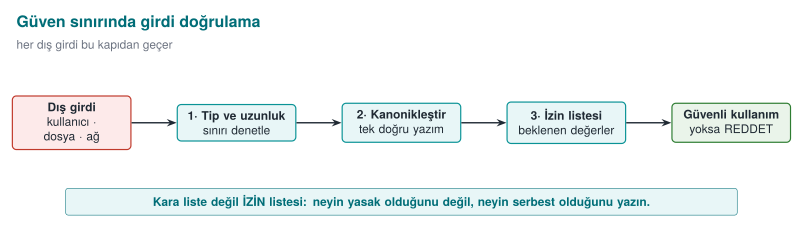
"User input" makes us think of a keyboard; but everything that crosses a trust boundary is input:
| Source | Example | Commonly forgotten point |
|---|---|---|
| Command line | argv | Even argv[0] can be a value the attacker chose |
| Environment variables | PATH, HOME, LANG | Week 1's secure startup |
| Files | Configuration, document, image | Length fields inside the file format |
| Network | Protocol message, HTTP header | The client can say "this message is 16 bytes" and send 1 byte |
| Inter-process communication | Socket, named pipe, shared memory | Another process on the same machine is untrusted too |
| Database | Previously stored data | "Data we wrote ourselves" may have been modified since |
| Library interface | JNI, plugin API | The calling application is treated as untrusted too |
Five principles¶
- Allow-list, not deny-list. Define what is permitted ("only digits, at most 6 of them"); don't try to enumerate what is forbidden. A deny-list always forgets something.
- Canonicalize first, then validate. The same value can have more than one spelling (
/tmp/../etc,%2e%2e/, upper/lower case, Unicode forms). Validation must be performed on the value's single, canonical form (Recipes 3.7, 3.8, 3.12). - Length, type, range, format — in that order. First bound the length (prevents a buffer overflow), then check its type (is it a number?), then its range (0–100?), then its format (is it a date?).
- Validate as early as possible, at the trust boundary. Data is validated the moment it comes in and then travels around already validated; every function no longer has to repeat the same check.
- Rejecting is safer than fixing. Reject invalid input instead of "cleaning it up" and using it anyway. Cleanup code has bugs too; worse, the cleaned-up value can end up meaning something different from what the user intended.
Reading a number correctly: strtol instead of atoi¶
The smallest but most frequently mishandled example of input validation is reading a number:
int count = atoi(argv[1]); /* "abc" → 0, "99999999999" → undefined, "12abc" → 12 */
#include <errno.h>
#include <limits.h>
#include <stdlib.h>

/* 0 on success; -1 if invalid or out of range */
int read_number(const char *s, long min_val, long max_val, long *result)
{
    char *end;
    errno = 0;
    long value = strtol(s, &end, 10);
    if (end == s)              return -1;   /* no digits at all */
    if (*end != '\0')          return -1;   /* trailing junk character: "12abc" */
    if (errno == ERANGE)       return -1;   /* did not fit in a long */
    if (value < min_val || value > max_val) return -1;  /* business-rule range */
    *result = value;
    return 0;
}
All four checks are necessary, and each one closes off a real class of bug: empty input, input with trailing junk, overflow, and business-rule violation. CERT asks for this pattern via the ERR34-C rule ("detect errors when converting a string to a number").
Binary data: length-prefixed records¶
In network protocols and file formats, data is usually laid out as [type][length][data]. From Heartbleed all the way to this week's fuzzing demo, the source of many bugs is trusting the length field:
/* buffer: incoming data, remaining: bytes remaining in the buffer */
int read_record(const uint8_t *buffer, size_t remaining, Record *rec)
{
    if (remaining < 3) return -1;                        /* not even a header */
    rec->type = buffer[0];
    uint16_t length = (uint16_t)(buffer[1] << 8 | buffer[2]);
    if (length > remaining - 3) return -1;               /* declared > received: REJECT */
    if (length > sizeof rec->data) return -1;             /* doesn't fit the destination: REJECT */
    memcpy(rec->data, buffer + 3, length);
    rec->length = length;
    return 3 + length;                                    /* bytes consumed */
}
The two checks are different from each other and both are necessary: one protects the source (is there really this much data in the incoming buffer?), the other protects the destination (does this much data fit in the buffer?). The expression remaining - 3 does not wrap, thanks to the earlier remaining < 3 check; the order of the checks matters too.
Worked example: tracing read_record byte by byte¶
Let's not leave the function above abstract; let's trace it line by line with real bytes. Suppose remaining = 8 bytes arrive from the network and the contents are as follows (hex, then meaning):
| Offset | Byte (hex) | Meaning |
|---|---|---|
| 0 | 01 | type field = 1 |
| 1 | 00 | high byte of the length |
| 2 | 05 | low byte of the length |
| 3–7 | 48 45 4C 4C 4F | "HELLO" (5 bytes of data) |
The function processes the following steps in order:
1) is remaining < 3?            8 < 3  → NO, continue.
2) rec->type = buffer[0]        = 0x01
3) length = buffer[1]<<8 | buffer[2]
            = (0x00 << 8) | 0x05
            = 0x0000 | 0x0005
            = 5
4) is length > remaining - 3?  remaining - 3 = 8 - 3 = 5;  5 > 5  → NO, continue.
5) is length > sizeof(rec->data)?  (if rec->data is 64 bytes) 5 > 64 → NO, continue.
6) memcpy(rec->data, buffer+3, 5)  → rec->data = "HELLO"
7) return 3 + length = 3 + 5 = 8   (bytes consumed; the WHOLE of remaining, consistent)
Now let's trace an input where the attacker has changed only the length field, leaving the rest of the data untouched (remaining is still 8, but the declared length is now much larger than the real data):
| Offset | Byte | Meaning |
|---|---|---|
| 0 | 01 | type = 1 |
| 1 | FF | high byte of the length |
| 2 | FF | low byte of the length |
| 3–7 | 48 45 4C 4C 4F | still 5 bytes of real data |
1) is remaining < 3?            8 < 3 → NO, continue.
2) rec->type = buffer[0]        = 0x01
3) length = buffer[1]<<8 | buffer[2]
            = (0xFF << 8) | 0xFF
            = 0xFF00 | 0x00FF
            = 0xFFFF = 65,535
4) is length > remaining - 3?  65,535 > 5  → YES → REJECT, the function returns -1.
   (memcpy is NEVER reached)
The check kicks in at exactly this point: buffer really has only 5 bytes of data, but the field says "65,535 bytes are coming." Without the check, step 4 would be skipped, memcpy(rec->data, buffer+3, 65535) would be called, and the read would go far beyond the bounds of the buffer array — this is CWE-125 (out-of-bounds read), and exactly the bug this week's Demo 4 finds with fuzzing. Even making length a uint16_t is not enough by itself: a 16-bit field can carry at most 65,535, but that can still be far larger than the actual amount of data (remaining - 3); real safety comes not from the field width but from the comparison.
Common mistake: making a length field uint16_t/uint32_t and assuming it 'fits'
A field's data type bounds the largest value it can hold; it does not guarantee that the incoming data really has that many bytes. A uint16_t length holds at most 65,535, but the buffer may still contain only a handful of real bytes. The type choice is not something you can relax about; the actual validation is the comparison (step 4).
Rule
Always compare a declared length field against the number of bytes that actually arrived (remaining) and against the destination buffer's size (sizeof rec->data); if either one falls short, the data is rejected — it is never truncated or "fixed up" with a default value (principle 5, above).
How it's done in the field
The first item in payment libraries' defensive programming requirements is "every input and output of the application must be validated." A library does not trust the application calling it either: every string and array coming through a JNI interface is re-validated on the native side for length and format. If validation fails, the function returns "failure" without giving details.
4. Example pairs from CERT rules¶
The most instructive part of the CERT standard is the noncompliant / compliant code pair it gives for every rule. Below we work through five rules that touch this week's topics, using our own examples. For each pair, try to spot the bug first, then read the explanation.
STR31-C: sufficient space for a string and its terminator¶
char copy[16];
int n = snprintf(copy, sizeof copy, "%s", name);
if (n < 0 || (size_t)n >= sizeof copy) {
    /* truncated: don't use it, or return an error */
}
snprintf's return value is the number of characters that would have been written had there been room; if it is equal to or greater than the buffer size, the output has been truncated. A truncated path or command can mean something different.
Numerical check: the string name = "Mehmet Ali Kaya Demir" is 21 characters long (including spaces, excluding the \0). char copy[16] can hold only 15 characters plus the \0 terminator (16 bytes = 15 + 1). When snprintf(copy, 16, "%s", name) is called:
Actual length to write (n)       : 21
Buffer size (sizeof copy)        : 16
n >= sizeof copy ?               : 21 >= 16 → YES → TRUNCATED
What actually ends up in copy    : "Mehmet Ali Kaya" (first 15 characters) + '\0'
Had strcpy been used, there would have been no check at all, and the 21-character string would be copied into the 16-byte buffer with no bounds checking, overflowing the neighbouring memory by 5 bytes (21 − 16). snprintf prevents the overflow; but silently truncating is itself a bug — if a user named "Mehmet Ali Kaya Demir" is stored in the system as "Mehmet Ali Kaya," two different users could end up with the same truncated name. This is why the check in the compliant solution, if (n < 0 || (size_t)n >= sizeof copy), is mandatory: the truncation must be noticed and either rejected or handled by allocating a larger buffer.
INT30-C: unsigned operations must not wrap¶
size_t remaining = total - read_count;   /* a gigantic number if read_count > total */
memcpy(dest, src + read_count, remaining);
Unsigned subtraction cannot go below zero, it wraps: 3 - 5 produces SIZE_MAX - 1. The order is checked before the subtraction.
Numerical check (on a 64-bit system, where size_t is 8 bytes): unsigned arithmetic works modulo 2⁶⁴ (the result is taken "mod," i.e., the remainder after dividing by 2⁶⁴).
The real mathematical result : -2
Its modular equivalent       : -2 + 2^64 = 2^64 - 2
2^64                          : 18,446,744,073,709,551,616
2^64 - 2                      : 18,446,744,073,709,551,614   ← "remaining" becomes this gigantic number
SIZE_MAX (2^64 - 1)           : 18,446,744,073,709,551,615
Comparison                    : 2^64 - 2 = SIZE_MAX - 1  ✓ (matches the claim in the text exactly)
If this remaining value is passed to memcpy(dest, src + read_count, remaining), the function is asked to copy about 18.4 quadrillion gigabytes; since memory cannot possibly be that large, the processor keeps reading past the region pointed to by src until it hits an unmapped page and the program crashes with a segmentation fault (or, if it reaches a mapped but foreign region, leaks information instead). On a 32-bit system (size_t 4 bytes) the same calculation gives 2³² − 2 = 4,294,967,294 — smaller, but still many times larger than the buffer's real size; the outcome is the same.
MEM30-C: do not access freed memory¶
for (Node *n = head; n != NULL; n = n->next)
    free(n);                              /* n->next is read AFTER the free */
Node *n = head;
while (n != NULL) {
    Node *next = n->next;                 /* read it first */
    free(n);
    n = next;
}
Deleting a linked list is one of the most innocent-looking places where UAF shows up: the for loop's increment expression reads the field of a node that has already been freed inside the loop body.
EXP33-C: do not read uninitialized memory¶
int result;
if (condition) result = compute();
return result;                            /* a random value if condition is false */
int result = ERROR_CODE;                  /* safe default */
if (condition) result = compute();
return result;
An uninitialized local variable carries whatever value used to sit at that stack location — which could even be a secret belonging to a previous function. For security purposes, the default value should mean "no permission" or "error" (Week 1's secure-default principle).
ERR33-C: detect library errors¶
FILE *f = fopen(path, "rb");
fread(buffer, 1, sizeof buffer, f);       /* f == NULL if fopen fails */
FILE *f = fopen(path, "rb");
if (f == NULL) return ERROR;
size_t n = fread(buffer, 1, sizeof buffer, f);
if (n < sizeof buffer && ferror(f)) { fclose(f); return ERROR; }
fclose(f);
When fread returns a short read, feof/ferror must be used to tell whether that was end-of-file or an error. Treating a partially read structure as fully read is just another form of reading uninitialized memory.
Thinking in terms of rule ids
Try to match every bug you find in a code review to a CERT rule. This both makes the finding objective ("a STR31-C violation" instead of "I think this would be better this way") and makes it easier to search for the same rule being violated elsewhere in the codebase.
5. Format string vulnerability (Recipe 3.2)¶
Picture a web server's log line: printf(the_username_the_user_typed) may have run fine for years — users normally type ordinary names. Then one day someone types %x%x%x%x into the username field. What happens? The program doesn't crash, doesn't even print an error; the screen fills with meaningless hexadecimal numbers. What are those numbers really the value of, and why did the program print them at all? That is exactly this section's question.
Brief history: format string vulnerabilities
Format string vulnerabilities became widely recognized in 1999–2000 through real vulnerabilities in widely used software such as wu-ftpd, a popular FTP server: attackers could feed user data into logging calls that used it as a format string, leaking information or even achieving remote code execution. These incidents taught the security community that a "harmless-looking" marker like %n is actually a write primitive, and led compilers to respond with warnings like -Wformat-security and libraries with runtime checks like _FORTIFY_SOURCE (part of the defense race we saw in §1).
The first argument to the printf family is a format string: markers inside it such as %d, %s, %x tell the function "take an argument of this type off the stack and print it in this format." The function does not know how many arguments were actually passed; it does whatever the format string says. If the format string comes from the user, the user has effectively given the function a command — like telling a waiter "relay this note to the kitchen" versus opening the kitchen door for the customer and saying "shout whatever you want."
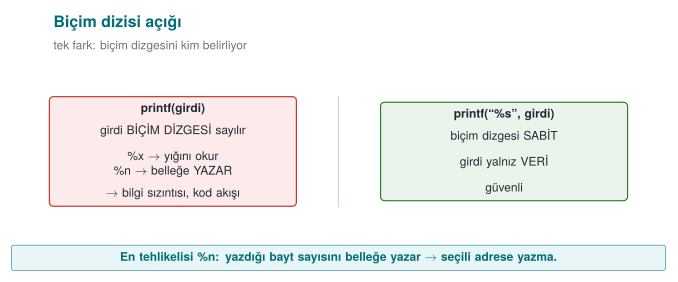
printf(user_input);                  /* WRONG: the input is interpreted as the format string */
printf("%s", user_input);            /* CORRECT: the input is only data */
Why is it dangerous?¶
| Marker | Normally | If the attacker supplies it |
|---|---|---|
%x, %p | Prints an argument in hexadecimal | Instead of missing arguments, values from the stack are read: information leak |
%s | Prints the string a pointer points to | A random value on the stack is taken as a pointer: crash or memory read |
%n | Writes the number of characters printed so far to a pointer | Writes to the address held by a value on the stack: memory corruption |
How harmful this is depends on the platform and the protections in place; but even the mildest outcome is an information leak: a key sitting on the stack, an address (which weakens ASLR), or a canary value could be read. The same bug shows up in syslog, fprintf, snprintf, err/warn, and every function that takes a format string; in Week 2 we saw this exact syslog(LOG_INFO, user_input) bug in an audit log.
Worked example: what does %x read from the stack? Step by step¶
Let's recall how printf works: when printf(bicim, arg1, arg2, ...) is called, the function assumes it is expecting as many arguments as there are % markers in the bicim string. Where it actually reads those arguments from depends on the calling convention (ABI) the compiler generates. For teaching purposes, let's first follow the classic, simple model (all arguments on the stack), then add today's 64-bit difference.
1) Simplified model — all arguments sit consecutively on the stack
In leak.c the call is printf(buffer) — only 1 real argument (the format string itself) is passed, no other value is given. If the user writes "%x.%x.%x.%x.%x.%x" into buffer, printf sees 6 %x markers in the format string and proceeds on the assumption "6 more arguments are coming." But in reality none were sent. The only thing printf can do is well-defined: for each %x, look at "the position where the next argument should be" and print the bytes found there as if they were a number, in hexadecimal. In this simple model, those positions are the stack cells directly above the call — that is, the region holding main()'s own local variables:
volatile unsigned secret_value = 0x5ECE7u;   /* the function's local variable #1 */
char buffer[64];                            /* the function's local variable #2, holds the user's input */
These two variables sit next to each other in the same stack frame (the exact order and any gap between them can vary with the compiler and flags; what matters is that both are in the same frame, close together). When printf(buffer) is called, the format string itself is already inside buffer — meaning the place being read and the format string doing the reading are in the same memory region. If enough %x markers are supplied, the scan sooner or later reaches the 4-byte cell where secret_value sits:
1. %x  → the value at argument position #1  (e.g. a random byte left over from an earlier call)
2. %x  → the value at argument position #2  (random)
3. %x  → the value at argument position #3  (random)
   ...
N. %x  → argument position #N lands exactly on the cell holding secret_value
         → printf reads these 4 bytes as an unsigned int and prints it in hex
         → WHAT APPEARS ON SCREEN: "5ece7"
The demo program verifies this independently: the code first prints secret_value to the screen deliberately, via printf("...0x%05x...", secret_value) (as a control); then, when leak '%x.%x.%x...' is run, the same 5ece7 value is seen reappearing in the output of the %x scan. The two outputs matching is proof that the leaked value really is secret_value — not a random number, but a value read from the program's own memory.
2) The 64-bit difference — why the first few %x markers behave differently
The "everything's on the stack" model above is exactly correct for the x86 32-bit calling convention (cdecl), and it is the classic teaching model for format string attacks. On today's 64-bit Linux/Windows builds, however, the x86-64 System V ABI carries the first 6 integer/pointer arguments in processor registers (RSI, RDX, RCX, R8, R9 — RDI is reserved for the format string itself) instead of the stack; only arguments beyond the sixth go on the stack. The result: in a printf(buffer) call, the first few %x markers do not read a stack cell at all — they read whatever values happen by chance to be sitting in those registers at that moment (left over from earlier calls, e.g., snprintf, or printf's own setup); only the %x markers after the 6th one reach the stack, and therefore the region where secret_value also lives. This is exactly why the demo script gradually increases the number of %x markers (step 2): how many %x markers are needed varies with the compiler, the optimisation level, and the platform; the mechanism is what the student needs to see, not a specific fixed number.
3) Why %n is more dangerous
%x only reads; %n says "write the number of characters printed so far to the address that the pointer given to me points at" — that is, it is a write operation. In the model above, %n also reads "the next argument position" as a value, just like %x; but this time it treats that value not as a number but as an address (a pointer), and writes to that address. Since no argument was ever actually given, this "address" is also whatever happens to be sitting on the stack/in a register at that moment — usually an invalid address, and the program crashes. But because the attacker writes the format string themselves, they can also place byte sequences of their own choosing inside the string; by first mapping, with %x, which position corresponds to which data, and then arranging for %n to land exactly on that position, they can fill the cell that will be read as an "address" with a value they supplied themselves. This turns %n from merely a crash source into a tool for writing a chosen value to a chosen location in memory (CWE-134). This course does not go beyond this into a working exploitation step — understanding the mechanism is enough to understand the defence (fixing the format string).
Common mistake: assuming 'the input has no % in it, so it's fine'
Looking at a code review and thinking "this input is just a username, no one's going to type %n," and approving the printf(input) call anyway, is the most common thing to miss. Validation must look at the shape of the call, not the content of the input: a variable string must never be placed in the format parameter position — what the input contains is irrelevant.
Rule
The rule is one sentence, with no exceptions: the format string must always be a fixed text literal; user data may only appear as the argument of a marker such as %s. printf("%s", input) — never printf(input).
This mechanism is a concrete example of the "violation of memory read/write bounds" family of bugs we saw in Week 1: %x performs an out-of-bounds read, %n performs an out-of-bounds write — the difference is that what crosses the bound is not an array index but the number of markers in the format string. It comes from the same root as the injection attacks we will see in Week 5: data has taken the place of a command — in SQL injection the data becomes part of a query, here the data is interpreted as a formatting command.
Demo 1 — Format string vulnerability¶
Demo 1 · code/week-04/01-format-string · CWE-134 · Recipe 3.2
The leak program prints the text it is given with printf(buffer); a synthetic "secret value" sits in the program's memory. First we check whether the compiler warns about this line, then we show the secret value leaking via %x markers and how %n is stopped on different platforms. In the last step, the fixed version prints the same input only as text.
| Step | What is done? | What is seen? | Lesson |
|---|---|---|---|
| 0 | Build | GCC/Clang -Wformat-security warns; MSVC's C compiler stays silent, /analyze catches it | Turn on warnings and count them as errors |
| 1 | leak Hello | Normal output | — |
| 2 | leak '%x.%x.%x…' | The stack is dumped in hex; the secret value appears in the output | Information leak |
| 3 | leak 'AAAA%n' | On Linux the unprotected version crashes; on Windows the C runtime rejects %n | Platform difference |
| 4 | leak_checked 'AAAA%n' | _FORTIFY_SOURCE catches %n targeting writable memory and stops the program | Protection layer |
| 5 | leak_secure '…%n…' | Markers are printed only as text | The actual fix |
Watch the animation below to follow, step by step, how %x scans the argument slots on the stack in order, where it reaches the secret value, and what %n would do next (conceptually).
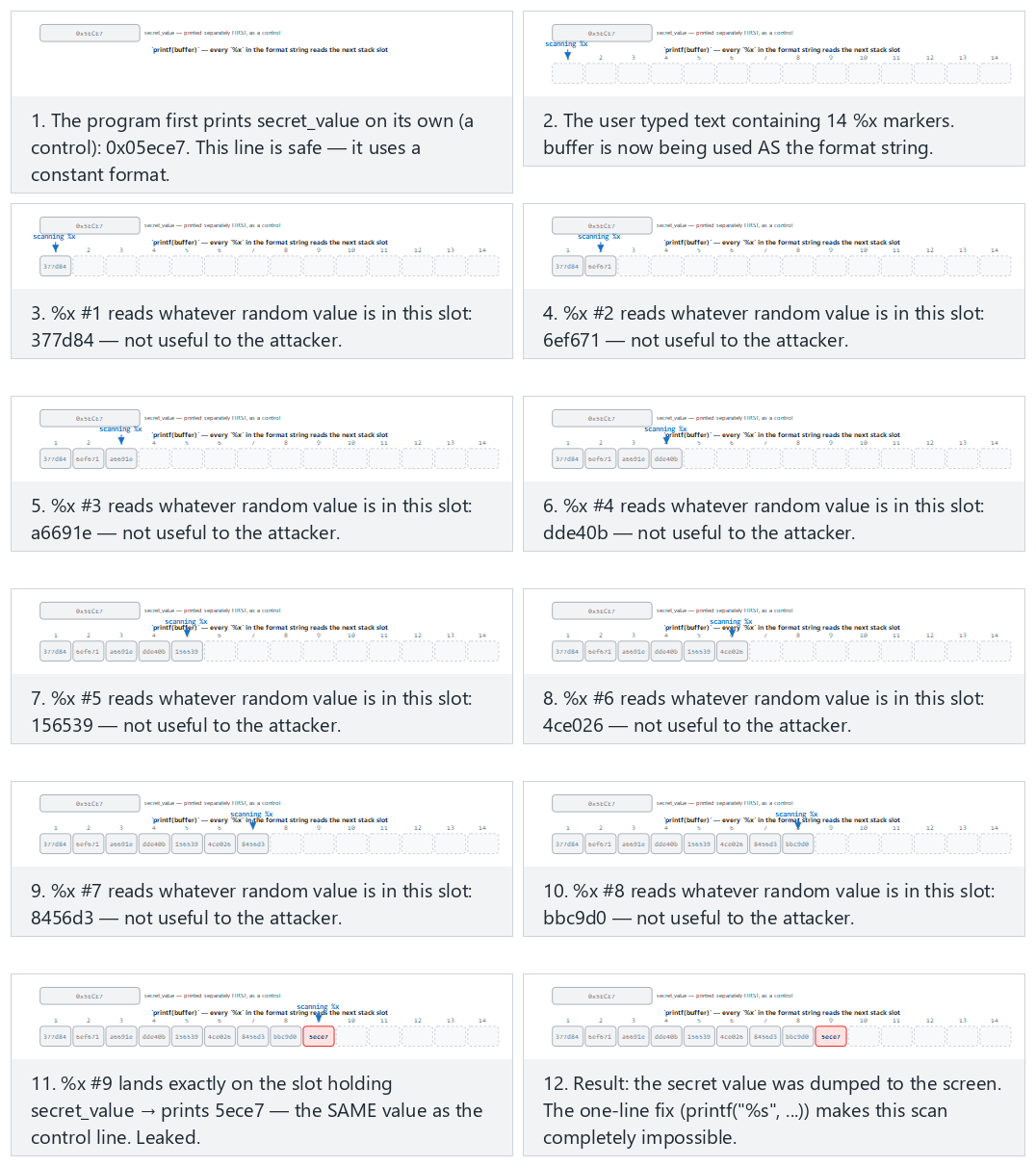
Try the presets found (normal), leak on the very last marker (hard), and the edge cases not enough markers, what %n would do, and the secure version — or roll 🎲 for a random marker-count/target-position pair, or type your own values.
The fix and its layers of defence¶
- The format string must always be constant (FIO30-C). User data is only an argument:
printf("%s", s). - Compiler warnings:
-Wformat -Wformat-security(even-Werror=format-security) on GCC/Clang;/analyzeon MSVC. Add__attribute__((format(printf, 1, 2)))to your ownprintf-like functions so the compiler checks them too. - Runtime protection: in glibc,
_FORTIFY_SOURCE=2rejects%nin format strings that live in writable memory; Microsoft's C runtime disables%nby default. - Validate the number of variadic arguments (Recipe 13.4): if you write your own variadic function, take the argument count or type from an explicit parameter, not from the format string.
#if defined(__GNUC__)
#  define FORMAT_CHECK(a, b) __attribute__((format(printf, a, b)))
#else
#  define FORMAT_CHECK(a, b)
#endif

void log_write(int level, const char *format, ...) FORMAT_CHECK(2, 3);

log_write(1, user);                /* the compiler now warns here */
log_write(1, "%s", user);          /* correct */
How does an evaluator test this?
They search the source code for every call that takes a variable as its format string argument (printf(, syslog(, snprintf(buf, n, followed by a non-constant argument). In dynamic testing they feed every text field inputs like %x%x%x%n and look for hexadecimal values, a crash, or corruption in the log.
6. Use-after-free and double free¶
Picture a hotel room: you checked out, but you didn't return the key card — you just kept it in your pocket. The hotel cleaned the room and gave it to another guest. Your key card still opens the door — but what's behind it is no longer your belongings, it's the new guest's. Programming has the same problem: a pointer (the key card) can still be held even after the memory (the room) is "returned" via free() (a dangling pointer); once the memory manager hands that empty room to the next requester, the old key still works, but it now points at someone else's data.
Week 1, §17 gave us, at a basic level, the theory of memory management bugs, the ownership rule, and why use-after-free is dangerous. In this section we trace the same bug byte by byte in a running program and see how C++ eliminates most of these bugs by design.
Why is this still a live topic?
Use-after-free is a different family of memory bug from the classic stack overflow of the 1988 Morris Worm we saw in §1, but it comes from the same root (manual memory management). It has remained one of the most common bug classes in the security-update notes of major browser engines (Chrome, Firefox, Safari) for years; that's why projects like Chrome now enforce policies pushing toward C++ tools like unique_ptr/shared_ptr and toward memory-safe languages (Rust) — exactly why the "encoding ownership in the type" idea below matters.
The three steps of the bug¶
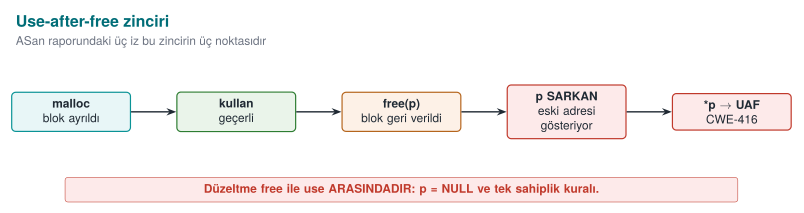
- An object is allocated on the heap and more than one pointer points to it.
- The object is
freed somewhere, but at least one of the pointers still holds the old address (a dangling pointer). - The memory manager gives the same block to another object; the dangling pointer now reads or modifies that other object's data.
If there is a function pointer inside the object (C's imitation of a "virtual function," or a virtual table pointer in C++), the danger grows: the program may interpret bytes written for an entirely different purpose as "the address of the function to call." A significant fraction of "memory corruption fixed" notes in browser and operating system updates fall into this class.
Worked example: reallocating the same block, step by step¶
Let's trace Demo 2's struct session byte by byte:
struct session {
    void (*action)(void);   /* a function pointer on a 64-bit system: 8 bytes */
    char  role[16];          /* 16 bytes */
};
Size calculation: on a 64-bit system a pointer is 8 bytes. 8 (action) + 16 (role) = 24 bytes; since 24 is already a multiple of 8, the compiler does not need to add any padding bytes — sizeof(struct session) == 24. The memory layout, in terms of offset:
| Offset (bytes) | Field | Size |
|---|---|---|
| 0–7 | action (function pointer) | 8 bytes |
| 8–23 | role (string) | 16 bytes |
Now let's trace the real uaf.c's mode_uaf() function step by step (the line numbers are the file's real lines):
1) s = malloc(sizeof *s)              -- uaf.c:32
   The memory manager finds a free 24-byte block and hands it back, say, at address A.
   s → A

2) s->action = normal_panel           -- uaf.c:34  → A+0..7  = the address of normal_panel
   strcpy(s->role, "user")            -- uaf.c:35  → A+8..12 = 'u','s','e','r','\0'  (A+13..23 old/random bytes)

3) free(s)                            -- uaf.c:38
   The memory manager marks the block at address A as "free." Many memory managers (e.g.
   glibc's tcache) write a "next free block" pointer INSIDE THE FREE BLOCK ITSELF so they can
   hand it straight back to the NEXT request of the same size — the freed memory changes
   SILENTLY. The `s` variable still points to A (the compiler never resets it) → DANGLING POINTER.

4) fake = malloc(sizeof *s)           -- uaf.c:43
   24 bytes are requested from the memory manager again. Because the block just freed at A is an EXACT SIZE
   MATCH, most allocators (LIFO / "last in, first out" free-list order) hand back that SAME ADDRESS A.
   fake → A     (s still → A: BOTH NOW POINT AT THE SAME BLOCK)

5) fake->action = admin_panel         -- uaf.c:44  → A+0..7  = the address of admin_panel  (OVERWRITES the old value)
   strcpy(fake->role, "admin")        -- uaf.c:45  → A+8..13 = 'a','d','m','i','n','\0'

6) printf(..., s->role)               -- uaf.c:49
   s still points to A; the byte sequence read at A+8 is now "admin" (written by fake in step 5).
   s's own data looks unchanged, but the physical memory HAS CHANGED → on runs where the allocator DID
   hand back address A, "admin" is read instead of "user" (see the warning below — this is not guaranteed).

7) s->action()                        -- uaf.c:51
   The pointer read from A+0..7 is now the address of admin_panel (overwritten in step 5) — again, only
   if the allocator handed back A. The program may call admin_panel() instead of normal_panel().
Result: the s pointer was never modified even once (it still holds the same A address); but because the memory it points to was reused by another object, everything read through s is now that new object's data. This is a concrete violation of the ownership theory (Week 1): s and fake have behaved as two different owners of the same block, whereas a block should belong to exactly one owner at any given time (MEM30-C).
Why step 6-7's outcome can change from run to run
Steps 6 and 7 above assume the allocator's malloc after free(s) really does hand back the same address A — common with LIFO free-list allocators (like glibc's tcache), but not something the C standard guarantees. Depending on the compiler/library version, fake might land at a different address; in that case s->role still reads "user" and s->action() still calls normal_panel. Either way, the read is still access to freed memory through a dangling pointer (undefined behavior) — the outcome "looking harmless" does not make it safe. ASan catches this every time, regardless of outcome (see the report below).
Common mistake: not resetting p after free(p)
The free(s) call only tells the memory manager "you can reclaim this block"; it does not modify the s variable itself — s still holds the old address. Code that accidentally writes s->... on the next line no longer knows whose memory it is touching.
Rule
Write p = NULL; immediately after free(p) (or, in C++, use a smart pointer and let the compiler take care of this step). Accessing memory through a nulled pointer crashes immediately instead of silently reaching the wrong data — the bug surfaces early and loudly, making it easy to spot.
Demo 2 — Use-after-free and double free¶
Demo 2 · code/week-04/02-use-after-free · CWE-416, CWE-415 · CERT MEM30-C, MEM31-C
In the program, a "session" object held on the heap (a user role and a function pointer) is freed but the pointer is not reset. A new block, allocated afterward at the same size, then takes the old session's place, and the dangling pointer reads this new data: the role changes, and the function pointer calls the program's own admin panel. No code is injected from outside; the whole operation stays within the program's own memory.
| Step | Target | What is seen? | Lesson |
|---|---|---|---|
| 1 | uaf uaf (unprotected) | 1) Session opened: role=user then 2) Session freed; step 3-4's outcome depends on the allocator (see the warning above) | UAF = undefined behavior, sometimes privilege escalation |
| 2 | uaf_asan uaf | ASan reports heap-use-after-free (or access-violation on Windows); it shows where the block was allocated, freed, and used | The sanitizer catches the bug regardless of outcome |
| 3 | uaf double (unprotected) | Double free; the memory manager either notices the corruption and halts, or undefined behaviour follows | The allocator's internal structures are corrupted |
| 4 | uaf_asan double | ASan reports attempting double-free | — |
| 5 | uaf_secure | free + NULL, single owner, single free point | Both bugs are gone |
Watch the animation below to follow, step by step, how a small heap works, how a block goes onto the free list after free, and how the next malloc hands it back (or how the free list gets corrupted on a double-free).
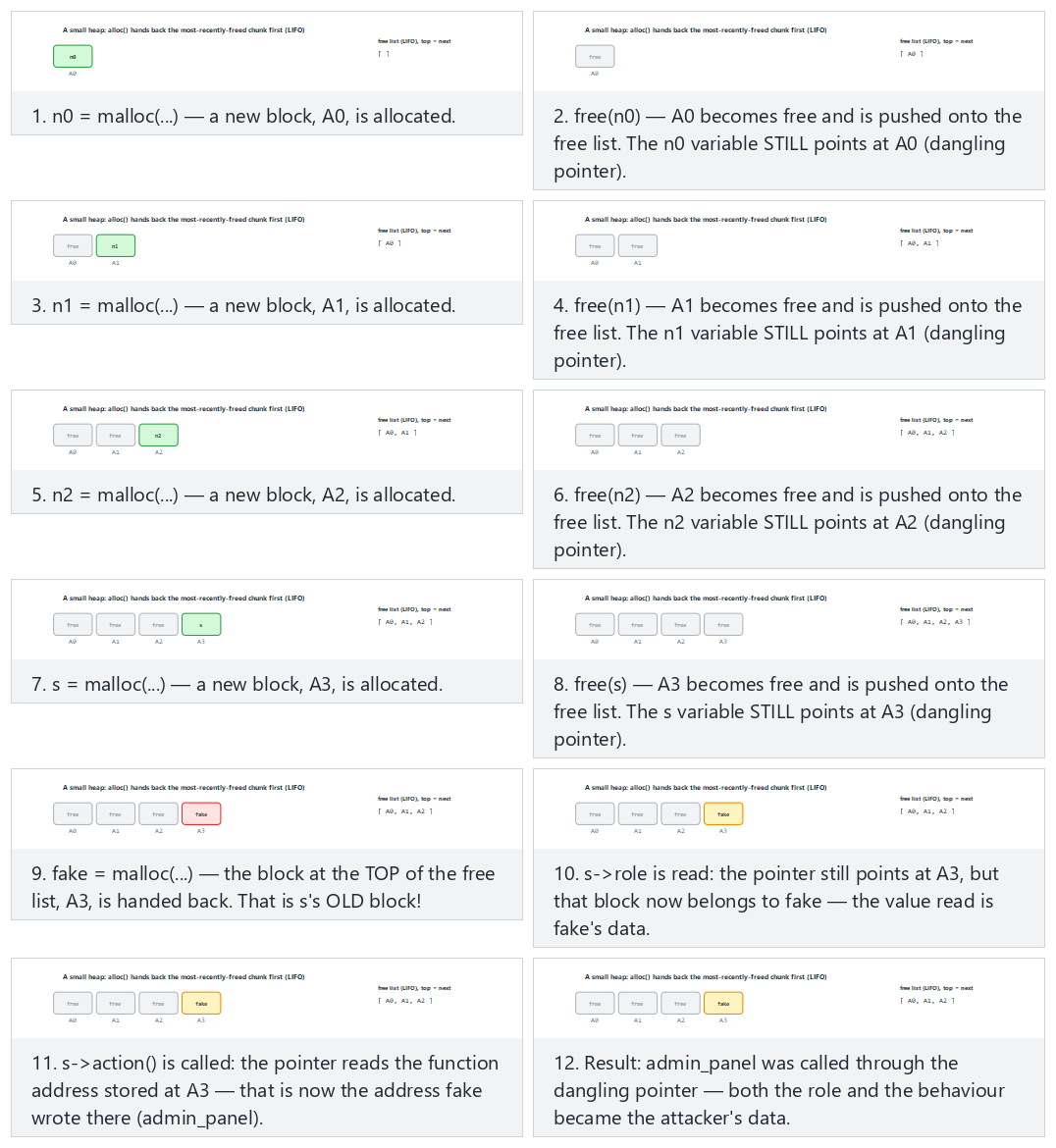
Try the presets normal UAF (3 noise pairs), hard (5 noise pairs), the edge cases the bare mechanism (no noise) and double-free — or roll 🎲 for a random operation sequence.
Reading an ASan report: three stack traces¶
In a UAF report, ASan gives three locations; all three are needed to fix the bug. The real uaf.c does the allocation, the free, and the use all inside the same mode_uaf() function, so all three traces name that one function, at different lines:
ERROR: AddressSanitizer: heap-use-after-free on address 0x6020000000f0
READ of size 8 ...
    #0 in mode_uaf  uaf.c:49        <- 1. USE: where the bug was observed (reading s->role)
freed by thread T0 here:
    #0 in free
    #1 in mode_uaf  uaf.c:38        <- 2. FREE: ownership ended here (free(s))
previously allocated by thread T0 here:
    #0 in malloc
    #1 in mode_uaf  uaf.c:32        <- 3. ALLOCATION: where the object was born (s = malloc(...))
The fix is most often at location 2: the code that frees the object made an ownership decision that the other pointers were never told about. (The address 0x6020000000f0 is from one example run; the real address changes every run under ASLR, but the line numbers are fixed by uaf.c itself.)
C++: encoding ownership in the type¶
In C, ownership is a contract; in C++ it can be made part of the type:
| Need | C | C++ |
|---|---|---|
| Single owner | Documentation + discipline | std::unique_ptr<T>: not copyable, only movable; frees in its destructor |
| Shared ownership | Reference count (by hand) | std::shared_ptr<T>: frees when the last owner goes away |
| Observation without ownership | Raw pointer | std::weak_ptr<T>: if the object is gone, lock() returns empty, never dangling |
| Array | malloc + size | std::vector<T>, std::array<T,N> |
#include <memory>

struct Session { std::string role; };

std::shared_ptr<Session> active = std::make_shared<Session>(Session{"user"});
std::weak_ptr<Session>   cached = active;      // NOT an owner, only an observer

active.reset();                                // the session ended, the object was destroyed

if (auto s = cached.lock()) {                  // is the object still alive?
    use(*s);
} else {
    /* the object is gone: a dangling pointer never reaches OLD memory */
}
Smart pointers don't solve everything
A raw pointer obtained with unique_ptr::get() still dangles once the owner is gone. If std::vector's capacity grows when an element is added, every pointer and iterator taken into its elements is invalidated (CERT CTR51-CPP). The rule is the same: a borrowed pointer must not outlive its owner.
7. Integers and undefined behaviour (Recipe 3.5)¶
A simple question: if you have INT_MAX (2,147,483,647, the largest value an int can hold) and add 1 to it, what happens? Intuition says "maybe it stays stuck at the maximum" or "maybe it raises an error." What actually happens according to the C standard is: anything can happen — the compiler ASSUMES this situation never occurs and generates code accordingly. This section's topic is C's most surprising, least understood concept: undefined behaviour (UB).
In Week 1 we saw a signed length turn into a huge number when converted to size_t. In this section we cover the whole family of integer bugs in depth.
Intuition: why is 'undefined' so dangerous?
An ordinary bug (e.g. division by zero) usually gives a predictable result (a crash, an infinite value). Undefined behaviour is different: the standard gives no guarantee at all, so the compiler is free to assume that code path never runs and reorganize the surrounding code accordingly — an overflow that looks "harmless" with today's compiler can behave completely differently with tomorrow's compiler version (or even just a different optimization level). SEI CERT C's INT rule family and UBSan (§10) exist precisely to eliminate this unpredictability.
Four integer bugs¶
| Bug | Example | Result | CERT |
|---|---|---|---|
| Unsigned wraparound | unsigned n = 0; n - 1 → 4,294,967,295 | Well-defined (modular arithmetic) but usually a logic error | INT30-C |
| Signed overflow | INT_MAX + 1 | Undefined behaviour | INT32-C |
| Conversion loss | int → short, long long → int, signed ↔ unsigned | Value is truncated or its sign changes | INT31-C |
| Shift error | 1 << 31 (int), x << 32 | Undefined behaviour | INT34-C |
Integer bugs often look harmless on their own; their danger shows up when they get mixed into a size calculation:
uint32_t count = read_input();                 /* attacker: 0x40000001 */
uint32_t size = count * sizeof(uint32_t);    /* 0x40000001 * 4 = 4 (wrapped!) */
uint32_t *array = malloc(size);              /* a 4-byte block */
for (uint32_t i = 0; i < count; i++)
    array[i] = read_value();                          /* heap overflow */
Numerical check: 0x40000001 in hexadecimal is 1,073,741,825 in decimal. sizeof(uint32_t) is always 4 (uint32_t = 32 bits = 4 bytes, by definition).
Real product (as if there were no 32-bit limit) : 1,073,741,825 * 4 = 4,294,967,300
Largest value a uint32_t can hold               : 2^32 - 1 = 4,294,967,295
Does 4,294,967,300 fit?                          : NO (overflows by 5 bytes: 4,294,967,300 - 4,294,967,295 = 5)
Wrapping to 32 bits (mod 2^32)                   : 4,294,967,300 mod 4,294,967,296 = 4
→ value STORED in the size variable             : 4  (bytes!)
The malloc(4) call allocates only a 4-byte block (one uint32_t). But the loop runs array[i] = read_value(); count (1,073,741,825) times — each writing 4 bytes, attempting to write a total of 1,073,741,825 * 4 = 4,294,967,300 bytes (≈ 4 GB), even though the allocated block is only 4 bytes. Starting with the very first assignment (array[1]), a heap overflow begins, corrupting neighbouring memory structures (the allocator's own bookkeeping data, other objects).
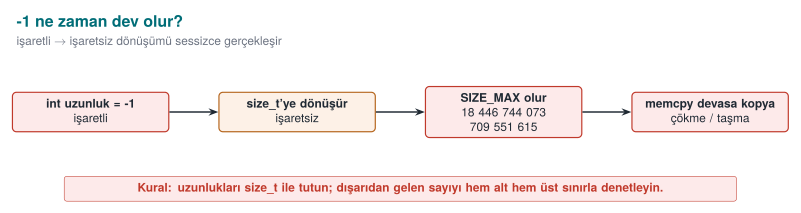
Worked example: (int)-1 converted to a size_t¶
This is the most common and most dangerous form of INT31-C: a function returns a signed -1 on error, and the caller unknowingly stores it in an unsigned variable.
int compute_length(const char *s) { /* returns -1 on error */ return is_valid(s) ? (int)strlen(s) : -1; }

int n = compute_length(input);
size_t size = n;                 /* if n == -1: CONVERTED, UNCHECKED */
memcpy(dest, src, size);     /* size is now a gigantic number */
The conversion happens in two conceptual steps (the C standard's rule for converting signed to unsigned):
Step 1 — the bit pattern of -1 as a 32-bit int (two's complement representation):
    -1  (int, 32 bit)  =  0xFFFFFFFF   (all 32 bits '1')

Step 2 — when assigned to a size_t (8 bytes = 64 bits on a 64-bit system), the value is
         interpreted mathematically by the rule "add 2^N until it falls inside the target type's range":
    -1 + 2^64 = 2^64 - 1

Step 3 — 2^64 - 1 numerically:
    2^64        = 18,446,744,073,709,551,616
    2^64 - 1    = 18,446,744,073,709,551,615   = SIZE_MAX (on a 64-bit system)

Result: size = 18,446,744,073,709,551,615   (approximately 18.4 QUADRILLION gigabytes)
If memcpy(dest, src, size) is called with this value, the processor tries to read this many bytes starting at the src address; since real physical/virtual memory is nowhere near that large, the read almost immediately hits an unmapped page and the program crashes with a segmentation fault — often misdiagnosed as "crashed somewhere random," when the cause is actually completely determinable. On a 32-bit system (size_t 4 bytes) the same calculation gives 2^32 − 1 = 4,294,967,295 (≈4.3 billion); smaller, but still a number that is many times larger than any real buffer's size.
Common mistake: keeping an 'error code -1' and a 'size' in the same variable family
If a function's contract is "returns -1 on error, otherwise the length," and its return value is assigned directly to a size_t/unsigned variable, it silently turns into a huge number. -Wsign-conversion (GCC/Clang) or /w44365 (MSVC) warns exactly on this line; turning that warning into an error with -Werror (Section 0, "Warning vs error") catches this entire class of bug at compile time.
Rule
An error code must always be checked in its own signed type, before it is assigned to an unsigned variable: int n = compute_length(s); if (n < 0) { /* error */ } size_t size = (size_t)n; — the conversion happens only after n has been proven non-negative.
Boundary values at a glance¶
Let's collect, in one table, the boundary values that keep coming up in this week's examples; every row is a direct input to a calculation somewhere in this section:
| Type | Smallest value | Largest value |
|---|---|---|
int8_t | −128 | 127 |
uint8_t | 0 | 255 |
int16_t | −32,768 | 32,767 |
uint16_t | 0 | 65,535 |
int32_t (int, typical) | −2,147,483,648 | 2,147,483,647 (INT_MAX) |
uint32_t | 0 | 4,294,967,295 |
int64_t | −9,223,372,036,854,775,808 | 9,223,372,036,854,775,807 |
uint64_t / size_t (64-bit) | 0 | 18,446,744,073,709,551,615 (SIZE_MAX) |
Don't memorize the rule, compute it: an unsigned type of n bits spans 0 to 2ⁿ − 1, and a signed type of n bits (two's complement) spans −2ⁿ⁻¹ to 2ⁿ⁻¹ − 1. Why does INT_MAX + 1 jump to INT_MIN? Because the two are opposite neighbours on the same 32-bit "wheel" — one more than 2³¹ − 1 corresponds, as a bit pattern, to exactly −2³¹ (shown in the box below).
What is undefined behaviour?¶
For certain operations the C standard says "I am not defining what happens in this case": signed integer overflow, out-of-bounds array access, dereferencing a NULL pointer, reading an uninitialized variable, misaligned access, and the like. This does not mean "the program crashes" — it means the compiler is allowed to assume this situation never happens, and optimizes the code accordingly.
int add_and_check(int x)
{
    if (x + 100 < x)          /* intended as "if it overflows, the result gets smaller" */
        return -1;            /* but signed overflow is UB: the compiler MAY DELETE this branch */
    return x + 100;
}
The programmer intended to catch an overflow; but because signed overflow is undefined, the compiler is allowed to reason "x + 100 < x can never be true" and remove the check entirely. The same code "works" at -O0, and the check disappears at -O2. This is another instance of the "the compiler deleted the security code" situation we saw in Week 1's Demo 2.
Why does INT_MAX + 1 jump, bit for bit, to INT_MIN? The proof, bit by bit:
INT_MAX (decimal)         = 2,147,483,647
INT_MAX (bit pattern)     = 0111 1111 1111 1111 1111 1111 1111 1111   (0x7FFFFFFF)

  Adding 1 to the last bit: 0111 1111 1111 1111 1111 1111 1111 1111
                         +                                        1
                         --------------------------------------------
  Overflowed sum (33 bit) = 1000 0000 0000 0000 0000 0000 0000 0000   (0x100000000 — bit 33 overflows and is DROPPED)
  Remaining 32 bits        = 1000 0000 0000 0000 0000 0000 0000 0000   (0x80000000)

Read as unsigned, this bit pattern (0x80000000) is 2,147,483,648; but read as signed (two's
complement), it is a NEGATIVE number because the top bit (the sign bit) is 1, and it is exactly:
  0x80000000 (signed, 32-bit) = -2,147,483,648 = INT_MIN
From the hardware's point of view nothing is "wrong": the processor dropped the 33rd bit and kept the 32 bits exactly as they were; that is what addition hardware always does. The problem is that the C standard declares this situation (signed integer overflow) "undefined," so the compiler is allowed to optimise under the assumption that "this never happens" — even though the hardware silently wraps to INT_MIN, the compiler may assume the overflow never occurred and delete a check that relies on it.
The correct check: before the operation, or with overflow-reporting builtins¶
#include <limits.h>
#include <stdbool.h>

/* 1) Compare against the bound before the operation (portable) */
bool safe_add(int a, int b, int *result)
{
    if ((b > 0 && a > INT_MAX - b) || (b < 0 && a < INT_MIN - b))
        return false;
    *result = a + b;
    return true;
}

/* 2) GCC/Clang builtins: return true if it overflows */
bool safe_multiply(size_t a, size_t b, size_t *result)
{
    return !__builtin_mul_overflow(a, b, result);
}
The C23 standard made the same job portable with ckd_add, ckd_sub, ckd_mul (<stdckdint.h>). On MSVC, functions like SizeTMult and ULongAdd in <intsafe.h> can be used. When allocating memory, calloc(count, size) or reallocarray check the multiplication for overflow on your behalf (Week 1).
Demo 3 — Undefined behaviour and UBSan¶
Demo 3 · code/week-04/03-undefined-behavior · CWE-190, CWE-758 · CERT INT32-C, INT34-C
The program tries three undefined behaviours in turn: signed overflow (INT_MAX + 1), an invalid bit shift, and a misaligned memory access. On an x86 processor most of these "work" silently and produce a wrong result. The version compiled with UndefinedBehaviorSanitizer (UBSan, -fsanitize=undefined) reports each one at runtime with a line number. UBSan exists only on GCC and Clang; on Windows the demo covers MSVC's /RTC and /analyze options and the CERT rules instead.
A UBSan report has the following shape: ub.c:27:15: runtime error: signed integer overflow: 2147483647 + 1 cannot be represented in type 'int'. The type, location, and values of the error are all given on a single line. UBSan's overhead is lower than ASan's; many projects turn both on together in test builds.
Watch the animation below to follow, step by step, how the unchecked addition silently wraps for many add values while x = INT_MAX stays fixed, and how checked_add catches the exact same overflow BEFORE adding.
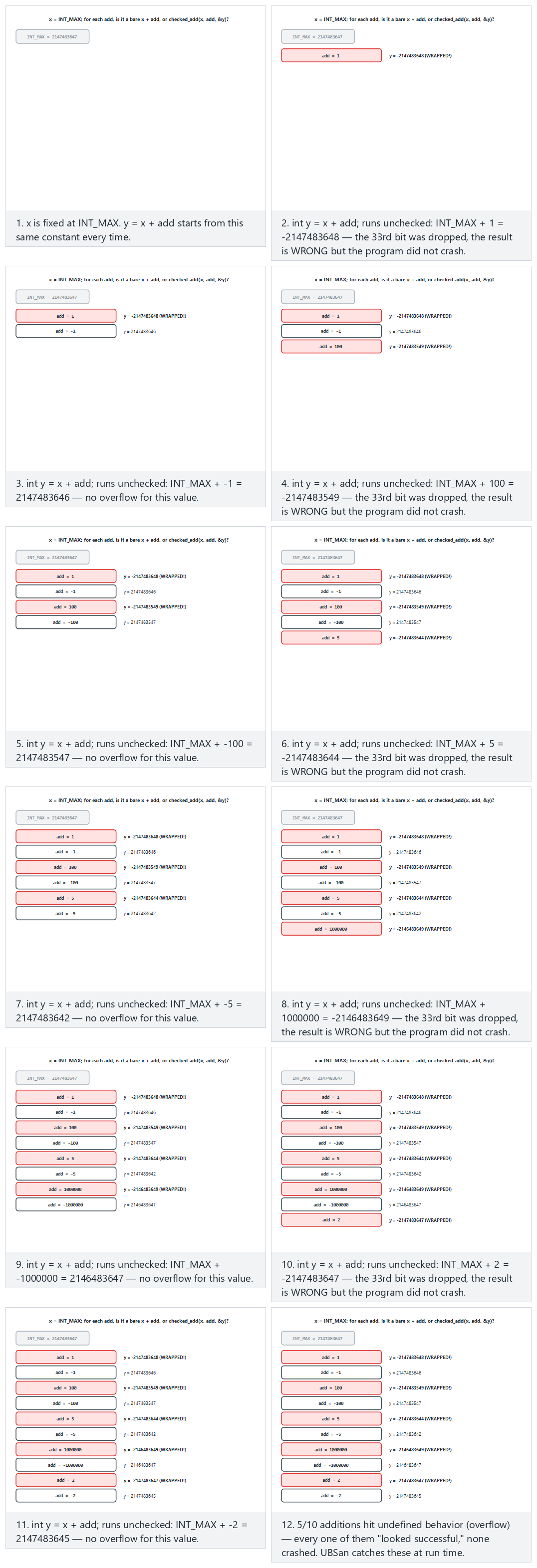
Try the presets mixed sign (normal), extreme values (hard), the edge cases includes zero and the secure version rejects the same mix — or roll 🎲 for a random list of add values.
Compiler options for integer bugs
-Wconversion -Wsign-conversion(GCC/Clang),/W4and/w44365(MSVC, in C++ mode): surface hidden conversions.-ftrapv: halts the program on signed overflow (has a runtime cost, so it is not for the release build).-fwrapv: defines signed overflow as modular arithmetic; this disables UB-based optimisations but hides the logic error.-fsanitize=undefined,integer(Clang): catches most integer bugs in test builds.
8. Error handling, variadic functions, and signals (Recipe 13.1, 13.4, 13.5)¶
Three topics are just as common as memory bugs, yet talked about less — and they are the source of a significant share of real vulnerabilities.
Error handling: checking the return value and failing closed¶
In C, errors are usually reported through a return value, and checking it is left to the programmer. An unchecked error means the program continues on a false assumption:
| Call | On failure | If not checked |
|---|---|---|
malloc | NULL | Writing through a NULL pointer, crash |
setuid / setresuid | -1 | The program stays privileged but believes it has dropped privileges (Week 1) |
fopen | NULL | The next fread crashes, or the operation proceeds with empty data |
RAND_bytes / getrandom | != 1 / -1 | The "random" key is made of zeros (Week 3) |
EVP_DecryptFinal_ex | != 1 | Tampered data is treated as verified (Week 3) |
snprintf | Return ≥ size | The output has been truncated; a path or command can change meaning |
The recommendations in the textbook's Recipe 13.1 still apply today, and combine with Week 3's "fail-closed" principle:
- Check every return value (ERR33-C). If you deliberately won't check a result, discard it explicitly with
(void)so a reviewer can see this was intentional. Add__attribute__((warn_unused_result))to your functions in GCC/Clang, or[[nodiscard]]in C23. - Return to a safe state on error: unwind a half-finished operation, wipe secrets, release resources. In C, the single-exit (
goto temizle) pattern makes this readable. - Don't let error messages give the attacker a hint: a generic message to the user ("operation failed"), the details to a secure log. "User not found" versus "wrong password" as separate messages lets an attacker guess valid usernames.
How it's done in the field
In a sensitive native library, functions do not return a detailed error code; they return only "success"/"failure," and even that opaquely (not a plain 0/1, but a structure that cannot be easily recognised or tampered with). A detailed error code would be a roadmap telling the attacker exactly which check tripped. This choice is a line straight out of Week 1's trade-off log: diagnostics for the support team run through a separate, secure channel instead.
Variadic functions (Recipe 13.4)¶
Functions that take a variable number of arguments, like printf, do not know the number or type of the arguments; they learn it by trusting the caller's word (the format string). If the format string and the actual arguments don't match, the result is undefined:
long long big = 5000000000LL;
printf("%d\n", big);            /* type mismatch: should be %lld */
printf("%s\n");                 /* no argument: a random value is read from the stack */
If you need to write your own variadic function: take the argument count through an explicit parameter, or terminate the list with a sentinel (NULL); pair every va_start/va_end on every path; and if you use a format string, add the format attribute from Section 5. In C++, type-safe templates (std::format, variadic template parameters) are preferred over variadic functions.
Signal handlers (Recipe 13.5)¶
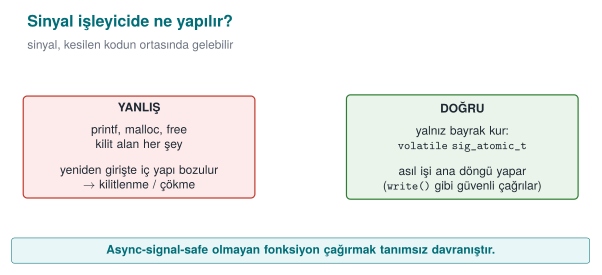
A signal (e.g., SIGINT, SIGTERM, SIGALRM) can arrive at any moment in the program, even in the middle of a malloc call. The handler interrupts whatever code was running at that moment. If functions like malloc, printf, or free are called inside the handler, and the interrupted code was inside the same function, internal data structures get corrupted. This is also the root cause of a real SSH server vulnerability (2024, "regreSSHion," CVE-2024-6387): a timeout signal's handler called a logging function that was not async-signal-safe.
#include <signal.h>

static volatile sig_atomic_t stop = 0;

static void handler(int sig)
{
    (void)sig;
    stop = 1;                   /* only this: async-signal-safe */
}

int main(void)
{
    struct sigaction sa = {0};
    sa.sa_handler = handler;
    sigemptyset(&sa.sa_mask);
    sigaction(SIGTERM, &sa, NULL);

    while (!stop) {
        /* the real work; cleanup and logging happen outside the loop, in normal flow */
    }
    cleanup_and_exit();
}
The rules (SIG30-C, SIG31-C): only async-signal-safe functions (from the POSIX list; e.g., write, _exit) may be called inside a handler; shared variables must be volatile sig_atomic_t; the real work happens in the main loop, not the handler. sigaction() is used instead of signal(), because signal()'s behaviour differs from system to system.
How does an evaluator test this?
In static analysis, they list calls whose return value is unused, paying particular attention to memory allocation, privilege changes, crypto, and I/O calls. They compare error messages to test whether it is possible to tell from the outside which check tripped. They read the contents of signal handlers and look for calls that are not async-signal-safe.
9. Static analysis: finding bugs without running the code¶
Sanitizers and fuzzing find bugs by running the program; static analysis finds them by reading the source code. The two complement each other: static analysis also sees paths that are never executed, but it can produce false alarms; dynamic analysis only sees the paths that actually run, but whatever bug it finds is certain.
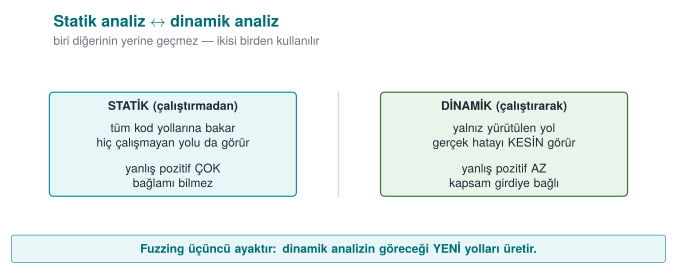
Tools, layer by layer¶
| Level | Tool | What it finds | Cost |
|---|---|---|---|
| Compiler warnings | -Wall -Wextra -Wformat=2 -Wconversion -Wshadow · MSVC /W4 | Suspicious conversions, format strings, unused values | Zero: on every build |
| Compiler analyser | gcc -fanalyzer · clang --analyze · MSVC /analyze | Path-sensitive: NULL access, leaks, double free | Low |
| Rule checker | clang-tidy (cert-*, bugprone-*), cppcheck (--addon=cert) | CERT violations, dangerous APIs | Low |
| Semantic query | CodeQL, Semgrep | Source-to-sink data flow: "does a value from argv reach an unvalidated memcpy?" | Medium |
| Commercial | Coverity, Klocwork, Polyspace | Deep analysis and reporting on large codebases | High |
gcc -fanalyzer -Wall -Wextra -c parser.c
clang-tidy parser.c -checks='-*,cert-*,bugprone-*,clang-analyzer-security*' -- -I.
cppcheck --enable=warning,portability --addon=cert parser.c
Data-flow analysis: source → sink¶
The most valuable kind of static analysis is taint tracking: it asks whether a value coming from an untrusted source (argv, a file, the network) reaches a dangerous sink (a memcpy length, a format string, system, an array index) without being validated. CodeQL and Semgrep can ask this question across an entire codebase:
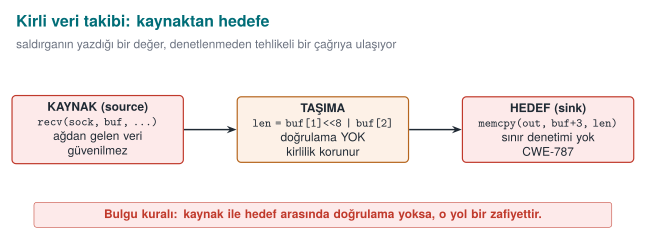
Living with false alarms¶
Static analysis produces false alarms; managing them is also part of the process:
- Start with high-confidence rules first: format strings, dangerous functions, NULL access.
- Every suppression needs a justification:
// NOLINT(cert-err33-c): return value is deliberately ignored, because ...An unjustified suppression hides a future real bug. - Zero warnings in new code: cleaning up every warning in old code in a single day is not realistic; but it is possible to enforce, in continuous integration, that no warnings are introduced into newly added code.
How does an evaluator test this?
Certification source code review usually starts with a static analysis scan; the evaluator also asks the developer for their own scan report. A team that can say "we ran the tool, got this many findings, fixed these, and these are false alarms for this reason" demonstrates a mature process. The evaluator then looks by hand at what the tool cannot see — especially crypto usage and the logic of security checks.
10. Sanitizers: catching bugs at runtime¶
In Week 1 we briefly saw AddressSanitizer for the first time, catching an overflow (Week 1, §14). This week we go deep into the whole sanitizer family, ASan's internal mechanism (shadow memory), and how to read a report line by line.
Brief history: sanitizers
AddressSanitizer (ASan) was developed by Google engineers and published in 2012, both in an academic paper (USENIX ATC) and as an addition to the LLVM/GCC compilers. Before it, tools for catching memory errors at runtime (e.g. Valgrind) were far slower (10–50×); ASan's compiler-embedded design, running at only about 2× slowdown, made it practical to run a sanitizer on every test build by default. UBSan, MSan, and TSan are sibling tools the same team produced in the following years.
A sanitizer is a checking layer the compiler adds to a program: it checks, at runtime, whether every memory access, every integer operation, or every thread access is valid, and gives a detailed report at the first bug. Unlike static analysis it almost never produces false alarms; but it only finds bugs on the code path that is actually run. This is why sanitizers are used together with tests and fuzzing.
| Sanitizer | What it finds | Flag (GCC/Clang) | MSVC | Slowdown |
|---|---|---|---|---|
| AddressSanitizer (ASan) | Overflow (stack, heap, global), UAF, double free, use-after-return | -fsanitize=address | /fsanitize=address | ~2× |
| LeakSanitizer (LSan) | Memory leaks | With ASan (Linux) | — | Low |
| UndefinedBehaviorSanitizer (UBSan) | Signed overflow, invalid shift, NULL access, misaligned access, invalid enum/bool | -fsanitize=undefined | — | Low |
| MemorySanitizer (MSan) | Reading uninitialized memory | -fsanitize=memory (Clang only) | — | ~3× |
| ThreadSanitizer (TSan) | Data races | -fsanitize=thread | — | 5–15× |
How does ASan work? Shadow memory¶
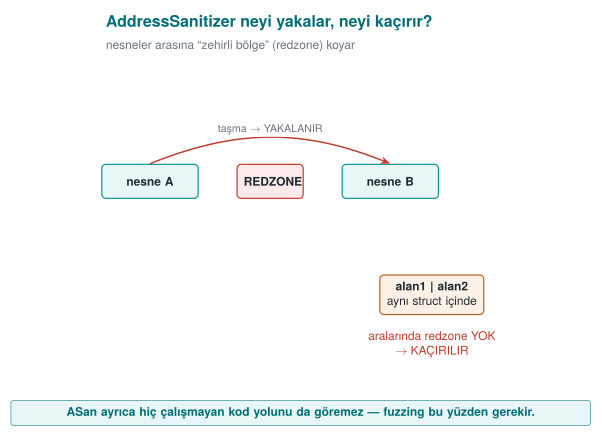
ASan keeps 1 byte of shadow memory for every 8 bytes of the program's memory. The shadow byte says how much of those 8 bytes is valid. Redzones — poisoned regions — are placed before and after every array; freed blocks are not reused immediately, they are held in quarantine for a while and marked poisoned. The compiler adds a few instructions before every memory access to check the shadow byte. An overflow is caught the moment it touches a poisoned region; a UAF is caught the moment it reaches a block still in quarantine.
One consequence of this design is the limitation we saw in Week 1 Demo 3: if an overflow stays inside the same structure (from one field into the neighbouring field), ASan cannot see it, because there is no poisoned region between them.
Practical use¶
# Test build: debug info + frame pointer + two sanitizers
gcc -g -O1 -fno-omit-frame-pointer -fsanitize=address,undefined program.c -o program_test

# To stop at the first UBSan error and get a detailed stack trace
UBSAN_OPTIONS=halt_on_error=1:print_stacktrace=1 ./program_test
ASAN_OPTIONS=detect_leaks=1 ./program_test
Reading a UBSan report line by line¶
When Demo 3's tasma(1) call (INT_MAX + 1) is run in a build compiled with UBSan, it produces a report similar to the one below. Let's read it line by line:
ub.c:24:15: runtime error: signed integer overflow:
            2147483647 + 1 cannot be represented in type 'int'
ub.c:24:15→ which file, which line, which column the error occurred at (line 24, character 15 ofub.c— exactly where thex + ekleexpression sits).runtime error:→ this is not a compile-time error, it is a problem the program caught while running.signed integer overflow:→ the type of error: signed integer overflow (INT32-C).2147483647 + 1 cannot be represented in type 'int'→ the values at the moment the error occurred: the left-hand side (2147483647=INT_MAX), the right-hand side (1), and which type (int) it did not fit into. UBSan gives you these values without you having to compute them; you can use this line to double-check the bit-pattern calculation from Section 7.
The same report format applies to other kinds of UB; only the middle line changes:
ub.c:33:15: runtime error: shift exponent 31 is too large for 32-bit type 'int'
ub.c:43:14: runtime error: load of misaligned address 0x... for type 'int', which requires 4 byte alignment
Let's read an ASan report the same way — what each line says. Demo 5's overflow_hardened target uses /GS (a stack canary), not ASan, as we just saw in §12. But this exact kind of overflow (overflow.c's copy_in) would be reported like this if it were built with ASan (the format is identical to the real ASan output you saw in Demos 1-4):
==12345==ERROR: AddressSanitizer: stack-buffer-overflow on address 0x7ffee...
WRITE of size 1 at 0x7ffee... thread T0
    #0 in strcpy
    #1 in copy_in overflow.c:23          <- WHICH LINE: the write happened here
    #2 in main overflow.c:34
==12345==→ the operating system's process id (PID); it helps tell reports apart when more than one process is running at once.ERROR: AddressSanitizer: stack-buffer-overflow→ the class of the error: this is a stack buffer overflow (not heap) — other classes likeheap-buffer-overfloworheap-use-after-freeare reported in the same format (Demo 4'sparser.cshowed a realheap-buffer-overflow).WRITE of size 1→ the operation was a write (a read would sayREAD), and it was 1 byte wide (strcpycopies 1 character at a time).#0,#1,#2→ the call stack: the error occurred insidestrcpy(#0),strcpywas called from thecopy_infunction (#1,overflow.c:23), andcopy_inwas called frommain(#2,overflow.c:34). In a code review, the line to look at is almost always at position#1—#0is most often library code (strcpy); the real bug is on the caller's side.
Rule
When reading a sanitizer report, first find the error class (the top line), then the caller's line (usually #1), and finally, if present, the values (on the bottom line in UBSan). These three give you all the information you need to fix the bug — you don't even need to try to reproduce it yourself.
A sanitizer build never ships
Sanitizers are slow, consume memory, and open up debugging-oriented interfaces. They must be off in the release build. The correct usage: run tests and a short fuzzing session with a sanitizer build on every merge, in continuous integration (CI).
11. Introduction to fuzzing¶
Fuzzing is running a program with a large number of automatically generated, mostly malformed inputs and looking for inputs that make it crash or that a sanitizer reports as a bug. Fuzzing was not yet widespread when the textbook was written in 2003; today it is a standard security test for every major project, from browsers to operating system kernels. Google's OSS-Fuzz service for open source projects has found tens of thousands of bugs over the years.
Brief history: fuzzing
- 1990 — Barton Miller and his team at the University of Wisconsin publish the first systematic study that fed random (malformed) input to UNIX utilities and measured how many crashed — the academic origin of both the term and the idea of "fuzz testing."
- 2013 — Michal Zalewski's AFL (American Fuzzy Lop) turns coverage-guided feedback into an accessible, easy-to-use tool, moving fuzzing from "research lab" into everyday development practice; it quickly finds a large number of real-world vulnerabilities.
- libFuzzer (part of the LLVM project) turns AFL's coverage-guided approach into a library that runs inside the program's own process (no separate process launch, via the
LLVMFuzzerTestOneInputinterface we see in this week'sfuzz.c), typically used together with ASan — this week's Demo 4 uses exactly this tool.
How does coverage-guided fuzzing work?¶
Modern fuzzers (libFuzzer, AFL++, honggfuzz) don't just generate random input; they measure which code paths the program executes, and keep inputs that open up a new path, mutating them to continue:
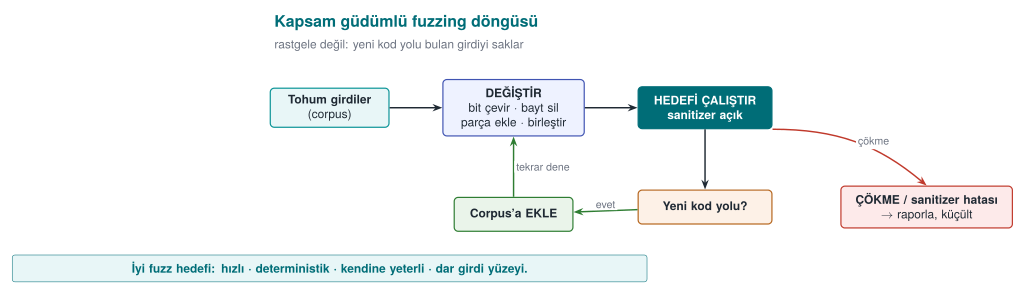
This feedback loop lets the fuzzer discover, on its own, things like a file format's "magic bytes" or the correct value of a length field. When used together with a sanitizer, it also catches cases where the program doesn't crash but does corrupt memory.
Writing a fuzz target (harness)¶
In libFuzzer, you write a single function that calls the code under test. The fuzzer calls this function thousands of times a second, with a different byte sequence each time:
#include <stddef.h>
#include <stdint.h>
#include "parser.h"

int LLVMFuzzerTestOneInput(const uint8_t *data, size_t size)
{
    parse_document((const unsigned char *)data, size);
    return 0;
}
clang -g -O1 -fsanitize=fuzzer,address fuzz.c parser.c -o fuzz_parser
mkdir -p corpus && cp seeds/*.bin corpus/
./fuzz_parser corpus/ -max_total_time=10     # a session capped at 10 seconds
The properties of a good target: it is fast (no network, disk, or sleep), deterministic (the same input always gives the same result), leaves no state behind (every call is independent), and tests one thing (a separate target for every parser).
Demo 4 — Finding bugs with fuzzing¶
Demo 4 · code/week-04/04-fuzzing · CWE-125, CWE-787 · Recipe 3.1
A small parser reads records in the [type][length][data…] format but never compares the length field to the incoming data. libFuzzer, by tracking code coverage, finds a crashing input in at most 10 seconds; ASan reports the bug at the exact location. The fixed parser is then fuzzed for the same amount of time and no bug is produced. Fuzzing is always time-bounded, and output is written only under the demo folder's fuzz-out/.
| Step | What happens? |
|---|---|
| 1 | Normal input (seeds/normal.bin) parses without issue |
| 2 | The buggy parser is fuzzed with libFuzzer; a crashing input is found |
| 3 | The input found is replayed against the ASan build; a full error report |
| 4 | The fixed parser is fuzzed for the same amount of time; no crash |
| 5 | The fixed version safely rejects the seeds/crash.bin file |
First, let's see byte by byte how the parser itself validates its input (or fails to, in the buggy version) — this makes clear WHY what the fuzzer finds is dangerous:
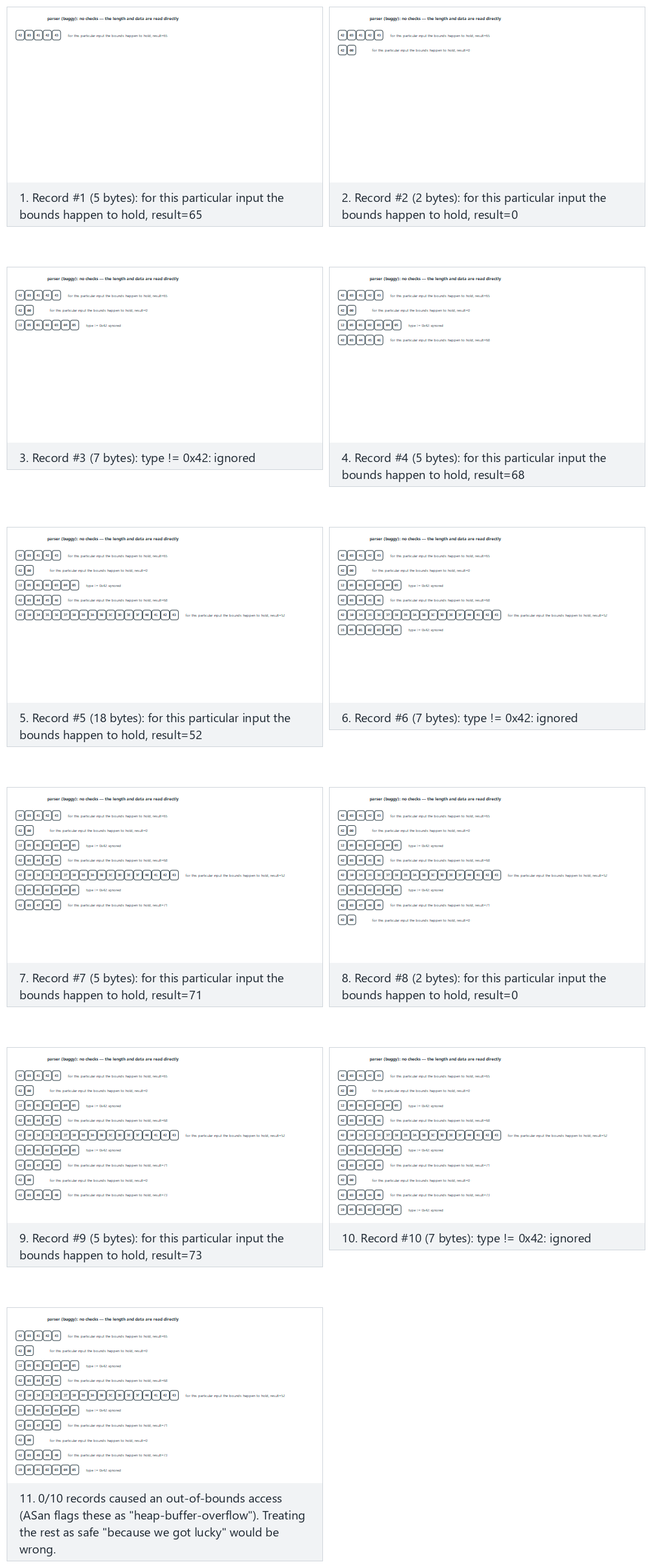
Try the presets 10 well-formed records (normal), mixed (hard), the edge cases all malformed and the secure version handles the same mix — or roll 🎲 for a random record list.
Now let's watch the fuzzer itself — the coverage-guided loop: every candidate is run, its coverage is measured, it is kept if it opened new coverage and discarded otherwise, and the session stops the moment a crash is found.
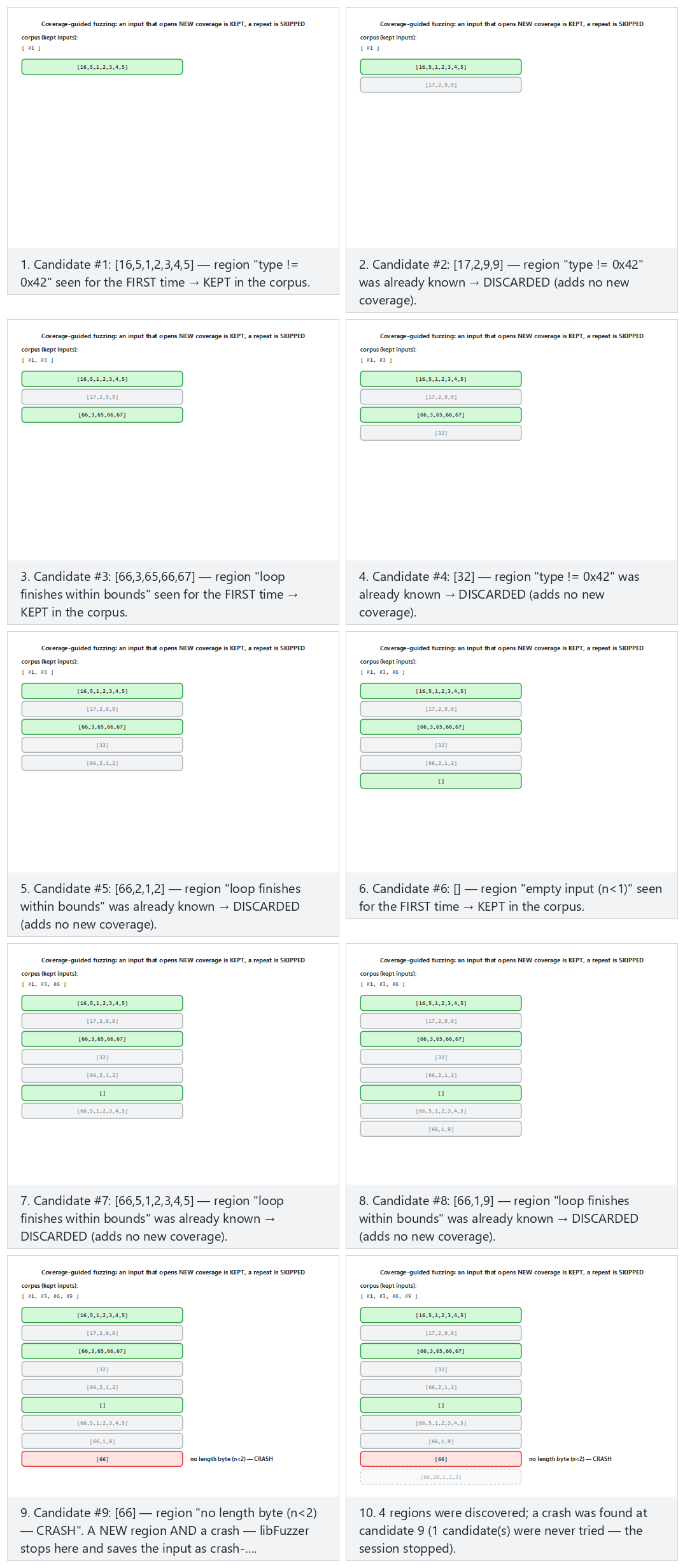
Try the presets normal (crash at candidate 9), hard (a longer session), the edge cases crash on the very first candidate and no crash is ever found — or roll 🎲 for a random candidate list.
If clang is not installed (sudo apt install -y clang on Ubuntu 20.04), CMake skips the libFuzzer targets and the demo shows the bug via the ASan replay build instead. On Windows, libFuzzer runs through Visual Studio's /fsanitize=fuzzer support.
Adding fuzzing to your project
Every function in your project that reads outside data (a file parser, a network message decoder, a configuration reader) is a candidate fuzz target. Adding a line like "this function was fuzzed with a sanitizer for this long, reached this much code coverage, and these bugs were found and fixed" to your security guide's verification section is strong evidence for an evaluator.
Common mistake: running the fuzzer without a sanitizer
A fuzzer only looks for crashes; on a target compiled without a sanitizer, an out-of-bounds read like Section 3's read_record often passes without crashing (if the byte read happens to sit on a mapped page). Fuzzing's value multiplies on a target compiled together with ASan/UBSan: the sanitizer also catches input that doesn't crash the program but does corrupt memory.
Rule
Always compile your fuzz targets with -fsanitize=fuzzer,address,undefined (combine the sanitizers from Section 10 into the same binary as the fuzzer); a target compiled with only -fsanitize=fuzzer misses a significant share of bugs.
12. Compiler and operating system protections¶
Week 1's "Who catches the overflow?" section already gave us a brief list of these protections (Week 1, §14); this week we go through each one's internal mechanism and what it stops and doesn't stop, one at a time. Secure coding prevents bugs; compiler and operating system protections make a bug harder to exploit once one slips through. The textbook mentions only the stack protector among these (StackGuard, ProPolice, MSVC /GS) (Recipe 3.3); ASLR, DEP/NX, RELRO, and control-flow integrity became widespread after the textbook was written.
Brief history: when did each protection arrive?
- 1998 — Crispin Cowan's StackGuard was the first widely used compiler protection to place a "canary" value before the return address and check it on function return; IBM's ProPolice (around 2000) and later GCC/Clang's built-in
-fstack-protectorrefined the same idea. - 2001 — the PaX project brought ASLR (address space layout randomization) to the Linux kernel, plus a software emulation of NX (making data pages non-executable) even on hardware without native support.
- 2003–2004 — OpenBSD's W^X policy (a memory page is either writable or executable, never both, 2003) and Windows XP SP2's DEP (2004, using most modern CPUs' hardware NX bit) carried this protection into mainstream operating systems.
All three waves follow the same pattern: a research/open-source project proves the idea first, then mainstream compilers and operating systems make it the default — concrete milestones of the defense race we saw in §1.
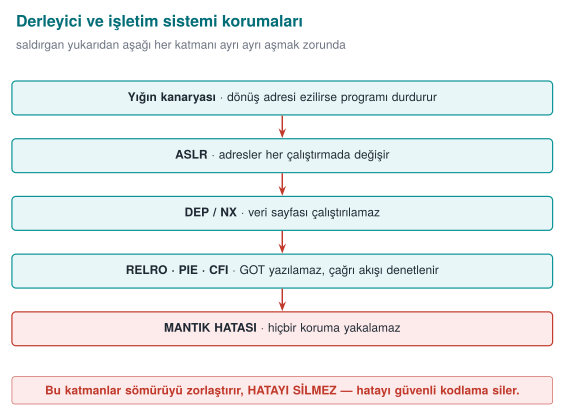
These layers make exploitation harder, they do not erase the bug. The bug itself is only removed by the secure coding covered in Sections 3–8.
Protections and flags¶
| Protection | What it does | GCC/Clang (Linux) | MSVC (Windows) |
|---|---|---|---|
| Stack protector (canary) | Places a random value before the return address; halts the program on return if it has been corrupted | -fstack-protector-strong | /GS (default) |
_FORTIFY_SOURCE | Checks library calls that write into buffers whose size is known at compile time (memcpy, strcpy, sprintf…) | -D_FORTIFY_SOURCE=2 (or 3) + -O1 and above | Secure CRT (_s functions) |
| PIE + ASLR | Changes the addresses of the program and its libraries on every run | -fPIE -pie | /DYNAMICBASE /HIGHENTROPYVA |
| DEP / NX | Forbids executing code on data pages (stack, heap) | Default | /NXCOMPAT (default) |
| RELRO | Makes the dynamic linking tables (GOT) read-only after startup | -Wl,-z,relro,-z,now | — |
| Control-flow integrity | Ensures indirect calls and returns only go to valid targets | -fcf-protection (Intel CET), -fsanitize=cfi (Clang) | /guard:cf (CFG), /CETCOMPAT |
| SafeStack / shadow stack | Keeps return addresses on a separate, protected stack | -fsanitize=safe-stack (Clang), hardware shadow stack | CET shadow stack |
What does each protection stop, and what doesn't it stop?¶
| Protection | Stops | Does not stop |
|---|---|---|
| Canary | A consecutive stack overflow that reaches the return address | Corruption of local variables placed before the canary; heap overflow; a canary read through an information leak |
_FORTIFY_SOURCE | Library calls that write too much into a buffer of known size | Loops you wrote yourself; buffers of unknown size |
| ASLR | Attacks that rely on assuming a fixed address | Cases where an address has been leaked (a format string vulnerability!) |
| NX | Executing code placed into a data region | Attacks that reuse pieces of the program's own code |
| CFI / CFG | An indirect call jumping to an invalid target | Jumping to a wrong-but-valid target among the valid ones; data corruption |
The last column of the table matters: every protection makes an attack technique harder, it does not eliminate a class of bug. Protections complement each other; for example, ASLR is weakened by an information leak, which is why "read-only" bugs like the format string vulnerability are also taken seriously. And no protection stops a logic bug (such as the corruption of a privilege flag in Week 1 Demo 3).
Going through each protection one by one¶
The table above is meant as a summary; each of the six protections works through a different physical mechanism and targets a different class of attack. Substituting one for another (e.g., saying "ASLR is on, we don't need the canary") is a mistake — each one is broken down separately below.
Stack canary — what happens at the memory level?
Take Demo 5's overflow.c: char buffer[64]; strcpy(buffer, input);. When the protection is on (overflow_hardened), the compiler automatically adds an extra region to the stack frame in the following order (addresses from high to low, in the direction the stack grows):
[ return address         ]  ← execution returns here once the function ends (8 bytes, on 64-bit)
[ saved frame pointer    ]  ← the caller's frame pointer (8 bytes)
[ C A N A R Y            ]  ← written on function ENTRY, checked on function EXIT (8 bytes, on 64-bit)
[ buffer[64]             ]  ← where strcpy writes; the OVERFLOW GROWS UPWARD FROM HERE
The code the compiler adds when entering the function copies a random value — generated once by the operating system at process startup (glibc's __stack_chk_guard, usually from /dev/urandom) — into the canary cell. Just before the function returns, a second piece of compiler-added code reads this cell's value again and compares it against the starting value:
Capacity of buffer           : 64 bytes
Length of input              : 80 bytes (+ terminator)
Overflow amount              : 80 - 64 = 16 bytes
First 64 bytes               : fill buffer (as intended)
Next 8 bytes (65-72)         : overwrite the CANARY cell → the canary is CORRUPTED
Remaining byte(s)            : advance toward the saved frame/return address

Check on function return: read_canary == starting_canary ?
   NO → __stack_chk_fail() is called → "*** stack smashing detected ***" → abort()
When the protection is off (overflow_weak), this extra region and comparison don't exist at all; the same 80-byte input is written straight over the saved frame and the return address — the program either "returns" to a random address (usually invalid, so it crashes), or keeps running with memory silently corrupted.
Why isn't it enough on its own? Three concrete limits:
- Variables before the canary are not protected. The compiler tries to place buffers close to the canary, but if a local variable in the same frame sits far from the canary, before the buffer (
-fstack-protectordoes not always reorder every variable), that variable can be affected by an overflow while the canary is never touched and the function returns "normally." - The heap is not protected at all. The canary exists only in stack frames; heap objects such as Demo 2's
malloc-basedstruct sessionhave no such protection. - If the canary itself can be leaked, the protection becomes meaningless. This is one of the most important connections within this week: Section 5's format string vulnerability can read any 8 bytes on the stack with
%x— the canary is one of those eight-byte groups. The attacker first learns the canary's real value through the leak, then crafts the overflow to write that exact value back; the comparison comes out==and the protection never triggers. This link between the canary and the format string vulnerability is a concrete example of the "no single protection is enough on its own" principle (Week 1's defence in depth).
ASLR (Address Space Layout Randomisation) — what does it randomise, and what doesn't it?
ASLR changes the starting addresses of the program's code region, stack, heap, and shared libraries on every run (done by the operating system when the process starts). What it blocks: an attack that relies on the attacker assuming a fixed address — e.g., "I'll write this fixed address as the return address" — since the address is different on every run, a fixed value stops working on the next run. What it does not block: (a) if an information leak (e.g., a format string vulnerability, a pointer accidentally printed to the screen) exposes a real address, the remaining addresses become calculable from it (libraries are usually loaded at fixed offsets relative to each other); (b) on 32-bit systems the address space is small, so the randomness has low "entropy" and can be brute-forced; © it has no effect whatsoever on logic bugs.
DEP / NX (data execution prevention) — what does it block, and what doesn't it?
The processor's memory management unit can mark every memory page as "executable" or "non-executable." DEP/NX makes data pages like the stack and heap non-executable. What it blocks: an attacker writing their own machine code (shellcode) into a buffer and jumping straight to it — such a jump is now rejected by the processor itself. What it does not block: if, instead of writing their own code, the attacker chains together existing pieces (functions, instruction sequences) from the program's already executable own code region (the family of techniques known as ROP/JOP), DEP/NX cannot see this, because no "executing code from a data page" ever happens — this is why an additional layer such as CFI/CFG is needed.
RELRO (Relocation Read-Only) — what does it block, and what doesn't it?
A dynamically linked program keeps the real addresses of the external functions it calls (e.g., printf, malloc) in a table (the GOT — Global Offset Table); this table is normally writable, because some addresses are filled in "lazily," only on their first call. Full RELRO (-z relro -z now) resolves all of the program's external function addresses at startup and then makes this table read-only. What it blocks: using a memory-write bug to change an entry in the GOT table (e.g., the address of free) to an address of the attacker's choosing. What it does not block: corruption in the program's own stack/heap variables; it protects no structure other than the GOT.
PIE (Position-Independent Executable) — a prerequisite for ASLR
PIE means the program's own code (not just its shared libraries) is compiled so that it can run at any address. What it blocks/provides: a program compiled without PIE always has its own code region at the same fixed address — even if ASLR randomizes the libraries, the program's own code remains predictable. PIE closes this gap. What it does not block: PIE alone does not prevent a memory bug; it only extends ASLR's coverage to the program's own code — ASLR without PIE is a "half" protection.
CFI / CFG (Control-Flow Integrity / Guard) — what does it block, and what doesn't it?
When an indirect call is made — through a function pointer, or a C++ virtual function call — CFI/CFG checks at runtime whether "this target is within the set of valid targets determined at compile time." What it blocks: exactly the kind of situation in Section 6's UAF example, where a corrupted function pointer jumps to a completely random or attacker-chosen address — a jump outside the valid target set is detected and the program is halted. What it does not block: the attacker choosing a wrong-but-permitted target among the valid targets (e.g., jumping to another function inside the program that is itself also in the CFI set, which would not be stopped); it also never sees data corruption other than a function pointer (e.g., modifying a privilege flag, as in Week 1 Demo 3).
Common mistake: saying 'ASLR is on, we're safe'
A single protection showing "on" in a protection table does not mean the system is safe. A binary audit in the field asks for all of them together: canary + FORTIFY + PIE/ASLR + NX + RELRO + CFI. If any one is missing, the others can be indirectly bypassed through the path that missing link opens (e.g., without RELRO, an indirect call can be hijacked through the GOT even if ASLR is on).
Rule
Read a protection table with two columns per row, "what it blocks" and "what it does not block" (as in the table above). "This protection is on, therefore we're safe" is a wrong sentence; the correct sentence is "this protection makes this attack technique harder, it still does not stop this class of bug."
Demo 5 — Turning protections on and off¶
Demo 5 · code/week-04/05-compiler-protections · CWE-121 · Recipe 3.3
The same overflow bug is compiled twice: with protections off (overflow_weak) and on (overflow_hardened). When a long input overflows the 64-byte buffer, the canary is corrupted in the hardened version and the program halts safely; in the weak version the overflow silently corrupts memory or the program crashes. Then a script checks the protections in both binaries: readelf on Linux, dumpbin on Windows (no Developer PowerShell needed).
The message seen in the hardened version is proof that the protection worked: on Linux, *** stack smashing detected ***: terminated; on Windows, exit code 0xC0000409 (stack buffer overflow). The program has crashed; but control flow was never hijacked.
Watch the animation below to follow, step by step, how strcpy fills buffer[64] with an overflowing input, reaches the CANARY, then the saved frame pointer and the return address — and how the hardened build's canary catches it.
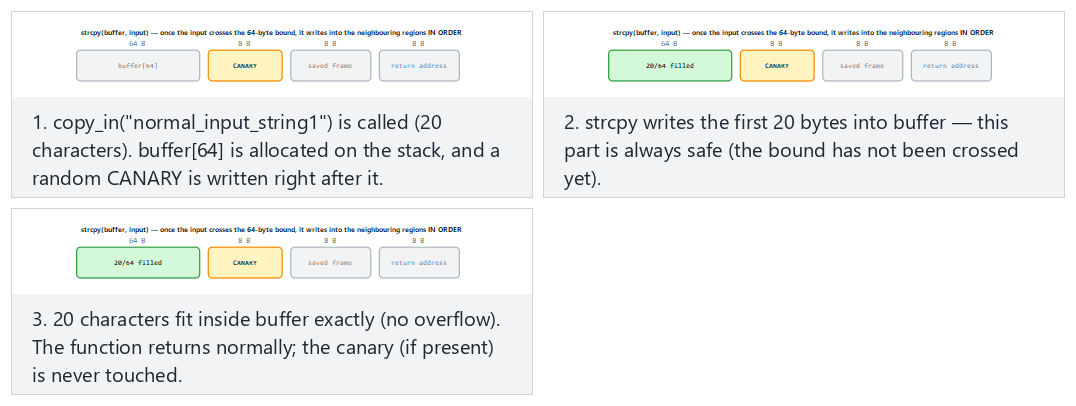
Try the presets fits (no overflow), hardened build catches it (hard), the edge cases weak build has no canary, exactly 64 characters, and reaches all the way to the return address.
Auditing a binary's protections¶
readelf -h prog | grep Type                 # DYN = PIE, EXEC = not PIE
readelf -l prog | grep -A1 GNU_STACK        # RW = NX on, RWE = off
readelf -l prog | grep GNU_RELRO            # is RELRO present?
readelf -d prog | grep BIND_NOW             # full RELRO
readelf -s prog | grep __stack_chk_fail     # canary in use
The checksec script (checksec --file=prog) shows all of these in a single table.
Recommended release flags
GCC/Clang: -O2 -D_FORTIFY_SOURCE=2 -fstack-protector-strong -fPIE -pie -Wl,-z,relro,-z,now -fcf-protection -Wall -Wextra -Wformat=2 -Werror=format-security. MSVC: /O2 /GS /sdl /guard:cf /DYNAMICBASE /HIGHENTROPYVA /NXCOMPAT /CETCOMPAT /W4. In the course demos, most of these flags (canary, FORTIFY, PIE, full RELRO; on Windows /GS, /guard:cf, ASLR, DEP) are turned on for Demo 5's overflow_hardened target; you add them to your own project's CMakeLists.txt yourself. OpenSSF's "Compiler Options Hardening Guide for C and C++" keeps an up-to-date list.
How does an evaluator test this?
They extract the protection table for every binary and shared library that is shipped (checksec, dumpbin, or on mobile, readelf for the .so files inside the APK). A protection that is off is written up as a finding; the justification for it (e.g., performance, legacy platform support) must be in the trade-off log. They also ask whether the application itself checks that the operating system's protections are enabled — this is also one of the card scheme's requirements.
13. Secure build pipeline: bringing it all together in continuous integration¶
Every tool this week gains its value not from being run once by hand, but from running automatically on every change. A security bug most often appears when a small change breaks code that used to be correct. A continuous integration (CI) pipeline is how this kind of regression gets caught.
A sample pipeline¶
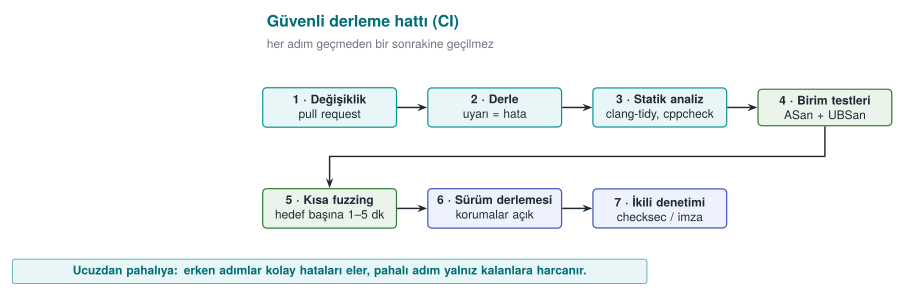
| Stage | Failure criterion |
|---|---|
| Build | A single warning (-Werror / /WX) |
| Static analysis | A new high-severity finding |
| Sanitizer-enabled tests | Any sanitizer report |
| Fuzzing | A new crash; also, inputs found earlier (the corpus) are run every time as a regression test |
| Release build | A protection flag being turned off |
| Binary audit | A logging string or a forbidden constant in strings output; the symbol table not being stripped |
Every input fuzzing finds is a test
A crashing input the fuzzer found is not deleted once the bug is fixed; it is placed into a folder like tests/regresyon/ and run on every build. This way the same bug can never enter the codebase again.
Modes in the course's CMake setup¶
The course's demo infrastructure (code/cmake/cen429.cmake) offers a small model of this pipeline by compiling the same source file in different modes. Note: the modes change the source code and a few flags; most of the release protection flags are only turned on for Demo 5's overflow_hardened target:
| Mode | Purpose | Flags (summary) |
|---|---|---|
korumasiz | Show the bug "bare" | Optimisation off (-O0 / /Od) |
optimize | Show the effect of compiler optimisation (Week 1 Demo 2) | -O2 / /O2 |
asan | Catch memory bugs | -O1 -fsanitize=address / /fsanitize=address; FORTIFY is turned off on Linux so only ASan is seen |
denetimli | The library's runtime checks | -O2 -D_FORTIFY_SOURCE=2 (KUTUPHANE_DENETIMI define on Windows) |
guvenli | The fixed source code | -O2 / /O2; the real difference is in the code itself |
Set up a similar split in your own project: debug + sanitizer for day-to-day development, sanitizer + fuzzing for CI, protections on and logging off for the release build.
Supply chain: the build environment itself¶
As we saw in Week 2, an attacker sometimes targets not the code but the build environment. For the security of the build pipeline:
- Access to the build server must be restricted and logged.
- Dependencies must be pinned by version and hash digest (Week 5's SBOM).
- Release binaries must be signed and their hash digests published (Week 1's unique version identifier).
- Where possible, use a reproducible build: the same source always produces a bit-for-bit identical binary.
14. Introduction to code obfuscation (Recipe 12.1, 12.3)¶
Everything we have covered so far is enough against a remote attacker who only sends input. But the white-box attacker we saw in Week 1 possesses the program itself: they can open the binary in a disassembler, read its strings, find its functions by name. If your code has a license check, part of a key, or a security check, reading it is the first step toward bypassing it. Code obfuscation is the general name for transformations that make a program's behaviour harder to understand, without changing that behaviour.
This week we only introduce obfuscation: what it gives, what it does not, and three simple measures. The full catalogue of obfuscation rules and how to measure them come in Week 9; applying the same rules automatically with a tool comes in Week 14.
Brief history: the academic origin of code obfuscation
The first work to systematically classify code obfuscation is Christian Collberg, Clark Thomborson, and Douglas Low's 1997 technical report "A Taxonomy of Obfuscating Transformations." It splits obfuscation techniques into layout, data, control-flow, and preventive families, and proposes measuring each technique by its potency (how much it increases complexity), resilience (how well it resists automated tools), and cost (runtime/size overhead) — this is still the framework in use today (the table below, and the measurement section in Week 9, both follow this classification).
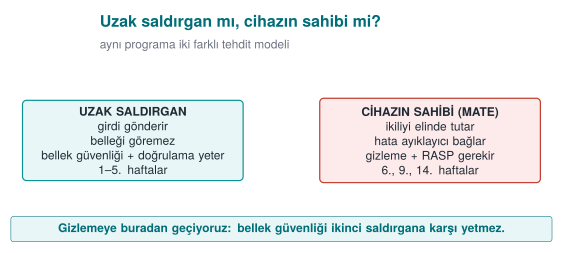
What does obfuscation give you, and what doesn't it?¶
The textbook is candid about software protection (Recipe 12.1): an attacker with enough time and skill will eventually defeat any obfuscation. The goal of obfuscation is not to make it impossible, but to make it expensive:
- Raising the cost of the attack above the value of what is being protected.
- Making the attack harder to automate: a method found in one copy should not work on every copy the same way (Week 14's diversification).
- Buying time for the other layers (RASP, integrity checks, server-side checks): holding out until keys are rotated or the version is updated.
One of the textbook's recommendations still holds today: rather than trying to perfect one advanced technique, it is more effective to combine several simple techniques together with data obfuscation. Every layer of obfuscation raises maintenance cost; that's why it is applied only to sensitive parts.
Obfuscation techniques: a map¶
| Family | What it hides | Example techniques | This term |
|---|---|---|---|
| Layout | Names, structure | Hiding symbols, making function and file names meaningless, removing logging | This week Demo 6 |
| Data | Constants, strings, variables | String encryption, constant transformations, variable splitting/merging, opaque booleans | This week, Week 9 |
| Control flow | The algorithm's structure | Control-flow flattening, opaque predicates, fake and dead branches | This week Demo 7, Week 9 |
| Preventive | The work of analysis tools | Structures that mislead a disassembler, runtime decoding | Week 9 (concept) |
| Virtualisation | The machine code itself | Translating a function into a custom virtual machine's bytecode | Weeks 9 and 14 (Tigress) |
How it's done in the field
The list of hardening measures on the native side of a certified mobile payment library covers almost this entire map: turning off symbol visibility in the shared library; hand-obfuscating function, file, and parameter names (the real names are kept in internal documentation); hiding constants through arithmetic transformations; encrypting static strings before build time and decrypting them, then immediately wiping them, only at the moment of use; opaque boolean values that only return "success/failure"; replacing standard library functions with the library's own versions; fake operations that don't change the result and dead branches that never run; control-flow flattening with a randomised exit point on error; and completely removing logging from the release build. None of these measures is strong on its own; their strength comes from being used together, and together with RASP.
15. Symbol, string, and log hiding¶
The first step of reverse engineering is usually the simplest one: looking at the readable text and function names inside the binary. A function named license_verify or a string like "invalid" tells the attacker exactly where to look. This is why the first and cheapest layer of obfuscation is stripping this information out of the binary.
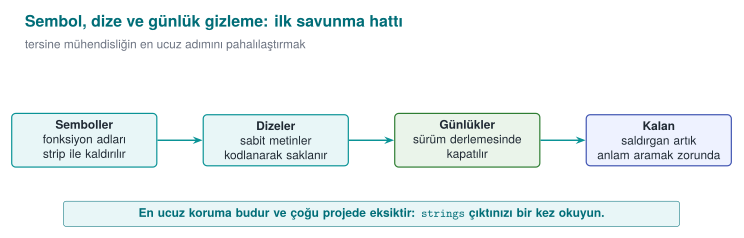
Three simple measures¶
| Measure | How? | What does it buy you? |
|---|---|---|
| Hide symbols | static functions; -fvisibility=hidden in a shared library, exposing only the necessary API; strip -s in the release; not shipping the PDB file on Windows | Function names do not appear in the binary |
| Remove logging in the release | Compile logging macros completely out of the build with a build flag | Error messages and internal state information do not stay in the binary |
| Hide sensitive strings | Encrypt or scramble at compile time, decrypt at the point of use, and immediately wipe it (Recipe 12.11) | A strings scan cannot find the sensitive constants |
#ifdef LOG_ENABLED
#  define LOG(...) fprintf(stderr, __VA_ARGS__)
#else
#  define LOG(...) ((void)0)       /* neither the string nor the call end up in the binary */
#endif

LOG("[LOG] license check: %s\n", result ? "passed" : "failed");
Silencing logging with a runtime flag (if (hata_ayiklama) printf(...)) is not enough: the string stays in the binary, and the attacker can turn logging back on by changing the flag. In the field, the one exception is usually a deliberate decision recorded in the trade-off log (e.g., writing only an encrypted diagnostic value).
String hiding is not a key-storage method
An encrypted string is decrypted at the moment of use while the program is running; at that moment it sits in memory unencrypted, and the decryption key is also inside the program. String hiding stops static scans like strings; against an attacker examining the program while it runs you need RASP (Week 6), and for real keys you need whitebox cryptography (Week 11). This is why, in the field, the string-hiding key is itself also split up and hidden, and the decryption function is protected with additional checks.
Demo 6 — Symbol and string leakage¶
Demo 6 · code/week-04/06-symbol-strings · CWE-200, CWE-215 · Recipe 12.11
The same small license check is compiled twice: secret_exposed (symbols, log strings, and a synthetic license key all exposed) and secret_hidden (logging compiled out, the string scrambled at compile time, symbols stripped). Both run the same way; the difference shows up in the binary.
| Step | What happens? |
|---|---|
| 1 | Both versions give the same result |
| 2 | strings: the license string and [LOG] lines appear in the exposed version; they are absent in the hidden version |
| 3 | nm: license_verify appears in the exposed version; the symbol is absent in the hidden version |
| 4 | Windows: function names live in the PDB file, not the EXE; the hidden version does not produce a PDB, and its strings are hidden |
Watch the animation below to follow, step by step, how every byte of the secret string is XOR'd with the key at compile time, and how the symbols visible with nm differ between the exposed and hidden builds.
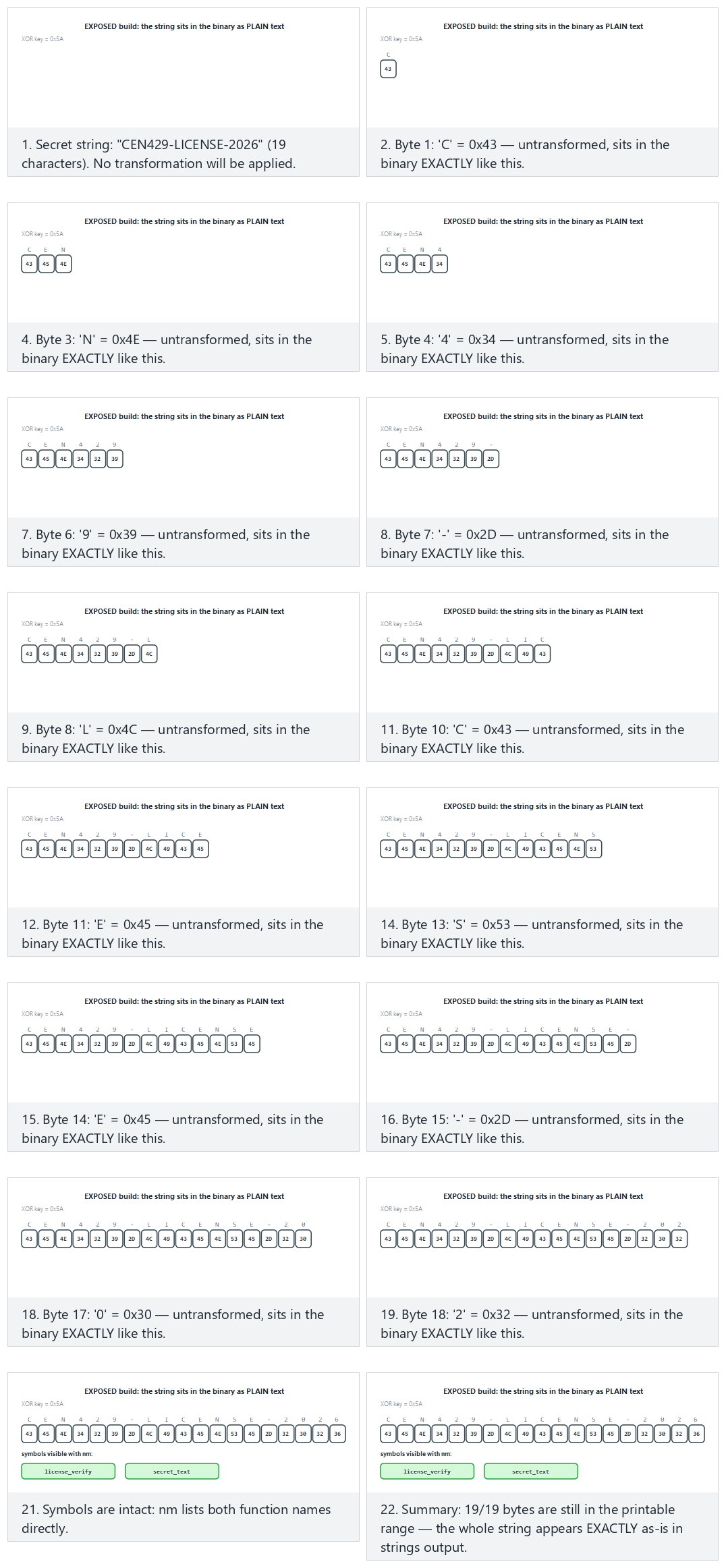
Try the presets exposed build (normal), hidden build (hard), the edge cases a small key and key 0x00 — hides nothing — or roll 🎲 for a random text/key pair.
16. Control-flow flattening and opaque values (Recipe 12.3, 12.8)¶
A compiled function's control-flow graph (CFG) shows the algorithm's skeleton: which check is done in which order, which branch leads to success. Control-flow flattening moves all of a function's basic blocks into a switch dispatcher inside a single loop. The natural adjacency between blocks disappears; which block follows which can only be read off from the value of a state variable. Here we see the idea and a small demo; the in-depth version comes in Week 9 as rule K-04.
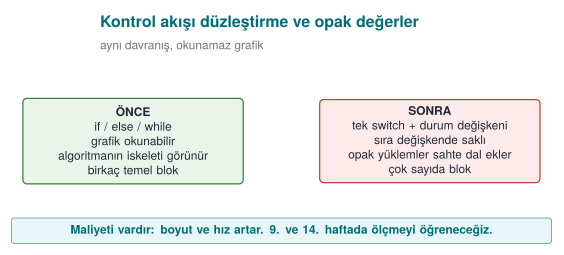
int state = 1;
for (;;) {
    switch (state) {
    case 1: /* step 1 */  state = 2; break;
    case 2: /* step 2 */  state = (condition ? 3 : 4); break;
    case 3: /* success path */ state = 5; break;
    case 4: /* failure path */ return FAILURE;
    case 5: return SUCCESS;
    }
}
On its own, this pattern can be reversed fairly quickly by an experienced analyst. To make it strong it is combined with other techniques:
- Hiding the state values: instead of
case 1,case 2, the state values are stored through a simple arithmetic transformation, so the sequential order is not visible (Recipe 12.5, constant transformations). - Fake and dead blocks: blocks that never run, or that don't change the result, are added; this makes it harder for the analyst to tell which block is real.
- A randomised exit point: when a check fails, the state variable is set to an unpredictable value and the function exits through the
defaultbranch; where the error was caught can no longer be read off from the flow. - Opaque values: critical results like "true/false" are not kept as a plain
0/1, but in a form that depends on more than one value and cannot be flipped by changing a single byte (Recipe 12.8). The textbook's approach in this recipe is also the basis for the "opaque boolean" return values used by libraries in the field.
Demo 7 — Control-flow flattening¶
Demo 7 · code/week-04/07-flow-flattening · Recipe 12.3
A small PIN check is written in two forms: the natural if chain (pin.c) and a hand-flattened form (pin_flattened.c). The two versions give the same result for the same PINs (the correct PIN is synthetic); but their machine code and control-flow graphs differ. In the last step, the cost of flattening is shown through a timing measurement.
| Step | What happens? |
|---|---|
| 1 | Both versions give the same result for the same PINs |
| 2 | objdump / dumpbin is used to compare pin_verify's machine code: the flattened version has far more branches |
| 3 | Timing: the flattened version is slower |
Watch the animation below to follow, step by step, how the plain version takes a direct if chain while the flattened version walks the dispatcher from state=0 again for EVERY guess, hopping from state to state.
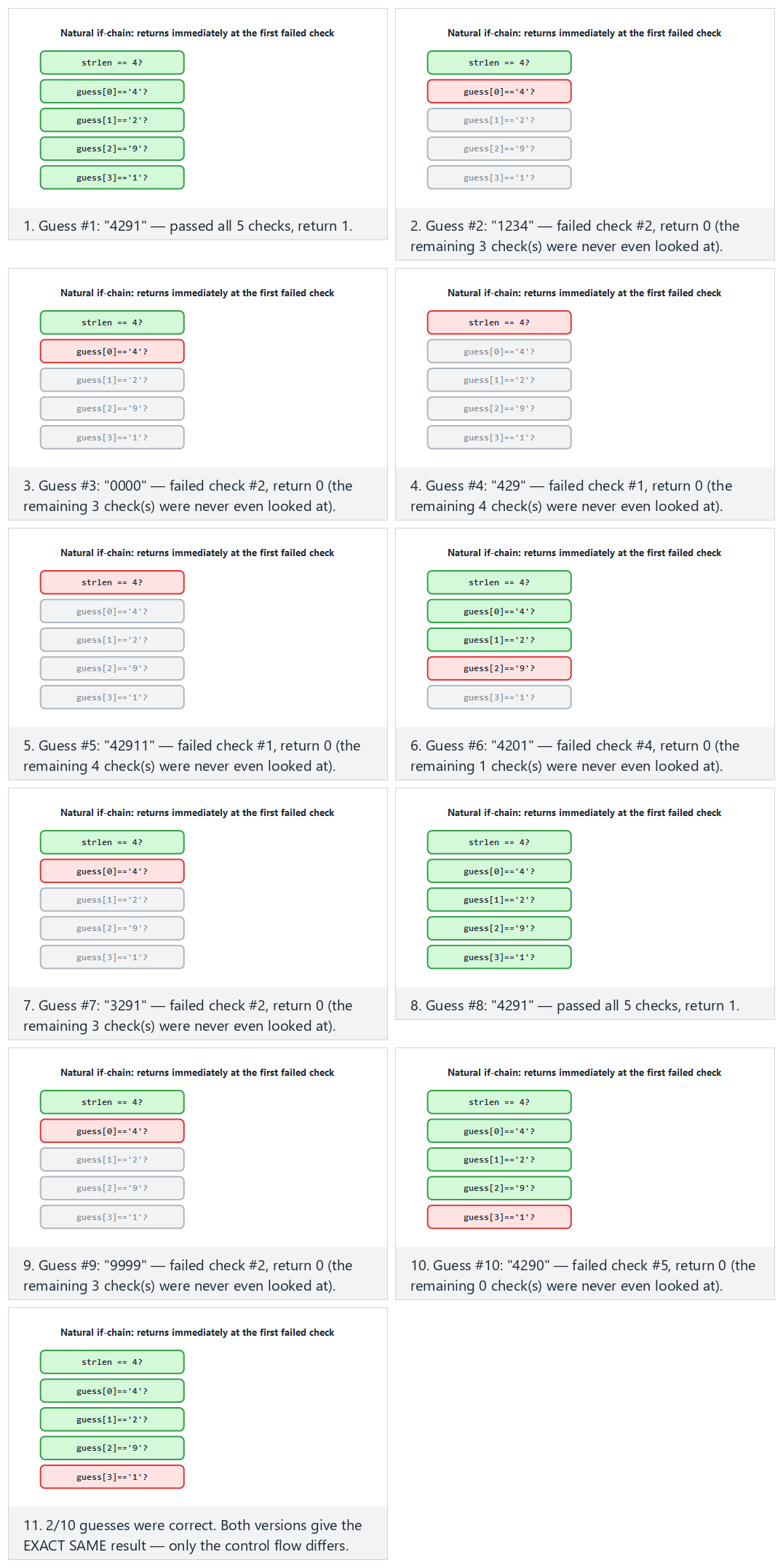
Try the presets plain version (normal), flattened version (hard), the edge cases every guess correct and every guess has the wrong length — or roll 🎲 for a random guess list.
This demo is the hand-made counterpart to what we will do automatically in Week 14 with Tigress's --Transform=Flatten transformation. We will cover how to measure obfuscation's effectiveness (strength, resilience, cost) in Week 9.
Flattening the control flow alone is not enough: a reverse engineer can still step through the dispatcher and work it out. Opaque predicates are a second layer that makes that even harder — watch the animation below prove, experimentally, that (x*x) % 4 is never 2 for any integer (so one branch ALWAYS goes the same way).
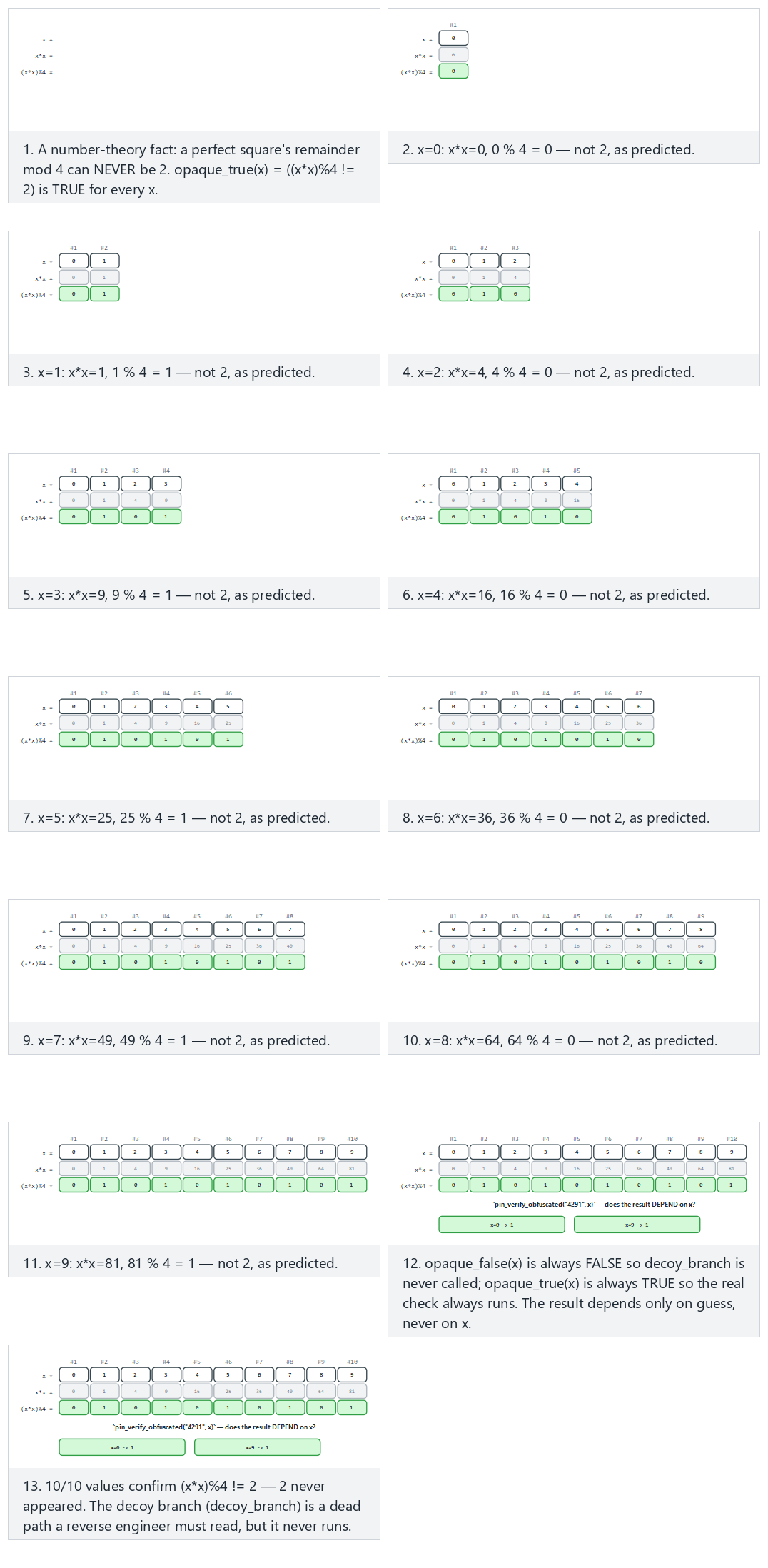
Try the presets 10 small positive x values (normal), mixed negative and large (hard), the edge cases near the INT bounds and wrong PIN, still independent of x — or roll 🎲 for a random list of x values.
Function name hiding, allocation obfuscation, and dynamic encryption: the concept¶
The other three techniques the syllabus places in this week will be covered in detail in Week 9; here it is enough to know what they are:
- Function name hiding: stripping symbols removes exported names; but if an API's entry points (e.g., a JNI interface) must stay exposed, those names are made meaningless, and the real names are kept only in internal documentation. The programmer's readability is preserved through a macro layer.
- Allocation obfuscation: the size and order of buffers allocated for sensitive data leave a recognisable trace (e.g., "a 32-byte block = an AES key"). This trace is blurred by changing the buffers' sizes, order, and layout, adding fake allocations, and filling used memory with random values afterward.
- Dynamic encryption: the most sensitive code sections stay encrypted in the binary and are decrypted into memory only at the moment they are about to run, then re-encrypted or wiped afterward. It is a powerful technique, but it conflicts with the operating system's memory protections (DEP/NX, the separation between writable and executable pages) and requires careful design; that is why it is used selectively in practice.
How does an evaluator test this?
They evaluate obfuscation not as "present/absent" but by time: how long did it take to find a sensitive function in the binary, understand its logic, and bypass a check? They start with a strings and symbol scan, then examine the control flow with a disassembler. The report records how much each protection layer delayed the attack; in attack-potential scoring (Week 13), the "time required" and "expertise required" metrics come from exactly this.
17. Term project: this week¶
Write the first draft of your security guide's S9 "Code hardening" section:
- Compile your project with the recommended release flags from the "Compiler and operating system protections" section; add the protection table (
checksec/dumpbin) to the guide. If any protection is left off, write the justification in the trade-off log. - Scan your code against the CERT rules with
clang-tidyorcppcheck; fix at least five findings and document them by rule id. - Run your tests with ASan + UBSan.
- Write a fuzz target for at least one function that reads external data, and fuzz it for at least 10 minutes; write down the result.
- Show that logging is removed from the release build and that sensitive strings do not appear in
stringsoutput.
### KS-01 Removing logging in the release build
**Description:** Why is it needed? (which asset, which threat)
**Implementation:** How was it done? (file, macro, build flag)
**Verification:** How was it tested? (command + expected output)
**Residual risk / trade-off:** If any
18. Work on your own¶
Exercise 1 — Easy: turn warnings into errors
Compile your own project with -Wall -Wextra -Wformat=2 -Wconversion -Werror (/W4 /WX on MSVC). How many warnings came out? Either fix each one, or explain in a comment why it is harmless.
Exercise 2 — Easy: format string hunt
Find every call in your own code that takes a variable as its format string argument (printf(, fprintf(, snprintf(, syslog(). Add the format attribute to your own logging function and see whether the compiler now produces new warnings.
Exercise 3 — Medium: overflow checking
Write a function that allocates memory for n items of struct record, first with malloc(n * sizeof(struct record)), then with __builtin_mul_overflow, then with calloc. Compare the behaviour of the three versions for n = SIZE_MAX / 2.
Exercise 4 — Medium: hunting undefined behaviour with UBSan
Add a fourth undefined behaviour to the three in Demo 3 (e.g., accessing one element past the end of an array, or a member access through a NULL pointer). Observe which one UBSan catches and which one ASan catches.
Exercise 5 — Medium: your own fuzz target
Write LLVMFuzzerTestOneInput for a parser in your project. Prepare a few meaningful seed files, run the fuzzer for 10 minutes, and note the coverage reached (the cov: value). If you find a bug, fix it and turn the input that found it into a regression test.
Exercise 6 — Medium: protection table
Extract the protection tables for Demo 5's overflow_weak and overflow_hardened targets. Which flag changed which row? Add the same flags to your own project and extract the table again. How much do the binaries' size and runtime differ?
Exercise 7 — Hard: signal handler review
Write a small program that calls printf and malloc inside a signal handler, and explain why this is wrong using SIG30-C. Then fix the handler so it only sets a volatile sig_atomic_t flag.
Exercise 8 — Hard: the cost of flattening
Apply Demo 7's pin_verify function to a function in your own project (by hand). Measure the time and binary size; write the result into Section S9 as a trade-off line.
19. Self-check¶
1. What are the three layers of code hardening? Which one actually removes the bug?
Secure coding, compiler/OS protections, code obfuscation. Only secure coding removes the bug; the other two make exploitation or understanding the code harder.
2. What is the difference between a 'rule' and a 'recommendation' in CERT? What does L1 priority mean?
Violating a rule can directly lead to a vulnerability and can be checked automatically; recommendations are good practice. L1 is the highest priority once severity, likelihood, and cost to fix are considered together.
3. Why is printf(girdi) dangerous? What is its mildest consequence?
The input is interpreted as a format string; %x/%p read values off the stack, %n writes to memory. Its mildest consequence is an information leak (a key, an address, a canary).
4. What are the three stack traces in a UAF report? Where is the fix usually found?
The use, free, and allocation locations. The fix is usually at the free location: that is where the wrong ownership decision was made.
5. Why can the check if (x + 100 < x) be deleted by the compiler?
Signed overflow is undefined behaviour; the compiler assumes the overflow never happens and, reasoning that the expression can never be true, removes the branch. The correct approach is to compare against the bound before the operation, or to use overflow-reporting builtins.
6. Why must printf not be called inside a signal handler?
A signal can arrive while the interrupted code is inside the very same function; functions that are not async-signal-safe corrupt internal data structures. The handler should only set a volatile sig_atomic_t flag.
7. Why can't ASan see an overflow from one field into a neighbouring field within the same structure?
ASan places poisoned regions between objects; there is no poisoned region between the fields of a structure.
8. What are the four properties of a good fuzz target?
Fast, deterministic, leaves no state behind, and tests a single thing.
9. What does the canary stop, and what doesn't it stop?
It stops a consecutive stack overflow that reaches the return address (by terminating the program). It does not stop corruption of variables placed before the canary, a heap overflow, or a leaked canary.
10. Why is ASLR weakened by an information leak?
ASLR relies on keeping addresses secret; if a leak like a format string vulnerability exposes one real address, the remaining addresses become calculable.
11. Why isn't silencing logging with a runtime flag enough?
The log strings remain in the binary and logging can be turned back on by changing the flag. The correct approach is to remove it completely at compile time.
12. Why is control-flow flattening weak on its own? Name three techniques that strengthen it.
The pattern is recognisable and the flow can be reconstructed by tracing the state variable. Hiding the state values, fake/dead blocks, a randomised exit point, opaque values.
13. Does %x in a printf(tampon) call always read from the stack? What is the difference on a 64-bit system?
In the simplified teaching model (32-bit cdecl), yes, all arguments sit consecutively on the stack. On the 64-bit x86-64 System V ABI, the first 6 integer/pointer arguments are carried in registers (RSI, RDX, RCX, R8, R9); the first few %x markers read leftover random values from those registers, and only the %x markers after the 6th one reach the stack.
14. Why is %n more dangerous than %x?
%x only reads; %n writes "the number of characters printed so far" to the address pointed to by the "argument" given to it. Since no argument was actually given, this address is also a random value read from the stack/register; because the attacker writes the format string themselves, they can place a byte sequence of their own choosing at this "address" position.
15. In Demo 2, why does fake = malloc(sizeof *s) get the same address as s?
The block freed by free(s) is exactly 24 bytes (sizeof(struct session) = 8 + 16). Memory managers (e.g., glibc's tcache) satisfy the next request in the same size class from the block that was just freed, following the LIFO ("last in, first out") free-list principle; this is why fake most often gets the same address as s (though the C standard does not guarantee it — see the warning in §6).
16. Why should p = NULL; be written immediately after free(p)?
free(p) only returns the block to the memory manager; it does not modify the p variable, so p still holds the old address (a dangling pointer). Resetting p makes the next accidental p->... access crash immediately and loudly instead of silently reaching the wrong data.
17. What value does (int)-1 take when assigned to a 64-bit size_t? How do you compute the result?
-1 + 2^64 = 2^64 - 1 = 18,446,744,073,709,551,615 (SIZE_MAX on a 64-bit system). -1's 32-bit bit pattern (0xFFFFFFFF) is brought into range by mathematically adding 2^64 when it is assigned to an unsigned 64-bit type.
18. Why is INT_MAX + 1 equal, bit for bit, to INT_MIN?
INT_MAX = 0x7FFFFFFF; adding 1 overflows the 33rd bit, which is dropped, leaving 0x80000000 in the remaining 32 bits. Read as unsigned this bit pattern is 2,147,483,648; read as signed (two's complement), the top bit (the sign bit) is 1, so it is -2,147,483,648 = INT_MIN.
19. What does 0x40000001 * sizeof(uint32_t) wrap around to, in bytes, once it overflows uint32_t?
The real product is 4,294,967,300; the largest value uint32_t can hold is 4,294,967,295 (2^32-1). Since 4,294,967,300 mod 2^32 = 4, only 4 bytes remain in the boyut variable; malloc(4) is called, but the loop then tries to write billions of bytes.
20. Exactly where does the stack canary sit, and what does it protect?
The canary is written, at function entry, with a random value between the buffer (e.g., tampon[64]) and the saved frame/return address. It only catches consecutive overflows that reach the return address (above it on the stack), via the comparison the function makes when it returns.
21. Why should the canary be thought about together with this week's format string vulnerability?
The canary is also just an 8-byte value sitting on the stack; a format string vulnerability can read those bytes too, with %x. If the attacker learns the canary's real value through the leak, they can craft the overflow to write that exact value back, and the comparison never triggers — one protection (the canary) is bypassed through another bug (an information leak).
22. What does ASLR randomise? Why is ASLR incomplete without PIE?
ASLR changes the starting addresses of the code, stack, heap, and shared libraries on every run. A program compiled without PIE always has its own code region at the same fixed address; even if ASLR randomizes the libraries, the program's own code remains predictable — PIE closes this gap.
23. With DEP/NX on, how can an attacker still execute code (conceptually)?
DEP/NX only prevents new code from being written to and executed on data pages (stack, heap). Instead of writing their own code, the attacker can chain together existing pieces of the program's already-executable own code region (the ROP/JOP family of techniques); since this never executes code on a data page, DEP/NX cannot see it.
24. Exactly what does RELRO make read-only, and what does this prevent?
RELRO makes the GOT (Global Offset Table), which holds dynamically linked function addresses, read-only once all addresses have been resolved at program startup. This prevents a memory-write bug from being used to change a function address in the GOT to an address the attacker has chosen.
25. Which calls does CFI/CFG check, and which ones doesn't it?
It checks that indirect calls (through a function pointer, or a virtual function) go only to the set of valid targets determined at compile time; it blocks jumps outside that set. It does not see a jump to a wrong-but-permitted target inside the set, nor does it see data corruption other than a function pointer (e.g., a privilege flag).
26. In what order should you read an ASan/UBSan report?
First the error class on the top line (stack-buffer-overflow, signed integer overflow, ...), then, in the call stack, usually the line at position #1 (the one in your own code), and finally, if UBSan gives them, the values. #0 is most often library code (strcpy, malloc); the line you actually need to fix is the next one up.
20. Resources and further reading¶
Textbook — J. Viega, M. Messier, Secure Programming Cookbook for C and C++, O'Reilly, 2003:
- Recipe 3.1 (basic input validation), 3.2 (preventing attacks against formatting functions), 3.3 (preventing buffer overflows), 3.5 (integer conversion and wraparound)
- Recipe 13.1 (error handling), 13.4 (variadic functions), 13.5 (handling signals)
- Recipe 12.1 (understanding software protection), 12.3 (obfuscating code), 12.5 (constant transformations), 12.8 (obfuscating boolean values), 12.11 (obfuscating strings)
Open standards and resources
- SEI CERT C Coding Standard and SEI CERT C++ Coding Standard (wiki.sei.cmu.edu).
- OpenSSF, Compiler Options Hardening Guide for C and C++.
- LLVM documentation: AddressSanitizer, UndefinedBehaviorSanitizer, libFuzzer; Microsoft Learn:
/fsanitize=address,/guard:cf,/GS. - Google OSS-Fuzz and ClusterFuzz documentation; AFL++ documentation.
- MITRE CWE: CWE-134 (uncontrolled format string), CWE-190 (integer overflow), CWE-252 (unchecked return value), CWE-415, CWE-416, CWE-479 (unsafe function call from a signal handler), CWE-758 (reliance on undefined behaviour), CWE-215 (information exposure through debug information), CWE-200.
- C. Collberg, J. Nagra, Surreptitious Software, Addison-Wesley, 2009 (taxonomy of obfuscation; covered in detail in Week 9).
Glossary
| Term | English | Short definition |
|---|---|---|
| Hardening | Hardening | Making code and a binary resilient against attack |
| Format string | Format string | The first argument to the printf family, describing how it should write |
| Use-after-free | Use-after-free | Accessing freed memory through an old pointer |
| Undefined behaviour | Undefined behaviour | An operation whose result the standard does not define; the compiler assumes it never happens |
| Sanitizer | Sanitizer | A runtime error check the compiler adds |
| Fuzzing | Fuzzing | Looking for bugs with automatically generated malformed input |
| Harness | Harness | The function the fuzzer calls, wrapping the code under test |
| Stack canary | Stack canary | A value placed before the return address that reveals an overflow when corrupted |
| ASLR | Address space layout randomisation | Memory addresses changing on every run |
| DEP / NX | Data execution prevention | Forbidding code execution on data pages |
| RELRO | Relocation read-only | Making dynamic linking tables read-only |
| CFI / CFG | Control-flow integrity | Indirect calls going only to valid targets |
| Obfuscation | Obfuscation | A transformation that makes something harder to understand without changing its behaviour |
| Control-flow flattening | Control-flow flattening | Moving blocks into a single loop + switch dispatcher |
| Opaque predicate | Opaque predicate | A condition whose value the programmer knows but that is hard to work out through analysis |
Next week
Week 5 — Java and interpreted languages. This week we dealt with manually managed memory and compiler/OS protections in C/C++; Week 5 shows how Java's runtime (the JVM) eliminates most of the memory bugs we saw this week (overflow, use-after-free, undefined behaviour), but opens up a new bug class — injection. The SEI CERT Java rules will be compared with the SEI CERT C/C++ rules we covered today.