Week 2 — Computer Viruses and Security Models¶
| Date | 25.09.2026 |
| Learning outcomes | LO.1 |
| Duration | 3 hours |
| Prerequisites | Week 1 (CIA, attacker models, STRIDE, attack trees); reading files in C; cd and ls in PowerShell or a Linux terminal |
| Labs | code/week-02 — 14 demos; runs on Windows (MSVC), WSL and Linux |
Lecture notes (PDF) Lecture notes (DOCX) Slides (PDF) Slides (PPTX) Slides (HTML, offline) Download all (ZIP) Open slides full screen
Click inside the slides and use the arrow keys; use the button at the bottom right of the slides or the link above for full screen.
By the end of this week you will be able to
- Distinguish malware (virus, worm, trojan horse, ransomware, rootkit, bot) by behaviour, and show a virus's three parts (infection mechanism, trigger, payload) in one example.
- Explain why and how malware hides (encryption, oligomorphism, polymorphism, metamorphism) and see in a working demo why this makes signature-based detection harder.
- Discuss countermeasures (signature, heuristic, behaviour-based detection, sandboxing, emulation) and the false-positive/false-negative limits of each.
- Write an access policy with an access control matrix; state the difference between DAC / MAC / RBAC.
- Show the rules of the Bell–LaPadula, Biba and Clark–Wilson models and what each protects (confidentiality/integrity) in a simulator; connect them to the Unix and Windows access models.
- Map a vulnerability to a CWE family, and explain the role of the CWE Top 25 / OWASP Top 10 / MASVS lists.
- Give a base CVSS v3.1 score to a vulnerability (know the difference from v4.0) and associate it with a CVE identifier.
- Describe the vulnerability lifecycle (discovery → disclosure → patch → public release) and responsible disclosure.
Course flow (timing plan for the instructor)
| Time | Section | What happens |
|---|---|---|
| 0:00–0:10 | Warm-up | Recap of last week; discussion of "what is malware, is everything a virus?" |
| 0:10–0:35 | 1–4 | History, anatomy, types of malware; epidemic model — Demo 09 |
| 0:35–0:50 | 5–7 | Concealment and countermeasures — Demo 01, 02, 07, 08; incident case studies |
| 0:50–1:00 | Break | |
| 1:00–1:30 | 8–9 | Attack trees — Demo 04; audit logging — Demo 10, 11 |
| 1:30–1:50 | 10–12 | Access control and formal models — Demo 03, 14 (class activity) |
| 1:50–2:00 | Break | |
| 2:00–2:20 | 12 | Unix and Windows models — Demo 12, 13, 06 |
| 2:20–2:50 | 13–16 | CWE / OWASP / MASVS / CVE / CVSS / lifecycle — Demo 05, class activity |
| 2:50–3:00 | 17–24 | Checklist, project contribution (S4), self-check; remaining exercises left to students |
Prepare the lab in advance
The demos compile on both Windows (Visual Studio 2022 Community, MSVC) and WSL/Linux (GCC). One source, two platforms: for SHA-256 and AES, Windows uses the operating system's BCrypt library and Linux uses OpenSSL (code/common/cen429_crypto.h); on Windows you do not need to install OpenSSL separately.
In Visual Studio: File > Open > Folder → code → select the Windows (MSVC) or WSL (GCC) configuration from the top bar → Build > Build All. The TOCTOU demo (Demo 6) only runs on WSL/Linux.
Ethics rule — especially important this week
This week we learn about malware conceptually. No demo contains real malware, self-replicating code, file deletion/encryption, or network attacks. All demos are safe simulations that run only inside their own folders, without administrator privileges (a toy file format, a simulator, a calculator). Try what you learn only on your own computer and only on the given demos. Writing, spreading, or infecting someone else's system with malware is a crime.
0. Before we start¶
This section prepares you for the week. It first briefly recalls the earlier topics this week builds on; it then defines each of this week's concepts in one sentence and links it to the section where it is explained in full.
What we bring from earlier weeks¶
- Asset, threat, vulnerability, risk, and the attacker model — the language for telling an asset's value, the threat against it, the weakness that makes the threat possible (vulnerability), and risk (probability × impact) apart (Week 1, §1; for the attacker model, Week 1, §3). This week we make this language concrete through malware (the threat side) and access models (the defence side).
- STRIDE and the attack tree — asking STRIDE's six letters against an interface, then breaking the resulting threats down from a root goal into branches with AND/OR logic (Week 1, §7). This week we add cost to the attack tree and compute the cheapest attack path (§8, Demo 04).
This week's concept map¶
| Concept | In one sentence | Detail |
|---|---|---|
| Malware | Any program written to cause harm, steal data, or seize control without the owner's permission and knowledge; a virus is only one subtype of it. | §2 |
| A virus's three parts | A virus splits into three functions: the infection mechanism (how it spreads), the trigger (when it activates), and the payload (the actual harm it does). | §3 |
| Malware types | A virus infects a carrier, a worm copies itself over the network on its own, a trojan horse looks harmless while carrying hidden harm, and ransomware encrypts files; rootkits, bots, spyware, and wipers are other types in this family. | §3 |
| Concealment: polymorphic/metamorphic | Polymorphic malware keeps its body encrypted and changes only the decryptor in each copy; metamorphic malware uses no encryption and rewrites its entire code in each copy; both aim to evade signature-based detection. | §5 |
| Detection methods | Malware detection layers signature (looking for a known fingerprint), heuristic (scoring suspicious features), behaviour-based (watching runtime actions), sandboxing, and emulation (running code in an isolated environment). | §6 |
| Entropy | A measure of how random a file's bytes look, from 0 (uniform) to 8 (fully random); encrypted/packed content usually looks high-entropy, but that alone does not prove it is malicious. | §6 |
| Access control | The framework that answers "can this subject perform this operation on this object?", expressed as a matrix of subjects, objects, and rights. | §10 |
| DAC / MAC / RBAC | In DAC the object's owner decides permissions, in MAC the system/policy imposes mandatory rules, and in RBAC permissions are tied to roles rather than individuals. | §10 |
| Bell–LaPadula, Biba, Clark–Wilson | Bell–LaPadula protects confidentiality with "no read up, no write down"; Biba protects integrity by applying the reverse rules; Clark–Wilson protects commercial integrity through well-formed transactions and separation of duty. | §11 |
| Audit log | A log kept as evidence of who did what and when, which must be sealed with a keyed digest (HMAC) against tampering. | §9 |
| CWE | MITRE's numbered catalogue of weakness types, as opposed to specific flaws. | §13 |
| CVE and CVSS | A CVE is the unique identifier of a specific flaw in a specific product; CVSS is the scoring system that turns that flaw's severity into a number from 0 to 10. | §15 |
| OWASP Top 10 and MASVS | Documents that turn the weaknesses CWE covers into prioritised, verifiable lists for the web (Top 10, ASVS) and mobile (MASVS). | §14 |
| The vulnerability lifecycle | The process a flaw goes through from discovery to public release, including responsible disclosure and the patch gap. | §16 |
1. This week's big picture: threat, model, classification¶
Last week we built the language of security: asset, threat, vulnerability, risk; the attacker model; STRIDE and the attack tree (Week 1, §7). This week we fill in three columns of that language:
Brief history: malware and security models
- 1949 — von Neumann establishes the theory of self-replicating automata: the mathematical root of the virus idea.
- 1971 — Creeper (first experimental worm) · 1986 Brain (first PC virus) · 1988 the Morris Worm halts a large part of the internet and puts security on the agenda.
- 1973–1977 — the Bell–LaPadula (confidentiality) and Biba (integrity) access models; 1987 Clark–Wilson (commercial integrity).
- 1999 → 2006 — a common classification language: CVE (a concrete flaw), CWE (weakness type), CVSS (severity score).
So "recognising malware" and "modelling access" are two separate strands; this week we cover both at once.
- Threat side — malware: We will break the attacker's most visible tool, malicious software, into types (virus, worm, trojan horse, ransomware) and see how it hides. Because part of the answer to "what is ranged against us?" when designing a defence is this.
- Defence side — security models: We will learn to answer "who can access what?" not arbitrarily, but with a formal model (access matrix, DAC/MAC/RBAC, Bell–LaPadula, Biba, Clark–Wilson). These models are the foundation of the permission architecture of operating systems (Unix, Windows).
- Common language — classification: When we find a vulnerability we must name it in a language everyone understands and be able to measure its severity. That is why we have CWE (flaw type), CVE (specific flaw), CVSS (severity score), and OWASP/MASVS (priority lists).
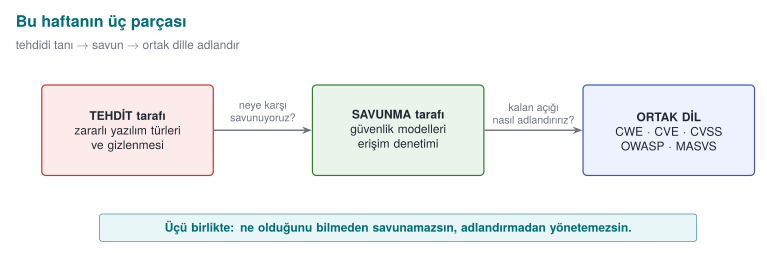
These three are linked: without recognising malware you cannot build a model against it, without building the model you cannot see the remaining flaws, and without naming flaws in a common language you cannot know which threat to prioritise.
This course's point of view
A classic "virus course" teaches you to use antivirus software. We look at it from a programmer's point of view: a piece of malware's concealment technique (polymorphism, entropy) and our own technique for protecting our code (code obfuscation, encrypted constants — Weeks 9 and 11) are, most of the time, the same techniques. Attacker and defender pull tools out of the same box; the difference is intent and context.
2. What is malware? A brief history¶
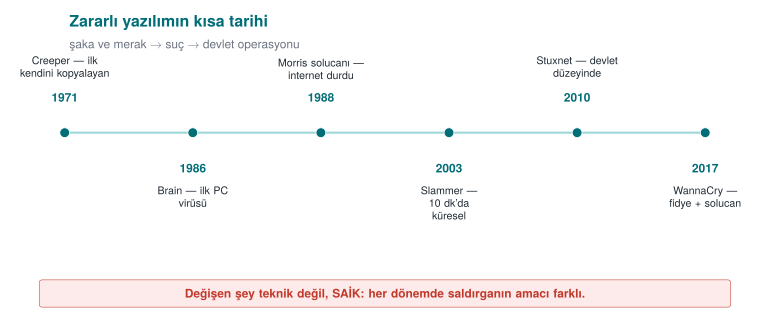
Malware ("malicious software") is any program written to cause harm, steal data, use resources, or seize control without the owner's permission and knowledge. In everyday language "virus" is used for all of these; however, a virus is only one type. To see the distinction, let's first look at a few milestones.
| Year | Event | Type | Why does it matter? |
|---|---|---|---|
| 1971 | Creeper | Experimental worm | First experimental self-copying program on ARPANET ("I'm the creeper") |
| 1984 | Fred Cohen's definition | Theory | First formal definition of a computer virus and the proof that "complete detection is impossible" |
| 1986 | Brain | Boot sector virus | First widespread PC virus; infected the boot sector of a floppy disk |
| 1988 | Morris worm | Worm | First major self-propagating incident on the internet; slowed down thousands of machines |
| 1999 | Melissa | Macro virus | Spread rapidly via Word documents and email |
| 2000 | ILOVEYOU | Worm/trojan | Affected millions of machines via an email attachment; the power of social engineering |
| 2001 | Code Red | Worm | Used a buffer overflow flaw in a web server and spread in memory |
| 2008 | Conficker | Worm/bot | Built a botnet out of millions of machines |
| 2010 | Stuxnet | Targeted worm | Targeted industrial controllers (PLCs); the symbol of a sophisticated, state-sponsored attack |
| 2013+ | CryptoLocker | Ransomware | Popularised the model of encrypting files and demanding a ransom |
| 2017 | WannaCry | Ransomware + worm | Ransomware that self-propagated via a network flaw; affected hospitals/companies worldwide |
| 2017 | NotPetya | Destructive (wiper) | Looked like ransomware but actually destroyed data permanently; caused enormous economic damage |
Fred Cohen (1984) and the proof of the detection limit
Cohen defined a virus as "a program that can copy itself (possibly by modifying itself) into other programs" and proved an important theoretical result: it is impossible to write a general algorithm that correctly answers the question "is this program a virus?" in every case (it reduces from the halting problem). The practical consequence is this: no antivirus detects 100%; every method has false positives (flagging something clean) and false negatives (missing something malicious). This week we will see this with our own eyes in Demo 01.
Term: 'in the wild'
The situation where a piece of malware is circulating on real users' computers — spreading in the field, not only in a laboratory. In this course we work with no in-the-wild sample whatsoever; we use only the concepts and safe simulations.
Real incident: WannaCry (2017) — one week's lesson for a programmer
WannaCry is instructive because it combines three different topics in a single incident. (1) Propagation: it spread like a worm, without the user doing anything, by exploiting a buffer overflow flaw (EternalBlue) in a network file-sharing protocol — that is, the overflow class we will see this week (Week 1) directly became a worm's engine. (2) Payload: on machines it reached, it demanded a ransom by encrypting files; this is exactly the trace this payload leaves behind — the entropy spike we will see in Demo 2. (3) Patch gap: the patch for the exploited flaw had been released weeks before the attack; nonetheless, hundreds of thousands of machines that had not updated (including hospitals and factories) were affected. Three lessons for the programmer: overflow flaws do not stay theoretical, defence must also watch behaviour, and releasing a patch is not enough — it must be applied. These three threads are exactly this week's backbone.
3. The anatomy and types of malware¶
A virus's three parts¶
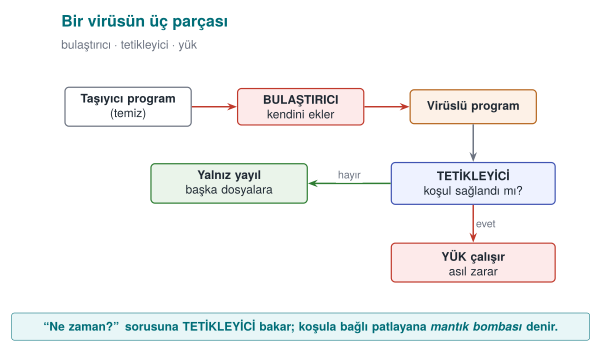
The easiest way to understand a virus is to split it into three functions. Using a disease analogy:
| Part | Also known as | What it does | Disease analogy |
|---|---|---|---|
| Infection mechanism | infection mechanism | Copies itself into another carrier | The virus entering a cell and multiplying |
| Trigger | trigger / logic bomb | The condition for "when do I activate?" (date, counter, event) | Incubation period |
| Payload | payload | The part that does the actual damage (delete data, steal, encrypt) | Symptoms |
Not all three parts have to be present: there are viruses with no payload that only spread (they still consume resources and constitute a vulnerability). Code that waits for the trigger condition and then goes off is called a logic bomb.
Types: by propagation style¶
The most useful way to distinguish malware is by how it spreads and what it does:
Attaches itself to another program or file; running requires that carrier to be executed (by the user). Subtypes:
- Program (file) virus: Infects executable files (
.exe, ELF); when the file runs, the virus runs too. - Macro virus: Written in the macro language inside office documents (Word, Excel); runs when the document is opened. Melissa spread this way in 1999. Today, the "enable macros" trap is still an attack vector.
- Boot sector virus: Infects the disk's first sector (boot sector / MBR); runs before the operating system while the computer is starting up. Brain in 1986 was like this. Modern UEFI Secure Boot has made this class much harder.
Spreads over the network on its own, without needing a carrier or user interaction. Usually exploits a flaw (e.g. an overflow) in a network service. Morris (1988), Code Red (2001), WannaCry (2017) spread this way. A worm's danger is its speed of propagation: it can reach hundreds of thousands of machines within minutes.
Software that looks like a useful or innocent program while causing harm in the background. It does not copy itself; it relies on the user willingly running it (social engineering). A "free game" or a "fake update" is very often a trojan horse.
A payload type that encrypts the user's files and demands money for the decryption key. There are variants that spread like a worm (WannaCry) or infect like a trojan horse. In Demo 02 we will safely see the entropy trace ransomware leaves behind — without actually encrypting a single file.
- Rootkit: Hides itself and other malware from the operating system (removes itself from file, process, and network connection listings). The hardest class to detect.
- Bot / botnet: A network of machines taking remote commands; used for DDoS, spam, and cryptomining.
- Spyware / adware: Collects data or displays advertisements.
- Wiper: Looks like ransomware but permanently destroys data (NotPetya). The goal is not money but destruction.
- Backdoor: A payload that bypasses normal authentication and leaves the attacker hidden access; it does not spread on its own and is usually the persistent entry point left behind by another piece of malware or a supply-chain attack — the SUNBURST incident below is an example.
Quick classification in class (3 minutes)
Which type are the following? (Answers are in the hidden box.)
- The "invoice.pdf.exe" email attachment runs when opened and mails itself to everyone in the address book.
- It exploits an overflow flaw in a web server and infects vulnerable servers on the internet on its own.
- A "free video player" is installed and secretly sends out browser passwords in the background.
- It encrypts the files it opens and leaves a "pay up" note on the screen.
Answers
- Worm/trojan mix (the user opens it → it spreads) · 2. Worm · 3. Trojan horse (+ spyware) ·
- Ransomware.
4. How fast do worms spread? The epidemic model¶
What determines a worm's danger is its speed, far more than its payload. Releasing a patch, distributing a signature, writing a firewall rule takes hours, sometimes days; a worm, on the other hand, can reach saturation within minutes. To see this speed through calculation rather than intuition, we use a simple model borrowed from epidemiology.
The SI model: susceptible and infected¶
We split the vulnerable machines on the network into two groups: susceptible (S, not yet infected) and infected (I). Every infected machine scans random addresses per unit time; if the scanned address happens to hit a susceptible machine, it infects it too. If i is the number of infected machines and N is the total number of vulnerable machines:
beta * i(t): the more infected machines there are, the faster scanning happens (growth is exponential).(1 - i(t) / N): as susceptible machines run out, the hit probability drops (growth saturates).
The result is an S-shaped curve: a long, quiet opening phase, followed by a sudden explosion, then saturation. The opening phase is the defender's only window of opportunity; once the explosion starts, a human-speed response can no longer keep up.
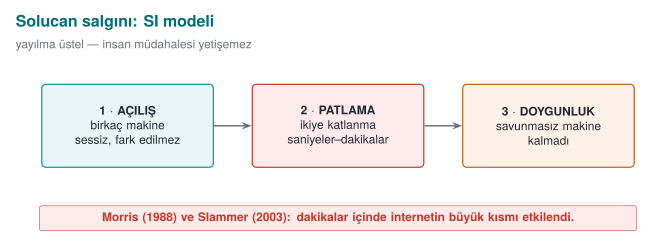
Real numbers¶
| Event | Entry path | Speed |
|---|---|---|
| Code Red (July 2001) | IIS .ida buffer overflow (CVE-2001-0500) | ~359,000 servers by 19 July; doubling time ~37 minutes |
| SQL Slammer (January 2003) | SQL Server resolution service, UDP 1434, a single 404-byte packet (CVE-2002-0649) | Doubled roughly every ~8.5 seconds in the first minute; ~90% of vulnerable machines within ~10 minutes |
Two things made Slammer this fast: a single UDP packet was enough (no waiting to establish a connection), and it scanned the network as fast as possible to find targets. Ironically, the reason it slowed down after the first minute was not the defence — it was that the network bandwidth had filled up.
Demo 09 — Worm Epidemic Simulation¶
Demo 09 · code/week-02/09-outbreak-simulation · calculation only, no network
The program computes the SI equation above step by step and plots the curve of three scenarios as an ASCII chart: Code-Red-like (slow random scanning), Slammer-like (fast random scanning), and a hitlist (the attacker starts with 10,000 pre-prepared targets). It performs no network operations and writes no files.
  Scenario: Slammer-like (random scanning, fast UDP)
    N=75000 susceptible  i0=1  doubling=8.50 s
      time        infected  fraction
          54 s          78    0.1% |..............................|
         1.5 min       1430    1.9% |#.............................|
         2.1 min      19700   26.3% |########......................|
         2.4 min      45601   60.8% |##################............|
         2.7 min      65251   87.0% |##########################....|
         3.3 min      74429   99.2% |##############################|
      -> 90% saturation:    2.7 min

  COMPARISON (time to reach 90% saturation):
    Code-Red-like : 48013 s (~13.3 hours)
    Slammer-like  : 165 s (~2.7 minutes)
    Hitlist       : 50 s (~0.8 minutes)
On 25 January 2003, SQL Slammer (code name Sapphire) infected half of all vulnerable SQL Server copies in under 10 minutes using a single 376-byte UDP packet — the fastest-spreading worm on record. The animation below computes outbreak.c's SI difference equation (i(t+dt) = i(t) + beta·i(t)·(1-i(t)/N)·dt above) step by step, and shows how changing beta pulls the saturation time from hours down to minutes.
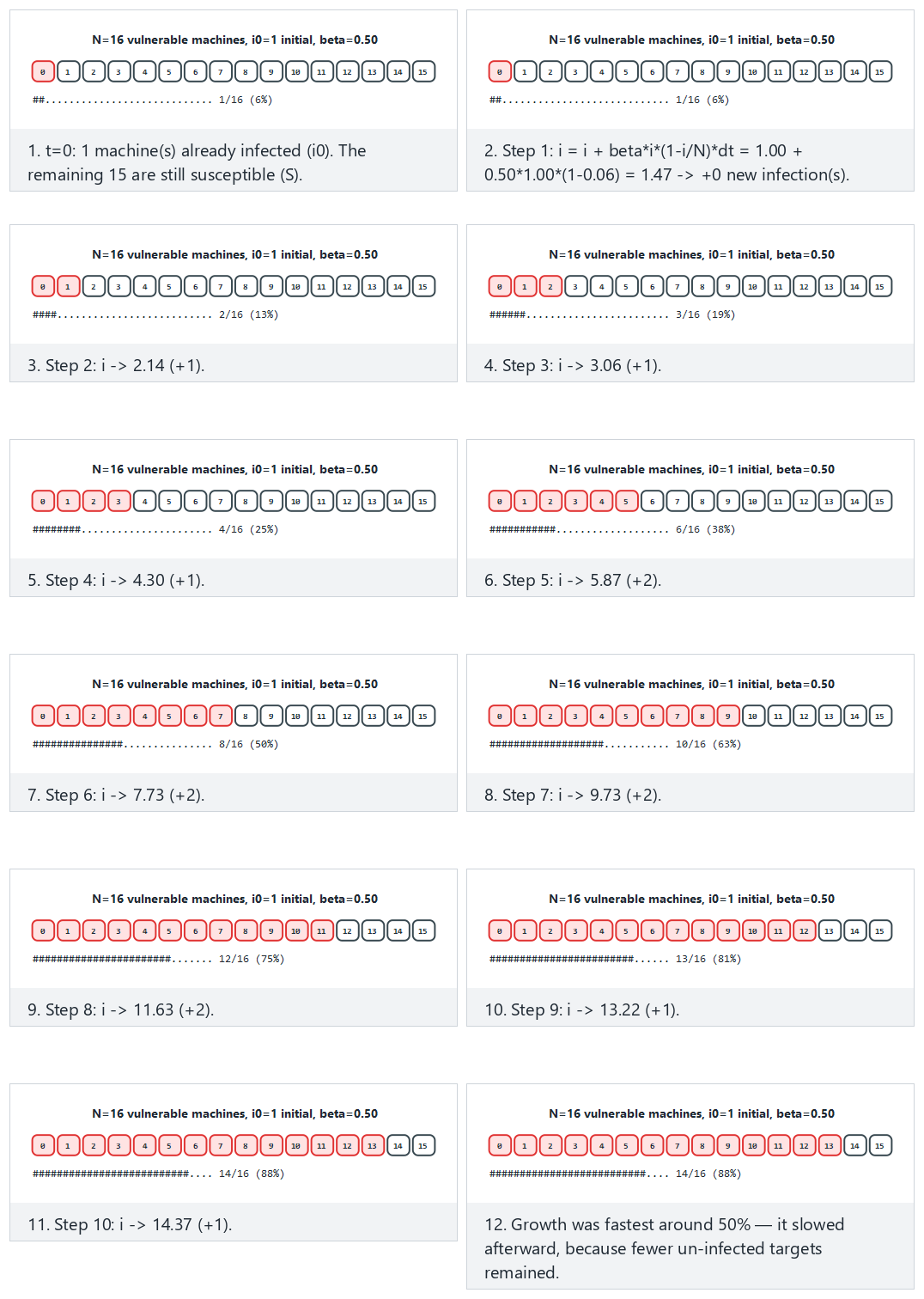
Try Hard: Slammer-like fast spread, saturates in a few steps and Edge case: already half-infected at the start (a hitlist) from the preset picker; the 🎲 button also lets you test your own N, i0, beta.
When reading the output, look at three things:
- Opening phase: in the Slammer-like scenario, only 78 machines are infected in the first 54 seconds. Nothing seems to be happening on the chart; yet the explosion begins a minute and a half later. Saying "it's little for now" is the most expensive mistake you can make with exponential growth.
- Speed (
beta): in the same model, merely increasing the scanning speed brings the saturation time down from hours to minutes. That is why defence against a worm has to be automatic: a firewall rule, network segmentation, a patch applied in advance. - Hitlist: if the attacker skips the opening phase with a pre-prepared target list, the defender's already narrow window of opportunity closes completely.
A lesson for the programmer
The programmer does not determine the propagation speed; but the programmer does make the mistake that makes the first infection possible. Code Red, Slammer, and Blaster all spread because of code that copied network-supplied data into a buffer without bounds checking. In the age of the worm, a single overflow bug means hundreds of thousands of machines within minutes. Also: every network port you listen on is an attack surface; never opening an unused service is the cheapest countermeasure.
Try it yourself
Halve the beta value in outbreak.c (e.g. a network with a high patch rate, or a firewall that limits scanning speed). How does the saturation time change? In the hitlist scenario, if you lower i0 to 100, how much difference is left?
5. Propagation and Concealment: How Does It Go Unnoticed?¶
A virus constantly tries to change so as not to get caught. This has a four-step ladder; each step makes signature-based detection a little harder:
| Method | What changes? | What does the antivirus do? |
|---|---|---|
| Encryption (encrypted) | The body is encrypted with a different key in every copy; the decryptor stays constant | Signs the constant decryptor |
| Oligomorphism | The decryptor has several (dozens of) different forms | Signs all decryptor forms |
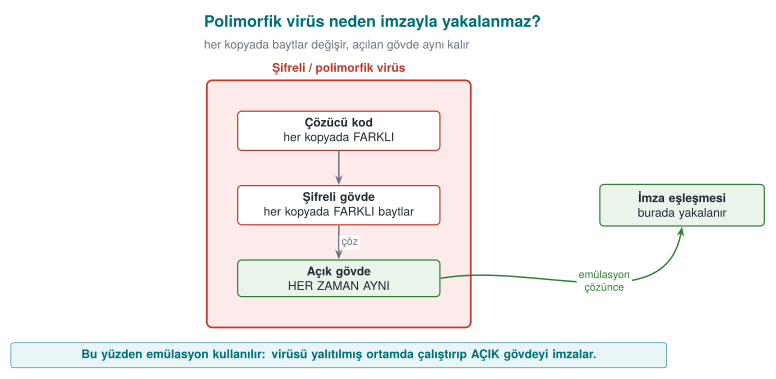
| Polymorphism | The decryptor is regenerated in every copy (infinite variation), the body stays encrypted | Tries to decrypt it (emulation) |
| Metamorphism | No encryption; the entire code is rewritten in every copy (register swapping, junk code, instruction substitution) | Looks at behaviour; very hard |
The key idea is this: the encrypted body looks completely different in every copy but is always the same once decrypted. This is exactly why encrypted/packed content has a tell: high entropy (see Demo 02). In a polymorphic virus, the changing decryptor still has to decrypt the body in the end; defence rests exactly on this point — emulation.
Demo 01 — Signature, Polymorphism, Heuristic Analysis, Emulation¶
Demo 01 · code/week-02/01-signature-scanner · Book: Recipe 12.1
Shows how the four scanning methods work — and where each falls short — with working code. There is no real malware. Instead, this demo uses a non-executable "CAPSULE" data format invented for this demo: a magic header + a "decryptor" command line + a (plain or scrambled) body. This structure mimics the skeleton of real encrypted/polymorphic malware, but it contains only harmless text.
The capsule format (completely harmless, a toy format we invented ourselves):
The sample generator writes six files: a captured sample (sample_a.bin), a copy of it that differs by a single byte, and three "polymorphic" copies of the same body with different keys/decryptors. Now let's try each method in turn:
Compile and run it (.\build.ps1 or ./build.sh inside code/, then in the demo folder):
Step 2 — Hash signature. Compares the file's SHA-256 digest against a digest in the database.
STEP 2 - Hash (digest) signature: catches the exact same file
  clean.txt          CLEAN      sha256=98eb0dc95503901a...
  sample_a.bin       CAUGHT     Sample.BlueCat.A
  sample_a_1byte.bin CLEAN      sha256=53cdcf9fe2d6fd4b...
   ^ Change a single byte and the digest is completely different: the hash signature is evaded.
A hash signature is exact but brittle: when a single byte changes, the digest changes completely (the avalanche effect). That is why an attacker can evade a hash signature just by appending one meaningless byte to the file.
Step 3 — Pattern (byte-sequence) signature. Checks whether a known byte sequence occurs inside the file.
STEP 3 - Pattern (byte sequence) signature: survives small changes
  sample_a.bin       CAUGHT     Sample.BlueCat.A
  sample_a_1byte.bin CAUGHT     Sample.BlueCat.A
  poly_1.bin         CAUGHT     Sample.Decoder.xs32
  poly_2.bin         CAUGHT     Sample.Decoder.xs32
  poly_3.bin         CLEAN
   ^ poly_1/poly_2 were caught by the decoder pattern; poly_3, whose
     decoder changed, was never caught at all (polymorphism).
A pattern signature is resistant to a single-byte change, and it catches poly_1/poly_2 by signing the decryptor code. But poly_3 (a different algorithm, a different instruction order), whose decryptor has also changed, cannot be caught at all — this is exactly polymorphism's power against signature-based detection.
Step 4 — Same body, different key. The first body bytes of the three polymorphic copies:
  poly_1.bin  body[0..15]: 70 5f a6 24 b0 91 dc 94 db bd 97 3b bd 9e 0b 3e
  poly_2.bin  body[0..15]: 9c bf 1d 0a 8a 28 3c 42 7b 5a df ee 63 94 df a8
  poly_3.bin  body[0..15]: b6 34 7f 2e a2 2f 3b 46 db 0f 2b c2 fe 02 54 8b
All three carry the same harmless body, but their bytes are completely different. Writing a signature for this is close to impossible.
Step 5 — Heuristic analysis. When there is no signature, it scores suspicious features: high entropy (+50), decryptor code that runs before the body (+30), meaningless "junk" instructions (+20).
STEP 5 - Heuristic analysis: no signature, score suspicious traits
  clean.txt          CLEAN      score=  0 H=4.24
  sample_a.bin       CLEAN      score=  0 H=4.76
  poly_1.bin         SUSPICIOUS score= 80 H=7.95 entropy decoder
  poly_3.bin         SUSPICIOUS score=100 H=7.95 entropy decoder junk-code
  archive.bin        SUSPICIOUS score= 50 H=7.88 entropy
   ^ archive.bin is a harmless high-entropy file: a FALSE POSITIVE.
     sample_a.bin slipped past the heuristic (a false negative).
Heuristic analysis caught the polymorphic copies without a signature — but it made two mistakes: it flagged a harmless, high-entropy file (archive.bin) as suspicious (a false positive), and it missed the plain-bodied sample_a.bin (a false negative). This is exactly the uncertainty Cohen was talking about.
Step 6 — Emulation. Runs the capsule's decryptor in a safe "virtual machine" (not real machine code, a toy language with 6 instructions), then scans the decrypted body again with the pattern:
STEP 6 - Emulation: run the decoder in a safe environment, then scan
  clean.txt          CLEAN      not a capsule
  sample_a.bin       CAUGHT     Sample.BlueCat.A | no decoder (plain body)
  poly_1.bin         CAUGHT     Sample.BlueCat.A | 5 commands, 0 NOP, xs32
  poly_2.bin         CAUGHT     Sample.BlueCat.A | 5 commands, 0 NOP, xs32
  poly_3.bin         CAUGHT     Sample.BlueCat.A | 8 commands, 4 NOP, lcg8
  archive.bin        CLEAN      not a capsule
Emulation caught all of them: once the body was decrypted, all three polymorphic copies reduced to the same signature. Real antivirus products also "run" a suspicious file in an isolated virtual environment and scan its decrypted form. This is powerful but expensive, and if the malware detects it (anti-emulation), it can hide.
Fred Cohen coined the term "computer virus" and gave its first formal definition in his 1984 conference paper (published from his 1986 doctoral dissertation); the same work proved that no algorithm can perfectly decide "is this program a virus?" for every possible program (a result related to the halting problem) — which is exactly why a real scanner needs several imperfect methods layered together, not one perfect one. The animation below steps through scanner.c's hash, pattern, and emulation logic together, showing the byte comparisons and pattern match that each method performs.
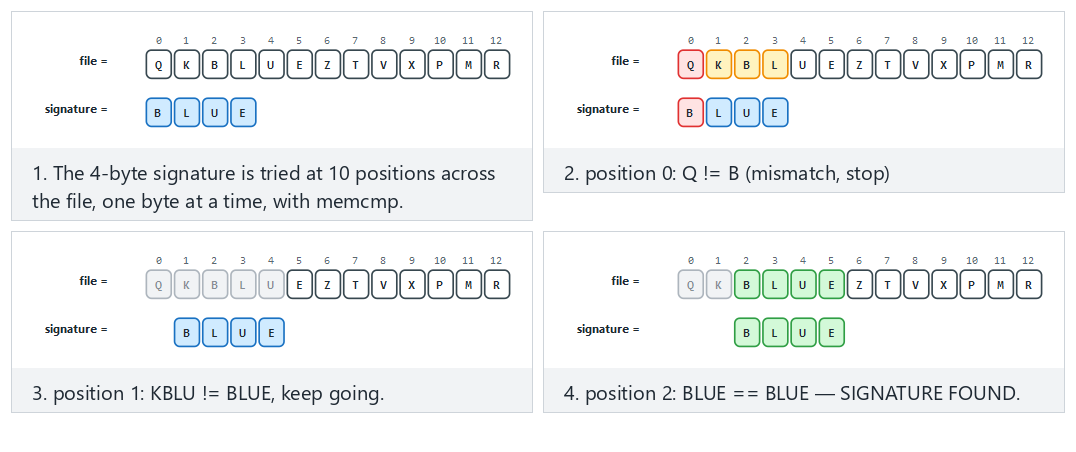
Try Normal: the signature is found in the middle of the file and Hard: many near-misses, the real signature is absent; the edge cases with the signature at position 0 and at the very last possible position are worth a look too.
Lesson
A single method is not enough. Modern protection is layered: hash (fast, exact) → pattern (resilient) → heuristic (signature-free) → emulation/sandbox (deep) → behaviour monitoring (while running). Each layer exists to catch what the previous one missed — just like last week's defence in depth.
How is this applied in the field?
The other side of the coin, from the standpoint of protecting your own code: a mobile payment application keeps sensitive strings and constants encrypted to make reverse engineering harder, and decrypts them at the moment of use. That is, legitimate software also uses the "encrypted body + decryptor" pattern (Weeks 9 and 11). The difference is that here it protects your asset, while in a virus it evades signatures. This is exactly why a security assessor looks for high-entropy regions: "there's something encrypted here, where's the decryptor, how does it find the key?"
A common mistake
The idea that "my signature database is up to date, so I'm safe." Signature-based detection only catches known malware; a polymorphic/metamorphic or never-before-seen (zero-day) sample evades the signature. That is why defence starts with a signature but does not end there.
6. Countermeasures: How Do We Catch It?¶
We saw four methods in the demo above. Let's now pull the whole family of countermeasures together:
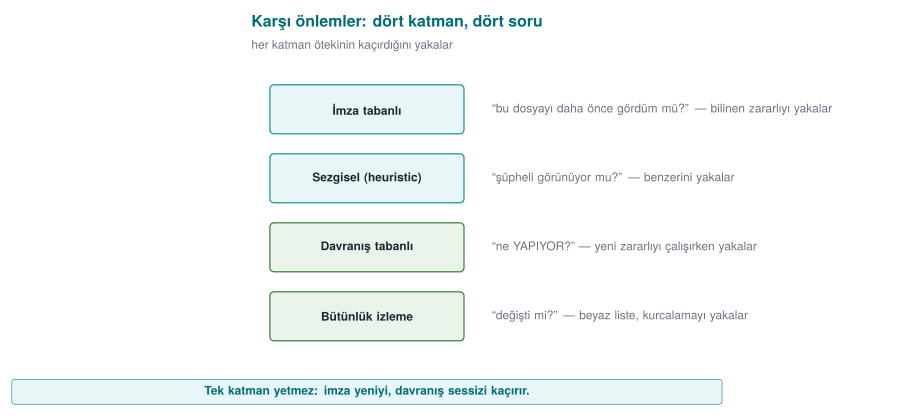
| Method | How does it work? | Strength | Weakness |
|---|---|---|---|
| Signature-based | Looks for a known malware sample's digest/pattern | Fast, low false-positive rate | Misses unknown and polymorphic samples |
| Heuristic | Suspicious features are scored | Finds new samples without a signature | Produces false positives/negatives |
| Behaviour-based | What the program does while running is monitored (file encryption, hooking, network) | Resistant to concealment | Some damage may already have occurred; evasion techniques exist |
| Sandbox | The suspicious file is run in an isolated environment | Sees real behaviour | Slow; malware may detect "I'm in a VM" and go dormant |
| Emulation | Code is stepped through a simulator that is like a sandbox but lighter | Unpacks the decryptor | Can be evaded with anti-emulation techniques |
| Reputation / cloud | The file's prevalence, source, and signer are queried | Good against fast-spreading threats | Requires connectivity and raises privacy concerns |
Modern endpoint protection (EDR/XDR) combines all of these and gives particular weight to behaviour. For example, "a process that reads hundreds of files in a short time and writes them back in a high-entropy form" is nearly certain evidence of ransomware — from behaviour alone, without looking inside the files.
How is this applied in the field? — defence and attack, the same toolbox
The techniques malware uses to hide and the techniques legitimate software uses to protect itself are very often the same. A mobile payment library keeps sensitive strings encrypted to slow down reverse engineering and decrypts them at runtime (Weeks 9, 11); this is exactly a polymorphic malware's "encrypted body + decryptor" pattern. The difference is intent and context: one protects your asset, the other evades signatures. That is why, when a security assessor sees high-entropy regions in your binary, they say "there's something encrypted here" and ask the natural question: where is the decryptor, where does it get the key from, how long does the key stay exposed in memory? The very same entropy measurement is the tool behind both an antivirus's question "is it packed?" and an assessor's question "is your protection real?" Seeing this symmetry explains why the protection methods we will cover throughout the term concern both the attacker and the defender.
Demo 02 — Entropy Meter: How Is Encrypted/Packed Content Recognised?¶
Demo 02 · code/week-02/02-entropy · Book: Recipe 12.1
Measures Shannon entropy (0 = uniform, 8 = random bit/byte) on our own files. It does not touch any file, it only reads.
Here, \(p(b)\) is the probability of byte b occurring in the file. Plain text uses a small number of characters frequently (low H); encrypted/compressed data uses all bytes equally (H ≈ 8).
Sample files are generated the same way on both platforms (no external tool required): uniform, plain text, synthetic machine-code-like data, AES-256-GCM-encrypted, and random files.
STEP 1 - Entropy of different kinds of files (0 = uniform, 8 = random)
  file             bytes    H |0 bit ------------ 8 bit| verdict
  uniform.txt      4096  0.00 |........................| uniform
  document.txt     3504  4.06 |############............| low
  code.bin         2048  6.23 |###################.....| medium
  encrypted.bin    3520  7.94 |########################| HIGH
  random.bin       4096  7.95 |########################| HIGH
   ^ Text is low, machine-code-like is medium, encrypted/random is high.
--------------------------------------------------------------
STEP 2 - The same content in three forms: plain -> machine-code-like -> encrypted
  document.txt     3504  4.06 |############............| low
  code.bin         2048  6.23 |###################.....| medium
  encrypted.bin    3520  7.94 |########################| HIGH
   ^ Encrypted and random data CANNOT BE TOLD APART by entropy alone.
Two important conclusions: (1) Entropy alone does not answer the question "is it malicious?" — encrypted, compressed, and random data are all close to 8; so are a .zip or a .png. Plain text comes out low (~4), compiled machine code medium (~6). (2) But high entropy in an unexpected place is a clue. Step 3 shows this: an encrypted section hidden in the middle of a text shows up as a "hot region" in a windowed scan — the same "small unpacking stub + high-entropy body" pattern that is typical of packed programs.
STEP 3 - A mixed file: an encrypted section hidden in the middle of text
  mixed.bin (4608 bytes), window 512 bytes:
    1024-  1535  4.04 |################................| low
    1536-  2047  7.54 |##############################..| HIGH   <-- hidden section
    2048-  2559  7.57 |##############################..| HIGH
    3072-  3583  4.03 |################................| low
   ^ Packed programs show a similar 'hot spot': a small unpacking
     stub + a high-entropy encrypted body.
This measure traces back to Claude Shannon's 1948 paper "A Mathematical Theory of Communication," which reduces "how unpredictable is this byte?" to a single number. Malware defenders borrowed it years later for scanning: an encrypted/packed body leaves a very different "shape" than plain text.
The animation below steps through entropy.c's windowed scanning loop: how each window's histogram accumulates, how H = -Σ p(b) log2 p(b) is computed, and how H jumps when the file goes from plain text to random data.
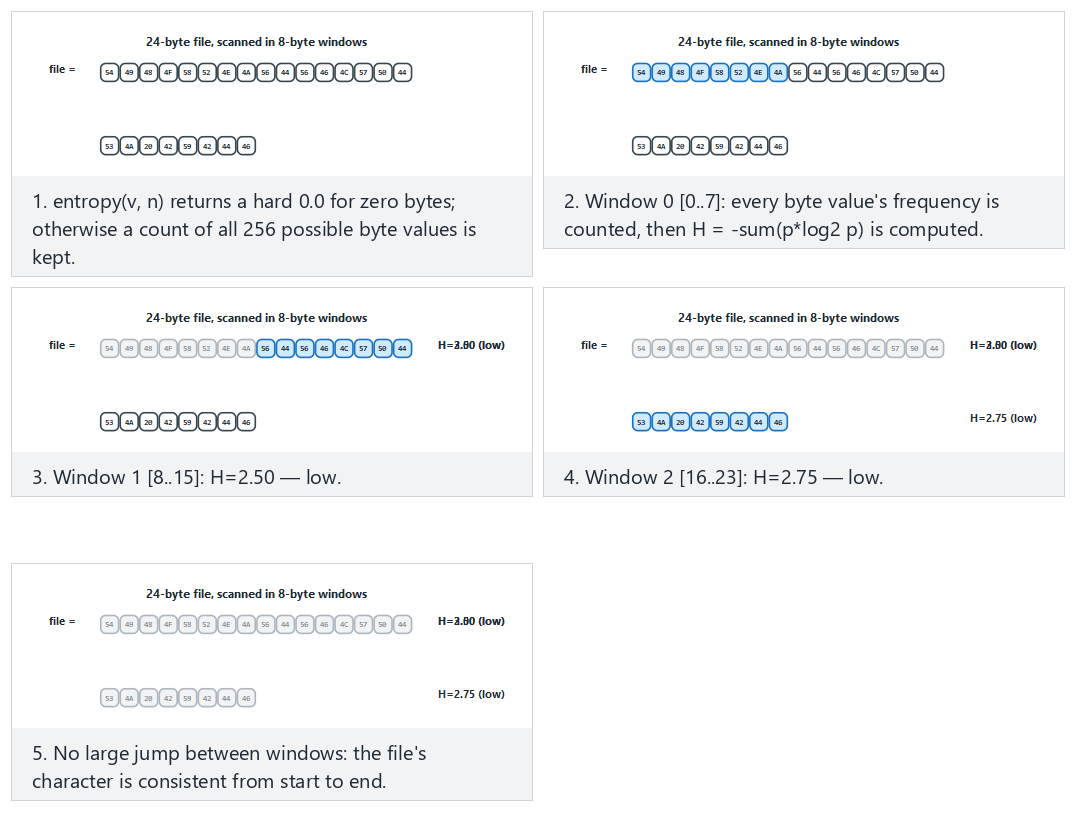
Try Normal: text is consistent throughout (low/medium H) and Hard: plain text, then random data — H jumps from the preset picker; in the edge case where the window does not divide the file evenly, watch how the last window comes out shorter.
How does an assessor test this?
A security lab splits your binary into sections and measures each section's entropy. If the .text (code) section is much higher than expected, they say "this is packed/encrypted" and look for the unpacker. If your project uses encrypted constants, this is normal; but the key sitting in a low-entropy, predictable location is a finding. In other words, "I encrypted it, done" is not enough; where the key sits is critical (Weeks 3 and 11).
Class activity 1 — Compare the methods (10 minutes)
Keep Demo 01 open. Three groups discuss three questions and answer each in one sentence:
- How does an attacker evade an antivirus that only uses a hash signature? (What is the cheapest way?)
- Why is evading a pattern signature more expensive? What does polymorphism provide here?
- What can malware do to evade emulation? (Hint: how does it tell "I'm in a virtual machine"?)
Demo 07 — Rule-Based Detection: A Small Rule Engine¶
An advanced form of signature-based detection is to use a rule instead of a single byte sequence. The most common tool for this in the industry is YARA: a rule defines a few strings (text, or a hexadecimal pattern with wildcards) and a condition over those strings. Demo 07 shows this idea with a small engine written from scratch, using only harmless patterns we made up ourselves.
Demo 07 · code/week-02/07-rule-engine · our own harmless patterns
The rule file (rules.txt) contains five rules. For example:
rule Word_Context {
  string $a     = "download"
  string $b     = "run"
  string $magic = "CAPSULE/1"
  condition ($a and $b) and $magic
}
The engine counts how many times each string occurs in each file, then evaluates the condition (and, or, not, counting, "n of them"). In hexadecimal patterns, ?? matches any byte (a wildcard).
STEP 2 - Scan five files with five rules
  5 rule(s) loaded
  clean.txt     (no match)
  guide.txt     (no match)
  capsule.bin   Capsule_Format, Marker_Hex, Word_Pair, Word_Context
  variant.bin   Marker_Hex
  notes.txt     Many_Repeats

STEP 3 - False positive: why did the harmless guide match?
  guide.txt (147 bytes)
    Word_Pair              $a=0 $b=1 -> -
    Word_Context           $a=0 $b=1 $magic=0 -> -
   ^ Word_Pair looked at words, not CONTEXT: a FALSE POSITIVE.

STEP 4 - The modified variant: what did the wildcard (??) buy us?
  variant.bin (74 bytes)
    Capsule_Format         $magic=1 $decode=0 -> -
    Marker_Hex             $h=1 -> MATCHED

STEP 5 - The rule file is input too: a broken file is rejected
line 4: the text is empty, too long, or unclosed
rule file REJECTED (broken or incomplete)
Four lessons from this demo:
- A narrow rule misses, a broad rule raises false alarms.
Word_Pairalso caught a harmless guide because it only looked at two words (a false positive).Word_Context, which combines the same words with context ($magic), did not make this mistake. Writing a rule means balancing precision against coverage. - A wildcard tolerates the changing part.
variant.binevaded theCapsule_Formatrule because it broke the familiar structure; but the hexadecimal pattern (Marker_Hex) that skips the variable bytes with??still caught it. When writing a rule against polymorphism, you need to target the skeleton that does not change. - A rule engine is also a parser. The rule file comes from the outside; if the engine accepted a malformed file, the detection tool itself would become an attack surface. The demo catches the faulty line and rejects the file entirely (default deny). Parsing bugs in security tools have been exploited many times in the real world.
- A rule catches what is known. There is no rule for a never-before-seen piece of malware; that is why rule-based detection is used together with heuristic and behaviour-based methods.
The condition language itself ($id, #id op n, and/or/not, "n of them") is evaluated by a small recursive-descent parser (expr() → and_expr() → not_expr() → primary(), one grammar level per precedence). The animation below walks that parser token by token: watch how a parenthesised group recurses into expr() and back, how and/or always evaluate both sides (there is no short-circuit — see the and_expr() comment "resolve both: let the syntax be checked"), and how a broken condition returns a CONDITION ERROR instead of crashing or silently matching.
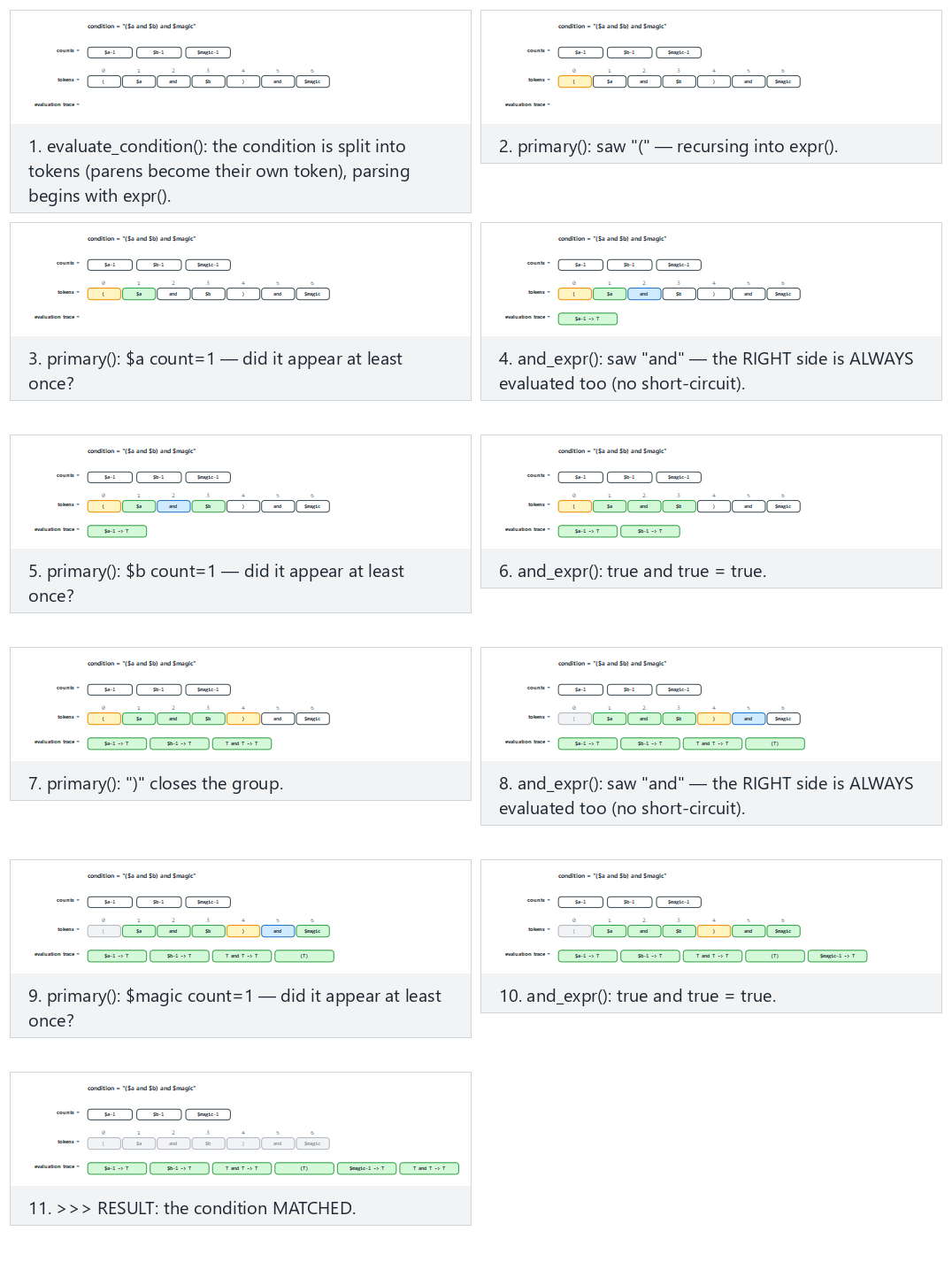
Try Normal: parens + chained "and" (like the Word_Context rule) and Hard: "not", "or" and a #count comparison together from the preset picker; also look at the edge case where an incomplete condition produces a CONDITION ERROR.
Demo 08 — Integrity Monitoring: Whitelist Logic¶
A blacklist says "recognise the bad"; a whitelist says "recognise the good, and be suspicious of everything else." Integrity monitoring is the file-level form of this: while the system is in a known-good state, every file's cryptographic digest is written into a manifest; it is then recomputed and compared regularly. Tools like Tripwire, application whitelists (AppLocker/WDAC on Windows), and operating systems' code-signing checks all rest on the same idea.
Demo 08 · code/week-02/08-integrity-monitoring · an updated version of Recipe 12.2
The program writes a SHA-256 manifest for the sample files in the demo folder, seals the manifest with HMAC-SHA256 using a separately kept key, then reports changes as OK, CHANGED, DELETED, NEW. code/common/cen429_crypto.h is used for the digest and HMAC (OpenSSL on Linux, BCrypt on Windows). The book did the same job with CRC32; CRC does not protect against a deliberate change.
STEP 4 - Simulation: an 'attacker' touches the files
  a line was added to library.bin, data.txt was removed, hidden.bin was dropped
  OK       config.conf      9b1741bb66d862e8...
  DELETED  data.txt         (in the manifest, not in the folder)
  CHANGED  library.bin      5ab02b714a50... -> 12c5803ffe5b... (48->62 B)
  OK       start.txt        56d6b8da7f680093...
  NEW      hidden.bin       28262e242da3d683... (not in the baseline)
  RESULT: 3 deviation(s) found -> investigate!

STEP 5 - To cover their tracks, the attacker rewrites the manifest too
  OK       config.conf      9b1741bb66d862e8...
  OK       hidden.bin       28262e242da3d683...
  OK       library.bin      12c5803ffe5bb001...
  OK       start.txt        56d6b8da7f680093...
  RESULT: integrity preserved (4 file(s))
   ^ If the manifest isn't protected, the monitor is FOOLED: everything looks OK.

STEP 6 - But the seal (HMAC) cannot be regenerated without the key
  SEAL INVALID: the manifest was changed by someone without
  the key -> DO NOT TRUST the manifest
The demo's real lesson is in steps 5 and 6: the digest catches a change, but the expected values must also be protected. If someone who can modify the files can also modify the manifest, the monitor says "everything is fine." The fix is to seal the manifest with a keyed digest (HMAC) or a digital signature and not keep the key in the same place as the monitored files. The comparison is also done in constant time; otherwise a timing difference could leak how many bytes matched.
How is this applied in the field?
The same principle comes back in Week 6 as runtime integrity checking: an application that needs high security computes the digest of its own code section while running and compares it against an expected value embedded after compilation. Where and how the expected value is stored matters just as much as the check itself.
How does an assessor test this?
An independent assessor first modifies a monitored file and checks whether it is detected; they then try to evade the check itself by also modifying the expected values (the manifest, the embedded digest). If the second test cannot be passed, the integrity check only protects against accidents, not against an attacker.
7. Incident Case Studies: Which Programming Error, Which Countermeasure?¶
Almost every major epidemic in history was built on a programming or configuration error. In the table below we read each incident not by what the malware did, but by how it got in; because this course's subject is closing that entry point.
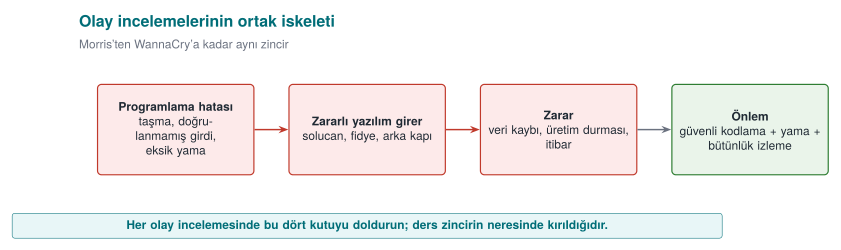
| Incident | Entry path | Error class | What should the programmer have done? |
|---|---|---|---|
| Morris worm (2 November 1988) | Unbounded read into a 512-byte buffer with gets() in fingerd; DEBUG mode left enabled in sendmail; rsh/rexec trust relationships; password guessing | CWE-120 / CWE-242, CWE-489, CWE-287, CWE-521 | Bounds-checked reading (fgets); not leaving debug code in a release; not relying on address-based trust; password policy |
| Code Red (July 2001) | Buffer overflow in the IIS .ida handler (CVE-2001-0500) | CWE-120 | Validating network input length before copying; disabling the unused handler |
| SQL Slammer (January 2003) | Stack overflow in the SQL Server resolution service via a single UDP packet (CVE-2002-0649) | CWE-121 | Bounds checking; not exposing an unnecessary service; applying the patch (it had existed for months) |
| Blaster (August 2003) | Windows RPC/DCOM buffer overflow (MS03-026, CVE-2003-0352) | CWE-120 | Bounds checking; blocking RPC ports at the network boundary |
| Conficker (November 2008) | Path-handling overflow in the Server service (MS08-067, CVE-2008-4250); weak passwords | CWE-119, CWE-521 | Safe string handling; strong authentication; automatic patching |
| Stuxnet (2010) | Code loading via displaying a shortcut (.lnk) file (CVE-2010-2568) plus three more zero-day flaws; stolen driver signing certificates | Loading code from untrusted content; signing keys not being protected | Not executing code while displaying content; protecting signing keys in hardware (an HSM) |
| WannaCry (12 May 2017) | Memory corruption in the SMBv1 server (EternalBlue, CVE-2017-0144); the patch had been released on 14 March 2017 | Input validation / memory safety | Bounds checking in the parser; disabling the legacy protocol; not leaving the patch unapplied for two months |
| NotPetya (27 June 2017) | Distributed through an accounting software's update server; followed by lateral movement via EternalBlue/EternalRomance and credential harvesting | CWE-494 (downloading code without integrity check) | Signing updates and verifying the signature on the client; protecting the update infrastructure |
| SUNBURST (December 2020) | A monitoring software's build environment was breached and a backdoor was inserted into a signed library; ~18,000 customers affected | Supply chain: build environment security | Protecting the build environment, reproducible builds, comparing the build output against the source (the SBOM and integrity topic in Week 5) |
Reading the table from top to bottom, a trend appears: most epidemics between 1988 and 2008 spread through a single buffer overflow. After 2017, the entry point increasingly shifted to update and build processes: instead of breaking the code, the attacker seized the path by which the code reaches the user. This course's two ends come from exactly this: on one side, bounds checking and safe memory management (Weeks 1 and 4); on the other, signed updates, integrity verification, and supply-chain security (Weeks 3, 5, and 10).
Patch delay
The patch for the flaw WannaCry used had been released two months before the epidemic; Slammer's had existed for months too. What this means for your own software is this: the update mechanism is part of the security feature. A product whose updates are hard, slow, or dependent on the user keeps even fixed bugs open for months.
Discussion
Since 2022, Office blocks macros in documents that come from the internet by default. Which weakness of old epidemics like Melissa and ILOVEYOU does this decision close? Why is the effect of a default setting on security greater than user training?
8. Attack Trees¶
We drew an attack tree last week; this week we will put it into numbers. The root is the attacker's goal; the branches are the ways to reach it. At an OR node, one branch is enough; at an AND node, all of them are required. If we write a cost (person-days, equipment, expertise) on every leaf, we can solve the tree bottom-up and find the cheapest attack:
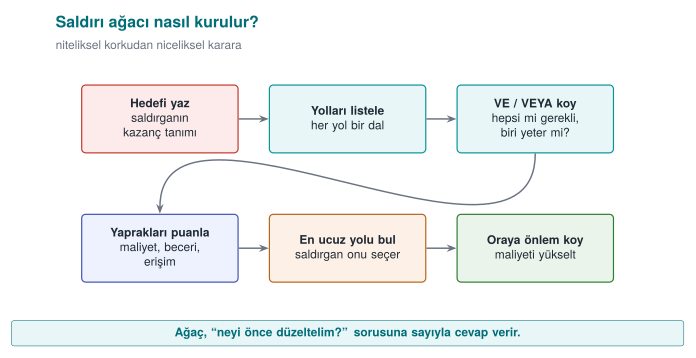
- OR node: the cheapest of the children (whichever suits the attacker).
- AND node: the sum of the children (since all are required).
Demo 04 — Attack Tree Cost Calculator¶
Demo 04 · code/week-02/04-attack-tree
Reads an attack tree written with indentation, computes the cheapest cost for every node, and prints the weakest chain to defend. It carries out no attack; it only adds up numbers.
Windows: cd code\week-02\04-attack-tree ; .\demo.ps1 · WSL/Linux: cd code/week-02/04-attack-tree && sh demo.sh (build once inside code/ first).
  [OR] Obtain the payment key  (cost=2)
    [AND] Copy and decrypt the local database [all required]  (cost=9)
    [OR] Read it from memory during use [one is enough]  (cost=2)
      Read memory with a debugger  (cost=2)
    [AND] Eavesdrop between the server and the phone [all required]  (cost=15)

  CHEAPEST ATTACK = 2 unit(s). ... the weakest point:
  -> Read it from memory during use -> Read memory with a debugger
The cheapest path is 2 units: reading the key from memory. The second tree shows what happens when RASP (debugger and hook detection — Week 6) is added to this branch:
  [OR] Obtain the payment key  (cost=8)
    [OR] Read it from memory during use [one is enough]  (cost=8)
      Memory dump (defeat random wiping)  (cost=8)
  CHEAPEST ATTACK = 8 unit(s).
The defence raised the cheapest attack from 2 to 8; the weakest point changed. This is how you justify a security investment with a number: "this countermeasure makes the cheapest attack 4 times more expensive." AND nodes force the attacker to break multiple layers together — the quantitative counterpart of defence in depth.
In 1999, Bruce Schneier's "Attack Trees" article introduced this AND/OR structure to the security community: attaching a cost or probability to every node and computing the cheapest path beats arguing about it by intuition. The animation below walks through tree.c's cost calculation bottom-up, node by node: an AND node sums its children's costs, an OR node picks the cheapest branch.
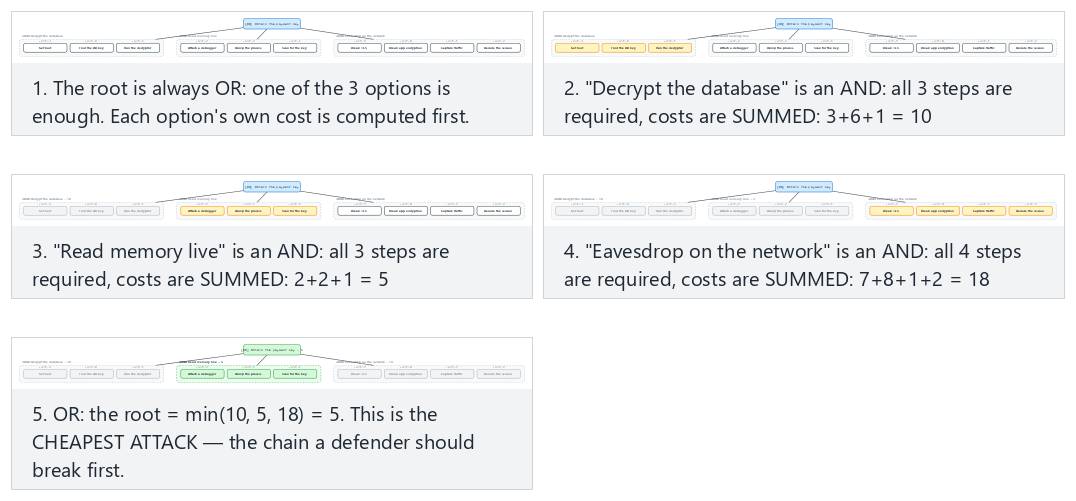
Try Normal: a root OR, the cheapest of three options wins and Hard: five AND groups, the gap between them is small from the preset picker; also look at the edge case where the root is a single leaf.
Connection to the project
In the S4 section of your term project you will draw an attack tree. Use this demo's input format to write your own tree; find the cheapest path and show which countermeasure adds the most cost there.
9. Security Audit Logging: The Log as Evidence¶
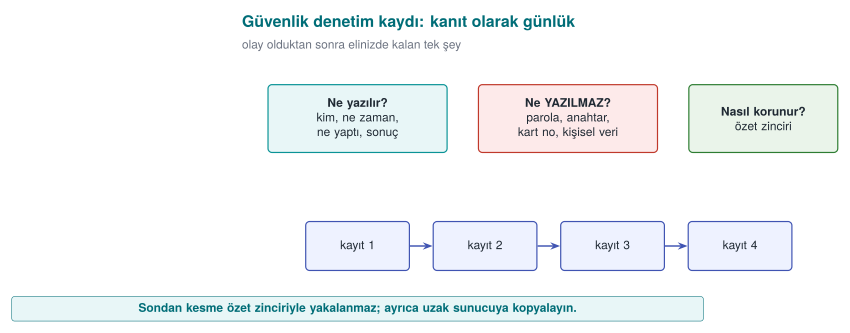
The attack tree asks "where does the attacker come from?"; the audit log answers "did they get in, and what did they do?" A reliable record is the only way to understand what happened after an incident, find who is responsible, and prevent it from happening again. The book covers this topic in Recipe 13.11; the recommendations there still hold today, only the tools have been updated.
What Is Logged, and What Should Never Be Logged?¶
| Log this | Never log this |
|---|---|
| Authentication attempts (successful and failed), who, when, from where | Password, PIN, session token, private key |
| Permission changes, role assignments, configuration changes | The full card number, ID number, and other personal data (mask if needed) |
| Sensitive operations (payment approval, data export, deletion) | The decrypted form of encrypted data |
| The result of security checks (signature failure, integrity failure, RASP alert) | Debug output (completely removed in a release build) |
Logging is designed assuming that an attacker might also read it. Every secret written to the log has, in effect, been handed to anyone who can access the log file. This is why one of the instructor's methods is to remove debug logging from the code entirely in a release build: logging code that is merely silenced with a disabled flag still remains in the binary, leaking information through its strings and remaining re-enablable.
Demo 10 — Log Injection (CWE-117)¶
A log line very often contains a field that comes from the user: a username, a filename, a request path. If this field contains a line break (\n, \r) or a terminal control character (an ESC sequence), an attacker can make the log print an event that never happened, or hide a real line on screen.
Demo 10 · code/week-02/10-log-injection · CWE-117
The program writes a login audit log with four sample inputs: one normal, one that injects a fake admin ... SUCCESS line via a line break, one that erases part of the line on screen via an ESC sequence, and one that is excessively long. The unsafe version runs first, then the safe version. Files are only written under work/ inside the demo folder.
STEP 1 - UNSAFE log: the field is written without any check
  AUDIT login user=alice result=FAILURE
  AUDIT login user=bob
  AUDIT login user=admin result=SUCCESS result=FAILURE
  AUDIT login user=carol^[[2K^Mhidden result=FAILURE
STEP 2 - Count the forged line:
  Log: 4 line(s); forged 'admin SUCCESS' line(s): 1
STEP 3 - SAFE log: escaping + a length limit + a fixed format string
  AUDIT login user=bob\x0A2026-... user=admin ...
  AUDIT login user=carol\x1B[2K\x0Dhidden result=FAILURE
  AUDIT login user=AAAAAAAAAAAAAAAA... result=FAILURE
STEP 4 - Count the forged line (safe):
  Log: 4 line(s); forged 'admin SUCCESS' line(s): 0
In the unsafe version, three inputs produced four lines: a line break hidden inside the name bob added an administrator login that never happened to the log. An administrator or an automated alerting system reading this log reacts to a fake event; the real attack, meanwhile, gets lost in the noise. The safe version does three things:
- Escaping: every unprintable byte (
\n,\r, ESC) is written in\xNNform; every input stays on a single line. - Bounding: the field is truncated at a fixed length (
...); the log file cannot be inflated with a single input. - A fixed format string: the field is never passed as the format string of
printf/syslog. The mistakesyslog(LOG_INFO, user_input)that the book warns about in Recipe 13.11 is a format string vulnerability (CWE-134; covered in detail in Week 4): the correct form issyslog(LOG_INFO, "%s", user_input).
The animation below shows logtool.c's unsafe and safe write paths side by side: how the escaping loop handles every byte, and where the length bound kicks in.
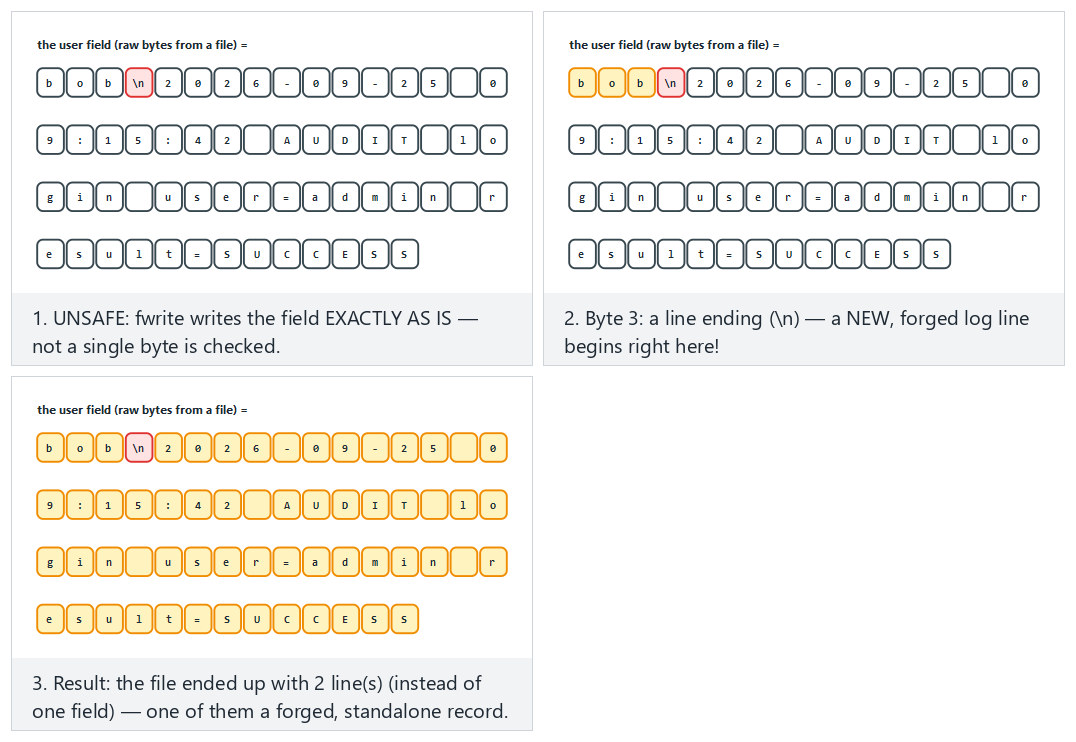
Try Normal: UNSAFE — a line ending forges a new record and Hard: SAFE — the SAME attack, harmless once escaped from the preset picker; also look at the edge case with an ANSI escape sequence plus a carriage return.
How does an assessor test this?
An independent assessor puts line breaks, ESC sequences, and format specifiers like %n/%x into every field that ends up in the log, such as a username or filename; they then open the log and check whether the line count increased, the screen got corrupted, or the program crashed. They also search log files for passwords, keys, and personal data.
Tamper-Resistant Logging¶
Preventing injection ensures the log is written correctly; but it does not stop an attacker who has breached the system from changing it afterwards to cover their tracks. The log does not need to be unmodifiable; it is enough that a modification is noticed. There are two classic ways to do this:
- Digest chain: every record contains the digest of the previous record. If an attacker edits one record's content without also rewriting the digests that follow it, only that one record fails to verify — the verifier always compares against each record's own stored digest, so later records (built from their own untouched content and the untouched previous digest) still check out. The real weakness is that there is no key: an attacker who can rewrite the file can recompute every digest from the tamper point onward and make the whole thing self-consistent again, hiding the tampering completely.
- HMAC chain and key evolution: every record is sealed with a keyed digest; moreover, the key evolves through a one-way function after every record, and the old key is deleted (Schneier–Kelsey, 1999). The instant an attacker seizes the machine, they only find the current key; they cannot go backward from it to the keys that sealed earlier records. This protects the records that predate the breach (forward security).
The verifier keeps the initial key in a separate, secure (offline) place, and validates every record by recomputing the chain from the start.
Demo 11 — Tamper-Resistant Logging: HMAC Chain and Key Evolution¶
Demo 11 · code/week-02/11-tamper-evident-log · an updated version of Recipe 13.11
The program generates the same six-record log twice: once with an evolving key, once with a static key. Every record carries a sequence number and an HMAC-SHA256 (code/common/cen429_crypto.h). It then tries four attacks: modifying a record, deleting a record, reordering records, and rewriting history with a captured key. The records are synthetic; files are only created inside the demo folder.
STEP 2 - Verify the sound log (evolve):
  #1 seq=1 "wallet opened"  MAC:OK
  ...
  >>> RESULT: the log is INTACT (every record verified).
STEP 3 - Raw tampering: change seq=4's message (the MAC is left stale)
  #4 seq=4 "payment approved amount=9999"  MAC:BROKEN
  >>> RESULT: the log has been TAMPERED WITH (verification failed).
STEP 4 - DELETING a record: seq=5 is deleted
  #5 seq=6 "session closed"  MAC:BROKEN  ORDER:BROKEN
When a record is modified, the MAC no longer matches; when a record is deleted, both the MAC and the sequence number break. The demo's final steps show the real difference: when the attacker tries to rewrite the log with the key found on the machine, in the static-key log they can reseal the whole history and fool the verifier; in the evolving-key log, they can only touch the records after the moment of capture, because the earlier keys no longer exist anywhere.
The animation below shows log_chain.c's HMAC chain: how each record's digest includes the previous record's digest, and how changing one record's message leaves only that record reading "BROKEN" — later records still verify, because the chain always follows the stored digests, never a freshly recomputed one (confirmed against the real log_chain.exe: modifying seq=4 alone leaves seq=5 and seq=6 both MAC:OK).

Try Normal: an intact chain, key evolution on and Hard: the VERY FIRST record is changed — still only that one record breaks from the preset picker; also look at the edge case with a static key (no evolution) that shows why the same attack goes uncaught there.
Rule
Write user data to the log by escaping and bounding it; never log secrets; seal the log with a keyed chain, evolve the key at every record, and delete the old key; do not keep the verification key on the machine where the log lives. Whenever possible, send records to a separate log server immediately: the copy the attacker cannot reach is the strongest evidence.
How is this applied in the field?
In applications like mobile payments, the on-device log is kept to a minimum and contains no sensitive field; security events (integrity failure, debugger detection) are reported to the server. This is the "reporting" leg of the RASP countermeasures we will see in Week 6.
10. Access Control: Who Can Do What, to What?¶
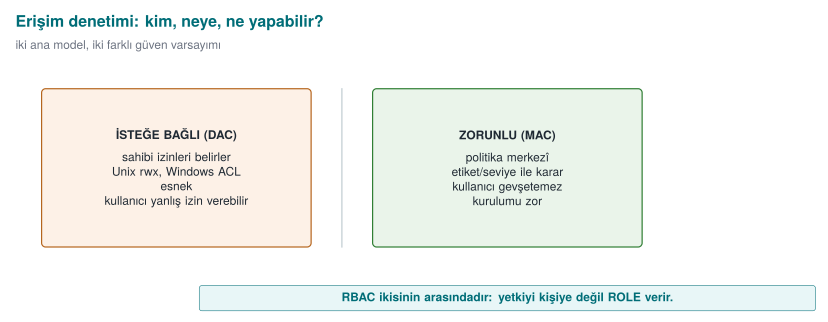
We now move to the defence side. One of security's most fundamental questions is: "Can this subject perform this operation on this object?" We organise this with three concepts:
- Subject: the one performing the operation (a user, a process).
- Object: the thing the operation is performed on (a file, a record, memory).
- Right/permission: the operation that can be performed (read, write, execute).
The Access Control Matrix¶
The most general model is a matrix where rows are subjects, columns are objects, and every cell holds the permissions:
payment_key | log | |
|---|---|---|
| application | — | write |
| library | read, write | write |
| attacker | — | — |
This matrix is conceptual; in reality it is stored in two forms:
- Access control list (ACL): the matrix is stored column by column — every object keeps a list of "who can access me." Unix file permissions and the Windows DACL work this way.
- Capability: the matrix is stored row by row — every subject keeps tickets for "what can I access."
DAC, MAC, RBAC¶
| Model | Who decides? | Example | Strengths/weaknesses |
|---|---|---|---|
| DAC (discretionary) | The owner of the object decides the permissions | Unix chmod, Windows DACL | Flexible; but a leak occurs if the owner grants the wrong permission or a program is tricked (a "confused deputy") |
| MAC (mandatory) | The system/policy decides; the owner cannot change it | Bell–LaPadula, Biba, SELinux | Strict, prevents leaks systemically; hard to administer |
| RBAC (role-based) | Permissions are given to roles, users are assigned to roles | The "Accountant" role | Scales well; the standard method in large organisations |
Real systems use these together: DAC provides the owner's wishes, MAC the system's mandatory boundary, and RBAC administrative convenience. The effective decision is usually the intersection of all of them ("both the owner must permit it and the system policy must permit it").
Demo 03 — Access Matrix and Model Simulator (together with Section 11)¶
We will run this demo together with the formal models in the next section; but its first step is the DAC matrix alone:
Windows: cd code\week-02\03-access-model ; .\demo.ps1 · WSL/Linux: cd code/week-02/03-access-model && sh demo.sh.
STEP 0 - Pure DAC (access control matrix): the owner's permission decides
  library(D   ) R   payment_key (D   ) DAC:YES BLP:OK  BIBA:OK   => ALLOW
  app    (D   ) R   payment_key (D   ) DAC:no  BLP:OK  BIBA:OK   => DENY
  attacker(D   ) R   payment_key (D   ) DAC:no  BLP:OK  BIBA:OK   => DENY
   ^ app READ payment_key: not in the matrix -> DENY (least privilege)
No subject that has no right in the matrix can access it — a direct application of the principle of least privilege. Not even the application has direct access to the payment key; only the security library can access it.
11. Formal Security Models¶
DAC says "whatever the owner says goes"; but this cannot prevent a leak systemically. For example, a program that can read a confidential document can write that information to a publicly readable file — DAC does not prevent this. Mandatory (MAC) models close exactly this gap. We will look at three classic models.
Bell–LaPadula (BLP) — Confidentiality¶
Designed in 1973 for military secrecy. Objects and subjects are given confidentiality levels (Unclassified < Confidential < Top Secret). Two rules:
- The simple security property ("no read up"): a subject cannot read an object more confidential than its own level. (A clerk cannot see a top-secret document.)
- The star (*) property ("no write down"): a subject cannot write to an object less confidential than its own level. (A general cannot write top-secret information into an unclassified document and leak it.)
In short, BLP says "read down, write up": read what is below, write above. Its purpose is to protect confidentiality.
Biba — Integrity¶
In 1977, Biba inverted BLP. This time the levels are trustworthiness/integrity levels (External < Application < Kernel). The rules are symmetric:
- "No read down": a subject cannot read an object less trustworthy than itself. (Business logic does not directly trust unvalidated external input.)
- "No write up": a subject cannot write to an object more trustworthy than itself. (A component that receives data from the network cannot corrupt a signed configuration.)
So Biba says "read up, write down" and protects integrity: dirty data cannot corrupt clean data.
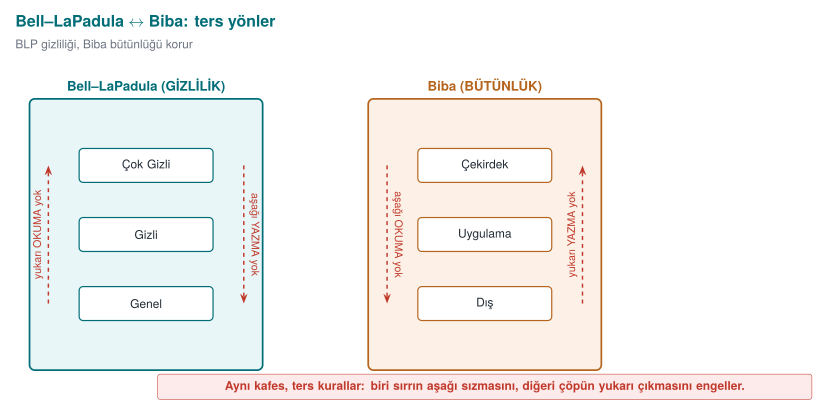
Two models, opposite directions
BLP says "confidential information must not leak down" (it forbids reading up and writing down). Biba says "dirty information must not rise up" (it forbids reading down and writing up). If a piece of data must be both confidential and trustworthy (both at once), that data can only be processed at its own level — this is the conclusion most practical designs arrive at.
Clark–Wilson — Commercial Integrity¶
In 1987, Clark and Wilson proposed a different integrity model for commercial systems such as banks. Instead of military levels, it is built on well-formed transactions and separation of duties:
- Constrained data items (CDI): data whose integrity must be preserved (an account balance).
- Transformation procedures (TP): only approved, well-formed transactions may change a CDI (no direct writes). For example, a balance can only change through a "deposit/withdraw" procedure.
- Integrity verification procedures (IVP): regularly check that the data is consistent ("debits = credits").
- Separation of duty: the person who initiates a transaction and the person who approves it are different people.
The spirit of Clark–Wilson transfers directly into today's software: touch data only through verified transactions, never directly; do not tie a critical step to a single person or a single path. It is the formal form of last week's "separation of privileges" principle.
How is this applied in the field? — the code equivalent of the models
Although these models look abstract, they have everyday code equivalents. The Biba principle means "do not directly trust data coming from the outside"; in practice, this means treating every piece of external input as untrusted and passing it through a validation layer (the input validation from Week 1). Bell–LaPadula's "no write down" rule turns, in a mobile payment library, into a ban on "writing a sensitive key into a less protected log or the clipboard" — it prevents secrets from accidentally leaking into a low-security channel. Clark–Wilson's "well-formed transaction" idea means changing a balance or a transaction counter only through an audited function instead of updating it directly; this way, skipping or rewinding the counter can be prevented in a single place.
How does an assessor test this? — access and authority
An independent assessor concretely tests the question "who can access what?" in your code: is least privilege actually applied, or does every component run with more authority than it needs? If a component is compromised, how far can it reach into the others (lateral movement)? Is a sensitive operation tied to a single flag/single branch — that is, can it be evaded by changing one byte? These questions are answered by looking directly at your interface and asset table (S3, S5) and your attacker model (S4); an authority path that is not in the list is a path that is not audited.
| Model | Year | Protects | Core idea |
|---|---|---|---|
| Bell–LaPadula | 1973 | Confidentiality | No read up, no write down |
| Biba | 1977 | Integrity | No read down, no write up |
| Clark–Wilson | 1987 | Integrity (commercial) | Well-formed transaction + separation of duty + verification |
Demo 03 — Compare the Models¶
  clerk  (Publ) R   operation   (TopS) DAC:YES BLP:DENY BIBA:OK   => DENY
  general(TopS) W   notice      (Publ) DAC:YES BLP:DENY BIBA:OK   => DENY
   ^ clerk READ operation: reading up -> DENY (cannot see secret information)
     general WRITE notice: writing down -> DENY (a leak is prevented)
  listener(Exte) W   record      (Appl) DAC:YES BLP:OK  BIBA:DENY  => DENY
  processor(Appl) R   incoming    (Exte) DAC:YES BLP:OK  BIBA:DENY  => DENY
   ^ listener WRITE record: writing up -> DENY (dirty data must not corrupt clean data)
     processor READ incoming: reading down -> DENY (don't trust untrusted input)
Notice: DAC is YES (the owner has granted permission) in both cases; it is the system that brings the mandatory model into play. Because the effective decision is DAC AND MAC, the model can still deny access even when the owner permits it. You can open the policy files (policy-confidentiality.txt, policy-lwm.txt) and write your own rules.
The animation below steps through access.c's dominates() function: how BLP and Biba use the exact same label comparison in opposite directions, and exactly which comparison "read up" and "write down" correspond to.
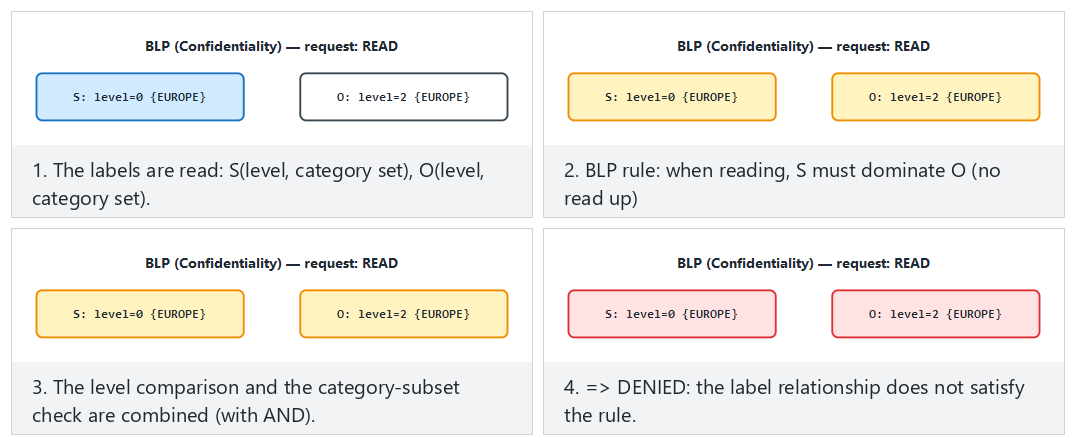
Try Normal: BLP, a read-up is denied and Hard: Biba, the level matches but the category set does not from the preset picker; also look at the edge case where equal labels always allow.
A third model: Chinese Wall (Brewer–Nash, 1989). BLP and Biba rely on a fixed hierarchy; but in a consulting firm the real risk is a conflict of interest — if the same consultant works for both BankA and its rival BankB, one bank's confidential data can leak to the other. David Brewer and Michael Nash's 1989 model solves this with a history-dependent rule: once a subject has read one company's data, data from competing companies in the same conflict-of-interest class closes off to them.
  consultant1 R   a_balance_sheet  DAC:YES CW:OK   => ALLOW
  consultant1 R   b_balance_sheet  DAC:YES CW:DENY  => DENY
     ^ BankA already read; BankB is in the same class (bank)
  consultant2 W   market_summary  DAC:YES CW:DENY  => DENY
     ^ BankB's data could leak into a public object
Unlike BLP/Biba, the decision here is history-dependent: the exact same request can be ALLOW once and DENY another time, depending on which company the consultant read earlier.
Class activity 2 — Choose the model (10 minutes)
Which model fits the following systems, and why?
- A hospital's patient records (no one without authorisation should see them).
- An aircraft's flight control software (data coming from outside must not corrupt critical commands).
- A bank's ledger (must only change through approved transactions, and must be recorded).
Answers
- Bell–LaPadula (confidentiality) · 2. Biba (integrity) · 3. Clark–Wilson (well-formed transaction + verification).
12. Unix and Windows Access Control Models¶
These classic models did not stay on paper; the permission architecture of operating systems is their practical form.
The Unix Model (Recipe 2.1)¶
Unix implements DAC with user/group identities and permission bits. Every process has three identities: effective (used in permission checks), real (the actual owner), and saved (for temporarily dropping and later reclaiming privilege). Every file has three groups of permission bits — owner, group, others — each with read/write/execute:
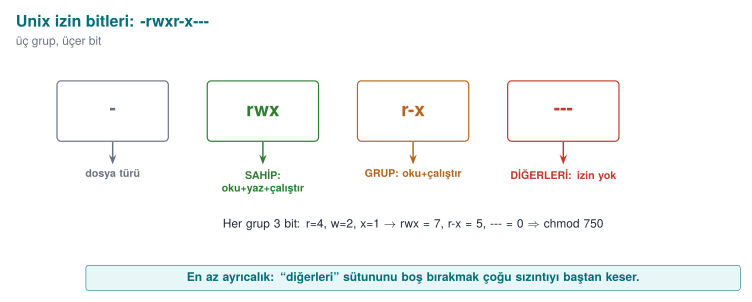
In addition there are the setuid/setgid bits (the program runs with the authority of its owner) and the sticky bit (prevents deleting someone else's file in a shared directory like /tmp). A setuid root program runs with root authority no matter who runs it — powerful but dangerous; this is exactly why last week's "least privilege" is critical.
TOCTOU: the classic trap of Unix access control
If a program first checks and then opens — asking "is it safe for me to write to this file?" — an attacker can replace the file with a symbolic link between the two operations. This is called TOCTOU (Time-Of-Check, Time-Of-Use; CWE-367). The book's Recipe 2.3 describes exactly this race. We will see this safely in Demo 06.
The Windows Model (Recipe 2.2)¶
Windows uses a more detailed ACL model. Every object (file, registry key, mutex) has a security descriptor. There are two lists:
- DACL (Discretionary ACL): holds the access rules — who can do what. It contains a series of ACEs (access control entries); each ACE is a SID (a user/group identity), a right, and an "allow / deny" flag.
- SACL (System ACL): holds the audit rules — which accesses get logged.
An important trap: a NULL DACL (a list with no entries at all) means "full rights for everyone" — never a good idea. Windows picks the best-matching ACE; "deny" entries are generally evaluated before "allow" ones.
| Concept | Unix | Windows |
|---|---|---|
| Identity | UID / GID | SID |
| Permission carrier | Mode bits (rwx × 3) | ACEs inside the DACL |
| Audit | syslog (external) | SACL (built in) |
| "Open to everyone" danger | chmod 777 | NULL DACL |
| Privilege escalation | setuid | Impersonation, tokens |
Modern Windows also adds mandatory boundaries similar to Biba with integrity levels (Mandatory Integrity Control) and AppContainer — so formal models are still alive in practice.
Demo 06 — TOCTOU Race Condition¶
Demo 06 · code/week-02/06-toctou · CWE-367 · Book: Recipe 2.3
A "log writer" checks "is the target safe?" before writing. The unsafe version first looks with lstat() and then opens with fopen(); if the target is replaced with a symbolic link between the two operations, it writes to a different file. The safe version opens with O_NOFOLLOW and rejects symbolic links. Everything happens under work/ inside the demo folder; no system file is touched.
WSL / Linux (this demo only runs here): cd code/week-02/06-toctou && sh demo.sh (run ./build.sh inside code/ first). On Windows, .\demo.ps1 prints how to run it in WSL.
STEP 1 - UNSAFE version: check first, then open (the race window)
  unsafe: 'FORGED-RECORD-added-by-us' -> work/log.txt (written)
  --- Result: contents of secret_target.txt ---
    important data lives in here
    FORGED-RECORD-added-by-us
  >>> ATTACK SUCCEEDED: we redirected the write to another file!

STEP 2 - SAFE version: opens in one step with O_NOFOLLOW
  rejected: the target is a symbolic link (O_NOFOLLOW)
  >>> Attack blocked: secret_target.txt was not corrupted.
In 1988, Ken Thompson's Turing Award lecture "Reflections on Trusting Trust" and that era's /tmp race attacks showed that the time gap between a check and its use is itself a vulnerability; MITRE later gave this class the number CWE-367 (TOCTOU Race Condition). The animation below compares logwriter.c's unsafe and safe versions on the same timeline, showing exactly when the attacker swaps in the symbolic link.
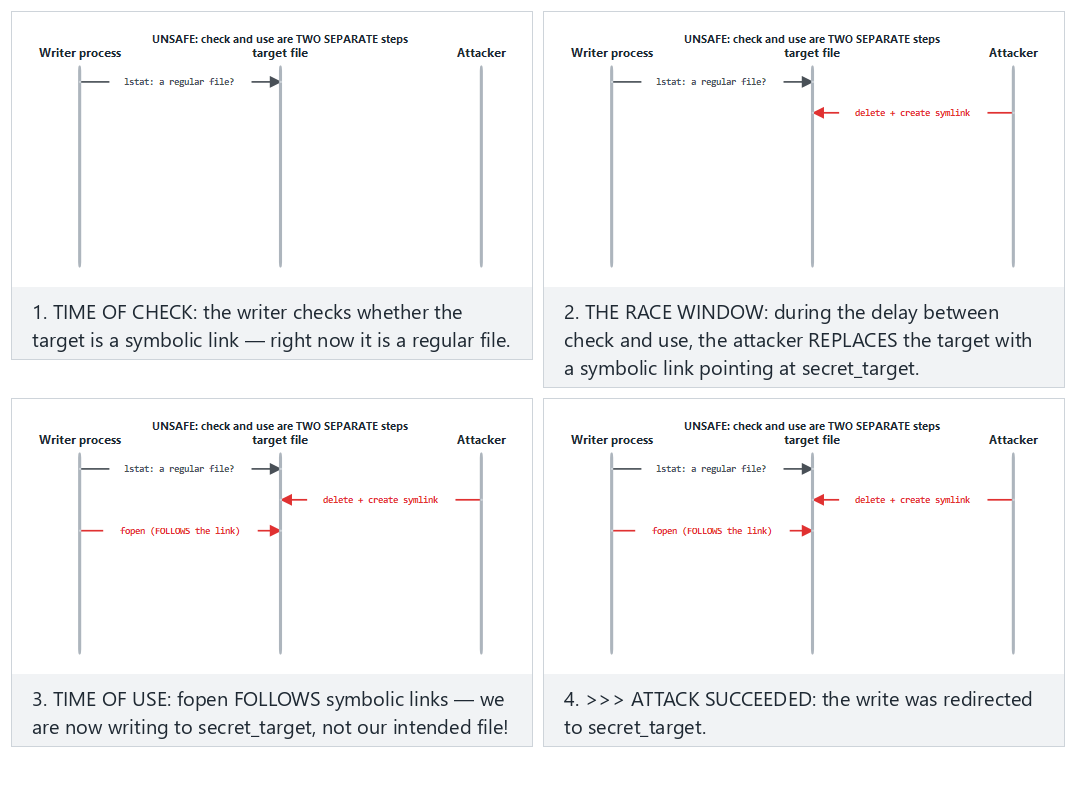
Try Normal: UNSAFE + the attacker races in — the attack succeeds and Hard: SAFE + the SAME attacker — O_NOFOLLOW blocks it from the preset picker.
Rule
Do the check and the use in a single atomic step: open the file with O_NOFOLLOW/O_EXCL and work through the open descriptor (fd); do not repeatedly operate on it by name (path). Use mkstemp for a temporary file (CWE-377). This replaces the "access() first, then open()" pattern.
Demo 12 — Windows Access Control Algorithm: How Are ACEs Evaluated?¶
Windows evaluates a request to access an object by comparing the SIDs (users and groups) in the requesting process's access token against the ACEs in the object's DACL, in order (Recipe 2.2). The rule is simple, but the outcomes are surprising:
- ACEs are examined in list order; an ACE belonging to a SID not in the token is skipped.
- If a DENY ACE matching one of the requested rights is found, the request is denied immediately.
- ALLOW ACEs accumulate the requested rights; once all are granted, the request is accepted.
- If the list ends and rights are still missing, the request is denied (default deny).
- Canonical order: explicit DENY → explicit ALLOW → inherited DENY → inherited ALLOW. Windows' own tools write ACEs in this order; an order broken by hand or by faulty code can cause a DENY to never be read at all.
- A NULL DACL (no DACL at all) grants every right to everyone; an empty DACL (no ACEs) grants no right to anyone. The object's owner, however, can read and change permissions no matter what the DACL says.
Demo 12 · code/week-02/12-ace-evaluation · Recipe 2.2
The program implements this algorithm from scratch: it reads the token (user, groups, integrity level) and the object (owner, label, DACL) from scenario files, evaluates the request step by step, and prints which ACE decided it. It touches no system setting; it is pure calculation. In the last step, it shows the demo's own file's real ACL by only reading it — with icacls on Windows, with stat on Linux.
== SCENARIO: 1a - the book's DACL, alice is a Marketing member ==
    1. DENY  Everyone       FULL
    2. ALLOW Marketing      WRITE
    3. ALLOW Everyone       READ
  Request WRITE:
    ACE 1 DENY  Everyone      -> matched; WRITE denied
  => DENY  (ACE 1: later ACEs are never consulted)
== SCENARIO: 1b - the same ACEs, ALLOW first (not canonical) ==
    ACE 1 ALLOW Marketing     -> granted WRITE (missing: -)
  => ALLOW  (every requested right was granted)
== SCENARIO: 2a - a NULL DACL, the requester is an unrelated account ==
  => ALLOW  (DANGER: including TAKE_OWNER and WRITE_DAC!)
== SCENARIO: 2b - an EMPTY DACL, the same unrelated account ==
  => DENY  (missing: READ)
== SCENARIO: 3b - inheritance broken (removed) ==
  => DENY  (the list ended; missing: READ)
In the first two scenarios the ACEs are identical, only their order differs: in canonical order alice is denied, in the broken order the same request is accepted. The second step shows one of the most common mistakes programmers make: creating an object's security descriptor with a NULL DACL so that "everyone can access it" grants everyone not just read, but also the right to take ownership and change permissions. The correct approach is to write a DACL that explicitly grants the rights that are needed. The third step shows inheritance: explicit ACEs are evaluated before inherited ACEs; cutting inheritance and deleting the inherited ACEs can lead to an unexpected default deny.
The animation below steps through ace.c's ACE evaluation loop: how each ACE is compared against the SIDs in the token, and why the first matching DENY stops the list right there.
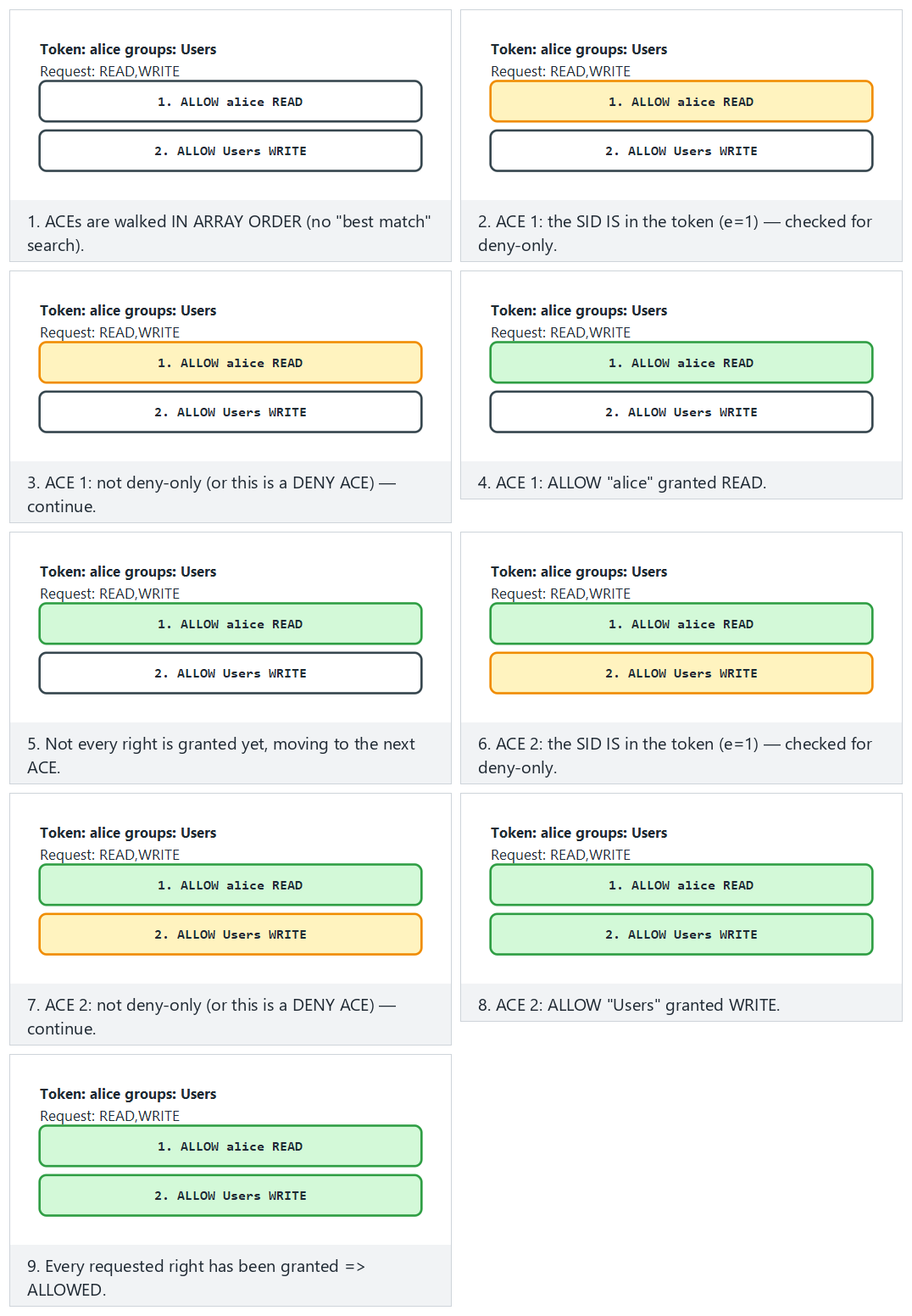
Try Normal: two ALLOW ACEs together build up the full grant and Hard: if ALLOW comes first, DENY may never be seen (non-canonical order) from the preset picker.
How does an assessor test this?
They list the DACLs of the files, registry keys, named pipes, and shared-memory objects the application creates (with tools like icacls, accesschk); they look for write rights for Everyone/Users, a NULL DACL, and non-canonical order.
Demo 13 — Unix Permissions, umask, and setuid Traps¶
Three subtleties of the Unix model (Recipe 2.1) explain most real-world bugs:
- The first matching class decides. The kernel first asks "is the requester the file's owner?"; if so, only the owner bits apply, and the group and other bits are never even looked at. If not the owner but a group member, only the group bits are used; if neither, the other bits are used.
- umask narrows a new file's permissions:
actual permission = requested & ~umask.fopen()always requests0666; if umask is000, the file becomes writable by everyone. A sensitive file should be opened withopen(..., 0600)(Recipe 2.7, Week 1). - A setuid program runs with the authority of the file's owner, not the person running it. A program that does not know the distinction between real, effective, and saved user IDs can think it has "dropped" its privilege while leaving it recoverable through the saved identity (Recipe 1.3).
Demo 13 · code/week-02/13-unix-permissions-umask · Recipe 2.1, 2.7, 1.3
The program first shows the kernel's permission algorithm, umask, setuid identity transitions, and the sticky bit by simulation; it creates no real setuid file and requests no administrator privilege. It then tests the same rules with real files under the demo folder's output/ subfolder, shows the POSIX ACL, and only lists the setuid programs on the system. On Windows the simulation steps run exactly the same way; then the Windows equivalent of umask, permission inheritance from the parent folder, is shown with icacls. For the real Unix steps (umask, chmod, ACL), the script recommends WSL.
A) Kernel permission check: the first matching class decides
  process request  file          owner:group    perms       class -> decision
  mark    write    report.txt    alice:accounting rw-r-----   group -> DENY
  alice   read     paradox.txt   alice:accounting ---rwxrwx   owner -> DENY
  zoe     read     paradox.txt   alice:accounting ---rwxrwx   other -> ALLOW
   ^ alice CANNOT READ paradox.txt: the owner class was picked and
     the owner bits are '---'; the group/other bits are never consulted.
B) umask: the real permission = requested & ~umask (Recipe 2.7)
  requested umask 000    umask 022    umask 077
  0666      rw-rw-rw-    rw-r--r--    rw-------
C) setuid simulation: alice (uid 1001) runs a setuid program
   owned by root. After exec: effective=saved=0.
    seteuid(1001)                  r/e/s=1001/1001/0 g=1001 ok
The paradox.txt example runs against intuition: alice, the file's owner, cannot read it, yet zoe, who has no relation to it at all, can. The authentication logic of "first look at who you are, then apply only that class's rule" requires thinking through each class separately when writing permissions. The setuid step shows that a temporary drop done with seteuid() leaves the saved identity at 0, meaning the privilege can be reclaimed; a permanent drop requires changing all three identities with setresuid() and verifying the result.
The animation below steps through permissions.c's permission check and its umask calculation: how the root/owner/group/other class gets picked, and the requested & ~umask bit operation.
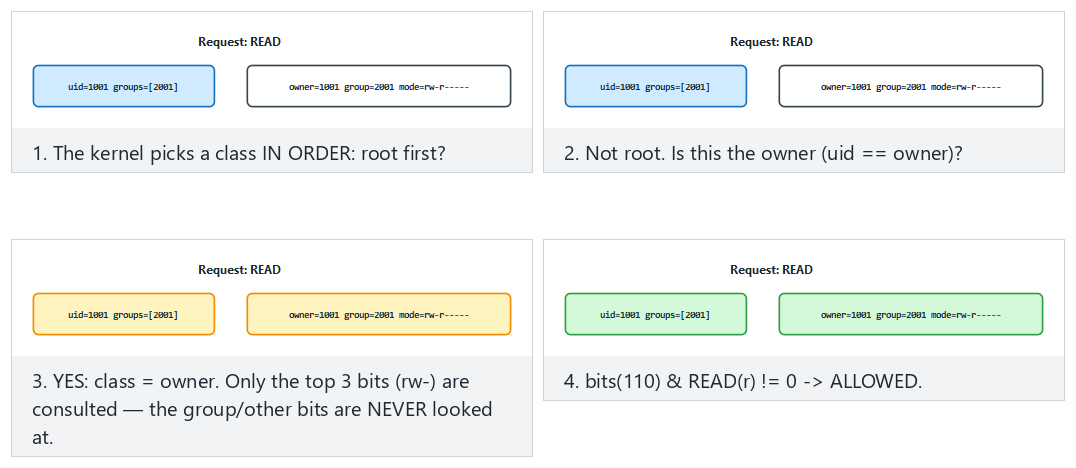
Try Normal: the owner reads, it is allowed and Hard: the "owner can't read" paradox (owner bits are off) from the preset picker; also look at the dangerous edge case where umask 000 opens a 0666 request to everyone.
Demo 14 — RBAC, Separation of Duty, and Clark–Wilson¶
The Clark–Wilson model's two core ideas are the well-formed transaction (only certified transactions may touch data) and separation of duty (whoever initiates a task cannot approve it). RBAC, meanwhile, grants authority to roles rather than to people; static separation of duty (SSD) forbids assigning one person to two conflicting roles, and dynamic separation of duty (DSD) forbids activating both of them at once in the same session.
Demo 14 · code/week-02/14-rbac-clark-wilson · a bank simulation
The program reads roles, users, constraints, two accounts (CDIs), and certified transactions (TPs) from a scenario file; it then evaluates a series of requests against the Clark–Wilson rules (C1–C5, E1–E4). Transfers over 5,000 units require a second person's approval; the IVP (integrity verification procedure) compares account totals against the ledger.
== 1 - RBAC: role assignment and separation of duty (SSD/DSD) ==
[01] ASSIGN carl TELLER
     SSD(TELLER,APPROVER): carl cannot hold both -> DENY
[04] SESSION dana TELLER,AUDITOR
     DSD(TELLER,AUDITOR): both cannot be active in the same session -> DENY
[05] SESSION dana AUDITOR
     session opened; active: AUDITOR
== 2 - Clark-Wilson: only a certified TP touches a CDI ==
== 3 - Separation of duty: a large transfer needs a second person's approval ==
[20] dana IVP
     IVP expected total from the ledger 20250, found 20250
  => CONSISTENT (C1: the CDIs are in a valid state)
== 4 - If a broken TP gets certified, the IVP catches it ==
[31] dana IVP
     IVP expected total from the ledger 20250, found 20220
  => INCONSISTENT! difference -30: a TP is broken, or a CDI changed outside a TP
The fourth step is the model's most instructive part: if the certifier certifies a faulty transaction, the enforcement rules (E1–E4) cannot notice it, because the transaction looks "authorised." What catches the error is the independently running IVP: the totals do not match the ledger. Lesson for the programmer: authority checking alone is not enough; you also need a mechanism that separately verifies the consistency of the data.
The animation below steps through bank.c's E1–E4 gates in order (is the role held, is the TP certified, is there an open session, does only a TP touch the CDI): which gate stops a request, and which gates pass.
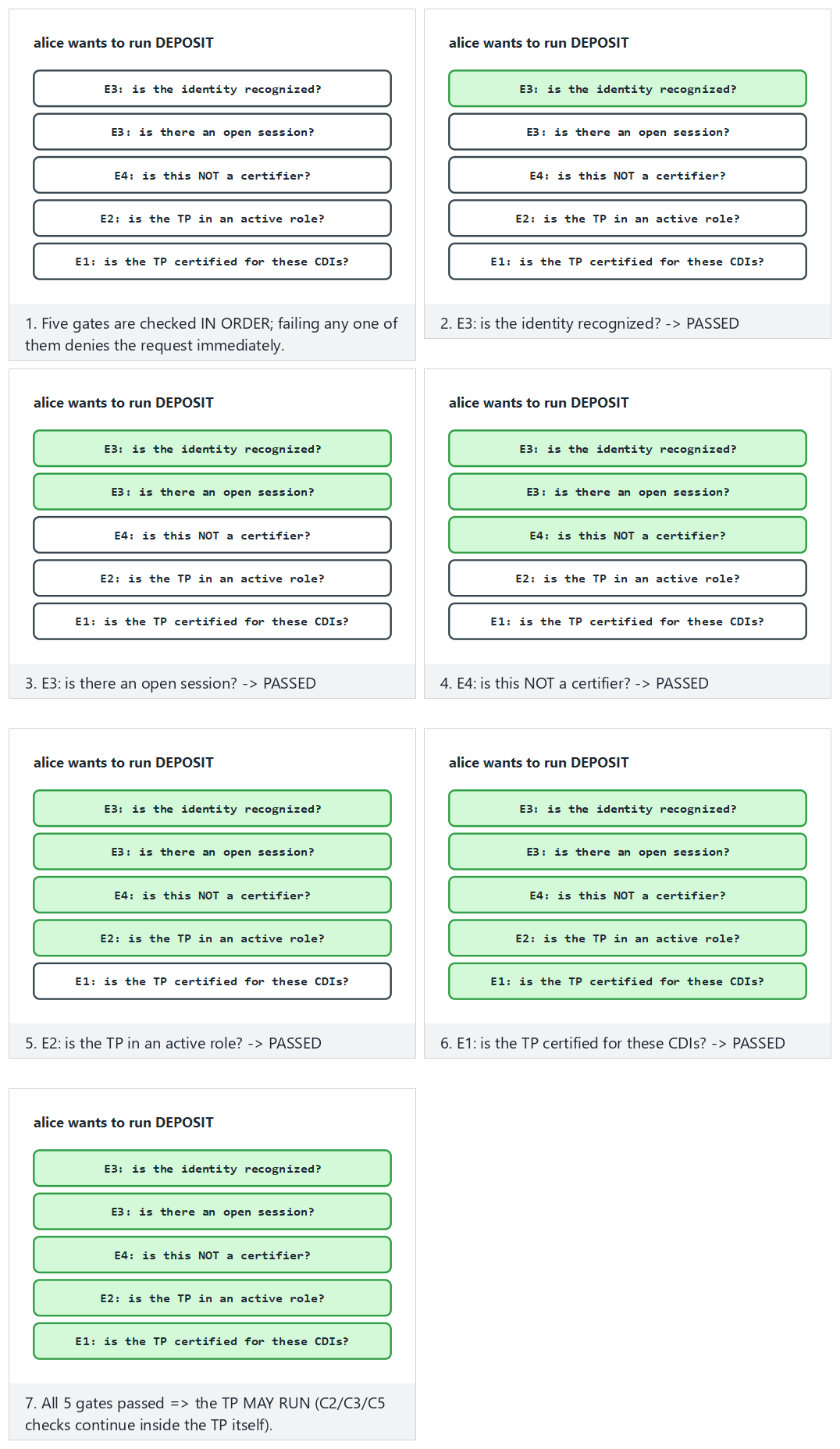
Try Normal: all five gates pass, the TP runs and Hard: the role is right but the TP is not certified (stops at E1) from the preset picker.
How is this applied in the field?
In payment systems, the "four eyes" principle (the person who prepares a transaction and the person who approves it are different people), "split knowledge and dual control" in key management (no single person knows the whole key), and daily reconciliation procedures are direct counterparts of Clark–Wilson's separation of duty and IVP ideas.
13. Classifying Software Security Vulnerabilities: CWE¶
When you find a vulnerability, you must name it so that others understand it, it is not rediscovered from scratch, and a countermeasure can be taken. The first tool is CWE (Common Weakness Enumeration): a numbered catalogue of weakness types, maintained by MITRE. If a CVE is a specific flaw in a specific product, CWE is its type.
| CWE | Weakness type | Where in this course? |
|---|---|---|
| CWE-787 | Out-of-bounds write | Week 1 Demo 03 (overflow) |
| CWE-125 | Out-of-bounds read | The Heartbleed family |
| CWE-89 | SQL injection | Week 5 |
| CWE-79 | Cross-site scripting (XSS) | Web vulnerabilities |
| CWE-416 | Use after free | Week 4 |
| CWE-20 | Improper input validation | Every week |
| CWE-367 | TOCTOU race condition | This week, Demo 06 |
| CWE-798 | Hardcoded credentials | Weeks 3, 10 |
| CWE-327 | Use of a broken/risky cryptographic algorithm | Week 10 |
| CWE-326 | Inadequate encryption strength | Weeks 10, 11 |
The CWE Top 25 is the list of the 25 most common and most dangerous weaknesses of the year; it is computed from real CVE data by combining frequency and severity. It is a good first answer to a security programme's question "what should I look at first?" Out-of-bounds write (CWE-787), XSS (CWE-79), and SQL injection (CWE-89) have topped the list for years.
CWE is hierarchical
CWEs are linked like a tree: pillar → class → base → variant. For example, under a very general "improper input validation" (CWE-20) there are more concrete entries like "path traversal" (CWE-22) or "OS command injection" (CWE-78). Mapping a finding to the most concrete possible CWE also clarifies the fix.
How does an assessor look at this? — weakness categories → CWE
A security assessor looks for specific weakness families in your product and ties every finding to a CWE. Typical families and their counterparts:
| What the assessor looks for | Possible CWE |
|---|---|
| Secrets left exposed (a hardcoded key, a secret left in cleartext in memory) | CWE-798, CWE-316 |
| Weak/incorrect cryptography (ECB, uncertified, a weak checksum) | CWE-327, CWE-326 |
| Bypassable RASP (a check tied to a single point, hookable detection) | CWE-693 (protection mechanism failure) |
| Code/data "lifting" (using a whitebox table as an oracle) | CWE collection: insufficient protection |
| Logging leaks (a log left in the release build, an error code that gives a hint) | CWE-532, CWE-209 |
In your term project's S4 table you will tie every threat to a CWE like this.
14. OWASP Top 10 and MASVS¶
CWE catalogues all weaknesses; OWASP, on the other hand, turns these into priority lists and verification standards for specific domains.
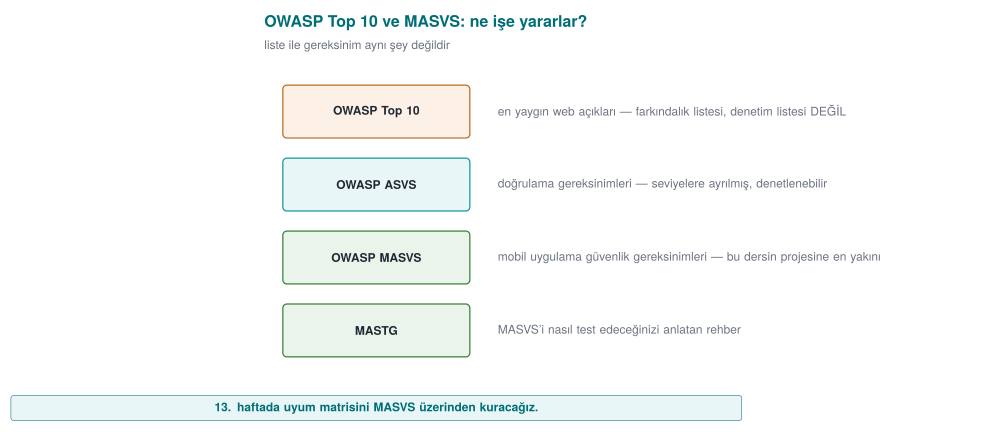
- OWASP Top 10: the ten most critical risk categories in web applications (e.g. broken access control, cryptographic failures, injection, insecure design). It is an awareness and prioritisation document; each item covers many CWEs.
- OWASP ASVS (Application Security Verification Standard): a detailed, levelled checklist for the web, answering the question "which checks must be passed to be considered secure?"
- OWASP MASVS (Mobile Application Security Verification Standard): the mobile counterpart of the same idea. Since this course focuses heavily on mobile protection, MASVS is especially important for us. Its categories (briefly): STORAGE, CRYPTO, AUTH (authentication), NETWORK, PLATFORM, CODE (code quality), and RESILIENCE (protection against reverse engineering and tampering). The test guide that accompanies MASVS is MASTG.
| Document | Scope | Type |
|---|---|---|
| CWE / Top 25 | All software | Weakness catalogue / priority |
| OWASP Top 10 | Web | Awareness / priority |
| OWASP ASVS | Web | Verification standard |
| OWASP MASVS + MASTG | Mobile | Verification standard + test guide |
Connection to this course: MASVS-RESILIENCE
The topics we will cover throughout the term — code obfuscation (Weeks 9, 14), RASP (Week 6), and whitebox (Week 11) — are the direct counterpart of MASVS's RESILIENCE category. In other words, every protection you learn maps onto an item of a recognised standard.
Class activity 3 — Classify the finding (10 minutes)
Map the following three short findings to (a) a CWE, (b) an OWASP Top 10 / MASVS category if possible:
- A mobile application never verifies the server certificate; a fake certificate is accepted.
- An API key hardcoded in the source code is identical across all copies.
- There is a login form that inserts the username directly into a SQL query.
Answers
- CWE-295 (improper certificate validation) · OWASP A02 cryptographic failures / MASVS-NETWORK.
- CWE-798 (hardcoded credentials) · MASVS-STORAGE/CRYPTO. 3. CWE-89 (SQL injection) · OWASP A03 injection.
15. CVE and CVSS: Which Flaw, How Severe?¶
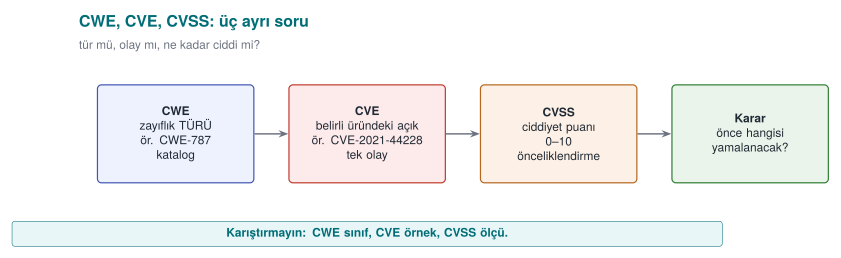
- CVE (Common Vulnerabilities and Exposures): the unique identifier of a specific flaw in a specific product, e.g.
CVE-2014-0160(Heartbleed). A CVE is a name, not a severity. A CVE belongs to one or more CWE types. - CVSS (Common Vulnerability Scoring System): a system that turns a flaw's severity into a number between 0.0 and 10.0. It is maintained by FIRST. There are three groups of metrics: Base (the flaw's own properties, unchanging), Temporal (does exploit code exist, has a patch been released), Environmental (how important it is in your environment). In this course we will focus on the Base score.
CVSS v3.1's eight Base score metrics:
| Metric | Its question | Values |
|---|---|---|
| AV Attack vector | From where is it exploited? | Network / Adjacent network / Local / Physical |
| AC Complexity | How difficult is it? | Low / High |
| PR Privileges required | Is prior authority needed? | None / Low / High |
| UI User interaction | Does the victim have to do something? | None / Required |
| S Scope | Does the impact spill beyond the vulnerable component? | Unchanged / Changed |
| C / I / A Impact | How much are confidentiality / integrity / availability broken? | High / Low / None |
Demo 05 — CVSS v3.1 Base Score Calculator¶
Demo 05 · code/week-02/05-cvss (Python) · FIRST v3.1 formulas
Takes a CVSS vector and computes the base score from scratch; test_cvss.py validates the result by comparing it against known values from the FIRST document. It makes no network requests; it needs no compilation (Python 3.8+).
Windows: cd code\week-02\05-cvss ; .\demo.ps1 · WSL/Linux: cd code/week-02/05-cvss && sh demo.sh. By hand: python3 cvss.py --examples (on Windows py -3.12 cvss.py --examples).
  1) Remote, no authentication needed, full takeover (Heartbleed-like severity)
  CVSS:3.1/AV:N/AC:L/PR:N/UI:N/S:U/C:H/I:H/A:H
    BASE SCORE = 9.8  |####################|  Critical

  2) The same, but the SCOPE changed (impact spills outside the box) -> higher
  CVSS:3.1/AV:N/AC:L/PR:N/UI:N/S:C/C:H/I:H/A:H
    BASE SCORE = 10.0  |####################|  Critical

  4) Local privilege escalation (the device is in the attacker's hands) -> high
  CVSS:3.1/AV:L/AC:L/PR:L/UI:N/S:U/C:H/I:H/A:H
    BASE SCORE = 7.8  |################....|  High
Even with the same impact (C:H/I:H/A:H), a remote + unauthenticated flaw (9.8) scores higher than a local + privileged one (7.8); when the scope changes it goes up to 10.0. FIRST (the Forum of Incident Response and Security Teams) published the CVSS v3.1 specification in June 2019 — this demo's test_cvss.py is validated directly against that document's example scores. We convert scores into severity bands:
| Score | Band |
|---|---|
| 0.0 | None |
| 0.1–3.9 | Low |
| 4.0–6.9 | Medium |
| 7.0–8.9 | High |
| 9.0–10.0 | Critical |
The animation below steps through cvss.py's base score calculation: how the Impact and Exploitability sub-scores are computed from the eight metrics, and why the formula changes when the scope changes.
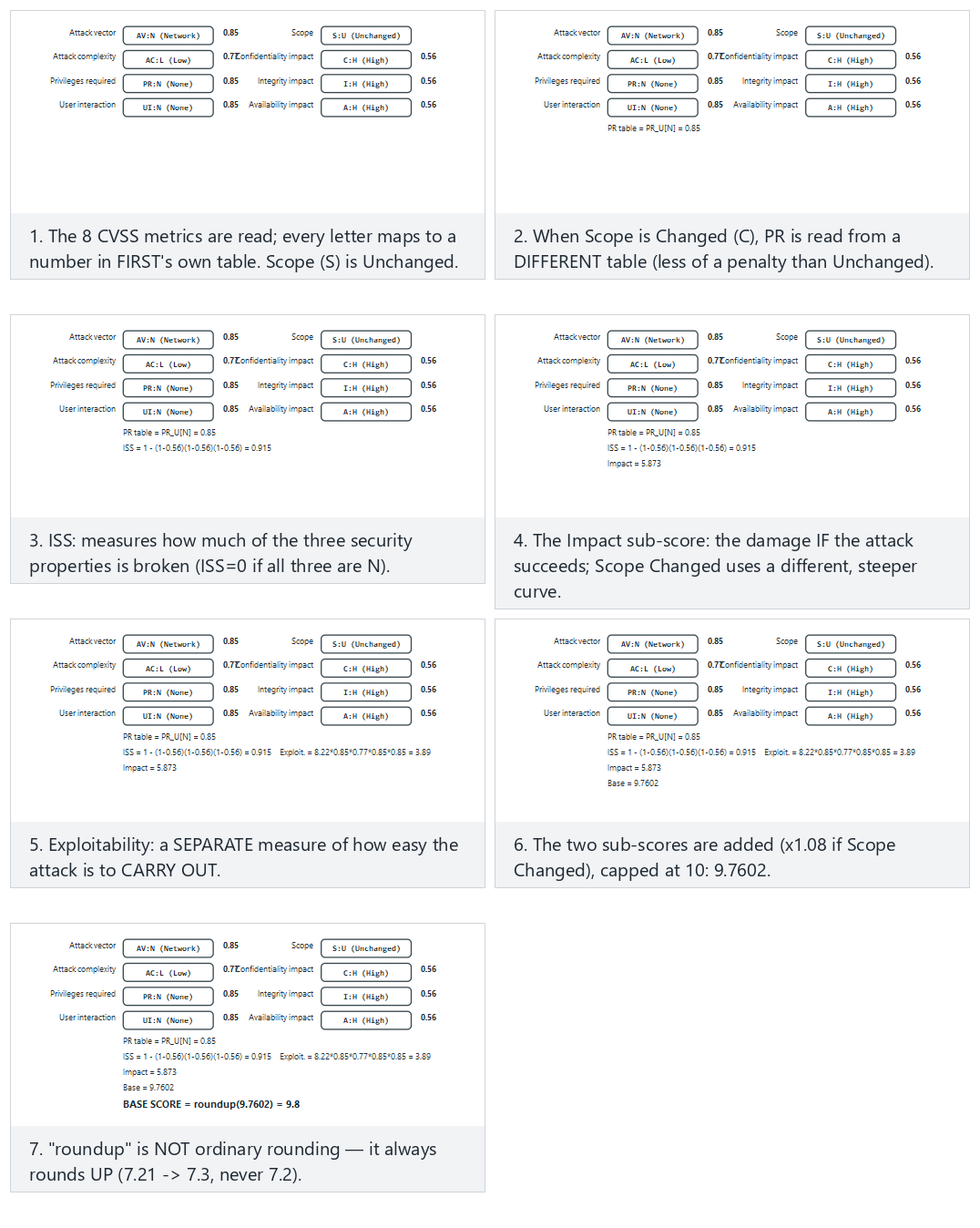
Try Normal: Heartbleed-like (remote, no auth, full takeover) and Hard: the same flaw, Scope Changed — a higher score from the preset picker; also look at the edge case with no impact at all, a hard 0.0.
CVSS v4.0 in brief
v4.0, released in 2023, fixes some of v3.1's weaknesses: the Base score is now called CVSS-B; the "scope" metric was removed and replaced with separate Vulnerable System Impact (VC/VI/VA) and Subsequent System Impact (SC/SI/SA); with exploit maturity (E) and threat/environmental metrics, CVSS-BTE can be computed. The goal is to better reflect real risk. In this course we wrote the calculator for v3.1, because it is still the most common in the field; v4.0's logic is the same, the weights differ.
CVSS's common mistake
"CVSS is 9.8, let's patch it right away; 4.0 can wait." The base score does not know the context: a 4.0 flaw is more important to you than a 9.8 one if it is exactly the door to your most valuable asset. This is why there are Environmental metrics and your asset table (S5). The score is a starting point for prioritisation, not the final word.
How does an assessor test this? — from finding to score
When a security lab finds an issue, it does not just leave it at "bad"; it grades it reproducibly. First it maps the finding to the most concrete CWE; then, while constructing a CVSS vector, it asks concrete questions: can the attacker use this over the network, or only while holding the device (AV)? Is prior authority or user interaction required beforehand (PR, UI)? Does the impact stay inside the vulnerable component or spill outside it (S)? In this course's context (the program runs on the attacker's device), most findings come out local (AV:L); so even when the CVSS score is low, the risk does not decrease — the assessor writes the attack potential (time spent, expertise, equipment) next to the score. In your project you will record every finding this way, with CWE + CVSS + a short justification (S4, S16).
16. The Vulnerability Lifecycle and Responsible Disclosure¶
A flaw goes through a lifecycle from the moment it is discovered to the moment it is made public. How this cycle is managed determines how long users remain at risk.
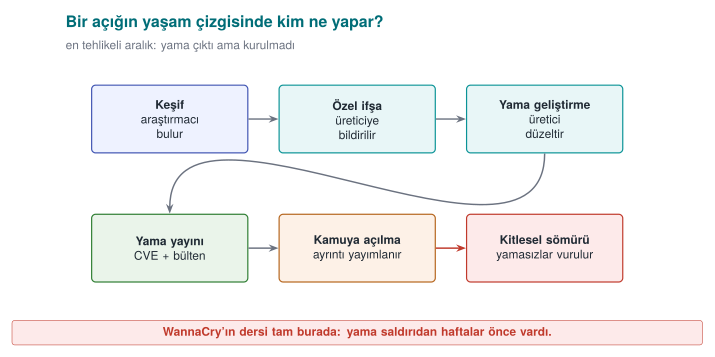
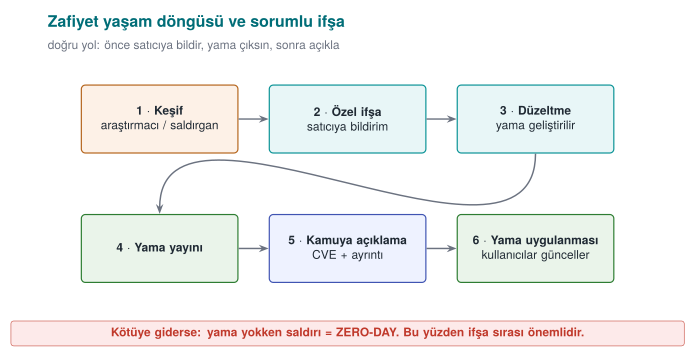
Key concepts:
- Zero-day: a flaw the vendor does not yet know about, or for which there is no patch. The most dangerous situation, because there is no defence.
- Responsible disclosure (coordinated disclosure): the researcher reports the flaw to the vendor first, waits a reasonable period (usually 90 days) for a patch, then discloses it publicly. The goal is to protect users while also getting the vendor to act.
- Full disclosure: disclosing the flaw publicly right away. It pressures the vendor but puts users at risk; it is controversial.
- Bug bounty programmes: programmes in which companies reward researchers who responsibly report flaws. They encourage responsible disclosure.
- Patch gap: the moment a patch is released, the flaw becomes public; anyone can reverse-engineer the patch and learn the flaw. Users who do not update are vulnerable in this gap — WannaCry spread to machines that still had not updated after the patch had already come out.
How is this applied in the field?
For a product team, this cycle is a process: a channel that accepts vulnerability reports (security.txt, a security email), a responsible person, a patch SLA (how quickly it will be fixed), and a release/patch announcement mechanism. An independent assessment asks not only about the product's code but also about this process: "if a flaw is reported, what happens, who does what, and how quickly?" In your project you will address this in the development process (S13) and reporting policy (S12) sections.
17. Common Mistakes and Checklists¶
This week we covered four big topics together: malware and detection, attacker mindset and audit logging, access control models, and vulnerability classification and prioritisation. Below, for each cluster, you will find first the most common misconceptions, then a checklist you can use to test yourself. Every mistake item also includes a short answer to "why is this wrong?"; if you can explain every checklist item to a friend in your own words, you have learned that topic.
Malware and Detection¶
Common mistakes
- "All malware is a virus." A virus is only one type: it attaches to a carrier and runs when the carrier runs. A worm needs no carrier, a trojan horse does not copy itself. Getting the type wrong leads to the wrong defence being chosen (a network patch against a worm, user training and an allow-list against a trojan horse).
- "My signature database is up to date, so I'm safe." A signature only catches what is known; details in §5 (Demo 01).
- "High entropy = malicious." Encrypted, compressed, and random data are all close to 8; so are a
.zip, a.png, an encrypted backup. Entropy is only a meaningful clue in an unexpected place (Demo 02). - "The sandbox came back clean, so it's clean." Malware can sense the virtual environment and go dormant, or wait for a date or user interaction. A sandbox result means "it did nothing under these conditions," not "it is harmless."
- "Emulation defeats metamorphic malware." Emulation catches the moment an encrypted body is decrypted; metamorphic code has no fixed body that gets decrypted. Behaviour-based detection is needed here.
- "We'll buy a product that detects 100%." According to Cohen's result, there is no algorithm that correctly answers "is this program a virus?" in every case; every detection method strikes a balance between false positives and false negatives.
- "I did integrity monitoring with a plain SHA-256 list." Just as an attacker can modify the file, they can update the list too. The baseline values must be keyed (HMAC) or signed and must sit somewhere the attacker cannot reach (Demo 08).
- "The patch was released, job done." The risk continues until the patch is applied; details in §7 (the WannaCry example).
Checklist — Malware
- I can distinguish virus, worm, trojan horse, ransomware, rootkit, bot, spyware, and wiper by propagation and purpose.
- I can show a virus's infection mechanism, trigger, and payload parts in one scenario.
- I can say what changes at every step of the encrypted → oligomorphic → polymorphic → metamorphic ladder, and which detection method it makes harder.
- I can explain the purpose of packers and anti-analysis techniques (VM detection, dormancy, debugger detection).
- I can state the strength and weakness of a hash signature, a pattern signature, a YARA rule, a fuzzy hash, heuristics, behaviour/EDR, a sandbox, emulation, and an allow-list, each in one sentence.
- I can show that the doubling time in the SI epidemic model is
ln 2 / β, and why a hitlist shortens the opening phase (Demo 09). - I can state one lesson left for the programmer by each of the Morris, Code Red, Slammer, Stuxnet, WannaCry, NotPetya, and SolarWinds incidents.
Attacker Mindset, Attack Trees, and Audit Logging¶
Common mistakes
- "The user cannot modify our application." Recipe 12.1's basic assumption is the opposite: the attacker can fully control the device's hardware, operating system, and tools. Protection is not unbreakability, it is raising the cost of the attack.
- "A single attacker model is enough." The capabilities of a remote attacker, a malicious app on the same device, and the device owner (white-box) attacker are very different. If the threat table is filled in before the models are written, the rows become arbitrary.
- "It doesn't matter whether it's AND or OR in an attack tree." At an OR node the cheapest child is taken, at an AND node the children's sum is taken. Mixing these up finds the wrong cheapest path and sends the defence budget to the wrong branch.
- "Let's reinforce the most expensive branch." The attacker picks the cheapest path. If the defence does not make the cheapest path at the root more expensive, the cost of the cheapest attack does not change at all (Demo 04).
- "Adding a countermeasure to the attack–defence tree is enough." Every countermeasure can itself be evaded; if you do not write the ways to defeat it (a counter-countermeasure) underneath the countermeasure node, the calculation comes out overly optimistic.
- "Let's log everything." A password, PIN, key, or full card number never goes into the log (CWE-532). A record carries just enough information to reconstruct the event: who, what, when, where, outcome.
- "I wrote the username into the log as-is." An input containing a line break produces a fake log line (CWE-117). Control characters must be escaped, or a structured (field-by-field) log must be used.
- "I appended a digest to the end of the log file, so tampering will be noticed." An attacker can recompute an unkeyed digest. An HMAC chain catches insertion and modification; to catch truncation from the end, the last chain value must also be kept separately (on a remote server) (Demo 11, Recipe 13.11).
Checklist — Attacker and Audit Log
- I can list the five validation approaches from Recipe 12.1 (input, hardware, network, environment, integrity), and how each is evaded.
- I can write at least three attacker models (capability, access, goal) for my project.
- I can solve an attack tree bottom-up using cost, probability, and "is special equipment required" attributes.
- I can show countermeasure and counter-countermeasure nodes in an attack–defence tree.
- I can compute a countermeasure's annual net benefit using SLE, ARO, and ALE.
- I can map the weakness families an assessor looks for (exposed secrets, weak cryptography, bypassable RASP, code extraction, logging leaks) to concrete CWE identifiers.
- I can list what should and should not be in an audit log line, and say what an HMAC chain can and cannot catch.
Access Control and Security Models¶
Common mistakes
- "First
access(), thenopen()." There is a race window in between (CWE-367), andaccess()checks the real identity whileopen()checks the effective identity. The check and the use must happen in a single atomic step (Recipe 2.3, Demo 06). - "If there's an error let's allow it, so the user isn't hurt." Saltzer–Schroeder's fail-safe defaults principle says the opposite: if the policy cannot be read, the answer must be deny (CWE-636).
- "We verified identity, so we've verified authority too." Authentication is "who are you?", authorisation is "can you do this?" CWE-862, ranked fourth in the 2025 CWE Top 25, is exactly this missing check.
- "BLP and Biba say the same thing." Their directions are opposite: BLP forbids reading up and writing down for confidentiality; Biba forbids reading down and writing up for integrity.
- "A NULL DACL and an empty DACL are the same." A NULL DACL means full access for everyone; an empty DACL with no ACEs at all means no access for anyone. The former is a serious vulnerability (CWE-732).
- "ACE order doesn't matter." Windows evaluates ACEs in order and stops at the first decisive entry; in canonical order, explicit deny entries come before allow entries. A manually mis-ordered DACL can neutralise an intended deny (Demo 12).
- "
chmod 777fixed the problem." The problem is not "fixed" by opening permissions to everyone, it is made bigger. Secrets should be created with0600, andumaskshould be set deliberately at the start of the program (Recipe 2.7, Demo 13). - "We set up RBAC, so separation of duty comes for free." If the same person is given both the "initiate refund" and "approve refund" roles, RBAC does not provide separation of duty; a static or dynamic separation-of-duty constraint must be defined separately (Demo 14).
Checklist — Access Control
- I can list Saltzer–Schroeder's eight design principles and give a code example for each.
- I know the reference monitor's three properties (invoked on every access, tamper-proof, verifiably small).
- I can convert an access matrix into an ACL and a capability list and compare them in terms of revocation; I know what the HRU result says.
- I can distinguish DAC, MAC, RBAC, and ABAC by the question "who decides?"
- I can apply the BLP, Biba, Clark–Wilson, and Chinese Wall rules to a scenario.
- I can interpret
ls -loutput, thesetuid/stickybits, and aumaskcalculation (Recipe 2.1). - I can explain the concepts of token, SID, DACL, SACL, ACE order, NULL DACL, integrity level, and UAC on Windows (Recipe 2.2).
- I can connect the mobile permission model (per-app sandboxing, runtime permissions) to least privilege.
Vulnerability Classification and Prioritisation¶
Common mistakes
- "CWE and CVE are the same thing." CWE is a weakness type (CWE-125, out-of-bounds read); CVE is the identifier of a specific flaw in a specific product (CVE-2014-0160, Heartbleed).
- "Picking the most general CWE is safe." High-level entries like CWE-20 (input validation) or CWE-693 do not describe the fix. Rule: pick the most concrete entry possible (preferably at base level).
- "The CVSS score is the risk." The base score does not know your context; details in §15. In this course's attacker model the vector usually comes out
AV:L/PR:H, lowering the score — but if the device is already in the attacker's hands ("flaws on the device score low, so they're unimportant" is the matching fallacy), the risk does not shrink; the attack potential and asset value must be written next to the score. - "I'll enter a CVSS v3.1 vector into a v4.0 calculator." v4.0 has no Scope (S); it has AT, VC/VI/VA, and SC/SI/SA metrics, and UI takes three values (N/P/A). Vectors are not converted into each other, they are rebuilt.
- "EPSS is high, so CVSS must be high too." EPSS measures the probability of exploitation (within 30 days), CVSS measures severity; they answer different questions and are read together.
- "If it's not in KEV, it's not being exploited." KEV only contains records with proven exploits and that meet the criteria (a CVE identifier, proof of exploitation, a clear remediation action); not being on the list is not proof of safety.
- "OWASP Top 10 is a checklist." The Top 10 is an awareness document; verifiable requirements are in ASVS for the web, and in MASVS and MASTG for mobile.
Checklist — Classification
- I know the CWE abstraction levels (pillar, class, base, variant) and the "most concrete entry" rule.
- I can state the first five of the 2025 CWE Top 25 and how the list is computed (frequency × average CVSS).
- I can distinguish the roles of OWASP Top 10:2025, ASVS 5.0, and MASVS v2; I can list MASVS's eight control groups.
- I can construct a CVSS v3.1 vector for a finding and compute the score by hand or with Demo 05; I can state the differences from v4.0.
- I can propose a patch order by using CVSS, EPSS, KEV, and SSVC together (Demo 05).
- I can explain the vulnerability lifecycle, the concepts of zero-day, n-day, and patch gap, and coordinated disclosure.
18. Term Project: This Week (S4)¶
Last week you built the skeleton of your security guide's S4 — Threat model and attacker model section: you derived threats with STRIDE and wrote a rough attack table. This week you turn that table into something an assessor can read: every row will be named in a common language (CWE), measured (CVSS), and for your most critical asset the cheapest attack path will be shown with an attack tree.
What to add to S4 this week
- Attacker models table: at least three models; capability, access, and goal for each.
- For every row of the threat table: the most concrete CWE identifier, a CVSS v3.1 vector, and the base score.
- For every row, which attacker model you assumed (the vector is built accordingly).
- An attack tree (at least 8 leaves) for your most critical asset, the cheapest path, and the countermeasure that raises that path's cost the most.
- A priority order with its justification: CVSS score + asset value + position in the attack tree.
- For any third-party components you use (e.g. SQLite, OpenSSL), the relevant real CVEs, if any, and whether they affect your version.
- A one-paragraph justification of the access model appropriate for your system (is DAC enough, or is RBAC or a mandatory boundary required?).
Step-by-Step Method¶
- Write the attacker models. Define the attacker before the threat; otherwise you will score the same threat with different assumptions on different rows. In this course's context there should be at least these three: a remote attacker, a malicious application on the same device, and the device owner (white-box) attacker.
- Derive threats from the interfaces. For every row of your S3 interface table (client–server, application–library, library–local database...) ask STRIDE's six letters. Every S5 asset must appear in at least one threat; if it doesn't, either the asset is unnecessary or the table is incomplete.
- Map to CWE. Name the threat's root cause (the weakness), not its consequence. "The key is stolen" is a consequence; the root cause might be "the key is hardcoded into the code" (CWE-321/CWE-798) or "the key stays exposed in memory" (CWE-316). Check the entry's "Mapping" note on cwe.mitre.org: some high-level entries are not recommended for mapping.
- Build the CVSS vector according to the attacker model. The same weakness gives
AV:Nfor a remote attacker andAV:L/PR:Hfor the device owner. Write which model you assumed in the column. Compute the score with Demo 05 or FIRST's calculator, and write the vector in full so the assessor can reproduce it. - Link the countermeasure and the section. Every threat's countermeasure is described in another section of the guide (S5, S7, S9, S10, S11, S12). The section column is also the basis of the S17 compliance matrix.
- Justify the priority. Do not order priority by score alone; the cheapest path in the attack tree and the asset's value decide it together. Write the justification as a paragraph.
A Fully Filled-In Synthetic Example¶
The example below is written for the course's common example architecture, "a mobile payment application + a security library." The application manages the user interface, communication with the server, and the local database. The security library (native C) carries session keys, one-time payment key counters, and integrity/RASP checks. All values are made up; they exist to show the table format and the way of thinking.
S4.1 — Attacker Models
| Code | Model | Capability | Access | Goal |
|---|---|---|---|---|
| SM1 | Remote attacker | Sends requests to the server API, downloads and examines the app | Network only | Transacting on someone else's behalf, data collection |
| SM2 | Nearby network attacker | Sets up a rogue access point, redirects traffic | Same local network | Hijacking the session, altering the transaction |
| SM3 | Malicious app on the device | Runs with normal permissions, no root | Same phone | Reading logs/files, tampering with a temporary file |
| SM4 | Device owner / white-box | Root, debugger, hooking tool, binary patching | The entire device | Extracting keys, evading protections, cloning |
S4.2 — Threat Table (with CWE and CVSS v3.1 added)
All vectors are read with the CVSS:3.1/ prefix; the scores were computed with Demo 05.
| ID | Threat (STRIDE) | Asset | Attacker / path | CWE | CVSS v3.1 vector | Score | Countermeasure | Section |
|---|---|---|---|---|---|---|---|---|
| T1 | Reading the session key from memory at the moment of use (I) | Session key (C, I) | SM4 · debugger, memory dump | CWE-316 | AV:L/AC:L/PR:H/UI:N/S:U/C:H/I:N/A:N | 4.4 Medium | Short lifetime + secure erasure, anti-debug, whitebox later | S5, S7, S10 |
| T2 | Extracting the API key hardcoded in the binary (I) | Server API key | SM1 · download the app, search strings | CWE-798 | AV:N/AC:L/PR:N/UI:N/S:U/C:L/I:L/A:N | 6.5 Medium | Per-device credential obtained via registration; rate limiting on the server | S6, S8 |
| T3 | Man-in-the-middle due to unverified certificate (T, I) | Transaction messages, session token | SM2 · rogue access point | CWE-295 | AV:N/AC:H/PR:N/UI:N/S:U/C:H/I:H/A:N | 7.4 High | Chain + hostname validation, pinning, message-level AEAD | S11 |
| T4 | Patching the library binary to bypass the PIN/root check (T, E) | Native code integrity | SM4 · jne → jmp | CWE-693 | AV:L/AC:L/PR:H/UI:N/S:U/C:N/I:H/A:N | 4.4 Medium | Multi-point, overlapping integrity checks; feeding the result into key derivation | S9, S10 |
| T5 | Card data and token in logging left in the release build (I) | Card data (synthetic), session token | SM3 · shared log/crash report | CWE-532 | AV:L/AC:L/PR:L/UI:N/S:U/C:H/I:N/A:N | 5.5 Medium | Removing logging in the release build, masking, logging policy | S12 |
| T6 | Rolling back the usage counter in the local database (T) | One-time key counter (I+) | SM4 · editing SQLite with root | CWE-642 | AV:L/AC:L/PR:H/UI:N/S:C/C:N/I:H/A:N | 6.0 Medium | Counter carries a MAC and is synced with the server; rollback detection | S5, S7 |
| T7 | Accessing another user's transaction on the server API (E) | Transaction history, receipts | SM1 · log in with own account + change the transaction number | CWE-639 | AV:N/AC:L/PR:L/UI:N/S:U/C:H/I:N/A:N | 6.5 Medium | Object-level ownership check, unguessable identifiers | S3, S6 |
| T8 | Injecting a fake record into the audit log with a line break (R) | Audit log (I) | SM1 · \n in the username field | CWE-117 | AV:N/AC:L/PR:N/UI:N/S:U/C:N/I:L/A:N | 5.3 Medium | Escaping control characters, HMAC chain, remote logging | S12 |
| T9 | Out-of-bounds write while parsing a payment request link (E) | The library process, all assets | SM1 · a malicious link, opened by the user | CWE-787 | AV:N/AC:L/PR:N/UI:R/S:U/C:H/I:H/A:H | 8.8 High | Length checking, fuzz testing, compiler hardening | S9, S16 |
Two deliberate choices in the table
T1 and T4 were scored with PR:H, because they require root. This is correct from a CVSS standpoint, and it lowers the score to 4.4. But this course's assumption is "the platform is untrusted, the attacker may own the device"; so these two rows sit higher in the priority order than their scores would suggest. T6 was taken to have a changed scope (S:C): a rolled-back counter deceives not just the application, but also the server side (a separate security authority) that accepts the one-time key.
S4.3 — Priority and Justification (example paragraph)
By base score, the order is T9 (8.8) → T3 (7.4) → T2/T7 (6.5). However, the attack tree (S4.4) for the "payment from someone else's account" goal shows the cheapest path is T7 (3 units), followed by T3 (6 units). Exploiting T9 requires high expertise (9 units in the tree). Therefore the priority order was set as T7 → T3 → T9 → T1. T1 and T4's low scores come from the fact that, in our attacker model (SM4), root is already in the attacker's hands; these two threats will be addressed together with the RASP and secure-erasure countermeasures in the midterm submission.
Attack Tree (Example)¶
Root goal: "Make a payment from someone else's account." Leaf costs are sample person-day effort. The T numbers in parentheses are the leaf's row in the threat table.
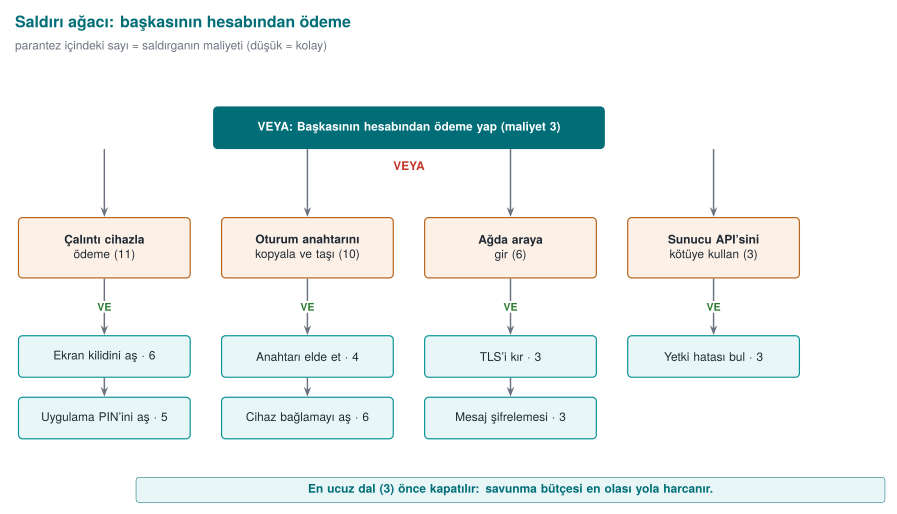
The same tree in Demo 04's REAL input format (tree.c's keywords are always English: GOAL, AND, OR, LEAF, cost=; the leaf descriptions are kept in English too, matching the real demo files):
GOAL: Pay from someone else's account
  AND Pay with a stolen device
    LEAF Bypass the screen lock                cost=6
    LEAF Bypass the app PIN                     cost=5
  AND Copy and exfiltrate the session key
    OR Obtain the key
      LEAF Root + debugger (T1)                 cost=4
      LEAF Copy and decrypt the local DB         cost=8
      LEAF Malicious-link code execution (T9)    cost=9
    LEAF Bypass device binding                  cost=6
  AND Man-in-the-middle on the network
    LEAF Set up a rogue access point            cost=1
    LEAF Bypass certificate validation (T3)     cost=2
    LEAF Replay the session token               cost=3
  AND Abuse the server API
    LEAF Log in with your own account           cost=1
    LEAF Tamper with the transaction number (T7) cost=2
The end of the output we get when we actually feed this file to tree.exe (saved as tree-fraud-example.txt and run as tree.exe tree-fraud-example.txt):
  CHEAPEST ATTACK = 3 unit(s). The chain the defender should
  break first (the weakest point):

  -> Pay from someone else's account (cost=3)
    -> Abuse the server API [all required] (cost=3)
      -> Log in with your own account (cost=1)
      -> Tamper with the transaction number (T7) (cost=2)
When we applied the countermeasures in order, the cheapest path changed as follows (the same file, only the relevant cost= value updated and rerun — every row was actually verified):
| Countermeasure applied | Leaf changed | New cheapest path | Cheapest attack |
|---|---|---|---|
| — (start) | — | Abuse the server API (T7) | 3 |
| Object-level ownership check | T7: cost=2 → cost=20 | Man-in-the-middle on the network (T3) | 6 |
| Certificate validation + pinning | T3: cost=2 → cost=12 | Copy and exfiltrate the session key (T1) | 10 |
This table is S4's strongest piece of evidence: two countermeasures raised the cheapest attack from 3 to 10 and showed, with a number, where the next investment should go (the key in memory: RASP, secure erasure, device binding). Notice: T9, the most severe row by CVSS, is not the cheapest path for this goal — this is exactly why the two tools are read together.
Grading Criteria¶
S4 is the main part of the security analysis criterion in the midterm submission. The table below is used for grading.
| Criterion | Weak | Adequate | Good |
|---|---|---|---|
| Attacker model | None, or one sentence | Three models, capabilities written | Every model's access and goal are explicit; every threat row is tied to a model |
| Coverage | A few random threats | STRIDE applied to every interface | Every S5 asset appears in at least one threat; exclusions are justified |
| CWE mapping | Missing, or always high-level entries | A CWE on every row | Most concrete entry; root cause separated from consequence |
| CVSS | Score only, no vector | Full vector + score | Vector consistent with the attacker model; debatable metrics (S, PR) justified |
| Attack tree | Missing, or AND/OR wrong | Correctly computed, cheapest path stated | Before/after countermeasure comparison and a suggestion for the next investment |
| Priority | None | Ordered by score | Score, asset value, and attack tree jointly justified |
| Traceability | No countermeasure | Countermeasure on every row | Countermeasure → guide section → S17 requirement ID chain established |
Common project mistakes
Writing the consequence in the table ("data is stolen"), copying the same vector into every row, writing the CVSS score but not the vector, picking the smallest child at an AND node in the attack tree, and writing a single word like "encryption" in the countermeasure column (which algorithm, which key, which section?). An assessor must be able to reproduce every row.
19. Class Activities¶
Activities are not graded; they exist to reinforce the topics in class. Each one's duration, group setup, and expected output are given. Which activity is done in which class hour is in the "Course flow" plan; anything that does not fit is left for the student's own study.
Activity 1 — Classify the Malware, Pick the Layer (12 min · groups of 3–4)
Goal: to use type classification and the boundaries of detection layers together.
Steps:
- Every group gets two of the six scenarios below (3 min reading).
- For every scenario, the group fills in these four fields: type (virus/worm/trojan horse/ransomware/rootkit/wiper), propagation path, the layer that would catch it first (hash, pattern, YARA, heuristic, behaviour/EDR, sandbox, emulation, allow-list), and that layer's likely mistake in this scenario (a false positive, or a false negative?).
- Every group presents one scenario to the class in 1 minute.
Scenarios: (a) the "invoice.pdf.exe" attachment mails itself to the address book when opened; (b) it self-propagates through an overflow flaw in a service exposed to the internet; © a "free video player" sends out browser passwords in the background once installed; (d) it loads as a kernel driver and removes its own processes from the listings; (e) it encrypts files and leaves a note, but never stores the key at all; (f) a backdoor inserted into a software's official update during the build.
Expected output: A six-row table. Example: (e) wiper; propagation via a network flaw or an update; caught first by behaviour/EDR ("rewriting many files with high entropy in a short time"); a hash signature gives a false negative on the new copy.
Instructor's note: in scenario (f), both the signature and the allow-list fail, because the file is validly signed; discuss here why supply-chain attacks are frightening. For (d), ask "how does a scanner at the same privilege level trust a kernel that lies to it?"
Activity 2 — Think Like an Attacker: Attack Tree Duel (15 min · paired groups)
Goal: to apply Recipe 12.1's "never underestimate the attacker" principle and AND/OR arithmetic.
Steps:
- In 6 minutes, every group draws an attack tree with at least 6 leaves for the goal "change a grade in the exam system"; they write a cost (person-days) on the leaves.
- Groups swap trees. In 4 minutes, the other group tries to find a path that is not in the tree and is cheaper (e.g. an insider, a backup file, the password-reset flow).
- The original group adds the found path, rewrites the tree in Demo 04's format, and computes the cheapest path.
Expected output: Two versions of the tree, and an answer to "by how many units did the other group's path lower the cheapest path?"
Instructor's note: students almost always write technical branches and forget social-engineering and process branches. Once the found path is added, the root's cost is usually cut in half; write the conclusion "an attack tree is never finished" on the board.
Activity 3 — From Matrix to Model (15 min · pairs)
Goal: to express the same policy as an access matrix, an ACL, a capability list, and BLP/Biba labels.
Policy: the subjects are application, library, reporter; the objects are session_key, transaction_log, error_report. The library reads/writes the key and writes to the transaction log; the application reads the transaction log and writes to the error report; the reporter only reads the error report.
Steps:
- Draw the access matrix (3 min).
- Convert the matrix into ACLs (column by column) and capability lists (row by row) (4 min).
- Give the objects a confidentiality level (
session_key: Confidential, the others: Unclassified) and label the subjects. Which cell is denied according to BLP? (4 min) - Give Biba trustworthiness levels (
error_reporthas an external source: Low). Which cell is denied? (4 min)
Expected output: Four small tables and one sentence: "If the library is at the Confidential level, its writing to the Unclassified transaction_log violates BLP's *-property; so either the log only receives non-confidential fields, or the library is split into two parts."
Instructor's note: the resulting contradiction is deliberate: practical systems need a "trusted subject" exception or a split component. You can have the same rules written into Demo 03's policy file and compare the result.
Activity 4 — From Finding to Patch Order (15 min · groups of 3)
Goal: to combine CWE, CVSS, EPSS, KEV, and SSVC into a single decision.
Findings (synthetic):
| No | Finding | System | EPSS | KEV |
|---|---|---|---|---|
| B1 | No length check in the library's parser, remote code execution | Exposed to the internet | 0.62 | Yes |
| B2 | CSRF in the admin panel | Internal network only | 0.03 | No |
| B3 | Full card number in logging | All clients | 0.01 | No |
| B4 | Session cookie missing the Secure flag | Exposed to the internet | 0.08 | No |
| B5 | Local privilege escalation in the driver | Employee computers | 0.41 | Yes |
Steps:
- Write the most concrete CWE for each finding (3 min).
- Build a CVSS v3.1 vector and score it with Demo 05 (5 min).
- Rank them first by CVSS alone, then also taking EPSS and KEV into account (4 min).
- For B1 and B5, fill in the SSVC decision points (exploitation, automatability, technical impact, mission prevalence, public well-being) and write the Track/Track*/Attend/Act decision (3 min).
Expected output: Two rankings and a one-sentence explanation of the difference. B1 comes first in both rankings; B5 might sit in the middle by CVSS alone but rises because it is in KEV.
Instructor's note: likely CWEs: B1 CWE-787 (or CWE-120), B2 CWE-352, B3 CWE-532, B4 CWE-614, B5 CWE-269 or a more concrete entry depending on the driver's root cause. Tie the discussion back to "the score is a starting point, the decision is made with context" (Demo 05).
Activity 5 — Tamper With the Audit Log (10 min · pairs)
Goal: to experimentally see what an HMAC chain catches and what it cannot catch (Recipe 13.11).
Steps:
- Manually change the amount in one line of the chained log file that Demo 11 produced, and run the verifier. From which line onward did it report an error?
- Delete a line, then add a line. What happens?
- Delete the last three lines (truncation from the end). Did the verifier notice? Why?
- Write two countermeasures for the question "what happens if the attacker also captures the HMAC key?"
Expected output: modification, deletion, and insertion are caught; truncation from the end is only caught if the last chain value or the line count is also kept separately (on a remote server). If the key is captured, the whole chain can be recomputed; recommended countermeasures are sending records to the remote server immediately, and updating the key with a one-way function after every record (forward-secure key evolution).
Instructor's note: remind students here of Recipe 13.11's warning that "syslog sends over UDP, unencrypted and unauthenticated"; today, syslog over TLS (RFC 5425) and centralised logging systems are used.
Activity 6 — Code-Reading Tournament (15 min · teams of 4)
Goal: to recognise this week's CWEs in code.
Steps:
- The instructor projects four snippets from the "Code reading exercises" section on the screen (with the answer boxes closed).
- In 2 minutes per snippet, teams write down the CWE identifier, a one-sentence attack, and the fix on paper.
- Scoring: correct CWE 2 points (a more general CWE in the same family 1 point), a working attack 1 point, a correct fix 2 points.
Expected output: a team score table; the two most commonly confused CWEs written on the board.
Instructor's note: a good foursome: Reading 1 (TOCTOU), Reading 9 (fail-open), Reading 13 (out-of-bounds read), Java 3 (default ECB). Students most often write CWE-20 as a "wildcard"; do not give full marks without asking for a more concrete entry.
Activity 7 — Incident Autopsy (10 min · groups of 3–4)
Goal: to describe malware incidents in the language of classification.
Steps: every group picks one incident: Heartbleed, WannaCry, or Log4Shell. They fill in these fields: CVE, CWE, the CVSS v3.1 score (NVD), the flaw's disclosure date, the patch date, the date of widespread exploitation, and the lesson for the programmer.
Expected output (for the instructor to check):
| Incident | CVE | CWE (NVD) | CVSS v3.1 (NVD) | Note |
|---|---|---|---|---|
| Heartbleed | CVE-2014-0160 | CWE-125 | 7.5 | Out-of-bounds read; a key can leak from memory |
| WannaCry (EternalBlue) | CVE-2017-0144 | No NVD data | 8.8 | Patch MS17-010 (14 March 2017), attack 12 May 2017 |
| Log4Shell | CVE-2021-44228 | CWE-917 (Apache: CWE-20, 400, 502) | 10.0 | Expression injection in a logging library |
Instructor's note: open the scores from the NVD page together with the class; show, using the Log4Shell example, that the NVD's CWE mapping can differ from the product owner's (CNA).
20. Code Reading Exercises: Find the Vulnerability¶
Each of the code snippets below has a vulnerability. Find its type (CWE) and its fix; the answers are in the hidden box.
Snippet 1 — Access Control
/* Does the user have access to the file? */
if (access(file, W_OK) == 0) {
    FILE *f = fopen(file, "w");     /* ... */
    fprintf(f, "%s\n", record);
    fclose(f);
}
Answer
CWE-367 (TOCTOU). The file can be replaced with a symbolic link between access() and fopen() (see Demo 06). Also, access() uses the real identity while fopen() uses the effective identity — in a setuid program these differ. Fix: skip the check and open with open(file, O_WRONLY|O_CREAT|O_NOFOLLOW, 0600), then work through the fd.
Snippet 2 — Integrity Check
uint32_t expected = 0x1a2b3c4d;
uint32_t found     = crc32(code_region, size);
if (found != expected)
    return ERROR;   /* tampered */
run();
Answer
(1) CRC32 is not cryptographic (CWE-327/CWE-354): an attacker can modify the code and force the CRC back to its old value (collisions are easy). A cryptographic digest (SHA-256) or a signature is needed. (2) The check is tied to a single branch (if): an attacker evades it by turning jne into jmp. Fix: use the digest's result in the decision flow (e.g. in key derivation), not tied to a single branch. (Week 6.)
Snippet 3 — Access Default
struct user u;
strncpy(u.name, input, sizeof u.name);
/* u.admin field is never assigned */
if (u.admin) grant_admin_panel();
Answer
A violation of fail-safe defaults (CWE-1188 / CWE-665: improper initialisation). Because u.admin is never initialised, the garbage value on the stack can be nonzero → an accidental administrator. Fix: start explicitly on the safe side with struct user u = {0}; or .admin = 0.
21. Work on Your Own¶
Not graded; it exists to reinforce the lesson. All of it is done on code/week-02, only on your own computer.
Exercise 1 — Easy: A Fourth Polymorphic Copy
Look at generate_samples.c in Demo 01. poly_3 used a different algorithm. Write a capsule file by hand (with a text editor) and show it to the pattern method. Does emulation catch it?
Hint
Capsule format: line 1 is CAPSULE/1, line 2 is the decryptor commands, then the body. Emulation catches it if it decrypts the body and looks for the BLUE-CAT-42 marker.
Exercise 2 — Easy: The Entropy Threshold
In Demo 02, measure a .png, a .zip, and a .txt file from your own computer. Which harmless files does the rule "suspicious if entropy is greater than 7.2" flag incorrectly?
Expected result
Because .png and .zip are compressed, they come out above 7.2 → a false positive. Entropy alone is not a sufficient criterion; it must be combined with context (file type, location).
Exercise 3 — Medium: BLP + Biba Together
In Demo 03, write MODEL BLP+BIBA in a policy file. How must you set the levels so that a subject can both read and write an object? Interpret the result.
Answer
Both must be at the same level. BLP requires the object's level to be at or below the subject's for reading, and at or above it for writing ("no read up, no write down"); Biba requires the reverse — the object's level at or above for reading, at or below for writing ("no read down, no write up"). Both sets of rules are satisfied at once only when the object's level equals the subject's. Conclusion: data requiring both high confidentiality and high integrity can only be processed at its own level.
Exercise 4 — Medium: Defence in the Attack Tree
In Demo 04, copy tree-payment.txt and make the "decrypt the database" branch cheaper (lower its costs). Does the cheapest path change? Where should you place a defence to raise the cheapest attack's cost the most?
Hint
The cheapest path is always the lowest-cost branch of the OR at the root. Adding a defence to that branch is most effective; adding it to another branch does not change the cheapest path.
Exercise 5 — Medium: The Effect of CVSS Metrics
In Demo 05, change the AV:N/AC:L/PR:N/UI:N/S:U/C:H/I:H/A:H (9.8) vector one metric at a time and watch the score: AV:N→L, PR:N→H, S:U→C. Which change lowers/raises the score the most?
Expected result
S:U→C raises the score (the scope widens). AV:N→L and PR:N→H lower it (remote + unauthenticated is the most dangerous case). This is a good lead-in to the discussion "if the device is in the attacker's hands (local access), even though the score drops, the risk to you does not decrease."
Exercise 6 — Medium: TOCTOU Without a Delay
In Demo 06, remove the export TOCTOU_DELAY_US=... line from attack.sh (set the delay to 0). Does the unsafe attack still work? Why do real attackers automate the attempt?
Expected result
Without the delay, winning the race becomes harder; the attack sometimes does not work. This is why real attackers try thousands of times — even working once is enough. Race condition flaws are "dangerous once automated, even if they don't work every time."
Exercise 7 — Hard: What Is Metamorphism?
Polymorphism encrypts the body and changes the decryptor. In metamorphism there is no encryption; the entire code is rewritten in every copy. What would happen to Demo 01's entropy? Do the signature and emulation methods still work?
Hint
Metamorphic code's entropy stays like normal code (not encrypted) → entropy gives no clue. Since there is no fixed "decrypted body," emulation cannot converge on a single signature either. That is why behaviour-based detection is needed against metamorphic malware.
Exercise 8 — Hard: Work Through a Real CVE
Find a CVE record for an open-source library (of your own choosing). (a) Which CWE type is it? (b) Enter the CVSS vector into Demo 05 and verify the score. © What did the patch change? (d) Is this an example of a "patch gap"?
22. Self-Check¶
1. Explain the difference between a virus, a worm, and a trojan horse, one sentence each.
A virus attaches itself to another file and needs its carrier to be run. A worm spreads over the network on its own, without user interaction. A trojan horse looks innocent while causing harm in the background, and does not copy itself.
2. What are a virus's three parts? Which one looks at the 'when' question?
The infection mechanism (copies itself), the trigger (the condition — "when"), the payload (the actual damage). The trigger looks at the "when" question; code that goes off based on a condition is called a logic bomb.
3. What is the difference between polymorphism and metamorphism?
In polymorphism, the body is encrypted and the decryptor changes in every copy; once decrypted, the body is always the same. In metamorphism there is no encryption; the entire code is rewritten in every copy. Metamorphic code cannot be reduced to a single signature by emulation.
4. Does high entropy prove a file is malicious?
No. Encrypted, compressed, and random data are all high-entropy too; so are harmless files like .zip/.png. Entropy is only a clue; high entropy specifically in an unexpected place raises suspicion.
5. What are the two fundamental limits of signature-based detection?
(1) It only catches known malware; it misses a never-before-seen (zero-day) sample. (2) Polymorphic/metamorphic malware evades the signature by changing it. This is why a signature alone is not enough.
6. How does emulation catch a polymorphic virus? What is its limit?
It "runs" the suspicious file in an isolated environment, waits for the decryptor to unpack the body, then signs the decrypted body. Its limit: it is slow, and if the malware detects "I'm in a virtual machine" (anti-emulation), it can hide its behaviour.
7. What is the difference between DAC and MAC? Give an example.
In DAC, the permissions are decided by the owner of the object (Unix chmod); it is flexible but cannot prevent a leak systemically. In MAC, permissions are decided by the system/policy and the owner cannot change them (Bell–LaPadula, SELinux); it is strict but provides a mandatory boundary.
8. What are Bell–LaPadula's two rules, and what do they protect?
"No read up" (cannot read something more confidential than itself) and "no write down" (cannot write to something less confidential than itself). It protects confidentiality: confidential information cannot leak downward.
9. How does Biba differ from BLP?
Biba protects integrity and its rules are reversed: "no read down" (do not trust dirty data) and "no write up" (do not corrupt clean data). BLP is for confidentiality, Biba is for integrity.
10. What is the core idea of the Clark–Wilson model?
Critical data (a CDI) is touched not directly, but only through approved, well-formed transactions (TPs); integrity is checked regularly (an IVP), and a critical operation is split across multiple people through separation of duty. It is designed for commercial (banking) integrity.
11. What does the setuid bit do on Unix? Why is it dangerous?
setuid makes a program run with the authority of the file's owner (often root), no matter who runs it. It is dangerous because a small flaw in the program turns directly into privilege escalation; this is why least privilege and dropping privilege early are critical.
12. What does a NULL DACL mean on Windows, and why is it dangerous?
A DACL with no ACEs at all grants full access to everyone on the object (including taking ownership and changing the DACL). This is an "open to everyone" state that can easily be abused.
13. What is the difference between CWE and CVE?
CWE is the weakness's type (e.g. SQL injection, CWE-89). CVE is the identifier of a specific flaw in a specific product (e.g. Heartbleed, CVE-2014-0160). A CVE belongs to one or more CWE types.
14. What does the CVSS Base score not measure? Why might a 4.0 flaw be more important to you than a 9.8 one?
The base score does not measure context (the value of your asset, your environment); it measures the flaw's own properties. If a 4.0 affects exactly your most valuable asset, it takes priority over some other 9.8 for you. This is what the Environmental metrics and your asset table are for.
15. What is responsible disclosure (coordinated disclosure), and why does it matter?
It is the researcher reporting the flaw to the vendor first, waiting a reasonable period (e.g. 90 days) for a patch, and then disclosing it publicly. It protects users while also getting the vendor to act; it reduces the risk of full disclosure (disclosing immediately).
16. Explain the concepts of 'zero-day' and 'patch gap'.
A zero-day is a flaw the vendor does not know about, or for which there is no patch (there is no defence). The patch gap is the period, after the patch is released, during which anyone can study the patch and learn the flaw, and users who have not updated remain vulnerable.
17. Which topics of this course does MASVS-RESILIENCE relate to?
With resilience against reverse engineering and tampering: code obfuscation (Weeks 9, 14), RASP (Week 6), and whitebox cryptography (Week 11). The protections we learn in this course are the direct counterpart of this category.
18. Which CWEs does a security assessor look at for 'exposed secrets'?
CWE-798 for a hardcoded credential/key, CWE-316 for sensitive data left exposed in memory; they test these with source/binary analysis and a memory dump (as in Week 1 Demo 02).
23. Sample Quiz-1-Style Questions¶
Quiz-1 (Week 8) contains short-answer and code-reading questions of this kind. Try them; verify the answers against the sections above.
- Split the following types into two groups, "requires user interaction / does not require it": virus, worm, trojan horse, macro virus.
- Write the base score and band of the vector
CVSS:3.1/AV:N/AC:L/PR:N/UI:R/S:C/C:L/I:L/A:N. (Hint: a typical XSS. Verify with Demo 05.) - Which model satisfies a system's requirement "no one without authorisation should see the confidential document"? Write its two rules.
- What is the flaw in the
access()thenopen()pattern (with its CWE number), and what is its one-line fix? - Why does a signature-based scanner miss a polymorphic sample? Which method catches it?
24. Resources and Further Reading¶
Course textbook — J. Viega, M. Messier, Secure Programming Cookbook for C and C++, O'Reilly, 2003:
- Recipe 2.1 (the Unix access control model), 2.2 (the Windows access control model)
- Recipe 2.3 (checking a user's access to a file; TOCTOU)
- Recipe 12.1 (the problem of software protection — attacker and defender using the same methods)
- Recipe 13.11 (audit logging — the SACL/syslog context)
Updating the book's 2003 content
The book's account of the access model is fundamentally still valid; however, the Windows side was written for the XP/2003 era. Today, Mandatory Integrity Control (MIC) and AppContainer (Biba-like mandatory boundaries) are added to it. On the Unix side, POSIX ACLs, capabilities (CAP_*), and SELinux/AppArmor (MAC layers) have joined the classic permission bits.
Open sources (may be cited by name)
- F. Cohen, "Computer Viruses — Theory and Experiments", 1984 (the definition of a virus and the detection limit).
- D. E. Bell, L. J. LaPadula, security model reports, 1973 (the confidentiality model).
- K. J. Biba, "Integrity Considerations for Secure Computer Systems", 1977 (the integrity model).
- D. Clark, D. Wilson, "A Comparison of Commercial and Military Computer Security Policies", 1987.
- B. Schneier, "Attack Trees", 1999.
- MITRE CWE and CWE Top 25; MITRE CVE; FIRST's CVSS v3.1 and v4.0 documents.
- OWASP Top 10, ASVS, MASVS, and MASTG.
- Real incidents (for date verification): Brain (1986), the Morris worm (1988), ILOVEYOU (2000), Code Red (2001), Stuxnet (2010), WannaCry (2017), NotPetya (2017).
Glossary
| Term | Turkish | Short definition |
|---|---|---|
| Malware | Zararlı yazılım | Any program written to cause harm or steal data |
| Payload | Yük | The part of the malware that does the actual damage |
| Polymorphism | Polimorfizm | Malware whose decryptor changes in every copy, with an encrypted body |
| Metamorphism | Metamorfizm | Malware whose entire code is rewritten in every copy |
| Entropy | Entropi | A measure of how random/mixed data is (0–8 bits/byte) |
| Sandbox | Kum havuzu | Running suspicious code in an isolated environment |
| Heuristic | Sezgisel | Detection by scoring suspicious features without a signature |
| Access matrix | Erişim denetim matrisi | A subject × object permission table |
| DAC / MAC / RBAC | İsteğe bağlı / zorunlu / rol tabanlı erişim | The decision is made by the owner / the system / the role |
| Bell–LaPadula | — | Confidentiality model (no read up, no write down) |
| Biba | — | Integrity model (no read down, no write up) |
| Clark–Wilson | — | Commercial integrity through well-formed transactions + separation of duty |
| TOCTOU | Denetim/kullanım yarışı | The race flaw between check and use (CWE-367) |
| CWE | Zayıflık kataloğu | A numbered list of software weakness types |
| CVE | Zafiyet kimliği | The unique identifier of a specific flaw in a specific product |
| CVSS | Zafiyet puanı | A flaw's severity score, from 0 to 10 |
| Responsible disclosure | Sorumlu ifşa | Reporting the flaw to the vendor first and waiting for a patch |
| Zero-day | Sıfırıncı gün | A flaw the vendor does not know about / has no patch for |
Next week
Week 3 — Data security. The entropy metric we used for malware detection this week (§6) comes back next week to assess the disorder feeding a cryptographic random generator (CSPRNG) (Week 3, §3). The vulnerability language we prioritised with CWE and CVSS this week also resurfaces in Week 12, as an input to penetration-test planning.