Week 14 — Tigress and Diversification¶
| Date | 18.12.2026 |
| Learning outcomes | LO.3 |
| Duration | 3 hours |
| Prerequisites | Obfuscation rules and the measurement framework from Week 9; compiling C; a Linux/WSL terminal (Tigress runs on Linux only) |
| Labs | code/week-14 — 1 demos; on WSL/Linux sh demo.sh; if Tigress is not installed the script shows the same flow with a clean derivative |
Lecture notes (PDF) Lecture notes (DOCX) Slides (PDF) Slides (PPTX) Slides (HTML, offline) Download all (ZIP) Open slides full screen
Click inside the slides and use the arrow keys; use the button at the bottom right of the slides or the link above for full screen.
This week's working demo
code/week-14/01-source-to-source — Tigress transform pipeline (if installed) or a local example + download instructions; measures the function's cost.
Run it: in the code/week-14/01-source-to-source folder, run sh demo.sh (Linux/WSL; use WSL on Windows). If Tigress is not installed, the script shows the same flow with a clean derivative. Step by step in the box below.
Run the demo yourself — step by step (copy-paste)
This demo requires Tigress (a source-to-source C obfuscator). From the code folder:
Expected output: if Tigress is installed, the grant_access function is obfuscated source-to-source: transform pipeline → behaviour verification (output unchanged) → cost measurement with objdump → a different binary with two seeds (diversification). If Tigress is not installed, the script shows the same flow with a clean derivative. Installation: https://tigress.wtf (free for academic use).
By the end of this week you will be able to
- Explain what source-to-source obfuscation is and describe Tigress as the automatic counterpart of week 9's manual rules.
- Map Tigress's transform families (control, data, function, integrity, anti-analysis) onto week 9's rules, and describe how to build a transform pipeline (applying several transforms in sequence).
- Produce diversification with a tool: explain the logic of using a seed (
--Seed) and randomised transforms to produce binaries from the same source that are different but behaviourally equivalent. - Measure the effectiveness of obfuscation and diversification: cost (size, speed) and resilience (resistance to symbolic execution); apply week 9's potency/resilience/cost framework on top of the tool.
- Place obfuscation into a build and deployment pipeline (S15): which functions, why, and at what cost; together with signing and build identity.
Class schedule (timing plan for the instructor)
| Time | Section | What happens |
|---|---|---|
| 0:00–0:20 | 1 | Source-to-source obfuscation; what Tigress is and where it fits; installation and licensing |
| 0:20–0:50 | 2 | Mapping transform families onto week 9's rules; building a transform pipeline |
| 0:50–0:55 | Break | |
| 0:55–1:35 | 2 | Worked pipeline: flatten a check + encode data + scramble functions (concept, synthetic) |
| 1:35–1:40 | Break | |
| 1:40–2:10 | 3 | Diversification: seeds and randomised transforms; diversification in space/time |
| 2:10–2:40 | 3–4 | Measurement: size/speed cost; resilience to symbolic execution (Tigress + KLEE study) |
| 2:40–3:00 | 4+ | Placing it into the build pipeline (S15); limits and ethics; project; self-check |
About this week's sources and the Tigress license
This week applies week 9's rules with a tool. The main source is Tigress's own worksheets/lecture material. Tigress is a source-to-source C obfuscator/diversifier; its current version is v4 (Linux, macOS, Windows, Android; Intel/ARM/WebAssembly). License: free for non-profit use; commercial use requires a license from the University of Arizona. This is why the course does not distribute a Tigress binary or an old version; students download the current version themselves from the official site (tigress.wtf) and verify the license terms there. All examples are synthetic and are applied only to your own code.
0. Before we start¶
This section prepares you for the week. It first briefly recalls the earlier topics this week builds on; it then defines each of this week's concepts in one sentence and links it to the section where it is explained in full. Background knowledge not covered in earlier weeks is explained from scratch under the "Background" headings.
What we bring from earlier weeks¶
- Source code, compiler, and binary file — the program text a human writes (source code) being translated by a compiler into machine code and turned into an executable binary (Week 9, Background). This week we extend the same chain by passing the source through an obfuscation tool first, then the compiler.
- Code obfuscation — a countermeasure that makes code hard for a human to understand without changing its behaviour, raising the attacker's cost (Week 9, §1). Week 9 applied these rules by hand; this week we see the automatic (Tigress) counterpart of the same rules.
- Week 9's obfuscation rules (K-01–K-12) — opaque predicates, arithmetic encoding, control-flow flattening, string encoding, variable splitting, virtualisation, and the other hand-applied rules (Week 9, §5, §6, §7). Section 3 maps each of them onto a Tigress transform.
- Control flow graph (CFG) — a diagram that turns basic blocks into nodes and transitions into edges (Week 9, Background). Week 9 drew this graph from source code by hand and counted nodes/edges; this week we automate the same count with
objdumpon a compiled binary (see "Background" below). - Symbolic execution — automated analysis that solves program paths as mathematical constraints (e.g., KLEE) (Week 9, §10). This week we reuse it in section 7 as the tool for measuring resilience.
- Diversification — the idea of producing behaviourally equivalent, structurally different binaries from the same source (Week 9, §8). This week we automate it in section 6 with Tigress's
--Seedflag. - CI (continuous integration) and the build pipeline — the system that runs build/test steps automatically on every code change, and the ordered sequence of steps from source to product (Week 4, §13). This week, section 9 adds obfuscation and diversification as further steps in that same pipeline.
- Build identity and the hash value — the record of exactly which binary/source/hash triple was evaluated/deployed (Week 1, §19). This week, section 9 adds a seed field to that record, because diversification can deliberately produce different binaries under the same version label.
This week's concept map¶
| Concept | In one sentence | Detail |
|---|---|---|
| Source-to-source obfuscation | A tool takes C source as input and produces C source again as output; the output is behaviourally identical but far harder to read, and is compiled with your normal compiler. | §1 |
| Tigress | A source-to-source C obfuscator and diversifier built by Christian Collberg and his team at the University of Arizona, free for academic use. | §1 |
Transform and --Functions | The --Transform flag names a single obfuscation operation for Tigress to apply; the --Functions flag names which functions it applies to. | §2 |
| Transform families and the week 9 mapping | Tigress transforms such as Flatten, EncodeArithmetic, EncodeLiterals, and Virtualize are the automated counterpart of week 9's K-01–K-12 rules. | §3 |
| Transform pipeline | Applying several transforms in sequence; each transform is applied to the output of the previous one, and the order affects both the result and the cost. | §4 |
| Step-by-step cost growth | Each transform added to a pipeline increases instruction and branch counts cumulatively; the increase is always computed against the absolute number from the previous step. | §5 |
| The diversification tool: the seed | Running the same transform pipeline with a different --Seed value to produce behaviourally identical but structurally different binaries. | §6 |
| Measuring obfuscation and diversification | Each of potency, resilience, stealth, and cost is measured on the obfuscated binary with a concrete tool and command, and reported. | §7 |
| The seven-step classroom flow | Prepare → obfuscate → verify → compare → measure → diversify → report; each step takes the previous one's output as its input. | §8 |
| The S15 build and deployment pipeline | The pipeline in which obfuscation, diversification, signing, and build-identity logging run automatically and in order inside CI. | §9 |
Background: Tigress's vocabulary¶
None of the terms below were taught in earlier weeks; all of them are needed to understand this week's tool, Tigress, and its command line. The definitions are given in an order that builds on itself.
Source-to-source transforms, pipelines, and seeds¶
This week's subject is source-to-source obfuscation: the input is a C source file, and the output is C source again — just obfuscated; this new source is then compiled with your normal compiler (gcc/clang).

A single obfuscation operation applied to the source is called a transform (for example, flattening control flow). A tool usually offers many transforms; you decide which one applies to which function. Applying several transforms in sequence is called a transform pipeline; each transform is applied to the source the previous one produced, which is why order matters (section 4).
Most transforms include some amount of randomness (e.g., which constant an opaque predicate is built from). The starting number that governs this randomness is called a seed: running the same transform pipeline with a different seed produces a different obfuscated output — this is exactly the tool behind section 6's diversification (see "What we bring from earlier weeks" above).
Working with a CLI and unit tests¶
Tigress runs from a CLI (Command-Line Interface), an interface where you run things by typing commands: you type a line such as tigress --Transform=... file.c, and the tool produces the obfuscated source. A small, automated test that checks a function works correctly is called a unit test; this week's rule is that unit tests written before obfuscation must still pass after it — behaviour must be preserved (section 2).
Two Tigress-specific details: the environment flag and transform dependency¶
The --Environment flag tells Tigress the target platform: processor architecture, operating system, and compiler version (in the demo script, --Environment=x86_64:Linux:Gcc:11 → 64-bit Intel/AMD, Linux, GCC 11). Some transforms (especially virtualisation and low-level opaque-predicate kinds) must know compiler-specific details; source generated with the wrong environment information may fail to compile on the target machine, or may behave incorrectly.
Some transforms can only run if another transform has already run first; this is called a transform dependency (example: AddOpaque needs InitOpaque — we will see this in detail in section 3). This means section 4's "order matters" rule is sometimes not just about improving the result, but about being a precondition for the transform to work at all.
Measuring and comparing cost: objdump, diff, cmp¶
This week's demo script (demo.sh) uses a tool called objdump to measure how much a single function inside a binary has grown: a command-line tool that opens a binary file (.exe, ELF, ...) and dumps the assembly instructions inside it in human-readable form (part of the GNU Binutils package; comes preinstalled on Linux/WSL). objdump -d file ("disassemble") converts the binary's code section from machine code to assembly and prints it; the instruction count is how many lines of instructions appear in a function's assembly output (each line is a single processor instruction such as mov, cmp, or add), and the branch/call count is how many of those instructions are a jump (jmp, je, jne, ... starting with j) or a call — that is, how many points exist where the program decides to "go somewhere else."
The measurement function in the demo script (olc()) does exactly this:
objdump -d "$f" | awk '/<grant_access>:/{a=1;next} /^$/{a=0} a{n++; if($0 ~ /\t(j|call)/)b++} END{printf "%d komut, %d dal/cagri", n, b}'
Line by line, this is what it does: objdump -d converts the whole binary to assembly; the awk script reads only the section that begins with the <grant_access>: label (the a=1 flag), and stops when it reaches a blank line (the end of the function, a=0); it adds every line it reads to the n counter, and if a line has j... or call after a tab, it also increments the b counter. Result: how many instructions belong to that function, and how many of them are branches/calls.
This number is the automatic, finer-grained counterpart of the basic-block and CFG node/edge count we measured by hand in week 9: week 9 drew this graph from source code by hand and counted nodes/edges (Week 9, Background — the denetim function example: 3 nodes, 2 edges); here we count the same idea on the compiled binary, automatically, with a tool. Both ask the same question: "how much work is it to read/analyse this function?"
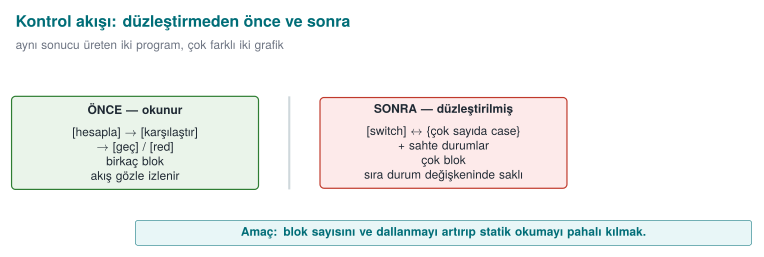
Why isn't instruction count enough on its own — why do we also need the branch count?
Adding only plain, non-branching instructions to a function (e.g., a few unnecessary movs) increases the instruction count but doesn't make the analyst's job much harder — a flat list is easy to read. The real difficulty comes from an increase in the branch count: every new branch is a new path the analyst has to trace (recall section 7's cyclomatic complexity formula, branch_count + 1). This is why the measurement always reports both together; giving only the instruction count is an incomplete measurement.
There are two different ways to compare the numbers we measure (clean/obfuscated version): cmp compares two files byte by byte, and only tells you "same or different" (and, optionally, the location of the first difference) — it gives a single result for the whole file. diff compares two text/source files line by line, and lists in detail which lines were added/removed/changed; for text broken into lines, such as assembly output, it is more informative than cmp. Section 6's flow of "a coarse check with cmp first, then a targeted verification with objdump+diff" rests on the idea that these two tools complement each other: cmp is fast but coarse, diff is slow but detailed.
Quick glossary: this week's new English terms¶
The following are added this week to week 9's glossary (Obfuscation, Reverse engineering, Decompiler, ...); you will meet these terms by these English names in Tigress's official documentation and on the command line:
| Term (as used this week) | Full form / as seen in tools & papers |
|---|---|
| Source-to-source (obfuscation) | Source-to-source (obfuscation) |
| Transform | Transform |
| Transform pipeline | Transform pipeline |
| Seed | Seed |
| Environment (target platform) | Environment |
| Opaque predicate (init / add / update) | (Init / Add / Update) Opaque |
| Virtualisation-based obfuscation | Virtualisation-based obfuscation |
| Continuous integration | Continuous Integration (CI) |
| Target of evaluation | Target of Evaluation (TOE) |
| Function splitting / merging | Split / Merge |
| Just-in-time code generation | Just-In-Time (Jit) |
| Random function/argument | Random functions / arguments |
1. What is source-to-source obfuscation?¶
In week 9 we applied obfuscation rules by hand: opaque predicates, flattening, string encoding, dead branches. Manual obfuscation is instructive, but it has three problems: (1) it is error-prone — hand-written obfuscation code can break behaviour; (2) it is hard to maintain — the source becomes unreadable; (3) it cannot be diversified — you cannot differentiate every copy by hand. The solution is to have a tool do the obfuscation.
A short history: source-to-source obfuscation and diversification
- 1993 — Cohen introduces the idea of diversification with "program evolution": same function, different binary.
- 1997 — Collberg, Thomborson, Low's obfuscation taxonomy (the foundation of week 9); the same year, Forrest, Somayaji, Ackley argue for diversification from a separate root ("Building Diverse Computer Systems").
- 2002 — Necula et al., CIL: the parse/regenerate infrastructure Tigress is built on.
- ~2012–2013 — Tigress (Christian Collberg, University of Arizona): a source-to-source obfuscator for C, plus virtualisation and diversification; the de facto standard for measuring resilience in research.
- 2015 — Obfuscator-LLVM (O-LLVM): compiler-based obfuscation.
- 2016–2017 — Banescu et al. measure the resilience of transforms with Tigress + KLEE → the "resilience ↔ cost" rule.
Let's unpack the history a little more¶
- 1993 — Cohen, "program evolution": Fred Cohen (the researcher who also gave the computer virus concept its academic definition) showed that a program's structure could be changed automatically without changing its function; this is the academic origin of the idea that "every copy should look different" — this week's diversification.
- 1997 — Collberg, Thomborson, Low: they published the five-family taxonomy we use in week 9 today (layout, data, control flow, preventive, virtualisation) and the potency/resilience/stealth/cost framework; this paper is still the field's reference point, and it is the basis of this week's mapping table (section 3).
- 1997 — Forrest, Somayaji, Ackley, "Building Diverse Computer Systems": from a separate root than Cohen's (1993) single observation, they argued that diversity is a major source of robustness in biological systems while computers are notably uniform, and showed that randomizing stack-frame memory layout disrupts a simple buffer overflow attack — the direct academic ancestor of both today's ASLR and this week's seed-based diversification (section 6).
- 2002 — Necula, McPeak, Rahul, Weimer, CIL: "CIL: Intermediate Language and Tools for Analysis and Transformation of C Programs" (CC 2002) defined an intermediate representation and toolset for parsing and regenerating C programs. Tigress is built on CIL: this is the infrastructural foundation of its source-to-source ability — Tigress's "reads C source, produces C source again" capability is not written from scratch, it rests on this parse/regenerate infrastructure that has existed since 2002.
- ~2012–2013 — Tigress's first public releases: no single "first release" date has been officially announced, but two independent pieces of evidence confirm this range: a 2012 study (Kinder, WCRE 2012) references a virtualization-obfuscated sample "supplied by Tigress's authors" (proof Tigress was already usable by then); a 2023 survey ("Evaluation Methodologies in Software Protection Research") describes Tigress as "approaching ten years of age" (i.e. its origin is around ~2013). Christian Collberg and his team (University of Arizona) turned the 1997 taxonomy into a working source-to-source tool in this period; it became the de facto test platform for academic resilience research (including the Banescu study below) — so learning Tigress this week means learning not just a tool, but the field's shared measurement language.
- 2015 — Obfuscator-LLVM (O-LLVM): Junod, Rinaldini, Wehrli, Michielin, "Obfuscator-LLVM — Software Protection for the Masses" (SPRO 2015, the 1st International Workshop on Software Protection, co-located with ICSE). An open-source obfuscation pass added to the LLVM compiler infrastructure; it applies techniques such as flattening and opaque predicates at compile time, without a separate source-to-source step (week 9, K-11). Its difference from Tigress is that it operates on the compiler's intermediate representation (IR) rather than on source code — so you cannot view O-LLVM's output as "C source again"; it produces a binary directly.
- 2016–2017 — Banescu et al.: they systematically broke the transforms Tigress produces using KLEE, and measured how long each transform combination took to solve; this is the experimental evidence for the "resilience ↔ cost" relationship we will revisit in section 7 this week.
These seven points are, in fact, parts of a single line: two independent diversification ideas (1993, 1997) → classification (1997) → infrastructure (2002) → two different implementation routes: source-to-source (~2012–2013) and compiler-based (2015) → the scientific testing of that implementation (2016–2017). This week we apply the using Tigress, and understanding how to evaluate it with Banescu's method steps of that line (section 7).
Source-to-source obfuscation means a tool takes C source as input and produces C source again; the generated source is behaviourally identical but far harder to read, and it is compiled with your normal compiler. The best-known tool for this approach is Tigress.
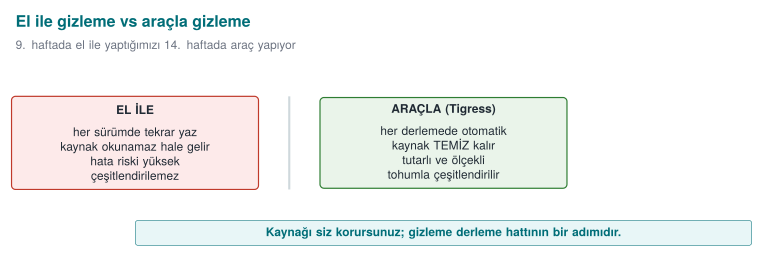
The important difference: you keep and maintain the readable source; obfuscation runs as an automatic step in the build pipeline. This largely solves week 9's "every obfuscation brings a maintenance cost" problem: the maintenance cost stays with the readable source, while the distributed source is obfuscated.
What is Tigress, and where does it fit?¶
Tigress is a source-to-source C obfuscator and diversifier developed by Christian Collberg and his team at the University of Arizona. Its place in this course:
- It is the automatic counterpart of week 9's manual rules: flattening, opaque predicates, data encoding, virtualisation — each as a transform.
- It is cross-platform (Linux, macOS, Windows, Android; Intel/ARM/WebAssembly) and works with GCC/Clang/MSVC.
- Its current version is v4.
License and use in the course
Tigress is free for non-profit (academic/research) use; commercial use requires a license from the University of Arizona. Its source code is not open; researchers may request access to an encrypted source. This is why the course does not distribute a Tigress binary or an old version. Students download the current version themselves from the official site (tigress.wtf) and verify the license terms there. In assignments, Tigress is applied only to the student's own code, on the student's own machine.
Why a tool, not by hand?¶
| Manual obfuscation (week 9) | Tool-based obfuscation (Tigress) |
|---|---|
| Instructive, shows the concept | Scales, used in production |
| Error-prone (can break behaviour) | Transforms preserve behaviour (tested) |
| Source becomes unreadable | Readable source stays with you |
| Diversification isn't feasible by hand | Automatic diversification via seed |
| Uniform, recognisable | Varies with the transform and seed combination |
But a tool is not magic
Week 9's core rule applies here too: Tigress does not grant unbreakability either — it raises cost. Moreover, the patterns a well-known tool produces can become recognisable over time; that's why diversification (section 6) and layered defence (RASP, server-side checks) are still essential. Tigress itself is also the main subject of research (section 7) that measures how much the transforms rely on resistance to symbolic execution.
How much obfuscation for which code? (decision flow)¶
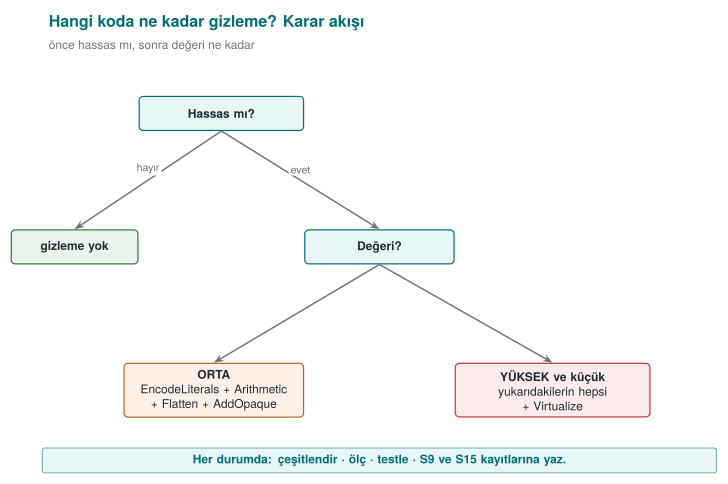
Obfuscating every function is both unnecessary and expensive: it increases size and running time, and makes debugging harder. The decision is made with two questions. First, is it sensitive — code that interests an attacker, such as license checking, key handling, or payment logic? If not, obfuscation isn't needed. If it is sensitive, how valuable is it — for medium-value code, constant obfuscation, arithmetic transforms, flattening, and opaque predicates are enough; for a high-value, small core, virtualisation is added on top (virtualisation is slow, so it's applied only to small sections). In every case the result is diversified, measured, tested, and the reasoning for the decision is written into the S9/S15 records.
Worked example: let's compare the same function by hand and with a tool¶
In week 9, when we applied rule K-07 (string encoding) by hand, the source code itself changed: instead of a constant string, we wrote XOR'd bytes and a decode loop. Let's now do the same idea with a source-to-source tool — the input and output are still both C, but you don't write the output, the tool produces it.
int grant_access(const char *token) {
    if (token_is_valid(token)) return GRANTED;   /* a single branch, a single return: an easy target */
    return DENIED;
}
int grant_access(const char *token) {
    /* GRANTED and DENIED are no longer plain constants; they pass through a decode step at runtime.
       The idea is identical to K-07 from week 9 (see the 0x41 XOR 0x5A example); the difference
       is that the decode code was produced by the TOOL, not by YOU. */
    if (token_is_valid(token)) return _decoded_constant_0x9F2A();  /* == GRANTED, but GRANTED doesn't appear in the source */
    return _decoded_constant_0x117C();                            /* == DENIED */
}
The second block is not real Tigress output — the generated code changes with the version, compiler, and --Seed value; it is only meant to show the idea of EncodeLiterals (just like this document's other "conceptual flow" blocks show the syntax of the commands without claiming to be real output). The important difference is this: in week 9, you would write a function like _decoded_constant_0x9F2A() by hand, test it by hand, and write it again each time you moved to the next function. Here, the tool applies this step automatically to every function you mark with --Functions=grant_access.
Common mistake: hand-editing the variant.c file that Tigress produces
A developer who opens an obfuscated source file (variant.c) wanting to "fix a line" or "make it a bit more readable" breaks two things: (1) the hand-made change disappears on the next obfuscation run (the tool regenerates it from source.c), (2) it can break the internal structure the transform assumes (e.g., the interdependence of the flattened switch state values), which can break the behaviour. Rule: edit only source.c (the original, readable source); variant.c is always a regenerated, hands-off output — just as you would never hand-edit the .o file a compiler produces.
How much time does it save? A rough comparison (hypothetical)¶
Let's also look at the why-a-tool question from a time perspective. The numbers below are hypothetical, meant only to show the order of magnitude:
| By hand (week 9's method) | With a tool (Tigress) | |
|---|---|---|
| Applying K-07 to 1 function | ~15 minutes (write the encoding + decode function, test it) | ~1 minute (add --Transform=EncodeLiterals --Functions=f) |
| Applying the same rule to 10 functions | ~150 minutes (each one separate, error-prone) | ~1 minute (same flag, 10 names in the --Functions list) |
| Producing a second copy with a new seed | Not possible (you'd have to write it differently by hand each time) | ~seconds (change the --Seed value and rerun) |
The real gain here is a difference that grows not linearly, but multiplicatively: as the number of functions increases, the manual method's cost grows proportionally, while the tool method's cost stays almost constant. This is the practical reason behind section 9's recommendation to "add an obfuscation step to CI in S15."
Worked example: a one-year maintenance scenario (hypothetical)¶
Let's spread the "how much time does it save?" table over a year. Say a product releases 12 versions in 12 months, and on average 3 functions newly become sensitive with each release (e.g., a new payment flow, a new license check):
| By hand (week 9's method) | With a tool (Tigress, inside CI) | |
|---|---|---|
| Monthly work per added function | ~15 minutes/function × 3 = 45 minutes | Adding 3 names to the --Functions list, ~2 minutes |
| Yearly total (12 months) | 45 × 12 = 540 minutes (9 hours) | 2 × 12 = 24 minutes |
| Diversification (a different seed per release) | Not done in practice (section 6's "common mistake") | Part of CI, requires no extra effort (section 9) |
| Risk of forgetting (a function skipping obfuscation) | High (tracked by hand) | Low (the --Functions list is visible in code review) |
This table is hypothetical, but it correctly reflects two real trends: (1) the manual method's cost grows linearly with the number of functions and releases, while the tool method's cost stays almost constant (the scaled-up version of the first table above); (2) in the manual method, the "risk of forgetting" is a real security vulnerability — if a newly sensitive function skips obfuscation and it goes unnoticed in code review, it can ship completely unprotected; in the tool method, this risk is reduced because the --Functions list is itself an auditable document.
Rule: make the --Functions list part of code review
When a new sensitive function is added, your code review process must explicitly ask "was this function added to the --Functions list?" — just like "was a unit test added for this function?" This is the obfuscation-specific counterpart of week 12's rule that "every change requires an impact analysis."
2. Basic flow: obfuscating a program step by step¶
Tigress runs from the command line: you tell it which transforms to apply, to which functions, and in what order; the output is an obfuscated C file. Conceptual flow (the syntax may change with the version — verify against the official documentation):
# input: source.c  → output: variant.c  (then compiled normally)
tigress --Transform=Flatten --Functions=grant_access \
        --out=variant.c source.c
cc -o program variant.c
The three ideas here are the foundation of all Tigress usage:
--Transform=...says which transform to apply (Flatten = control-flow flattening, week 9 K-04).--Functions=...says which functions the transform applies to — because we apply obfuscation only to sensitive functions (the cost rule).- The output is C again; you compile it with your own compiler. Obfuscation is a step added to the build pipeline.
Why is --Functions so important? Let's compare selective and blanket obfuscation¶
A flag like --Functions=grant_access means "apply only to this function." Let's consider the opposite — obfuscating every function in a file — and compare the two approaches:
Selective (--Functions=grant_access) | Blanket (the whole file) | |
|---|---|---|
| Cost | Only the sensitive function | Every function (most aren't sensitive) |
| Debugging | Easy: unobfuscated code stays readable | Hard: the whole program is obfuscated, even logs are unreadable |
| Value/cost ratio | High (the goal of section 0's decision flow) | Low — you protect an unnecessarily large surface |
| Writing a rationale in S9/S15 | Easy: "this function, for this reason" | Hard: "I obfuscated everything" is not a rationale |
Common mistake: thinking 'if I don't specify --Functions, it's more secure'
If the --Functions flag is skipped (or every function name in the file is unthinkingly added to the list), the transform is also applied to non-sensitive helper functions such as main. This means skipping section 0's decision flow (is it sensitive, how valuable is it); the result is not more secure, just a bigger and slower program. Rule: always fill in the --Functions list deliberately and with a rationale; don't expand it on the logic of "it might come in handy."
End to end: let's read the demo.sh script line by line¶
To make the conceptual flow concrete, let's read this week's real demo script (code/week-14/01-source-to-source/demo.sh) from start to finish, step by step. The script consists of four steps; let's go through all of them without skipping any.
Step 0 — Setup. The script first moves into the folder it's running from (cd "$(dirname "$0")") and picks a compiler (CC=cc, falling back to gcc if not found). This guarantees that the script will be self-sufficient no matter which machine it runs on — an example of the "resolve environment differences inside the script" habit we have seen since week 1.
STEP 1 — Build and run the clean version.
"$CC" -O2 -o access_original source.c && ./access_original "CEN429-OK" && ./access_original "yanlis"
This line compiles source.c (the actual file containing the grant_access function we defined in section 0) with no obfuscation applied, and runs it twice: once with the correct token (CEN429-OK), once with the wrong token (yanlis). Expected output:
This is the reference behaviour before obfuscation — the correctness of every obfuscation done in section 3 and after is tested by comparing it against these two lines (was the behaviour preserved?).
STEP 2 — Checking for Tigress and the transform pipeline. The script first checks whether Tigress is installed with command -v tigress. There are two paths:
tigress --Environment=x86_64:Linux:Gcc:11 \
        --Transform=EncodeLiterals --Functions=grant_access \
        --Transform=EncodeArithmetic --Functions=grant_access \
        --Transform=Flatten --Functions=grant_access \
        --Transform=InitOpaque --Functions=main \
        --Transform=AddOpaque --Functions=grant_access --AddOpaqueKinds=call \
        --out=variant.c source.c
This single command applies five transforms in sequence (the subject of section 4): first strings/constants are encoded (EncodeLiterals), then arithmetic is encoded (EncodeArithmetic), then control flow is flattened (Flatten), then the infrastructure needed for opaque predicates is prepared on the main function (InitOpaque — a preparation transform in Tigress that must be called once before adding opaque predicates), and finally call-based opaque predicates are added to grant_access (AddOpaque --AddOpaqueKinds=call). The --Environment flag specifies the target platform (here, 64-bit Linux, GCC 11); for some transforms Tigress needs to know compiler-specific details (the "Tigress environment" definition in section 0).
The obfuscated source is then compiled normally ("$CC" -O2 -o access_variant variant.c), and its behaviour is compared in STEP 3.
The script does not raise a real error; instead it prints installation/license instructions and points the student to week 9's manual working demo:
ADIM 2 - Tigress KURULU DEGIL.
  Tigress'i resmi siteden indirin: https://tigress.wtf
  Lisans: kar amaci gutmeyen (akademik) kullanim UCRETSIZ; ticari icin Arizona Univ. lisansi.
  Kurulumdan sonra 'tigress' PATH'te olunca bu betik hatti otomatik uygular ve olcer.

  Tigress olmadan bile: ayni kurallarin EL ILE surumu ve olcumu week-09'da CALISIR:
    cd ../../week-09/01-manuel-gizleme && sh demo.sh
This is a concrete application of this course's general principle: if the tool is missing, the lesson doesn't stop — it switches to the manual working version of the same concept.
STEP 3 — Verify behaviour. If Tigress was found, the script does this:
[ "$(./access_original CEN429-OK)" = "$(./access_variant CEN429-OK)" ] && echo " ✓ ayni cikti" || echo " ✗ FARK"
It compares whether the clean and obfuscated versions produce the same output for the same input. If ✓ ayni cikti isn't printed, the obfuscation pipeline has broken the behaviour — this is the script's counterpart of section 4's "order and test rule."
STEP 4 — Diversification. Two separate binaries are produced with two different seeds (--Seed=1001, --Seed=2002) and compared byte by byte with cmp -s A B; if the two differ, the script prints ✓ iki tohum farkli ikili uretti. This is the subject of section 6.
Rule: verify the output after running each step; don't move on without seeing the result
The script's four steps are deliberately dependent on each other: if STEP 2 doesn't run, there is no access_variant for STEP 3 to compare; if STEP 3 prints "✗ FARK", the binaries STEP 4 diversifies are already faulty. The same discipline applies in your own project: after running a transform pipeline, first verify behaviour, then measure cost, then diversify — skipping the order means you notice the error late.
Let's follow these four steps as a whole, from source all the way to a binary.
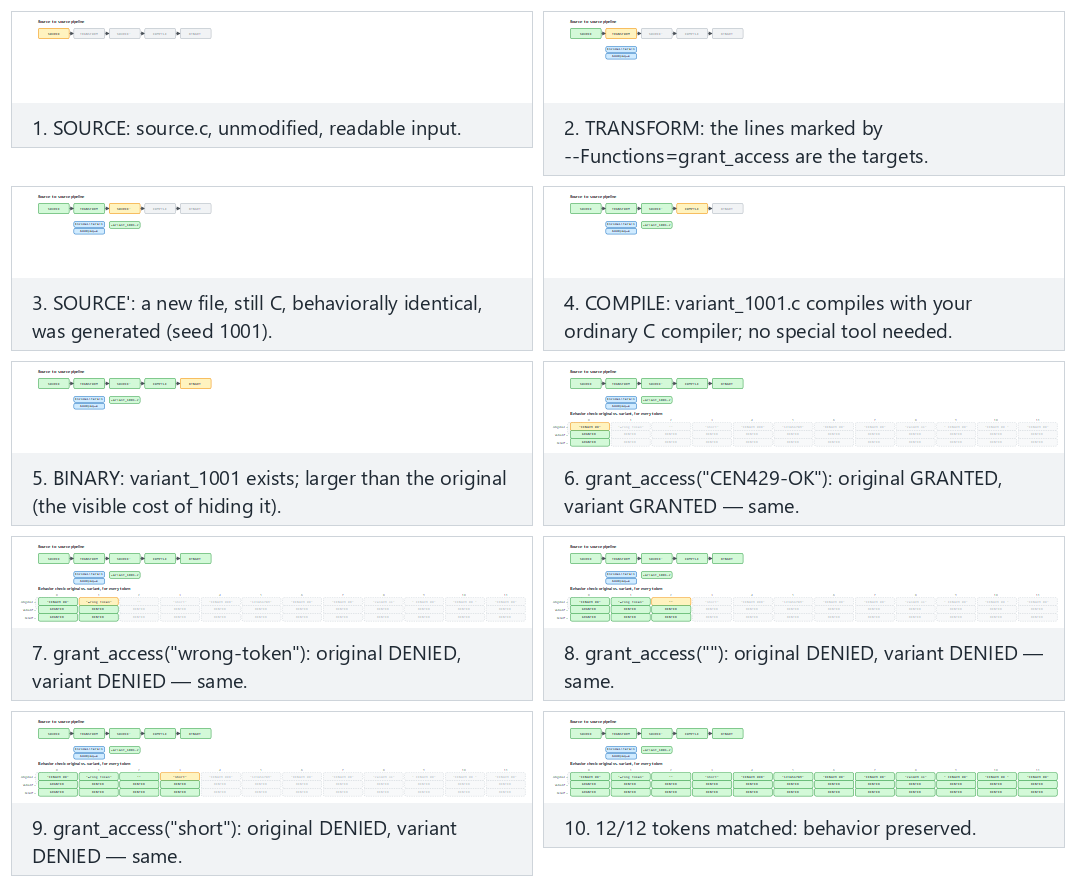
Try the normal (Tigress, two transforms), fallback-three (local fallback, three transforms) and edge-corrupted-variant (a hand-corrupted variant) presets; use 🎲 for your own seed/token list too.
--out, and obfuscating several functions at once¶
The --out=variant.c flag specifies which file the generated obfuscated source is written to; if not specified, Tigress uses a default name (verify against the official documentation). All the examples we've seen this week have focused on a single function (grant_access); but --Functions can take a list. Say your project has, alongside grant_access, a function called anahtar_turet, and both are sensitive:
tigress --Transform=Flatten --Functions=grant_access,anahtar_turet \
        --Transform=AddOpaque --Functions=grant_access,anahtar_turet \
        --out=variant.c proje.c
--Functions=grant_access,anahtar_turet (a comma-separated list) applies the same transform to both functions. This is the concrete syntax for section 1's "applying the same rule to 10 functions" comparison: in the manual method you'd have to write separate encoding for each function; here it's enough to add one more name to a single flag.
Different functions may need different transforms
grant_access and anahtar_turet might not be at the same value level — perhaps anahtar_turet is more critical and also needs Virtualise, while grant_access is satisfied with Flatten+AddOpaque (the decision flow from section 1). In that case, instead of applying the same thing to all of them in a single command, you use a separate --Transform/--Functions pair for each function (or a separate Tigress call); the assumption of "one pipeline for everyone" is an extension of section 2's "why is --Functions so important" discussion — selectivity applies not only to which functions, but also to how much obfuscation.
3. Transform families and mapping onto week 9's rules¶
Tigress transforms correspond to the obfuscation families we saw in week 9. The table below gives the most commonly used transforms and their counterparts in the course (transform names should be verified against the official documentation; there may be small differences between versions):
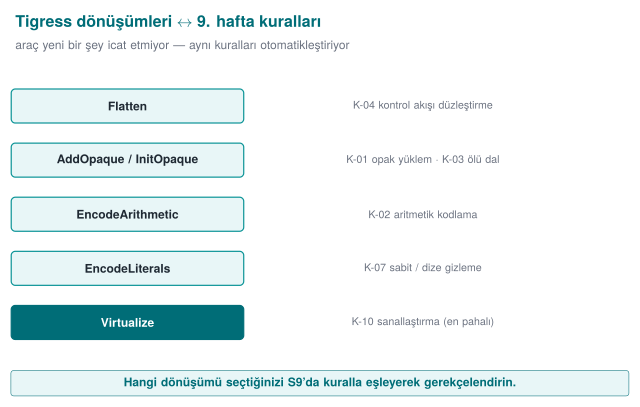
| Tigress transform | What it does | Week 9 counterpart |
|---|---|---|
| Flatten | Flattens control flow (switch dispatcher) | K-04 control-flow flattening |
| InitOpaque / AddOpaque / UpdateOpaque | Adds opaque predicates; bogus branches | K-01 opaque predicate, K-03 dead branch |
| EncodeArithmetic | Replaces arithmetic operations with equivalent, complex expressions (MBA) | K-02 arithmetic encoding |
| EncodeLiterals | Encodes constants and strings | K-07 string encoding, K-08 constant transform |
| EncodeData | Encodes the representation of variables | K-09 variable splitting/encoding |
| Split / Merge | Splits / merges functions (obscures structure) | K-06 call/structure hiding |
| Virtualise | Turns a function into a custom VM bytecode | K-10 virtualisation |
| Jit | Generates code at run time (dynamic) | K-12 dynamic (concept) |
| AntiBranchAnalysis / AntiAliasAnalysis / AntiTaintAnalysis | Makes static analysis techniques harder | Preventive family |
| RandomFuns / RndArgs | Adds random functions / bogus parameters | Diversification, K-06 bogus parameter |
Families and cost
Think about these transforms in week 9's cost order: EncodeArithmetic/EncodeLiterals are cheap; Flatten and opaque predicates are moderate; Virtualise is expensive (tens of times slower). That's why you apply Virtualise only to the most critical, small functions — selecting the target with --Functions in Tigress exists exactly for this.
Worked example: let's map K-01 onto a Tigress transform, step by step¶
Let's not leave the mapping table abstract; let's connect K-01 (week 9, opaque predicate/loop) end to end to Tigress.
- Week 9's definition (reminder): K-01 is adding a bogus branch with a condition (opaque predicate) whose truth value is constant but looks uncertain to the attacker — the
((x*(x+1)) & 1) == 0example and why it is always true were worked through in Week 9, §5. - Its counterpart in Tigress is two steps, not one: as seen in the demo script's real command, first
--Transform=InitOpaque --Functions=mainruns, then--Transform=AddOpaque --Functions=grant_access --AddOpaqueKinds=call.InitOpaqueprepares the hidden state variables the opaque predicates will rely on (usually initialised insidemain, as we saw in section 2);AddOpaqueuses that state to add the real opaque conditions to the target function (grant_access).--AddOpaqueKinds=callselects the kind of opaque predicate to add (here, a "call"-based kind). - Result: K-01's definition of a "constant-true but uncertain-looking condition" matches exactly the conditions
AddOpaqueproduces;InitOpaqueshows the fact that K-01 isn't enough on its own — it requires a preparation step.
Common mistake: skipping the InitOpaque step and running AddOpaque directly
A student trying to shorten the transform pipeline might write only --Transform=AddOpaque --Functions=grant_access and skip the InitOpaque step. This either raises an error, or produces an unexpected result because the state structure the opaque predicates depend on is missing. Rule: transforms can have dependencies between them (in this demo, InitOpaque → AddOpaque); don't assume a transform is "enough on its own" without reading the official documentation. This shows that section 4's "order matters" rule extends beyond just which order, to which transform requires which transform (the "transform dependency" definition in section 0).
Worked example: let's map K-07 onto EncodeLiterals¶
Let's repeat the same steps for K-07 (string encoding), since this rule is also used in the demo script:
- Week 9's definition (reminder): K-07 means not leaving a string like
"CEN429-OK"as plain text in the binary; storing it with a reversible encoding such as XOR and decoding it only at the moment of use — the0x41 ^ 0x5Aexample, traced bit by bit, was worked through in Week 9, §6. - Its Tigress counterpart:
--Transform=EncodeLiterals --Functions=grant_access. This transform encodes the constant strings and numeric constants in the target function, and generates code that decodes them at run time — the automated counterpart of K-07's "hand-written" form (the "BEFORE/AFTER" example in section 2). - Verification: a
stringscheck like the one in the demo script (as in week 9's demo) verifies that the textCEN429-OKis no longer visible in the obfuscated binary; this is K-07's "success criterion."
These two examples (K-01 → InitOpaque+AddOpaque, K-07 → EncodeLiterals) show how to read the rest of the table too: for each row, first recall week 9's definition, then find which flag(s) produce it, then identify a way to verify it.
Worked example: let's see how Flatten applies K-04, in code¶
After K-01 and K-07, let's make the table's most powerful control-flow transform — Flatten — concrete at the code level. Let's take section 2's grant_access as our base:
int grant_access(const char *token) {
    if (token_is_valid(token)) return GRANTED;
    return DENIED;
}
int grant_access(const char *token) {
    int _state = 7341;          /* scattered, unpredictable initial state */
    int _result;
    while (1) {
        switch (_state) {
            case 7341:
                _state = token_is_valid(token) ? 2098 : 5560;   /* the decision is hidden here */
                break;
            case 2098:
                _result = GRANTED;
                _state = 9999;
                break;
            case 5560:
                _result = DENIED;
                _state = 9999;
                break;
            case 9999:
                return _result;
        }
    }
}
This second block, too, is not real Tigress output; it only shows the idea of Flatten. Note three points:
- The original
if/returnstructure is gone; in its place is aswitchdispatcher inside a singlewhile(1)loop. In a decompiler, this loop is not instantly readable the wayif (token_is_valid(...))was. - The state constants (
7341,2098,5560,9999) are scattered, not sequential — this is the concrete counterpart of the earlier note that "values should be produced with K-02, or as random, scattered constants"; sequential constants (1, 2, 3, 4) are instantly recognised in a decompiler as the signature of "a flattened dispatcher." - The branch count increased: the original had a single
if(1 branch point); the flattened version has 4cases inside theswitchand the transitions between them — this is exactly the source of the "branch count only jumps at Flatten" observation in sections 5 and 7.
Common mistake: seeing the flattened code and thinking 'the logic is now completely gone'
Someone who looks carefully at the example above can still see that there are two exit states (2098→GRANTED, 5560→DENIED) and that the decision between them is made in case 7341 — flattening does not destroy the logic entirely, it only removes its direct visibility. That's why week 9's K-04 rule doesn't consider Flatten sufficient on its own; the state constants themselves must also be encoded (with K-02) and the decision points hidden with opaque predicates (K-01) — this is exactly why this week's transform pipeline (EncodeLiterals → EncodeArithmetic → Flatten → AddOpaque) uses four transforms together.
Let's unpack the transforms one by one: the idea behind each row¶
Let's unpack the table's ten rows in order, referring back to their week 9 definitions. For each one we answer three questions: what it does, which K rule it automates, and when it's preferred.
1. Flatten — control-flow flattening. Turns a function's if/else/loop structure into a switch dispatcher inside a single while loop; every original block becomes a case, and transitions between blocks are done by changing the case number. It is the exact automatic counterpart of week 9's K-04 (section 5, "RULE K-04 — Control-flow flattening"). As we saw in section 5's grant_access example, it's a moderate-cost, moderate-to-high-potency first step for easy targets like "single branch, single return."
2. InitOpaque / AddOpaque / UpdateOpaque — the opaque predicate family. The automatic form of K-01 (opaque predicate/loop). Splitting it into three separate commands is deliberate: InitOpaque prepares (sets up state variables, usually in main), AddOpaque adds (places the real conditions into the target function), and UpdateOpaque is used to update/diversify opaque structures that have already been added (across multiple obfuscation rounds). We detailed this above.
3. EncodeArithmetic — arithmetic encoding (MBA). The automatic form of K-02 (week 9, section 6: "encoding arithmetic instructions"); it turns a simple operation like a + b into a mixed boolean-arithmetic expression that gives the same result but is hard to read (recall week 9's (a^b) + 2·(a&b) = a+b example). It is low cost; but week 9's warning that "MBA can be undone with simplifiers" applies here too (section 7).
4. EncodeLiterals — constant and string encoding. The automatic form of K-07 (string encoding); we covered it in detail above. Very low cost, but weak on its own (it is exposed in memory while running — week 9's "obfuscation does not store a key" warning).
5. EncodeData — variable representation encoding. The closest automatic counterpart of K-09 (week 9, section 6: "variable splitting, merging, and array restructuring"); it changes a variable's representation in memory (e.g., a split/encoded structure instead of a single 32-bit integer). The goal is that the value does not appear directly in a memory dump.
6. Split / Merge — function splitting/merging. Part of K-06 (week 9, section 5: "hiding function calls and external library dependencies"); Split breaks a function into several smaller pieces, Merge combines several functions into one large function. Both blur the function's boundaries — in a decompiler, this makes the question "is this a single logical operation or a combination of several?" harder to answer.
7. Virtualize — virtualisation-based obfuscation. The automatic form of K-10 (week 9, section 7); it turns a function into a custom virtual machine's bytecode. It is the most expensive row in the table (the "tens of times slower" warning in the "Families and cost" box above); it is applied only to small, critical functions (the decision flow from section 1, "Step 5" in section 5).
8. Jit — run-time code generation. The conceptual counterpart of K-12 (week 9, section 7: "self-modifying code and dynamic encryption"); part of the code is generated at run time, not compile time. Week 9's warning for K-12 (that it can conflict with the operating system's memory protections — DEP/NX, W^X) applies here too; that's why it's marked "(concept)" in the table — it is not applied in this course, only recognised.
9. AntiBranchAnalysis / AntiAliasAnalysis / AntiTaintAnalysis — the anti-analysis family. The direct automatic counterpart of week 9's "preventive" family (one of the five families in section 2); these three respectively target and make harder the tools that perform branch analysis, alias analysis, and taint analysis (techniques used by a decompiler or a symbolic executor). Concrete examples of K-06's note that "targeting the analysis tools themselves is more laborious."
10. RandomFuns / RndArgs — random function/parameter addition. As we'll see in section 6's "Diversification" note, these don't serve a single K rule on their own — they serve diversification and K-06's "bogus parameter" idea: RandomFuns adds random, functionless (but real-looking) functions; RndArgs adds bogus parameters to existing functions. Both, when combined with a seed, differentiate every copy.
Rule: ask the three questions in order as you read each row
When you encounter a new Tigress transform (in the official documentation), repeat this section's discipline: (1) which week 9 family does this belong to? (2) which K rule is closest? (3) is its cost low, moderate, or high? These three questions let you place a transform you've never seen into the right category and the right cost budget.
Let's follow three transforms — Flatten, EncodeArithmetic, AddOpaque — step by step on small code; the last one uses the real lines of a file that actually runs (fallback_transform.py).
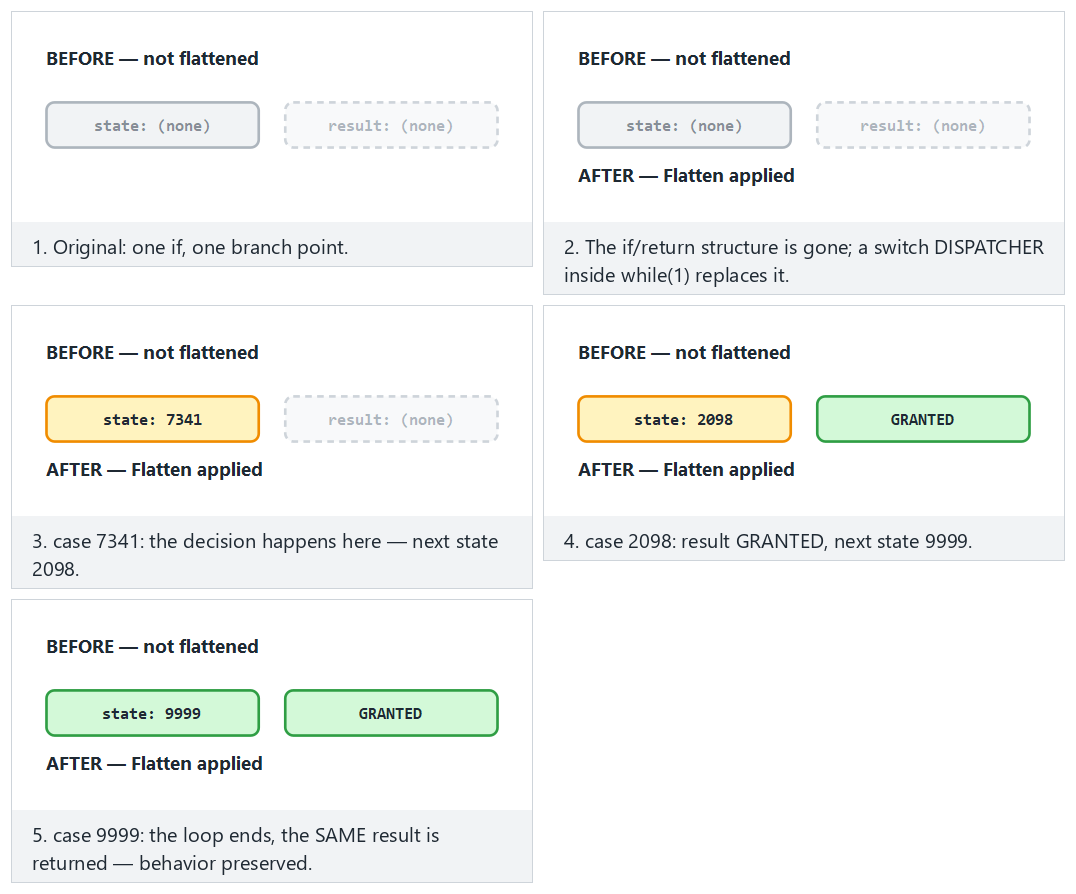
Try the flatten-granted (the dispatcher takes the GRANTED path), arith-typical (the MBA identity) and opaque-seed-zero (the predicate is still true even at seed 0) presets.
Worked example: how EncodeData splits a variable (conceptual)¶
Let's make EncodeData, the automatic counterpart of K-09 (week 9: variable splitting/merging), concrete. Say there is an "attempt counter" variable inside grant_access:
int attempt_count = 0;
...
attempt_count++;
if (attempt_count > 3) return LOCKED;
struct { unsigned char alt; unsigned char ust; } _counter_parts = {0, 0};
...
/* the counterpart of attempt_count++: increment the low byte, update the high byte on overflow */
_counter_parts.alt++;
if (_counter_parts.alt == 0) _counter_parts.ust++;
/* the counterpart of attempt_count > 3: merge the two pieces and compare */
if (((_counter_parts.ust << 8) | _counter_parts.alt) > 3) return LOCKED;
In a memory dump (e.g., pausing the program with a debugger and reading memory), instead of appearing as a single, whole 32-bit integer, attempt_count sits as two independent bytes, scattered inside a struct — this matches exactly section 0's goal that "the value should not appear directly in a memory dump."
Common mistake: merging the pieces back together right after use and storing them
If a developer, out of performance concerns, caches _counter_parts into a single variable (int birlesik = (...) << 8 | (...)) before every comparison and keeps that variable for the whole function, there is once again a single, whole, recognisable 32-bit block — K-09's advantage is lost (this matches exactly week 9's warning on the same topic). Rule: merge only at the exact moment it's needed, discard it right after use; don't keep a persistent "merged" copy.
Worked example: how Split divides a function (conceptual)¶
Let's make the Split transform concrete too. Say grant_access performs two logical steps back to back: a length check and a content comparison (exactly what the real grant_access in source.c does — the code in section 0).
int grant_access(const char *token) {
    if (strlen(token) != strlen(VALID_TOKEN)) return 0;
    unsigned diff = 0;
    for (unsigned i = 0; i < sizeof VALID_TOKEN - 1; i++)
        diff |= (unsigned)((unsigned char)token[i] ^ (unsigned char)VALID_TOKEN[i]);
    return diff == 0;
}
static int _step_a(const char *token) {          /* length check only */
    return strlen(token) == strlen(VALID_TOKEN);
}
static unsigned _step_b(const char *token) {      /* difference computation only */
    unsigned diff = 0;
    for (unsigned i = 0; i < sizeof VALID_TOKEN - 1; i++)
        diff |= (unsigned)((unsigned char)token[i] ^ (unsigned char)VALID_TOKEN[i]);
    return diff;
}
int grant_access(const char *token) {
    if (!_step_a(token)) return 0;
    return _step_b(token) == 0;
}
The result is two new, generically named helper functions (_step_a, _step_b); a decompiler now sees three separate symbols (recall the "symbol table" definition in section 0), and grant_access itself is now just two calls — the actual logic has been spread across other functions. Merge does the exact opposite: it combines several small functions into a single, large function; the result makes the question "is this one operation, or the sum of several?" harder in the reverse direction.
Why do function boundaries matter with Split?
A reverse engineer usually starts by drawing a "map" from function boundaries (name, number of parameters, inputs/outputs — recall week 9's decompiler example in section 0). Split makes this map itself misleading: small, generically named functions like _step_a and _step_b can be numerous and small enough to distract an engineer's attention. This row's counterpart of K-06 (function hiding) is exactly this.
4. Transform pipeline: combining several transforms¶
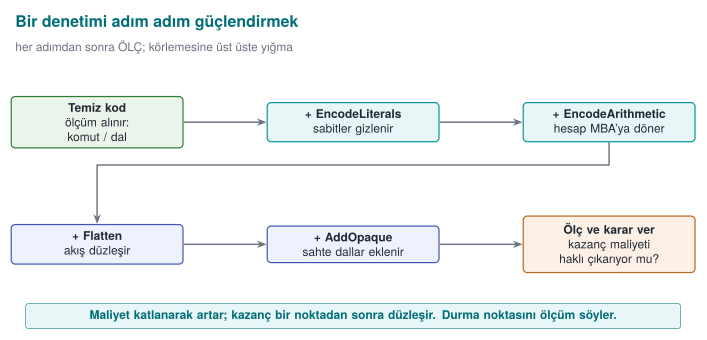
Week 9's most important rule was "not a single technique, but together." In Tigress this means applying transforms in sequence (as a pipeline). Every --Transform is applied to the previous one's output; order matters.
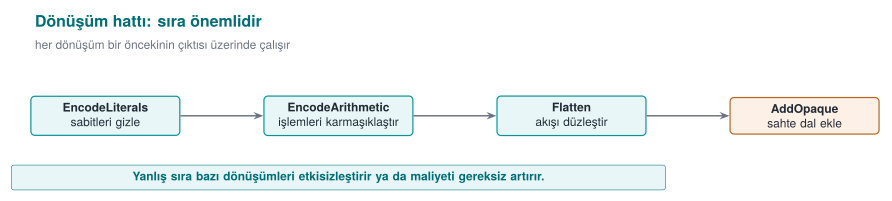
Signing comes last (obfuscate first, sign after); after every pipeline, test the behaviour and measure the cost.
tigress \
  --Transform=EncodeLiterals --Functions=grant_access \
  --Transform=EncodeArithmetic --Functions=grant_access \
  --Transform=Flatten        --Functions=grant_access \
  --Transform=AddOpaque      --Functions=grant_access \
  --out=variant.c source.c
This pipeline first encodes the constants/strings of a single check (grant_access), then encodes its arithmetic, then flattens it, then strengthens it with opaque predicates. The result is the automatic version of what week 9's K-04 called "reinforced flattening."
Order and test rule
Transform order affects the result, and some orders unnecessarily hurt performance. Rule: after every transform pipeline, run the program's unit tests (was the behaviour preserved?) and measure size/speed. Obfuscation must never change behaviour; if it does, the pipeline is wrong. This connects directly to week 12's "S16 test results."
Let's concretely compare two different orders¶
Let's not leave the sentence "order matters" abstract. Let's think through the same four transforms (EncodeLiterals, EncodeArithmetic, Flatten, AddOpaque) in two different orders, and trace what covers what in each order. The rule is simple but its consequences differ: a transform can only transform what already exists in the source at the moment it runs; it cannot see the new code a transform coming after it produces.
Order 1 (this section's pipeline, the order the demo script uses):
Because EncodeLiterals runs first, it only encodes the constants/strings in the original source (source.c). When Flatten runs third, EncodeLiterals can no longer see the new state constants (case 1, case 2, ...) that the flattened switch dispatcher produces itself — because that step has already passed. This is not a problem, because Flatten already produces its own state values as scattered/unpredictable (the note in section 5: "values should be produced with K-02, or as random, scattered constants" — here that job falls to Flatten itself). The gain in this order is this: by the time Flatten runs, the arithmetic inside every case of the dispatcher has already been complicated (thanks to EncodeArithmetic) — that is, the flattened code is hard to read both in structure and in content.
Order 2 (structural transforms first, encoding transforms after):
Here EncodeLiterals is the last step; it can now see and encode not only the constants in the original source, but also the state constants Flatten produced and the opaque condition constants AddOpaque added — a wider scope. But it has a cost: since EncodeArithmetic also runs fourth, it must now encode arithmetic spread across Flatten's dispatcher logic and AddOpaque's added conditions, not just a single small function's arithmetic — the transform's job grows, and so does the generated code and cost.
| Order 1 (encode → structure) | Order 2 (structure → encode) | |
|---|---|---|
What does EncodeLiterals cover? | Only the constants in the original source | Original + the new constants Flatten/AddOpaque produce |
The arithmetic Flatten sees | Already encoded (harder-to-read case contents) | Raw, plain (easier-to-read case contents) |
| Expected cost | Moderate | Probably higher (later steps apply to a bigger surface) |
Takeaway: there is no single "correct" order; order is a scope/cost trade-off. This week we take Order 1, the one the demo script uses, as our baseline because it is simple and predictable; but if you try a different order in your own project, don't say "this order is better" without running section 7's measurement steps separately for each order and comparing them — this is exactly what the "order and test rule" above means in practice.
Common mistake: extending the pipeline only on the logic 'more transforms = more secure'
While placing four transforms in sequence is available, some students say "10 transforms is more secure" and repeatedly add more from the same family (e.g., several different opaque predicate transforms one after another). This both grows the cost unnecessarily, and some transform pairs can cancel each other out or just inflate size without any additional benefit. Rule: build the pipeline to include one representative from each family (control flow + data + preventive); add more than one transform from the same family only if it's justified by measurement (section 7).
Worked example: what happens if the signing order breaks?¶
Let's test the "signing comes last" rule with a concrete scenario. Say a developer accidentally reversed the order:
source.cis compiled →program(unsigned).programis signed →program.imzali(a digital signature, bound to the file's current byte content).- Then the "forgotten" obfuscation step is noticed;
variant.cis produced fromsource.c, recompiled, and the resulting new binary is copied over the old signed file.
Result: the new binary produced in step 3 is different from the byte content signed in step 2 (obfuscation can change every byte of the file — recall the instruction count increase in sections 5/7). The verifying party (e.g., a loader, a store) finds the signature invalid and rejects the program — in a production environment, this means "the release could not ship."
Common mistake: thinking 'I added obfuscation afterward, so recomputing the signature is enough'
When some teams notice this mistake, they think recomputing just the signature solves the problem — technically true (the new content matches the new signature), but the process is still wrong: this means the rule "signing must be the last step in CI" has become a manual exception that has to be remembered over and over. Rule: in the CI skeleton (section 9), the sign stage is structurally defined after the obfuscate and measure stages; keeping this order should be left not to human memory, but to CI's own definition.
Let's follow how order affects both scope (what EncodeLiterals can see) and the signature, in one pipeline.
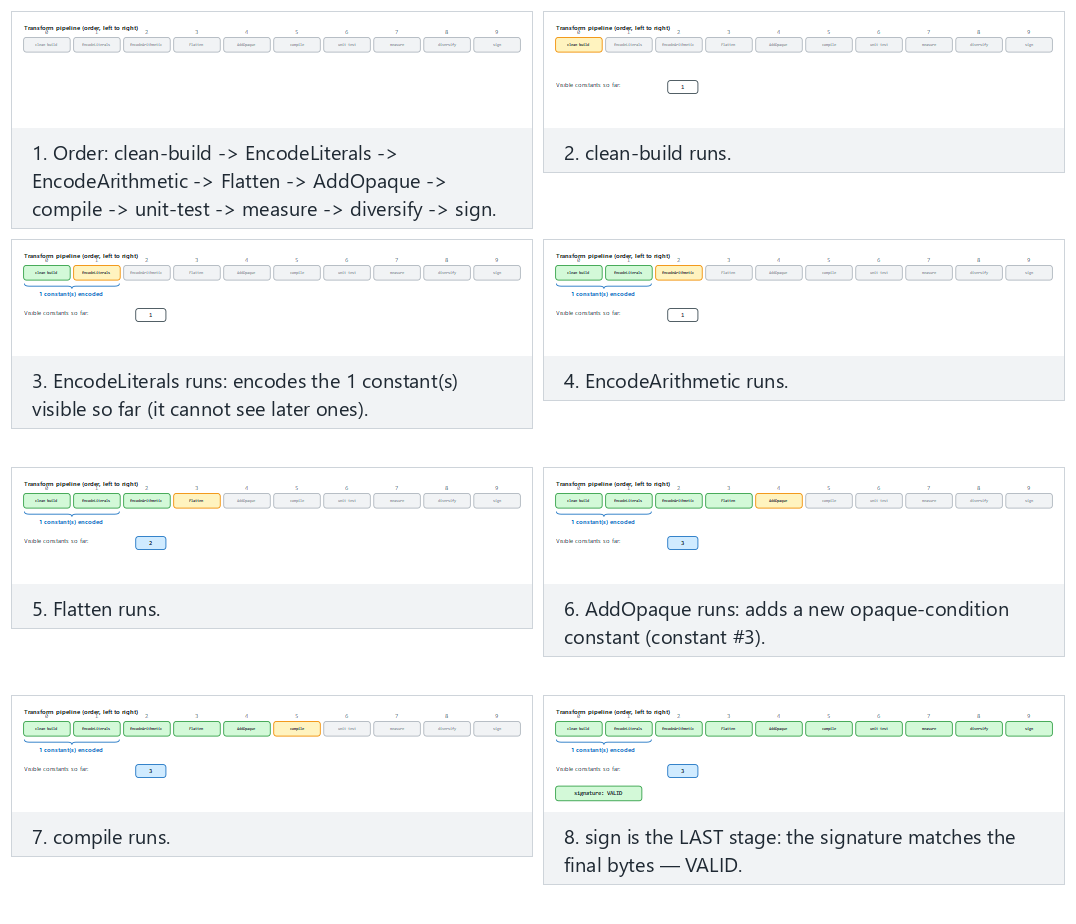
Compare the code-then-structure (Order 1, correct), structure-then-code (Order 2, wider scope) and sign-too-early (signing first — the edge case) presets.
5. Step-by-step example: reinforcing a check (synthetic)¶
Let's take a single synthetic access check and reinforce it layer by layer. The goal is to see what each step adds, and how much it costs.
int grant_access(const char *token) {
    if (token_is_valid(token)) return GRANTED;   /* a single branch, a single return: an easy target */
    return DENIED;
}
| Step | Transform applied | What changes? | Cost |
|---|---|---|---|
| 0 | (none) | strings, single branch, bypassable with a single-byte patch | — |
| 1 | EncodeLiterals | GRANTED/DENIED and strings no longer appear in plain form | Very low |
| 2 | EncodeArithmetic | The comparison/computation turns into a complex expression | Low |
| 3 | Flatten | The single branch is no longer visible; a switch dispatcher | Moderate |
| 4 | AddOpaque | Bogus branches and opaque conditions are added | Moderate |
| 5 | (Virtualise, only if needed) | The function turns into VM bytecode | High |
Takeaway: each step makes the attack a little more expensive; but each step also adds a cost. You decide where to stop based on the value of the protected asset and the cost you measure (section 4). Step 5 (Virtualise) is unnecessary for most checks; it's applied only to the most critical, small functions.
Let's trace the step-by-step cost increase with a numeric example (hypothetical)¶
Let's fill the table above with numbers. The instruction/branch counts below are hypothetical (a real measurement can't be taken while Tigress isn't installed); they are meant only to show the order of magnitude of each step and how the arithmetic is verified. For real numbers, run demo.sh while Tigress is installed and read the objdump output the script prints (recall the "instruction/branch counting" definition in section 0).
| Step | Instructions | Branches | Increase over previous step | Cumulative increase over step 0 |
|---|---|---|---|---|
| 0 — clean | 22 | 2 | — | — |
| 1 — + EncodeLiterals | 30 | 2 | (30−22)/22×100 ≈ 36.4% | 36.4% |
| 2 — + EncodeArithmetic | 46 | 2 | (46−30)/30×100 ≈ 53.3% | (46−22)/22×100 ≈ 109.1% |
| 3 — + Flatten | 78 | 5 | (78−46)/46×100 ≈ 69.6% | (78−22)/22×100 ≈ 254.5% |
| 4 — + AddOpaque | 101 | 7 | (101−78)/78×100 ≈ 29.5% | (101−22)/22×100 ≈ 359.1% |
Three observations:
- The branch count only jumps at Flatten (2 → 5): this is expected, because flattening logic, by nature, builds a multi-way
switchdispatcher instead of a singleif(the direct source of section 7's "potency" metric). - The cumulative increase is not the sum of the step increases — each percentage is added multiplicatively on top of the previous one (36.4% followed by 53.3% gives a total of 109.1%, not 36.4%+53.3%=89.7%). This is a common arithmetic mistake when computing percentages; compute each row with its own denominator (the previous step's number).
- A large cumulative number like 359% is the expected result of stacking four transforms on top of each other; it should not be confused with the cost of a single transform (the real 82% measured in week 9's hand-applied Flatten+AddOpaque example) — here four transforms are counted together.
Common mistake: applying Step 5 (Virtualise) on the logic 'since I'm here, let's add everything'
After seeing a cumulative cost like 359% in the table above, thinking "it's already grown a lot, let me also add Virtualise" is a common mistake. Virtualise is many times more expensive than the sum of the other four transforms (section 1's "Families and cost" box: "tens of times slower") — it is measured not in percentages, but in multiples. While a 359% growth for a check function is often acceptable, adding a further 10-50x slowdown on top is meaningless for most products. Rule: make the Virtualise decision separately; don't add it automatically on the logic "I already obfuscated it" — go back to section 1's decision flow (is it sensitive, how valuable is it).
Worked example: a single transform, or four transforms together? A numeric comparison¶
Let's test section 1's rationale for "using them together" against the numbers above. What would have happened if we'd applied only a single transform to the same grant_access function, versus what happened when we applied four transforms together — let's put the two side by side (the numbers are taken from the table above/hypothetical):
| Approach | Instructions | Branches | Cost increase (over step 0) | How many different analysis techniques are challenged? |
|---|---|---|---|---|
Only EncodeLiterals | 30 | 2 | 36.4% | Only static string scanning (strings) |
Only Flatten (hypothetical, if applied on its own) | ~54 | 5 | ~145.5% | Only pattern recognition/CFG reading |
| Four transforms together (this week's pipeline) | 101 | 7 | 359.1% | String scanning + pattern recognition + MBA simplification + opaque-predicate solving |
The last column is the real point: applying only EncodeLiterals neutralises just one of the attacker's tools (strings); the attacker can still read the control flow directly. Applying four transforms together requires the attacker to defeat four different analysis techniques at the same time and in a mutually dependent way (the numeric rationale for week 9's rule that "two weak layers together are stronger than one layer").
Rule: report not the cost increase, but 'how many different techniques it challenges'
In your S9/S15, just saying "it grew 359%" is incomplete. As in the last column of the table above, also write which transform counters which analysis technique (read together with section 7's "measured against which tool" table). This shows an evaluator not just a number, but the breadth of the defence.
6. Diversification: different binaries from the same source¶
Recall week 9's "Rule 2 — break automation" principle: if an attacker can crack one copy and distribute the attack to every copy, one crack opens everything. Diversification means producing behaviourally identical but structurally different binaries from the same source. Tigress does this with a seed: if you run the same transforms with different seeds, the opaque predicates, bogus branches, and flattening states vary from copy to copy.
tigress --Seed=1001 --Transform=Flatten --Transform=AddOpaque \
        --Functions=grant_access --out=gizli_a.c source.c
tigress --Seed=2002 --Transform=Flatten --Transform=AddOpaque \
        --Functions=grant_access --out=gizli_b.c source.c
# gizli_a.c and gizli_b.c do the same job; their machine code differs
Let's follow, step by step, how the real fallback_transform.py derives its mask from the seed, for three seeds.
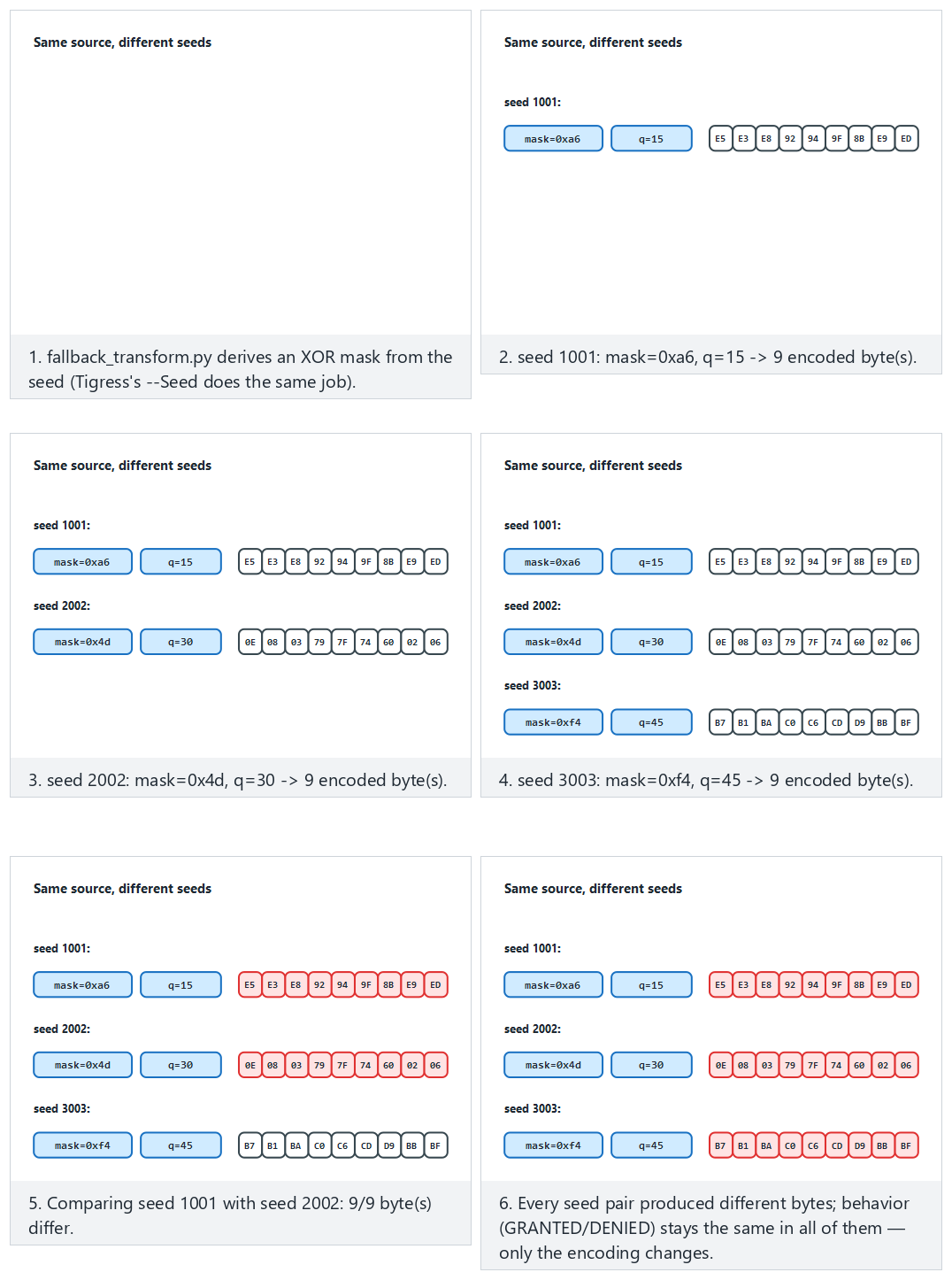
Try the three-seeds (1001/2002/3003, all different), small-seeds (½/3, even small seeds differ) and edge-same-seed-twice (what happens if a seed is forgotten and reused) presets.
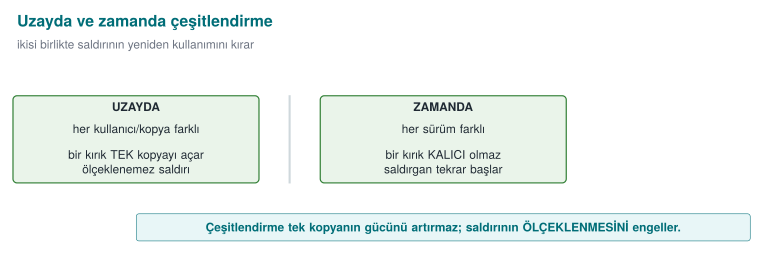
Two kinds of diversification (from week 9):
- Diversification in space: distributing copies produced with different seeds to different users/devices. An automated attack written against one copy does not work on another.
- Diversification in time: producing every release with a new seed. An attack found against an old release breaks on the new one. This works together with your week 10 key/version renewal policy.
Related transforms
In Tigress, RandomFuns adds random bogus functions and RndArgs adds bogus parameters; combined with a seed, every structure looks different. Diversification does not raise obfuscation's potency (it's still possible to crack one copy) but it prevents it from scaling — this distinction was week 9's core idea.
Worked example: let's compare the binaries produced with two seeds, step by step¶
The demo script's STEP 4 does exactly this: it produces two separate grant_access builds from the same source.c with --Seed=1001 and --Seed=2002, compiles them, and compares them byte by byte with cmp -s A B. Let's trace the steps one by one:
- Same source, two commands:
tigress --Seed=1001 --Transform=Flatten --Transform=AddOpaque --Functions=grant_access --out=a.c source.c
tigress --Seed=2002 --Transform=Flatten --Transform=AddOpaque --Functions=grant_access --out=b.c source.c
Note: the --Transform list is exactly the same in both (Flatten, AddOpaque); the only difference is the --Seed value. 2. Compile: a.c and b.c are compiled with the same compiler and flags (-O2) into two separate binaries (A, B). 3. Compare behaviour (this first!): both binaries must be run with the CEN429-OK input and verified to give the same output (GRANTED) — diversification must never change behaviour (section 4's rule applies here too). 4. Compare structure: cmp -s A B compares the two files byte by byte; if $? (the exit code) is 0, the files are identical (bad — it means diversification didn't work), if it's 1, they are different (the expected result).
Let's quantify the difference ratio (hypothetical, in a form similar to week 9's real 66.4% example). Say the flattened + opaque-predicate version of grant_access takes up 160 bytes in both binaries; comparing byte by byte, we measured that 96 bytes came out different:
Interpretation: 60% of the two copies are different, 40% is shared (likely parts the compiler keeps fixed, such as function entry/exit — the same reason for the remaining 33.6% in week 9's 512-byte example). The 66.4% measured in week 9's manual diversification and the 60% Tigress produces this week with --Seed are the same order of magnitude — this is expected, because both apply the same idea (changing structure with random choices); the exact number will, of course, differ between hand-written and tool-generated code.
Common mistake: saying 'different, so diversification happened' without reading cmp's output
cmp -s A B only tells you whether the files are identical or not; it does not show what is different. Two binaries can be different, but the difference might be in an insignificant spot only (e.g., a compile timestamp, uncompressed debug information); the protected function (grant_access) itself might have stayed the same. Rule: prove a diversification claim not just with cmp, but by comparing the target function itself separately (with section 0's objdump method, taking only what's under the <grant_access>: label).
Rule: always record the seed
If you don't record the --Seed value you used to produce a binary, you can never produce that exact same binary again (this is a problem if you need to recompile that release for a debugging session). This is exactly why section 9's S15 pipeline rule says "every release is diversified with a seed; the seed and the build identity are recorded."
Worked example: let's compare the target function directly instead of cmp¶
Let's apply the correct method the "common mistake" box above recommends. cmp -s A B only says "different/same"; to see whether the target (grant_access) itself is different, we apply section 0's objdump method to both binaries and compare only that function's section:
# Extract only what's under the <grant_access>: label from both binaries
objdump -d A | awk '/<grant_access>:/{a=1} a{print} /^$/{if(a)exit}' > erisim_A.asm
objdump -d B | awk '/<grant_access>:/{a=1} a{print} /^$/{if(a)exit}' > erisim_B.asm
diff erisim_A.asm erisim_B.asm | wc -l    # if 0, the target function stayed the SAME
If diff's output is empty (line count 0), this means the two seeds produced no difference at all in grant_access — that is, section 6's claim (diversification happened) is false, and the difference cmp found across the whole file was only in an insignificant spot (e.g., a compile timestamp). If diff's output is non-empty, the target function itself has really changed — only then can we say "diversification is proven." This two-step verification (first "is something different?" with cmp, then "is the target itself different?" with objdump+diff) completes the demo-script account at the start of section 6.
Rule: write the claim and the verification command together
In your S9/S15, the sentence "I diversified with two seeds" is not enough on its own; also write, as above, which command you verified it with. This is another concrete application of week 12's "result, not plan" rule: a claim must be backed by a runnable command.
How many users, how many seeds? Let's think about diversification in space at scale (hypothetical)¶
Let's make the "diversification in space" definition from the start of section 6 concrete with a deployment scenario. Say a mobile application has 10,000 users, and a different seed is used for every install:
| Scenario | Number of seeds | Share of users a single crack affects |
|---|---|---|
| No diversification (one binary, same for everyone) | 1 | 100% (10,000/10,000) |
Weak diversification (only 2 fixed variants, e.g. -O2/-O3) | 2 | ~50% (cracking one variant affects everyone using that variant — the numeric counterpart of section 6's "common mistake" box) |
Real diversification (a unique --Seed per install) | 10,000 | 1/10,000 = 0.01% (only that one cracked copy) |
The calculation in the third row is simple: even if an attacker cracks a single copy and produces a byte patch specific to that copy, the patch only works on binaries produced with the same seed; if every user has a different seed, the patch works on no other copy. These numbers are hypothetical (the real impact also depends on how well the attacker can generalise the patch — e.g., a patch that targets only a specific byte offset has an even narrower effect, while one based on a behavioural pattern might be a bit wider); the goal is only to show the relationship that "as the number of seeds grows, a crack's spreading surface shrinks."
Worked example: let's trace diversification in time on a timeline (hypothetical)¶
Let's also make diversification in time, the twin of the "diversification in space" example above, concrete with a release calendar. Say a product releases a new version every month, and every release is obfuscated in CI (section 9's rule) with a new seed:
| Month | Version | Seed | Status |
|---|---|---|---|
| January | v1.0 | 1001 | Released |
| February | v1.1 | 4832 | Released; an attacker cracked v1.0 in mid-February (the byte patch spread) |
| March | v1.2 | 9214 | Released; February's patch no longer works (different seed, different structure) |
The "lifetime" of February's crack lasted only one month (from v1.1's release date to v1.2's release date) — this is the numeric counterpart of section 1's "Rule 3 — buy the other layers time" principle. If the product had never changed the seed (no diversification in time) and kept the same obfuscation structure even while adding new features every month, February's crack would have stayed valid indefinitely.
This cycle's cost is nearly zero, because section 9's CI skeleton runs obfuscation + measurement + signing automatically on every release (recall section 2's "tool or by hand" comparison); if diversification had been done by hand, obfuscation would have had to be rewritten by hand every month — which would not have been sustainable in practice at all.
Is diversification in time enough on its own?
No — section 1's "Rule 3" says obfuscation buys the other layers time, not that it is a permanent solution. In the time it takes for the new release to ship at the end of the month, the attacker can still harm users who are on the February release. This is why diversification in time is used together with RASP (week 6, detecting an intrusion attempt at run time) and server-side checks (e.g., rejecting old/cracked releases).
7. Measuring obfuscation and diversification¶
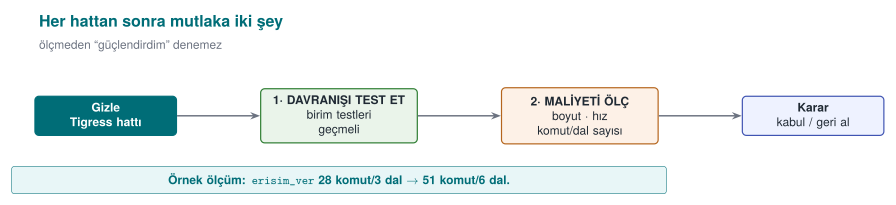
In week 9 we learned to measure obfuscation along four dimensions (potency, resilience, stealth, cost). Tigress's greatest teaching value is that it lets you make these measurements concrete: you obfuscate the same program and measure it before/after.
Cost measurement (easy and mandatory)¶
Measure the following for every transform pipeline and write them into S9/S15:
| Metric | How | Expectation |
|---|---|---|
| Binary size | ls -l / size | Obfuscation increases size |
| Running time | Run an operation many times and average it | Flatten/Virtualise slow it down |
| Source/CFG complexity | Basic block count in a decompiler (e.g., Ghidra) | An increase before/after |
Let's put all four metrics into one table, for the original program and two diversified variants.
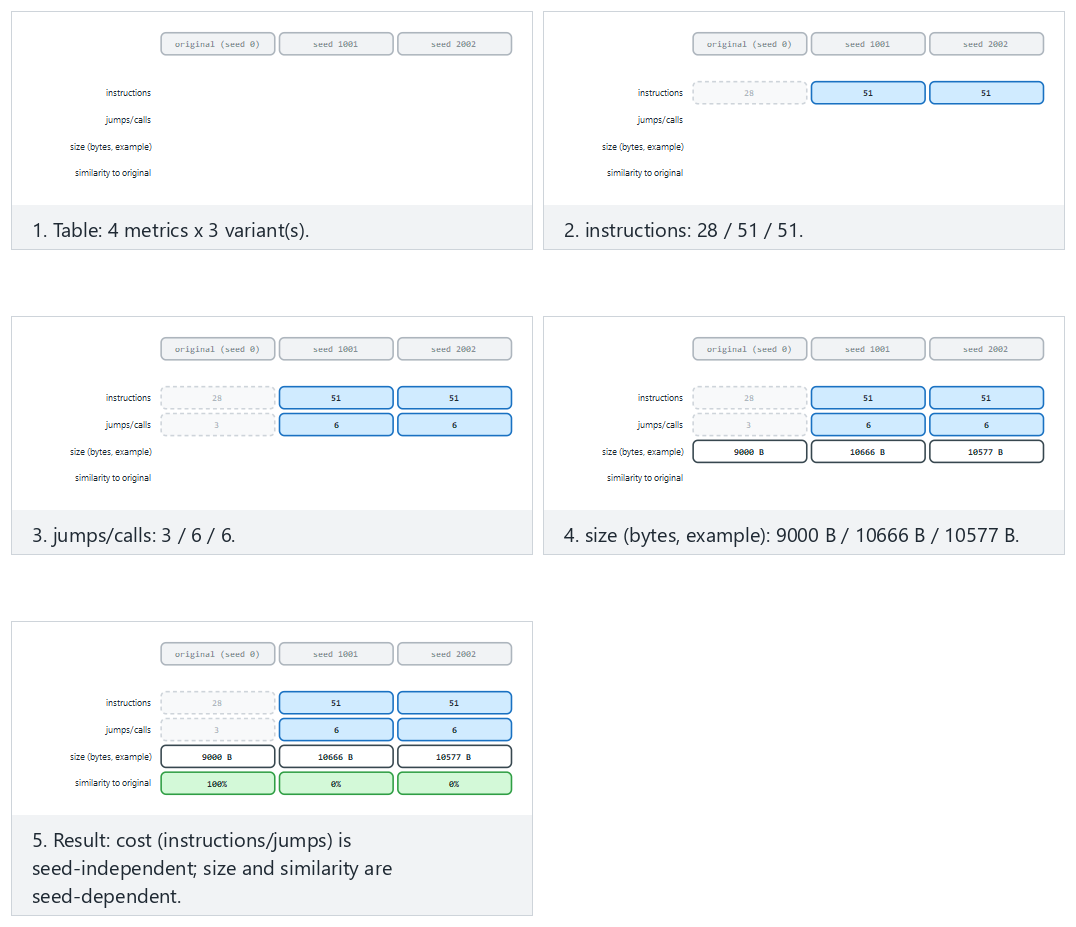
Compare the two-different-seeds, large-seeds and edge-both-zero (both "seeds" are really the original) presets: cost stays seed-independent while size and similarity vary with the seed.
size ./program_temiz ./program_gizli        # size difference
# time: run N times with the same input, compare the average
Resilience measurement (advanced, conceptual)¶
In week 9 we said resilience is "a measured quantity, not a claim." Tigress is at the centre of academic work on this: the study by Banescu and colleagues measures how much Tigress's transforms resist symbolic execution (like KLEE). The finding is an important rule for this course:
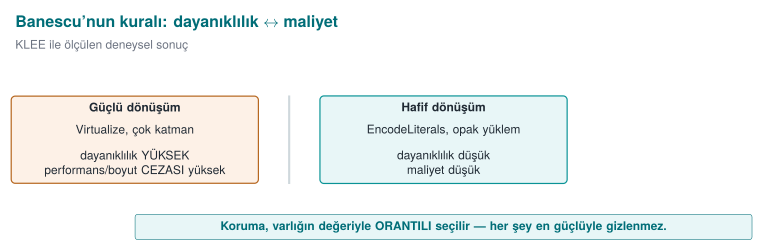
- A single transform (Flatten alone) can usually be undone with symbolic execution.
- Combining transforms and growing the state space (tying opaque predicates to structures that are expensive to solve) can make the solver's job exponentially harder.
- But this also raises the cost. That is, resilience and cost trade off exactly as we said in week 9.
Measurement rule (S9/S15)
Defend an obfuscation decision in your project not by calling it "strong," but with a measurement: "The Flatten + AddOpaque pipeline grew the binary size by X%, slowed the operation down by Y%; in return, the target function's basic block count rose Z-fold." Unmeasured obfuscation is, in the eyes of week 12's evaluator, a claim, not evidence.
Let's complete the size and time measurement: adding to section 5's numbers¶
In section 5 we traced, step by step, the increase in a single function's (grant_access) instruction and branch counts (a hypothetical 359.1% cumulative instruction increase, going from 2 branches at step 0 to 7 branches at step 4). Let's now distribute these numbers across Collberg's four metrics (the table above) and also add size and time.
Potency, using week 9's cyclomatic complexity formula (branch_count + 1):
Step 0 (clean)        : 2 branches + 1 = 3
Step 4 (full pipeline): 7 branches + 1 = 8
Increase              : (8 − 3) / 3 × 100 ≈ %166,7
Cost, the instruction-count increase from section 5: we already computed it, 359.1% (cumulative, four transforms together).
Size: an important warning is needed at this point.
Common mistake: measuring the whole .exe/binary's size (ls -l) and concluding 'it barely changed'
In a small, synthetic program like this week's demo, the total file size measured with ls -l access_original access_variant often comes out nearly the same — because most of the file (a few KB) consists of ELF/PE headers, dynamic linking tables, and references to the run-time library; a single small function growing by 79 instructions gets lost in the statistical noise next to this fixed overhead. Seeing this and concluding "obfuscation doesn't increase size" is wrong. Rule: in small/synthetic demos, for the size metric, measure not the whole file, but the target function's own code size (by converting section 0's objdump instruction count to bytes). In a real, large product (with hundreds of functions obfuscated), this effect becomes visible in the total file size too; it not being visible in a small demo is expected, not proof of an error.
Time: a similar warning applies to time — a single call to such a small function takes far less time than the operating system's timer resolution (usually sub-millisecond); to see a meaningful time difference, you need to call the function a large number of times (e.g., a million) in a loop and measure the total time:
# Pseudocode: the real measurement tool varies by platform (e.g. `time`, a benchmarking loop)
for i in $(seq 1 1000000); do ./access_original CEN429-OK >/dev/null; done   # time is measured
for i in $(seq 1 1000000); do ./access_variant CEN429-OK >/dev/null; done  # time is measured and compared
Note: the loop above actually also measures the cost of starting a new process each time (fork/exec), which can overshadow the real function time; in a real measurement, the function is called millions of times inside a loop, in the same process, and only that loop's duration is measured. This distinction — "the cost of starting a process" versus "the function's own time" — is a point that is often confused in small demos.
Let's gather the four metrics in a single table¶
| Metric | Value for this week's demo | Source |
|---|---|---|
| Potency | ~166.7% complexity increase (3→8) | The calculation above, branch count + 1 |
| Cost | ~359.1% instruction increase (22→101, four transforms together) | Section 5 |
| Resilience | Not measured in this demo; the subject of the subsection below | Below |
| Stealth | Not measured in this demo; requires statistical distinguishability | Week 9, section 9 |
Rule: report all four, not just the easy one to measure
Week 9's warning "common mistake: measuring only cost and calling it 'strong'" applies here too. This demo gives only potency and cost directly as numbers; resilience and stealth need a separate tool (a symbolic executor like KLEE, or a statistical distinguishability test). Write all four into your S9/S15; also state clearly which two were not measured — this is a more honest sentence than "I didn't measure it": "not yet measured, can be measured with such-and-such a tool."
Let's make resilience a bit more concrete: how does symbolic execution break the condition AddOpaque produces?¶
The section above said "resilience measurement (advanced, conceptual)" and referred to the Banescu et al. study; week 9 walked through this mechanism step by step on a classic opaque predicate (((x*(x+1)) & 1) == 0). Let's apply the same reasoning to a tool-generated opaque predicate — this week's subject (one of the conditions Tigress's AddOpaque adds, conceptually):
- A symbolic execution tool (like KLEE) runs the program not with concrete values, but by keeping the input as an unknown symbol.
- When it reaches a branch
AddOpaquehas added, the question the tool has to ask is the same: "does this condition give the same result for every value of the input, or is there an input that breaks it?" - It hands this question off to a constraint solver (an SMT solver). If the condition
AddOpaqueproduces rests on a mathematically simple, well-known pattern, like week 9'sx*(x+1)example, the solver solves it in seconds and proves that branch is "dead" (never runs). - Result: being tool-generated does not automatically make an opaque predicate more resilient — the mathematical structure of the generated condition is still what determines this. This shows that week 9's warning that "not every technique resists every tool equally" also applies to Tigress's own output.
So does Tigress add nothing at all?
It does add something — but its contribution isn't making a single opaque predicate unbreakable, it is (1) adding a large number of opaque predicates automatically and consistently (writing hundreds of predicates by hand isn't practical), (2) diversifying them with a seed (section 6), (3) combining them with other transforms (Flatten, EncodeArithmetic) — stacking individually weak layers to make the solver's job harder (week 9's rule that "two weak layers together are stronger than one layer"). So the gain comes not from the mathematical strength of a single predicate, but from scale and combination.
Connection to week 12's measurement/evidence discipline¶
Week 12 taught that a security claim must be backed only by a test result (S16), that a "result, not a plan" is expected; the same discipline applies here. This week's four-metric table (potency, resilience, stealth, cost) should appear in your S9/S15 document not as a standalone claim, but as a result tied to its own evidence (a measurement table, cmp output, a symbolic-execution attempt). Don't forget to also add to week 12's TOE identity (section 0) which seed and which transform pipeline produced the binary this measurement table belongs to — otherwise an evaluator cannot tell which measurement describes which binary.
Worked example: let's conceptualise the stealth metric¶
Recall week 9's entropy example (section 0: [0x41,0x41,0x41,0x41] is low-entropy, [0x3F,0xA1,0x08,0xC7] is high-entropy). Stealth asks whether obfuscated code is statistically distinguishable from normal code — and this distinguishability often comes precisely from a difference in entropy/density.
A hypothetical example: say a tool scanning a binary file measures the branch-instruction density in every 256-byte window:
| Region | Branch instructions per 256 bytes | Interpretation |
|---|---|---|
| An ordinary helper function | ~8 | The expected range for a normal C function |
grant_access (before obfuscation) | ~6 | Within the normal range |
grant_access (after Flatten+AddOpaque) | ~34 | Many times above the normal range — draws attention |
Interpretation: the obfuscated grant_access's branch density is statistically markedly different from the file's other ordinary functions. Without having to scan the whole binary, an attacker can go straight to grant_access just by looking for "abnormally branch-dense regions" — this means "stealth is dropping": while potency and cost increase (section 7's first table), stealth has decreased.
A numeric example: hypothetical solver time for different transform combinations¶
Let's show the shape of Banescu et al.'s method (not their real numbers) with a table; the times below are entirely hypothetical, meant only to show the shape of the relationship "more layers = longer time for the solver":
| Transform combination | Hypothetical solver time (with a KLEE-like tool) |
|---|---|
| None (clean code) | Instant (the branch is already open) |
Only AddOpaque (a classic predicate) | Seconds (like week 9's x*(x+1) example) |
Flatten + AddOpaque | Minutes (the dispatcher + the opaque condition must be solved together) |
EncodeArithmetic + Flatten + AddOpaque | Hours (MBA simplification + CFG recovery + opaque predicate together) |
| The above + diversification (a different seed per copy) | Must start over for every copy — total attacker effort multiplies by the number of copies |
The last row is the reflection, on the resilience metric, of section 6's rule that "diversification doesn't raise potency, it prevents scaling": the hours-scale solver effort spent on one copy must be spent again from scratch for the next copy — because a different seed produces different opaque-predicate constants.
This table is not a real measurement
The times above are meant only to show order of magnitude; how long a real symbolic execution tool takes against a specific function varies hugely with the hardware, the tool itself, and the transform's exact configuration. If you use a table like this in your S9/S15, actually run and measure the numbers; otherwise clearly mark them "hypothetical" (as we have done throughout this week).
Common mistake: thinking 'the more I obfuscate, the better'
The large percentages in sections 5 and 7 (359% instruction increase, 166.7% complexity increase) may look impressive, but this section shows that overly heavy obfuscation can give away its own presence. In a real product, lightly obfuscating not just grant_access but also some unimportant functions around it (or adding bogus functions with RandomFuns — section 3) flattens the branch-density map and hides the target. Rule: think about potency and stealth together; obfuscating a single function excessively is like marking that function on a map.
8. In-class flow: obfuscate, compare, measure, diversify¶
This week's exercise is done on the student's own small program, on the student's own machine (they download Tigress themselves from the official site). The flow is entirely defensive in purpose: you protect your own code and measure the cost of protecting it.
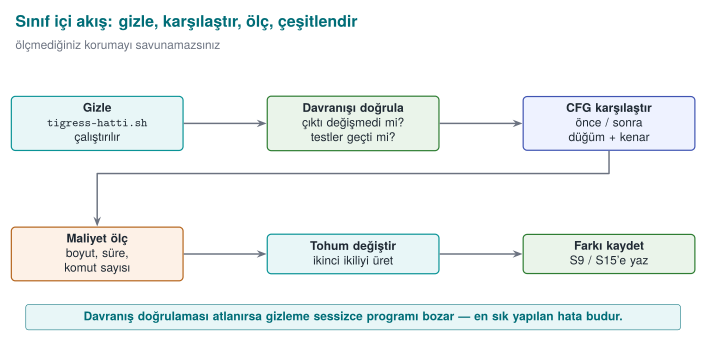
- Setup: write a small, synthetic program (e.g., an
grant_accesscheck). Show that it works correctly with unit tests. - Obfuscate: apply a transform pipeline (EncodeLiterals → EncodeArithmetic → Flatten → AddOpaque).
- Verify behaviour: run the same unit tests against the obfuscated version — the result must be exactly the same. If not, the pipeline is wrong.
- Compare: compare the clean and obfuscated versions' control flow in a decompiler (e.g., Ghidra/objdump); note the increase in basic block count.
- Measure: measure binary size and running time before/after.
- Diversify: run the same pipeline with two different seeds; show that the two binaries are different.
- Report: write the findings into a table (transform, size, time, block count, seed difference) — this table goes directly into S9/S15.
Ethical and safe use
Tigress is applied only to your own code. The goal is not to analyse someone else's program, but to learn to protect your own code and measure the cost of doing so. The example program does not harm the student's computer; it does not change system settings, and it does nothing on the network. All values are synthetic.
Let's follow the four stages (obfuscate → compare → measure → diversify) alongside pipeline_check.py's real lines.
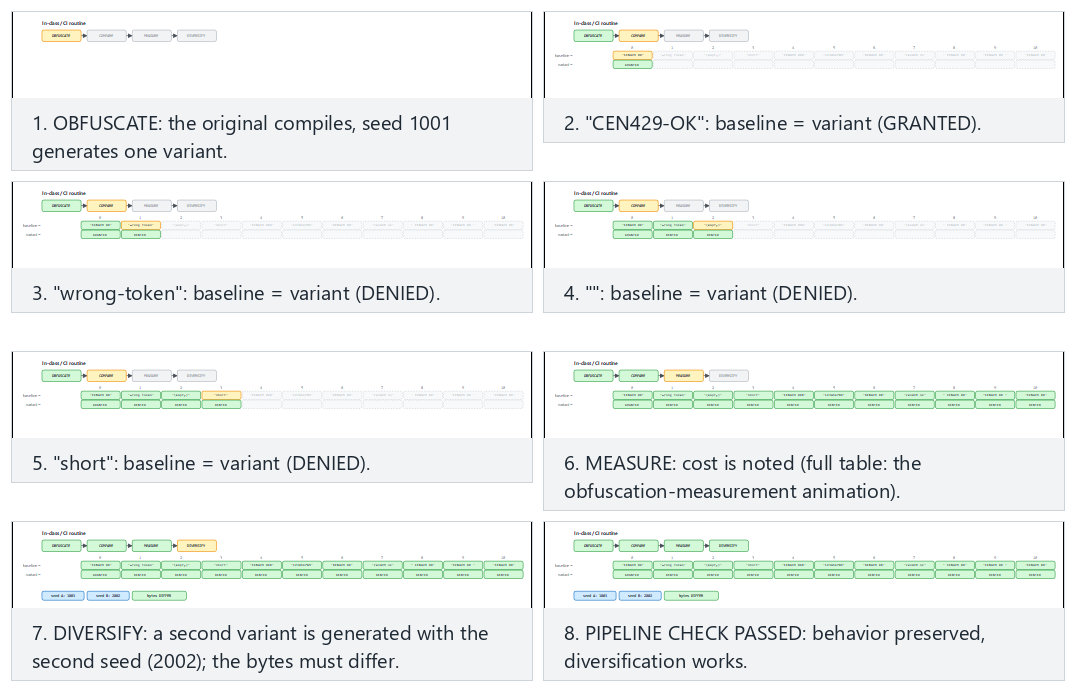
Try the all-pass (every token matches, PASSED), all-pass-many-tokens (all 14 tokens) and edge-mismatch-and-same-seed (one mismatch and a reused seed — FAILED) presets.
Common mistake: skipping step 3 (verify behaviour) and going straight to step 5 (measure)¶
Under time pressure, some students run the transform pipeline, immediately measure the binary size, and jump to the conclusion "obfuscation worked" — without ever doing the behaviour verification (step 3). This is dangerous because a function that is larger but broken also looks "successful" on the size metric; the real question is not size, but whether correctness was preserved.
Common mistake: measuring before verifying behaviour
If a transform pipeline has broken behaviour (e.g., Flatten misconfigured, a case missing), the resulting binary is usually larger and slower (broken code usually contains unnecessary instructions) — that is, someone looking only at the size/speed metric might not notice this, and might even think it's "well obfuscated." Rule: the step order never changes: behaviour first (step 3), then measurement (step 5). There is no point measuring a broken protection.
Rule summarising the seven steps in one line
Prepare → obfuscate → verify → compare → measure → diversify → report. Every arrow in this sequence takes the previous step's output as its input; skipping one step makes the rest of the chain meaningless — just like in section 4's transform pipeline (here the idea of a "pipeline" is applied not just to technical transforms, but to the in-class process itself).
Worked example: let's trace the seven steps in a real student scenario (hypothetical)¶
Let's summarise, with a short record table, how a student applied these seven steps to their own small "PIN verification" function (the numbers are hypothetical, meant only to show the shape of the process):
| Step | What the student did | Evidence recorded |
|---|---|---|
| 1. Setup | pin_dogrula.c was written, 4 unit tests added | Test file + "4/4 passed" output |
| 2. Obfuscate | The EncodeLiterals → Flatten → AddOpaque pipeline was run | The command line used |
| 3. Verify behaviour | The same 4 tests were run against the obfuscated version | "4/4 passed" output (unchanged) |
| 4. Compare | Clean/obfuscated pin_dogrula compared with objdump | 3 branches → 6 branches |
| 5. Measure | Instruction count and (approximate) time measured | Instructions: 18 → 34 (88.9% increase) |
| 6. Diversify | Two binaries produced with two seeds, compared with cmp | "different" result |
| 7. Report | The six rows above copied into S9/S15 | This table itself |
This table format is a template you can copy directly into your term project's S9/S15 section; you just need to replace the numbers with your own measurements.
Worked example: how skipping one step breaks the chain (hypothetical)¶
Let's make the seven-step flow's warning that "skipping a step makes the rest of the chain meaningless" concrete with a table:
| Step skipped | What goes unnoticed? | Result |
|---|---|---|
| 1. Setup (no tests) | There is no verifiable reference for behaviour at all | Step 3 becomes meaningless: "same" compared to what? |
| 3. Verify behaviour | A broken obfuscation goes unnoticed | The measurement in step 5 shows a broken program as "successful" (the "common mistake" above) |
| 5. Measure | Cost is unknown | Unmeasured claims like "unbreakable" appear in S9/S15 (week 9, section 1) |
| 6. Diversify | A single binary is distributed to everyone | The 100% impact scenario from section 6's "diversification in space" example plays out |
| 7. Report | What was done goes undocumented | An evaluator (week 12) cannot verify anything; the claim stays unsupported |
This table shows that none of the seven steps is optional: each row points to which later step is made meaningless by skipping the one before it — just like in section 4's transform pipeline, here too the idea of a "pipeline" is applied to the process itself.
9. Placing obfuscation into the build and deployment pipeline (S15)¶
Obfuscation should not be "a job done by hand at the very end," but a step in the build pipeline. Your project's S15 section, after the midterm, documents exactly this:
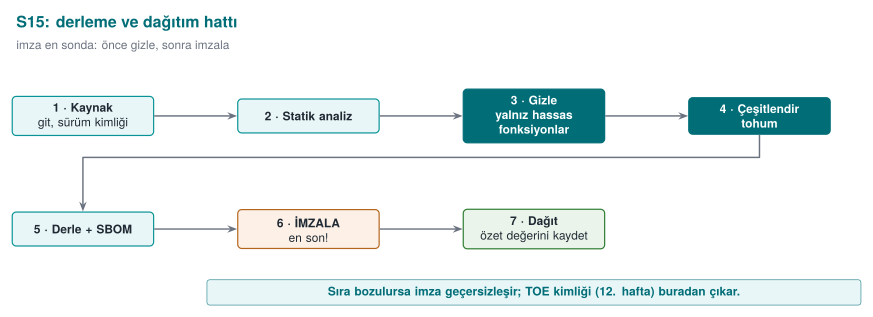
- Only sensitive functions are obfuscated (
--Functions); the rationale is written down. - Every release is diversified with a seed; the seed and the build identity are recorded.
- Signing happens after obfuscation; the build identity and hash values (week 12's TOE identity) stay consistent.
- The pipeline runs in continuous integration (CI); unit tests + size/speed measurement run automatically on every release.
Weeks 9, 11, and 14 together
These three weeks form a whole: week 9 gives obfuscation's rules, week 11 gives the whitebox limit for keys, week 14 gives their automatic and diversified application. Their shared rule is the same: obfuscation does not grant unbreakability, it raises cost; its strength comes from layered defence (RASP, key renewal, server-side checks) and from being measured.
Let's read the S15 pipeline step by step¶
Let's unpack the four boxes in the figure (h14-07) (obfuscation, signing, build identity, CI) into a sequential list — each step is the input to the next, just like in section 4's transform pipeline:
- Build (clean):
source.c(the readable source) is compiled normally; unit tests are run against this build. - Obfuscate: the agreed transform pipeline (section 7) is applied only to the sensitive functions marked with
--Functions; a new--Seedis generated (section 6's "always record the seed" rule kicks in here — CI must write the seed it used to a log/artefact). - Rebuild (obfuscated):
variant.cis compiled normally; the same unit tests are run against this build as well (the CI counterpart of section 2's STEP 3 — if behaviour hasn't changed, the tests pass; if it has, CI must fail). - Measure: size/instructions/branches (sections 5, 7) are measured automatically and compared against the previous release; a sudden, unexplained deviation (e.g., unexpectedly shrinking) can point to a bug.
- Sign: only the binary that passes the test + measurement steps is signed — the CI counterpart of section 4's "signing comes last" rule.
- Record the build identity: the seed used, the transform pipeline, the hash value, and the signature are written together into a record (the S15 document) — this is a direct application of week 12's TOE identity definition (version + binary + source + hash); the difference is that a fifth field (the seed used) is added to the four components here, because the same source+version label can produce deliberately different binaries with different seeds (recall the "build identity and hash value" definition in section 0).
Let's write these six steps as a CI script's conceptual skeleton (not the syntax of a specific CI product, but pseudocode showing the order of the steps):
stage derle_temiz:
    cc -O2 -o out/temiz source.c
    run_unit_tests out/temiz

stage gizle:
    seed = new_random_seed()
    tigress --Seed=$seed --Transform=... --Functions=... --out=variant.c source.c
    save seed -> log/release-$RELEASE.txt

stage derle_gizli:
    cc -O2 -o out/gizli variant.c
    run_unit_tests out/gizli   # CI STOPS if it fails

stage olc:
    objdump -d out/gizli | olc_komut_dal grant_access >> log/release-$RELEASE.txt

stage imzala:
    sign out/gizli -> out/gizli.signed

stage kaydet_surum:
    digest = sha256(out/gizli.signed)
    save RELEASE, seed, digest, transform_pipeline -> TOE-record-$RELEASE.txt
Every line of this skeleton corresponds to a section from this week: derle_temiz → section 2, STEP 1; gizle → section 4 (pipeline) + section 6 (seed); the test step of derle_gizli → section 2, STEP 3; olc → sections 0/5/7; imzala → this section's "signing last" rule; kaydet_surum → week 12's TOE identity.
Let's follow these six stages across several CI runs, each release with its own seed.
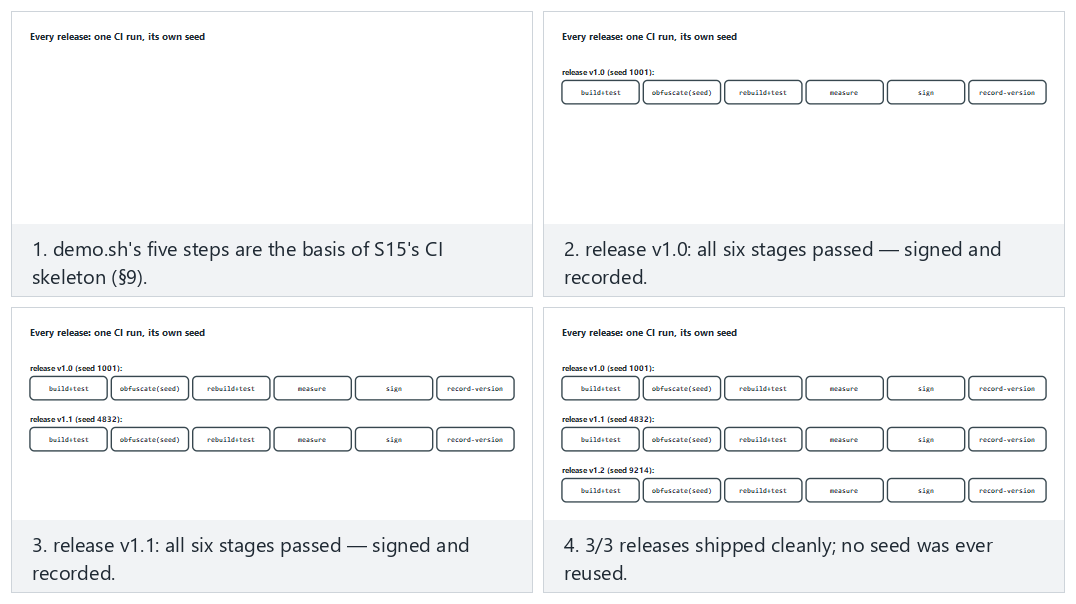
Try the three-clean-releases (v1.0/v1.1/v1.2, same as the S15 worked example), one-test-failure (one release fails its tests) and edge-seed-reused (a release accidentally reuses an old seed) presets.
Common mistake: keeping the seed only on the developer's own machine, outside CI
If a developer runs obfuscation by hand on their own computer and, out of habit, uses a fixed value like --Seed=42 every time, two things break: (1) this is no longer diversification (the same problem as section 6's "common mistake" box — a fixed value produces a single, predictable variant), (2) the official release CI produces and the release the developer produces on their desktop can be different binaries; which one was tested becomes unclear. Rule: the seed is generated only inside CI, new on every run, and recorded in CI's own log; no obfuscated binary is ever distributed by hand from a developer's personal machine.
Worked example: a TOE record across three releases¶
Let's make the "build identity + seed" idea from section 0 and this section concrete with a filled-in record table for three consecutive releases (hypothetical):
| Release | Seed | Transform pipeline | Hash (SHA-256, truncated) | Signature status |
|---|---|---|---|---|
| v1.0 | 1001 | EncodeLiterals→EncodeArithmetic→Flatten→AddOpaque | a1b2c3... | Valid |
| v1.1 | 4832 | Same pipeline, new seed | f9e8d7... | Valid |
| v1.2 | 9214 | Same pipeline + RandomFuns added | 4c5b6a... | Valid |
This table is the S15-document counterpart of section 6's "diversification in time" example: each row proves exactly which binary that release is (via seed + pipeline + hash), and that binary is signed and tested. The "pipeline change" in v1.2 (RandomFuns added) is also recorded — this is the information week 12's "delta evaluation" (re-evaluating only the changed part) needs: an evaluator can read directly from this table what changed from v1.1 to v1.2, without having to compare the source code line by line.
10. Term project: this week (S9 advanced + S15 pipeline)¶
- Choose a transform pipeline and write it into S9: which functions, which transforms, in what order, why.
- Measurement table: size, time, and (if available) block count — before/after.
- Diversification: production with two seeds and the difference metric; if you won't apply it, the rationale.
- The S15 pipeline: document the obfuscation + signing + build identity steps with a diagram.
- Evidence of behaviour: show that the obfuscated version passes the unit tests (the link to S16).
Checklist: what should this week's submission include?
- Is every step of the chosen transform pipeline written down, along with why it's in that order? (section 4)
- Is behaviour verification (unit test result) documented after every step? (section 2, STEP 3)
- Does the measurement table contain at least the instruction/branch count; were size and time also added if possible? (section 7)
- If diversification was applied, is there proof that the binaries produced with the two seeds are different (e.g.,
cmpoutput)? If it wasn't applied, was the rationale written down? (section 6) - In the S15 diagram, is the order of the obfuscation, signing, and build-identity steps correct? (section 9)
- Was a phrase like "unbreakable" avoided; are all claims written as measurable statements? (week 9, section 1)
A filled-in example: the "RULE" template for S9/S15¶
Week 9's section 4 taught writing every protection decision with the template "What it protects / How / Cost / Limit." Let's fill in the same template for this week's Tigress pipeline:
What does it protect? : The logic of the synthetic access check (which token counts as valid);
                         delays it against reverse engineering.
How?                   : Tigress --Transform=EncodeLiterals,EncodeArithmetic,Flatten,InitOpaque,AddOpaque
                         (the full command in section 2, STEP 2); a new --Seed is generated every release (section 6).
Cost                   : ~%359,1 instruction increase, ~%166,7 complexity (potency) increase (section 7,
                         hypothetical demo numbers; real numbers are measured with `demo.sh`).
Limit                  : Resilience and stealth were not measured in this demo (section 7); a whitebox-level
                         protection is not claimed without Virtualize on its own (compare with week 11).
Repeat this filled-in example in your own project, with your own function and your own measured numbers; none of the template's four lines should be left blank.
An example filled-in mini-report (a starting template for S9/S15)¶
Let's combine all of this week's pieces (transform pipeline, measurement, diversification, S15 pipeline) into one example report. The text below is a starting point you can carry directly into your S9/S15 section by replacing the numbers with your own measurements (all numbers are consistent with this week's hypothetical examples):
Function          : grant_access
Why sensitive?    : Synthetic token check (the decision flow in section 1: sensitive + medium value)
Transform pipeline: EncodeLiterals -> EncodeArithmetic -> Flatten -> InitOpaque(main) -> AddOpaque
Seed (release 1.0): 1001
Behaviour proof   : The clean and obfuscated versions gave the same output for the CEN429-OK / yanlis inputs (ADIM 3: ayni cikti)
Cost              : Instructions 22->101 (%359,1), branches 2->7, complexity (potency) 3->8 (%166,7)
Diversification   : Binaries produced with Seed=1001 and Seed=2002 showed a %60 byte difference (cmp: different)
Resilience        : Not measured this round; will be tested with KLEE in the next iteration (section 7)
Stealth           : Not measured this round; a branch-density map will be produced (section 7)
S15 status        : In CI, the obfuscate->test->measure->sign->record steps are defined; release record TOE-record-1.0.txt
Limit             : No whitebox-level protection is claimed on its own (compare with week 11)
Every line of this template corresponds to a section from this week (read it together with the "A filled-in example: the RULE template" section above): Function/Why sensitive → section 1; Transform pipeline/Seed → sections 4, 6, 9; Evidence of behaviour → section 2, STEP 3; Cost → sections 5, 7; Diversification → section 6; Resilience/Stealth → section 7; S15 status → section 9; Limit → sections 1, 9, 11.
Common mistake: writing an unmeasured value like 'Resilience: high'
Notice that the "Resilience" and "Stealth" lines in the example above say 'not measured' — this is a deliberate choice. A student might be tempted to write a subjective value like "high" or "strong" into these lines; this violates section 7's "report all four together" rule. Rule: leaving an unmeasured metric blank, or writing "not measured, can be measured with such-and-such a method," is always more correct than writing a made-up value — both academically and in front of an evaluator.
The week's big picture: how do the sections connect?¶
After seeing so many new terms and examples, it can become hard to see them all as a single chain. The table below summarises this week's eleven sections in order; each row explains what it adds to the one before it:
| Section | What it adds to the previous one |
|---|---|
| 0 | Terms (source-to-source, transform, seed, objdump, CI, TOE) |
| 1 | Answers "why a tool, not by hand" with those terms |
| 2 | The real command line of the tool (Tigress), step by step |
| 3 | Ties every flag on the command line to week 9's K rules |
| 4 | Combines several flags into a pipeline (an ordered sequence of transforms) |
| 5 | Traces the pipeline end to end on a single function, with numbers |
| 6 | Runs the same pipeline with different seeds and diversifies it |
| 7 | Spreads sections 5 and 6's numbers across four metrics (potency/resilience/stealth/cost) and measures |
| 8 | Orders sections 2–7 into an in-class seven-step process |
| 9 | Moves section 8's process into a CI pipeline (automation) |
| 10 | Turns everything into a term-project submission (S9/S15) |
This table gives a quick answer to "which section did I forget?" when preparing for an exam or a project: if you can't explain what a section adds to the one before it, reread that section; if one link in the chain is missing, the rest loses its meaning too — just like in section 4's transform pipeline.
11. Self-check¶
1. What is source-to-source obfuscation? What are its three advantages over manual obfuscation?
A transform is applied to the source code, producing new source code (C again), which is then compiled normally. Its advantages: repeatable/automatic (on every build), consistent and scalable (across many functions), the original source stays clean (easy to maintain) — plus diversification via seed.
2. What is Tigress's place in this course; under what license, and why isn't its binary distributed in the course?
Tigress is a source-to-source C obfuscator; even though it's academic/free, it is distributed under its own license/usage terms, so everyone downloads it themselves; the binary isn't shared in the course. The demos are written so that they still work with a clean derivative/fallback if Tigress is absent.
3. Map the following transforms onto week 9's rules: Flatten, EncodeArithmetic, EncodeLiterals, Virtualise, AddOpaque.
Flatten = control-flow flattening; EncodeArithmetic = arithmetic obfuscation; EncodeLiterals = constant/string obfuscation; Virtualise = virtualisation (strongest, most expensive); AddOpaque = adding an opaque predicate/dead branch.
4. Why is a transform pipeline stronger than a single transform? Why does order matter?
Different transforms protect against different analysis techniques; together they form layered resistance. Order matters: for example, you need to flatten first and then add opaque predicates; the wrong order can neutralise some transforms or needlessly raise the cost.
5. Which two things do you always do after every transform pipeline? (Hint: behaviour + cost)
(1) You test that behaviour hasn't changed (unit tests must pass — obfuscation must not break the function), (2) you measure the cost (size/speed/instruction count; compared before and after).
6. Why is Virtualise applied only to small and critical functions?
Virtualisation brings a large performance and size penalty; it can't be applied everywhere. That's why it's used only on high-value, small, critical functions — where the cost is justified.
7. How does the seed (--Seed) enable diversification? What is the difference between diversification in space and in time?
When the same source is obfuscated with a different seed, the tool makes different random choices → a different binary (same behaviour). Diversification in space: different copies/users are different (one crack doesn't crack everyone). Diversification in time: it changes across releases (one crack doesn't stay valid forever).
8. Does diversification prevent obfuscation's potency, or its ability to scale?
It prevents its ability to scale: it doesn't raise a single copy's potency, but it prevents an attack from spreading (being reused) across all copies/users.
9. What is the main rule for this course from the Banescu et al. study? (Resilience ↔ cost)
A stronger transform gives more resilience, but it also raises the performance/size cost. Protection is chosen in proportion to the asset's value; not everything is obfuscated with the strongest transform.
10. When placing obfuscation into the build pipeline, why does signing come after obfuscation?
The signature protects the final binary. If you sign first and obfuscate after, the binary changes and the signature becomes invalid. The correct order: build → obfuscate → (package) → sign.
11. What is the rationale for S15's rule that 'only sensitive functions are obfuscated'?
Obfuscating everything blows up performance/size, and most of the code isn't sensitive anyway. Concentrating protection on critical functions lowers the cost and raises the impact.
12. Write, in one sentence, the shared rule of weeks 9, 11, and 14.
Protection provides not unbreakability but delay; its strength comes from being combined, diversified, and measured.
13. What do the 'instruction count' and 'branch count' measured with objdump represent; what is their relationship to week 9's CFG node/edge count?
objdump -d converts a binary into assembly; every line after the target function's label (<grant_access>:) gives the instruction count, and the ones among them starting with j.../call give the branch/call count. This is the automatic, finer-grained, compiled-binary counterpart of the CFG node/edge count drawn by hand from source code in week 9; both measure the question 'how much work is it to analyse this function?'
14. Why are InitOpaque and AddOpaque two separate transforms; which one must run first?
InitOpaque prepares the hidden state variables the opaque predicates will rely on (usually inside main); AddOpaque uses that state to add the real opaque conditions to the target function. If InitOpaque is skipped, the infrastructure AddOpaque relies on stays missing; that's why the order is InitOpaque first, then AddOpaque (this is the real order in the demo script).
15. What is the basic difference in scope between Order 1 (EncodeLiterals→EncodeArithmetic→Flatten→AddOpaque) and Order 2 (Flatten→AddOpaque→EncodeArithmetic→EncodeLiterals)?
In Order 1, since EncodeLiterals runs first, it only encodes the constants in the original source; it does not cover the state constants Flatten produces later. In Order 2, since EncodeLiterals runs last, it can also encode the new constants Flatten and AddOpaque produce, but EncodeArithmetic now has to process arithmetic spread across the dispatcher, which can grow the cost. There is no definitively 'better' order; the decision is made by measurement (section 7).
16. Why is it wrong to compute the cumulative increase in section 5's table by adding the per-step increase percentages (like 36.4% + 53.3%)?
The percentages rest on different denominators (each on the absolute number of a different previous step), so they cannot be added directly. The correct method is to recompute the cumulative increase always over step 0's absolute number: (46−22)/22×100 ≈ 109.1% is correct; the sum 36.4%+53.3%=89.7% is wrong.
17. Which formula computes section 7's potency metric; what is the result with this week's demo numbers?
Cyclomatic complexity ≈ branch_count + 1. Step 0 (clean): 2+1=3. Step 4 (full pipeline): 7+1=8. Increase: (8−3)/3×100 ≈ 166.7%.
18. Why isn't it a bug that the whole binary's size (ls -l) barely changes in a small demo; how is the measurement done correctly?
In small programs, most of the file consists of fixed headers, dynamic linking tables, and library references; a single function growing by a few dozen instructions stays invisible next to this fixed overhead. For a meaningful measurement, not the whole file, but the target function's own code size (via objdump's instruction count) must be measured.
19. Why is a 'seed' field also added to the TOE identity (week 12: version+binary+source+hash) in the S15 pipeline?
Because the diversification we learned this week can produce deliberately different binaries from the same source and the same version label. To tell which binary was produced with which seed, the seed must also be added to the TOE record; otherwise, different binaries under the same version label can get mixed up.
20. In the diversification example, if 96/160 bytes differ, what is the difference ratio; what does this ratio alone not prove?
96/160×100=60%. This ratio only shows how different the two binaries are; it does not show whether the difference is inside the target function or in an insignificant spot like a timestamp — for that, the target function must be separately compared with objdump (cmp alone isn't enough).
21. What are the two basic advantages of putting the obfuscation step inside CI, compared to running it by hand?
(1) The seed is generated automatically and freshly on every release; it isn't forgotten or fixed (real diversification is guaranteed). (2) The official binary CI produces and the binary that is tested are the same; there's no confusion with a different binary a developer produced by hand on their desktop.
22. If STEP 3 in the demo script prints 'FARK' (difference), why is it wrong to move on to STEP 4 (diversification)?
STEP 3 verifies that behaviour was preserved. Printing 'FARK' means the transform pipeline broke the behaviour; diversifying a broken binary only produces different copies of the broken behaviour, it doesn't fix the problem. The pipeline must be fixed first, behaviour re-verified, and only then diversified.
23. Why is it a mistake to automatically add Virtualise on the logic 'since I'm obfuscating anyway, let's add everything'?
Virtualise is many times (tens of times) more expensive than the sum of the other transforms; it's measured not in percentages but in multiples. While a growth like 359% may be acceptable for a function, adding a further 10-50x slowdown on top is meaningless for most products; the decision must be made separately, with section 1's 'is it sensitive, how valuable is it' flow.
24. Why doesn't this week's demo script raise an error when Tigress isn't installed; what does it do instead?
The script first checks with command -v tigress; if it isn't installed, it prints installation/license instructions (tigress.wtf, free for academic use) and points the student to week 9's manual working demo (week-09/01-manuel-gizleme) — the lesson doesn't stop, it switches to the manual working path of the same concept.
25. In the diversification-in-space example (10,000 users), how does moving from a single seed to a unique seed per user change a crack's rate of impact?
With a single seed, one crack affects 100% of users. When every user gets a unique seed, one crack affects only that one copy: 1/10,000×100=0.01%. The numbers are hypothetical, but the relationship (as the number of seeds grows, the spreading surface shrinks) is general.
26. Why isn't diversification in time a sufficient defence on its own?
Section 1's 'Rule 3' says obfuscation only buys the other layers time, not that it's a permanent solution. In the time before the next release ships, the attacker can still harm users on the old release; that's why diversification in time must be used together with RASP and server-side checks (rejecting old/cracked releases).
27. Why does the stealth metric conflict with the logic 'the more I obfuscate, the better'?
Overly heavy obfuscation (e.g., an abnormally high branch density) makes the protected function statistically distinguishable from the file's other functions; this makes it easier for an attacker to go straight to that function. Stealth can decrease while potency and cost increase — all four must be balanced together.
28. Explain why the state constants (like 7341, 2098, ...) in a function with Flatten applied are chosen scattered rather than sequential.
Sequential constants (like 1, 2, 3, 4) are instantly recognised in a decompiler as the signature of 'a flattened dispatcher' (pattern recognition — section 4/week 9, section 10). Scattered/unpredictable values make this recognition harder; moreover, these values themselves can also be encoded with K-02 (arithmetic encoding), combining two layers.
29. What are the four lines of the 'RULE' template in S9/S15? How did we fill them in for grant_access this week?
The template has four lines: What it protects / How / Cost / Limit. In section 10's filled-in example: what it protects → the access check's logic; how → the five-transform Tigress pipeline + seed; cost → a hypothetical 359.1% instruction / 166.7% complexity increase; limit → resilience/stealth not measured, whitebox-level protection isn't claimed on its own.
30. Does this week's 'signing comes last' rule conflict with week 9's 'obfuscation does not store a key' rule?
No, they describe different layers. 'Signing comes last' is an order rule in the build pipeline: the obfuscated binary must be signed unchanged (sections 4, 9). 'Does not store a key' says obfuscation does not carry a mathematical secrecy claim (K-07 is an encoding, not encryption — week 9, section 0). Both are different faces of the theme 'obfuscation provides discipline and measured cost, not unbreakability.'
31. How does EncodeData protect a variable; what is the common mistake that nullifies this protection?
It splits/encodes a variable's representation in memory (e.g., two byte pieces inside a struct instead of a single 32-bit integer); the value does not appear directly in a memory dump. Common mistake: merging the pieces back together right after use and storing them in a single variable for the whole function — this recreates a single, recognisable block and nullifies the protection.
32. Is the difference between applying only EncodeLiterals and applying four transforms together just about cost?
No. Only EncodeLiterals neutralises just one of the attacker's techniques (strings scanning); the control flow is still directly readable. Applying four transforms together requires the attacker to defeat several different analysis techniques at the same time (string scanning + pattern recognition + MBA simplification + opaque-predicate solving) — the real gain comes not just from cost, but from how many different techniques are challenged.
33. Why is a change in the transform pipeline column from v1.1 to v1.2 (adding RandomFuns) also recorded in the TOE record table?
Week 12's delta evaluation asks for re-evaluating only the changed part; this column lets an evaluator see what changed between the two releases without comparing the source code line by line.
34. Why isn't it a sufficient fix to sign before obfuscating and then say 'I'll just recompute the signature'?
Technically the new content matches the new signature, but the process is still flawed: the correct order is left to human memory, and the mistake can recur. The rule is that signing is defined structurally after the obfuscation and measurement steps in CI, so that an order mistake becomes impossible.
35. Why is the last row of the (hypothetical) solver-time resilience table ('+ diversification') especially important?
It shows that diversification does not eliminate the attacker effort (on the order of hours) spent on a single copy, but requires that effort from scratch for every new copy — this is the reflection, on the resilience metric, of section 6's rule 'doesn't raise potency, prevents scaling.'
36. How does the Split transform disrupt a reverse engineer's 'map'?
A reverse engineer usually draws a map by looking at function boundaries (name, number of parameters, inputs/outputs); Split makes this map misleading by spreading a single logical operation across several small, generically named functions (e.g., _step_a, _step_b) — understanding how many functions are actually part of one operation takes extra effort.
37. What is the difference between cmp -s A B and an objdump-based comparison of the target function; which one actually proves diversification?
cmp only says whether the two files are as a whole the same/different, it doesn't show what's different. Extracting only the target function's (grant_access) section with objdump and running diff on it shows whether the difference is really inside the protected function; only this second method actually proves diversification.
38. In the one-year maintenance scenario, why is the 'risk of forgetting' higher in the manual method?
In the manual method, every new sensitive function needs a separate, hand-written obfuscation step; this step may not be clearly visible in code review and can be forgotten. In the tool method, the --Functions list is an auditable document, directly visible in code review, and it's easier to notice a gap.
39. Is using a list like --Functions=grant_access,anahtar_turet always correct? When could it be wrong?
It's correct only if the two functions are of the same value/sensitivity and deserve the same transform pipeline. Applying the same pipeline with the same list to functions of different value (e.g., one critical and needing Virtualise, the other light) means skipping section 1's decision flow (is it sensitive, how valuable is it).
40. Why is writing 'Resilience: not measured' in the example mini-report better engineering practice than writing 'Resilience: high'?
'High' is a subjective, unsupported claim (a mistake in the same category as week 9's 'unbreakable' warning). 'Not measured' is an honest state; if it also states which method could measure it (e.g., with KLEE), it lets an evaluator see the next step — this is consistent with week 12's 'result, not plan' discipline.
41. What is the basic difference between cmp and diff; in section 6's two-step verification flow, which one plays which role?
cmp compares two files byte by byte and only says 'same or different' (coarse but fast); diff performs a detailed text/line-level comparison (slow but informative). In section 6's flow, a coarse check is done first with cmp; if a difference is found, diff is run on the objdump output to verify whether the target function really changed.
42. According to section 10's 'the week's big picture' table, what exactly does section 9 add to section 8?
Section 8 defines a seven-step process followed by hand in class (prepare → obfuscate → verify → compare → measure → diversify → report). Section 9 automates this same process and moves it into a CI pipeline: the seed is generated automatically on every release, tests run automatically, measurement and signing are done automatically — reliance on human memory disappears.
43. Is the real grant_access in this week's demo script (source.c) the same function as the simplified grant_access representation in sections 4-5? Why did we use both representations together?
They share a name but not the same body: the real grant_access in source.c performs a length check and a constant-time XOR comparison (the real code in section 0); the "BEFORE" blocks in sections 4-5 summarize the same idea with a single, simplified token_is_valid(...) call — an instructive representation, not a real file. We used both together because the simplified representation (the if/return structure) is clearer for showing the transforms' idea; the real code defines what you'll see when you actually run the script. Section 3's Split example uses the real code, most of the other examples use the simplified representation — which one is used is always noted in the title.
44. Why does every 'AFTER' code block's title this week always carry the phrase 'conceptual representation'; why does this matter?
Because Tigress's real output varies with the version, the compiler, and the --Seed value; the 'AFTER' blocks shown in this week's notes (the EncodeLiterals, Flatten, EncodeData, Split examples) are not the exact output of a real Tigress command, but instructive representations that convey the transform's idea. Not clearly stating this distinction would push students into thinking the real output looks exactly like this — which would amount to giving made-up information. Rule: to see the real output, run demo.sh while Tigress is installed and read the variant.c file.
45. Are all of this week's numeric cost/potency/diversification examples (like 359.1%, 166.7%, 60%) real measurements?
No, as clearly stated, they are hypothetical — because Tigress was not installed while preparing this note, real objdump/cmp output could not be obtained. These numbers are meant only to show how the arithmetic is set up and the orders of magnitude involved. Rule: use these table formats in your own project, but measure the numbers yourself by running demo.sh while Tigress is installed; presenting a hypothetical number as if it were measured is a dishonesty mistake in the same category as week 9's 'unbreakable' warning.
12. Resources and further reading¶
- The Tigress official site and worksheets (
tigress.wtf) — transforms, syntax, current version (v4), and license. Students verify the current version and terms here. - C. Collberg, C. Thomborson, D. Low, "A Taxonomy of Obfuscating Transformations" (1997) — the obfuscation taxonomy and measurement framework (shared with week 9); also the source of this week's
AddOpaquefallback's quadratic-residue-mod-4 opaque predicate. - S. Forrest, A. Somayaji, D. Ackley, "Building Diverse Computer Systems" (HotOS-VI, 1997) — one of the academic roots of diversification (section 6): disrupting buffer-overflow attacks by randomizing stack layout.
- G. Necula, S. McPeak, S. P. Rahul, W. Weimer, "CIL: Intermediate Language and Tools for Analysis and Transformation of C Programs" (CC 2002) — the C parse/regenerate infrastructure Tigress is built on.
- P. Junod, J. Rinaldini, J. Wehrli, J. Michielin, "Obfuscator-LLVM — Software Protection for the Masses" (SPRO 2015) — an alternative to compiler-based obfuscation (week 9, K-11).
- S. Banescu, C. Collberg et al. — measuring the resilience of Tigress transforms to symbolic execution (KLEE).