Week 1 — Introduction to Secure Programming and the Application Protection Plan¶
| Date | 18.09.2026 (make-up: 30.09.2026) |
| Learning outcomes | LO.1, LO.5 |
| Duration | 3 hours |
| Prerequisites | Functions, arrays and pointers in C; cd and ls in PowerShell or a Linux terminal |
| Labs | code/week-01 — 4 demos; on Windows .\demo.ps1, on WSL / Linux sh demo.sh; also opens in Visual Studio 2022 Community |
Lecture notes (PDF) Lecture notes (DOCX) Slides (PDF) Slides (PPTX) Slides (HTML, offline) Download all (ZIP) Open slides full screen
Click inside the slides and use the arrow keys; use the button at the bottom right of the slides or the link above for full screen.
By the end of this week you will be able to
- Explain the concepts of confidentiality, integrity, and availability and the asset–threat–vulnerability–risk chain with your own examples.
- Choose an attacker model for a piece of software; in particular, state what changes when "the device is in the attacker's hands."
- Write the first sections (scope, architecture, assets, threats) of the application protection plan for a small application.
- Derive threats from a data flow diagram using STRIDE and draw an attack tree.
- Show and fix the dangers a program inherits at start-up (environment variables, memory dumps) and secrets left in memory.
- Demonstrate a buffer overflow and a signed/unsigned integer error in a working example, catch them with compiler and sanitizer tools, and fix them.
- Recognise memory management errors (leaks, double free, UAF); securely erase secrets and prevent memory from being written to disk.
- Explain the seven layers of application protection and the ideas of protected code partitioning and secure processing under encryption; list the processes that keep a protection plan alive (version identity, change management, trade-off log).
Lesson flow (timing plan for the instructor)
| Time | Section | What happens |
|---|---|---|
| 0:00–0:10 | Introductions | Syllabus, term project, assessment, lab setup |
| 0:10–0:35 | 1–4 | Security concepts, attacker models, design principles (interactive lecture) |
| 0:35–0:50 | 5 | Overview of application protection: seven layers, the white-box attacker, the cost of protection |
| 0:50–1:00 | Break | |
| 1:00–1:25 | 6–8 | Protection plan, interface and asset tables, STRIDE, attack tree, DFD, risk score |
| 1:25–1:50 | 9 | Worked example "Vault" (seven steps) — class exercise |
| 1:50–2:00 | Break | |
| 2:00–2:20 | 10–12 | Demo 1 (fooling via PATH), secure start-up, Demo 2 (password left in memory) |
| 2:20–2:40 | 13–16 | Process memory, buffer overflows, Demo 3, Demo 4 |
| 2:40–2:55 | 17–19 | Memory management, protected code partitioning, secure development process |
| 2:55–3:00 | 20–23 | Toolbox, project kickoff, self-check |
Prepare the lab beforehand
All demos run on Windows (Visual Studio 2022 Community or PowerShell), on WSL, and on Linux. Setup, opening the project in Visual Studio, and the safety rules: code/README.en.md. In short:
Install Visual Studio 2022 Community with the Desktop development with C++ workload. Then, in PowerShell:
mkdir C:\Dersler; cd C:\Dersler
git clone https://github.com/ucoruh/cen429-secure-programming.git
cd cen429-secure-programming\code
.\build.ps1
cd week-01\01-path-spoofing
.\demo.ps1
In Visual Studio: File > Open > Folder → code → configuration Windows (MSVC) → Build > Build All.
Code of ethics — applies every week in this course
In this course we learn about attacks by seeing them. Every demo runs only inside its own folder, needs no administrator rights, and changes no setting on your computer. Only try the techniques you learn on your own computer and on the demos provided. Trying them on someone else's system without permission is a crime.
How the course runs
- One term project: a C/C++ application plus a security guide written "as if it were going through certification"; the midterm check happens at the week 7 demo, the final check at the week 15 demo.
- Two quizzes: week 8 (weeks 1–6 material) · week 16 (weeks 9–14 material).
- Grade formula:
Midterm = 0.6·Project1 + 0.4·Quiz1·Final = 0.7·Project2 + 0.3·Quiz2. - Every week follows the same pattern: buggy code → attack → fix.
0. Before we start¶
This section prepares you for the week. As this is the first week of the course, it builds on no earlier topic: the concept map below defines each of this week's concepts in one sentence and links it to the section where it is explained in full.
This week's concept map¶
| Concept | In one sentence | Detail |
|---|---|---|
| Security | Security means protecting a system against a deliberate attacker who wants to harm it; unlike an ordinary bug, there is a conscious adversary on the other side. | §1 |
| Asset | An asset is anything worth protecting — data, a key, a function — and security always begins with "what are we protecting?" | §1 |
| Threat and vulnerability | A threat is a possible event or person that could harm an asset; a vulnerability is the weak point the threat can exploit; threat + vulnerability + attacker together make up risk. | §1 |
| The CIA triad | Security's three core goals are confidentiality (only someone authorized can see it), integrity (it cannot be changed without authorization), and availability (it works when it needs to). | §1 |
| Attacker model | An attacker model is a systematic answer to "what can the attacker see, what can they do?"; the defence is designed accordingly. | §3 |
| White-box / MATE | MATE (Man-At-The-End) is an attacker who owns the program itself: they can read the code, see the memory, and modify it — the real situation for mobile/desktop applications. | §3 |
| Secure design principles | The principles Saltzer and Schroeder wrote in 1975 — least privilege, secure default, open design, and others — are still the backbone of secure design today. | §4 |
| Defence in depth | Defence in depth means building many complementary protection layers instead of relying on a single countermeasure; if one is bypassed, the next one takes over. | §5 |
| Trade-off | Every protection carries a cost (speed, complexity, expense); security is not "infinite protection" but balanced protection with an explicitly written-down remaining risk. | §5 |
| Threat modelling | Threat modelling is systematically answering "what are we protecting, against whom, and how?"; it lists assets, threats, and countermeasures. | §7 |
| STRIDE | STRIDE is a method that classifies threats with six letters: spoofing, tampering, repudiation, information disclosure, denial of service, and elevation of privilege. | §7 |
| Attack tree | An attack tree is a tree that breaks a goal down into the sub-steps an attacker could follow; the root is the attacker's goal, and the branches are the ways to reach it. | §7 |
| Data flow diagram (DFD) | A DFD is a diagram that shows how data flows through a system via processes, data stores, external entities, flows, and trust boundaries; it is a map for finding threats. | §8 |
1. What is security?¶
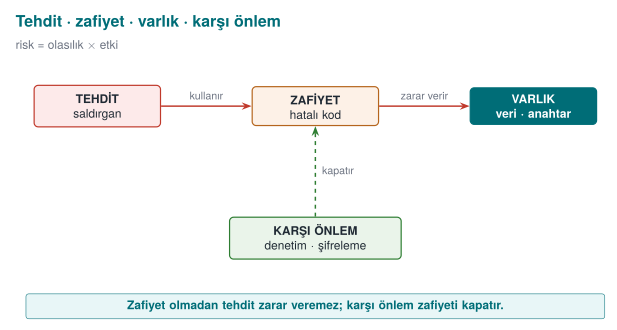
Security means protecting a system against a deliberate attacker who wants to harm it; unlike an ordinary software bug, there is a conscious adversary on the other side. To make this concrete, think of a bank's safe. The money inside the safe is the asset. Someone who wants to steal the money is the threat. The safe's lock being faulty is a vulnerability. The thief using that faulty lock is the attack. Risk is the answer to the question "how likely is this event, and how much damage does it cause if it happens?"
A short history: where did the idea of secure programming come from?
- 1972 — James P. Anderson's Computer Security Technology Planning Study, written for the US Air Force, is one of the first documents to systematically define a "trusted computing base" and an attacker model — one of the starting points of modern computer security.
- 1975 — Saltzer & Schroeder publish the eight principles of secure design (least privilege, defence in depth, open design...). Still foundational today.
- 1970s–80s — the CIA triad (confidentiality · integrity · availability) emerges from military/government information security and becomes a common language.
- 1998–99 — the STRIDE threat classification (Kohnfelder & Garg) is developed at Microsoft; in the same years, Bruce Schneier introduces attack trees.
- 2001 — OWASP (the Open Web Application Security Project) is founded, providing a shared resource, guides and terminology for web and application security.
- 2001–2003 — Viega & McGraw's Building Secure Software and Viega & Messier's Secure Programming Cookbook for C and C++ (the main source for this course) establish the culture of "build it in from the start, don't bolt it on afterward."
- 2002 → 2004 — Bill Gates's "Trustworthy Computing" memo to Microsoft staff (2002) shifts the company's priorities; the effort becomes the formal Security Development Lifecycle (SDL) in 2004 (see §19).
All of this week's tools (CIA, attacker model, STRIDE, attack tree) are products of this lineage.
Software has the same chain; only the program stands in for the safe, and data stands in for the money.
| Concept | Definition | Safe example | Software example |
|---|---|---|---|
| Asset | Anything worth protecting | The money in the safe | A user's password, a payment key, customer records |
| Threat | A possible event or person that could harm the asset | The thief | Someone who wants to steal the password |
| Vulnerability | The weakness the threat can exploit | The faulty lock | A strcpy whose length is never checked |
| Attack (exploit) | Actually exploiting the vulnerability | Picking the lock | Becoming administrator with a long username |
| Countermeasure | A measure that reduces risk | A new lock, an alarm | Length checking, compiler protection |
| Risk | Probability × impact | "With this lock, in this neighborhood, there is one burglary a year" | "If this bug is found, every account is compromised" |
The three goals of security: CIA¶
When we talk about security, we are almost always trying to protect these three things; together they are known as the CIA triad (confidentiality, integrity, availability):
| Goal | Question | What happens if it breaks? | Typical countermeasure |
|---|---|---|---|
| Confidentiality | Can only authorized parties see the data? | Passwords, card details leak | Encryption, access control |
| Integrity | Can the data be changed without authorization? | A balance, a grade, a price is changed | Hash, MAC, digital signature |
| Availability | Does the service work when needed? | The system crashes, nobody can use it | Redundancy, resource limiting |
Three more concepts are often added to these: authentication (are you really who you say you are?), authorization (do you have permission to do this?), and accountability / non-repudiation (who did this, and can they deny it afterward?).
Let's discuss in class (5 minutes)
Think about the banking app on your phone. Which CIA goal does each of the following break?
- The app writes your account balance to the phone's memory without encrypting it.
- Someone can change the recipient IBAN of a money transfer while it is in transit.
- The server crashes from overload on a holiday night.
Answers
1. Confidentiality · 2. Integrity · 3. Availability
The difference between a bug and a vulnerability¶
Not every software bug is a security hole; but the vast majority of security holes are ordinary software bugs. Once a bug lets an attacker achieve the outcome they want, it becomes a vulnerability.
From the real world: Heartbleed (2014)
In a "heartbeat" message in the OpenSSL library, the length the client claimed was never compared against the length of the data it actually sent. When the attacker said "send me 64 KB back" while sending only a few bytes, the server sent back whatever neighboring data sat in its memory — passwords, session cookies, even private keys (CVE-2014-0160). A single missing length check affected a significant part of the internet. This week, in Demo 4, we'll see a bug from the same family with our own hands.
2. Why "secure programming"?¶
Firewalls, antivirus software, network monitoring... All of these matter, but they cannot rescue a badly written program. The attacker comes in through the door that is left open — the program itself. Secure programming treats security not as a layer bolted on afterward, but as decisions made while writing the code:
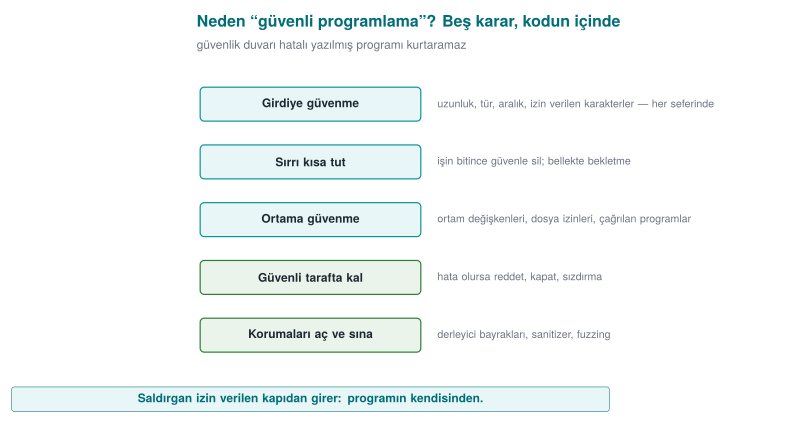
- Don't trust input; validate every input (length, type, range, allowed characters).
- Keep secrets in memory for the shortest time possible, and erase them securely once you're done.
- Don't trust the environment the program runs in (environment variables, file permissions, the programs it invokes).
- If an error occurs, stay on the safe side: refuse, shut down, don't leak.
- Turn on the protections the compiler and operating system offer, and test with tools (sanitizers, fuzzing).
Over the term we will apply these principles first in C/C++, then in Java, and then in the world where "the program is in the attacker's hands" (runtime protection, code obfuscation, white-box cryptography).
3. Who is the attacker, and what can they reach?¶
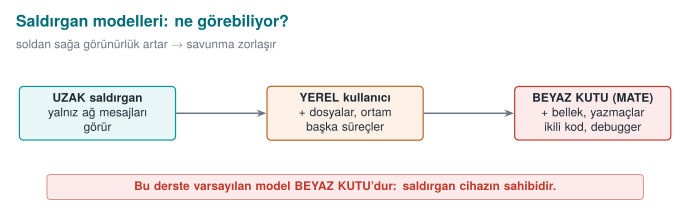
The first question in evaluating any security measure is: "Against whom?" The same countermeasure may be enough against one attacker and useless against another. That's why every project starts by writing down an attacker model.
| Attacker | What can they reach? | What can they do? | Example | Where the defence weight goes |
|---|---|---|---|---|
| Remote attacker | Only the messages they send over the network | Sends malformed/long input, eavesdrops on traffic | Someone attacking a web server | Input validation, TLS |
| Local user | An ordinary account on the same computer | Reads files, changes environment variables, runs programs | Another student on a shared server | Permissions, secure start-up |
| Malicious insider | Authorized access to source code, to servers | Adds a backdoor, exfiltrates data | An employee abusing their role | Privilege separation, audit logging |
| Attacker who owns the device (white-box, "Man-At-The-End") | Full access to the program itself | Steps through it with a debugger, dumps memory, modifies the binary | Someone trying to break a mobile payment app on their own phone | Runtime protection, code obfuscation, white-box cryptography |
What makes this course different
Classic security courses mostly deal with the first two attackers. In this course we will give special weight to the last row — the situation where the program runs on the attacker's own device. Mobile payment, digital content protection (DRM), anti-cheat for games, and license enforcement all live in this world. Here, "just hide the key and you're done" is not enough: the attacker can read memory, modify the code, and stop and restart the program however they like.
4. The basic principles of secure design¶
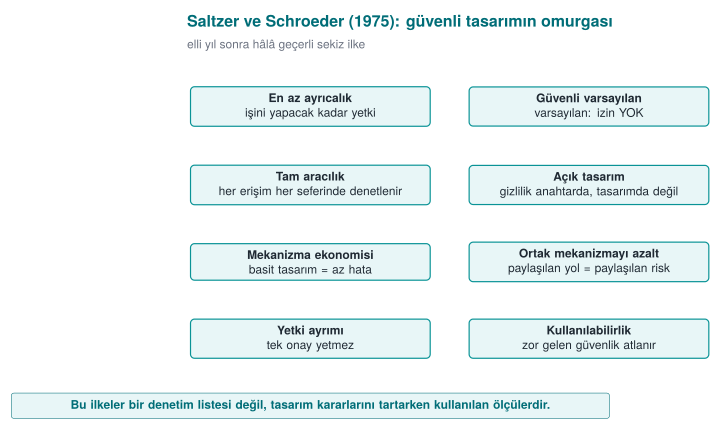
The principles Saltzer and Schroeder wrote in 1975 are still the backbone of secure design today. Keep each one in mind with a one-sentence example:
| Principle | Meaning | Example |
|---|---|---|
| Least privilege | Every component runs with just enough privilege to do its job | The reporting program runs as an ordinary user, not as administrator |
| Secure default | The default state is "no permission" | A new user's admin field starts at 0 |
| Complete mediation | Every access is checked, every time | Permission is not checked once and then cached |
| Open design | Security rests on the secrecy of the key, not the secrecy of the design (Kerckhoffs) | You do not write your own encryption algorithm |
| Economy of mechanism | A simple design contains fewer bugs | A clear 20-line check beats a "clever" 500-line one |
| Separation of privilege | A critical operation requires more than one condition | Both a password and an SMS code for a money transfer |
| Least common mechanism | Resources shared between users are minimised | Every session gets its own temporary file |
| Psychological acceptability | Security must be usable, or it gets bypassed | Asking for a password every 5 minutes leads to the password being written on paper |
Let's add one modern principle to these: defence in depth. We don't rely on a single countermeasure; we build layers that complement each other. If one is bypassed, the next one takes over. In week 3 we will see how a sensitive key is carried inside exactly four separate protection layers (a security shell).
5. Overview of application protection: the defence-in-depth map¶
So far we have talked about what security is and against whom we are protecting. Now let's map out the toolbox we will use for the rest of the term. "Application protection" is not a single technique; it is a whole of complementary layers. Each layer answers a different question and stands against a different attacker capability.
Why a single countermeasure is not enough¶
Think of a building. You've fitted a good lock on the door. But if the window is open, the key is under the doormat, or the safe inside has no combination, the lock alone means nothing. It's the same in software:
- Your code can be bug-free, but the attacker can open the binary and read your logic.
- You can hide your logic, but the attacker can stop the running program with a debugger and read its memory.
- You can protect memory against being monitored, but if the key sits in the code as plain text, a single string scan is enough.
- You can hide the key, but the attacker can change a check in the binary (e.g. making the "is the license valid?" question always answer "yes") and bypass the protection entirely.
Each line shows what one countermeasure does not solve. This is the logic of defence in depth: each layer closes the path the previous one left open; the attacker has to defeat all of them at once, and that multiplies the cost.
Seven layers¶
The diagram below orders the layers we will see this term from the inside out. The inner layers deal with "write the code correctly"; the outer layers deal with "what happens once the code is in the attacker's hands?"
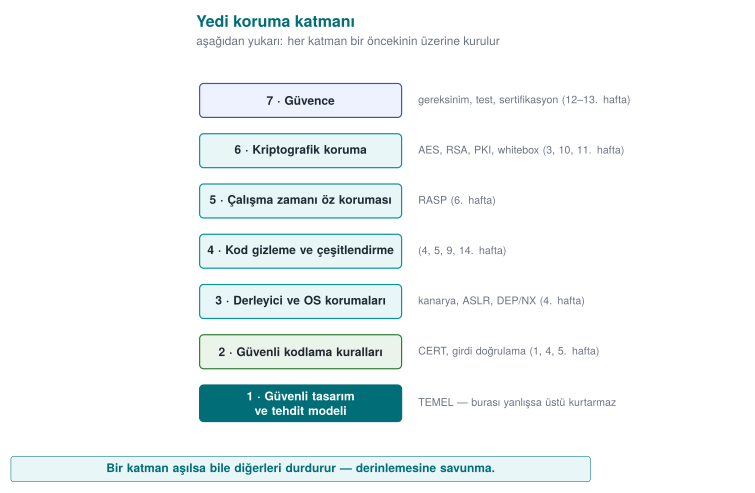
| Layer | Question it answers | Typical techniques | Attacker it stops |
|---|---|---|---|
| 1. Secure design | What are we protecting, against whom? | Threat model, asset and interface tables, least privilege | Anyone looking for a design flaw |
| 2. Secure coding | Is my code bug-free? | Input validation, bounds checking, safe APIs, SEI CERT rules | An attacker sending input remotely |
| 3. Compiler/OS protections | If a bug slips through, is it harder to exploit? | Stack canary, ASLR, DEP/NX, CFI, _FORTIFY_SOURCE | An attacker trying to exploit a memory error |
| 4. Obfuscation | Can someone reading the code understand it? | Control-flow flattening, opaque predicates, string obfuscation, virtualisation | A reverse-engineering analyst |
| 5. RASP | Does the program notice it is under attack? | Debugger/hook detection, root/emulator detection, integrity checks | An attacker inspecting the program while it runs |
| 6. Cryptography | Even if the data is captured, is it meaningless? | Authenticated encryption, key hierarchy, white-box crypto | An attacker who obtains stored or transmitted data |
| 7. Assurance | How do we prove all of this actually works? | Code review, fuzzing, penetration testing, ETSI/EMV/FIPS/Common Criteria | Auditors and evaluators |
The idea that ties the layers together: the security shell
In the method the instructor has used in the field, a sensitive piece of data (e.g. a key) is carried inside several of these layers at once: it is stored encrypted, decrypted only at the moment it is needed and only as much as needed, the code section where it is decrypted is obfuscated and integrity-checked, and the process it runs in has debugger detection. In this course we will call these nested layers a security shell. In week 3 we will build a four-shell design step by step.
Which layer matters when? Choosing by attacker model¶
Not every application needs all seven layers equally. The choice is driven by the attacker model we defined in section 3:
| Application type | Where is the attacker? | Priority layers |
|---|---|---|
| Server-side web service | On the network; no access to code or server | 1, 2, 3, 6 (TLS), 7 |
| Desktop business application | On the user's computer; but usually the user is not the attacker | 1, 2, 3, 6 |
| Mobile banking / payment app | The device may be in the attacker's hands | All of them; especially 4, 5, 6 |
| Game, licensed software | The user themself is the attacker (cheating, pirated copies) | Mostly 4, 5 |
| Embedded device (e.g. a smart meter) | Physical access is possible | 2, 3, 6, hardware-backed protection |
The critical distinction here is: on the server side, your code runs on a machine you control; the attacker only controls the inputs. On the client side (phone, desktop, game console), the attacker owns the program itself: they can copy it, open it, modify it, and re-run it as many times as they like. This model is called the "white-box" attacker, and layers 4, 5, and 6 exist precisely for this attacker.
Obfuscation is not a substitute for correct code
A common mistake is to skip secure coding and say "we'll obfuscate the code anyway." Obfuscation slows the attacker down, it does not fix the bug. An obfuscated buffer overflow is still a buffer overflow; it just takes a bit longer to find. The outer layers only make sense once the inner layers are solid.
The white-box attacker's six paths¶
The security guide for a sensitive library running on the client side typically summarizes the attacker's goals in a six-row attack table. Each row is a question that at least one of the layers has to answer:
| # | Attacker's path | Example | Layers that answer |
|---|---|---|---|
| 1 | Bypassing platform controls | A rooted device, an emulator, a modified OS | 5 (RASP) |
| 2 | Reverse-engineering the code | Reading logic and keys with a decompiler | 4 (obfuscation), 6 |
| 3 | Modifying the code | Flipping an if check and repackaging | 5 (integrity), 4 |
| 4 | Abusing the interfaces between components | Calling the library from your own program, reading data as it crosses the interface | 1 (design), 5, 6 |
| 5 | Extracting assets at runtime | Memory dump, debugger, hook | 2 (erasure), 5, 6 (white-box) |
| 6 | Redirecting control flow at runtime | Skipping a branch with a debugger, changing a return value | 5 (flow counter), 4 |
This table is the starting point for the threats section of a protection plan: for every asset, you write down how each of these six paths is closed off.
The same set of requirements has two more items that state plainly why defence in depth is mandatory:
- The application must not rely solely on security functions that have no assurance of their own: features like the OS's protections, a keychain, an app sandbox, or a hardware-backed key store vary from device to device and can be disabled by the attacker.
- Mechanisms the platform provides (e.g. the OS's crypto library) can be used, but only in addition to the application's own protections.
Defensive programming is listed item by item in the same place: every input and output is checked; assets are processed for the shortest time possible; assets are never passed in the clear even across interfaces inside the code; delays are added against timing-correlation attacks; and a secure erase function that wipes the data is used once the work is done. We will apply every one of these rules over the course of the term.
The cost of protection: every layer has a price¶
Adding a layer is never free; security involves a constant trade-off between speed and complexity — the goal is not infinite protection but balanced protection, with the remaining risk written down explicitly. When writing a protection plan, you weigh these four costs for every layer:
- Performance: Obfuscated code runs slower (e.g. control-flow flattening can slow a function down several times over). Integrity checking and debugger detection also cost CPU time.
- Size: Obfuscation, virtualisation, and table-based white-box cryptography make the binary bigger.
- Development and maintenance: Bugs in obfuscated code are hard to debug; crash reports become unreadable. That's why obfuscation is applied only to sensitive sections, and symbol-mapping files are kept somewhere safe.
- False positives: An overly sensitive root or emulator check can punish a legitimate user (e.g. a phone with developer options turned on).
That's why every countermeasure in a protection plan is written with its justification: "We protect this asset, against this attacker, at this cost." A countermeasure with no written justification is either unnecessary or in the wrong place.
The path we'll follow through the semester¶
We will fill in this map by opening up one layer each week:
| Week | Layer | Main question |
|---|---|---|
| 1 | 1, 2 | Secure design, threat model, how memory errors happen |
| 2 | 1 | Malware, security models, classifying vulnerabilities |
| 3 | 6 | How do we protect data in transit, at rest, and in use? |
| 4 | 2, 3, 4 | How do we harden C/C++ code? |
| 5 | 2, 4 | Injection, obfuscation, and dependency security in Java and interpreted languages |
| 6 | 5 | How does the program protect itself while under attack? |
| 9 | 4 | Advanced obfuscation and measuring its effectiveness |
| 10 | 6 | AES, RSA, digital signatures, PKI |
| 11 | 6 | How is a key protected while it is inside code in the attacker's hands? |
| 12–13 | 7 | Certification, penetration testing, security requirements |
| 14 | 4 | Automated obfuscation and diversification with Tigress |
How does an evaluator look at these layers?
An independent evaluator reading a product reads this table backward: they try the easy paths first (string scanning, opening the binary, attaching a debugger) and note which layer stopped them. Every step that was not stopped becomes a finding in the report. Your project's security guide will likewise answer, for every layer, "which countermeasure did I take, and how did I test it?"
Try it yourself¶
- What is the attacker model for an offline password manager (all data on the user's computer)? Which of the seven layers matter most? Why?
- Under what conditions is the statement "our app runs on the server, we don't need obfuscation" true, and under what conditions is it false?
- A game company uses only obfuscation to stop cheating. Which attack path stays open?
Answer hints
- The attacker could be someone copying the file (a stolen laptop) or someone who infected the computer with malware; cryptography (6: password-based key derivation, authenticated encryption) and secure coding (2) matter most; since the user themself is not the attacker, obfuscation is secondary.
- It is true if the code really runs only on the server and no logic is ever sent to the client. It is false if the client application also carries business logic or a key (a mobile app, JavaScript in the browser).
- A cheating client sending inconsistent data to the server: obfuscation protects the client, but if the server does not validate every value coming from the client (e.g. "this player can't move 100 meters in one second"), cheating is still possible. The rule: the server never trusts the client.
6. The application protection plan¶
The security of a piece of software is not left to chance; it is managed with a written plan. In products that go through security certification at an independent lab, this plan turns into a security guide hundreds of pages long. In this course, you too will write a small version of one for your term project. The backbone of the plan is:
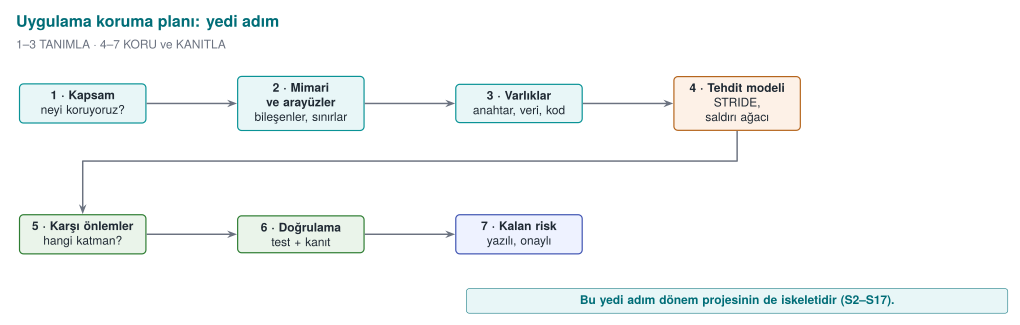
The plan is not written once and forgotten: every time the product changes (a new feature, a bug fix, a new release) you return to step 1 and update the plan.
- Scope: What are we evaluating? Saying "version 2.1" alone is not enough — which binary, which source code, which hash value? In certification this is called the target of evaluation.
- Architecture and interfaces: What are the components, which channel do they talk to each other over, and how is identity verified on each channel?
- Assets: every piece of data to be protected is listed one by one: where does it live, when is it created, when is it erased, does it need confidentiality (C) or integrity (I)?
- Threats: who is the attacker (see section 3), and by what path can they reach each asset?
- Countermeasures: for each threat, which countermeasure, in which layer?
- Verification: how is it proven that each countermeasure actually works — a unit test, a bypass attempt?
- Residual risk: the risks that cannot be closed, or are knowingly accepted, and why (e.g. performance).
The plan's two core tools: the interface table and the asset table¶
Steps 2 and 3 of the plan are written with two tables; we will use this same method throughout the whole term. Let's see the method on an example architecture: a mobile app that makes contactless payments over the phone's NFC, and a security library that does its critical work. Part of the library is in Java, while the most security-sensitive part runs in a native layer written in C/C++.
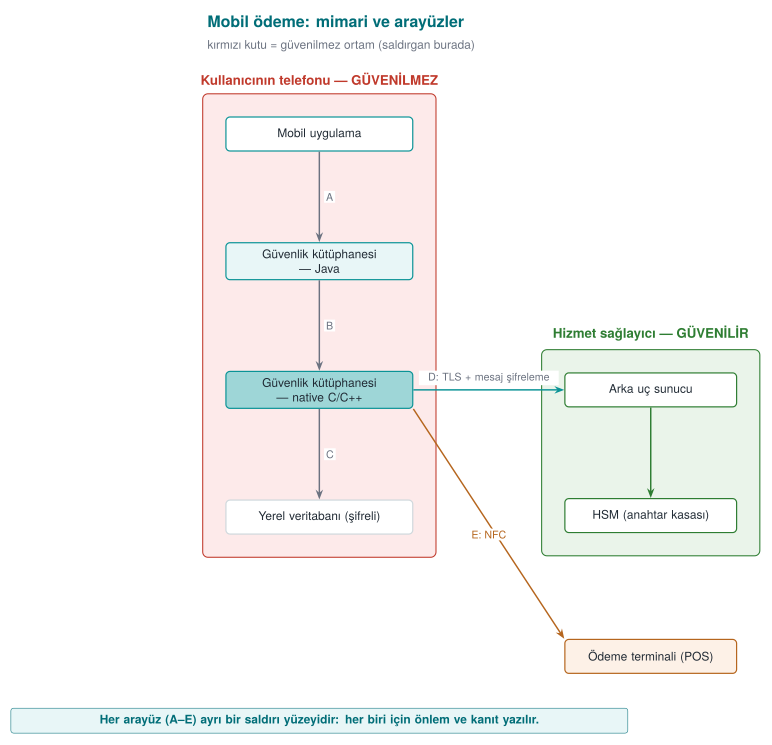
Notice two things in this diagram:
- The phone box is labelled "untrusted environment." The phone is in the user's — i.e., a potential attacker's — hands. It may be rooted, it may have a debugger attached. That's why the design starts from the assumption "I do not trust the phone."
- Every arrow labelled with a letter is an interface. The following table is filled in for each interface:
| Interface | End A | End B | Authentication | Confidentiality / integrity |
|---|---|---|---|---|
| A | Mobile app | Library (Java) | The calling app's signature is verified | Same process; no sensitive data crosses |
| B | Library (Java) | Library (native) | Mutual integrity check | Data crosses encrypted and masked |
| C | Library (native) | Local database | — | Encryption + integrity code (MAC), key bound to the device |
| D | Library | Back-end server | Certificate pinning + server verification code | TLS and message-level encryption on top |
| E | Library | Payment terminal | Payment protocol | One-time payment key |
And a slice of the asset table (the values are synthetic):
| Asset | Type | Where | Creation → deletion | Protection |
|---|---|---|---|---|
| One-time payment key | Cryptographic, dynamic | Database (encrypted), memory at time of use | Downloaded from the server → used in one payment → erased | C, I |
| Device fingerprint | Dynamic | Memory, in two separate pieces | Computed at app start-up | I |
| Session key | Cryptographic, dynamic | Memory only | Derived when the session with the server is set up → erased at session end | C, I |
| Transaction counter | Dynamic | Database | Increments on every payment | I |
| Server public key | Cryptographic, static | Embedded in the app | At build time | I |
Why so much detail?
The first thing an evaluator does is look at this list and ask, for every row: "Where and when is this asset exposed?" An asset that is not on the list is an asset that is not protected. In your project, too, every asset will have a place in this table.
What comes after this method
Every week this term we will open up one of the methods that protect the assets in these tables: layered data protection and security shells (week 3), hardening native code (weeks 4 and 9), hardening the Java side (week 5), runtime self-protection (week 6), crypto methods and key hierarchy (week 10), white-box cryptography (week 11), certification and requirement mapping (weeks 12–13).
7. Threat modelling: STRIDE and attack trees¶
Threat modelling means asking, systematically, "if I were the attacker, how would I attack this?" One of the most common methods is STRIDE, developed at Microsoft: each letter is a family of threats and the security property it breaks.
| Letter | Threat | Property it breaks | Example (mobile payment architecture) |
|---|---|---|---|
| S | Spoofing — identity impersonation | Authentication | A fake app disguising itself as the real app and calling the security library |
| T | Tampering | Integrity | A check in the native library being altered in the binary |
| R | Repudiation | Non-repudiation | A user claiming "I didn't make this payment" with no proof to the contrary |
| I | Information disclosure | Confidentiality | The payment key being read from a memory dump |
| D | Denial of service | Availability | Thousands of fake registration requests against the server |
| E | Elevation of privilege | Authorization | An ordinary user reaching an administrator function |
Applying it is simple: draw the system's data flow diagram (external entities, processes, data stores, data flows, and trust boundaries), then ask all six letters for every element, one by one. Every arrow that crosses a trust boundary is where the most threats come from.
Attack tree¶
In an attack tree, the root is the attacker's goal; the branches below it are the ways to reach that goal. In an OR node one branch is enough; in an AND node all of them are required. Once the tree is drawn, the cheapest path and the key points to defend fall out on their own.
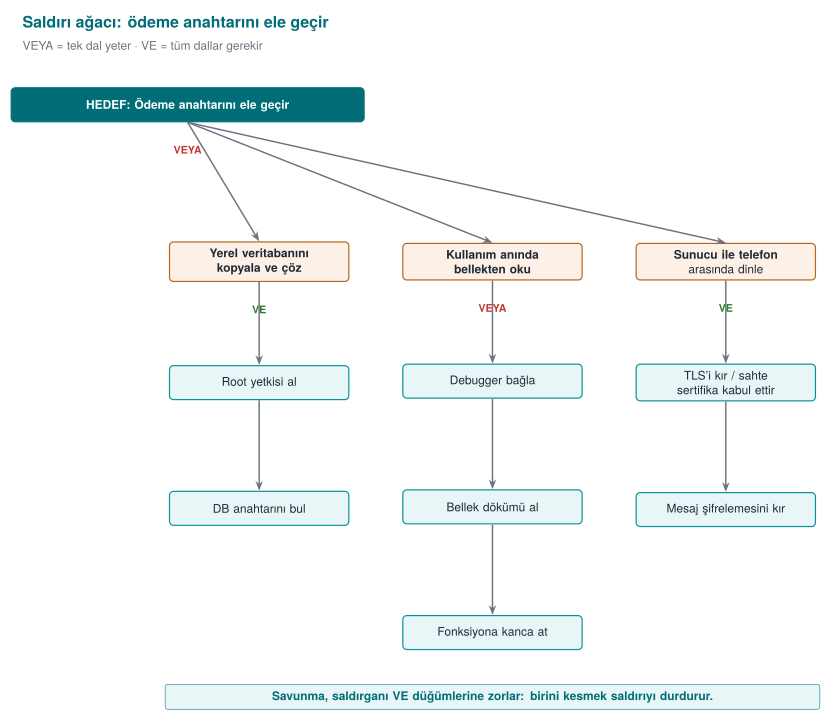
Two conclusions follow immediately from this tree: (1) Path C is expensive because it requires breaking two layers at once — that's defence in depth at work. (2) Path B has three alternatives; that means the key in memory is the weakest point, and it needs dedicated countermeasures (this week's Demo 2, runtime protection in week 6, white-box in week 11).
The animation below computes the same idea numerically on a slightly larger tree (4 branches, 11 leaves): how is every AND/OR node's cost worked out bottom-up, and which is the cheapest path?
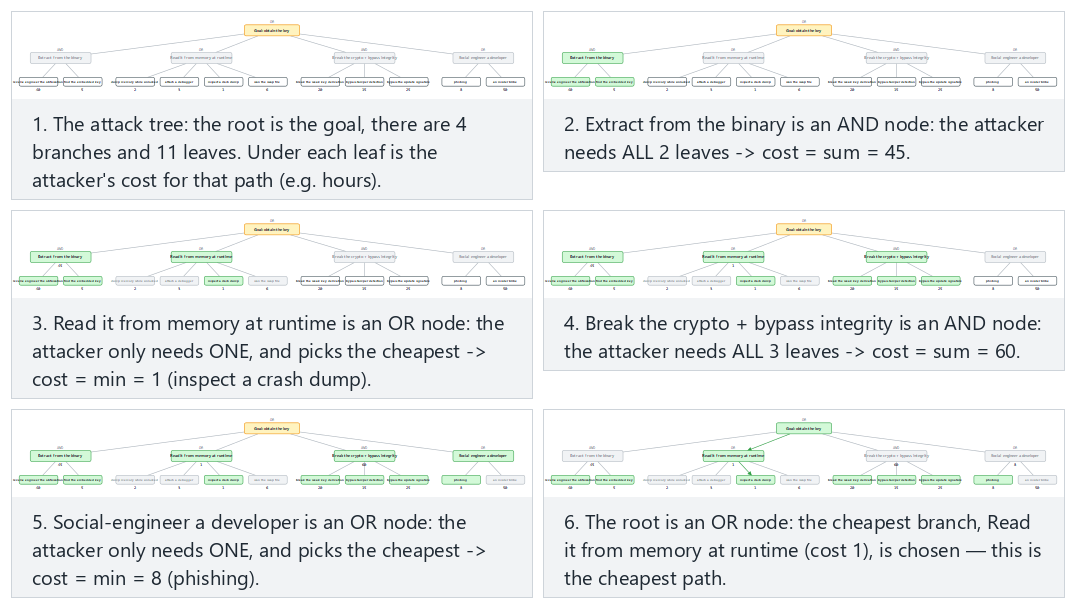
Try the payment-key, license-check (root AND) examples and the two edge cases (a forced two-layer tree / every node AND) in the picker; use 🎲 to evaluate your own tree.
Class exercise (15 minutes, groups of 3–4)
Think of a "student grading system": the instructor enters grades, the student sees their grade, the data lives on a server.
- Draw the data flow diagram; mark the trust boundaries with a dashed line.
- Write at least six STRIDE threats (one for each letter).
- Draw an attack tree for the goal "raise my grade from 45 to 85." Which is the cheapest path?
Hint
Trust boundaries: browser ↔ server, server ↔ database, student role ↔ instructor role. For "E," think of a student reaching the grade-entry page by typing its address directly; for "R," think of there being no record of "who changed this grade, and when?"
8. Going deeper into threat modelling: the data flow diagram, STRIDE in detail, and risk scoring¶
In the previous section we met STRIDE and the attack tree. In this section we'll learn to apply the method step by step, like an engineer: how do we draw the diagram, which letters do we ask of each element, and how do we rank the dozens of threats that come out of it?
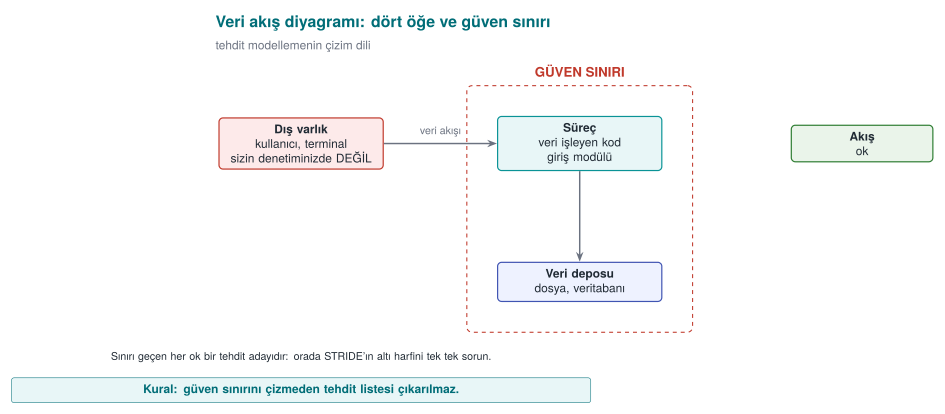
The four elements of a data flow diagram (DFD) and the trust boundary¶
The diagram used in threat modelling is a simplified version of the data flow diagram you know from software engineering courses. There are only five symbols:
| Symbol | Name | What it represents | Example |
|---|---|---|---|
| Rectangle | External entity | A person or system not under your control | User, payment terminal, email server |
| Circle / rounded box | Process | Code that processes data | Login module, encryption library |
| Two parallel lines | Data store | Where data sits | Database, config file, registry |
| Arrow | Data flow | Data moving from one place to another | HTTP request, function call, file write |
| Dashed line | Trust boundary | Where the level of trust changes | Internet ↔ server, user mode ↔ kernel, application ↔ operating system |
The concept of the trust boundary is the heart of the method. The moment a piece of data crosses a trust boundary, it becomes "data that came from the other side" and cannot be used without validation. Most threats are born at these crossings. A practical rule: color every arrow that crosses a trust boundary red in your diagram, and start your review there.
Which letter applies to which element?¶
Not every element is exposed to all six threats. The "STRIDE-per-element" table that Microsoft popularized shows which questions actually make sense:
| Element | S | T | R | I | D | E |
|---|---|---|---|---|---|---|
| External entity | ✔ | ✔ | ||||
| Process | ✔ | ✔ | ✔ | ✔ | ✔ | ✔ |
| Data store | ✔ | ✔¹ | ✔ | ✔ | ||
| Data flow | ✔ | ✔ | ✔ |
¹ If the data store is an audit log, the repudiation threat is asked too: if the record is deleted or altered, who did what can no longer be proven.
The animation below applies this table to a small system (like a student grade system, 12 elements) one element at a time: for every element it shows which of the six letters are meaningful, and why.
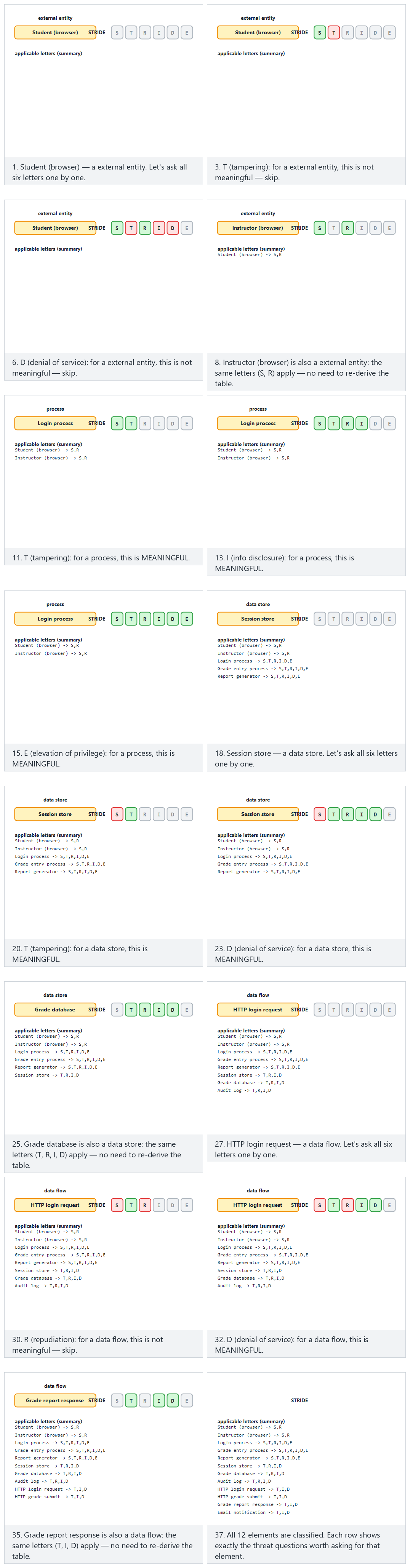
Try the grade-system and password-vault examples and the two edge cases (all data flows / all external entities) in the picker; use 🎲 to generate your own mixed system.
The logic of the table is intuitive: a data flow (e.g. a network packet) cannot be spoofed, because it has no "identity"; but it can be eavesdropped on (I), altered (T), or cut off (D). A process, on the other hand, is exposed to all six threats: it can be impersonated, its code can be altered, its memory can be read, it can be crashed, its privilege can be abused.
Questions to ask for each letter, and typical countermeasures¶
| Letter | Ask yourself | Typical countermeasure | Where it appears in this course |
|---|---|---|---|
| S | Is the other party really who they claim to be? Could someone else pose as them? | Authentication, mutual TLS, signature verification, certificate pinning | Weeks 3, 10 |
| T | Can this data or code be altered in transit or on disk? Would I notice if it were? | MAC/HMAC, digital signature, integrity checking, read-only memory | Weeks 2, 3, 6 |
| R | If a user says "I didn't do this," do I have proof? | Tamper-resistant audit log, signed transaction, timestamp | Week 2 |
| I | Can this data end up in the hands of someone unauthorized — on disk, on the network, in memory, in a log, in an error message? | Encryption, memory wiping, data minimization, masking | Weeks 1, 3, 11 |
| D | Can this component be crashed, deadlocked, or have its resources exhausted? | Input limits, rate limiting, timeouts, resource quotas | Weeks 1, 4 |
| E | Can someone less privileged get someone more privileged's work done? | Least privilege, complete mediation, memory safety, sandboxing | Weeks 1, 2, 4 |
The same bug can have more than one letter
A buffer overflow is a threat under D (the program crashes), E (the attacker hijacks control flow and runs privileged code), and I (a secret in adjacent memory is read) all at once. STRIDE is not a classification, it's a thinking tool: its purpose is not to put a threat in the right box, but to make sure no threat is skipped.
Ranking threats: likelihood × impact¶
Threat modelling on a medium-sized system easily produces 50–100 threats. You cannot close all of them at once. That's why every threat gets a risk score. The simplest method is to score likelihood and impact from 1 to 3 and multiply them:
| Impact: Low (1) | Impact: Medium (2) | Impact: High (3) | |
|---|---|---|---|
| Likelihood: High (3) | 3 — medium | 6 — high | 9 — critical |
| Likelihood: Medium (2) | 2 — low | 4 — medium | 6 — high |
| Likelihood: Low (1) | 1 — low | 2 — low | 3 — medium |
The animation below places 12 threats from a password-vault application onto this matrix one by one, then ranks all of them by score:
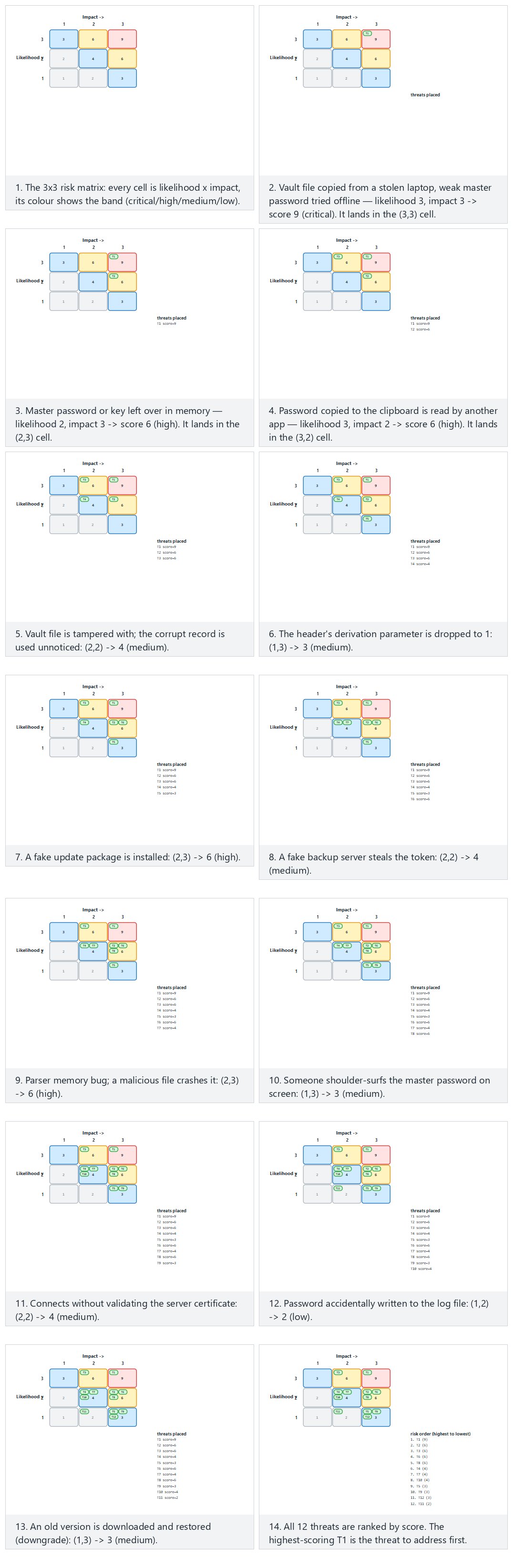
Try the vault and terminal examples and the two edge cases (all critical / all low) in the picker; use 🎲 to score your own threat list.
When determining likelihood, ask what the attacker needs: does it require physical access, or can it be done over the internet? Does it need special tooling or expertise? Can the attack be automated? When determining impact, go back to the asset table: which asset is affected, how many users are affected, what is the financial or legal consequence?
More detailed scales
The industry uses more detailed scoring systems than this. CVSS, which we'll see in week 2, scores a vulnerability from 0–10 using criteria such as attack vector, complexity, privileges required, user interaction, and impact on confidentiality/integrity/availability. In payment system certification, a scale called "attack potential" is used, which adds up the time required, expertise, knowledge of the target, window of opportunity, and equipment (week 13). This week, the simple 3×3 matrix is enough.
Four responses to a threat¶
For every threat, you consciously choose one of four options and write it into the plan:
- Mitigate: Add a countermeasure. The most commonly chosen response.
- Eliminate: Remove entirely the feature that causes the threat. E.g. if a "remember my password" feature isn't necessary, never writing it at all zeroes out the threat of the password being stored on disk. This is the strongest response.
- Transfer: Hand the risk off to someone else. E.g. never storing card data at all and leaving it to the payment service provider, or an insurance policy.
- Accept: Knowingly take on the risk and write down the justification. E.g. "We take no countermeasure against the chip being physically opened and examined; the cost of this attack is higher than the value it protects."
An accepted risk is not a forgotten risk
Saying "accept" means writing the risk into the plan's residual risk section and re-evaluating it in the next release. A risk that is not written into the plan has not been accepted — it has been overlooked. Evaluators look first at whether a residual risk list exists at all, and at its justifications.
9. Worked example: writing a protection plan step by step¶
Now let's apply all the tools from the previous three sections, start to finish, on a small application. This example will serve as a template for the first deliverable of your term project.
Step 0 — Define the application¶
Let "Vault" be a password vault, written in C++, running on the desktop:
- The user sets a master password. The vault encrypts the records inside it (site name, username, password) with a key derived from this master password and stores them in a single file.
- The user can copy a record's password to the clipboard.
- Optionally, the encrypted vault file can be sent to a backup server.
- The application downloads new versions from an update server.
Step 1 — Scope¶
| Field | Value |
|---|---|
| Target of evaluation | kasa.exe / kasa version 1.0, core library vault_core, configuration file |
| Platforms | Windows 10/11 (x64), Ubuntu 22.04 (x64) |
| Out of scope | The backup server's own security (owned by a separate team), the operating system itself |
| Security objective | The vault file and its backups must be unreadable and undetectably unmodifiable to anyone who does not know the master password |
The "out of scope" row matters: writing down explicitly what you are not protecting is as valuable as writing down what you are.
Step 2 — Architecture and interfaces¶
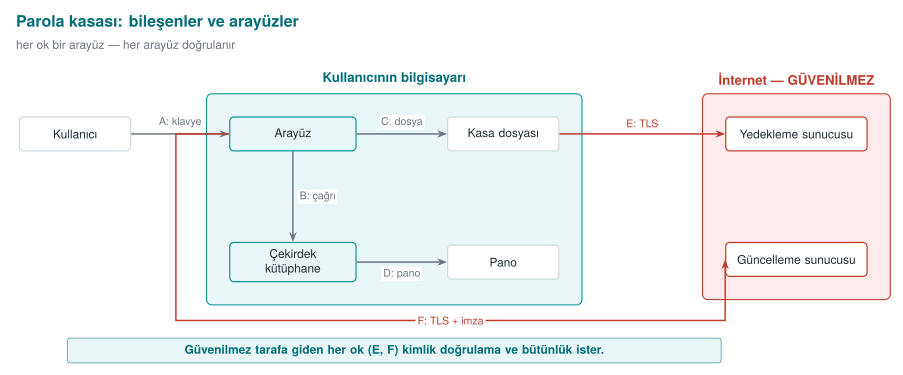
| Interface | End A | End B | Authentication | Confidentiality / integrity |
|---|---|---|---|---|
| A | User | Interface | Master password | Password is never shown on screen |
| B | Interface | Core | Same process | Master password is erased from memory after the call |
| C | Core | Vault file | — | Authenticated encryption (AES-GCM), key derived from the master password |
| D | Core | Clipboard | — | Clipboard is cleared after 30 s |
| E | Core | Backup server | Server certificate verified, user token | TLS + the file is already encrypted |
| F | Interface | Update server | The update package's digital signature is verified | TLS; the real assurance is the signature |
Step 3 — Assets¶
| # | Asset | Type | Where | Creation → deletion | Protection |
|---|---|---|---|---|---|
| V1 | Master password | Secret, short-lived | Memory only | User types it → key is derived → erased immediately | C |
| V2 | Vault key | Cryptographic, session-lived | Memory only | Derived → erased when the vault locks | C, I |
| V3 | Vault records (decrypted) | Secret | Memory (only the record being displayed) | Opened → erased once off screen | C |
| V4 | Vault file | Encrypted data | Disk, backup server | Persistent | C, I |
| V5 | Salt and derivation parameters | Public, but integrity matters | Vault file header | When the vault is created | I |
| V6 | Update signature public key | Cryptographic, static | Embedded in the app | At build time | I |
| V7 | Backup token | Credential | Disk (OS key store) | When the user connects → until revoked | C |
The "Protection" column uses four values: C (confidentiality), I (integrity), I+ (integrity plus accountability and authentication: the data's origin must also be verified; in the field this is provided by an authentication code shared with the server), and N (no protection needed). Asset tables used in the field also record each asset's size, the source of its value, its default value, and which table or file it lives in; static, dynamic, and cryptographic assets are listed in separate tables.
Step 4 — Threats (STRIDE, interface by interface)¶
| # | Where | Letter | Threat | Likelihood | Impact | Risk |
|---|---|---|---|---|---|---|
| T1 | C / V4 | I | The vault file is copied from a stolen laptop, a weak master password is brute-forced offline | 3 | 3 | 9 |
| T2 | B / V1, V2 | I | The master password or key stays in memory; it's read from a memory dump, a swap file, or a hibernation file | 2 | 3 | 6 |
| T3 | D / V3 | I | The password copied to the clipboard is read by another application | 3 | 2 | 6 |
| T4 | C / V4 | T | The vault file is modified; the app uses the corrupted record without noticing, or crashes | 2 | 2 | 4 |
| T5 | C / V5 | T | The derivation parameter (iteration count) in the header is dropped to 1; the next save uses a weak key | 1 | 3 | 3 |
| T6 | F / V6 | T, E | A fake update package is installed; the attacker's code runs with the user's privileges | 2 | 3 | 6 |
| T7 | E | S | A fake backup server steals the token | 2 | 2 | 4 |
| T8 | Process | T | A memory error in the vault file parser; a malicious file crashes the program or hijacks it | 2 | 3 | 6 |
| T9 | A | S | Someone next to the user reads the master password off the screen (shoulder surfing) | 1 | 3 | 3 |
Step 5 — Countermeasures¶
| Threat | Response | Countermeasure | Layer |
|---|---|---|---|
| T1 | Mitigate | Derive the key from the master password with a slow derivation function (PBKDF2 with a high iteration count, or Argon2id), a minimum password length requirement, a password strength meter | 6, 2 |
| T2 | Mitigate | Securely erase the key and password right after use, lock the memory against being swapped, disable crash dumps (sections 11–12 and 17 of this week) | 2 |
| T3 | Mitigate | Clear the clipboard after 30 s; use the "exclude from clipboard history" flag if the platform supports it | 1 |
| T4 | Mitigate | Authenticated encryption: never open the file if the tag doesn't match | 6 |
| T5 | Mitigate | Make the header additional authenticated data (AAD) of the encryption; hard-code a minimum iteration count and reject anything below it | 6, 2 |
| T6 | Mitigate | Never run the update package without verifying its signature against the embedded public key; reject version downgrades | 6 |
| T7 | Mitigate | Certificate validation + hostname check, optional certificate pinning | 6 |
| T8 | Mitigate | Validate every length field in the parser, test with fuzzing, turn on compiler protections | 2, 3, 7 |
| T9 | Accept | Mask the password on screen; further countermeasures against physical observation are out of scope | — |
Step 6 — Verification plan¶
For every countermeasure, you write down the answer to "how do I prove this works?" If a countermeasure has no test, it counts as if it doesn't exist in the evaluator's eyes.
| Countermeasure | Test | Expected result |
|---|---|---|
| T1 derivation | Unit test: derivation time is measured | ≥ 250 ms on the target machine |
| T2 erasure | After the vault locks, the process memory is dumped and searched for the master password | Not found |
| T4 integrity | A random byte of the vault file is modified | The app says "file corrupted," refuses to open, does not crash |
| T5 parameter | The iteration count in the header is set to 1 | The app rejects the file |
| T6 signature | A package with a broken signature is presented | Installation is refused, the event is logged |
| T8 parser | 24 hours of fuzzing (week 4) | No crashes; no sanitizer findings |
Step 7 — Residual risk¶
| Risk | Why was it accepted? | Re-evaluation |
|---|---|---|
| Memory can be read if malware is running on the computer while the vault is open | Full protection against malware running with the same user privilege is not possible; the auto-lock timeout was kept short | Every release |
| Shoulder surfing (T9) | The physical environment is out of scope | — |
| A very weak master password | The user is warned but not forcibly blocked (usability) | Based on user feedback |
Carry the template into your project
This seven-step structure is the skeleton of your term project's security guide. This week you are only expected to fill in steps 0–4 for your own project (see "Term project: this week"). You will fill in steps 5–7 throughout the term with the countermeasures you learn each week.
Common mistakes¶
- Forgetting assets: writing only "user data" and never listing keys, tokens, counters, configuration files, and the code itself (which is an asset whose integrity must be protected).
- Drawing the trust boundary wrong: putting the client application you wrote yourself in the "trusted" box. If the client runs on the user's machine, it is untrusted.
- Not matching a countermeasure to a threat: saying "we use TLS" is incomplete without saying which threat TLS closes (eavesdropping and tampering) and which it does not (data at the server, the client itself).
- A countermeasure with no test: saying "we erase the password from memory" and never checking whether the compiler removed that erasure (this week's Demo 2 is exactly this).
10. At program start-up: an untrusted environment¶
When a program starts running, it does not start with a blank page. It inherits a lot from whoever launched it: environment variables (PATH, LD_PRELOAD, IFS...), open file descriptors, the working directory, umask, resource limits. If the program trusts these, then whoever controls them also controls the program's behaviour. The first chapter of our source book (Viega & Messier, recipes 1.1–1.9) deals with exactly this topic of "secure start-up."
Demo 1 — Fooling the program via PATH¶
Demo 1 · code/week-01/01-path-spoofing · CWE-426 (untrusted search path)
The program calls a system command: date on Linux, which prints the date, and hostname on Windows, which prints the computer's name. The question is: which date, which hostname?
When you call a command without an absolute path, the shell searches the folders in the PATH variable from left to right and runs the first one it finds:
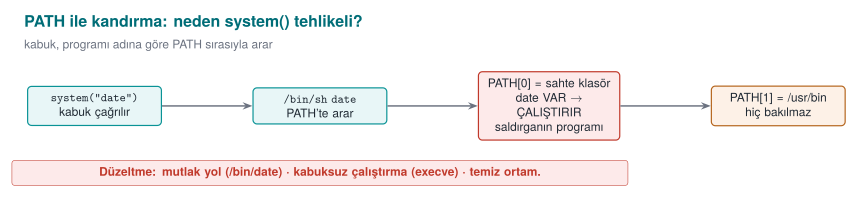
On Windows the situation is even worse: cmd.exe searches the working directory before PATH, and it also tries extensions like .bat and .cmd. Even which folder you run the program from can change which file actually runs.
Buggy code:
#ifdef _WIN32
#define COMMAND "hostname"
#else
#define COMMAND "date"
#endif

int main(void)
{
    printf("=== Monthly Sales Report ===\n");
    fflush(stdout);

    /* BUG: bare command name + shell + inherited environment (PATH, ...) */
    int status = system(COMMAND);
    ...
}
Run the demo:
STEP 1 - Normal run: the program finds the real date
=== Monthly Sales Report ===
Report date: Sat Sep 26 12:05:45 +03 2026

STEP 2 - Attack: the fake/ folder is added to the front of PATH
$ PATH="$PWD/fake:$PATH" ./bin/linux/report
=== Monthly Sales Report ===
Report date:
  !!! FAKE 'date' ran !!!
  The program was fooled through PATH. ...

STEP 3 - The fixed version under the same attack
=== Monthly Sales Report ===
Report date: Sat Sep 26 12:05:45 +03 2026
The fake date here only prints a message. A real attacker, at the very same point, could do anything they wanted with all the privileges of whoever runs the program. If the program runs with elevated privilege (e.g. a system service), this is a direct privilege escalation.
The fixed code does three things at once: 1) an absolute path, 2) no shell, 3) a small, known environment.
/* 1) C:\Windows\System32\hostname.exe — full path */
GetSystemDirectoryW(system_dir, MAX_PATH);
swprintf(program_path, MAX_PATH, L"%ls\\hostname.exe", system_dir);

/* 3) only SystemRoot in the environment block */
swprintf(env_block, MAX_PATH + 16, L"SystemRoot=%ls", sys_root);

/* 2) no cmd.exe: the program is launched directly */
CreateProcessW(program_path, cmd_line, NULL, NULL, FALSE,
               CREATE_UNICODE_ENVIRONMENT, env_block, NULL, &si, &pi);
Rule
If you need to run another program: use an absolute path, do not run it through a shell (use posix_spawn/execve on Linux, CreateProcessW on Windows, instead of system/popen), and give the child process a cleaned, known environment. Best of all: avoid needing to run another program at all — get the date yourself with time() and strftime(), and the computer name with gethostname() or GetComputerNameW().
Watch the animation below to see, step by step, how the shell tries the PATH directories in order and where the fake program wins.
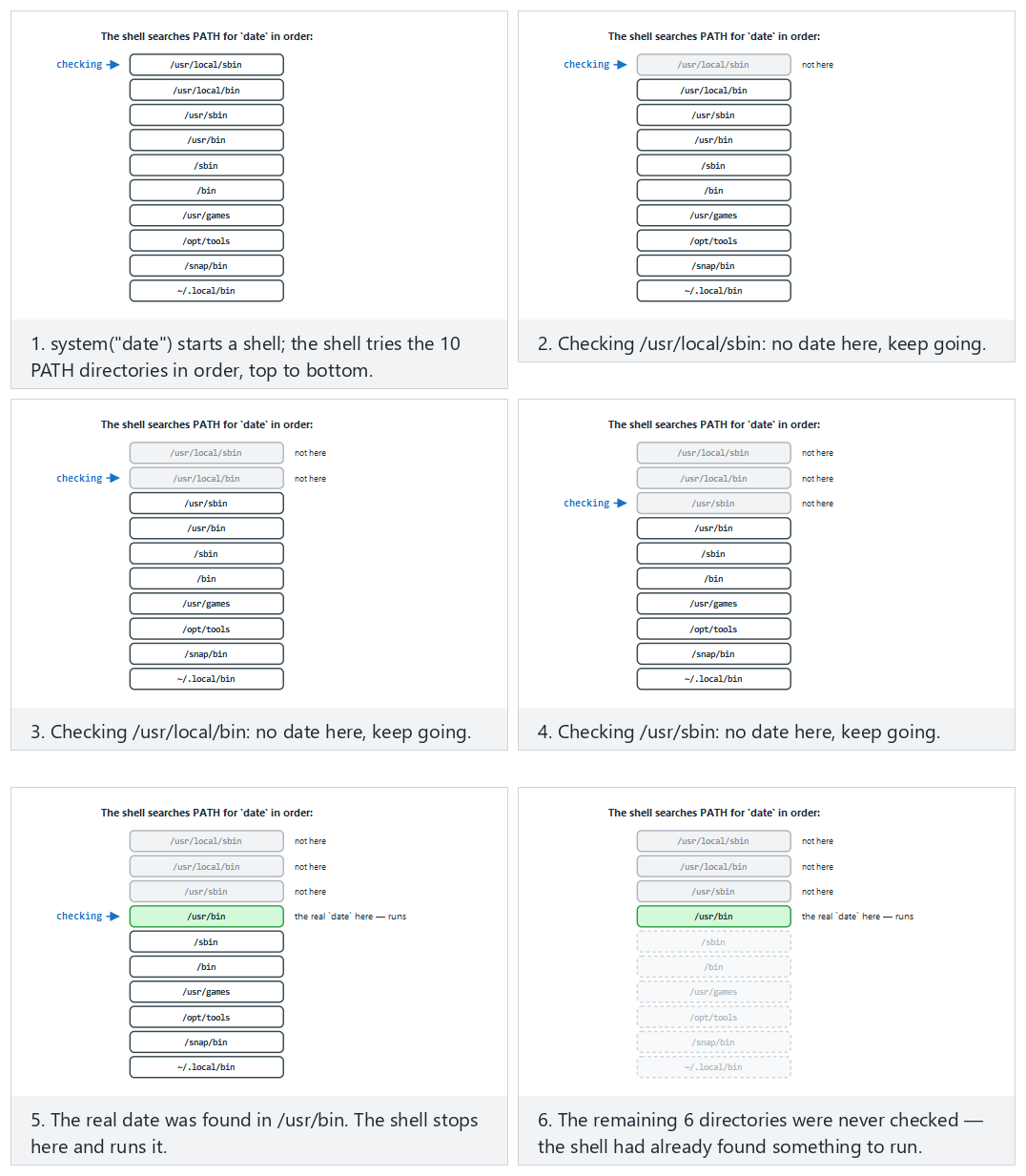
In the picker, try no attack (normal), the fake directory prepended to PATH (hard), and the edge cases the fake directory in the middle, still wins and the secure version — absolute path, no search — or press 🎲 for a random PATH list, or type your own directory list (mark entries dir:real / dir:fake, or try the absolute-path fix with ABSOLUTE date /bin/date).
11. Secure start-up: what to do in a program's first lines¶
Demo 1 showed how a single inherited environment variable (PATH) can turn all of a program's security upside down. PATH is not the only danger. The first chapter of our source book (Recipes 1.1–1.9) lists what a program should do in the first lines of its main() function. In this section we will update that list for today's systems and work through it step by step.
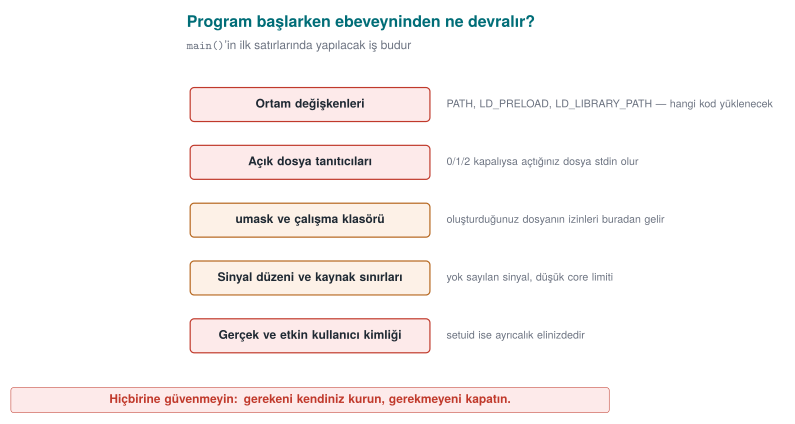
What does a program have when it starts?¶
When a process is started with exec (CreateProcess on Windows), it inherits the following from its parent:
| Inherited | Why is it dangerous? | Recipe in the book |
|---|---|---|
| Environment variables | PATH, LD_PRELOAD, LD_LIBRARY_PATH change which program and library gets loaded | 1.1 |
| Open file descriptors | A secret file or socket the parent left open leaks into the child process; if 0–2 are closed, the first file opened becomes "standard output" | 1.5 |
umask | Determines the permissions of new files; if 000, files become writable by everyone | 2.7 |
| Working directory | Relative paths (./ayar.ini) can point into a folder the attacker chose | 1.1 |
| Resource limits | If core dumps are enabled, memory is written to disk the moment the process crashes | 1.9 |
| Identity and privileges | In a setuid program the real and effective user differ; more privilege than needed is carried along | 1.3 |
| Signal settings | Signals the parent ignores are also ignored in the child | 13.5 |
The rule is simple: do not trust anything the program itself did not set up. The program's first job is to bring this inherited state to a known, safe state.
Step 1 — Clean the environment (Recipe 1.1)¶
There are two approaches: deleting the bad variables one by one (a blocklist), or wiping the environment entirely and rebuilding only what's needed (an allowlist). A blocklist is always incomplete, because you cannot know today which variable will turn out to be dangerous tomorrow. The right approach is the allowlist:
#include <stdlib.h>
#include <string.h>

static void sanitize_environment(void)
{
    const char *tz = getenv("TZ");          /* copy the variable to keep, first */
    char tz_copy[64] = "";
    if (tz && strlen(tz) < sizeof tz_copy)
        strcpy(tz_copy, tz);

    clearenv();                              /* glibc-specific; not portable (see below) */
    setenv("PATH", "/usr/bin:/bin", 1);      /* known, non-writable directories */
    if (tz_copy[0])
        setenv("TZ", tz_copy, 1);
}
Why do we copy it first?
getenv() returns a pointer into the environment block. clearenv() invalidates that block; using the pointer afterward is a use of freed memory. Copy the value you want to keep into your own buffer first. clearenv() is glibc-specific; portable code uses extern char **environ; environ = NULL; instead.
If you need to use a variable (e.g. the user's HOME), treat it like an input: limit its length, verify it has the expected shape (Recipe 3.6). On Windows the environment is inherited the same way; there, alongside PATH, the DLL search order is also a danger (Step 6 below).
Step 2 — Tidy up file descriptors (Recipe 1.5)¶
There are two separate problems:
- If 0, 1, 2 are closed: The attacker starts the program with its standard output closed. The first file the program opens (e.g. a password file) gets descriptor 1. Every subsequent
printfthen writes into that file. - Extra open descriptors: The parent hands the child a file or socket it left open without marking close-on-exec. The child can use that descriptor to reach a resource it normally couldn't.
#include <fcntl.h>
#include <unistd.h>
#include <stdlib.h>

static void sanitize_file_descriptors(void)
{
    for (int fd = 0; fd <= 2; fd++) {
        if (fcntl(fd, F_GETFD) == -1) {           /* closed? */
            int new_fd = open("/dev/null", O_RDWR);
            if (new_fd != fd)                        /* must get exactly that number */
                abort();
        }
    }
    /* Linux 5.9+ / glibc 2.34+: close 3 and above in one call */
    close_range(3, ~0U, 0);
}
On older systems, close() is called in a loop up to sysconf(_SC_OPEN_MAX); if the limit is very large (e.g. a million) this can be slow, which is why close_range was added. For files you open yourself, always use the O_CLOEXEC flag, so they don't leak into a child process you launch later.
Step 3 — Restrict the permissions of new files (Recipe 2.7)¶
umask is a mask: the bits set in it are subtracted from the permissions you pass to open(). With 077, no bits are left for group and others. Even so, write the permission explicitly when opening a sensitive file: open(path, O_WRONLY | O_CREAT | O_EXCL, 0600). O_EXCL refuses to open the file if it already exists (e.g. if it's a link the attacker pre-created); recall the TOCTOU demo from week 2.
Step 4 — Disable crash dumps (Recipe 1.9)¶
When a program crashes, the operating system may write the process's entire memory to a file to help with debugging. If that memory holds a password, a key, or decrypted data, all of it ends up sitting on disk as plain text. Demo 2's password can be found in exactly this way.
#include <sys/resource.h>
#include <sys/prctl.h>

static void disable_core_dump(void)
{
    struct rlimit r = { 0, 0 };
    setrlimit(RLIMIT_CORE, &r);            /* core dump size 0 */
    prctl(PR_SET_DUMPABLE, 0, 0, 0, 0);    /* no dump; not even the same user can attach via ptrace */
}
PR_SET_DUMPABLE provides a second benefit: another process running as the same user can no longer attach to this process as a debugger, and cannot read its /proc/<pid>/mem. We'll return to this line in week 6 when we talk about debugger detection.
#include <windows.h>

static void disable_core_dump(void)
{
    /* Close the crash dialog and critical-error dialogs */
    SetErrorMode(SEM_FAILCRITICALERRORS | SEM_NOGPFAULTERRORBOX);
}
On Windows, what actually determines whether a full memory dump is taken are Windows Error Reporting's (WER) local dump settings, which are configured at the system or user level. The most important thing a program can do from inside itself is: keep secrets in memory for the shortest time possible and erase them once the work is done (see sections 12 and 17). Even if a dump is taken, there should be no secret left inside it to find.
Step 5 — Drop unneeded privilege (Recipes 1.2–1.4)¶
If your program needs elevated privilege temporarily to do one thing (e.g. opening a port below 1024), it must drop that privilege permanently right after doing that thing.
#include <unistd.h>
#include <stdlib.h>

static void drop_privileges(void)
{
    uid_t u = getuid();
    gid_t g = getgid();

    if (setresgid(g, g, g) != 0) abort();   /* group first: afterward we no longer have permission to change it */
    if (setresuid(u, u, u) != 0) abort();   /* all three: real, effective and saved identity */

    uid_t r, e, s;
    getresuid(&r, &e, &s);
    if (r != u || e != u || s != u) abort();  /* VERIFY that it was actually dropped */
}
Three details are critical: (1) group first, then user — if you drop the user first, you no longer have the privilege to change the group. (2) seteuid(), which changes only the effective identity, is temporary; the saved identity stays privileged and privilege can be regained (week 2, Demo 13). (3) The result of dropping privilege is always verified; a setuid() call whose return value goes unchecked has caused real-world bugs.
On Windows the same idea is implemented with a restricted token: CreateRestrictedToken builds a token with administrator groups and privileges stripped out, and the risky work is done in a child process running with that token (Recipe 1.2). A stronger approach is privilege separation (Recipe 1.4): splitting the program into two processes — a small piece that needs privilege, and a large piece that runs unprivileged. A browser running every tab in an unprivileged "sandbox" process is today's version of this idea.
Step 6 — Care when loading other programs and libraries (Recipes 1.6–1.8)¶
| Wrong | Why? | Correct |
|---|---|---|
system("convert " + file) | The shell runs; a ;, &&, $(...) in the file name becomes a command (week 5) | execve("/usr/bin/convert", argv, clean_env) |
execvp("convert", ...) | Searches PATH (Demo 1) | execve with an absolute path |
CreateProcess(NULL, "C:\Program Files\Araç\a.exe", ...) | An unquoted path with spaces: C:\Program.exe is tried first | Give lpApplicationName the full path, quote the command line |
LoadLibrary("helper.dll") | A fake DLL placed in the app's or the working directory can be loaded during the search | SetDefaultDllDirectories(LOAD_LIBRARY_SEARCH_DEFAULT_DIRS) and an absolute path |
dlopen("libhelper.so") | LD_LIBRARY_PATH and search paths | An absolute path; LD_* variables should already be cleaned in Step 1 |
The Windows DLL search order problem is the twin of the PATH problem: if the program finds the library it wants in a folder the attacker left behind, that library's code runs with the program's privilege (CWE-427).
All together: secure_startup()¶
int main(int argc, char **argv)
{
    sanitize_file_descriptors();   /* Step 2 — Windows: not needed, descriptors are not inherited by default */
    sanitize_environment();        /* Step 1 — Windows: SetDefaultDllDirectories + PATH validation */
    umask(077);                    /* Step 3 — Windows: create the file explicitly with a restricted DACL */
    disable_core_dump();           /* Step 4 — Windows: SetErrorMode */
    drop_privileges();             /* Step 5 — Windows: restricted token / separate process */

    /* ... the program's actual work ... */
    return 0;
}
The order is not arbitrary: descriptors and the environment must be tidied up before the program does anything else, because every later step (e.g. writing an error message) depends on them.
The animation below takes a dangerous inherited state (12 variables, plus the descriptor/umask/dump/privilege state) and runs secure_startup()'s five steps in order, showing how many variables survive at the end.
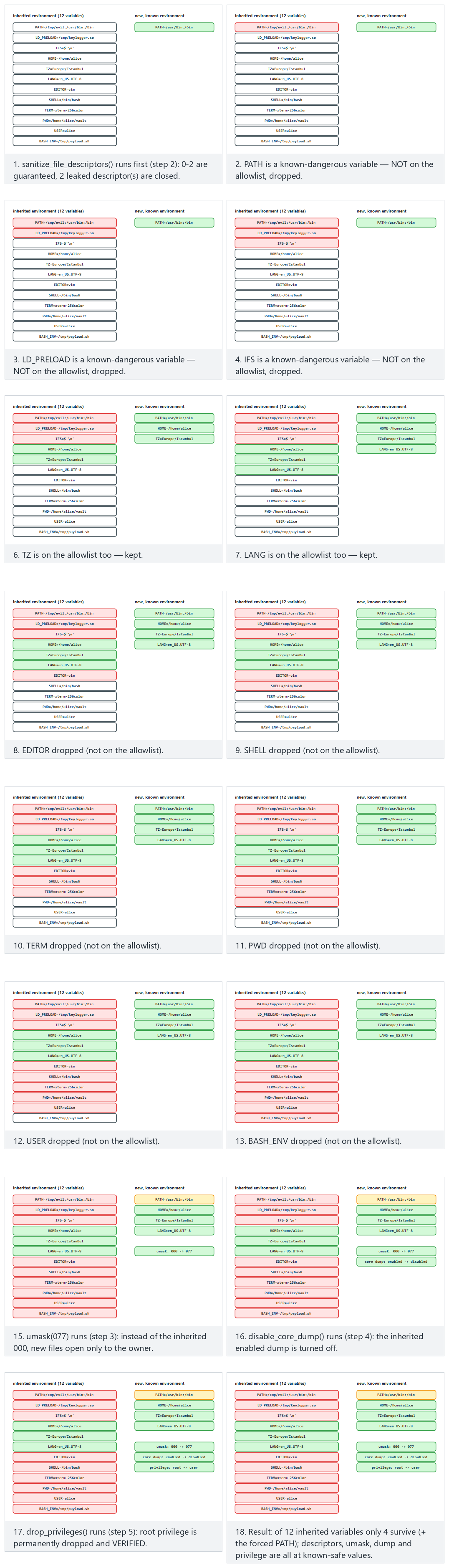
Try the workstation, server examples and the two edge cases (nothing dangerous / everything dangerous) in the picker; use 🎲 to sanitise your own inherited environment.
How does an evaluator test this?
They start the program with standard output closed, with a poisoned PATH and LD_PRELOAD, with umask 000; they trigger a crash and look for a dump file; for setuid programs they check whether privilege was really dropped by reading the Uid: line in /proc/<pid>/status. On Windows they drop a fake DLL into the app's folder and the working directory and see whether it gets loaded.
How is this applied in the field?
In mobile payment libraries, the native layer checks whether the LD_PRELOAD variable is set; it even writes a random variable with setenv and reads it back with getenv to detect whether the getenv function itself has been hooked. If the value doesn't match, someone is intercepting and altering the call. This is the point where secure start-up turns into "runtime self-protection" (week 6).
12. Secrets left in memory¶
What happens to a password after you use it? The variable goes out of scope, but the memory is not erased; those bytes sit there until something else is written over them. If an attacker can see that memory, they read the secret. There are more situations where memory can be seen than you might think:
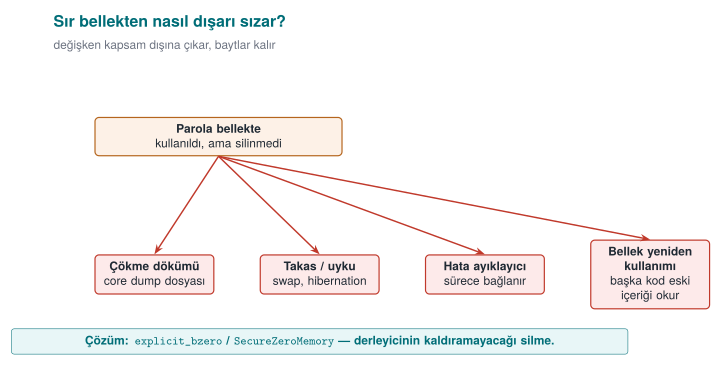
- The crash dump (core dump) file created when the program crashes,
- The swap area and the hibernation file, where the operating system writes memory to disk,
- A debugger attaching to the process,
- Another piece of code that later reuses the same memory reading its old contents.
Demo 2 — The password left in memory¶
Demo 2 · code/week-01/02-password-in-memory · CWE-14 (compiler removal of code to clear buffers), CWE-316
The program reads the password from password.txt, computes a key with it, then tries to erase the password. The demo dumps the program's memory to a file and searches it for the password: on Linux with gdb's gcore command, on Windows by having the program write its own memory with MiniDumpWriteDump. There are three versions: one that never erases, one that erases with memset, and one that erases with explicit_bzero / SecureZeroMemory.
unsigned long log_in(const char *file)
{
    char password[64];
    /* low-level read: the password lives only in this array */
    int fd = file_open(file);
    int n = (int)file_read(fd, password, sizeof(password) - 1);
    ...
    unsigned long key = derive_key(password, (size_t)n);

#if WIPE == 1
    memset(password, 0, sizeof(password));         /* "dead store" */
#elif WIPE == 2
  #ifdef _WIN32
    SecureZeroMemory(password, sizeof(password));  /* cannot be removed */
  #else
    explicit_bzero(password, sizeof(password));    /* cannot be removed */
  #endif
#endif
    return key;
}
STEP 1 - Version that never wipes the password
  RESULT: password FOUND in the dump in 1 place(s)  ->  Secret-Password-2026

STEP 2 - Version that wipes with memset (-O2)
  RESULT: password FOUND in the dump in 1 place(s)  ->  Secret-Password-2026

STEP 3 - Version that wipes with explicit_bzero (-O2)
  RESULT: password not found in the dump

Why? machine code of the log_in() function:
  number of wipe instructions in the memset version    ->  0
  explicit_bzero calls in the explicit version         ->  1
The second step is surprising: the code plainly writes memset, yet the password is still in memory! The reason is the compiler's optimisation. The compiler reasons like this: "the password array is never read after this line; writing zeros into it has no effect on the program's result. So this write is redundant, I can remove it." This is called dead store elimination. This optimisation, which speeds up ordinary programs, leaves a secret sitting in memory in security code. This isn't unique to GCC either: MSVC with /O2 on Windows produces the same result. See for yourself: on Linux, search for log_in with objdump -d bin/linux/password_memset | less; in Visual Studio, put a breakpoint on log_in and open Debug > Windows > Disassembly. There isn't a single instruction belonging to memset.
The animation below shows the same 64-byte password[] array under all three WIPE modes: written byte by byte, then wiped (or not) — what is left in a dump afterward?
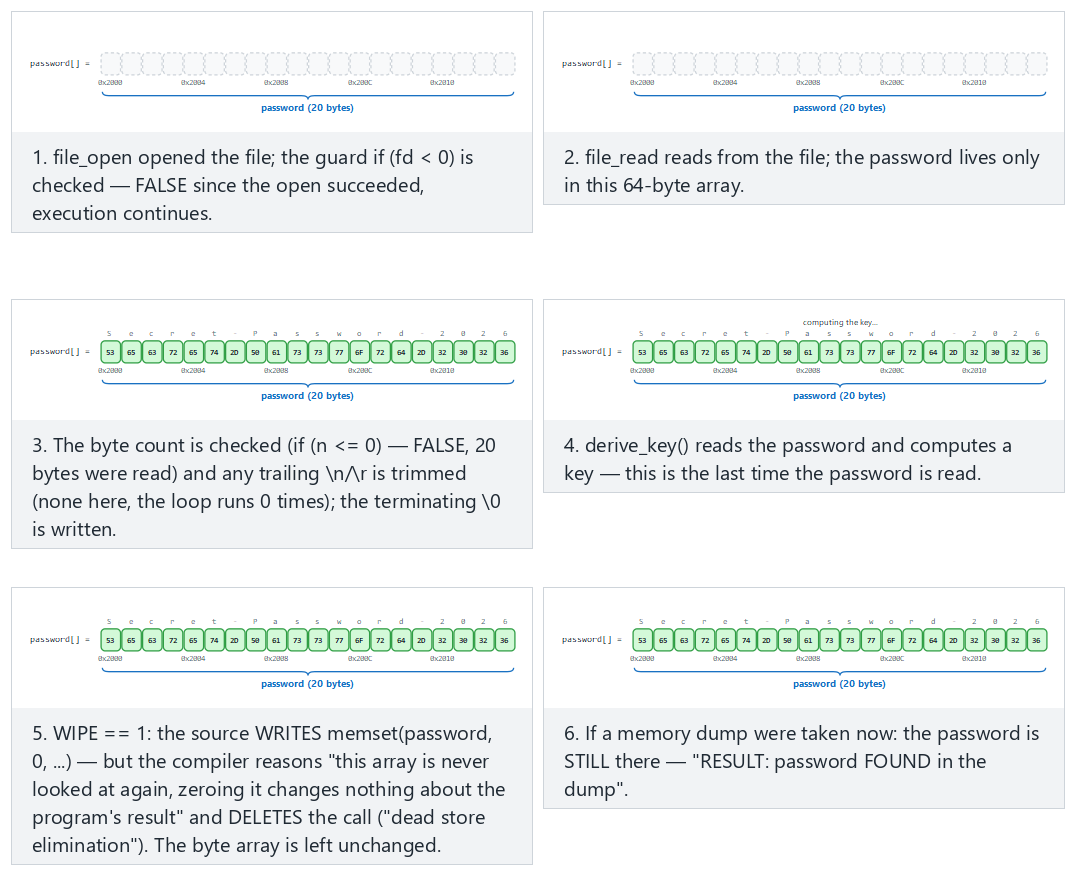
Try the memset-surprise (WIPE=1, the surprising result), never-wipes (WIPE=0) and explicit-bzero-fix (WIPE=2, the real fix) examples in the picker.
Rule
To erase secrets, use functions the compiler cannot remove: explicit_bzero on Linux/glibc, SecureZeroMemory on Windows, memset_s on compilers that support C11 Annex K, OPENSSL_cleanse in OpenSSL. Extra layers: disabling crash dumps (setrlimit(RLIMIT_CORE, 0)), preventing memory from being written to disk (mlock), keeping the secret for the shortest time possible, and not multiplying copies of it.
How is this applied in the field?
In software that needs high security, such as mobile payment, the one-time payment key is only decrypted at the moment of payment, and only in the native layer; right after use, the buffer is erased by overwriting it with random data. On the Java side, sensitive data is kept in erasable byte[] arrays instead of the unerasable String. An independent evaluator tests this by dumping memory during and after the payment and searching for the key — exactly what we did in Demo 2.
13. Process memory: where does your data live?¶
To understand overflow bugs, we first need to know how a program's memory is laid out. A process running on Linux has virtual memory laid out roughly like this:
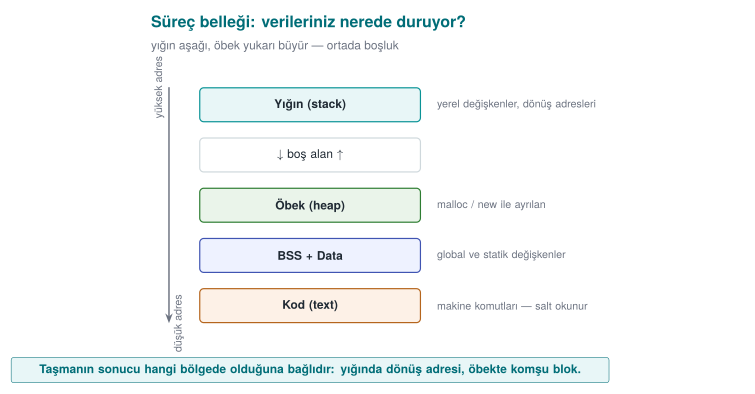
When a function is called, a stack frame is allocated for it on the stack. Local variables sit side by side in this frame. C does not check when the end of an array is reached: if you write a 17th byte into an ad[16] array, C does not stop you, and that byte overwrites whatever comes right after it in memory.
Let's look at the structure from Demo 3:
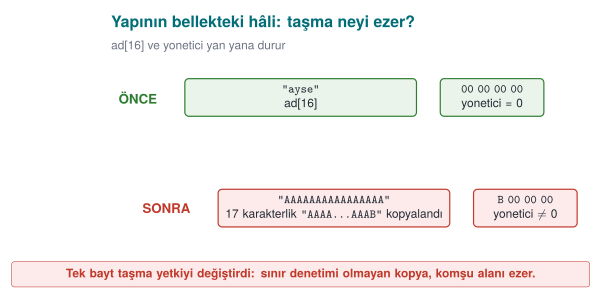
x86-64 processors are little-endian: an integer's least significant byte sits at the lowest address. That's why writing 'B' (0x42) into the first byte of admin turns the integer into 66 — and any non-zero value means "administrator."
struct session is just one instance on the stack — the full picture is bigger. The animation below sorts 10-16 realistic declarations (global, static, local, malloc, a string constant, a function) into the five regions (text/data/bss/heap/stack), showing that it is the declaration, not the type, that decides the region.
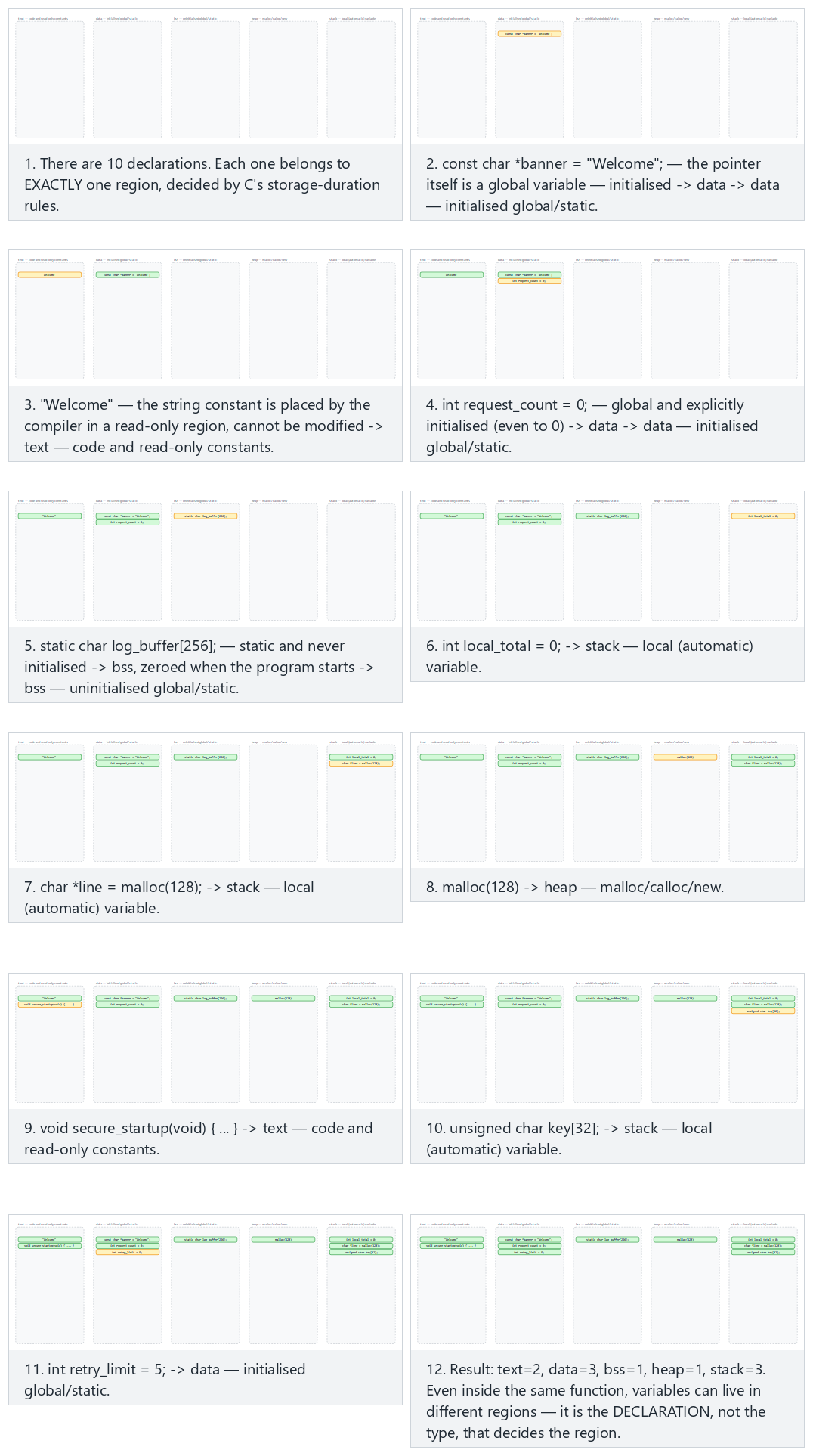
Try the core-ten, extended-sixteen (all 5 regions) examples and the two edge cases (everything on the stack / everything on the heap) in the picker.
14. Buffer overflows: how they happen, how to prevent them¶
In the previous section we saw the regions of a process's memory. Now let's meet the oldest, and still the most common, bug in that memory. A buffer overflow is when a program writes more data into an array than the space allocated for it. The overflowing bytes don't vanish; they get written into the memory right next to the array — that is, on top of other variables. "Out-of-bounds write" (CWE-787) has sat near the top of the CWE Top 25 list for years.
Why does C overflow so easily?¶
In languages like Java, C#, and Python, when you try to write past the end of an array, the runtime stops you (ArrayIndexOutOfBoundsException). In C and C++, however:
- An array is nothing more than consecutive bytes in memory; it does not know its own size.
- When you pass an array to a function, only its starting address goes along (
char *); the size information is lost. - Strings are not a separate type; they are a
chararray marked at the end with a'\0'byte. Functions likestrcpy,strcat, andsprintfcopy the source until they see the zero byte; they never ask how much room the destination has. - The compiler adds no bounds checking, so as not to give up speed.
The result: checking the bound is entirely the programmer's responsibility. Forget it once, and the bug is there.
A stack overflow, step by step¶
The function below copies a username into a small local array:
void greet_user(const char *name)
{
    int  authorized = 0;
    char buffer[16];

    strcpy(buffer, name);          /* what if name is longer than 16 bytes? */
    printf("Hello %s\n", buffer);
    if (authorized) { /* ... */ }
}
When the function is called, a stack frame is created for it. Inside that frame sit the local variables, the address of the previous frame, and the return address that says where to go once the function ends. A simplified view (lowest address at the top; the real layout varies by compiler):
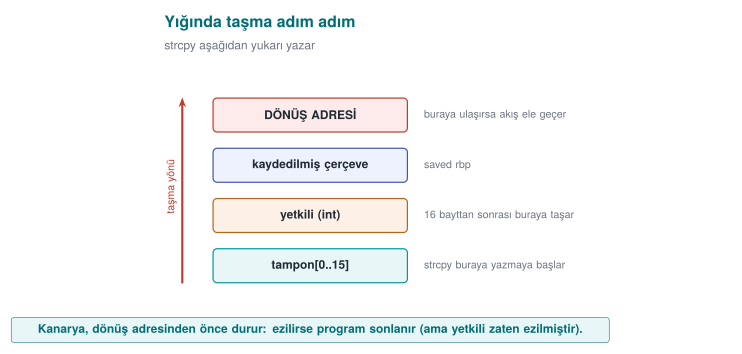
There are three cases:
| Input length | What happens? | Result |
|---|---|---|
| ≤ 15 characters | Everything fits in the buffer | The program works correctly |
| A little more | The overflowing bytes write over authorized; authorized is no longer 0 | The logic breaks: an unauthorized user is treated as authorized (Demo 3) |
| A lot more | The return address is corrupted; once the function ends, the processor jumps to a meaningless address | The program crashes (denial of service); on an unprotected system, control flow can be hijacked |
The last part of the third row is what makes an overflow this dangerous: whoever controls the return address controls which code the program runs next. This was the entry point for most outbreaks from the Morris worm in 1988 to Slammer in 2003 (week 2). Today's operating systems and compilers add protections that make this path much harder (below), but the bug itself is still in your code, and the protections don't close every case. In this course we care about how the bug happens, is found, and is prevented — not about how to exploit it.
1996 — the article that wrote it down
How a stack overflow hijacks the return address was first explained this clearly in Aleph One's "Smashing the Stack for Fun and Profit" (Phrack magazine, issue 49, 1996). It is still one of the most-cited sources on the topic today; the animation below shows the same idea (stack frame, saved frame pointer, return address) step by step.
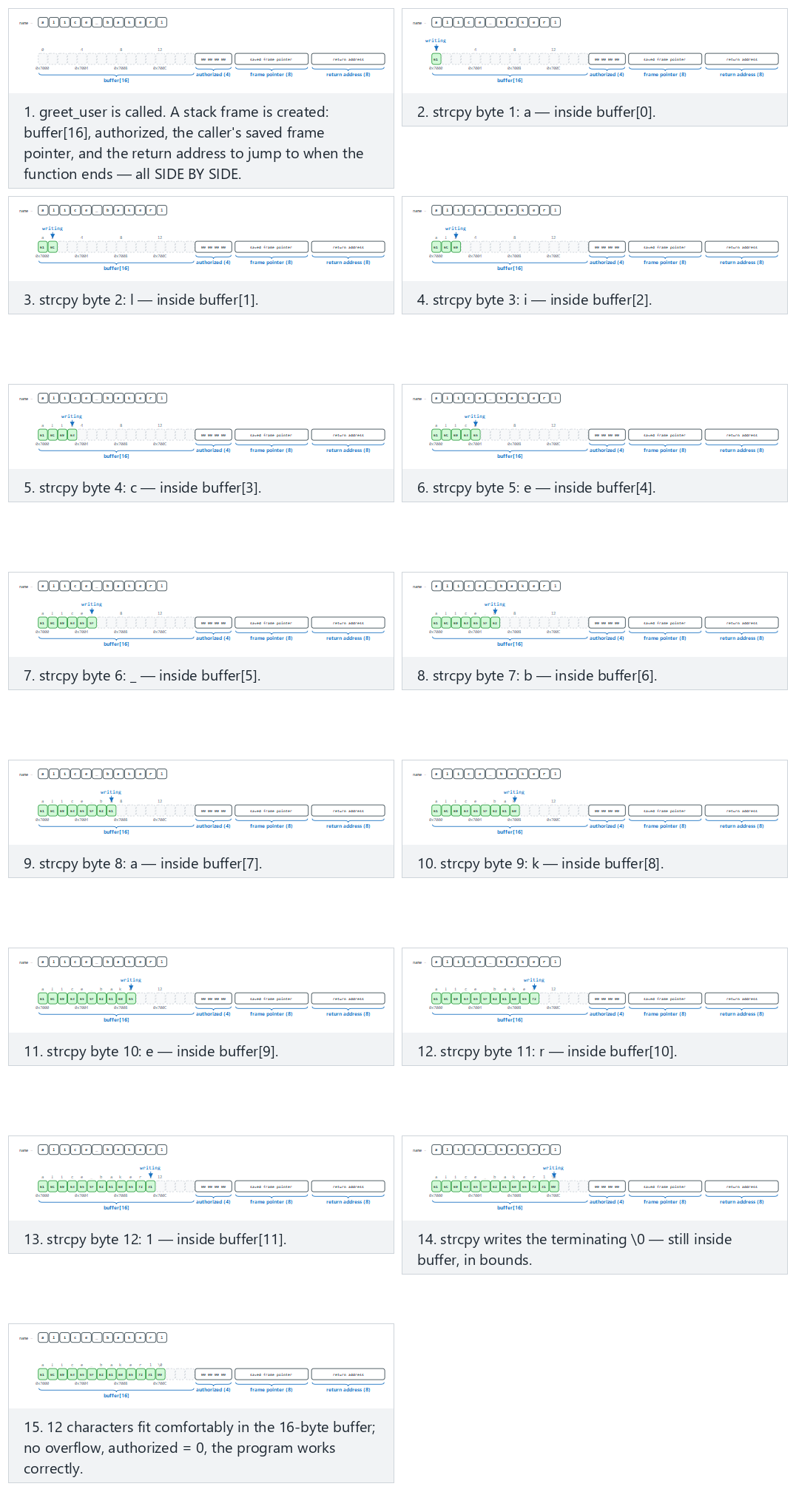
Try the Fits, authorized-flip, frame-corrupt and return-corrupt examples in the picker; the 🎲 button also generates a random name so you can watch your own overflow.
Types of overflow¶
| Type | Where? | Typical cause | CWE |
|---|---|---|---|
| Stack overflow | A local array | strcpy, gets, unbounded scanf("%s") | CWE-121 |
| Heap overflow | A block allocated with malloc | A memcpy with a miscalculated length; heap management metadata is corrupted | CWE-122 |
| Off-by-one | Any array | <= instead of <; forgetting to reserve room for the '\0' terminator | CWE-193 |
| Out-of-bounds read | Any array | Trusting a length the other party reports | CWE-125 |
| Integer-driven | Any array | n * size overflows, a small block is allocated, then a large copy is made into it | CWE-190 → 787 |
An out-of-bounds read is as dangerous as a write: Heartbleed (2014)
In OpenSSL's "heartbeat" extension, the client sent a message and that message's length; the server sent the message back as-is. The server never checked whether the declared length was really the length of the message it received. When the client sent a 1-byte message but said "64 KB," the server sent back 64 KB from its own memory — which could contain other users' passwords, session data, even the server's private key (CVE-2014-0160). Nothing was written, nothing crashed; it was only read. The fix was a single check: "if the declared length is bigger than the received record's length, drop the message."
Off-by-one: the most innocent-looking overflow¶
char name[8];
for (int i = 0; i <= 8; i++)     /* runs 9 times: name[8] is out of bounds */
    name[i] = source[i];
char name[8];
strncpy(name, source, sizeof name);  /* if source >= 8, name does NOT end with '\0' */
printf("%s\n", name);                 /* printf keeps reading past the end of the array */
strncpy's name is misleading: it is not a safe strcpy. If the source is longer than the destination it does not add a terminator; if it's shorter, it needlessly pads the rest of the destination with zeros. Even a single-byte overflow is enough to change the low byte of an adjacent variable, or a saved frame address.
Dangerous functions and what to use instead¶
| Dangerous | Problem | Instead | Note |
|---|---|---|---|
gets(s) | Never knows the bound | fgets(s, sizeof s, stdin) | Removed from the standard in C11 |
strcpy(d, s) | No target size | Check the length first, then memcpy; or snprintf(d, sizeof d, "%s", s) | strlcpy on glibc 2.38+ and the BSDs |
strcat(d, s) | No target size | Compute the remaining room; concatenate with snprintf | strlcat |
sprintf(d, ...) | Output length unknown | snprintf(d, sizeof d, ...) and check the return value | If the return is ≥ size, it means truncation |
scanf("%s", s) | Unbounded read | scanf("%15s", s) (size − 1) or fgets | |
strncpy(d, s, n) | No '\0' guarantee | snprintf or strlcpy | |
memcpy(d, s, n) | If n is not validated | Check n ≤ target size first | Most common bug: n comes from outside |
alloca(n), VLA char a[n] | A large n overruns the stack | A fixed upper bound, or malloc |
The modern equivalent of Recipes 3.3 and 3.4
The book recommends handing string operations off to a bounds-checked library (SafeStr) to prevent overflows. The idea still holds today, the tools have changed: snprintf and strlcpy in C, the strcpy_s/strcat_s family from C11 Annex K on the Microsoft compiler (glibc does not support this family), and std::string, std::vector, std::array::at(), and std::span in C++. Microsoft's secure development process uses a "banned functions" header file that marks dangerous functions as a build error; you can use the same method in your project.
The right pattern: validate first, then copy with a bound¶
#include <stdio.h>
#include <string.h>

int greet_user(const char *name)
{
    char buffer[16];
    size_t n = strnlen(name, sizeof buffer);

    if (n == sizeof buffer)            /* longer than 15 characters: reject, do not silently truncate */
        return -1;

    memcpy(buffer, name, n);
    buffer[n] = '\0';
    printf("Hello %s\n", buffer);
    return 0;
}
This pattern makes three decisions:
- With
strnlen, the length is measured over at most the buffer size in bytes; even if the source never terminates, the read never goes past the bound. - Long input is rejected. Silently truncating is sometimes correct (e.g. a title to be displayed on screen), but when a credential, a file path, or a command is truncated, its meaning can change:
/home/ayse/gizli_rapor.txttruncated can become/home/ayse/gizli. From a security standpoint, rejecting ambiguous input is safer. - The terminator is written explicitly, in every case.
In C++, the language does the same job for you:
#include <string>
#include <iostream>

void greet_user(const std::string &name)
{
    if (name.size() > 15) throw std::invalid_argument("name too long");
    std::string buffer = name;                 /* manages its own memory */
    std::cout << "Hello " << buffer << '\n';
}
C++ doesn't always protect you either
std::vector::operator[] does not check bounds; at() does. If you take the pointer from std::string::c_str(), hand it to a C function, and write to it there, all of C's problems come right back. Using a safe type does not exempt you from thinking about bounds.
Who catches the overflow? Layers of defence¶
Defence against overflows is layered too. The innermost layer is correct code; the outer layers limit the damage when a bug slips through:
| Layer | Tool | What it does | When? |
|---|---|---|---|
| Code | Bounds checking, safe API | Never lets the overflow happen at all | Always |
| Compiler warning | -Wall -Wextra -Wformat-security, MSVC /W4 /sdl | Flags suspicious calls at compile time | Development |
| Static analysis | clang --analyze, cppcheck, MSVC /analyze | Looks for possible overflows without running the code | Development, CI |
| Sanitizer | AddressSanitizer (-fsanitize=address, MSVC /fsanitize=address) | Checks every memory access; stops the program at the first overflow and says where | Testing |
| Fuzzing | libFuzzer, AFL++ | Feeds the program millions of random inputs | Testing (week 4) |
| Compiler protection | Stack canary (-fstack-protector-strong, MSVC /GS), _FORTIFY_SOURCE | Places a "canary" in front of the return address; terminates the program if it's corrupted | Release |
| Operating system | DEP/NX, ASLR | Blocks running code in a data region; changes addresses on every run | Release |
| Hardware | Shadow stack (Intel CET, ARM PAC) | Keeps a separate, protected copy of the return address | Release (newer processors) |
We will examine each of these protections in week 4 by turning them on and off one at a time. This week keep this idea in mind: a protection makes exploitation harder; it does not fix the bug. When the canary is corrupted, it terminates the program — meaning the attacker can still crash the program even if they can't hijack control flow. That, too, is a denial of service.
Catching an overflow with AddressSanitizer¶
If you compile the buggy greet_user function above with the sanitizer turned on and call it with a 20-character name, the overflow is caught before the program's logic is even corrupted. The output looks like this (abridged; addresses change on every run). You will produce a report of the same kind yourself with Demo 3's login_asan target:
==12345==ERROR: AddressSanitizer: stack-buffer-overflow on address 0x7ffd...
WRITE of size 21 at 0x7ffd... thread T0
    #0 in strcpy
    #1 in greet_user  example.c:7
    #2 in main         example.c:15
Address 0x7ffd... is located in stack of thread T0 at offset 48 in frame
    #0 in greet_user  example.c:3
  This frame has 1 object(s):
    [32, 48) 'buffer' <== Memory access at offset 48 overflows this variable
Read it in this order: what happened (a stack overflow, a 21-byte write), where it happened (example.c line 7, strcpy), which variable (buffer, 16 bytes: the 32–48 range; the access is at 48, i.e. it starts exactly one byte past the bound). The sanitizer slows the program down roughly twofold and increases memory use; that's why it is used in test builds, not in release builds.
How does an evaluator test this?
In source code review they first search for dangerous functions (grep -nE "strcpy|strcat|sprintf|gets|scanf"), then check whether every externally supplied length field is validated before use. In dynamic testing they feed every input an overly long value, a zero length, a negative length, and data shorter than what the field declares; they run the program under a sanitizer and do fuzzing. On the binary they check whether the stack canary, NX, and ASLR are turned on (checksec on Linux, dumpbin /headers on Windows).
How is this applied in the field?
In security-sensitive native libraries, the rules of defensive programming are written down at the very start of the guide: every input and output is validated, no data crosses an interface in the clear, assets are kept in memory for the shortest time possible, and memory is wiped with a secure erase function. Some teams use their own versions of standard functions like memcpy, memset, strcmp instead of the originals. There are two reasons for this: to make it harder for an attacker to hook these well-known functions and read data in transit, and to bring the code of these functions itself inside the scope of integrity checking (week 6).
15. Demo 3 — Privilege escalation via buffer overflow¶
Demo 3 · code/week-01/03-overflow-input · CWE-121 (stack-based overflow), CWE-787 (out-of-bounds write)
struct session s;
s.admin = 0;

strcpy(s.name, argv[1]);  /* BUG: the 16-byte destination size is never checked */

if (s.admin)
    printf(">>> Access granted to the ADMIN panel! <<<\n");
The demo compiles the same buggy code in four different ways and tries the same attack:
| Version | Linux / WSL (GCC) | Windows (MSVC) | What do we expect to see? |
|---|---|---|---|
login | -O0, no protection | /Od | The attack succeeds |
login_asan | -fsanitize=address | /fsanitize=address | Does AddressSanitizer catch it? |
login_checked | -O2 -D_FORTIFY_SOURCE=2 | /O2 + strcpy_s | Does the library's size check catch it? |
login_secure | Fixed code | Fixed code | The input is rejected |
STEP 1 - Normal login
$ ./bin/linux/login alice
Welcome, alice
admin field = 0 (0x00000000)
Normal user session.

STEP 2 - Attack: a name 1 byte longer than the 16-byte field (17 characters)
$ ./bin/linux/login AAAAAAAAAAAAAAAAB
Welcome, AAAAAAAAAAAAAAAAB
admin field = 66 (0x00000042)
>>> Access granted to the ADMIN panel! <<<

STEP 3 - Same attack, in the AddressSanitizer build
$ ./bin/linux/login_asan AAAAAAAAAAAAAAAAB
Welcome, AAAAAAAAAAAAAAAAB
admin field = 66 (0x00000042)
>>> Access granted to the ADMIN panel! <<<
   ^ ASan stayed silent: the overflow stayed INSIDE the struct.

STEP 4 - A long name that overflows past the struct, ASan version
==1784==ERROR: AddressSanitizer: stack-buffer-overflow on address 0x7fffffffe864 ...
WRITE of size 41 at 0x7fffffffe864 thread T0

STEP 5 - Same short attack, in the build compiled with _FORTIFY_SOURCE=2
$ ./bin/linux/login_checked AAAAAAAAAAAAAAAAB
*** buffer overflow detected ***: terminated
   (the program was stopped by the check the compiler added)

STEP 6 - The fixed version
$ ./bin/linux/login_secure AAAAAAAAAAAAAAAAB
Rejected: the name must be 1-15 characters; only letters, digits, _ and - are allowed.
The flow is the same on Windows. Only in step 5, strcpy_s knows the target is 16 bytes, so it sees the overflow and stops the program:
> .\bin\windows\login_checked.exe AAAAAAAAAAAAAAAAB
*** Secure library function detected an overrun: program terminated ***
   (exit code: 3)
Three lessons come out of this demo:
- A single byte of overflow is enough. The attacker doesn't need to crash the program; changing a single flag can be enough to escalate privilege.
- Tools have limits. AddressSanitizer places a "forbidden zone" around every object in memory; but because the overflow stayed inside the same struct (
name→admin), it didn't catch it. It caught it immediately once the overflow went outside the struct._FORTIFY_SOURCE(Linux) andstrcpy_s(Windows), on the other hand, knew the target (s.name) was 16 bytes, so they caught the short overflow too. Don't rely on a single tool. - The real fix lives in the code. Tools find the bug; fixing it is the programmer's job.
Watch the animation below to see, byte by byte and with a program counter, how strcpy copies argv[1] into struct session's memory.
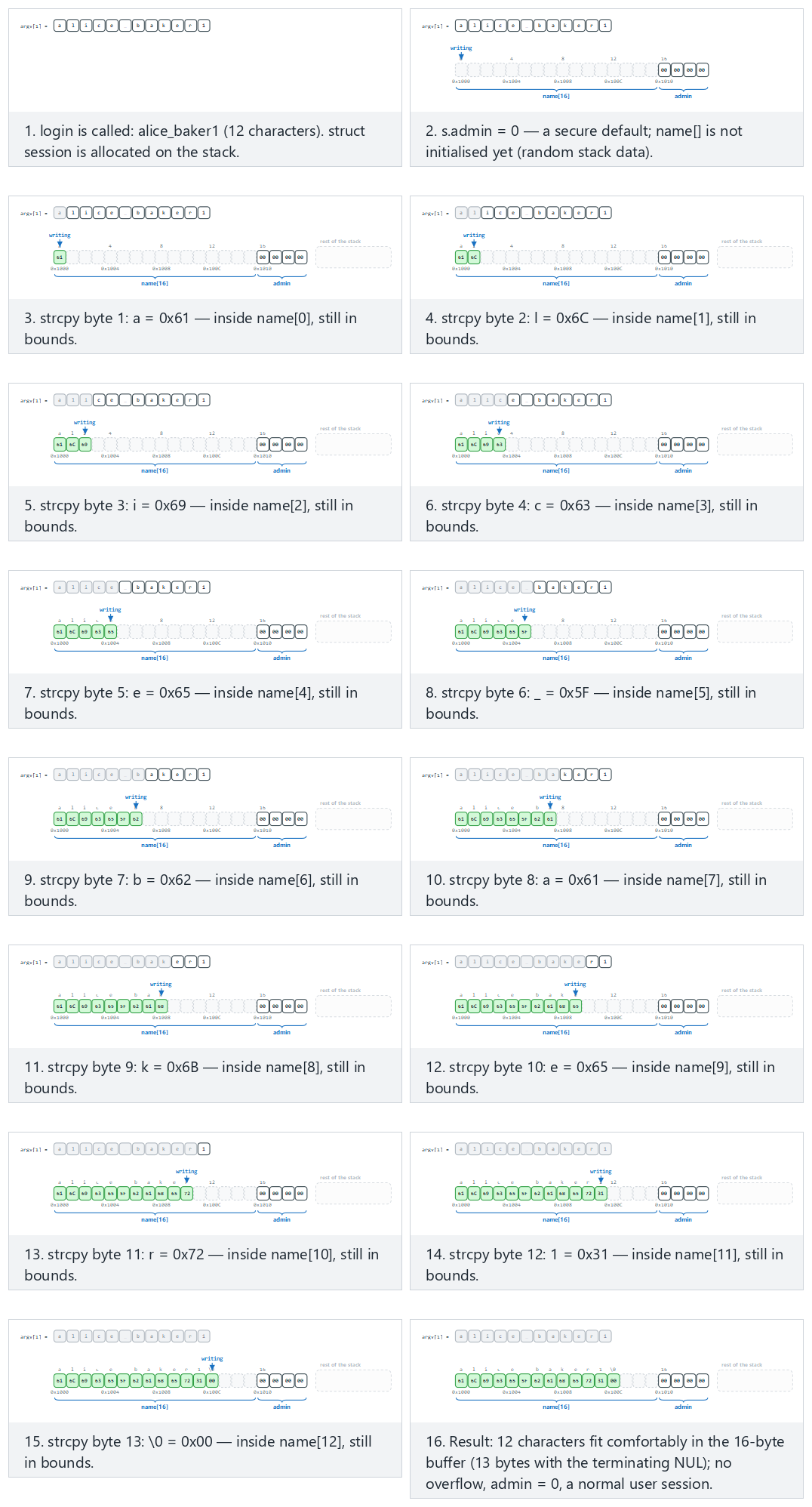
In the picker, try a name that fits (normal), a 17-byte overflow: sets admin (hard), and the edge cases exactly 16 bytes: the terminating NUL spills, 40 bytes: runs past the struct (ASan), and the secure version rejects it — or press 🎲 for a random username, or type your own (start it with SECURE to run the secure build).
/* Allow-list: 1-15 characters; letters, digits, '_' and '-' */
static int name_is_valid(const char *s)
{
    size_t n = strnlen(s, 16);
    if (n == 0 || n >= 16)
        return 0;
    for (size_t i = 0; i < n; i++) {
        unsigned char c = (unsigned char)s[i];
        if (!isalnum(c) && c != '_' && c != '-')
            return 0;
    }
    return 1;
}
...
if (!name_is_valid(argv[1])) { /* reject */ }
struct session s = { .admin = 0 };            /* secure default */
snprintf(s.name, sizeof(s.name), "%s", argv[1]);  /* a copy that knows the size */
What happens in real attacks?
Here, the overflowing bytes changed a flag. The function's return address also sits on the stack, right after the local variables; if the overflow reaches that far, the attacker can redirect the program's control flow. Modern systems take layered countermeasures against this: the stack canary (a secret value placed before the return address that gets corrupted by an overflow), DEP/NX (forbids executing data on the stack as code), and ASLR (changes addresses on every run). We'll cover these in detail in week 4; what matters here is knowing that they don't fix the bug, they only make exploitation harder.
16. Integers and the signed-length bug¶
In C, int is signed, while size_t is unsigned. Computers store negative numbers in two's complement: the 64-bit representation of -1 is 0xFFFFFFFFFFFFFFFF. Read as unsigned, that same bit pattern is 18,446,744,073,709,551,615. Functions like memcpy, malloc, and read take a size_t for their size parameter; so the moment a negative int is passed to them, it turns into a gigantic number.
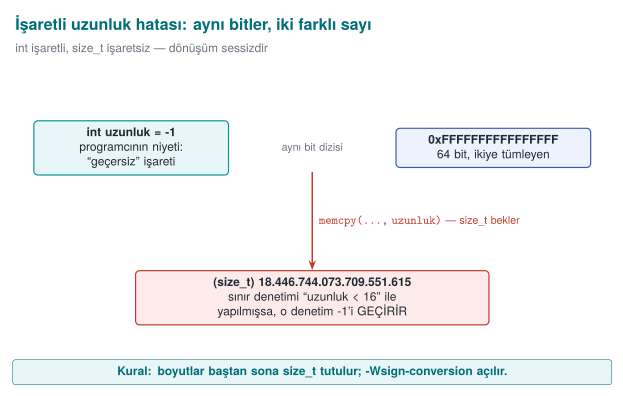
Demo 4 — The signed-length bug¶
Demo 4 · code/week-01/04-signed-length · CWE-195 (signed-to-unsigned conversion error)
#define RECORD_SIZE 16

static int copy_record(char *dest, const char *source, int length)
{
    /* BUG: the lower bound (a negative value) is never checked */
    if (length > RECORD_SIZE)
        return -1;
    memcpy(dest, source, length);   /* int -> size_t: -1 -> 2^64 - 1 */
    return 0;
}
STEP 0 - Does the compiler see this bug?
$ gcc -Wall -Wextra -fsyntax-only -I../../common copy.c
   -> No warning: -Wall -Wextra never reports this conversion.
$ gcc -Wsign-conversion -fsyntax-only -I../../common copy.c
copy.c:21:26: warning: conversion to 'size_t' {aka 'long unsigned int'} from 'int'
              may change the sign of the result [-Wsign-conversion]

STEP 1 - Normal use
$ ./bin/linux/copy 8
Copied: SAMPLE-R

STEP 2 - A length that's too large: the check catches it
$ ./bin/linux/copy 100
Rejected: length is too large.

STEP 3 - Attack: a negative length slips past the check
$ ./bin/linux/copy -1
Segmentation fault
   (exit code: 139 -- 139 = memory error, SIGSEGV)

STEP 4 - Same attack, with AddressSanitizer
==1821==ERROR: AddressSanitizer: negative-size-param: (size=-1)

STEP 5 - The fixed version
$ ./bin/linux/copy_secure -1 ; ./bin/linux/copy_secure 12abc ; ./bin/linux/copy_secure 8
Rejected: length must be an integer between 0 and 16.
Rejected: length must be an integer between 0 and 16.
Copied (8 bytes): SAMPLE-R
On Windows you see two differences. In step 3 the program ends with code 0xC0000409: Windows notices the stack is corrupted and terminates the process immediately. In step 0, MSVC's C compiler gives no warning at all, even with /Wall; the same code compiled as C++ does produce a warning:
> cl /Zs /W4 copy.c                  (compile as C)
   -> No warning: MSVC's C compiler never reports this conversion, even with /Wall.
> cl /Zs /W4 /w44365 /TP copy.c      (same code, as C++)
copy.c(21): warning C4365: 'argument': conversion from 'int' to 'size_t', signed/unsigned mismatch
The check asks "is length > 16?"; -1 answers "no" to that question, so it gets through. A length field in a packet coming over the network, a record size in a file header — any number the attacker controls can lead to this bug. The compiler could have warned us, but only if we asked: -Wsign-conversion is not in GCC's default warnings, and MSVC's C compiler doesn't have it at all. Knowing which warnings are on, and reading them, is a free security tool; a tool's silence does not mean the code is correct.
The animation below calls the real copy_record in sequence with 10-16 different length values, and shows exactly which huge number every negative one turns into as a size_t.
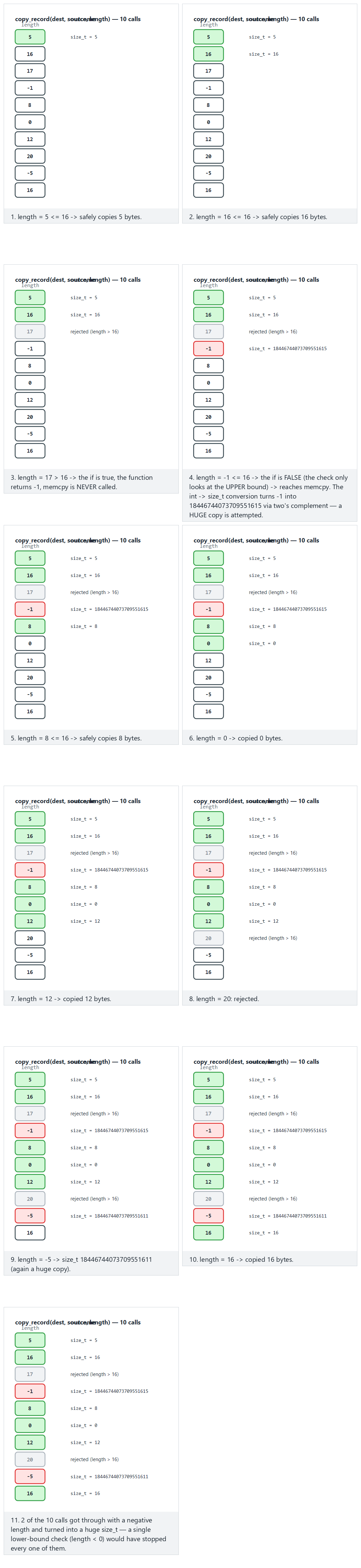
Try the typical-sweep, wide-sweep, edge-all-negative (all get through!) and edge-boundary examples in the picker; use 🎲 to run your own length sweep.
static int read_length(const char *text, size_t *result)
{
    char *end;
    errno = 0;
    long value = strtol(text, &end, 10);
    if (errno != 0 || end == text || *end != '\0')
        return -1;                       /* not a number, or it overflowed */
    if (value < 0 || value > RECORD_SIZE)
        return -1;                       /* out of range */
    *result = (size_t)value;
    return 0;
}
Rule
Keep sizes and lengths in size_t from the start. Validate every externally supplied number against both a lower and an upper bound. Use strtol, which reports errors, instead of atoi. Compile with -Wall -Wextra -Wconversion -Wsign-conversion turned on.
We will go deeper into this wider family of integer bugs — overflow, sign conversion, boundary values — in week 4's undefined-behaviour section.
17. Memory management and security¶
A buffer overflow happens when we forget how much we're writing. The bugs in this section happen when we forget who owns a piece of memory and how long it stays valid. In C and C++, memory allocated from the heap lives until the programmer frees it; the language does not track this lifetime for you.
The four lifetimes of memory¶
| Lifetime | How is it created? | When does it end? | Typical bug |
|---|---|---|---|
| Static | A global variable, a static local variable | When the program ends | Multiple threads writing to it at the same time |
| Automatic | A local variable inside a function | When the function returns | Returning the address of a local variable |
| Dynamic | malloc/calloc/new | When free/delete is called | Leak, double free, use-after-free |
| Thread-local | _Thread_local / thread_local | When the thread ends | — |
The lifecycle of dynamic memory has four steps: allocate → validate → use → free. A distinct class of bug lives at each step.
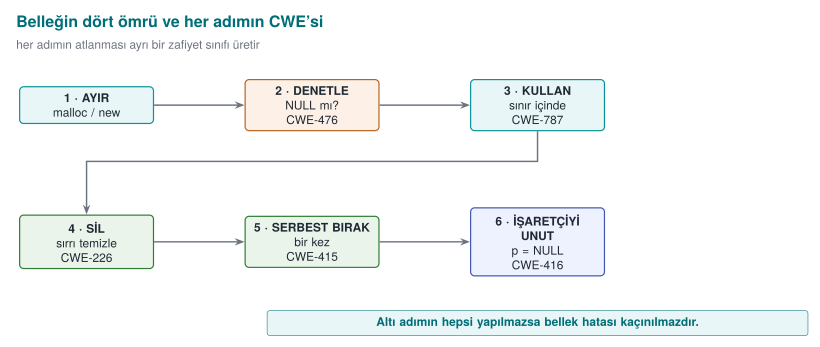
Classes of error¶
| Error | What happens? | Security consequence | CWE |
|---|---|---|---|
| Memory leak | Allocated memory is never freed | A long-running server runs out of memory → denial of service; secrets stay in memory longer than they should | 401 |
| Double free | The same block is freed twice | The memory manager's internal lists get corrupted; the next two malloc calls can hand the same block to two different objects | 415 |
| Use-after-free (UAF) | A freed block is accessed through a stale pointer | If the block has been handed to another object, the stale pointer reads or modifies someone else's data | 416 |
| Uninitialized read | A value is read before it's assigned | A previous user's data (e.g. a password) leaks; behaviour becomes unpredictable | 457, 908 |
| No NULL check | malloc fails, the result is not checked | A crash; on some systems, a write to a low address | 476 |
| Mismatch | Something allocated with new[] is freed with delete, something allocated with malloc is freed with delete | Undefined behaviour; the memory manager gets corrupted | 762 |
| Size-calculation overflow | n * sizeof(T) overflows | A small block is allocated, a large write follows → heap overflow | 190, 131 |
| Secret not erased | A freed block is not zeroed | The block gets handed to other code by the next malloc; the secret inside it can be read | 226, 244 |
Use-after-free: why is it so dangerous?¶
typedef struct { char name[32]; int privilege; } User;

User *active = malloc(sizeof *active);
User *cached = active;                /* a second owner */
/* ... */
free(active);                         /* session closed */
active = NULL;                        /* active is safe, but cached still holds the old address */

char *note = malloc(sizeof(User));    /* the allocator may hand back the very same block */
strcpy(note, "....");                 /* writing the note */

if (cached->privilege) { /* ... */ }  /* UAF: this now reads 'note's bytes */
free does not return memory to the operating system; it puts it on the memory manager's "free" list. The next malloc of the same size will most likely get the same block back. The stale pointer (cached) is now pointing at a completely different object. The program's logic reads bytes that were written for some other purpose as "the user's privilege." This is why UAF bugs are one of the largest classes of browser and operating system vulnerabilities.
The aktif = NULL; line in the example is a good habit, but it only protects that one pointer. The real problem is that more than one pointer claims ownership of the same block. The solution is an ownership rule:
The ownership rule
Every dynamic block has exactly one owner, and only that owner frees it. Other code borrows the block and never stores it anywhere that will outlive the owner. If ownership passes from one function to another, that is written explicitly in the function's name and documentation (e.g. ..._al() (take) takes over ownership, ..._goster() (show) only borrows it).
We will exploit a UAF step by step in C/C++ and catch it with AddressSanitizer in week 4.
The animation below applies the active/cached/note pattern to 10 small sessions; each one turns out clean, a leak, a double free, or a UAF — can you tell which is which?

Try the mixed-ten, mostly-broken examples and the two edge cases (all UAF / all clean) in the picker.
Fixed versions of the other errors¶
/* Wrong: if n is large, n * sizeof(Record) overflows and a too-small block is allocated */
Record *k = malloc(n * sizeof(Record));

/* Right 1: calloc checks the size multiplication for overflow and zeroes the memory */
Record *k = calloc(n, sizeof(Record));
if (k == NULL) return ERR_MEMORY;

/* Right 2: reallocarray for resizing (glibc 2.26+, BSD) */
Record *resized = reallocarray(k, n2, sizeof(Record));
if (resized == NULL) { free(k); return ERR_MEMORY; }   /* do not lose k */
k = resized;
/* Wrong: if realloc fails it returns NULL and the old block is still allocated;
   we just overwrote the only pointer to it -> leak */
buffer = realloc(buffer, new_size);
realloc has a second hidden problem: if the block moves, the old block is freed but not zeroed. If it held a secret, the old copy sits somewhere in memory forever. Don't use realloc for buffers that hold secrets; allocate a new block, copy into it, and erase the old one before freeing it.
Erasing secrets from memory (Recipe 13.2)¶
Demo 2, in the "Secrets left in memory" section, showed that the compiler can see the line memset(parola, 0, ...) as "a write to somewhere that's never read afterward" (a dead store) and remove it entirely. To prevent this, functions the compiler will not remove are used:
| Platform | Function | Note |
|---|---|---|
| Linux (glibc 2.25+), BSD | explicit_bzero(p, n) | The most common choice |
| Windows | SecureZeroMemory(p, n) | In windows.h |
| C11 Annex K | memset_s(p, smax, 0, n) | Not available on every compiler |
| C23 | memset_explicit(p, 0, n) | New standard |
| If none is available | Writing byte by byte through a volatile pointer | The portable fallback |
#include <string.h>
#ifdef _WIN32
#  include <windows.h>
#endif

static void secure_wipe(void *p, size_t n)
{
#if defined(_WIN32)
    SecureZeroMemory(p, n);
#elif defined(__GLIBC__) || defined(__OpenBSD__) || defined(__FreeBSD__)
    explicit_bzero(p, n);
#else
    volatile unsigned char *v = (volatile unsigned char *)p;
    while (n--) *v++ = 0;
#endif
}
Where the erasure happens matters too. A secret can have more copies than you think:
- Structs passed by value to a function (a copy is left on the stack on every call).
- The old block left behind when
reallocmoves it. std::string's small-string optimisation (SSO) and its copies;std::stringdoes not erase its contents when it's destroyed.- I/O buffers (the
stdinbuffer thatfgetsreads into). - The operating system's swap file and hibernation file (below).
How is this applied in the field?
In sensitive libraries, session data is erased by filling it with random values the moment the operation ends; on the native side, this filling is the only place the random number generator is used. A random value instead of zero also removes the tell-tale sign in memory that "a secret was just here" (a long run of zero bytes). The "creation → deletion" column in the asset table is written in enough detail to show exactly which line each asset is erased on.
Preventing memory from being written to disk (Recipe 13.3)¶
Under memory pressure, the operating system writes rarely used pages to the swap area (Linux swap, Windows pagefile.sys). When the computer enters hibernation, all of memory is written to disk. No matter how well you erase your secret from memory, a copy may already have been written to disk in the meantime. The countermeasure is to lock the pages holding secrets:
#include <sys/mman.h>

unsigned char key[32];
if (mlock(key, sizeof key) != 0) {
    /* RLIMIT_MEMLOCK may have been exceeded; report the error but still wipe the secret */
}
/* ... use the key ... */
secure_wipe(key, sizeof key);
munlock(key, sizeof key);
madvise(p, n, MADV_DONTDUMP) can also be used to keep these pages out of a core dump.
Locking works at the page level (typically 4 KB). When you lock a small array, the entire page containing it gets locked. The amount of memory that can be locked is limited; so lock only a small, separate region that holds keys — not the whole program.
All together: a secure buffer¶
Gathering the rules above into a single small module makes it easier to get this right everywhere:
typedef struct {
    unsigned char *data;
    size_t         size;
} SecretBuffer;

/* Allocates, zeroes, locks the memory. -1 on failure. */
int  secret_alloc(SecretBuffer *t, size_t size);

/* Securely wipes, unlocks, releases; sets t->data = NULL. Safe to call twice. */
void secret_free(SecretBuffer *t);
#include <stdlib.h>
#include <sys/mman.h>
#include "secret_buffer.h"

int secret_alloc(SecretBuffer *t, size_t size)
{
    t->data = calloc(1, size);
    if (!t->data) return -1;
    t->size = size;
    (void)mlock(t->data, size);                 /* not fatal if this fails */
    return 0;
}

void secret_free(SecretBuffer *t)
{
    if (!t->data) return;                        /* guards against a double free */
    secure_wipe(t->data, t->size);
    munlock(t->data, t->size);
    free(t->data);
    t->data = NULL;
    t->size = 0;
}
In C++ the same idea is put into a class's destructor; that way, once the object goes out of scope — even if an exception is thrown — the erasure happens automatically. This is called RAII (Resource Acquisition Is Initialization):
class SecretKey {
public:
    explicit SecretKey(std::size_t n) : v_(n) { lock(v_.data(), n); }
    ~SecretKey() { secure_wipe(v_.data(), v_.size()); unlock(v_.data(), v_.size()); }
    SecretKey(const SecretKey&) = delete;              /* no copy: the secret must not multiply */
    SecretKey& operator=(const SecretKey&) = delete;
    unsigned char* data() { return v_.data(); }
private:
    std::vector<unsigned char> v_;
};
Deleting the copy constructor is a deliberate decision: copying an object that holds a secret means a second copy somewhere else in memory that might be forgotten and never erased.
General rule in C++: no bare new/delete
Use std::unique_ptr for ownership (a single owner), std::shared_ptr if sharing is genuinely needed; use std::vector or std::array for arrays. These types free memory in their destructor; most double-free, leak, and mismatch bugs disappear on their own. That said, even unique_ptr frees memory without erasing it; secrets still need a dedicated type like the one above.
Tools that find memory errors¶
| Tool | Platform | What it finds | How? |
|---|---|---|---|
| AddressSanitizer | GCC, Clang, MSVC | Overflow, UAF, double free | -fsanitize=address / /fsanitize=address |
| LeakSanitizer | GCC, Clang (Linux) | Leaks | Comes bundled with ASan; reports at program exit |
| MemorySanitizer | Clang (Linux) | Uninitialized reads | -fsanitize=memory |
| Valgrind Memcheck | Linux | Everything (slow, but needs no recompilation) | valgrind --leak-check=full ./prog |
| CRT debug heap | MSVC | Leaks, overflow (at the block boundary) | The _CRTDBG_LEAK_CHECK_DF flag via _CrtSetDbgFlag |
How does an evaluator test this?
After a sensitive operation (login, decryption, payment) finishes, they dump the process's memory and search that dump for a known secret (a test password, a test key). If they find it, a finding is written up: "the asset persists in memory after use." In the source code, they look for a matching free for every malloc, and an erase call for every secret; they don't want to see realloc or by-value structs on buffers that hold secrets.
Try it yourself: memory¶
- Does
char *p = malloc(10); free(p); free(p);always crash? Why is it "dangerous even if it doesn't crash"? - How do you erase a password held in
std::string password;once you're done with it? Ispassword.clear()enough? - A server leaks 100 bytes on every request. If it receives 1000 requests a second, how long does it take to exhaust 4 GB of memory? Which STRIDE letter is this?
Answer hints
- No; depending on the version of the memory manager it may not even show a difference. Even when it doesn't, its internal lists get corrupted, and the next two
malloccalls can hand the same block to two different places, leading to a situation similar to UAF. Modern glibc usually catches a simple double free and stops the program (free(): double free detected). clear()only resets the length, it does not erase the bytes. Erase the content first withsecure_wipe(password.data(), password.capacity()); because of SSO and earlier copies, the safest option for secrets is to use a dedicated type (e.g.SecretKey) instead ofstd::string.- 4·10⁹ / (100·1000) = 40,000 seconds ≈ 11 hours. D (denial of service). An attacker can shorten this time by increasing the request rate.
18. Protected code partitioning and secure processing under encryption¶
Not every line of a program is equally sensitive. Code that draws a menu on screen and code that decrypts data with a key do not deserve the same level of care. Protected code partitioning means dividing the program into regions by sensitivity and turning the most sensitive region into a small, isolated core equipped with the strongest protections. Secure processing under encryption means ensuring that sensitive data (even sensitive code) is never in the clear outside this core.
Why partition? The trusted computing base¶
In security, the trusted computing base (TCB) is all the code of which we say "if this part is buggy, security collapses." The bigger the TCB, the higher the chance it contains a bug, and the harder it is to review. The practical translation of Saltzer and Schroeder's economy of mechanism principle (section 4) is: shrink the TCB.
Example: in a 200,000-line application, if the code that works with keys is 2,000 lines and is split into a separate module, penetration testing and code review can concentrate on those 2,000 lines. Obfuscation and integrity checking are applied only to that module; the performance cost is paid only there too (see "The cost of protection").
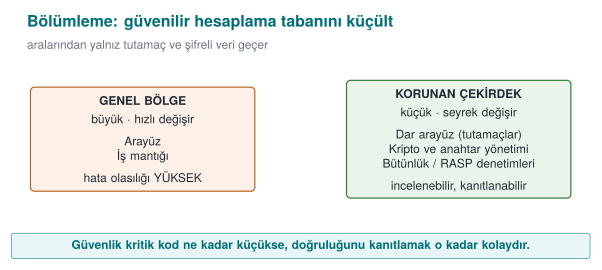
Partitioning options¶
Where you put the protected core depends on your attacker model and your platform:
| Option | Isolation strength | Example | Cost |
|---|---|---|---|
| A separate module in the same process | Low: same memory, same privilege | The C/C++ (native) library inside a Java application | Cheap; only makes the code harder to read |
| A separate process (privilege separation) | Medium: separate memory, different privilege | A browser's sandbox processes; a small privileged helper process (Recipe 1.4) | The design and cost of inter-process communication (IPC) |
| An OS service | Medium–high | Windows DPAPI, macOS Keychain, Android Keystore | Platform dependence |
| Hardware-backed isolation | High | Secure element, smart card, TPM, an ARM TrustZone-based trusted execution environment (TEE) | Not present on every device; hard to develop for |
| Moving it to the server | Highest (for the client) | Never sending the secret to the client at all, keeping it on the server, in an HSM | Requires network connectivity; doesn't work offline |
The strongest protection is usually removing the secret from the client entirely. When that isn't possible (e.g. the phone needs to make offline payments), hardware support is sought. When that isn't available either (or isn't present on every device), the secret has to be protected in software, and this is exactly the situation the obfuscation, RASP, and white-box techniques we'll see through the term are for.
Partitioning in mobile payment
In a payment app that does not use the phone's secure element (it emulates the card in software), the typical partitioning looks like this: the user interface and workflow are in Java/Kotlin; cryptographic operations and security checks are in a native library. While Java bytecode can easily be decompiled back to source code, understanding compiled and obfuscated native code takes far more effort. The native layer is called only by the Java layer and only through a narrow interface (JNI); the two layers check each other's integrity.
The interface between partitions: narrow, validated, secret-free¶
The value of partitioning depends entirely on the quality of the boundary interface. If you keep the key in a separate module and then hand it out through a function called anahtar_al() ("get key"), you have gained nothing. Three rules for the interface:
- Don't hand out the secret, do the work. The core does not return the key; it performs the operation with the key and returns only the result. What's handed out instead of the key is a handle (an opaque identifier).
- Validate everything that crosses the boundary. The core treats every parameter coming from the outer region like untrusted input (size, range, format).
- Never pass data across the boundary in the clear. Sensitive data that must cross the boundary does so encrypted and integrity-protected. Otherwise, the attacker hooks the interface function and reads the data in transit.
typedef struct VaultKey VaultKey;          /* opaque type: its insides are not visible from outside */

/* Derives the key from the master password and keeps it inside the core; wipes the password. */
int  vault_open(const char *password, size_t password_length,
             const unsigned char salt[16], VaultKey **out);

/* Encrypts / decrypts with the key; the key itself never leaves. */
int  vault_encrypt(VaultKey *a, const unsigned char *plain, size_t n,
                  unsigned char *cipher, size_t capacity, size_t *written);
int  vault_decrypt(VaultKey *a, const unsigned char *cipher, size_t n,
              unsigned char *plain, size_t capacity, size_t *written);

/* Securely wipes the key and releases it. */
void vault_close(VaultKey *a);
In C, an opaque type (a struct that is only declared, with its definition not in the header file) blocks calling code from directly accessing the key's bytes at the language level. Of course, an attacker in the same process can still read the memory; an opaque type prevents programming mistakes, not an attacker. Additional layers are needed against an attacker.
Misusing the interface: the decryption oracle and code lifting¶
Hiding the key well is not enough. The attacker can use your own function without ever finding the key:
- Decryption oracle: The attacker calls the
vault_decryptfunction directly with data of their own choosing. The key stays secret, but the attacker gets to decrypt anything they want. - Code lifting: The attacker copies the protected function (even with its embedded key) straight out of the binary and runs it as a black box in their own program. They never need to extract the key at all.
The countermeasures, therefore, go beyond "hide the key":
| Countermeasure | Idea | Week |
|---|---|---|
| Binding to the device and the instance | The key is mixed with information unique to the device and to that particular install of the app; code copied into another environment does not produce the right result | 3, 6 |
| Binding to the version | Version information feeds into key derivation; the key does not resolve on an old or modified version | 6 |
| Context checking | The core verifies the caller's integrity and the expected flow; it refuses an out-of-order or out-of-context call | 6 |
| Rate and usage limits | The number of decryption operations is capped; one-time keys are used | 3 |
| No shared static key | Breaking one installation does not affect the others | 3, 10 |
One key, every user
An application that uses the same embedded key in every copy loses every single user the moment one copy is broken. That's why certification requirements state explicitly that "breaking one instance must not affect the other instances." Keys unique to each install or device are the answer to this requirement.
Secure processing under encryption: narrowing the window of exposure¶
A sensitive piece of data exists in three states throughout its lifecycle: at rest (disk), in transit (network), and in use (memory, registers). Encrypting the first two is standard; the hard one is the third, because the data has to be decrypted at some point to be processed. (We will cover protecting data at rest and in transit in detail in week 3.) The goal is to narrow this window of exposure as much as possible, in both time and space:
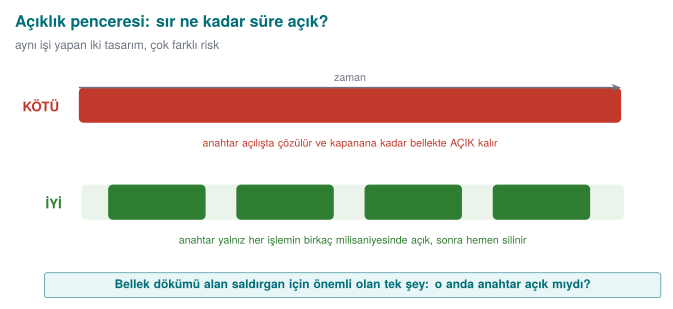
The techniques that achieve this:
- Just-in-time decryption: the data is decrypted only inside the function that will use it, and erased before that function returns.
- Masking in memory: while it's not in use, the key is kept XORed with a random mask generated at runtime. Instead of the key itself sitting in one place in memory, there are two meaningless pieces.
- Splitting: the key, or some value, is broken into pieces that sit in different places in memory (even inside different functions); they are only combined at the moment of use.
- Code encryption (dynamic decryption): not just data — the code of the most sensitive functions sits encrypted in the binary too; it is decrypted into memory at runtime, run, then re-encrypted. Details in weeks 4 and 9.
- Processing without ever exposing the key: in white-box cryptography, the key is embedded into computation tables in such a way that it never exists in the clear in memory during the operation (week 11).
#include <stdint.h>
#include <stddef.h>

typedef struct {
    uint8_t mask[32];      /* generated randomly at start-up */
    uint8_t masked[32];    /* key XOR mask */
} MaskedKey;

/* Only at the moment of use, combines into the caller's own temporary buffer. */
static void unmask_key(const MaskedKey *o, uint8_t temp[32])
{
    for (size_t i = 0; i < 32; i++)
        temp[i] = o->masked[i] ^ o->mask[i];
}

void sign(const MaskedKey *o, const uint8_t *data, size_t n, uint8_t tag[32])
{
    uint8_t k[32];
    unmask_key(o, k);
    crypto_hmac_sha256(k, sizeof k, data, n, tag);   /* operation: code/common/cen429_crypto.h */
    crypto_wipe(k, sizeof k);                    /* the exposure window closes here */
}
Masking is an obstacle, not a fortress
XOR masking prevents the key from being found by a direct search in a memory dump; it does not stop a determined attacker who finds the two pieces and combines them. Its value shows up when it's combined with other layers (obfuscation, debugger detection, frequently refreshing the mask). In security, there is no such thing as a countermeasure that is "enough on its own."
How is this applied in the field?
In a sensitive library, a single static key that must be embedded in the source code (e.g. the key used for string obfuscation) doesn't sit in one place: it is broken down at the nibble (half-byte) level and scattered across dozens of different functions, only combined at the moment of use. Values like a device fingerprint are stored in two different places with two different hashes and compared in the background; if either one is altered, the inconsistency shows up. Values on the application side that identify identity are also stored XORed with the device ID; data copied to another device becomes meaningless.
The limits of partitioning¶
- A module inside the same process provides no real isolation against an attacker who runs in that same process (e.g. a tool that hooks the program). In that case, the real protection is RASP and obfuscation.
- At an inter-process or client–server boundary, the communication channel itself is a new attack surface; it needs mutual authentication and integrity (week 3).
- Hardware isolation (TEE, secure element) is strong, but the code running inside it still has to be bug-free; buffer overflows have been found in TEE applications too.
How does an evaluator test this?
They first find the boundary: which functions are the entry points into the protected region? Then they hook those functions and log the data crossing the boundary ("is data crossing the interface in the clear?"). Next they try calling the protected function directly with inputs of their own choosing (an oracle), and copying it to another device or environment and running it there (code lifting). Finally, they dump memory during and after the operation and check whether the key sits there in the clear, or in an easily recombined form.
19. Secure development process: keeping the plan alive¶
A protection plan is not tested on the day it's written — it's tested every time the product changes. A new feature, a bug fix, or a library update can unknowingly neutralize a carefully built countermeasure. This section describes the processes that let the plan live alongside the product. In certified products, these processes are reviewed at least as closely as the code itself.
The secure software development lifecycle¶
Microsoft's Security Development Lifecycle (SDL) and NIST's Secure Software Development Framework (SSDF, SP 800-218) both say that security must be spread across every stage of software:
| Stage | Security activity | Where it appears in this course |
|---|---|---|
| Requirements | Write the security requirements (derived from standards) | Week 13 |
| Design | Threat model, protection plan, attack surface analysis | Weeks 1–2 |
| Implementation | Coding rules, banned functions, static analysis, code review | Weeks 4–5 |
| Verification | Sanitizers, fuzzing, penetration testing, security tests | Weeks 4, 12 |
| Release | Signed build, unique version identity, incident response plan | This section, week 10 |
| Response | Receiving vulnerability reports, the emergency update process | Week 12 |
Unique version identity: "is what was reviewed the same as what shipped?"¶
When an evaluator reviews a product, their report is valid for exactly that binary. A file shipped under the same version number but differing by even a single line is a product that was never reviewed. That's why every build must carry a unique, verifiable identity:
- Semantic version (e.g.
1.4.2): for humans. - Source code identity: the hash of the git commit the build was made from.
- Binary hash: the SHA-256 of the shipped file; the user or evaluator can verify for themselves that the file they downloaded matches this value.
execute_process(COMMAND git rev-parse --short=12 HEAD
                WORKING_DIRECTORY ${CMAKE_SOURCE_DIR}
                OUTPUT_VARIABLE GIT_COMMIT OUTPUT_STRIP_TRAILING_WHITESPACE)
target_compile_definitions(kasa PRIVATE VERSION="1.4.2" GIT_COMMIT="${GIT_COMMIT}")
if (argc > 1 && strcmp(argv[1], "--version") == 0) {
    printf("kasa %s (%s)\n", VERSION, GIT_COMMIT);
    return 0;
}
How is this applied in the field?
The version information doesn't just stay a string printed to the screen; it also feeds into key derivation. That way, if a user rolls back to an old, vulnerable version (a downgrade attack), that version cannot decrypt the new version's keys. This is how version identity turns into a security countermeasure.
The same discipline comes back at the end of the term: in Week 14, once obfuscation enters the build pipeline, which version was produced with which transformation and seed is again tracked through this identity and its hash values.
Change management: seven steps¶
In a mature development team, no change goes directly to the main branch. The typical process, adapted from IT service management, has seven steps:
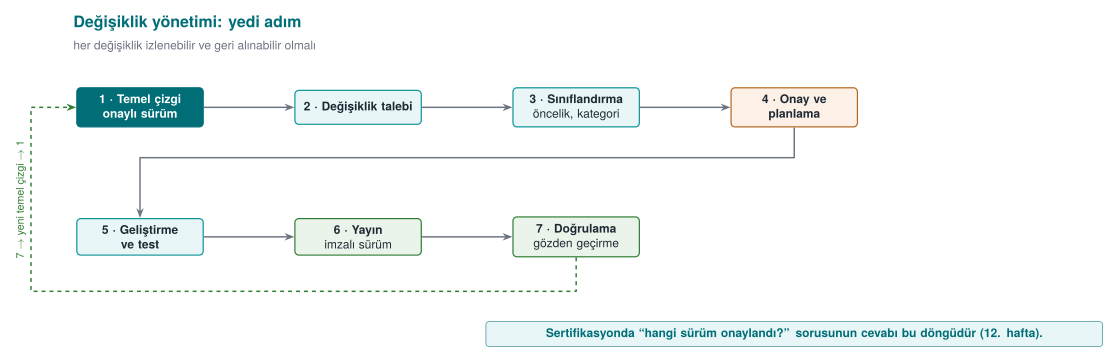
The most important step from a security standpoint is the security impact analysis done between steps 3 and 4: "which asset, which interface, which threat, and which countermeasure does this change touch?" If the answer is "none," the change can move fast; if it touches a countermeasure, that countermeasure's tests are re-run, and the evaluator is notified if needed. In certified products, an evaluation that re-reviews only the changed part based on this analysis is called a delta evaluation (week 13).
The same discipline is applied in the source code repository:
- Main branches are protected; only authorized people can merge into them.
- Every change is reviewed by at least one other developer.
- Releases are tagged (preferably with a signed tag).
- External access to the repository requires multi-factor authentication.
- The build environment is protected too: the supply-chain attacks we'll see in week 2 target code that gets into the build server.
The trade-off log: a record of conscious decisions¶
Security is almost always a trade-off with something: performance, usability, ease of maintenance. A mature team keeps these decisions in writing. A trade-off that isn't logged can't answer "why is it like this?" six months later, and looks like a bug in an evaluator's eyes.
| Decision | Options | Chosen | Rationale | Security impact / residual risk |
|---|---|---|---|---|
| Logging in release builds | On / leveled / fully removed | Fully removed (via a build macro) | Silenced logging code still leaves its strings in the binary and can be turned back on | Field debugging becomes harder; only an encrypted diagnostic output was left in |
| Error codes | Detailed code / success-or-failure only | Success-or-failure only (an opaque value) | A detailed code tells the attacker exactly which check they tripped | A separate, server-side diagnostic channel is needed for the support team |
| The native library's "debuggable" flag | Off / on | On (a justified exception) | The code integrity check needs to be able to read its own memory | Compensated for with debugger detection |
| Password derivation time | 50 ms / 250 ms / 1 s | 250 ms | Balance between how long the user waits and the cost of brute-forcing | Very weak passwords are still a risk (on the residual risk list) |
The third row of the table is especially instructive: one security countermeasure (integrity checking) required loosening another security setting (non-debuggability). A decision like this is defensible when it's written down with its rationale and its compensating countermeasure; when it isn't, it's a finding.
How protections affect the build pipeline¶
Countermeasures like integrity checking also change the build process. For the program to be able to check the hash of its own code, the correct hash value has to be embedded into the program — but embedding the hash changes the program, which changes the hash. This loop is solved with a multi-pass build: build once, measure the hash, embed it obfuscated into the code, rebuild; the measured region is designed so it does not include the embedded value. In the field, five-pass signed builds are used, where values like the signing certificate's hash, the package hash, and the code hash are embedded one after another. Steps like this go wrong if done by hand, so they are turned into a build script and documented. In week 6 we will build this loop ourselves with a small example.
Measuring the cost of protections¶
The last piece of the protection plan is measurement. Saying "we added obfuscation" is not enough; you have to show the product still runs at an acceptable speed. A simple method: run the critical operation (e.g. a payment, opening a vault) 20 times in both the protected and unprotected versions, and report the shortest, longest, and average time. A concrete target — such as keeping a contactless payment's total time under half a second — determines which protection can go where.
20. This week's toolbox¶
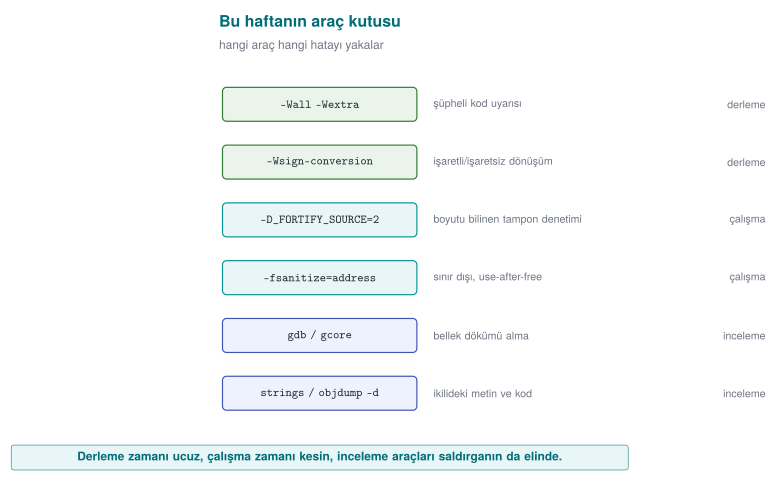
| Tool / flag | What is it for? | Where did we see it this week? |
|---|---|---|
-Wall -Wextra -Wsign-conversion | Compile-time warnings for suspicious code | Demo 4 |
-D_FORTIFY_SOURCE=2 (+ -O2) | Checks, at runtime, library calls that write into buffers of known size | Demo 3 |
-fsanitize=address (ASan) | Catches bugs like out-of-bounds access and use of freed memory at runtime | Demos 3, 4 |
gdb, gcore | Debugger; dumps a running process's memory to a file | Demo 2 |
strings, objdump -d | Shows the text strings and machine code inside a binary | Demo 2 |
explicit_bzero / SecureZeroMemory | Memory erasure the compiler cannot remove | Demo 2 |
posix_spawn + absolute path + a clean environment | Running another program safely | Demo 1 |
clearenv, close_range, umask(077), setrlimit(RLIMIT_CORE), prctl(PR_SET_DUMPABLE) | Cleaning up inherited state in a program's first lines | Secure start-up |
setresuid/setresgid + getresuid · CreateRestrictedToken | Permanently dropping privilege and verifying it | Secure start-up |
SetDefaultDllDirectories | Narrowing the DLL search order on Windows | Secure start-up |
snprintf, strnlen, strlcpy, fgets | Bounded string operations | Buffer overflows |
calloc, reallocarray | Memory allocation that checks for multiplication overflow | Memory management |
mlock / VirtualLock, madvise(MADV_DONTDUMP) | Preventing secrets from ending up in swap or a dump | Memory management |
valgrind --leak-check=full, LeakSanitizer | Finding leaks and UAF | Memory management |
git rev-parse, sha256sum / Get-FileHash | Unique version identity | Secure development process |
21. Term project: this week¶
In the term project you will develop a C/C++ application "as if it were going through a security certification" and write a security guide for it (20–30 pages). This week's tasks:
- Form your team (individual or up to 4 people) and choose your topic (the topic list is in the project guide).
- Create your project repository and project plan (work packages, timeline, task assignment) on GitHub; get the plan approved.
- Draft the first sections of the security guide:
- S0 Cover page and revision history
- S2 Product overview — what does your application do?
- S3 Architecture and interface table (in the table format from section 6)
- S4 Attacker model, STRIDE table, and an attack tree
- S5 Asset list (draft): for every asset, its location, creation → deletion, and C/I/I+ class
- Fill in steps 0–4 of the seven-step template from the "Worked example" section, for your own project.
| ID | End A | End B | Authentication | Confidentiality / integrity | Description |
| -- | ----- | ----- | --------------- | ---------------------------- | ----------- |
| A  | Console app | Security DLL | ... | ... | ... |
22. On your own¶
These exercises are not graded; they are for reinforcing the lesson. All of them are done on top of the demos in the code/week-01 folder, and only on your own computer.
Exercise 1 — Easy: another form of the PATH trap
On Linux, change the date command in report.c to ls -l report.c; on Windows, change hostname to whoami. Prepare a fake ls (or whoami.bat) and run it via PATH. Then modify report_secure.c so it runs the real program by its full path.
Hint
Put the fake file in the fake/ folder; on Linux make it executable with chmod +x fake/ls. In the fixed version, on Linux the argument array becomes { "ls", "-l", "report.c", NULL } and the path is /bin/ls; on Windows the path is GetSystemDirectoryW + \whoami.exe. Rebuild from the command line (.\build.ps1 or ./build.sh) and re-run the demo.
Exercise 2 — Easy: the effect of optimisation
In Demo 2's CMakeLists.txt, on the password_memset line, change MOD optimize to MOD korumasiz (GCC -O0, MSVC /Od), rebuild, and run the demo. Does the memset version manage to erase the password this time? Why?
Expected result
At -O0, the compiler doesn't optimise, so memset stays and the password gets erased. This shows that security should not depend on the optimisation level: release builds are always optimised, which is why explicit_bzero must be used.
Exercise 3 — Medium: the exact boundary of the overflow
In Demo 3, give the login program (bin/linux/login or bin\windows\login.exe) names that are 16, 17, 18, 19, and 20 characters long. Write down the value of the admin field for each one in a table, and explain it using the memory diagram from section 13. Why is a 16-character name dangerous too?
Hint
strcpy also copies the terminating '\0' character. Where does a 16-character name's '\0' get written?
Exercise 4 — Medium: a new privilege field
Add an int balance; field to struct session, right after name. Can you push the balance above 1000 with an overflow? Then show how login_secure.c prevents this.
Exercise 5 — Medium: a threat model
Draw a data flow diagram for your own term project, and ask all six STRIDE letters for every flow that crosses a trust boundary. Write at least 8 threats and propose a countermeasure for each.
Exercise 6 — Hard: read a real vulnerability report
Read a published technical write-up of Heartbleed (CVE-2014-0160). (a) Which length check was missing? (b) What does it have in common with Demo 4? © Which CWE category does it fall under? (d) Which lines did the fix add?
Hint
The term to search for: "out-of-bounds read" (CWE-125). The fix checks whether the length declared in the message exceeds the actual record length.
Exercise 7 — Easy: measure secure start-up
Write a small C program on WSL/Linux; at the start of main(), have it print the open file descriptors (the /proc/self/fd folder) and the number of environment variables. Run the program normally first, then with env -i ./prog, then with ./prog 1>&- (standard output closed). Then add the sanitize_file_descriptors() and sanitize_environment() functions from the "Secure start-up" section and observe the difference.
Hint
Count the entries in the folder with opendir("/proc/self/fd"). With standard output closed you won't see printf output; write the result to stderr or to a file instead. Once sanitize_file_descriptors() is added, you can see descriptor 1 bound to /dev/null with ls -l /proc/<pid>/fd.
Exercise 8 — Easy: proof of secure erasure
In Demo 2 you showed that the password_explicit version really erases the memory. Write the same program once more, in C++, keeping the password in a std::string. Erase it with password.clear() and with secure_wipe, and search for it in a memory dump. In which case is the password found? Explain why, using the "Memory management and security" section.
Exercise 9 — Medium: apply the protection plan to your own project
Fill in the seven-step template from the "Worked example" section for your own term project: steps 0–4 complete, and initial ideas for steps 5–7. Have at least 6 assets in your asset table, at least 8 threats in your threat table, and a likelihood × impact score for each.
Hint
Don't forget to include the code itself, configuration files, and log files in your asset list. For every threat, answer the question "at which interface, against which asset?"; if you can't answer it, the threat is written too generally.
Exercise 10 — Medium: dangerous function hunting
Search all .c files in the code/week-01 folder for dangerous functions. For every finding, make a table of (a) which file and line, (b) whether it was placed there deliberately (for the demo), © what it was replaced with in the fixed version.
Exercise 11 — Medium: catch a leak and a UAF with a tool
In a small program, (a) call malloc in a loop and never free, (b) read a block after freeing it. Compile and run the program with -fsanitize=address -g on WSL, and with /fsanitize=address /Zi on Windows. For each report, read and write down the answers to "what happened, where did it happen, where was the block allocated, and where was it freed."
Hint
A UAF report has three stack traces: where the access happened, where the block was freed, and where the block was allocated. The leak report on Linux is given by LeakSanitizer as the program exits; on Windows ASan does not report leaks, so use the CRT debug heap for that.
Exercise 12 — Medium: design an interface with an opaque handle
Looking at the vault_core.h example from the "Protected code partitioning" section, write a header file for the most sensitive operation in your own project. Rule: no function returns the key or a secret in the clear; every function returns success/failure; how each parameter is validated is written as a comment.
Exercise 13 — Hard: a masked key in memory
Get the "Masking in memory" example working: generate a random mask at start-up (Linux getrandom, Windows BCryptGenRandom), mask the key, and implement imzala() with the HMAC in code/common/cen429_crypto.h. Then dump the process's memory and search for the key: it should not be found while no work is in progress. If you dump memory during the operation (e.g. by pausing inside imzala() with a getchar()), what do you see?
Exercise 14 — Hard: unique version identity
Embed the git identity into your own project's CMakeLists.txt and add a --surum (version) option to the program. Build at two different commits and compare the SHA-256 values of the resulting binaries. When you build the same source code twice, does the hash come out the same? If not, why not? (Look into the concept of "reproducible builds.")
Hint
Compilers can embed information like timestamps and absolute file paths into the binary. /Brepro in MSVC, and -ffile-prefix-map plus the SOURCE_DATE_EPOCH environment variable in GCC, reduce these differences.
23. Self-check¶
1. Explain the difference between an asset, a threat, and a vulnerability, with an example.
Asset is the thing being protected (a user's password). Threat is the possible event/person that could harm it (someone who wants to steal the password). Vulnerability is the weakness the threat can exploit (the password staying in memory unerased).
2. In a money transfer, changing the recipient account in transit breaks which CIA goal? Which countermeasure prevents it?
Integrity. A message authentication code (MAC) or a digital signature; also TLS.
3. What distinguishes a 'white-box' attacker from a remote attacker? Give an example.
A white-box attacker has full access to the device the program runs on: they read memory, attach a debugger, modify the binary. Example: someone analysing a mobile payment app on their own (rooted) phone.
4. What threat does the 'E' letter in STRIDE describe? Which demo this week is an example of it?
Elevation of privilege. Demo 3: changing the admin flag with a long username.
5. What is the difference between an AND node and an OR node in an attack tree? Which is better from a defence standpoint?
In an OR node, one branch is enough; in an AND node, every branch is required. Forcing the attacker into AND nodes (making them break several layers at once) is better for defence; that is the logic of defence in depth.
6. Why is calling the date command with system() dangerous? List three fixes.
The shell searches for date via PATH; whoever controls PATH chooses which program runs. Fixes: an absolute path (/bin/date), running without a shell (posix_spawn/execve), a cleaned environment.
7. In Demo 2, why did memset fail to erase the password?
The compiler saw that the array is never read after memset and removed the write as a "dead store" (dead store elimination). explicit_bzero is defined in a way the compiler cannot remove.
8. In Demo 3, why couldn't AddressSanitizer catch the 17-character attack?
ASan does bounds checking at the object level; because the overflow stayed inside the same struct (name → admin), it never touched the forbidden zone. It caught it once the overflow went outside the struct. _FORTIFY_SOURCE, on the other hand, knew the target field's size, so it caught the short overflow too.
9. What happens when int length = -1; is passed to memcpy?
memcpy's size parameter is size_t; once -1 is converted to unsigned, it becomes 2⁶⁴ − 1, and the function tries to copy a gigantic region, crashing with a memory error (or worse, corrupting memory).
10. What is defence in depth? Give an example from this week's mobile payment architecture.
Not relying on a single countermeasure, but building complementary layers. In the example architecture, server–phone traffic is protected both by TLS and by message-level encryption on top; the attacker has to break both at once.
11. Which of the seven protection layers are unnecessary for a server-side web service? Why?
Obfuscation (4) and RASP (5) are generally unnecessary: the attacker cannot reach the server's code or memory, they can only send input. Secure design, secure coding, compiler/OS protections, cryptography (TLS), and assurance are still needed.
12. Why is the 'S' (spoofing) question never asked of a data flow in a data flow diagram?
A data flow has no identity; spoofing is an entity (a user, a process) appearing as someone else. A data flow can be eavesdropped on (I), altered (T), or cut off (D).
13. List the four responses that can be given to a threat, and give an example of 'elimination.'
Mitigate, eliminate, transfer, accept. Example: never offering a "remember my password" feature entirely eliminates the threat of the password being stored on disk.
14. Why do you need to copy the result of getenv(\"TZ\") before calling clearenv()?
getenv returns a pointer into the environment block; clearenv invalidates that block. Using it without copying first is a use of freed memory.
15. In a setuid program, why is the group identity changed before the user identity when dropping privilege?
Changing the group identity requires privilege. If the user identity is dropped first, the privilege needed to change the group goes away too, and the process keeps running with the privileged group.
16. Why is strncpy(d, s, sizeof d) not a safe strcpy?
If the source is longer than the destination, it doesn't add a '\0' at the end; subsequent string operations keep reading past the end of the array. The correct approach is snprintf, or a length check + memcpy + an explicit terminator.
17. What kind of memory bug is Heartbleed, and why did data leak without anything crashing?
An out-of-bounds read (CWE-125). The server only read from memory and sent it out; since it wrote nothing and the memory it read was still the process's own (valid) memory, the program never crashed.
18. What does the stack canary do when it notices an overflow? Why is this still a security problem?
It terminates the program immediately. Hijacking control flow is prevented, but the attacker can still crash the program whenever they want; that's a denial of service. Also, the canary doesn't see overflows that never reach the return address (e.g. an adjacent variable being modified).
19. What bug does the free(p); p = NULL; habit prevent, and what does it not prevent?
It prevents double free and UAF through that same pointer (accessing NULL crashes immediately, and free(NULL) is harmless). It does nothing for other pointers (aliases) that also point at the same block.
20. Why is realloc dangerous for buffers that hold secrets?
If the block moves, the old location is freed without being zeroed; a copy of the secret stays in memory. Also, if realloc fails and the result is assigned directly to the same variable, the old block is lost (a leak).
21. What does mlock/VirtualLock prevent, and what does it not prevent?
It prevents the page from being written to the swap area. It does not prevent the memory from being read by the same process or by a debugger, the hibernation file (depending on the system), or an unerased secret; erasure is still required.
22. What does it mean to misuse a protected module as a 'decryption oracle'? Give a countermeasure.
The attacker calls the module's decryption function directly with data of their own choosing, without ever extracting the key. Countermeasure: verify the caller's integrity and context, limit the number of calls, bind the key to the device/instance.
23. Using the same embedded key in every copy violates which requirement?
The requirement that "breaking one instance must not affect the other instances." A key extracted from a single copy affects every user.
24. What are the three components of a unique version identity, and why do they matter to an evaluator?
The semantic version, the source code (git) identity, and the binary's SHA-256 hash. An evaluation report is valid only for the binary that was reviewed; this is the only way to prove that the shipped file is the same one that was reviewed.
25. What columns does a trade-off log contain? Why is it kept in writing?
Decision, options, chosen, rationale, security impact/residual risk. A trade-off that isn't written down cannot be defended later, and looks like a bug in an evaluator's eyes.
24. Resources and further reading¶
Textbook — J. Viega, M. Messier, Secure Programming Cookbook for C and C++, O'Reilly, 2003:
- Recipe 1.1 (cleaning the environment), 1.2–1.4 (restricting and separating privileges), 1.5 (file descriptors), 1.9 (preventing crash dumps)
- Recipe 3.3 (preventing buffer overflow), 3.5 (integer conversion and overflow)
- Recipe 13.2 (secure erasure from memory), 13.3 (preventing memory from being written to disk)
- Recipe 12.1 (understanding software protection)
Open sources
- J. H. Saltzer, M. D. Schroeder, "The Protection of Information in Computer Systems", 1975.
- OWASP Threat Modelling; Microsoft STRIDE.
- MITRE CWE: CWE-14, CWE-121, CWE-122, CWE-125, CWE-193, CWE-195, CWE-226, CWE-316, CWE-401, CWE-415, CWE-416, CWE-426, CWE-427, CWE-476, CWE-787.
- SEI CERT C Coding Standard: STR31-C (allocating enough space when copying strings), INT31-C (integer conversions), MSC06-C (beware of compiler optimisations), ENV33-C (do not call
system()), MEM30-C (do not access freed memory), MEM31-C (free dynamic memory), MEM35-C (allocate sufficient memory), POS36-C (the order of dropping privilege), POS37-C (verify that privilege was successfully dropped). - Microsoft Security Development Lifecycle (SDL); NIST SP 800-218 Secure Software Development Framework (SSDF).
- A. Shostack, Threat Modelling: Designing for Security, Wiley, 2014 (data flow diagrams and STRIDE per element).
Glossary
| Term | Turkish equivalent | Short definition |
|---|---|---|
| Asset | Varlık | Data or resource worth protecting |
| Threat model | Tehdit modeli | A written definition of who the attacker is, what they can access, and what they target |
| Attack tree | Saldırı ağacı | An AND/OR tree showing the ways to reach an attack goal |
| Trust boundary | Güven sınırı | The line where components of different trust levels are separated |
| Buffer overflow | Arabellek taşması | Writing past the bound of a buffer |
| Dead store elimination | Ölü yazma giderme | The compiler removing writes whose result is never read |
| Sanitizer | Sanitizer | A compiler tool that monitors the program for bugs at runtime |
| Core dump | Çökme dökümü | A copy of a crashed process's memory written to disk |
| Least privilege | En az ayrıcalık | Every component running with only the privilege it needs |
| Defence in depth | Derinlemesine savunma | Complementary layers of protection |
Next week
Week 2 — Computer viruses and security models. We will apply the threat-modelling tools we built this week (STRIDE, attack trees) and the attacker model to a concrete class of threat — malware: how a virus spreads, how it hides, and which access-control models (DAC/MAC/RBAC) stop it. The CWE classification we met for this week's memory-safety bugs will deepen next week with CVE and CVSS.